
Yes! You can use AI to fill out Trusted Contact Authorization Form
Don't type 40 fields by hand. Tell our AI about yourself, or upload a document you already have, and it fills every field in seconds. You check it, then download, print or sign.
The AI does the filling. You just check it.
No typing into boxes, nothing to install.
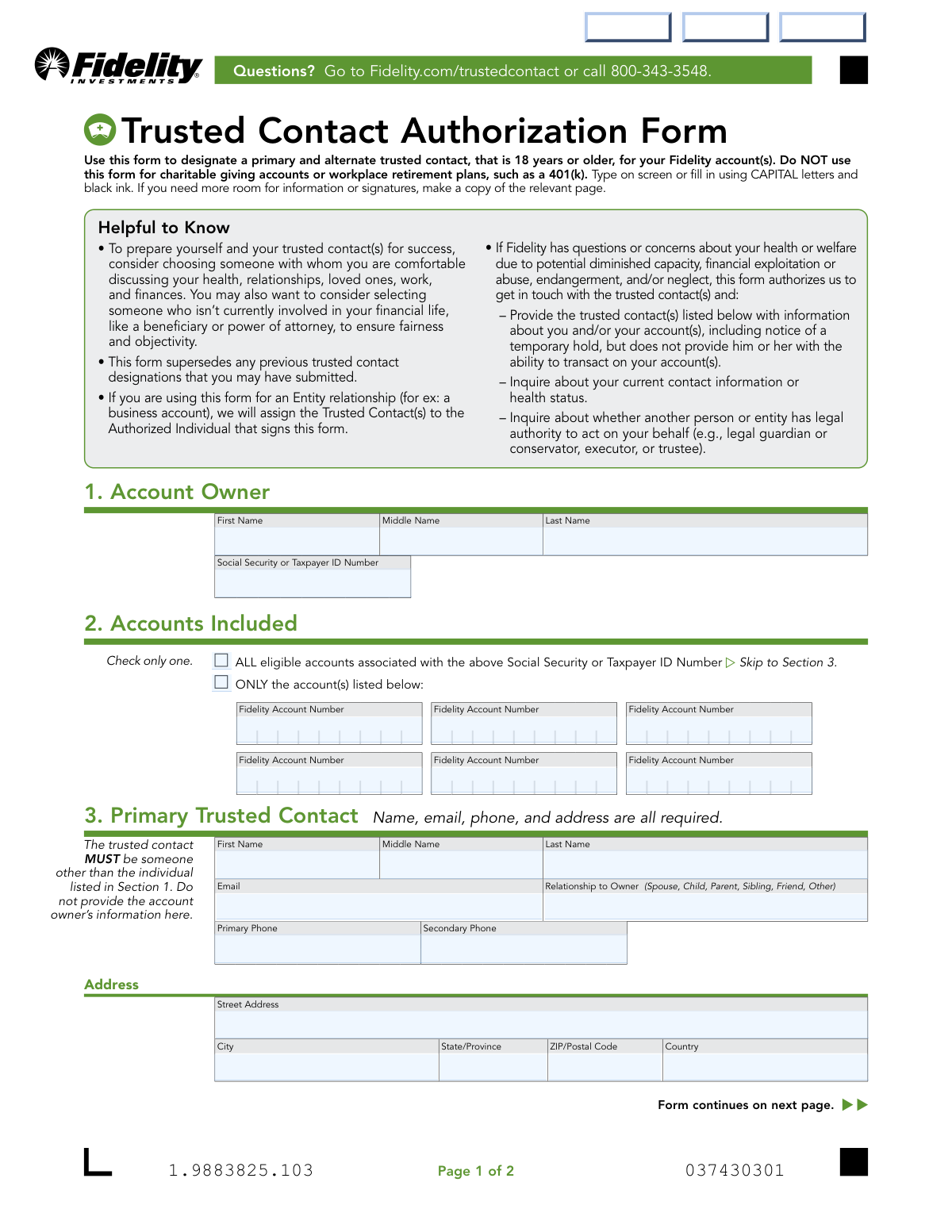
What this form asks for
The AI fills all of it, from your answers or your documents.
The AI checks your answers before you download
12 checks built for this form, so a wrong date or a missing answer is caught before anyone else sees it.
This check ensures that the Social Security or Taxpayer ID Number provided in Section 1 consists of nine digits, optionally formatted as XXX-XX-XXXX or XX-XXXXXXX. This is critical for correctly identifying the account owner's master record within Fidelity's systems. A failure to match this format will prevent the form from being processed as the owner cannot be uniquely and accurately identified.
This validation verifies that in Section 2, the user has selected either 'ALL eligible accounts' OR 'ONLY the account(s) listed below', but not both. It also ensures that if 'ONLY the account(s) listed below' is selected, at least one valid Fidelity Account Number is provided. This prevents ambiguity and ensures the designation is applied to the correct set of accounts as intended by the owner.
This check compares the name of the Primary Trusted Contact in Section 3 against the Account Owner's name in Section 1 to ensure they are not the same person. The purpose of a trusted contact is to have an independent third party to contact, so designating oneself is redundant and invalid. If the names match, the form will be rejected and the user will be prompted to provide information for a different individual.
This validation ensures that all required fields for the Primary Trusted Contact in Section 3 are filled out, including First Name, Last Name, Email, Primary Phone, and the full address. The form explicitly states these fields are required for Fidelity to be able to reliably get in touch with the contact. Incomplete information would render the designation useless and result in form rejection.
This check verifies that the email address provided for the Primary Trusted Contact in Section 3 follows the standard '[email protected]' format. An invalid email address would prevent Fidelity from communicating with the trusted contact electronically, which is a primary method of contact. The submission will fail if the format is incorrect, ensuring data quality for future communications.
This check ensures the 'Primary Phone' number in Section 3 is a valid phone number format, such as a 10-digit number with an optional country code. This is crucial for enabling direct voice communication with the trusted contact in urgent situations, such as suspected financial exploitation. An invalid number would prevent this critical communication channel, so the form would be rejected.
And 6 more checks
- Verifies Alternate Trusted Contact is Not the Owner or Primary Contact
- Ensures Signature and Date are Present
- Validates Signature Date Format and Plausibility
- Matches Printed Name in Signature Section to Account Owner
- Confirms Completeness of Alternate Trusted Contact Information (If Provided)
- Validates Relationship to Owner Field
Let AI fill out your Fidelity 802990.4.0
No typing. Every field filled in seconds, checked, ready to sign.
How to Fill Out Fidelity 802990.4.0 Online for Free in 2026
What the AI walks you through.
- Navigate to Instafill.ai and upload or select the Fidelity Trusted Contact Authorization Form.
- Provide your personal details in the 'Account Owner' section, including your full name and Social Security or Taxpayer ID Number.
- In Section 2, specify whether the authorization applies to all your eligible accounts or only to specific accounts by listing their numbers.
- Enter the required information for your 'Primary Trusted Contact' in Section 3, including their name, relationship to you, and full contact details.
- Optionally, complete Section 4 to designate an 'Alternate Trusted Contact' with their corresponding information.
- Carefully review all the information auto-filled by the AI for accuracy and completeness.
- Proceed to Section 5 to digitally sign and date the form, then download or submit it according to Fidelity's instructions.
Common Mistakes in Completing Fidelity 802990.4.0
The ones the AI is built to catch.
Missing Signature or Date
Self-Designating as a Trusted Contact
Incomplete Trusted Contact Information
Ambiguous Account Selection in Section 2
Using the Form for Ineligible Accounts
Listing the Same Person as Primary and Alternate
Illegible Handwriting
Incorrect or Incomplete Account Numbers
Submitting an Incomplete Scan of the Form
Signature Does Not Match Name on Account
Frequently Asked Questions About Fidelity 802990.4.0
Is it really free for 7 days?
Can I fill other forms too?
How do I cancel?
How does the AI fill out Fidelity 802990.4.0?
What happens to my information?
How complex is Fidelity 802990.4.0 to fill out?
What is the purpose of the Trusted Contact Authorization Form?
Can my trusted contact access my money or make trades?
Who should I choose as my trusted contact?
What information do I need to provide for my trusted contact?
Does this form apply to my 401(k) or workplace retirement plan?
How do I apply this designation to all my accounts?
How do I submit the completed form?
What happens if I want to change my trusted contact later?
Do I have to name an alternate trusted contact?
Why is my signature required on the form?
Can I use an AI tool to help me fill out this form?
How can I use Instafill.ai to fill this form out online?
What should I do if the PDF I have is not fillable?
Get your Fidelity 802990.4.0 filled out by AI
$0 today. Cancel before Nov 1 and you pay nothing.
Other forms like this one
trust forms: Form 8855, Election To Treat a Qualified Revocable Trust, Private Trust (Mod(PT).2005), Form 3520 (Rev. December 2023), Annual Return To Report Transactions With Foreign Trusts and Receipt of Certain Foreign Gifts, Judicial Council of California Form DE-120, Notice of Hearing—Decedent's Estate or Trust, Judicial Council of California Form DE-120, Notice of Hearing—Decedent's Estate or Trust, Fidelity Change of Account Ownership — Mutual Fund Only Accounts (Changing to a Trust, Estate, Guardian, or Conservator Account), Fidelity Ownership Change to Trust, Fidelity Change of Account Registration — Changing to a Trust, Estate, Guardian, or Conservator Brokerage Account, I.B.E.W. & Electrical Industry Local 697 Money Purchase Plan and Trust Direct Rollover Request Form Due to Qualified Domestic Relations Order, Bechtel Trust & Thrift Plan Rollover Process, General Purpose Loan Application Packet, IW DC of SOV Annuity Trust, NYPD Superior Officers Council Annuity Trust Fund Plan Rollover Form, Trust Certification and Trustee Powers, Housing Agency Retirement Trust Form #190, Request to Withdraw a Rollover Account, The Housing Agency Retirement Trust 457(b) Deferred Compensation Plan Request For Distribution Form, Housing Agency Retirement Trust Transfer/Rollover Form, Qualified Retirement Plan and Trust Summary Plan Description, The Housing Agency Retirement Trust 457b Deferred Compensation Plan Change of Beneficiary Designation Form, TIAA Trust, N.A. Private Asset Management, Request for a Direct Transfer From IRA Contracts, TIAA Trust Rollover From Your Retirement Plan (ERISA)
authorization forms: Form I-765, Application for Employment Authorization, Form CMS-588, EFT Authorization Agreement, Form 8821, Tax Information Authorization, Form 8879, IRS e-file Signature Authorization, Form SSA-827, Authorization to Disclose Information, Form I-905, Application for Authorization to Issue Certification for Health Care Workers, Form G-1650, Authorization for ACH Transactions, Arizona Form 285, General Disclosure/Representation Authorization Form, Arizona Form 285-I, Individual Income Tax Disclosure/Representation Authorization Form, The Department of Medical Assistance Services Applied Behavior Analysis Preservice Service Authorization Request Form (Effective Dates of Service 09/01/2025 and after), Form CH-006: PA-BH-Res-PCS, Oregon Behavioral Health Support Program Plan of Care Authorization (Plan of Care Request for Behavioral Health Residential or Personal Care Services), Continental American Insurance Company (CAIC) / Aflac Group Critical Illness Claim Form (with Attending Physician’s Statement, HIPAA Authorization to Obtain Information, and Electronic Funds Transaction Authorization), HIPAA Authorization Form, Authorization for the Release of Protected Health Information, Form G-1450, Authorization for Credit Card Transactions, Prior Authorization (PA) Request Form – Adult Palliative Care (Alameda Alliance for Health), Alameda Alliance for Health Prior Authorization (PA) Request Form – Adult Palliative Care, Manulife Group Benefits Drug Prior Authorization Form – Mounjaro (Tirzepatide) (GL5197E), Manulife Group Benefits Drug Prior Authorization Form (Ozempic/Semaglutide) – GL5197E, Out-of-Network Pre-Authorization and Exception Request Form, Form SSA-827 (06-2024), Authorization to Disclose Information to the Social Security Administration (SSA)
Fidelity forms: Fidelity Funds Account Transfer of Assets Form, Fidelity Stock Plan Services (SPS) Transfer Request Form, How to Transfer Assets from Morgan Stanley to Fidelity Investments (Fidelity Stock Plan Services Guide), Fidelity Investments Transfer/Rollover/Exchange Form, Fidelity Investments Standing Transfer Instructions Form, Fidelity Charitable 144/145 Contribution Form, One-Time Withdrawal – IRA, Fidelity Investments, Fidelity Investments Transfer/Rollover Form, Fidelity Advisor 403(b) Distribution Request Form, Fidelity Advisor IRA Distribution Request for Automatic Rollover Accounts, Special Tax Notice: Your Rollover Options - Fidelity Investments, Fidelity Charitable Letter of Authorization, Fidelity Advisor Trading Authorization and Indemnification, Fidelity Investment-Only (Non-Prototype) Retirement Account Application, Fidelity NetBenefits Send a Document Form, Fidelity NetBenefits Auditor's Guide: An Overview of Fidelity's 2024 Plan Year Reporting Package, Fidelity NetBenefits Distribution - Recurring Payments, Fidelity Investments® Beneficiary Distribution Form, Fidelity Investments Distribution Form, Fidelity One-Time Withdrawal Form — Nonretirement
Let AI fill out your Fidelity 802990.4.0
Your trial starts once a card is added. You pay nothing before Nov 1.
Our AI already knows this form, all 40 fields of it. Skip the typing: tell it about yourself, or upload what you have, and it fills the whole form in seconds.
- AI fills every field on both pages, checkboxes included
- No typing into boxes: answer a few questions, or upload a document you already have, an old copy of this form, a photo of a document
- The AI checks the answers; you review and change anything before you download
- Download the finished PDF, print it, or sign it online
- Encrypted, and never used to train AI
Cancel before Nov 1 and you pay nothing.
A card is needed to start the trial. Cancel in two clicks from your account.
Terms · Privacy