Yes! You can use AI to fill out Fidelity Ownership Change to Trust

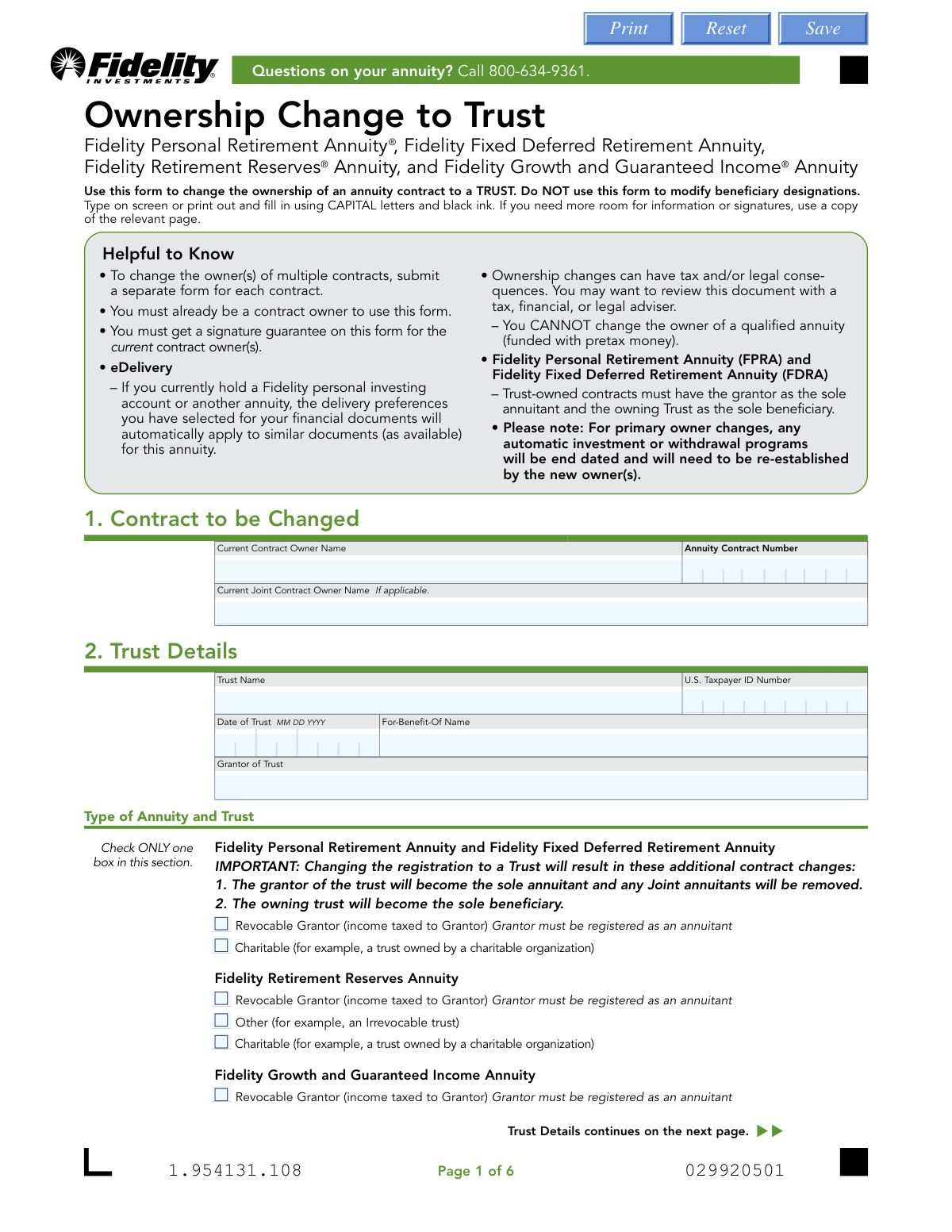
This form is a legal document used by current Fidelity annuity contract owners to change the ownership of their contract to a trust. It requires detailed information about the current contract, the trust itself, and all trustees, and has specific requirements for different types of annuities and trusts. Completing this form accurately is crucial as ownership changes can have significant tax and legal consequences. Today, this form can be filled out quickly and accurately using AI-powered services like Instafill.ai, which can also convert non-fillable PDF versions into interactive fillable forms.
Our AI automatically handles information lookup, data retrieval, formatting, and form filling.
It takes less than a minute to fill out Ownership Change to Trust using our AI form filling.
Securely upload your data. Information is encrypted in transit and deleted immediately after the form is filled out.

Form specifications

Form name: Fidelity Ownership Change to Trust
Number of pages: 1
Language: English
main-image

Instafill Demo: How to fill out PDF forms in seconds with AI

How to Fill Out Ownership Change to Trust Online for Free in 2026

Are you looking to fill out a OWNERSHIP CHANGE TO TRUST form online quickly and accurately? Instafill.ai offers the #1 AI-powered PDF filling software of 2026, allowing you to complete your OWNERSHIP CHANGE TO TRUST form in just 37 seconds or less.
Follow these steps to fill out your OWNERSHIP CHANGE TO TRUST form online using Instafill.ai:
  1. 1 Navigate to Instafill.ai and upload or select the Fidelity Ownership Change to Trust form.
  2. 2 Use the AI assistant to provide the current contract owner's name and the annuity contract number in Section 1.
  3. 3 Enter the complete details for the trust in Section 2, including its name, Tax ID, date, and type.
  4. 4 Provide the personal, contact, and address information for each trustee in Sections 3 and 4.
  5. 5 Review all the information auto-filled by the AI to ensure accuracy and completeness across all sections.
  6. 6 Electronically or physically sign the form. The current owner(s) must provide a Medallion Signature Guarantee, and all trustees must sign, potentially requiring notarization depending on state laws.
  7. 7 Download the completed form and mail the entire document to the appropriate Fidelity Annuity Service Center address listed on the form.

Our AI-powered system ensures each field is filled out correctly, reducing errors and saving you time.

Why Choose Instafill.ai for Your Fillable Ownership Change to Trust Form?

Speed

Complete your Ownership Change to Trust in as little as 37 seconds.

Up-to-Date

Always use the latest 2026 Ownership Change to Trust form version.

Cost-effective

No need to hire expensive lawyers.

Accuracy

Our AI performs 10 compliance checks to ensure your form is error-free.

Security

Your personal information is protected with bank-level encryption.

Frequently Asked Questions About Form Ownership Change to Trust

This form is used to transfer the ownership of a non-qualified Fidelity annuity contract from an individual to a trust. It should not be used to change beneficiary designations or for qualified annuities.

Any current owner of a Fidelity annuity who wants to change the legal owner of their contract to a trust must complete and submit this form.

No, you must submit a separate and complete form for each individual annuity contract you wish to transfer into the trust.

A Medallion Signature Guarantee is a special signature verification stamp from a financial institution that is required for all current contract owners signing this form. A notary stamp is not an acceptable substitute for this guarantee.

Yes, all current trustees of the trust must be listed and must sign the form. If you have more trustees than the space provided, you must use a copy of the relevant page.

Notarization for trustee signatures is required only if your trust is governed by the laws of specific states listed on the form, such as California, Delaware, Idaho, and others.

For primary owner changes, any automatic investment or withdrawal programs you have set up will be terminated. The new owner, the trust, will need to re-establish them.

When changing ownership of an FPRA or FDRA contract to a trust, the grantor of the trust automatically becomes the sole annuitant and the trust itself becomes the sole beneficiary.

You must mail the entire completed form to the Fidelity Annuity Service Center. The specific mailing address depends on your location and whether you use regular or overnight mail, as detailed on the last page of the form.

Once the changes are registered, Fidelity will send a 'Revised Annuity Profile' to the new contract owner (the trust) to confirm the update is complete.

Yes, services like Instafill.ai use AI to help you accurately auto-fill form fields, which can save time and help prevent common errors.

You can upload the PDF of the 'Ownership Change to Trust' form to the Instafill.ai platform. The service will make the document interactive, allowing you to easily type your information into the correct fields online.

If your PDF is a 'flat' or non-fillable version, you can use a service like Instafill.ai. It can convert the document into an interactive, fillable form that you can complete on your computer.

Yes, an ownership change may be treated as a taxable distribution and can have other legal consequences. You should consult with a tax, financial, or legal adviser before submitting the form.

Compliance Ownership Change to Trust
Validation Checks by Instafill.ai

1
Validates Annuity Contract Number
Checks that the Annuity Contract Number in Section 1 is provided and corresponds to an existing, active annuity contract in the system. This is crucial for identifying which contract is being modified. If the number is missing, invalid, or for a closed contract, the form cannot be processed and the ownership change will be rejected.
2
Ensures All Required Signatures are Present
Verifies that signatures are provided for the Current Contract Owner, any listed Current Joint Contract Owner, and all listed Trustees (from Sections 3 and 4). Missing signatures invalidate the authorization for the change. The form will be rejected and returned, as legal consent from all parties is mandatory for an ownership transfer.
3
Verifies Medallion Signature Guarantee for Current Owner(s)
Confirms that a valid Medallion Signature Guarantee is present for both the Current Owner and the Current Joint Owner (if applicable) in Section 5. This guarantee protects against fraudulent transfers by verifying the identity and authority of the signers. Forms submitted without the required guarantee will be rejected immediately, as this is a critical anti-fraud measure.
4
Validates Trust's U.S. Taxpayer ID Number Format
Checks that the U.S. Taxpayer ID Number provided for the trust in Section 2 is in a valid format (e.g., XX-XXXXXXX for an EIN). This number is essential for tax reporting purposes related to the annuity. An incorrectly formatted or missing TIN will cause processing delays and potential tax compliance issues, leading to form rejection until corrected.
5
Prohibits P.O. Boxes for Legal/Residential Addresses
This check verifies that the Legal/Residential Address fields for the Trust (Section 2) and all Trustees (Sections 3 and 4) do not contain a P.O. Box, mail drop, or 'c/o' designation. A physical address is required for tax reporting and legal identity verification purposes. If a prohibited address type is used, the form will be considered incomplete and returned for correction.
6
Validates Single Selection for Annuity and Trust Type
Confirms that exactly one checkbox is selected in the 'Type of Annuity and Trust' section. Selecting more than one or none at all creates ambiguity about the contract rules that should apply. This is critical because different annuity and trust types have different rules, and the form will be rejected if this rule is violated.
7
Ensures Joint Owner Signature if Joint Owner is Named
This validation checks that if a name is entered in the 'Current Joint Contract Owner Name' field in Section 1, a corresponding signature is present in the 'Current Joint Owner Signature' field in Section 5. The consent of all current owners is legally required to transfer ownership. If a joint owner is listed but does not sign, the form is legally incomplete and will be rejected.
8
Validates Completeness of Additional Trustee Information
Verifies that if any information is entered in Section 4 ('Additional Trustee'), all required fields within that section (Name, SSN/TIN, DOB, Address) and the corresponding trustee signature in Section 5 are completed. Partial information for a trustee is insufficient for legal and administrative purposes. The form will be rejected as incomplete if an additional trustee is partially identified without full details and a signature.
9
Confirms Grantor is Annuitant for FPRA/FDRA Revocable Trusts
If the annuity type is 'Fidelity Personal Retirement Annuity' or 'Fidelity Fixed Deferred Retirement Annuity' and the trust type is 'Revocable Grantor,' this check validates that the Grantor of the Trust (Section 2) is the same individual as the contract's annuitant. The form explicitly states this is a requirement. A mismatch would violate contract rules and the form would be rejected.
10
Validates Signature Dates are Not in the Future
This check ensures that all signature dates in Section 5 are on or before the date the form is received and processed. A future date is invalid as it implies the signature was not made at the time of submission. This is a basic data integrity check to ensure the legal validity of the document, and a form with a future date would be rejected.
11
Enforces Valid Date Formats (MM DD YYYY)
Validates that all date fields on the form (Date of Trust, Trustee Date of Birth, Signature Dates) are filled out in the specified MM DD YYYY format and represent a plausible date. Consistent and unambiguous date formatting is critical for legal record-keeping and establishing the timeline of events. Forms with incorrectly formatted or impossible dates (e.g., 13/45/2023) will be rejected to prevent data entry errors.
12
Validates Trustee's Social Security or Taxpayer ID Number
Ensures the Social Security or Taxpayer ID Number for each trustee in Sections 3 and 4 is provided and follows the correct format (XXX-XX-XXXX for SSN or XX-XXXXXXX for TIN). This information is required for identity verification and regulatory compliance. Failure to provide a validly formatted number will result in the rejection of the form pending correction.

Common Mistakes in Completing Ownership Change to Trust

Confusing a Notary Stamp with a Medallion Signature Guarantee

Applicants frequently obtain a standard notarization for the owner's signature, but the form explicitly requires a Medallion Signature Guarantee, which is a higher level of verification from a financial institution. A notary only verifies identity, while a Medallion Guarantee also confirms the signer's authority and guarantees the transaction. Submitting a form with a notary stamp instead of the required Medallion Guarantee will result in immediate rejection and processing delays.

Forgetting Mandatory Notarization for Trustee Signatures in Specific States

The form requires all trustee signatures to be notarized if the trust is governed by the laws of one of the states listed on page 5 (e.g., California, Delaware, Michigan). People often miss this state-specific rule, especially if they live in a different state than the one governing the trust. Failure to provide the required notarization for applicable trusts will cause the form to be rejected, requiring the trustees to sign and notarize a new form.

Missing Signatures from All Required Parties

This form requires signatures from all current contract owners and all trustees of the trust. It is a common mistake to miss a signature, especially for a joint owner or when there are multiple trustees. An incomplete set of signatures will render the form invalid and halt the ownership change process until a fully executed form is received. Using a checklist or a guided process can help ensure all required signature fields are completed.

Using a P.O. Box for a Legal/Residential Address

The form explicitly prohibits using a P.O. Box, mail drop, or 'c/o' address for the legal/residential address of the trust and trustees. This information is required for tax reporting and identity verification purposes. Submitting a P.O. Box will lead to the form being returned for correction. To avoid this, always provide a physical street address. AI-powered form filling tools like Instafill.ai can validate address formats and flag invalid entries before submission.

Entering an Incorrect or Incomplete Annuity Contract Number

A simple typographical error in the Annuity Contract Number in Section 1 is a frequent mistake that stops the entire process. This number is the primary identifier for the account being changed. If the number is incorrect or does not match the owner's name on file, Fidelity cannot process the request, leading to rejection and delays. Double-checking this number against a recent statement is crucial for a smooth transaction.

Attempting to Change Ownership of a Qualified Annuity

The form's instructions clearly state, 'You CANNOT change the owner of a qualified annuity (funded with pretax money).' Applicants sometimes misunderstand this and attempt to use the form for IRAs or other qualified plans. This request will be automatically denied, as changing ownership of a qualified annuity is generally a taxable event that cannot be processed with this form.

Failing to List All Trustees of the Trust

In Sections 3 and 4, all current trustees must be listed, and the certification on page 5 requires affirming that all trustees are named on the form. Applicants may forget to include a co-trustee or successor trustee who is currently serving. This omission is a serious error that can have legal implications and will cause the form to be rejected, as all trustees must sign.

Submitting Only the Signature Pages Instead of the Entire Form

Applicants sometimes believe that only the pages requiring a signature need to be submitted. However, the instructions on page 6 clearly state to 'Send the ENTIRE form to Fidelity.' Submitting an incomplete packet can cause processing delays as the service center may need to wait for the full document to ensure all sections were reviewed and completed correctly. Since this form is a non-fillable PDF, tools like Instafill.ai can convert it into a fillable version, making it easier to complete and save the entire document for submission.

Misunderstanding the Automatic Contract Changes for FPRA/FDRA Annuities

For specific annuity types (FPRA and FDRA), changing ownership to a trust automatically makes the grantor the sole annuitant and the trust the sole beneficiary, removing any prior joint annuitants or beneficiaries. Owners often miss this important detail in Section 2, leading to unintended changes to their contract structure. This can have significant estate planning consequences, so it's vital to understand these automatic changes before signing.

Using an Incorrect or Inconsistent Trust Name

The 'Trust Name' entered in Section 2 must be the exact legal name of the trust as it appears on the official trust documents. People may use abbreviations, informal names, or make typos, which creates a mismatch with the legal entity. This can lead to rejection of the form or future complications with tax reporting and administration of the contract. The name must be entered precisely and consistently throughout all paperwork.
Saved over 80 hours a year

“I was never sure if my IRS forms like W-9 were filled correctly. Now, I can complete the forms accurately without any external help.”

Kevin Martin Green

Your data stays secure with advanced protection from Instafill and our subprocessors

Robust compliance program

Transparent business model

You’re not the product. You always know where your data is and what it is processed for.

ISO 27001, HIPAA, and GDPR

Our subprocesses adhere to multiple compliance standards, including but not limited to ISO 27001, HIPAA, and GDPR.

Security & privacy by design

We consider security and privacy from the initial design phase of any new service or functionality. It’s not an afterthought, it’s built-in, including support for two-factor authentication (2FA) to further protect your account.

Fill out Ownership Change to Trust with Instafill.ai

Worried about filling PDFs wrong? Instafill securely fills fidelity-ownership-change-to-trust forms, ensuring each field is accurate.