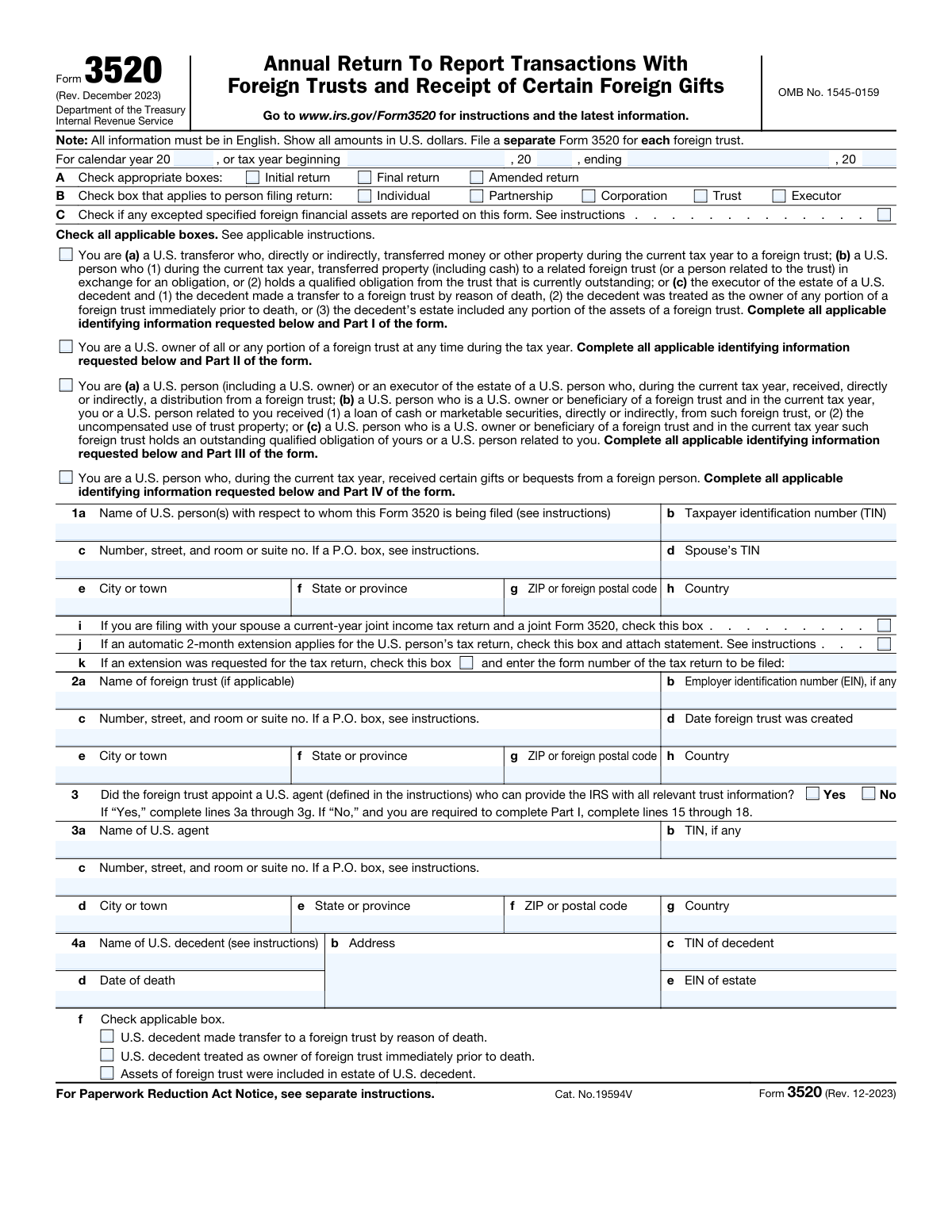
Yes! You can use AI to fill out Form 3520 (Rev. December 2023), Annual Return To Report Transactions With Foreign Trusts and Receipt of Certain Foreign Gifts
Form 3520 is an IRS information return required for U.S. persons who transfer property to a foreign trust, are treated as an owner of a foreign trust, receive distributions (including certain loans or use of trust property) from a foreign trust, or receive certain large foreign gifts or bequests. The form is organized into Parts IâIV to match these different reporting categories and may require additional schedules and attachments (for example, trust documents, beneficiary statements, or Form 4970 for interest charges on accumulation distributions). It is important because it supports compliance with U.S. international reporting rules and can carry significant penalties if not filed accurately and on time. A separate Form 3520 is generally required for each foreign trust involved.
Our AI automatically handles information lookup, data retrieval, formatting, and form filling.
It takes less than a minute to fill out Form 3520 using our AI form filling.
Securely upload your data. Information is encrypted in transit and deleted immediately after the form is filled out.
Form specifications
| Form name: | Form 3520 (Rev. December 2023), Annual Return To Report Transactions With Foreign Trusts and Receipt of Certain Foreign Gifts |
| Number of pages: | 6 |
| Language: | English |
| Categories: | beneficiary forms |
Instafill Demo: filling out a legal form in seconds
How to Fill Out Form 3520 Online for Free in 2026
Are you looking to fill out a FORM 3520 form online quickly and accurately? Instafill.ai offers the #1 AI-powered PDF filling software of 2026, allowing you to complete your FORM 3520 form in just 37 seconds or less.
Follow these steps to fill out your FORM 3520 form online using Instafill.ai:
- 1 Select the filing period and return type (initial, final, or amended) and identify the filer type (individual, partnership, corporation, trust, or executor), including whether any excepted specified foreign financial assets are reported.
- 2 Enter identifying information for the U.S. person(s) filing (name, TIN, address, spouse/joint filing indicators, and any extension information) and, if applicable, the foreign trust’s identifying details (name, EIN if any, address, creation date, and country information).
- 3 Complete the applicable reporting part(s) based on your situation: Part I for transfers to a foreign trust (including Schedules A–C for obligations and gratuitous transfers), Part II for U.S. ownership (including Form 3520-A status and owner statement/substitute), Part III for distributions/loans/use of property (including beneficiary statements and accumulation distribution calculations), and/or Part IV for foreign gifts or bequests.
- 4 Answer all required yes/no questions and fill the related tables (dates, descriptions, FMV in U.S. dollars, basis, gains, obligation terms, principal/interest payments), ensuring amounts are reported in English and U.S. dollars as required.
- 5 Attach required supporting documents and statements (for example, loan/sale documents, trust instruments and related trust documents if no U.S. agent is appointed, Foreign Grantor/Nongrantor Trust Beneficiary Statements, Foreign Grantor Trust Owner Statement, substitute Form 3520-A if needed, and Form 4970 when required).
- 6 Review for completeness and consistency across parts and schedules (totals, carryovers to lines such as total distributions, accumulation distribution amounts, and any additional tax/interest charge computations), then sign and date the return (and include paid preparer information if applicable) before filing.
Our AI-powered system ensures each field is filled out correctly, reducing errors and saving you time.
Why Choose Instafill.ai for Your Fillable Form 3520 Form?
Speed
Complete your Form 3520 in as little as 37 seconds.
Up-to-Date
Always use the latest 2026 Form 3520 form version.
Cost-effective
No need to hire expensive lawyers.
Accuracy
Our AI performs 10 compliance checks to ensure your form is error-free.
Security
Your personal information is protected with bank-level encryption.
Frequently Asked Questions About Form Form 3520
Form 3520 is an annual IRS information return used to report certain transactions with foreign trusts and the receipt of certain large foreign gifts or bequests. It helps the IRS track transfers to foreign trusts, ownership of foreign trusts, distributions from foreign trusts, and qualifying foreign gifts.
You generally must file if you are a U.S. person who transferred money or property to a foreign trust, are treated as an owner of any portion of a foreign trust, received a distribution (or certain loans/benefits) from a foreign trust, or received certain large gifts/bequests from foreign persons. Executors may also need to file for a U.S. decedentâs estate in specific foreign trust situations.
Yes. The form instructions on the face of the return state you must file a separate Form 3520 for each foreign trust.
No. The form states all information must be in English and all amounts must be shown in U.S. dollars.
You complete Part I for transfers to a foreign trust (including certain obligations), Part II if you are a U.S. owner of a foreign trust, Part III if you received distributions/loans/benefits or have certain obligations involving a foreign trust, and Part IV if you received certain reportable foreign gifts or bequests. You may need to complete more than one part if multiple situations apply.
You must provide the U.S. filerâs name, address, and taxpayer identification number (TIN), and in some cases a spouseâs TIN and joint-filing indicator. If applicable, you must also provide the foreign trustâs name, address, and EIN (if any), and the trust creation date.
Line 3 asks whether the foreign trust appointed a U.S. agent who can provide the IRS with all relevant trust information. If you answer âNoâ and you are required to complete Part I, you generally must complete additional lines (15â18) and attach specified trust documents.
If you report qualified obligations in Schedule A, you must generally attach copies of each loan document (or relevant updates if previously attached within the last 3 years). If you report transfers in Schedule B and have sale/loan documents, you may need to attach those documents (or updates) as well.
Line 18 lists documents that may need to be attached, such as a summary of agreements/understandings, the trust instrument, memoranda or letters of wishes, updates to trust documents, trust financial statements, and organizational charts/other trust documents. If these were attached to a Form 3520 or 3520-A within the previous 3 years, you generally attach only relevant updates.
Part I, Schedule B is used for gratuitous transfers where you received less than fair market value (FMV) or no consideration. Youâll list the date, property description, FMV, basis, any gain recognized, and what (if anything) you received in return.
A qualified obligation is a specific type of obligation/loan arrangement that can affect how transfers or loans involving a foreign trust are treated for reporting purposes. The form asks whether you agree to extend the IRS assessment period; if you generally refuse, the obligation may not be treated as âqualified,â which can change how it must be reported.
Part II asks whether the foreign trust filed Form 3520-A for the year. If it did, you attach the Foreign Grantor Trust Owner Statement you received; if it did not, you may need to complete and attach a substitute Form 3520-A to the best of your ability.
You report the date and description of cash/property received and its FMV on the distribution date, and any property you transferred in exchange. You also report certain loans or uncompensated use of trust property, and then total the amounts to determine total distributions for the year.
If you received the applicable Foreign Grantor Trust Beneficiary Statement or Foreign Nongrantor Trust Beneficiary Statement, you generally attach it and may not need to complete the remainder of Part III for that distribution (depending on the statement type and instructions). If you did not receive a statement, you generally use the default calculation schedule for that distribution and may need additional schedules if there is an accumulation distribution.
Part IV is used if, during the year, you received more than $100,000 in gifts or bequests from a nonresident alien or foreign estate (with special rules for related donors), or if you received gifts from foreign corporations/partnerships above the threshold described in the instructions. You must list details such as dates, donor information (for certain gifts), property descriptions, and FMV.
Compliance Form 3520
Validation Checks by Instafill.ai
1
Tax year period completeness and valid date range
Validates that the filer provides either a calendar year (e.g., 2023) or a tax year beginning and ending date, and that the dates are valid calendar dates. The ending date must be after the beginning date and the period should generally be 12 months (or a permitted short year). If this fails, the submission should be rejected or flagged because the IRS cannot determine the reporting period and downstream computations and due-date logic become unreliable.
2
Return type selection (Initial/Final/Amended) is present and mutually consistent
Checks that at least one return type box is selected and that incompatible combinations are not selected together (e.g., Initial and Final simultaneously, or Amended with missing original filing context if required by the system). This is important because processing rules, penalty considerations, and matching logic differ by return type. If validation fails, prompt the user to correct the selection before accepting the filing.
3
Filer entity type selection (Individual/Partnership/Corporation/Trust/Executor) required and consistent with decedent section usage
Ensures exactly one filer type is selected in section B and that the presence of executor/decedent fields (line 4) is consistent with selecting Executor. This prevents misclassification of the filer, which affects required identifiers (SSN/ITIN vs EIN) and signature/title requirements. If inconsistent, the system should block submission and request correction or additional information.
4
U.S. person identifying information completeness (Line 1) and English-only character set
Validates that line 1a name, line 1c street address, city, state/province, postal code, and country are completed, and that entries are in English (e.g., Latin characters) as required by the form instructions. This is critical for IRS correspondence, identity matching, and address standardization. If invalid or incomplete, the form should be rejected or routed to an exception queue for manual review.
5
TIN format validation for all TIN fields (SSN/ITIN/EIN) and required presence by context
Checks that each TIN field (taxpayer TIN, spouse TIN, foreign trust EIN if any, U.S. agent TIN if any, decedent TIN, estate EIN, preparer PTIN/firm EIN) matches acceptable formats (e.g., 9 digits with valid hyphen patterns where applicable) and is present when required by the filerâs situation. Correct TINs are essential for IRS matching and to avoid processing delays or penalty notices. If a required TIN is missing or malformed, the system should prevent submission and request correction.
6
Joint Form 3520 indicator requires spouse TIN and joint-return context
If the joint Form 3520 checkbox (line 1i) is selected, validates that spouse TIN (line 1d) is provided and that the filing context indicates a joint income tax return for the same year. This prevents invalid joint filings that can cause misapplied reporting and correspondence. If the spouse TIN is missing or the joint context is not supported, the system should block submission and instruct the filer to file separately or provide the missing data.
7
Extension indicators and form number logic (Lines 1j–1k)
Validates that if the extension requested checkbox (line 1k) is selected, the form number of the tax return to be filed is provided and matches an allowed set (e.g., 1040, 1120, 1065, 1041). If the automatic 2-month extension box (line 1j) is checked, ensures an extension statement attachment is present as required. If these conditions fail, the system should flag the filing because due-date and penalty computations may be incorrect.
8
Foreign trust identification completeness when any trust-related parts are selected
If the filer indicates they are a transferor/owner/recipient involving a foreign trust (Parts IâIII applicability), validates that the foreign trust name (line 2a) and address (line 2câ2h) are provided, and that the trust creation date (line 2d) is a valid date. This is important because the form is filed per foreign trust and the IRS must be able to identify the trust. If missing, the system should reject the submission or require the filer to add the trust details.
9
Country code fields must be valid ISO-style codes and consistent across trust sections
Validates that country code fields (e.g., lines 6a/6b and 21a/21b) are present when the corresponding part is completed and that they match the allowed country code list specified by IRS instructions. Also checks for consistency where the same trust is referenced (e.g., trust creation country and governing law country should not be blank and should not conflict with other provided trust metadata without explanation). If invalid, the system should block submission because incorrect codes can break IRS routing and analytics.
10
U.S. agent dependency rules (Line 3) and required follow-up sections
If line 3 is answered âYes,â validates that lines 3aâ3g (agent name, address, and TIN if any) are completed. If line 3 is âNoâ and Part I is required, validates that lines 15â18 are completed and that required trust document attachment indicators are addressed. If these dependencies fail, the system should not accept the filing because the IRS requires alternate disclosures when no U.S. agent is appointed.
11
Decedent/estate section completeness and logical consistency (Line 4)
If any decedent-related checkbox is selected on line 4f, validates that decedent name, address, decedent TIN, and date of death are provided, and that the estate EIN is provided when an estate is indicated. The date of death must be a valid date and should not be after the formâs tax year end. If validation fails, the filing should be flagged because executor reporting and estate identification cannot be reliably processed.
12
Schedule A qualified obligation rules: line 11/12 consistency and required loan document attachments
If line 11a is âYes,â requires completion of the obligation detail columns and ensures each obligation has a valid transfer date, maximum term, yield to maturity, and FMV. If line 11b indicates qualified obligations, validates that line 12 is âYesâ (agreement to extend assessment period) and that loan documents are attached or marked as previously attached with a year. If these checks fail, the system should prevent submission or downgrade the obligation status because the form instructions state the obligation cannot be treated as qualified without the extension agreement and documentation.
13
Schedule B gratuitous transfer arithmetic and nonnegative money fields (Line 13 totals)
Validates that all monetary fields are numeric U.S. dollars, nonnegative where appropriate, and that computed columns are internally consistent (e.g., column (f) equals (c) â (d) â (e); column (i) equals (c) â (h)). Also checks that the âTotalsâ line equals the sum of the rows provided. If arithmetic fails, the system should reject or require correction because incorrect gain/excess calculations can materially change tax consequences and penalties.
14
Part III distribution and loan totals reconcile (Lines 24–27) and qualified obligation dependency (Lines 25–26)
Ensures that line 27 equals the sum of line 24 column (f) total plus line 25 column (g) total, and that each row in line 24/25 has a valid date and FMV amounts. If any obligation is marked qualified in line 25 column (e), validates that line 26 is âYesâ (assessment period extension) and that column (f) is populated appropriately. If these validations fail, the system should block submission because the distribution totals drive subsequent income/interest charge computations.
15
Beneficiary statement logic (Lines 29–30) and schedule completion requirements
Validates that âN/Aâ is only selected when the trust type makes the statement inapplicable (grantor vs nongrantor), and that if âYesâ is selected the corresponding statement is attached and the filer does not complete conflicting default/actual calculation schedules for that same distribution. If âNoâ is selected, ensures the required schedules (Schedule A default calculation and/or Schedule B actual calculation, and Schedule C when accumulation distribution > 0) are completed. If this fails, the system should flag the filing because missing statements or schedules can lead to incorrect taxation of distributions.
16
Part IV foreign gift thresholds and donor detail completeness (Lines 54–56)
If line 54 is âYes,â validates that each gift/bequest entry includes a date, description, and FMV, and that entries are provided for each item in excess of $5,000 with totals computed. If line 55 is âYes,â requires donor name/address, donor type (corporation vs partnership), and FMV for each gift, and validates that line 56 is answered. If these checks fail, the system should reject or request correction because threshold-based reporting and donor identification are central to Part IV compliance.
Common Mistakes in Completing Form 3520
Form 3520 requires all amounts to be shown in U.S. dollars, but filers often copy figures directly from foreign bank/trust statements in local currency. This can materially misstate FMV, distributions, and gift totals and may trigger IRS questions or penalties if thresholds are crossed incorrectly. Convert each transaction using an appropriate exchange rate (per instructions/consistent method), document the rate used, and keep supporting calculations.
The form states all information must be in English, yet filers frequently paste trust names, property descriptions, or attachments in another language. Non-English submissions can delay processing and lead to follow-up requests for translations, increasing the risk of late-filing penalties. Provide English translations for key terms and attachments, and ensure property descriptions and statements are readable and complete in English.
A common misunderstanding is combining multiple trusts on one return to âsimplifyâ reporting. The form explicitly requires a separate Form 3520 for each foreign trust, and combining trusts can cause incomplete reporting of transfers/distributions and mismatched identifying information. File a separate Form 3520 per trust and ensure each one has the correct trust name, address, creation date, and related schedules.
Filers often skip or mis-check the boxes for Individual/Partnership/Corporation/Trust/Executor and the applicable category statements (transferor, owner, recipient, or gift recipient). This leads to completing the wrong parts (e.g., Part IV only when Part III is required) and can result in missing required disclosures. Carefully determine your role(s) for the year and check all applicable boxes, then complete every corresponding part and schedule.
Form 3520 requests multiple identification numbers (TINs/EINs) and filers frequently leave them blank, transpose digits, or use the wrong entityâs number. Missing/incorrect IDs can prevent proper matching to the taxpayerâs return and may prompt IRS correspondence or penalty notices. Verify each TIN/EIN against official documents (SSN/ITIN letter, EIN assignment, estate EIN) and ensure the spouseâs TIN is included when relevant.
Many filers answer Line 3 incorrectly or donât realize that a âNoâ answer (when Part I is required) triggers additional disclosures on lines 15â18 and requires attaching trust documents. Omitting beneficiaries/trustees/other power holders or failing to attach the trust instrument/agreements can lead to an incomplete filing and significant penalties. Confirm whether a qualifying U.S. agent was appointed and, if not, complete lines 15â18 and attach the required trust documentation (or relevant updates if previously provided).
Filers often forget to fill in the calendar year/tax year beginning and ending dates, or they use the trustâs year instead of the U.S. personâs tax year. This can cause mismatches with the taxpayerâs income tax return and confusion about which transactions belong in the reporting period. Use the U.S. personâs tax year for the header and ensure each transaction date (transfers, distributions, loans) matches the period being reported.
A frequent error is reporting loans or uncompensated use of trust property as regular distributions (or vice versa), or netting amounts without following the formâs structure. This can distort totals on lines 24â27 and may incorrectly trigger accumulation distribution calculations and interest charges. Follow the instructions: report distributions on line 24, loans/uncompensated use on line 25, and compute line 27 exactly as directed with proper FMV determinations.
When property (not cash) is transferred, filers commonly enter book value, original purchase price, or a rough estimate instead of FMV on the transfer date, and they often omit U.S. adjusted basis and gain recognized. Errors here affect the âexcessâ calculations and can change whether a transfer is treated as gratuitous and how it is reported. Determine FMV as of the transfer date (use appraisals/market quotes when needed), compute U.S. adjusted basis correctly, and complete all columns (c)â(i) without netting or skipping required fields.
Schedules A and B require attaching copies of qualified obligation loan documents and certain sale/loan documents (or relevant updates if attached within the prior 3 years). Filers often check âYesâ to qualified obligation questions but do not attach the underlying agreements, which undermines the claim that an obligation is âqualified.â Attach each required document (and any subsequent variances), and if relying on prior submissions, clearly provide the year attached and include only the updated pages/terms.
People frequently check that an obligation is qualified (Line 11b or Line 25(e)) but then answer âNoâ to the required agreement to extend the period of assessment (Lines 12 or 26). The form notes that refusing the extension generally means the obligation is not qualified, which can recharacterize amounts as distributions and increase tax/penalties. Ensure the qualified obligation criteria are met and answer the extension question consistently; if you cannot agree, treat the obligation as nonqualified and report accordingly.
Saved over 80 hours a year
âI was never sure if my IRS forms like W-9 were filled correctly. Now, I can complete the forms accurately without any external help.â
Kevin Martin Green
Your data stays secure with advanced protection from Instafill and our subprocessors

Robust compliance program
Transparent business model
Youâre not the product. You always know where your data is and what it is processed for.
ISO 27001, HIPAA, and GDPR
Our subprocesses adhere to multiple compliance standards, including but not limited to ISO 27001, HIPAA, and GDPR.
Security & privacy by design
We consider security and privacy from the initial design phase of any new service or functionality. Itâs not an afterthought, itâs built-in, including support for two-factor authentication (2FA) to further protect your account.
Fill out Form 3520 with Instafill.ai
Worried about filling PDFs wrong? Instafill securely fills form-3520-rev-december-2023-annual-return-to-repor forms, ensuring each field is accurate.