Yes! You can use AI to fill out Private Trust (Mod(PT).2005)

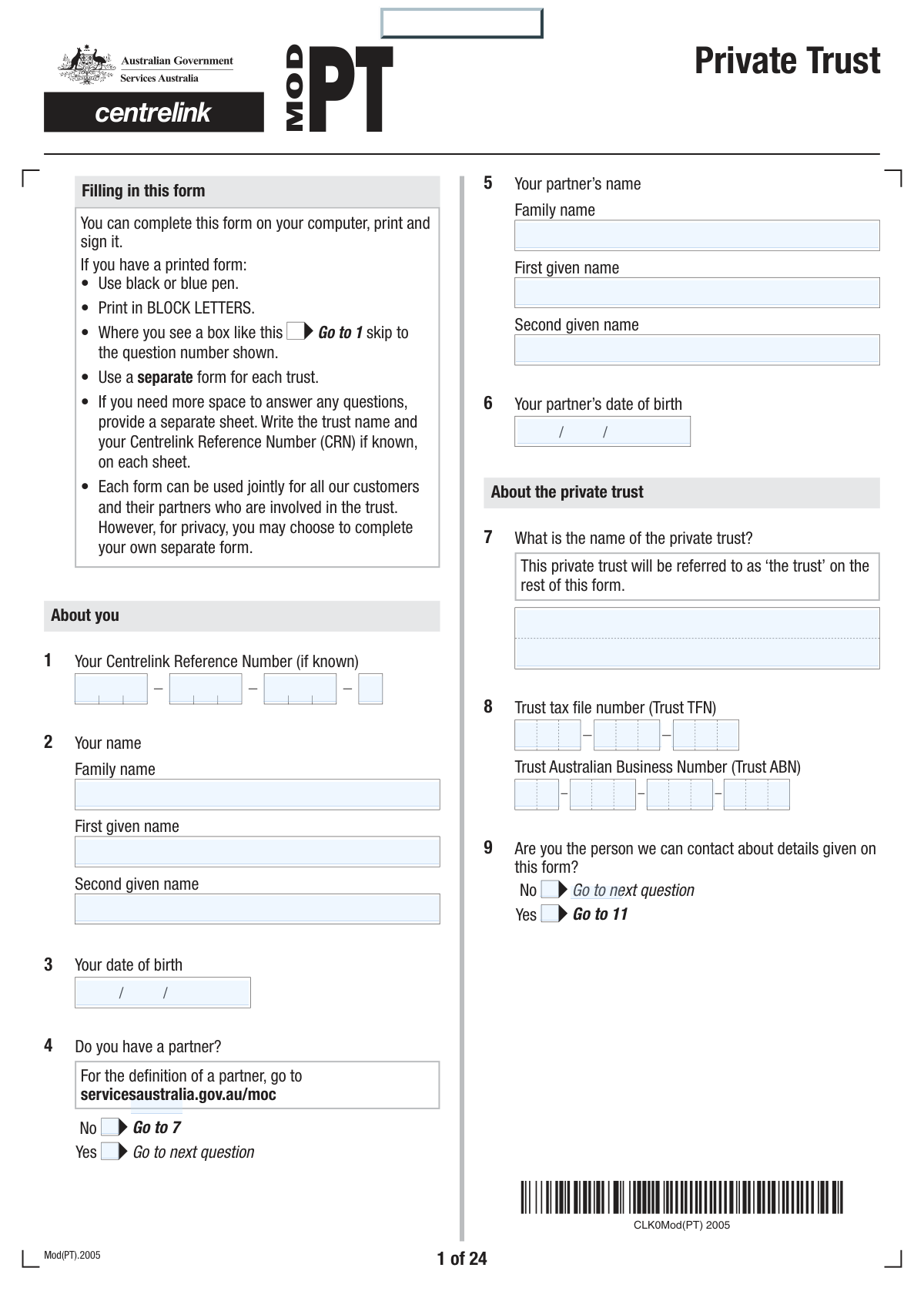
Private Trust (Mod(PT).2005) is a Services Australia (Centrelink) form used to collect detailed information about a private trust’s structure, controllers (trustees/appointors), beneficiaries, contributions/gifts, and financial position (income, assets, liabilities, and real estate). Centrelink uses this information to apply attribution rules (such as the control test and source test) to determine what portion of the trust’s income and assets should be treated as yours for social security means testing. It is important because incomplete or incorrect trust details can affect eligibility, payment rates, and ongoing review outcomes, and may delay or prevent a claim from being accepted if supporting documents are missing.
Our AI automatically handles information lookup, data retrieval, formatting, and form filling.
It takes less than a minute to fill out Mod(PT).2005 / Mod PT using our AI form filling.
Securely upload your data. Information is encrypted in transit and deleted immediately after the form is filled out.

Form specifications

Form name: Private Trust (Mod(PT).2005)
Number of pages: 30
Filled form examples: Form Mod(PT).2005 / Mod PT Examples
Language: English
main-image

Instafill Demo: filling out a legal form in seconds

How to Fill Out Mod(PT).2005 / Mod PT Online for Free in 2026

Are you looking to fill out a MOD(PT).2005 / MOD PT form online quickly and accurately? Instafill.ai offers the #1 AI-powered PDF filling software of 2026, allowing you to complete your MOD(PT).2005 / MOD PT form in just 37 seconds or less.
Follow these steps to fill out your MOD(PT).2005 / MOD PT form online using Instafill.ai:
  1. 1 Enter personal details for you (and your partner if applicable), including names, dates of birth, and Centrelink Reference Number (CRN), then confirm whether you have a partner.
  2. 2 Provide trust identification and contact details: trust name, TFN/ABN, and nominate the best contact person (you, tax agent, or accountant) for current questions and future requests for tax returns/financial statements.
  3. 3 Complete trust type and activity details: whether it is a testamentary trust, setup and trading dates, trading names and business types, and (if relevant) personal exertion/work bonus information and any recent change in circumstances.
  4. 4 Report trust control and participants: list trustees (and whether there is a corporate trustee), appointor/guardian and any other controllers, informal controllers, unitholders (if a unit trust), and beneficiaries (including potential beneficiaries).
  5. 5 Provide trust financials and transactions: fixed trust/unit changes since 9 May 2000, contributions/gifts/transfers for less than market value, shares and managed investments, involvement in other private companies or trusts, other assets, money owed to/from the trust, and income/benefits paid or entitled to associates/controllers/beneficiaries.
  6. 6 If the trust owns real estate, complete a ‘Trust real estate details’ section for each property (value, titles, use, occupancy, mortgages/encumbrances, rental income, factors affecting value) and sign the authority to inspect the property where required.
  7. 7 Attach required supporting documents from the checklist (for example trust tax return, financial statements, trust deed/will/loan agreements/property documents as applicable), sign the declaration (and partner/corporate trustee signatures if needed), and upload/lodge the form online via your Centrelink account.

Our AI-powered system ensures each field is filled out correctly, reducing errors and saving you time.

Why Choose Instafill.ai for Your Fillable Mod(PT).2005 / Mod PT Form?

Speed

Complete your Mod(PT).2005 / Mod PT in as little as 37 seconds.

Up-to-Date

Always use the latest 2026 Mod(PT).2005 / Mod PT form version.

Cost-effective

No need to hire expensive lawyers.

Accuracy

Our AI performs 10 compliance checks to ensure your form is error-free.

Security

Your personal information is protected with bank-level encryption.

Frequently Asked Questions About Form Mod(PT).2005 / Mod PT

This form is used by Services Australia to work out your share of a private trust’s income and assets, so they can assess your social security payment correctly. It helps determine whether trust income/assets should be attributed to you under the control or source tests.

You should complete it if, in the last 5 years, you and/or your partner have been involved with a private trust that has not been vested, or have made gifts/transfers involving a private trust (active or vested). Use a separate form for each trust.

You do not need to complete it if the trust is a Special Disability Trust, a Complying Self Managed Superannuation Fund, or the trust is vested and no gifts need to be declared. If relying on vesting, you must provide evidence that the trust has vested.

A private trust can include a family trust, testamentary trust, a fixed trust with fewer than 50 members, a non-complying self managed superannuation fund, or a trust outside Australia. It does not include a public trust, a complying super fund, or a fixed trust with more than 50 members.

You (or your partner) may be considered involved if you are an appointor/guardian/principal, trustee, director/shareholder of a corporate trustee, beneficiary (or potential beneficiary), unitholder, owed money by the trust, or able to benefit from the trust. Involvement can also include informal influence over the trustee.

You’ll generally need trust details such as the trust name, TFN/ABN, trust deed dates, trustee/appointor details, beneficiaries, and full financial documents (tax return, balance sheet, profit and loss, depreciation schedule). Much of this is usually held by the trust’s tax agent or accountant.

Yes—Services Australia suggests you speak to the trust’s tax agent or accountant because they often have the required information. However, you are still responsible for ensuring the form is complete, and Services Australia will not reimburse any fees charged by advisers.

Yes, if you are making a claim you must lodge this form and all supporting documents at the same time as your claim, or your claim may not be accepted. The only exception is if you are waiting for medical evidence or other third-party documents.

The checklist (Question 98) lists required documents, including your personal tax return (and your partner’s if involved), and the trust’s latest tax return, profit and loss statement, depreciation schedule, balance sheet, and notes to the accounts (if applicable). If you can’t provide a required document, you must explain why in the checklist section.

If the trustee is a company, you must also complete and return a Private Company (Mod PC) form for that company if it hasn’t already been provided. This is required to assess the company’s role and financial position in relation to the trust.

You must list any appointor/guardian and anyone else who can veto trustee decisions, replace the trustee, control trustee actions, or change the trust deed (Questions 29–30). You also need to disclose anyone giving instructions (Question 31) and anyone with informal control (Question 32).

A contribution includes gifting, transferring, or selling assets/services to the trust for less than market value (including loans written off) since 7:30 pm AEST 9 May 2000. These transactions can affect attribution and gifting assessments, and gifts may be assessed for 5 years from the transfer date.

If the trust owns real estate (Question 58), you must complete the “Trust real estate details” section (Questions 59–90) for each property. You also need to attach documents such as the latest council rate/valuation notice, title deeds (where required), and mortgage/loan statements if the property is encumbered.

Services Australia may need a professional valuation to correctly assess trust assets, and the authority allows a licensed valuer to inspect the property (without entering a dwelling unless invited). If permission to inspect isn’t provided and the value affects entitlement, your payment may not be granted, may be reduced, or may be stopped.

Eligible primary producers may apply for a special concession that can allow limited appointorship powers without full attribution, if strict conditions are met (including limits on control and beneficiary status). If applying (Question 91), you must provide stamped trust deed documents/amendments, a written statement about not exerting control/benefiting, and may also need a Business details (Mod F) form and 3 years of personal tax returns for primary production income.

Compliance Mod(PT).2005 / Mod PT
Validation Checks by Instafill.ai

1
Validates claimant identity fields are complete and properly formatted
Checks that 'Your name' is provided (family name and first given name at minimum) and that 'Your date of birth' is present and in a valid date format (DD/MM/YYYY). This is essential to correctly link the submission to the right customer record and apply age-based rules later in the form. If validation fails, the form should be rejected or routed for manual follow-up because the submission cannot be reliably attributed to a person.
2
Validates Centrelink Reference Number (CRN) format when supplied
If a CRN is entered for the customer, partner, trustees, or other listed people, validate it matches the expected CRN pattern/length used by the system (and contains only allowed characters). This prevents mis-linking to the wrong record and reduces downstream matching errors. If invalid, the system should flag the field and require correction or treat the CRN as unusable and request alternative identification.
3
Partner dependency logic: partner details required only when 'Do you have a partner?' is Yes
If the applicant answers 'Yes' to having a partner, the partner’s name and date of birth must be completed; if 'No', partner fields should be blank or ignored. This ensures correct assessment of joint involvement and income/asset attribution rules. If the logic is violated (e.g., partner marked 'Yes' but missing DOB), the submission should fail validation and prompt completion.
4
Trust identification completeness: trust name required and TFN/ABN format validation
Validates that the trust name (Q7) is provided and that Trust TFN and Trust ABN, if provided, are in valid numeric formats (TFN typically 9 digits; ABN 11 digits with checksum validation). Correct identifiers are critical for matching to ATO/trust records and ensuring the correct entity is assessed. If invalid or missing trust name, the form should be returned for correction; if TFN/ABN invalid, the system should block submission or mark as requiring evidence/manual review.
5
Contact person routing: ensures Q10/Q11 contact details are consistent and complete
If Q9 indicates the applicant is not the contact person, Q10 must be completed with name, role/position, postal address, and at least one contact method (daytime phone or fax). For Q11, if 'The person named below' is selected, the additional contact details must be fully provided; if 'You' or 'The person named at question 10' is selected, Q11 detail fields should not be required. If inconsistent, the system should fail validation because future requests for tax returns/financials may not be deliverable.
6
Phone and fax number format validation for contact fields
Validates that daytime phone and fax numbers (where provided) contain only permitted characters and meet expected Australian numbering rules (e.g., 10 digits for AU landlines/mobiles, optional area code formatting). This reduces failed contact attempts and supports time-critical reviews. If invalid, the system should prompt correction and prevent submission if the number is required by the selected contact option.
7
Testamentary trust conditional requirements and date consistency
If Q13 'Is this a testamentary trust?' is Yes, require testator name, date of death, relationship to beneficiaries, and ensure the will is marked/provided in the document checklist. Also validate the date of death is a real date and is not in the future. If missing or inconsistent, the submission should be flagged as incomplete because testamentary attribution rules depend on these details.
8
Surviving partner section logic and control-test follow-up questions
If Q14 indicates there is a surviving partner, require their name, DOB, and address/postcode; then require answers to Q15 and Q16 regarding control (personal control and control through an associate). If Q14 is No, Q15/Q16 should be skipped and not answered. If the surviving partner is provided but control questions are missing, the form should fail validation because attribution cannot be assessed.
9
Trust lifecycle date validation (setup, commence trading, cease trading)
Validates that trust setup date (Q17) and trading dates (Q18/Q20) are valid dates and logically ordered (setup date ≤ commence trading date; if ceased trading, cease date ≥ commence trading date). If 'trust still trading' is No (Q19), Q20 and Q21 (reason) must be completed; if Yes, Q20 should be blank. Failures should block submission or trigger manual review because trading status affects financial interpretation and evidence requirements.
10
Age Pension age gating for personal exertion questions (Q24–Q25)
Ensures Q24 and Q25 are only answered when the applicant/partner is age pension age or claiming Age Pension as instructed, and validates that the DOB-based qualifying age logic is applied correctly. If Q24 is Yes, Q25 percentages must be provided for each listed trading name and must be numeric. If answered when not eligible or missing required percentages, the system should flag the section because Work Bonus/personal exertion treatment may be misapplied.
11
Personal exertion percentage validation totals and bounds
For Q25, validates that each percentage for 'You' and 'Your partner' is between 0 and 100, and that the combined percentages for a given trading name do not exceed 100%. This prevents impossible allocations and ensures consistent income attribution. If invalid, the form should be rejected until corrected or routed for clarification.
12
Trustee and controller person records: required fields and duplication checks
Validates that each listed trustee/appointor/controller person entry includes a name and valid DOB (where requested), and checks for obvious duplicates across roles (e.g., same person entered multiple times with conflicting DOBs). Also enforces the 'more than X people' rule by requiring an attachment/supplement sheet indicator when limits are exceeded (e.g., >3 trustees, >2 appointors). If validation fails, the system should request correction/attachments because control assessment depends on accurate role mapping.
13
Corporate trustee dependency: requires Mod PC when corporate trustee or private company involvement is Yes
If Q28 indicates a corporate trustee, the submission must include a Private Company (Mod PC) form (unless already recorded in the case) and the trustee company details must be sufficient to identify it. Similarly, if Q50 indicates involvement in other private companies, require Mod PC for each listed company. If missing, the system should mark the submission incomplete because company financials/control are required for assessment.
14
Unit trust conditional requirements and unit data validation
If Q35 'Is this trust a unit trust?' is Yes, require at least one unitholder row with name, DOB, class of unit, number of units, and purchase price; validate units are positive integers and purchase price is a non-negative currency amount. This ensures entitlements can be calculated and prevents nonsensical holdings (e.g., negative units). If invalid or missing, the form should fail validation because unit holdings drive income/capital attribution.
15
Contribution/gifting section validation (post–9 May 2000) including real estate linkage
If Q47 indicates contributions since 7:30pm AEST 9 May 2000, require contributor identity, contribution description, date of contribution, nature (gifted/transferred/sold below market), and value fields; validate currency fields are non-negative and dates are valid and not in the future. Additionally, if the contribution includes real estate, enforce completion of the Trust real estate details section (Q57–Q90) for that property. If any required elements are missing, the system should block submission because gifting and source-test rules depend on complete contribution data.
16
Real estate section completeness, numeric bounds, and signature/authority requirements
If Q58 indicates the trust owns real estate, require the number of properties and a completed Q59–Q90 block for each property, including address, property type, date became trust asset, estimated market value, and council rate/valuation notice attachment. Validate numeric fields (market value, residence value, area measurements, ownership percentages) are non-negative and ownership percentages sum to 100% when not 100% trust-owned. Also require trustee signature(s) and dates on the authority to inspect (Q90) for each property section; if missing, the submission should be treated as incomplete because valuation and asset assessment cannot proceed.

Common Mistakes in Completing Mod(PT).2005 / Mod PT

Using the wrong form or completing it when it’s not required

People often complete Mod(PT) even when the trust is vested with no gifts to declare, or when the arrangement is actually a Special Disability Trust or a complying super fund (which are excluded). This happens because the “when to use” rules are in the notes and applicants assume any trust involvement requires this form. Submitting the wrong form can delay assessment or trigger requests for additional evidence. Before starting, confirm the trust type and whether there were any transfers/gifts in the last 5 years, and keep evidence of vesting if relying on the exemption.

Not completing a separate form for each trust (or mixing multiple trusts in one)

A very common error is combining details for multiple trusts on one Mod(PT), especially where a family has several related trusts. The form explicitly requires a separate form per trust, and mixing information makes it impossible to correctly attribute income/assets and match documents (tax returns, deeds, property details) to the right entity. This can lead to follow-up letters and reassessment delays. Use one Mod(PT) per trust and label any extra pages with the trust name and your CRN.

Leaving trust identifiers blank or entering personal TFN/ABN instead of the trust’s

Applicants frequently omit the Trust TFN/ABN (Q8) or accidentally provide their own TFN/ABN because they don’t have the trust paperwork in front of them. Missing or incorrect identifiers can prevent Services Australia from matching the trust to ATO records and the trust tax return, causing delays and requests for clarification. To avoid this, copy the TFN/ABN exactly from the trust’s Income Tax Return or deed documentation and double-check you are not using personal identifiers.

Incorrectly answering partner questions or providing incomplete partner details

People often tick “No partner” based on informal separation, living arrangements, or assumptions about the definition of partner, then omit partner name/DOB/signature. This can cause incorrect attribution and assessment outcomes because the form and rules consider partner involvement and transfers over the last 5 years. It may also lead to compliance issues if later information shows a partner existed under the social security definition. Use the Services Australia definition of partner, complete partner fields where required, and ensure both signatures are provided at the declaration if applicable.

Misunderstanding ‘control’ and failing to disclose appointors, veto powers, or informal controllers

Many people list only the trustee (Q27) and answer “No” to appointor/control questions (Q29–Q32) because they think control only means being the trustee. The form’s attribution rules consider appointors/guardians, people with veto or deed-change powers, and even informal influence where the trustee is expected to act on someone’s wishes. Under-disclosure can lead to incorrect attribution, later reassessment, and potential overpayment debts. Review the trust deed for appointor/guardian and amendment powers, and disclose anyone who can influence decisions even if they are not formally named as trustee.

Omitting previous trustees/appointors and change dates since 1 January 2002

Applicants often skip Q34 or provide names without dates/reasons because historical changes are hard to recall or not documented. However, changes in controllers are central to attribution and gifting assessments, and missing dates can prevent correct application of the 5-year gifting rules. This typically results in requests for deeds, minutes, or ASIC records and delays. Use trust deed amendments, trustee resolutions, and company records to provide exact change dates and reasons, and attach a separate sheet if there are more than three changes.

Failing to declare contributions/gifts/transfers since 9 May 2000 (including written-off loans and undervalue sales)

A frequent mistake is answering “No” at Q47 because the person thinks only cash gifts count, or they forget about services provided for free, assets sold below market value, or loans that were waived/written off. The form treats all of these as contributions and they can affect attribution and gifting assessments for up to 5 years (and may influence control findings). Missing these items can lead to reassessment and potential debts if later discovered. Go through bank records, trust accounts, loan ledgers, and property transfer documents to list every non-arm’s-length transfer with dates and market values.

Providing accounting values instead of current market values for assets and property

People commonly copy figures from the balance sheet (historical cost or written down value) into asset questions (Q53) and property value questions (Q63), even though the form asks for current market value. This happens because financial statements are the easiest source, but they often understate real values and can materially change payment rates. Incorrect values can trigger valuations, reviews, and backdated adjustments. Use reasonable market estimates (recent sales, appraisals, rate notices) and clearly separate market value from loan balances and accounting book values.

Incomplete real estate section: missing rate notices, title details, ownership percentages, or mortgage/security documents

When the trust owns property (Q58), applicants often forget to complete a separate ‘Trust real estate details’ section for each property, omit the council rate/valuation notice, or skip title/area and ownership percentage questions (Q69–Q83). They also frequently fail to attach mortgage/loan agreements and statements showing what assets are held as security (Q84–Q85). These omissions prevent accurate valuation and debt deductions, and can result in the claim being delayed or the asset being assessed conservatively. For each property, attach the rate notice, title deed(s), water rights documents if relevant, and loan/security paperwork, and ensure ownership percentages total 100%.

Not supplying required supporting documents (or lodging them separately from the claim)

Applicants often submit the form without the mandatory documents in the checklist (Q98), especially the trust tax return, financial statements, depreciation schedule, and personal tax returns for involved parties. This usually happens because documents are with the accountant or not yet prepared, but the form warns that claims may not be accepted unless supporting documents are lodged at the same time (except limited third-party evidence). Missing documents lead to non-acceptance of the claim or significant processing delays. Use Q98 as a packing list, request documents early from the trust accountant, and if something is unavailable, provide a clear written explanation and any interim statements the form suggests.

Missing signatures/authorities or using the wrong signatory (especially for corporate trustees)

A common final-step error is forgetting to sign the declaration (Q100), missing the partner’s signature where applicable, or not completing the trustee signature/second signature for corporate trustees in the property inspection authority (Q90). People also sometimes have an unauthorised person sign (e.g., a beneficiary instead of the trustee) because they assume any family member can sign. Unsigned or improperly signed forms can be treated as incomplete and returned or delayed, and missing inspection authority can affect property valuation and payment decisions. Ensure the correct trustee(s) sign where required, add the second signature for corporate trustees, and date all signatures in the requested format.
Saved over 80 hours a year

“I was never sure if my IRS forms like W-9 were filled correctly. Now, I can complete the forms accurately without any external help.”

Kevin Martin Green

Your data stays secure with advanced protection from Instafill and our subprocessors

Robust compliance program

Transparent business model

You’re not the product. You always know where your data is and what it is processed for.

ISO 27001, HIPAA, and GDPR

Our subprocesses adhere to multiple compliance standards, including but not limited to ISO 27001, HIPAA, and GDPR.

Security & privacy by design

We consider security and privacy from the initial design phase of any new service or functionality. It’s not an afterthought, it’s built-in, including support for two-factor authentication (2FA) to further protect your account.

Fill out Mod(PT).2005 / Mod PT with Instafill.ai

Worried about filling PDFs wrong? Instafill securely fills private-trust-modpt2005 forms, ensuring each field is accurate.