Yes! You can use AI to fill out Beneficiary Distribution Request
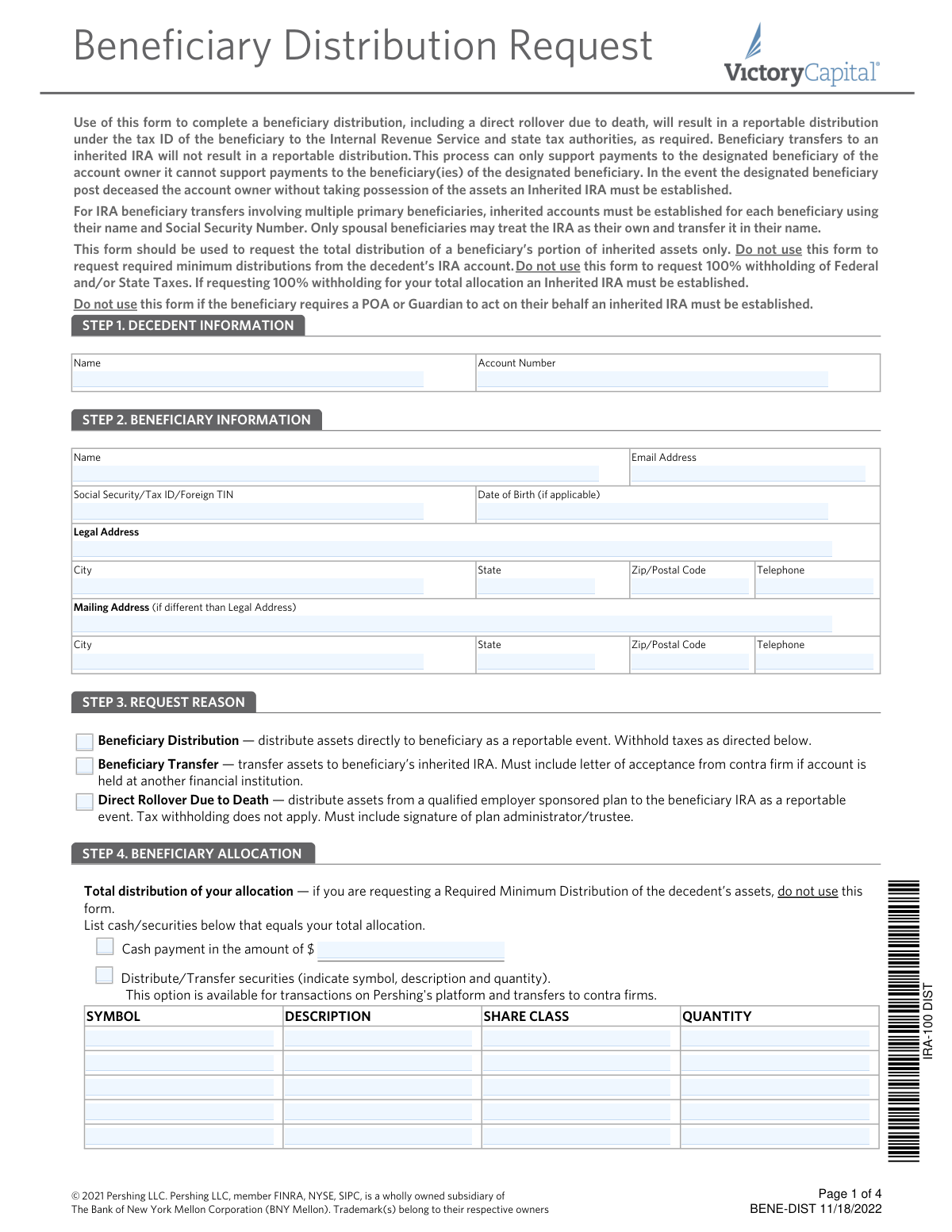
This form is used to initiate the total distribution of a beneficiary's share of inherited assets from a retirement or investment account. It allows the beneficiary to choose between a direct cash/securities distribution, a transfer to an inherited IRA, or a direct rollover, and specifies tax withholding elections. Today, this form can be filled out quickly and accurately using AI-powered services like Instafill.ai, which can also convert non-fillable PDF versions into interactive fillable forms.
Our AI automatically handles information lookup, data retrieval, formatting, and form filling.
It takes less than a minute to fill out BENE-DIST using our AI form filling.
Securely upload your data. Information is encrypted in transit and deleted immediately after the form is filled out.
Form specifications
| Form name: | Beneficiary Distribution Request |
| Number of pages: | 1 |
| Language: | English |
| Categories: | beneficiary forms, distribution forms |
Instafill Demo: How to fill out PDF forms in seconds with AI
How to Fill Out BENE-DIST Online for Free in 2026
Are you looking to fill out a BENE-DIST form online quickly and accurately? Instafill.ai offers the #1 AI-powered PDF filling software of 2026, allowing you to complete your BENE-DIST form in just 37 seconds or less.
Follow these steps to fill out your BENE-DIST form online using Instafill.ai:
- 1 Navigate to Instafill.ai and upload or select the Beneficiary Distribution Request form.
- 2 Use the AI assistant to accurately fill in Decedent Information (Step 1) and Beneficiary Information (Step 2), including names, account numbers, and addresses.
- 3 In Step 3, select the appropriate reason for the request, such as a direct distribution, transfer to an inherited IRA, or a direct rollover.
- 4 Detail the beneficiary allocation in Step 4, specifying the amount of cash or which securities to distribute.
- 5 Complete the Tax Withholding Election in Step 5 by choosing your preferences for federal and state income tax.
- 6 Select the desired Method of Delivery in Step 6, such as a check, wire transfer, or journal entry to another account.
- 7 Carefully review all the information populated by the AI, then electronically sign and date the form in Step 7 to certify and submit your request.
Our AI-powered system ensures each field is filled out correctly, reducing errors and saving you time.
Why Choose Instafill.ai for Your Fillable BENE-DIST Form?
Speed
Complete your BENE-DIST in as little as 37 seconds.
Up-to-Date
Always use the latest 2026 BENE-DIST form version.
Cost-effective
No need to hire expensive lawyers.
Accuracy
Our AI performs 10 compliance checks to ensure your form is error-free.
Security
Your personal information is protected with bank-level encryption.
Frequently Asked Questions About Form BENE-DIST
This form is used by a designated beneficiary to request the total distribution of their portion of inherited assets from a deceased person's account. This includes direct cash or security payouts, or transfers to an inherited IRA.
You should not use this form to request Required Minimum Distributions (RMDs), if a Power of Attorney (POA) needs to act on your behalf, or if you want to withhold 100% of the distribution for taxes. In these cases, an Inherited IRA must be established first.
A 'Beneficiary Distribution' is a direct payment to you, which is a reportable taxable event. A 'Beneficiary Transfer' moves the assets to an Inherited IRA, which is not an immediately reportable distribution.
Yes, the form notes that only spousal beneficiaries have the option to treat the inherited IRA as their own and transfer it directly into their name.
In Step 1, you must provide the full name and the account number of the deceased individual (decedent).
A beneficiary distribution is a reportable event to the IRS and is subject to income tax. You must make a tax withholding election in Step 5; otherwise, a default of 10% federal tax will be withheld.
You cannot use this form to request 100% tax withholding. The form instructions state that you must first establish an Inherited IRA to make that request.
Step 6 allows you to choose your method of delivery, which includes a check mailed to your address, a federal funds wire, or a journal entry to another Pershing account.
If you are transferring assets to another financial institution, you must include a letter of acceptance from that firm. Entity beneficiaries, like trusts, must attach proof of authority, such as a Trust Certification.
Return the completed form to the financial advisor or institution associated with the retirement account. The request must be signed, dated, and processed within 60 days of your signature.
This form cannot be used to make payments to the beneficiary of a designated beneficiary. An Inherited IRA must be established to handle this situation.
Yes, services like Instafill.ai use AI to accurately auto-fill form fields from your saved profile, which can save you time and help avoid errors on complex forms.
You can use Instafill.ai to fill this form online. Simply upload the PDF, and the tool will make it fillable, allowing you to type your answers and add a digital signature.
Services like Instafill.ai can convert flat, non-fillable PDFs into interactive forms. You can upload the document and fill it out on your computer without needing to print it.
Compliance BENE-DIST
Validation Checks by Instafill.ai
1
Validates Beneficiary's Tax Identifier Format
Checks that the Social Security Number, Tax ID, or Foreign TIN in Step 2 is provided and adheres to the correct format, such as nine digits for a U.S. SSN/TIN. This is critical for accurate tax reporting to the IRS and state authorities as required by law. An invalid or missing identifier will cause the submission to fail processing and result in tax reporting errors.
2
Ensures a Single Request Reason is Selected
This validation confirms that exactly one option has been chosen in Step 3 for the 'Request Reason' (Beneficiary Distribution, Beneficiary Transfer, or Direct Rollover). Selecting no reason leaves the request's purpose ambiguous, while selecting multiple reasons creates a processing conflict. Failure to select a single, valid reason will halt processing until the ambiguity is resolved by the submitter.
3
Verifies Tax Withholding Section is Conditionally Completed
This check ensures that Step 5 (Tax Withholding Election) is only completed if the 'Beneficiary Distribution' option is selected in Step 3. Tax withholding is not applicable to beneficiary transfers or direct rollovers due to death. If this section is filled out for an inapplicable request type, the form will be rejected to prevent incorrect tax actions and ensure the request aligns with tax regulations.
4
Prohibits 100% Tax Withholding on this Form
This rule validates that the Federal or State tax withholding amount entered in Step 5 is not equal to 100%. The form explicitly states that requesting 100% withholding requires the establishment of a separate Inherited IRA and cannot be done using this form. A submission with a 100% withholding request will be rejected with instructions to use the correct process.
5
Validates Plan Administrator Signature for Direct Rollovers
This check is triggered if 'Direct Rollover Due to Death' is selected in Step 3. It verifies that the Plan Administrator/Trustee signature, name, and date fields in Step 8 are all completed. This signature is a legal requirement to authorize the distribution from a qualified employer-sponsored plan, and its absence will prevent the transaction from being processed.
6
Confirms Signature Date is Within 60 Days
This validation checks the beneficiary's signature date in Step 7 against the date the form is received for processing. The form states it must be processed within 60 days of the signature date. A form with a 'stale' date (older than 60 days) is considered invalid and will be rejected, requiring the beneficiary to submit a newly signed form to ensure authorization is current.
7
Ensures Delivery Method Details are Complete
This check verifies that when a specific delivery method is chosen in Step 6, all associated required information is provided. For example, a 'Federal Fund Wire' must include a valid ABA/Routing number and DDA number, while a 'Journal entry' must include a Pershing account number. An incomplete selection will delay the distribution until the missing details are supplied.
8
Validates Presence of Allocation Instructions
This check ensures that the beneficiary has provided clear instructions for their total allocation in Step 4. The beneficiary must specify either a cash amount to be paid or list the specific securities (including symbol and quantity) to be distributed. A form without any allocation details is incomplete and cannot be acted upon, as there are no instructions on how to distribute the assets.
9
Cross-references Foreign Address with NRA Withholding Rules
This validation checks if a foreign address is provided in the Legal or Mailing Address fields in Step 2. If a foreign address is present, it confirms that the Nonresident Alien (NRA) withholding rules are being followed, as mandatory 30% withholding applies. This is crucial for maintaining tax compliance for non-U.S. beneficiaries and prevents processing if treaty rate reductions are improperly requested on this form.
10
Verifies Decedent's Name and Account Number are Provided
This check ensures that the decedent's full name and account number are both filled out in Step 1. This information is fundamental to identifying the correct source account from which assets are being distributed. A submission with missing or incorrect decedent information will be rejected as the system cannot locate the proper account to process the request.
11
Ensures Beneficiary Signature Block is Fully Completed
This validation confirms that the beneficiary has provided a signature, printed their name, and written the date in Step 7. All three components are required to create a legally binding instruction and authorize the distribution. An incomplete signature block renders the request invalid and it will be returned to the beneficiary for completion.
12
Validates Attachment of Letter of Acceptance for Transfers
This check is triggered when 'Beneficiary Transfer' or 'Deliver to Beneficiary’s IRA' is selected. It verifies that a letter of acceptance from the receiving financial institution (contra firm) is attached to the form submission. This letter is required to confirm the receiving account is set up correctly to accept the inherited assets, and its absence will halt the transfer process.
Common Mistakes in Completing BENE-DIST
Beneficiaries often mistakenly use this form to request a Required Minimum Distribution (RMD) or to have 100% of taxes withheld, both of which are explicitly disallowed. This leads to immediate rejection of the form and significant delays in accessing funds. Always read the instructions at the top of the form carefully to confirm it is appropriate for your specific request, which should only be for a total distribution of your allocated portion.
In Step 3, selecting the wrong request reason has major financial consequences. Choosing 'Beneficiary Distribution' creates a taxable event, while 'Beneficiary Transfer' moves assets to an inherited IRA without immediate tax implications. This mistake often happens due to misunderstanding the terminology, resulting in unintended tax liabilities. Beneficiaries should consult a tax advisor to understand the difference before making a selection.
In Step 5, many people either leave the tax withholding section blank or make conflicting choices (e.g., checking 'Do NOT withhold' and also entering a percentage). If no clear election is made, a default 10% federal withholding is applied, which may not align with the beneficiary's tax situation. To avoid this, make a single, clear choice for both federal and state withholding, or consult a tax professional to determine the appropriate rate.
The form requires specific attachments for certain requests, such as a 'letter of acceptance' for transfers to another institution (Step 3) or 'proof of authorized signor' for entity beneficiaries (Step 7). Forgetting to include these documents is a primary cause of processing delays, as the financial institution cannot proceed without them. Create a checklist of required documents before submission to ensure your request is complete.
When requesting a wire transfer in Step 6, entering an incorrect ABA/Routing number or bank account number is a high-stakes error. This can cause the funds to be sent to the wrong account, lost, or significantly delayed, requiring a lengthy and stressful recovery process. Double-check all numbers for accuracy before submitting the form; using an AI-powered tool like Instafill.ai can help by validating data formats to reduce typos.
In Step 7, a beneficiary may sign the form but forget to write the date, or they may submit the form more than 60 days after the signature date. In either case, the request is considered invalid and will be rejected, forcing the beneficiary to complete and re-submit the entire form. Always date your signature and ensure the form is sent to the financial institution well before the 60-day deadline expires.
If the distribution is from a qualified employer-sponsored plan, Step 8 requires a signature from the Plan Administrator or Trustee. Beneficiaries often overlook this step, assuming their own signature is sufficient. This omission will halt the process until the required authorization is obtained, delaying the distribution. Always verify the account type and secure all necessary third-party signatures before submission.
In Step 2, if a beneficiary's mailing address is different from their legal address, they must fill out both sections. People often skip the mailing address section, assuming mail will automatically go to their legal address. This can lead to checks, tax forms (like the 1099-R), and other important correspondence being sent to the wrong location and getting lost.
In Step 4, beneficiaries must clearly list the cash amount or the specific securities (symbol, description, quantity) that constitute their total allocation. Common errors include providing incomplete security details or listing assets that do not equal the total inherited portion. This ambiguity forces the firm to seek clarification, delaying the distribution. Ensure all details are precise and complete to facilitate a smooth transaction.
The form clearly states that Step 5 (Tax Withholding) should not be completed for 'Beneficiary Transfers' or 'Direct Rollovers'. However, people often fill out every section, causing confusion and potential processing errors. This can delay the transfer while the firm clarifies the conflicting instructions. Carefully read the instructions for each section to ensure you only complete the parts relevant to your request. If the form is a non-fillable PDF, a tool like Instafill.ai can convert it to a smart, fillable version with conditional logic to help prevent such errors.
Saved over 80 hours a year
“I was never sure if my IRS forms like W-9 were filled correctly. Now, I can complete the forms accurately without any external help.”
Kevin Martin Green
Your data stays secure with advanced protection from Instafill and our subprocessors

Robust compliance program
Transparent business model
You’re not the product. You always know where your data is and what it is processed for.
ISO 27001, HIPAA, and GDPR
Our subprocesses adhere to multiple compliance standards, including but not limited to ISO 27001, HIPAA, and GDPR.
Security & privacy by design
We consider security and privacy from the initial design phase of any new service or functionality. It’s not an afterthought, it’s built-in, including support for two-factor authentication (2FA) to further protect your account.
Fill out BENE-DIST with Instafill.ai
Worried about filling PDFs wrong? Instafill securely fills beneficiary-distribution-request forms, ensuring each field is accurate.