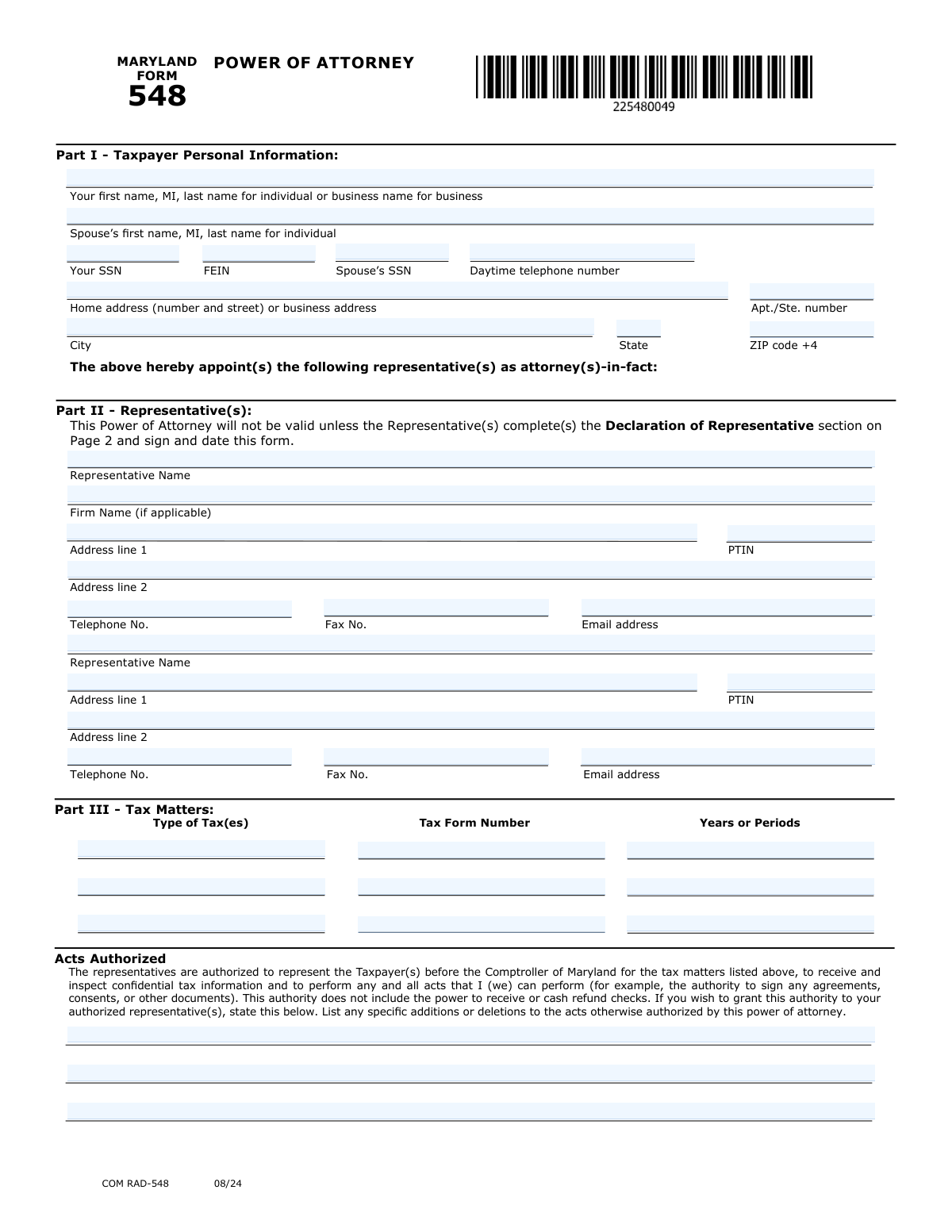
Yes! You can use AI to fill out Maryland Form 548, Power of Attorney
Maryland Form 548, Power of Attorney, is a legal document used by a taxpayer to grant authority to an individual, such as a CPA, attorney, or enrolled agent, to represent them before the Comptroller of Maryland. This authorization allows the representative to receive confidential tax information and perform acts on the taxpayer's behalf for specific tax types and periods. Today, this form can be filled out quickly and accurately using AI-powered services like Instafill.ai, which can also convert non-fillable PDF versions into interactive fillable forms.
COM RAD-548 is part of the
power of attorney forms category on Instafill.
Our AI automatically handles information lookup, data retrieval, formatting, and form filling.
It takes less than a minute to fill out COM RAD-548 using our AI form filling.
Securely upload your data. Information is encrypted in transit and deleted immediately after the form is filled out.
Form specifications
| Form name: | Maryland Form 548, Power of Attorney |
| Number of fields: | 51 |
| Number of pages: | 2 |
| Language: | English |
More forms in Power of attorney forms
Instafill Demo: How to fill out PDF forms in seconds with AI
How to Fill Out COM RAD-548 Online for Free in 2026
Are you looking to fill out a COM RAD-548 form online quickly and accurately? Instafill.ai offers the #1 AI-powered PDF filling software of 2026, allowing you to complete your COM RAD-548 form in just 37 seconds or less.
Follow these steps to fill out your COM RAD-548 form online using Instafill.ai:
- 1 Navigate to Instafill.ai and upload your Maryland Form 548 or select it from the template library.
- 2 Use the AI assistant to automatically fill in your personal details in Part I, such as your name, SSN or FEIN, and address.
- 3 Enter the information for your chosen representative(s) in Part II, including their name, firm, contact details, and PTIN.
- 4 Specify the tax matters in Part III by detailing the type of tax, form number, and the specific years or periods the power of attorney will cover.
- 5 Review all entered information for accuracy, then electronically sign and date the form in the taxpayer signature section. Ensure your spouse also signs if it's a joint matter.
- 6 Have your representative complete and sign the Declaration of Representative section on Page 2.
- 7 Download, print, or submit your completed and signed Form 548 as directed by the Comptroller of Maryland.
Our AI-powered system ensures each field is filled out correctly, reducing errors and saving you time.
Why Choose Instafill.ai for Your Fillable COM RAD-548 Form?
Speed
Complete your COM RAD-548 in as little as 37 seconds.
Up-to-Date
Always use the latest 2026 COM RAD-548 form version.
Cost-effective
No need to hire expensive lawyers.
Accuracy
Our AI performs 10 compliance checks to ensure your form is error-free.
Security
Your personal information is protected with bank-level encryption.
Frequently Asked Questions About Form COM RAD-548
Form 548, Power of Attorney, is used to authorize an individual, such as a CPA or attorney, to represent you before the Comptroller of Maryland regarding your state tax matters. This allows them to receive confidential tax information and act on your behalf.
Any individual or business taxpayer who wants to grant a representative legal authority to handle their tax matters with the Comptroller of Maryland must complete this form. Both the taxpayer and the appointed representative(s) must complete and sign their respective sections.
If you are an individual taxpayer, you must provide your Social Security Number (SSN). If you are filing for a business entity, you must provide the Federal Employer Identification Number (FEIN).
If the tax matter concerns a joint tax return and you want your representative to act for both of you, then both spouses must sign the form. If the matter only concerns one spouse, only that spouse needs to sign.
In Part III - Tax Matters, you must list the specific type of tax, the tax form number, and the exact years or periods you are authorizing your representative to handle. For example, you would enter 'Income Tax,' '502,' and '2023'.
Filing a new Form 548 automatically revokes all previous Powers of Attorney on file for the same tax matters and years. If you want to keep a prior POA active, you must check the box in the 'Retention/Revocation' section and attach a copy of the POA you wish to keep.
No, the standard authority granted by this form does not include the power to receive or cash refund checks. To grant this specific authority, you must explicitly state it in the 'Acts Authorized' section in Part III.
This section must be completed and signed by the person you are appointing as your representative. By signing, they declare under penalty of perjury that they are qualified and authorized to represent you before the Comptroller of Maryland.
The most common reasons for rejection are missing signatures or dates from either the taxpayer or the representative. An incomplete form, especially in the Tax Matters or Declaration of Representative sections, will also prevent it from being processed.
Yes, services like Instafill.ai use AI to accurately auto-fill form fields from your saved information, which can save you time and help prevent errors. This ensures your personal and representative details are entered correctly and consistently.
You can use a service like Instafill.ai to easily complete the form online. Simply upload the form, and the tool will allow you to fill in all the required fields digitally before printing for signature and submission.
If you have a non-fillable or 'flat' PDF, you can use a tool like Instafill.ai to convert it into an interactive, fillable form. This allows you to type your information directly into the fields instead of printing and filling it out by hand.
If your representative's designation is item 4-10 (e.g., family member, officer of the taxpayer), you must attach a copy of your own (the taxpayer's) government-issued photo ID. No ID is required for representatives who are attorneys, CPAs, or Enrolled Agents.
Yes, Form 548 provides space to appoint up to two representatives. If you appoint more than one, each must complete and sign their own 'Declaration of Representative' section on the form.
Compliance COM RAD-548
Validation Checks by Instafill.ai
1
Mutually Exclusive Taxpayer ID
This check ensures that for the primary taxpayer, either the Social Security Number (SSN) or the Federal Employer Identification Number (FEIN) is provided, but not both. This is critical for correctly identifying the taxpayer as either an individual or a business entity. If both fields are filled, or if both are empty, the form cannot be processed and will be rejected for ambiguity.
2
Joint Filer Signature Requirement
This validation verifies that if a spouse's name and SSN are entered in Part I, the spouse's signature and signature date fields are also completed. The form explicitly requires both signatures for joint representation on a joint return. Failure to provide the spouse's signature will invalidate the Power of Attorney for the spouse, limiting representation to only the primary taxpayer.
3
Representative Declaration Integrity
For each representative listed in Part II, this check confirms that the corresponding 'Declaration of Representative' section on Page 2 is fully completed, including the Designation number, Signature, and Date. The form states it will not be processed if this section is incomplete. This declaration is a legal attestation by the representative, and its absence makes their appointment invalid.
4
Conditional Jurisdiction for Representative
This check validates that the 'Jurisdiction (state)' field is filled out if the representative's 'Designation' is 1 (Attorney), 2 (CPA), or 3 (Enrolled Agent). These professional designations are state-specific, and the jurisdiction is required to verify their credentials and good standing. If the designation is 1, 2, or 3 and the jurisdiction is missing, the representative's qualification cannot be confirmed, and the form will be considered incomplete.
5
Tax Matters Minimum Requirement
This validation ensures that at least one complete row in the 'Part III - Tax Matters' section is filled out, including 'Type of Tax(es)', 'Tax Form Number', and 'Years or Periods'. A Power of Attorney is void if it does not specify the exact tax matters and periods for which authority is granted. If this section is blank, the form has no legal effect and will be rejected.
6
Cross-Page Taxpayer ID Consistency
This check verifies that the taxpayer's SSN or FEIN entered in 'Part I - Taxpayer Personal Information' is identical to the 'Taxpayer’s SSN or FEIN' entered on Page 2. This consistency is crucial for linking the two pages of the document and ensuring the signature and declaration apply to the correct taxpayer. A mismatch would create ambiguity and cause the form to be rejected.
7
Taxpayer Signature and Date Presence
This is a critical completeness check to confirm that the primary taxpayer's signature and signature date fields are not empty. The form explicitly states it will not be processed if it is not signed and dated by the taxpayer. This signature legally authorizes the representative, and its absence renders the entire document invalid.
8
SSN Format Validation
This check ensures that any Social Security Number entered (for the taxpayer or spouse) follows the nine-digit XXX-XX-XXXX format. Correct formatting is essential for database matching and accurate taxpayer identification. An incorrectly formatted SSN can lead to processing errors or failure to locate the taxpayer's account, resulting in rejection of the form.
9
Business Signer Title Requirement
This validation confirms that if the taxpayer is a business entity (identified by the use of an FEIN), the 'Title' field in the signature section is completed. This title (e.g., President, Partner, Executor) certifies that the individual signing has the legal authority to act on behalf of the business. Without a title, the signer's authority is unverified, and the Power of Attorney may be deemed invalid.
10
Second Representative Data Consistency
This check ensures that if the 'Second Representative Name' field is populated, then other required fields for that representative, such as 'Address line 1' and 'Telephone No.', are also filled. Appointing a representative requires providing complete contact information for identification and communication. If the name is present but contact details are missing, the appointment is incomplete and cannot be processed.
11
PTIN Format Validation
This validation checks that if a Preparer Tax Identification Number (PTIN) is entered, it follows the specified format of a capital 'P' followed by eight digits (e.g., P12345678). Using the correct format is necessary for the system to recognize and validate the ID against IRS records. An invalid format will cause a data error and may prevent the representative's credentials from being verified.
12
Revocation Attachment Requirement
This check flags a requirement if the 'Do not revoke a prior power of attorney' box is checked. The form instructions state that a copy of the Power of Attorney to remain in effect must be attached. The system should warn the user that this physical attachment is mandatory for the submission to be processed correctly, as failure to attach the document will result in the automatic revocation of all prior POAs.
Common Mistakes in Completing COM RAD-548
This error occurs when the taxpayer's name entered in Part I does not exactly match the name associated with the SSN or FEIN on file with the tax authority. This often happens with business names (e.g., using a DBA instead of the legal entity name) or individual name variations. A mismatch will cause the form to be rejected, delaying the appointment of the representative. To avoid this, carefully enter the full legal name as it appears on official tax documents. AI-powered tools like Instafill.ai can help by storing and auto-filling the correct, validated information consistently across all forms.
In Part III, filers often provide vague information, such as writing 'All Years' or 'Income Tax' without specifying form numbers and periods. The form requires specific details for 'Type of Tax,' 'Tax Form Number,' and 'Years or Periods' for the Power of Attorney to be valid for those matters. Ambiguity can lead to the representative lacking authority for the intended issue. Always list each tax type, form number (e.g., 502), and the specific years (e.g., 2021-2023) or periods involved.
A frequent and critical error is the failure to obtain all required signatures. The form is invalid if the taxpayer (and spouse, if applicable) does not sign and date it, or if the representative does not complete and sign the 'Declaration of Representative' on page 2. People often assume only the taxpayer needs to sign, forgetting the representative must also attest to their qualifications and identity verification. This oversight leads to immediate rejection of the form. Always double-check that all signature and date fields are completed by the correct parties before submission.
Filers often misunderstand the 'Retention/Revocation of Prior Power(s) of Attorney' section. By default, filing this form revokes all previous POAs for the same tax matters. If a taxpayer wants to keep a prior POA active, they must check the box and, crucially, attach a copy of the POA they wish to keep. Forgetting to check the box will unintentionally revoke prior authorizations, while checking the box but failing to attach the copy will cause processing issues and potential rejection.
The representative's section on page 2 is often filled out incorrectly or left incomplete. The representative must enter their designation number (1-10), jurisdiction (if applicable), signature, identification number, and date. Forgetting any of these elements, especially the signature and date, invalidates the entire form. This section is the representative's legal declaration, and its incompletion is a common reason for the Comptroller of Maryland to reject the POA.
When the Power of Attorney concerns a joint tax return or matter, both spouses must sign the form if joint representation is desired. It is a common mistake for only one spouse to sign, believing their signature is sufficient for the household. However, the instructions explicitly require both signatures to grant authority for a joint matter, and failure to comply will result in the POA being considered invalid for the non-signing spouse.
Taxpayers frequently make errors in Part I by entering an SSN in the FEIN field or vice-versa, or by filling out both fields. The form clearly requires an SSN for an individual and an FEIN for a business, but not both. This mistake can cause the form to be misrouted or rejected because the identification number does not match the entity type. To prevent this, carefully read the field instructions and provide only the one, correct identification number for the taxpayer.
The standard authorization does not include certain acts, such as the power to receive or cash refund checks. Taxpayers often assume the POA grants their representative unlimited authority and fail to list these specific additions in the 'Acts Authorized' section. If you want your representative to perform acts beyond the default, you must explicitly write them in this section. Leaving it blank when special authority is needed can prevent the representative from completing their work as intended.
The form specifies formats for various numbers, such as the taxpayer's ZIP+4, the representative's PTIN (P followed by 8 digits), and the taxpayer's FEIN (no hyphens). Users often enter these numbers in non-standard formats out of habit, which can cause data entry errors in the processing system. This can lead to delays or rejection. Using a tool like Instafill.ai can help prevent these mistakes by automatically formatting data to meet the specific requirements of each field.
Filers sometimes split address information incorrectly, putting the suite or apartment number on the main street address line, or vice-versa. The form provides separate fields for 'Home address (number and street)' and 'Apt./Ste. number' to ensure mailability. An incorrect or incomplete address for either the taxpayer or the representative can lead to failed correspondence and critical notices being missed. It is essential to use the correct field for each part of the address. If the form is a non-fillable PDF, a tool like Instafill.ai can convert it to a fillable version with clearly defined fields to guide correct data entry.
Saved over 80 hours a year
“I was never sure if my IRS forms like W-9 were filled correctly. Now, I can complete the forms accurately without any external help.”
Kevin Martin Green
Your data stays secure with advanced protection from Instafill and our subprocessors

Robust compliance program
Transparent business model
You’re not the product. You always know where your data is and what it is processed for.
ISO 27001, HIPAA, and GDPR
Our subprocesses adhere to multiple compliance standards, including but not limited to ISO 27001, HIPAA, and GDPR.
Security & privacy by design
We consider security and privacy from the initial design phase of any new service or functionality. It’s not an afterthought, it’s built-in, including support for two-factor authentication (2FA) to further protect your account.
Fill out COM RAD-548 with Instafill.ai
Worried about filling PDFs wrong? Instafill securely fills maryland-form-548-power-of-attorney forms, ensuring each field is accurate.