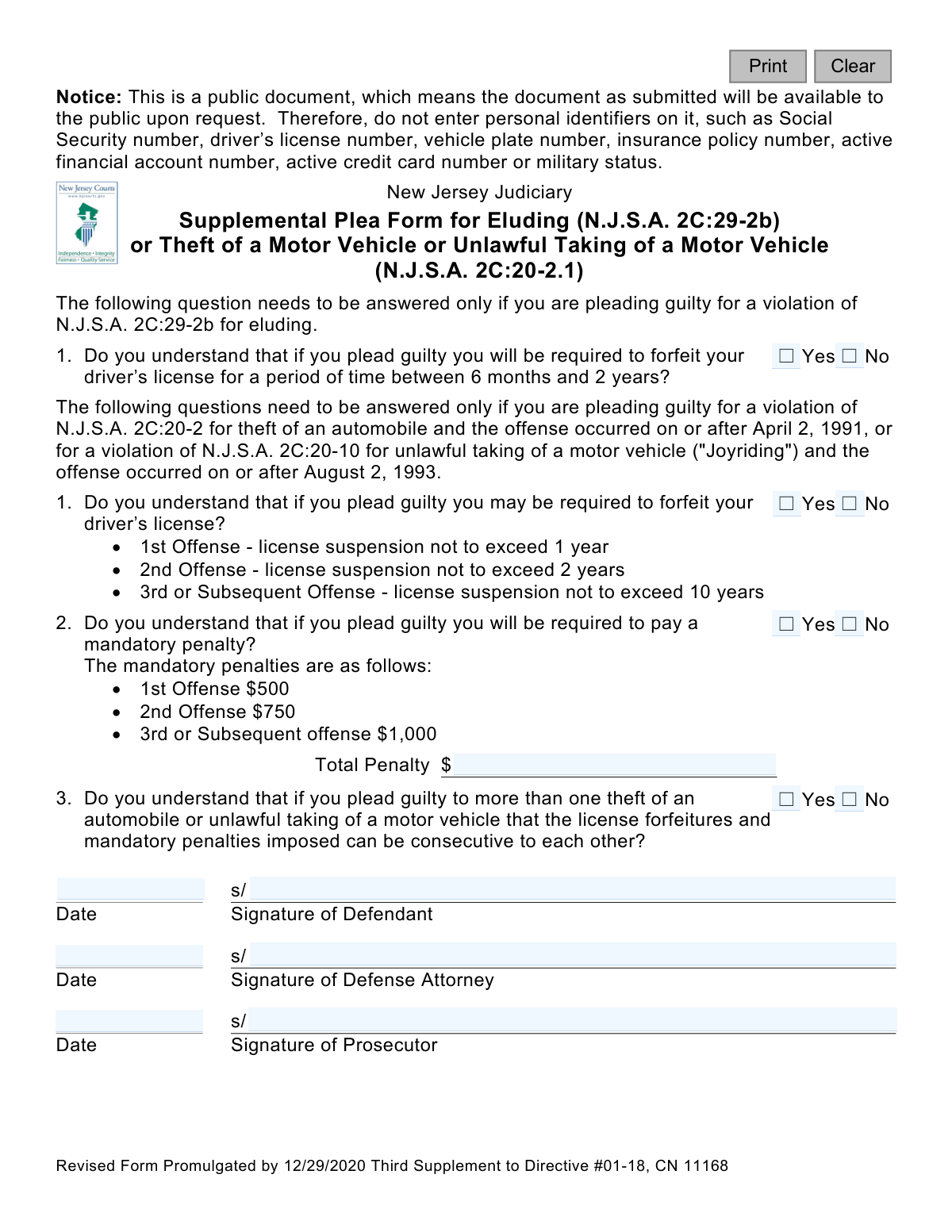
Yes! You can use AI to fill out Supplemental Plea Form for Eluding (N.J.S.A. 2C:29-2b) or Theft of a Motor Vehicle or Unlawful Taking of a Motor Vehicle (N.J.S.A. 2C:20-2.1) (Plea 07)
The Supplemental Plea Form Plea 07 is a legal document used by the New Jersey Judiciary to ensure that a defendant pleading guilty to eluding or motor vehicle theft fully understands the specific consequences of their plea, including mandatory license suspension and financial penalties. This form serves as a formal acknowledgment of these consequences before the court. Today, this form can be filled out quickly and accurately using AI-powered services like Instafill.ai, which can also convert non-fillable PDF versions into interactive fillable forms.
Our AI automatically handles information lookup, data retrieval, formatting, and form filling.
It takes less than a minute to fill out Plea 07 using our AI form filling.
Securely upload your data. Information is encrypted in transit and deleted immediately after the form is filled out.
Form specifications
| Form name: | Supplemental Plea Form for Eluding (N.J.S.A. 2C:29-2b) or Theft of a Motor Vehicle or Unlawful Taking of a Motor Vehicle (N.J.S.A. 2C:20-2.1) (Plea 07) |
| Number of fields: | 17 |
| Number of pages: | 1 |
| Language: | English |
Instafill Demo: How to fill out PDF forms in seconds with AI
How to Fill Out Plea 07 Online for Free in 2026
Are you looking to fill out a PLEA 07 form online quickly and accurately? Instafill.ai offers the #1 AI-powered PDF filling software of 2026, allowing you to complete your PLEA 07 form in just 37 seconds or less.
Follow these steps to fill out your PLEA 07 form online using Instafill.ai:
- 1 Navigate to Instafill.ai and upload or select the 'Supplemental Plea Form for Eluding or Theft of a Motor Vehicle' (Plea 07).
- 2 Use the AI assistant to identify which set of questions applies to your specific charge: eluding (N.J.S.A. 2C:29-2b) or motor vehicle theft (N.J.S.A. 2C:20-2.1).
- 3 Answer the 'Yes/No' questions to confirm your understanding of the potential license forfeiture periods and mandatory penalties associated with your offense.
- 4 If applicable, enter the total penalty amount in the designated field.
- 5 Electronically sign and date the form in the defendant's signature block.
- 6 Securely share the document with your defense attorney and the prosecutor to obtain their required signatures and dates.
- 7 Review the fully completed and signed form for accuracy before submitting it to the New Jersey Judiciary as part of your plea agreement.
Our AI-powered system ensures each field is filled out correctly, reducing errors and saving you time.
Why Choose Instafill.ai for Your Fillable Plea 07 Form?
Speed
Complete your Plea 07 in as little as 37 seconds.
Up-to-Date
Always use the latest 2026 Plea 07 form version.
Cost-effective
No need to hire expensive lawyers.
Accuracy
Our AI performs 10 compliance checks to ensure your form is error-free.
Security
Your personal information is protected with bank-level encryption.
Frequently Asked Questions About Form Plea 07
This form is used in New Jersey courts to ensure that a defendant pleading guilty to eluding or motor vehicle theft understands the specific, mandatory penalties, such as license suspension and fines, associated with their plea.
This form must be completed by defendants who are pleading guilty to the New Jersey offenses of eluding (N.J.S.A. 2C:29-2b) or theft/unlawful taking of a motor vehicle (N.J.S.A. 2C:20-2.1).
Since this is a public document, you must not include personal identifiers like your Social Security number, driver's license number, or financial account numbers. The form only requires you to acknowledge the penalties and provide your signature.
If you plead guilty to eluding, you must acknowledge on this form that you understand your driver's license will be forfeited for a mandatory period of six months to two years.
For a first offense, your license may be suspended for up to one year. A second offense carries a suspension of up to two years, and a third or subsequent offense can result in a suspension of up to ten years.
Yes, the form outlines mandatory penalties for motor vehicle theft: $500 for a first offense, $750 for a second, and $1,000 for a third or subsequent offense.
This means that if you are pleading guilty to multiple offenses, the court can order you to serve the penalties for each crime one after the other, rather than at the same time, resulting in a longer total penalty period.
The form must be signed and dated by the defendant, the defendant's defense attorney, and the prosecutor involved in the case.
This form is part of your official plea agreement and is submitted to the New Jersey Superior Court as part of your legal proceedings. Your attorney will handle the official filing with the court.
No, you only need to answer the questions that apply to the specific offense you are pleading guilty to. The form is divided into a section for eluding and a separate section for motor vehicle theft.
It is called 'supplemental' because it is used in addition to the main plea form to address the unique and mandatory penalties for eluding and motor vehicle theft that may not be detailed on the standard form.
Yes, services like Instafill.ai use AI to help you accurately fill form fields, which can save time and reduce errors. However, you must still read and understand the legal consequences you are acknowledging with your attorney.
You can use a service like Instafill.ai to upload the PDF form and fill it out electronically. The platform allows you to type directly into the fields, add your signature, and then download the completed document.
If you have a non-fillable or 'flat' PDF, you can upload it to a tool like Instafill.ai. It can convert the document into an interactive, fillable form that you can complete on your computer.
Compliance Plea 07
Validation Checks by Instafill.ai
1
Conditional Section Completion
Ensures that questions are answered for either the Eluding charge or the Theft charge, but not both, based on the specific plea being entered. This prevents confusion and ensures the plea form is relevant to the specific offense. If both or neither section is completed, the form should be rejected for clarification.
2
Plea Understanding Affirmation
Validates that for all applicable questions (e.g., q1Eluding or q1Theft, q2Theft, q3Theft), the 'Yes' box is checked. A 'No' response indicates the defendant does not understand the consequences of their plea, which legally invalidates the form. The submission must be halted and reviewed by the defense attorney and defendant.
3
Defendant Signature Presence
Checks that the defendant's signature field (`sigDefName`) is not empty. A missing signature from the defendant renders the entire plea agreement invalid. The form cannot be processed without the defendant's explicit acknowledgment.
4
Defense Attorney Signature Presence
Verifies that the defense attorney's signature field (`sigDefAtty`) has been filled out. This signature confirms that the attorney has reviewed the plea with their client and attests to the defendant's understanding. A missing attorney signature raises questions about proper legal counsel and informed consent.
5
Prosecutor Signature Presence
Ensures the prosecutor's signature field (`sigProscName`) is completed. The prosecutor's signature signifies the state's agreement to the terms of the plea. The form is incomplete and the plea is not mutually agreed upon without it.
6
Signature Date Completeness
Confirms that all three date fields (`sigDtDef`, `sigDtAtty`, `sigDtProsec`) are filled. Missing dates create ambiguity about when the agreement was signed, which is critical for legal timelines and record-keeping. An incomplete set of dates will cause the form to be rejected.
7
Valid Signature Date Format
Validates that all signature dates are entered in a proper format (e.g., MM/DD/YYYY) and represent a real calendar day. This prevents data entry errors and ensures the dates are machine-readable for court records. Gibberish or incorrectly formatted dates will fail validation.
8
Logical Signature Dates
Checks that none of the signature dates are in the future and that they are logically consistent with each other, such as all being on the same day. This prevents the submission of post-dated or anachronistic forms, ensuring the document reflects a specific point in time. A future date would be rejected immediately.
9
Penalty Amount Required for Theft Plea
If the plea is for Theft of a Motor Vehicle, this check ensures the `penaltyAmt` field is not empty. The form explicitly states a mandatory penalty is required for this offense. Failure to enter an amount makes the plea's financial consequences unclear and the form incomplete.
10
Penalty Amount Numeric Format
Verifies that the value entered in the `penaltyAmt` field is a valid positive number, potentially allowing for a dollar sign and decimal points. This prevents non-numeric or negative values from being entered, ensuring data integrity for financial processing and court records. Any text or negative numbers would be flagged as an error.
11
Penalty Amount Consistency Check
Checks if the entered `penaltyAmt` corresponds to one of the standard penalty amounts listed on the form ($500, $750, $1,000) or a logical sum for multiple offenses. This acts as a safeguard against typos or incorrect penalty calculations. A value that does not match expected amounts might trigger a warning for manual review.
12
Prohibited Personal Identifiers Check
Scans all text input fields to detect patterns matching personal identifiers like Social Security numbers, driver's license numbers, or financial account numbers. This is a critical security validation based on the explicit warning on the form to protect individuals' private information from public disclosure. If PII is detected, the form submission should be blocked with a message to remove the sensitive data.
Common Mistakes in Completing Plea 07
The form explicitly warns users not to include personal identifiers like Social Security or driver's license numbers because it is a public document. People often miss this notice and fill in such information out of habit, exposing their sensitive data to the public. To avoid this, carefully read all notices on the form and omit any data the form explicitly says to exclude.
The form contains separate, conditional sections for 'Eluding' and 'Theft of a Motor Vehicle'. A common error is for a defendant to answer questions in a section that does not apply to their specific charge. This creates confusion and can lead to the form being rejected, delaying the plea process. It is critical to read the heading of each section and only answer the questions relevant to the specific statute number of the offense.
Defendants may inadvertently skip a required Yes/No question within the section that applies to them. An incomplete form cannot be processed, leading to rejection by the court and delaying the resolution of the case. To prevent this, meticulously review the form to ensure every question in the relevant section is answered. AI-powered tools like Instafill.ai can help by highlighting all required fields, ensuring nothing is missed before submission.
The questions are phrased as 'Do you understand...?' and require a 'Yes' to confirm the defendant's comprehension of the plea's consequences. Answering 'No' indicates the plea is not being made knowingly and voluntarily, which will cause a judge to reject the plea agreement entirely. If there is any confusion, the defendant should not check 'No' but should instead seek immediate clarification from their defense attorney before completing the form.
A defendant might feel pressured to check 'Yes' to all understanding-based questions without fully grasping the severe consequences, such as mandatory license forfeiture and financial penalties. This is a grave error, as it finalizes a plea that may be based on a misunderstanding, waiving rights to future appeals on those grounds. A defendant must have their attorney explain every point until it is completely clear before signing.
The form includes a field for 'Total Penalty $', but it may be unclear to the defendant what amount to enter or if they are even the one responsible for filling it. Entering a speculative or incorrect amount can create discrepancies in the legal record that require later correction. Before entering any figure, the defendant must confirm with their attorney what the agreed-upon penalty is and who should officially record it on the form.
The form uses 's/' before the signature lines, which typically indicates an electronic or typed signature is acceptable in a digital filing context, but this can be confusing. A user might type their name without the 's/', fail to provide a required wet-ink signature, or use a format the court system will not accept. This can invalidate the document, so it is crucial to follow the specific signing instructions provided by the court or attorney. Since this form is often a non-fillable PDF, tools like Instafill.ai can convert it to a fillable version and help guide the user on proper digital signature formats.
The form requires dates next to the signatures of the defendant, defense attorney, and prosecutor. Common mistakes include entering dates in the wrong format, using future dates, or having mismatched dates that don't reflect the actual timeline of the agreement. Such errors can raise questions about the document's validity and timeline. Using a form-filling tool like Instafill.ai can help by auto-formatting dates correctly and ensuring consistency across fields.
A plea agreement is a multi-party document, and it is invalid if any of the required signatures (Defendant, Defense Attorney, Prosecutor) or their corresponding dates are missing. This often happens due to simple oversight during the routing and signing process, causing the form to be rejected and returned. A procedural checklist should be used to ensure all three parties have signed and dated the document before it is submitted to the court.
The form's header clearly indicates a revision date ('Revised Form Promulgated by 12/29/2020'), signifying that older versions exist. Using an outdated form is a frequent mistake that leads to immediate rejection by the court, as it may not reflect current laws or procedural requirements. Always ensure you are using the most current version of any legal document by obtaining it directly from the official New Jersey Judiciary website.
Saved over 80 hours a year
“I was never sure if my IRS forms like W-9 were filled correctly. Now, I can complete the forms accurately without any external help.”
Kevin Martin Green
Your data stays secure with advanced protection from Instafill and our subprocessors

Robust compliance program
Transparent business model
You’re not the product. You always know where your data is and what it is processed for.
ISO 27001, HIPAA, and GDPR
Our subprocesses adhere to multiple compliance standards, including but not limited to ISO 27001, HIPAA, and GDPR.
Security & privacy by design
We consider security and privacy from the initial design phase of any new service or functionality. It’s not an afterthought, it’s built-in, including support for two-factor authentication (2FA) to further protect your account.
Fill out Plea 07 with Instafill.ai
Worried about filling PDFs wrong? Instafill securely fills supplemental-plea-form-for-eluding-njsa-2c29-2b-or-theft-of-a-motor-vehicle-or-unlawful-taking-of-a-motor-vehicle-njsa forms, ensuring each field is accurate.