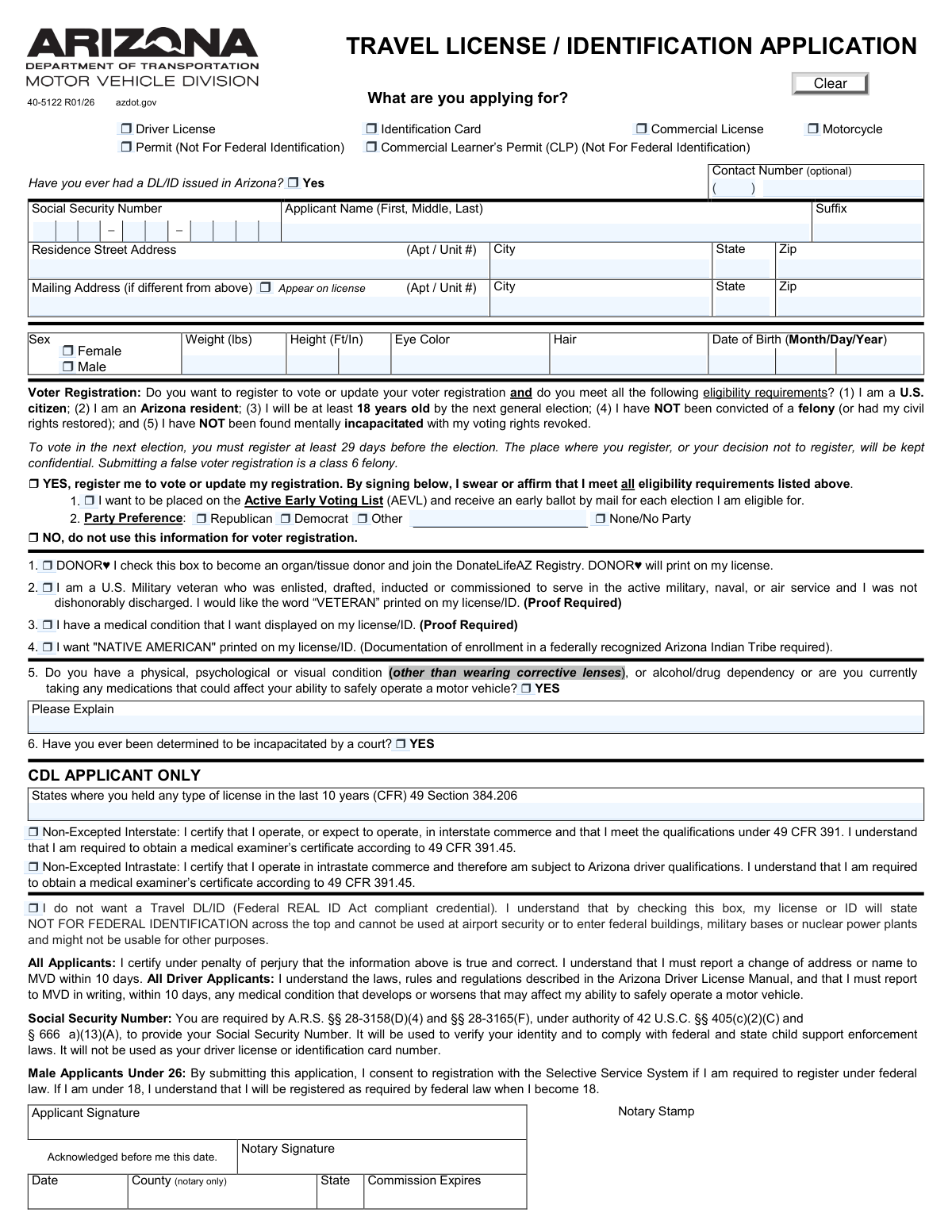
Yes! You can use AI to fill out Form 40-5122, Travel License / Identification Application

Arizona Form 40-5122, the Travel License / Identification Application, is the official document used by the Arizona Department of Transportation (ADOT) Motor Vehicle Division (MVD) for individuals applying for a driver's license, identification card, or various permits. The form gathers essential personal information, driving history, medical disclosures, and includes options for voter registration and organ donation. Today, this form can be filled out quickly and accurately using AI-powered services like Instafill.ai, which can also convert non-fillable PDF versions into interactive fillable forms.
Our AI automatically handles information lookup, data retrieval, formatting, and form filling.
It takes less than a minute to fill out 40-5122 using our AI form filling.
Securely upload your data. Information is encrypted in transit and deleted immediately after the form is filled out.

Form specifications

Form name: Form 40-5122, Travel License / Identification Application
Number of pages: 1
Language: English
Categories: identification forms
main-image

Instafill Demo: How to fill out PDF forms in seconds with AI

How to Fill Out 40-5122 Online for Free in 2026

Are you looking to fill out a 40-5122 form online quickly and accurately? Instafill.ai offers the #1 AI-powered PDF filling software of 2026, allowing you to complete your 40-5122 form in just 37 seconds or less.
Follow these steps to fill out your 40-5122 form online using Instafill.ai:
  1. 1 Navigate to Instafill.ai and upload or select the Arizona Travel License / Identification Application (Form 40-5122).
  2. 2 Indicate the type of credential you are applying for, such as a Driver License, Identification Card, or Commercial License.
  3. 3 Enter your personal information, including your full name, Social Security Number, date of birth, and residential/mailing addresses.
  4. 4 Complete the sections for physical descriptors (height, weight, eye color), voter registration, and special designations like organ donor or veteran status.
  5. 5 Answer the required medical and legal questions, and if applicable, provide details for a Commercial Driver's License (CDL).
  6. 6 Carefully review all the information auto-filled by the AI to ensure its accuracy and completeness before proceeding.
  7. 7 Electronically sign the application, have it notarized if required, and download the final document for submission to the Arizona MVD.

Our AI-powered system ensures each field is filled out correctly, reducing errors and saving you time.

Why Choose Instafill.ai for Your Fillable 40-5122 Form?

Speed

Complete your 40-5122 in as little as 37 seconds.

Up-to-Date

Always use the latest 2026 40-5122 form version.

Cost-effective

No need to hire expensive lawyers.

Accuracy

Our AI performs 10 compliance checks to ensure your form is error-free.

Security

Your personal information is protected with bank-level encryption.

Frequently Asked Questions About Form 40-5122

This is an official Arizona MVD form used to apply for a new, renewal, or replacement driver license, identification card, learner's permit, or commercial license.

Any individual in Arizona applying for a driver license, ID card, or permit, including commercial and motorcycle credentials, must complete this form.

A Travel DL/ID is a REAL ID Act compliant card that can be used for federal purposes, like boarding domestic flights. If you opt out, your card will be marked 'NOT FOR FEDERAL IDENTIFICATION' and will have restricted use at airports and federal facilities.

Yes, state and federal law require you to provide your Social Security Number to verify your identity and for child support enforcement laws. It will not be printed on your license or ID card.

If you are under 18, a parent or legal guardian must complete and sign the 'Legal Guardian Certificate' and the 'Driving Practice Certificate' sections. This must be done in front of a notary or an MVD agent.

Check the 'VETERAN' box and provide the MVD with required proof of your military service and that you were not dishonorably discharged. The word 'VETERAN' will then be printed on your license or ID.

Enter your physical residence address in the first address section, then provide your separate mailing address in the 'Mailing Address' section. MVD correspondence will be sent to the mailing address.

You must report any physical, psychological, or visual condition, alcohol or drug dependency, or medication that could affect your ability to safely operate a motor vehicle. A brief explanation is required if you answer 'YES'.

To register to vote or update your registration, check the 'YES' box in the Voter Registration section and select your party preference. By signing the form, you affirm you meet all eligibility requirements.

This section requires a parent or guardian to initial and certify that the minor applicant has completed the state-mandated hours of supervised driving practice required to obtain a graduated driver license.

By submitting the application, you are consenting to be registered with the Selective Service System, as required by federal law. If you are under 18, you will be automatically registered when you turn 18.

Yes, services like Instafill.ai use AI to accurately auto-fill form fields from your saved profile, which can save you time and help prevent common errors.

You can use a service like Instafill.ai to upload the form and fill it out on your computer or phone. The platform allows you to type directly into the fields, add your signature, and download the completed document for submission.

If you have a non-fillable or 'flat' PDF, you can upload it to a service like Instafill.ai. Their technology converts non-interactive PDFs into fillable forms that you can easily complete online.

Compliance 40-5122
Validation Checks by Instafill.ai

1
Validates Social Security Number Format and Completeness
This check ensures that the three separate fields for the Social Security Number combine to form a valid 9-digit number. The SSN is a mandatory field required by law for identity verification and child support enforcement. If the number is incomplete, contains non-numeric characters, or does not follow the valid SSN structure, the application will be rejected until a valid number is provided.
2
Requires Parent/Guardian Consent for Minor Applicants
This validation calculates the applicant's age based on the provided Date of Birth. If the applicant is under 18 and applying for a license or permit, it verifies that the 'Legal Guardian Certificate' and 'Driving Practice Certificate' sections are fully completed, including required initials and signatures. This is a critical legal requirement for establishing parental responsibility, and an incomplete section will prevent the issuance of a credential to a minor.
3
Ensures Date of Birth is a Valid and Plausible Date
This check validates that the month, day, and year entered for the Date of Birth constitute a real calendar date and that the date is in the past. It also flags dates that would make the applicant unreasonably old (e.g., over 120 years) or too young for any credential. This is crucial for accurately calculating age for eligibility and preventing obvious data entry errors.
4
Requires at Least One Application Type Selection
This validation ensures that the applicant has checked at least one box in the 'What are you applying for?' section. This selection is fundamental as it defines the primary purpose of the application and the type of credential to be issued. An application with no selected type is considered incomplete and cannot be processed.
5
Enforces Conditional Requirement for Medical Explanation
This check confirms that if an applicant checks 'YES' for question 5, indicating a medical condition that could affect driving, the 'Please Explain' text field is not left empty. This explanation is vital for the MVD to assess the applicant's fitness to operate a vehicle safely. Failure to provide the required explanation will halt the application until the necessary information is supplied for review.
6
Validates Voter Registration Logic and Consistency
This validation ensures the applicant's choices in the Voter Registration section are logical and not contradictory. An applicant cannot select both 'YES, register me' and 'NO, do not use this information'. Furthermore, if 'YES' is selected, it confirms that a party preference has also been chosen. Inconsistent selections will trigger an error, requiring the applicant to correct their choices before submission.
7
Enforces CDL Section Completion Based on Application Type
This check verifies that if the applicant selects 'Commercial License' or 'Commercial Learner’s Permit (CLP)', they must complete the 'CDL APPLICANT ONLY' section. This includes listing states where licensed in the last 10 years and selecting a commerce type (interstate/intrastate). This ensures compliance with federal regulations for commercial drivers and prevents incomplete CDL applications.
8
Validates Physical Attributes for Plausible Ranges
This check ensures that the values entered for Height (Ft/In) and Weight (lbs) are within a reasonable and plausible range for a person. For example, it would flag a height of 1 foot or a weight of 1,000 lbs as a likely error. This validation helps catch significant data entry mistakes and ensures the physical descriptors on the final credential are accurate.
9
Ensures Mandatory Residence Address is Complete
This validation verifies that the 'Residence Street Address', 'City', 'State', and 'Zip' fields are all filled out. A physical residence address is a legal requirement for issuing a state license or ID. An incomplete residence address will result in an immediate validation failure, as the MVD cannot issue a credential without a valid address of record.
10
Validates Applicant Name for Completeness
This check ensures that at least the First and Last name fields under 'Applicant Name' are provided. A full legal name is the primary identifier on the credential and is essential for all legal and identification purposes. An application submitted without a complete name is fundamentally invalid and will be rejected.
11
Requires Party Name when 'Other' Party Preference is Selected
This validation rule is triggered if the applicant selects the 'Other' checkbox for their voter registration Party Preference. It ensures that the corresponding text field to specify the party's name is not left blank. This prevents the submission of incomplete voter registration data and ensures the applicant's preference is recorded correctly.
12
Flags Selections Requiring Additional Documentation
This validation serves as a procedural check by identifying if the applicant has selected options that require proof, such as 'Veteran', 'Medical Condition', or 'Native American'. When any of these are checked, the system should flag the application to alert the processing agent that they must request and verify the necessary supporting documents. This ensures all legal and procedural requirements for special designations are met before the credential is issued.

Common Mistakes in Completing 40-5122

Using an Incorrect or Incomplete Legal Name

Applicants often enter a nickname, omit a middle name, or use a version of their name that does not exactly match their official identity documents like a birth certificate or passport. This discrepancy will cause the application to be rejected during the identity verification stage, requiring a new submission. To avoid this, always enter your full, legal name as it appears on your primary identification documents. AI-powered tools like Instafill.ai can help by saving your official name and ensuring it's entered consistently across all forms.

Confusing Residence and Mailing Addresses

A frequent error is listing a P.O. Box as a residence address or failing to provide a separate mailing address when the physical residence cannot receive mail. This can result in the new license or ID card being returned as undeliverable, causing significant delays. Always provide your actual physical street address in the 'Residence' section and use the 'Mailing Address' section only if you need mail sent elsewhere. Double-check that the correct address is selected to appear on the license if applicable.

Misunderstanding the 'Travel DL/ID' (REAL ID) Opt-Out

Many applicants check the box to opt-out of the 'Travel DL/ID' without fully understanding the consequences, believing it might simplify the process. This results in receiving a license marked 'NOT FOR FEDERAL IDENTIFICATION,' which cannot be used for airport security or to enter federal facilities. To prevent future travel issues, do not check this box unless you have an alternative REAL ID-compliant document, such as a passport, and understand the limitations of the non-compliant card.

Incomplete or Inaccurate Voter Registration Information

Applicants may check 'YES' to register to vote without carefully reading the eligibility requirements, or they may forget to select a party preference, resulting in being registered as 'No Party'. Submitting a false voter registration is a felony, and an incomplete selection can affect your ability to vote in primary elections. Before checking 'YES', confirm you meet all five eligibility criteria listed on the form and make a clear party preference selection.

Forgetting Required Proof for Special Designations

Checking boxes for designations like 'VETERAN', 'NATIVE AMERICAN', or a medical condition display is common, but applicants often forget to bring the required supporting documents to their appointment. This means the designation cannot be added to the license, leading to disappointment and wasted time. Always read the fine print next to these options, which specifies that 'Proof Required' or 'Documentation required,' and gather these documents before your visit.

Incorrect Social Security Number Entry

Transposing digits or entering an incorrect Social Security Number is a critical error that will lead to immediate application failure, as the number is required for identity verification. The application cannot be processed without a valid SSN that matches federal records. To avoid this, carefully enter the number and double-check it against your Social Security card before submitting. Tools like Instafill.ai can securely store and accurately populate this information, reducing the risk of manual entry errors.

Incomplete Medical Condition Disclosure

When answering 'YES' to the question about medical conditions affecting driving ability, applicants often provide a vague or incomplete explanation. This forces the MVD to request more information, delaying the application. Conversely, dishonestly answering 'NO' can have serious legal consequences. If you must answer 'YES', provide a clear, concise explanation as prompted to ensure the application can be processed efficiently.

Missing Signatures or Initials on Minor Applications

For applicants under 18, the 'Legal Guardian Certificate' and 'Driving Practice Certificate' sections are frequently filled out incorrectly. Parents or guardians may forget to initial the correct custody status, miss a required signature (especially when both are needed for joint custody), or fail to initial the driving hours attestation. Any missing initial or signature will render the minor's application void, preventing them from getting their permit or license. This section must be reviewed carefully by the parent/guardian before submission.

Forgetting the Final Applicant Signature

After filling out all the details, it is surprisingly common for applicants to forget to sign the form at the bottom. The signature certifies under penalty of perjury that all information is true and correct, making it a mandatory part of the application. An unsigned form is invalid and will be rejected on the spot. Always perform a final check of the entire document, paying special attention to the signature line.

Errors in the CDL Applicant Section

Applicants for a Commercial Driver's License (CDL) often make mistakes in their dedicated section, such as forgetting to list all states where they were licensed in the last 10 years. They may also be unsure whether to certify as 'Non-Excepted Interstate' or 'Non-Excepted Intrastate,' which has implications for their medical certification requirements. These errors can delay or invalidate a CDL application. CDL applicants should review federal and state requirements beforehand to ensure they complete this section accurately. Since this form is a flat PDF, a tool like Instafill.ai can make it fillable, helping to guide users through complex sections and prevent such mistakes.
Saved over 80 hours a year

“I was never sure if my IRS forms like W-9 were filled correctly. Now, I can complete the forms accurately without any external help.”

Kevin Martin Green

Your data stays secure with advanced protection from Instafill and our subprocessors

Robust compliance program

Transparent business model

You’re not the product. You always know where your data is and what it is processed for.

ISO 27001, HIPAA, and GDPR

Our subprocesses adhere to multiple compliance standards, including but not limited to ISO 27001, HIPAA, and GDPR.

Security & privacy by design

We consider security and privacy from the initial design phase of any new service or functionality. It’s not an afterthought, it’s built-in, including support for two-factor authentication (2FA) to further protect your account.

Fill out 40-5122 with Instafill.ai

Worried about filling PDFs wrong? Instafill securely fills form-40-5122-travel-license-identification-application forms, ensuring each field is accurate.