Yes! You can use AI to fill out Town of Horizon City Public Information Request (Texas Government Code, Chapter 552)
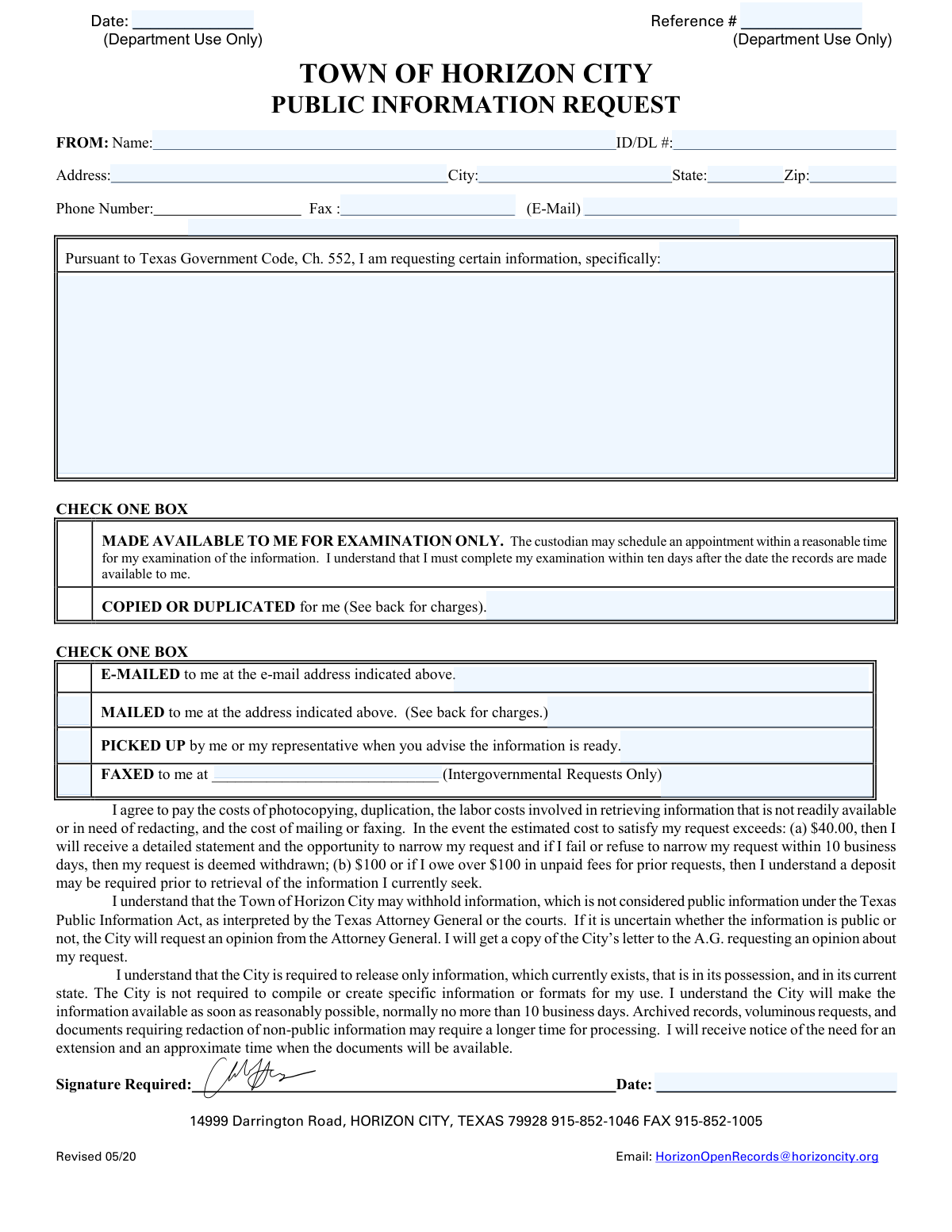
The Town of Horizon City Public Information Request form is an official request document used to seek public records held by the Town under the Texas Public Information Act (Texas Government Code, Chapter 552). It captures the requesterâs contact information, a detailed description of the information sought, and the preferred method of access (inspection, copies, email, mail, pickup, or fax for intergovernmental requests). The form also documents the requesterâs agreement to pay allowable charges and explains timelines, possible redactions, and the Cityâs right to request an Attorney General opinion when public status is uncertain. Completing it accurately helps the City locate responsive records and process the request efficiently while setting expectations about costs and delivery.
Our AI automatically handles information lookup, data retrieval, formatting, and form filling.
It takes less than a minute to fill out Horizon City Public Information Request using our AI form filling.
Securely upload your data. Information is encrypted in transit and deleted immediately after the form is filled out.
Form specifications
| Form name: | Town of Horizon City Public Information Request (Texas Government Code, Chapter 552) |
| Number of pages: | 2 |
| Filled form examples: | Form Horizon City Public Information Request Examples |
| Language: | English |
| Categories: | government forms, government request forms, Texas government forms, Horizon City forms |
Instafill Demo: filling out a legal form in seconds
How to Fill Out Horizon City Public Information Request Online for Free in 2026
Are you looking to fill out a HORIZON CITY PUBLIC INFORMATION REQUEST form online quickly and accurately? Instafill.ai offers the #1 AI-powered PDF filling software of 2026, allowing you to complete your HORIZON CITY PUBLIC INFORMATION REQUEST form in just 37 seconds or less.
Follow these steps to fill out your HORIZON CITY PUBLIC INFORMATION REQUEST form online using Instafill.ai:
- 1 Enter the date of the request (leave the Reference # blank if it is for department use only).
- 2 Provide requester identification and contact details: name, ID/DL number, address (city/state/zip), phone, fax (if applicable), and email.
- 3 Write a clear, specific description of the information/records requested (include dates, departments, subjects, addresses, case numbers, or other identifiers to narrow the search).
- 4 Select how you want access to the records by checking one option: examination only or copied/duplicated.
- 5 Choose the delivery method by checking one option: emailed, mailed, picked up, or faxed (fax is for intergovernmental requests only) and fill in any required destination details (email/address/fax number).
- 6 Review and acknowledge the fee and processing terms (cost estimates, deposits for higher costs or unpaid balances, possible redactions, and timelines/extension notices).
- 7 Sign and date the form, then submit it to the Town using the provided contact method (e.g., the listed open records email) and keep a copy for your records.
Our AI-powered system ensures each field is filled out correctly, reducing errors and saving you time.
Why Choose Instafill.ai for Your Fillable Horizon City Public Information Request Form?
Speed
Complete your Horizon City Public Information Request in as little as 37 seconds.
Up-to-Date
Always use the latest 2026 Horizon City Public Information Request form version.
Cost-effective
No need to hire expensive lawyers.
Accuracy
Our AI performs 10 compliance checks to ensure your form is error-free.
Security
Your personal information is protected with bank-level encryption.
Frequently Asked Questions About Form Horizon City Public Information Request
This form is used to request access to public records from the Town of Horizon City under the Texas Public Information Act (Texas Government Code, Chapter 552). You use it to describe the specific information you want to review or receive copies of.
Any member of the public can submit a request. You should provide your contact information so the City can communicate about costs, timelines, and how you want the records delivered.
Provide your name, ID/DL number (if requested), mailing address, city/state/zip, and phone number. Include an email address and/or fax number if you want the City to send records or updates that way.
The form includes a field for an ID/DL number, but it does not state it is always required. If you are unsure whether it applies to your request, contact the City at [email protected] before submitting.
In the space after âI am requesting certain information, specifically,â describe the records as clearly as possible (dates, departments, addresses, incident/report numbers, names, or topics). More detail helps the City locate the correct records faster and may reduce costs.
It means you will be allowed to review the records in person rather than receiving copies. The custodian may schedule an appointment, and you must complete your examination within 10 days after the records are made available.
If you request copies/duplication, you can choose to have them e-mailed, mailed, or picked up when ready. Fax delivery is listed as available for intergovernmental requests only.
The form states the City will make information available as soon as reasonably possible, normally no more than 10 business days. Archived records, very large requests, or records requiring redaction may take longer, and the City will notify you if an extension is needed.
The City is only required to release information that currently exists, is in its possession, and in its current state. The City is not required to create new documents, compile information into a new format, or generate reports to satisfy a request.
Yes. The City may withhold information that is not public under the Texas Public Information Act, as interpreted by the Texas Attorney General or the courts, and may redact non-public portions of otherwise public records.
If it is uncertain whether the information is public, the City may request an opinion from the Texas Attorney General. The form states you will receive a copy of the Cityâs letter to the Attorney General requesting that opinion.
You may be charged for copying/duplication, labor to locate/compile/reproduce/redact records (especially for more than 50 pages), overhead (20% of labor), computer resource charges, and postage/shipping. The back of the form lists example rates such as $0.10 per standard page and $6.00 per motor vehicle accident report.
If the estimated cost exceeds $40.00, the City will provide a detailed statement and give you the opportunity to narrow your request. If you fail or refuse to narrow it within 10 business days, the request is deemed withdrawn.
A deposit may be required if the estimated cost is more than $100, or if you owe more than $100 in unpaid fees for prior requests. The City may require the deposit before retrieving the information you requested.
You can contact the Town of Horizon City via email at [email protected]. The form also lists the Cityâs address as 14999 Darrington Road, Horizon City, Texas 79928, and a phone number (915-852-1046) for assistance.
Compliance Horizon City Public Information Request
Validation Checks by Instafill.ai
1
Validates Request Date is present and in an acceptable date format
Checks that the requester-facing Date field is completed and matches an allowed format (e.g., MM/DD/YYYY) and represents a real calendar date. This is important for tracking statutory response timelines and internal routing. If the date is missing or invalid, the submission should be rejected or flagged for correction before intake is finalized.
2
Ensures Requester Name is provided and meets minimum completeness rules
Verifies the FROM: Name field is not blank and contains at least a first and last name (or a clearly identifiable entity name for organizations). A usable name is necessary for correspondence, identity confirmation when records are picked up, and audit trails. If the name is missing or clearly incomplete (e.g., a single character), the request should be returned for completion.
3
Validates ID/DL number format when provided (and enforces requirement for pickup scenarios if applicable)
Checks that the ID/DL # field, if entered, matches expected patterns for a driver license or ID number (state-specific rules may apply) and does not contain illegal characters. If the delivery method is PICKED UP, the system should require either ID/DL # or an alternate identity verification field/policy acknowledgment. If validation fails, the request should be flagged for manual review or the requester prompted to correct the ID information.
4
Validates Mailing Address completeness when 'MAILED' delivery is selected
If the requester selects MAILED, verifies Address, City, State, and Zip are all present and non-empty. This prevents undeliverable mail and avoids delays and additional costs. If any required address component is missing, the system should block submission or require correction before processing.
5
Validates State field uses a valid US state/territory code or full name
Checks that the State value is a recognized US state/territory (preferably a 2-letter code such as TX) and not free-form text that cannot be standardized. Standardization supports mailing accuracy and consistent reporting. If the state is invalid, the submission should be rejected or the user prompted to select a valid state.
6
Validates ZIP code format (5-digit or ZIP+4) and consistency with State when possible
Ensures Zip is either 5 digits or ZIP+4 (e.g., 79928 or 79928-1234) and contains only digits/hyphen. Optionally, the system can cross-check that the ZIP is plausible for the provided state (e.g., TX ranges) to catch obvious errors. If invalid, the requester should be prompted to correct it to avoid failed delivery.
7
Validates Phone Number format and minimum digits when provided
Checks that Phone Number contains a valid US phone format (10 digits, allowing common punctuation) and is not obviously incomplete. A valid phone number is important for clarifying requests, cost estimates, and pickup coordination. If the phone number is malformed, the system should flag it and request correction or allow submission only with an alternate valid contact method.
8
Validates Fax number format and restricts Fax option to eligible request types
If a fax number is entered or the FAXED option is selected, validates the fax number format (10 digits) and ensures the form rule 'Intergovernmental Requests Only' is satisfied (e.g., requester type/agency field or internal flag). This prevents sending records to an invalid destination and enforces policy limitations. If the fax option is selected without eligibility or with an invalid number, the system should block submission or route to manual approval.
9
Validates Email address format when 'E-MAILED' delivery is selected
If E-MAILED is selected, verifies an email address is provided in the email field and matches a standard email pattern (local@domain). This is necessary to deliver records electronically and to send cost estimates and notices. If missing or invalid, the system should require correction or force selection of another delivery method.
10
Enforces exactly one selection for 'Access type' (Examination vs Copied/Duplicated)
Validates that the requester checks exactly one box in the first CHECK ONE BOX section: either 'MADE AVAILABLE TO ME FOR EXAMINATION ONLY' or 'COPIED OR DUPLICATED'. This prevents ambiguous fulfillment workflows and billing rules. If none or both are selected, the submission should be rejected and the requester prompted to choose one.
11
Enforces exactly one selection for 'Delivery method' (Email/Mail/Pickup/Fax)
Validates that exactly one delivery method is selected in the second CHECK ONE BOX section (E-MAILED, MAILED, PICKED UP, or FAXED). Clear delivery choice is required to calculate charges, apply redaction/format rules, and meet deadlines. If multiple or no options are selected, the system should block submission until corrected.
12
Requires a non-empty, sufficiently specific description of requested information
Checks that the narrative section describing the requested information is not blank and meets a minimum length/quality threshold (e.g., at least 20 characters and not only generic text like 'all records'). Specificity is important to locate records efficiently and to reduce back-and-forth that can delay statutory response. If too vague or empty, the system should prompt the requester to add details (date ranges, departments, subjects, addresses, case numbers, etc.).
13
Validates Signature presence and signature date completion
Ensures the Signature Required field is completed (captured as e-signature, typed attestation, or uploaded signature per system design) and that the signature Date is present and valid. This supports authorization, acknowledgment of costs, and defensibility of the request record. If signature or date is missing/invalid, the request should not be accepted as complete.
14
Checks logical consistency between signature date and request date
Validates that the signature date is not earlier than the request date by an unreasonable amount and is not in the future beyond an allowed tolerance. This helps detect data entry errors and ensures the acknowledgment aligns with the request timeline. If inconsistent, the system should flag for correction or manual review.
15
Department-use-only fields are protected from requester input and validated for internal completion
Ensures Reference # and the 'THIS SIDE TO BE COMPLETED BY CITY PERSONNEL ONLY' fields (Date City Received/Responded/Picked Up, payment info, charges) cannot be edited by external requesters and are only writable by authorized staff. This prevents tampering with official tracking and billing. If the system detects requester-supplied values in these fields, it should discard them, log the event, and flag the submission for review.
16
Validates charges line items and totals for internal billing accuracy
For staff-entered charge calculations, verifies that quantities are non-negative numbers, unit rates match the schedule (or require justification for 'Actual Cost' entries), and each line total equals quantity Ă rate. Also validates that TOTAL CHARGES equals the sum of all line totals and that 'No Sales Tax' is respected (no tax line added). If any arithmetic or rate validation fails, the system should prevent finalization of the invoice/response until corrected.
Common Mistakes in Completing Horizon City Public Information Request
People often write broad requests like âall recordsâ or leave the request area empty because they are unsure what to ask for. Vague requests can trigger delays, clarification requests, higher labor/redaction costs, or an Attorney General review if exemptions may apply. To avoid this, specify the record type, subject, date range, department, addresses, case/incident numbers, and any known names so staff can locate responsive documents efficiently.
Requesters sometimes forget to select whether they want to examine records, receive copies, or how they want them delivered (email, mail, pickup, fax). Missing or conflicting selections can stall processing because the City must confirm the method and may need cost approval before producing copies. To avoid this, check exactly one option in each âCHECK ONE BOXâ section and ensure the choices are compatible (e.g., âcopiedâ plus âe-mailedâ if you want digital delivery).
Many people assume that listing an email automatically means the City will email the records. If the email delivery box is not checked, staff may default to mail or pickup, which can add time and cost. To avoid this, both provide a clearly written email address and explicitly check the âE-MAILED to meâ box.
Handwritten forms often contain hard-to-read names, phone numbers, or addresses, or omit key parts like city/state/ZIP. If staff cannot reach you for clarifications, cost estimates, or pickup notifications, the request can be delayed or may be treated as abandoned. To avoid this, print clearly, include full mailing address details, and provide at least one reliable contact method (phone and/or email).
Some requesters skip the ID/DL field because they think it is optional or are concerned about privacy. While not every request legally requires an ID, the City may use it to verify identity for certain records or to prevent misidentification, which can slow fulfillment. To avoid issues, provide the requested ID/DL number when applicable, and if you cannot, include an explanation and any alternative identifiers (e.g., date of birth, case number) as appropriate.
People frequently complete the form but miss the âSignature Requiredâ and date line at the end. An unsigned/undated request may be considered incomplete and can delay acceptance, processing timelines, and communication about costs. To avoid this, sign and date the form after reviewing your selections and contact information.
A common misunderstanding is asking for summaries, spreadsheets, or âa list ofâ items that would require the City to create a new document or compile data in a new format. The form states the City is only required to provide existing records in their current state, so these requests can lead to denials, partial responses, or back-and-forth clarification. To avoid this, request specific existing documents (reports, emails, permits, invoices) and, if you need a dataset, ask what existing export formats already exist.
Requesters often overlook that labor for locating, compiling, reproducing, and redacting (especially for more than 50 pages) can be charged, and that mailing/faxing can add costs. If the estimate exceeds $40, you must respond within 10 business days to narrow the request or it can be deemed withdrawn; deposits may be required at $100+ or with unpaid prior fees. To avoid this, narrow the scope up front (date ranges, specific departments, specific document types) and set expectations for costs and response time.
Some people check âMADE AVAILABLE TO ME FOR EXAMINATION ONLYâ thinking it is the fastest route, but later expect the City to automatically provide copies. Examination-only means you must review within ten days after records are made available, and copies may require a separate request and charges. To avoid confusion, choose âCOPIED OR DUPLICATEDâ if you know you need copies, or state clearly that you want to inspect first and then request copies of specific pages/items.
The form indicates faxing is for intergovernmental requests only, yet individuals sometimes select fax or write âfax it to meâ without providing a number. This can cause delays because staff must contact you to change the delivery method or obtain missing information. To avoid this, do not select fax unless you qualify as an intergovernmental requester, and if you do, provide a complete fax number.
Some requesters write in the Date/Reference # fields marked âDepartment Use Onlyâ or attempt to complete the charges table on the back. This can create confusion, lead to incorrect tracking information, or require staff to re-enter data. To avoid this, leave all City personnel sections blank and focus only on requester fields, the records description, delivery choices, and signature/date.
Saved over 80 hours a year
âI was never sure if my IRS forms like W-9 were filled correctly. Now, I can complete the forms accurately without any external help.â
Kevin Martin Green
Your data stays secure with advanced protection from Instafill and our subprocessors

Robust compliance program
Transparent business model
Youâre not the product. You always know where your data is and what it is processed for.
ISO 27001, HIPAA, and GDPR
Our subprocesses adhere to multiple compliance standards, including but not limited to ISO 27001, HIPAA, and GDPR.
Security & privacy by design
We consider security and privacy from the initial design phase of any new service or functionality. Itâs not an afterthought, itâs built-in, including support for two-factor authentication (2FA) to further protect your account.
Fill out Horizon City Public Information Request with Instafill.ai
Worried about filling PDFs wrong? Instafill securely fills town-of-horizon-city-public-information-request-te forms, ensuring each field is accurate.



