Yes! You can use AI to fill out Incoming Transfer/Direct Rollover Governmental 457(b) Plan, City of Torrance Deferred Compensation Plan
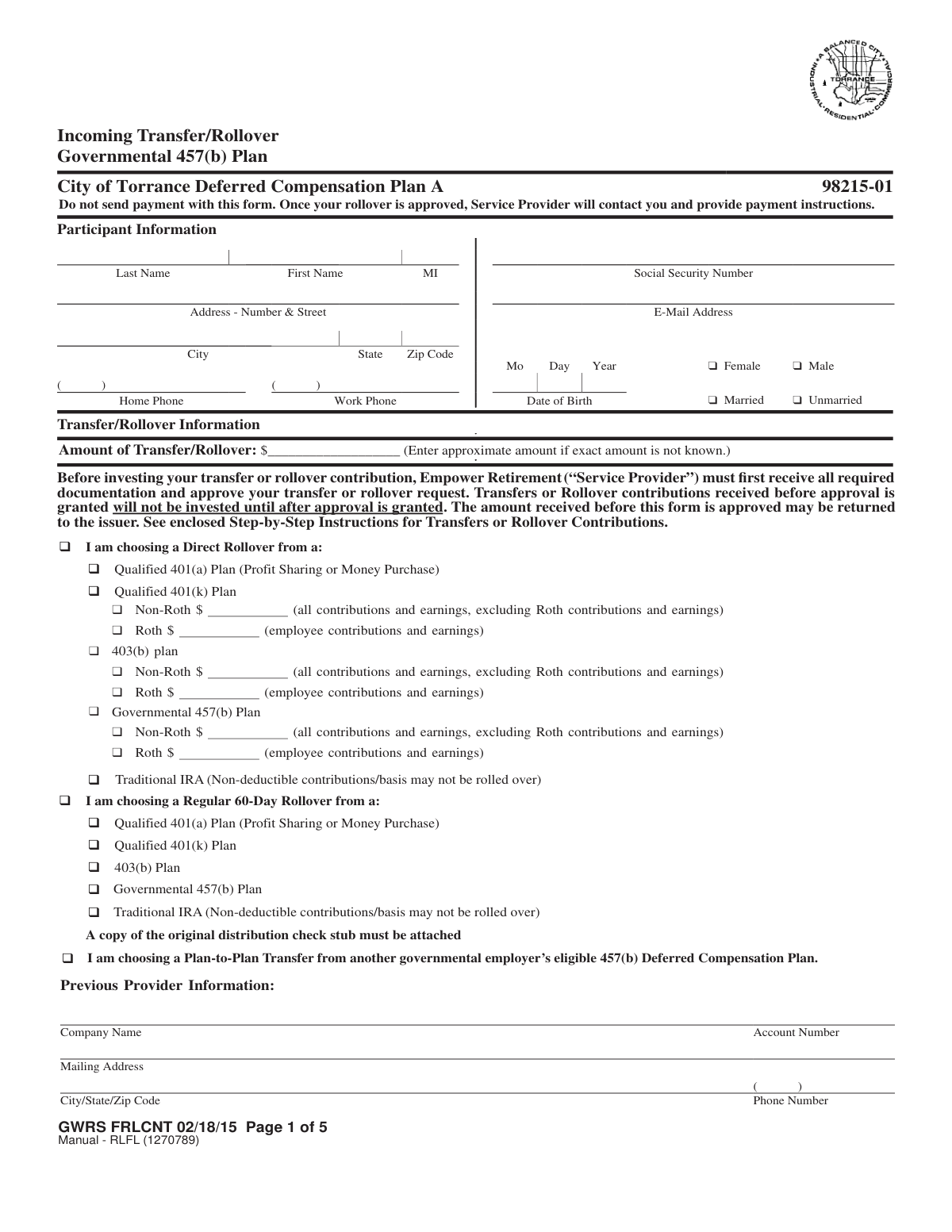
The Incoming Transfer/Direct Rollover Governmental 457(b) Plan form allows participants to consolidate their retirement savings by moving funds from other eligible retirement plans, such as a 401(k), 403(b), or another 457(b) plan, into their City of Torrance Deferred Compensation Plan account. This process is crucial for managing retirement assets in one place and requires detailed information about the participant, the source of the funds, and investment allocation choices. Today, this form can be filled out quickly and accurately using AI-powered services like Instafill.ai, which can also convert non-fillable PDF versions into interactive fillable forms.
GWRS FRLCNT is part of the
government forms, rollover forms, deferred compensation forms, 457 plan forms, government ID forms, government HR forms and UK government forms categories on Instafill.
Rather not fill this in by hand? Instafill is an online form filler that completes PDF forms automatically — upload the blank form, answer a few questions, and the AI fills every field.
Form specifications
| Form name: | Incoming Transfer/Direct Rollover Governmental 457(b) Plan, City of Torrance Deferred Compensation Plan |
| Number of pages: | 1 |
| Language: | English |
Our AI automatically handles information lookup, data retrieval, formatting, and form filling.
It takes less than a minute to fill out GWRS FRLCNT using our AI form filling.
Securely upload your data. Information is encrypted in transit and deleted immediately after the form is filled out.
Instafill Demo: How to fill out PDF forms in seconds with AI
How to Fill Out GWRS FRLCNT Online for Free in 2026
Are you looking to fill out a GWRS FRLCNT form online quickly and accurately? Instafill.ai offers the #1 AI-powered PDF filling software of 2026, allowing you to complete your GWRS FRLCNT form in just 37 seconds or less.
Follow these steps to fill out your GWRS FRLCNT form online using Instafill.ai:
- 1 Navigate to Instafill.ai and upload or select the Incoming Transfer/Direct Rollover form.
- 2 Use the AI assistant to automatically fill in your personal details in the 'Participant Information' section, including your name, address, and Social Security Number.
- 3 In the 'Transfer/Rollover Information' section, specify the amount and indicate the type of rollover or transfer you are making (e.g., Direct Rollover from a 401(k), Plan-to-Plan Transfer).
- 4 Provide the required details about your previous provider, including company name and account number. If necessary, have the previous provider complete their section.
- 5 Complete the 'Investment Option Information' section by either choosing to use your existing allocations or selecting new investment options for the incoming funds.
- 6 Review all auto-filled information for accuracy, then print the form to provide a handwritten signature as required in the 'Participant Consent' section.
- 7 Submit the signed form along with any required documentation (like account statements) to Empower Retirement via mail or fax as per the form's instructions.
Our AI-powered system ensures each field is filled out correctly, reducing errors and saving you time.
Why Choose Instafill.ai for Your Fillable GWRS FRLCNT Form?
Speed
Complete your GWRS FRLCNT in as little as 37 seconds.
Up-to-Date
Always use the latest 2026 GWRS FRLCNT form version.
Cost-effective
No need to hire expensive lawyers.
Accuracy
Our AI performs 10 compliance checks to ensure your form is error-free.
Security
Your personal information is protected with bank-level encryption.
Frequently Asked Questions About GWRS FRLCNT
This form is used to move funds from another eligible retirement plan, like a 401(k), 403(b), IRA, or another governmental 457(b) plan, into your City of Torrance Deferred Compensation Plan account managed by Empower Retirement.
No, do not send any payment with this form. You must submit the form for approval first, and Empower Retirement will then contact you with specific instructions on how to send the funds.
You must attach your most recent account statement from your previous retirement plan or IRA. If the statement is missing key information, you will also need a signed certification from your previous plan administrator.
No, a handwritten signature is required. The form explicitly states that electronic signatures will not be accepted and using one will result in a significant processing delay.
If this section is left incomplete, your incoming funds will be allocated the same as your existing ongoing contributions. If you have no investment election on file, the funds will be placed in the plan's default investment option.
No, an outstanding loan balance cannot be included in the transfer or rollover. You must pay off the loan before submitting this request or choose to roll over only the cash value of the account.
A Direct Rollover is when your previous provider sends the money directly to Empower Retirement. A Regular 60-Day Rollover is when you receive a check, which you must then deposit into your Empower account within 60 days to avoid taxes and penalties.
The form provides mailing addresses for both regular and overnight mail, as well as a fax number. Remember to send the form for approval before you instruct your previous provider to send the money.
You will need the company's name, your account number, and their contact information. For a Plan-to-Plan Transfer, your previous provider may also need to sign the form to verify contribution types.
If your initial rollover assets are received more than one year after this form is approved, you will be required to submit a new form for approval. For a 60-day rollover, you must complete the transaction within 60 days of receiving your distribution.
Yes, services like Instafill.ai use AI to help you accurately auto-fill form fields with your information. This can save time and help prevent errors before you print the form for your required handwritten signature.
You can upload the PDF to the Instafill.ai website, which makes the document interactive. The AI-powered tool helps you complete the fields, and then you can download the finished form to print and sign.
You can use a service like Instafill.ai to make the document interactive. It can convert flat, non-fillable PDFs into fillable forms that you can easily complete on your computer.
Compliance GWRS FRLCNT
Validation Checks by Instafill.ai
1
Social Security Number Format and Presence
This check verifies that the Social Security Number field is not empty and follows the valid 9-digit format (XXX-XX-XXXX or XXXXXXXXX). The SSN is a critical unique identifier for the participant's account and for tax reporting purposes. If the SSN is missing or invalid, the form cannot be processed, and the transfer/rollover cannot be linked to the correct individual, leading to rejection of the request.
2
Date of Birth Validity
Validates that the Date of Birth is a real date in MM/DD/YYYY format and falls within a logical range (e.g., the person is over 18 and under 110 years old). This is important for identity verification and for determining eligibility for certain plan features or distributions. An invalid or illogical date will cause the form to be rejected for correction, as it may indicate a data entry error or fraud.
3
Exclusive Transfer/Rollover Type Selection
Ensures that the participant has selected only one of the three main transaction categories: 'Direct Rollover', 'Regular 60-Day Rollover', or 'Plan-to-Plan Transfer'. Selecting multiple categories creates ambiguity about how to process the funds, their source, and the tax implications. A submission with multiple main types selected will be flagged as an error and require clarification from the participant.
4
Conditional Source Plan Selection
This check confirms that if a main transaction category like 'Direct Rollover' is chosen, a corresponding source plan sub-type (e.g., 'Qualified 401(k) Plan', 'Traditional IRA') is also selected. This information is legally required to confirm the eligibility of the funds for rollover into a Governmental 457(b) plan. Failure to specify the source plan will halt the process until the information is provided.
5
Investment Allocation Percentage Sum
If the participant chooses to 'Select Your Own Investment Options' (B), this validation ensures that the percentages assigned to the various funds add up to exactly 100%. This is critical to ensure the entire rollover amount is allocated according to the participant's wishes, leaving no funds uninvested. If the total is not 100%, the form will be returned for correction, delaying the investment of funds.
6
Investment Allocation Whole Percentage
Verifies that all values entered in the investment option percentage fields are whole numbers, as explicitly required by the form. Using fractional percentages can lead to processing errors and small, unallocated 'dust' amounts. The system should reject any entries with decimals and prompt the user to enter whole percentages only.
7
Mutually Exclusive Investment Allocation Method
This check ensures the participant has selected either '(A) Existing Ongoing Allocations' or '(B) Select Your Own Investment Options', but not both. Selecting both creates a conflict in investment instructions. The form submission will be considered invalid and returned to the participant to clarify their intended allocation strategy.
8
Participant Signature and Date Requirement
Confirms that the 'Participant Signature' and 'Date' fields are both completed. The signature legally authorizes the transaction and confirms the participant agrees to the terms, while the date establishes the time of authorization. A missing signature or date invalidates the entire form, and no action can be taken until a fully signed and dated form is received.
9
Conditional Previous Provider Information Completeness
If 'Plan-to-Plan Transfer' is selected, this validation ensures all fields in the 'Previous Provider Information' section (Company Name, Account Number, Address, Phone) are filled out. This information is essential for the new provider (Empower) to contact the old provider and coordinate the transfer of assets. Incomplete information will prevent the initiation of the transfer.
10
Conditional Previous Provider Authorization
For 'Plan-to-Plan Transfers', this checks for the presence of the previous provider's signature, printed name, and date. This signature certifies the breakdown of funds (employer/employee contributions and earnings) and confirms the transfer is authorized from their end. Without this third-party authorization, the receiving plan cannot accept the funds as a valid plan-to-plan transfer.
11
Completeness of Participant Contact Information
Verifies that the participant's full name (Last, First), address (Street, City, State, Zip), and at least one phone number are provided. This information is fundamental for creating or updating the account, mailing required notices and statements, and contacting the participant if issues arise with the rollover. Missing contact information will result in processing delays or rejection.
12
Regular 60-Day Rollover Documentation Check
If the 'Regular 60-Day Rollover' option is selected, this validation confirms that the participant has indicated that a copy of the original distribution check stub is attached. This stub is required to verify the distribution date and amount, which is crucial for ensuring the rollover is completed within the IRS-mandated 60-day window. Failure to provide this documentation will prevent the approval of the rollover.
13
Transfer/Rollover Amount Presence
This check ensures that a numeric value has been entered in the 'Amount of Transfer/Rollover' field. Even though an approximate amount is acceptable, the field cannot be left blank as it provides a necessary estimate for processing and reconciliation. A missing amount will cause the form to be flagged as incomplete.
14
Conditional Roth/Non-Roth Specification
When a rollover from a 401(k) or 403(b) plan is indicated, this check verifies that the participant has specified whether the funds are 'Non-Roth' or 'Roth'. This distinction is critical for proper tax tracking and reporting, as Roth and Non-Roth funds have different tax treatments. An ambiguous selection will require clarification and delay processing.
Common Mistakes in Completing GWRS FRLCNT
The form explicitly states multiple times that a handwritten signature is required and electronic signatures will not be accepted. This mistake often happens when people fill out the form digitally and type their name or use a software-generated signature. Submitting a form with an electronic signature will result in significant processing delays or outright rejection, requiring the participant to print, sign, and resubmit the entire form.
The instructions clearly state, 'Do not send payment with this form.' Participants sometimes miss this and mail a distribution check along with the paperwork, assuming it streamlines the process. However, the service provider has a specific workflow where they must first approve the form and then provide separate payment instructions. Sending a check prematurely can cause it to be returned or lost, delaying the investment of funds.
In the 'Investment Option Information' section, participants must allocate 100% of the funds into various investment options using whole percentages. Common errors include the percentages not adding up to exactly 100%, using fractions or decimals, or leaving the section blank entirely. This forces the provider to use the default allocation, which may not align with the participant's investment strategy, or could even lead to the funds being returned.
For Plan-to-Plan Transfers or when account statements lack required details, the form requires a signature and certification from the previous provider or plan administrator. Participants often overlook this or sign it themselves, which invalidates the form. Failing to coordinate with the previous institution to get this section completed is a primary cause of rejection, as it's essential for verifying the funds' eligibility.
The form requires attaching supporting documents, such as the most recent account statement from the previous provider, to verify the plan type, account details, and any Roth contributions. People often forget to include these statements or provide outdated ones. Without this documentation, the new provider cannot validate the source of the funds, and the rollover/transfer process will be halted until the correct paperwork is received.
The form presents several complex options: 'Direct Rollover,' 'Regular 60-Day Rollover,' and 'Plan-to-Plan Transfer,' each with different rules and sub-types. A participant might incorrectly select 'Direct Rollover' when they have already received a check (a '60-Day Rollover'), or misunderstand the source plan type (e.g., 401(k) vs. 403(b)). This mistake leads to processing errors, incorrect tax handling, and potential penalties if deadlines like the 60-day rule are missed.
When rolling over from a plan with a Roth component, it is crucial to specify the exact dollar amounts for both Roth and Non-Roth (pre-tax) funds. Participants may check the 'Roth' box but forget to enter the amount, or they may not know the breakdown. The form defaults to treating all funds as pre-tax if not specified, which can result in the loss of the tax-free growth benefit on the Roth portion and create significant tax complications in the future.
The form asks for the 'Amount of Transfer/Rollover' and specifies that an approximate amount is acceptable if the exact figure isn't known. Some individuals leave this field blank because they are waiting for the final distribution value. This omission can cause the form to be flagged as incomplete, delaying the initial approval process while the provider requests the missing information.
The instructions state the form must arrive *prior* to the transaction proceeds. A common coordination error is for the participant to submit the form and have the previous provider send the money simultaneously or even beforehand. If the funds arrive before the form is processed and approved, they cannot be invested and may be returned to the issuer, causing major delays and requiring the entire process to be restarted.
The 'Previous Provider Information' section requires the full company name, account number, and mailing address of the institution holding the funds. Participants may provide partial information, like just 'Fidelity' without a specific address, or an incorrect account number. This incomplete data makes it impossible for the new provider to contact the old one to facilitate the transfer, bringing the process to a standstill until the participant provides the correct details. AI-powered tools like Instafill.ai can help prevent this by auto-filling and validating such information.
Saved over 80 hours a year
“I was never sure if my IRS forms like W-9 were filled correctly. Now, I can complete the forms accurately without any external help.”
Kevin Martin Green
Your data stays secure with advanced protection from Instafill and our subprocessors




Robust compliance program
Transparent business model
You’re not the product. You always know where your data is and what it is processed for.
ISO 27001, HIPAA, and GDPR
Our subprocesses adhere to multiple compliance standards, including but not limited to ISO 27001, HIPAA, and GDPR.
Security & privacy by design
We consider security and privacy from the initial design phase of any new service or functionality. It’s not an afterthought, it’s built-in, including support for two-factor authentication (2FA) to further protect your account.
Fill out GWRS FRLCNT with Instafill.ai
Worried about filling PDFs wrong? Instafill securely fills incoming-transferdirect-rollover-governmental-457b-plan-city-of-torrance-deferred-compensation-plan forms, ensuring each field is accurate.
