
Instafill.ai
7 days free
AI form filling · 159 fields · 4 pages · done in seconds

Yes! You can use AI to fill out Form 630, Individual Identification Information Record

Don't type 159 fields by hand. Tell our AI about yourself, or upload a document you already have, and it fills every field in seconds. You check it, then download, print or sign.
7 days free, then $19.99/month · Cancel anytime
AI fills it, no typingEncrypted, never used to train AICancel in two clicks
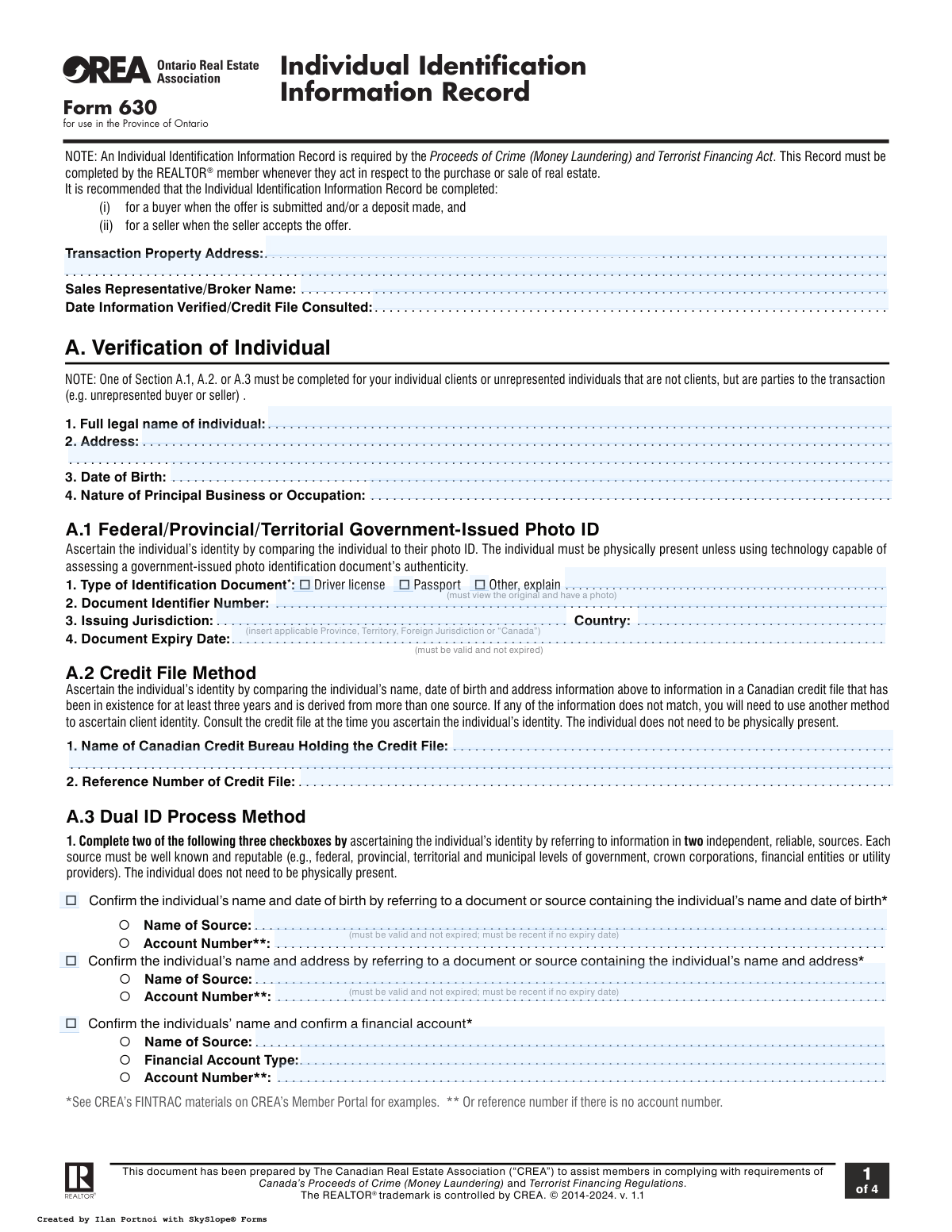
Form 630, Individual Identification Information Record, page 1
Complex · 70/100Form Complexity Index

The AI does the filling. You just check it.

No typing into boxes, nothing to install.

Tell the AI about youAnswer a few questions in plain words, or upload a document you already have. That is all the typing there is.
AI fills every field in secondsIt puts each answer in the right box on every page, tables and checkboxes included.
Check it and downloadReview every field, change anything, then download, print or sign the PDF.

What this form asks for

The AI fills all of it, from your answers or your documents.

Form 630, the Individual Identification Information Record, is a mandatory document for REALTORSĀ® in Ontario, required by the Proceeds of Crime (Money Laundering) and Terrorist Financing Act. It is used to formally verify and record the identity of individuals involved in a real estate purchase or sale to prevent financial crimes. Today, this form can be filled out quickly and accurately using AI-powered services like Instafill.ai, which can also convert non-fillable PDF versions into interactive fillable forms.
Fillable fields159
Pages4
Sections53
Tables and lists1
Questions that depend on earlier answers58
Form Complexity IndexComplex, 70/100

The AI checks your answers before you download

14 checks built for this form, so a wrong date or a missing answer is caught before anyone else sees it.

Ensures Identification Document is Not Expired

This check validates that the 'Document Expiry Date' provided in Section A.1 is a date in the future relative to the 'Date Information Verified'. This is critical for compliance as the form explicitly states the ID must be valid and not expired. If the ID is expired, the submission is invalid and cannot be used for identity verification, requiring the agent to request a current document from the individual.

Mandatory and Exclusive Verification Method Selection

This validation ensures that the user has completed the fields for exactly one of the three identity verification methods: A.1 (Photo ID), A.2 (Credit File), or A.3 (Dual ID). The form note specifies that one of these sections must be completed. A failure means either no method was chosen or multiple methods were, both of which make the form incomplete and non-compliant with FINTRAC regulations.

Conditional Requirement for 'Other' ID Type Explanation

If the 'Other' checkbox is selected under 'Type of Identification Document' in Section A.1, this check ensures the corresponding explanation field is not empty. This is important for clarity and record-keeping, as it specifies what type of non-standard ID was used. If the explanation is missing, the record is incomplete and lacks the necessary detail for an audit.

Dual ID Process Method Completeness

This check verifies that if Section A.3 (Dual ID Process Method) is used, exactly two of the three available checkboxes are selected and their associated data fields (e.g., 'Name of Source', 'Account Number') are filled. The form requires referring to two independent sources. Submitting with fewer or more than two sources selected, or with missing source details, invalidates this verification method.

Conditional Requirement for Third-Party Information

This validation enforces that if the user answers 'Yes' to the question 'Is the transaction being conducted on behalf of a third party?', then all fields in Section B.2 (Third Party Record) must be completed. This is a critical anti-money laundering check to identify all parties to a transaction. If Section B.2 is incomplete after a 'Yes' response, the submission fails as it does not meet the legal requirement to record third-party information.

Individual's Age Verification

This check validates that the 'Date of Birth' provided for the individual indicates they are of legal age to enter into a real estate contract (e.g., 18 years or older). This is essential to ensure the transaction is legally sound and the individual has the capacity to be a party to the agreement. A validation failure would flag the record for review as the transaction may not be legally enforceable.

And 8 more checks
  • Verification Date Logical Check
  • Client Risk Questionnaire Completeness
  • Risk Score Calculation and High-Risk Flagging
  • Conditional Requirement for Risk Question Explanations
  • Transaction Property Address Completeness
  • Third Party Telephone Number Format
  • Core Individual Information Mandatory Fields
  • Business Relationship Purpose Selection

Let AI fill out your Form 630

No typing. Every field filled in seconds, checked, ready to sign.

7 days free, then $19.99/month · Cancel anytime

How to Fill Out Form 630 Online for Free in 2026

What the AI walks you through.

  1. Navigate to Instafill.ai and upload or select the Individual Identification Information Record (Form 630).
  2. Enter the transaction property address, your name as the Sales Representative/Broker, and the date of verification.
  3. Provide the individual's full legal name, address, date of birth, and occupation.
  4. Choose one of the three identity verification methods (Government-Issued Photo ID, Credit File, or Dual ID Process) and input the required document details.
  5. Complete the sections for verifying third-party involvement and answer the client risk assessment questionnaire.
  6. Specify the purpose of the business relationship, such as the type of property being transacted.
  7. Review all the information pre-filled by the AI for accuracy, make any necessary corrections, and then securely download or share the completed Form 630.

Common Mistakes in Completing Form 630

The ones the AI is built to catch.

Using an Expired Identification Document
The form explicitly requires a valid, unexpired government-issued photo ID. Individuals often forget to check the expiry date on their driver's license or passport, leading them to present an invalid document. This mistake invalidates the entire identity verification process, causing delays as the REALTOR® must re-engage the client to obtain a current ID. To avoid this, always check the expiry date before filling out the form; AI-powered tools like Instafill.ai can also flag expired dates during data entry.
Incorrectly Completing the Verification Method in Section A
Section A provides three distinct, mutually exclusive methods for identity verification (Photo ID, Credit File, or Dual ID). A common error is filling out more than one section or choosing an inappropriate method for the situation. This often happens due to confusion about the requirements for each method. This error can invalidate the compliance record, requiring the form to be redone and demonstrating a failure in the FINTRAC process. Carefully read the instructions and complete only one of sections A.1, A.2, or A.3.
Providing a Vague Occupation Description
When asked for 'Nature of Principal Business or Occupation', individuals often provide vague answers like 'Consultant,' 'Business Owner,' or 'Self-Employed.' FINTRAC regulations require a more specific description to properly assess risk and understand the client's source of funds. A vague entry can be a red flag for compliance officers, potentially triggering additional scrutiny and delays. Be specific, for example, 'IT Consultant specializing in network security' or 'Owner of a retail clothing store'.
Misunderstanding or Ignoring the 'Third Party' Section
Determining if a client is acting on behalf of a third party is a critical compliance step that is often misunderstood. People may not realize that acting on instructions from a family member, business partner, or hidden beneficial owner constitutes a third-party relationship. Ignoring this section or incorrectly checking 'No' is a serious compliance failure. This can lead to significant penalties for the brokerage for failing to identify potential money laundering risks. Always ask clients directly if they are acting on anyone else's instructions.
Incorrectly Calculating the Client Risk Score
The risk assessment in Section C is complex, with a scoring system that can be counterintuitive. REALTORS® may misinterpret questions, select the wrong response, or miscalculate the final score. An inaccurate risk score leads to applying the wrong level of due diligence—either creating unnecessary work or, more seriously, failing to identify a high-risk client as required by law. To prevent this, double-check each question and its corresponding score, and seek guidance from a compliance officer if the total is 10 or higher.
Entering a Nickname Instead of the Full Legal Name
The form requires the individual's 'Full legal name' as it appears on their official identification. Many people habitually use a shortened name or nickname (e.g., 'Mike' instead of 'Michael') in daily life and enter it on the form. This creates a mismatch with the identification documents, rendering the verification invalid. This simple error can halt the transaction until the form is corrected and re-signed. Always use the exact full legal name as shown on your passport or driver's license.
Forgetting the 'Date Information Verified'
This date field is crucial for creating a complete audit trail, as it documents the exact point in time when the client's identity was confirmed. It is frequently left blank or filled with an incorrect date, such as the date the transaction started rather than the date of verification. An omission or error here compromises the integrity of the compliance record. The REALTOR® must ensure this date is accurately recorded at the time of verification.
Incomplete 'Dual ID Process' Information in Section A.3
When using the Dual ID Process method, the form requires information from two separate, independent, and reliable sources. A frequent mistake is to only provide details for one source or to use two sources that are not considered independent (e.g., a bank statement and a credit card statement from the same bank). This renders the identification attempt incomplete and non-compliant. Ensure you provide complete details for two distinct sources as outlined in the form's instructions.
Missing the 'Issuing Jurisdiction' for Photo ID
In Section A.1, when recording details from a photo ID, people often enter the country but forget to specify the 'Issuing Jurisdiction'. For a Canadian driver's license, for example, the jurisdiction is the province (e.g., 'Ontario'), not just 'Canada'. This omission makes the record incomplete, as the specific issuing authority is a required piece of data for proper identification. Always record both the country and the specific province, territory, or state that issued the document.
Leaving the Transaction Property Address Incomplete
The very first field, 'Transaction Property Address', is sometimes filled out partially, perhaps missing a unit number or postal code. This happens when the person filling the form is in a hurry or assumes the information is known elsewhere. An incomplete address makes it difficult to definitively link the compliance record to the specific property, which can cause issues during an audit. To avoid this, always enter the full, complete, and accurate property address. AI form-fillers like Instafill.ai can help by autocompleting and validating addresses to ensure they are complete.

Frequently Asked Questions About Form 630


Is it really free for 7 days?
Yes. You pay $0 today. Cancel before Nov 5 and you are never charged. Keep it, and it is $19.99 a month for 5 fills of your Form 630.
Can I fill other forms too?
This plan is for your Form 630: your own AI agent fills it as often as 5 times a month. To fill other forms and upload your own, choose a Professional plan from your account.
How do I cancel?
From your account, in two clicks, any time. No email, no call.
How does the AI fill out Form 630?
You answer a few questions in plain words, or upload a document you already have. The AI reads what you give it and puts each answer into the right field of Form 630, on every page, in seconds. It checks the answers against the form's own rules, and you review and change anything before you download, print or sign.
What happens to my information?
It is encrypted in transit and at rest, and it is never used to train AI.
How complex is Form 630 to fill out?
Form 630 has a Form Complexity Index of 70 out of 100, in the complex tier: 159 fillable fields across 4 pages. Instafill.ai's AI fills it in under a minute, with every field there for you to review before you download.
What is Form 630 and why is it required?
Form 630, the Individual Identification Information Record, is a mandatory document used by REALTORSĀ® in Ontario. It is required under Canada's Proceeds of Crime (Money Laundering) and Terrorist Financing Act to verify the identity of all individuals involved in a real estate transaction.
Who needs to complete the Individual Identification Information Record?
Your REALTORĀ® is responsible for completing this form for every individual they represent as a client, such as a buyer or seller. They must also complete it for unrepresented individuals who are a party to the transaction.
When should Form 630 be filled out?
It is recommended that the form be completed for a buyer when an offer is submitted or a deposit is made. For a seller, it should be completed when they accept an offer.
What information do I need to provide for this form?
You will need to provide your full legal name, address, date of birth, and your principal business or occupation. Your REALTORĀ® will then verify this information using one of the approved methods outlined in the form.
How will my REALTOR® verify my identity in Section A?
Your REALTORĀ® will use one of three methods: verifying a government-issued photo ID like a driver's license or passport, consulting your Canadian credit file, or using a dual-ID process with two independent sources (e.g., a utility bill and a bank statement).
What does the 'Third Party' section (Section B) mean?
This section is used to determine if you are conducting the real estate transaction on behalf of another person or entity. If so, your REALTORĀ® is required to collect information about that third party.
Why is there a 'Client Risk' assessment on this form?
The Client Risk section (Section C) is an internal tool for the brokerage to comply with federal law. It helps assess the potential risk of money laundering or terrorist financing, and a high score simply triggers enhanced due diligence measures.
Do I have to be physically present to have my identity verified?
Not always. While the photo ID method requires you to be physically present (unless specific technology is used), the Credit File and Dual ID Process methods do not require you to be physically present for verification.
What happens if my transaction is considered 'high risk'?
If the risk score is 10 or higher, the client is considered high risk, and the REALTORĀ® must apply enhanced measures. This may include asking for an additional piece of ID or conducting further searches in consultation with their Compliance Officer.
What is the purpose of Section D, 'Business Relationship'?
This section documents the purpose and intended nature of your professional relationship with the brokerage, such as buying a residential home or commercial land. It helps fulfill ongoing client monitoring requirements under FINTRAC regulations.
Can AI tools help fill out Form 630?
Yes, services like Instafill.ai use AI to accurately auto-fill form fields, which can save time and reduce errors for both clients and REALTORSĀ®. This helps streamline the entire documentation process.
How can I fill out this form online easily?
Your REALTORĀ® can use a platform like Instafill.ai to send you a secure, interactive version of the form. You can then fill it out and sign it electronically from any device, making the process quick and convenient.
The PDF copy of this form I have is not fillable. What can I do?
If you have a flat, non-fillable PDF, you can use a service like Instafill.ai to instantly convert it into a smart, fillable form. This allows you to easily type your information directly into the fields.
Encrypted in transit and at restNever used to train AIDelete your forms any time

Get your Form 630 filled out by AI

$0 today. Cancel before Nov 5 and you pay nothing.

7 days free, then $19.99/month · Cancel anytime