Yes! You can use AI to fill out Form 631, Corporation/Entity Identification Information Record

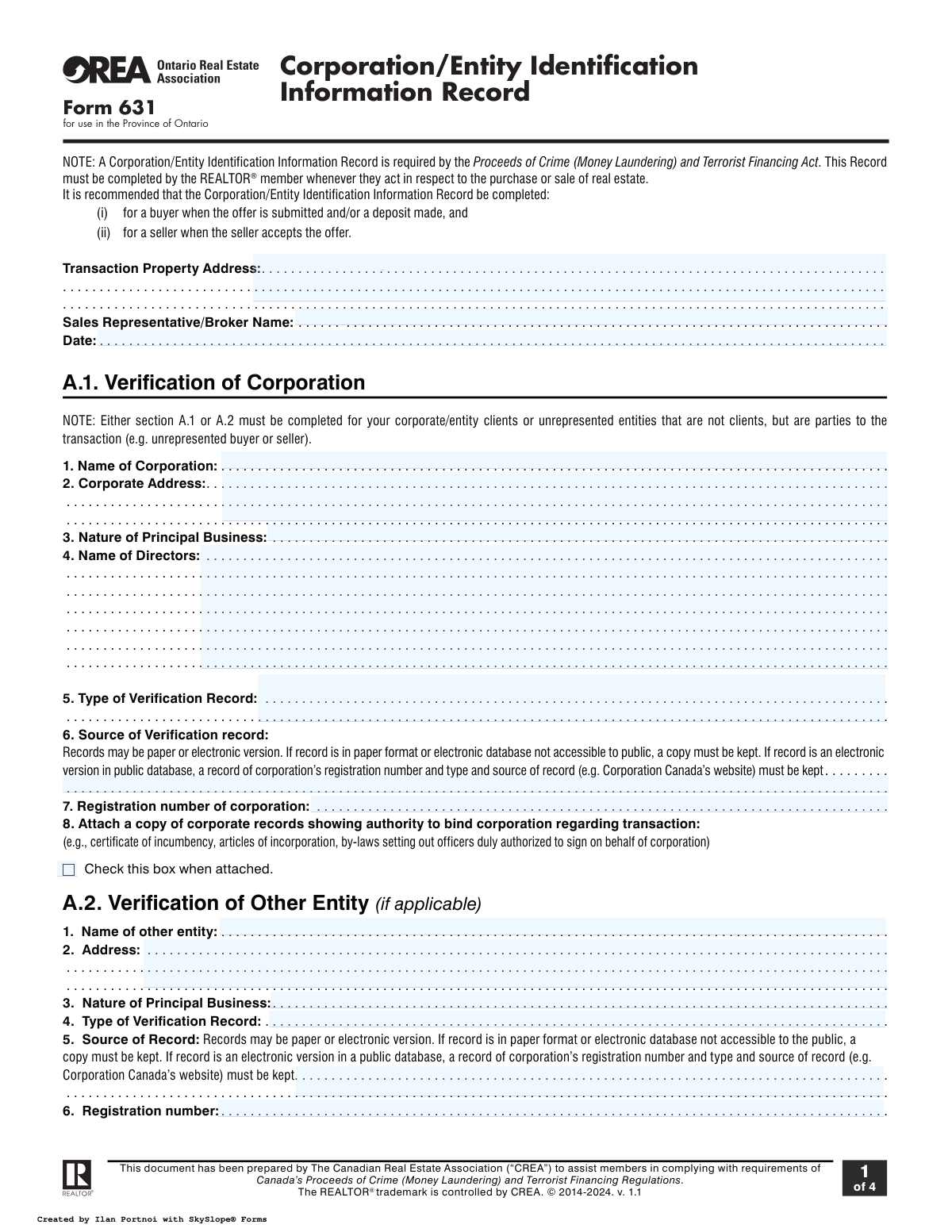
Form 631 is the Corporation/Entity Identification Information Record used by REALTOR® members in Ontario, Canada. It is a mandatory document required under the Proceeds of Crime (Money Laundering) and Terrorist Financing Act to verify the identity of corporations or other entities involved in real estate transactions. The form collects details about the entity, its directors, business nature, and assesses potential risks to prevent illicit financial activities. Today, this form can be filled out quickly and accurately using AI-powered services like Instafill.ai, which can also convert non-fillable PDF versions into interactive fillable forms.
Form 631 is part of the identification forms category on Instafill.
Our AI automatically handles information lookup, data retrieval, formatting, and form filling.
It takes less than a minute to fill out Form 631 using our AI form filling.
Securely upload your data. Information is encrypted in transit and deleted immediately after the form is filled out.

Form specifications

Form name: Form 631, Corporation/Entity Identification Information Record
Number of fields: 135
Number of pages: 4
Filled form examples: Form Form 631 Examples
Language: English
main-image

Instafill Demo: How to fill out PDF forms in seconds with AI

How to Fill Out Form 631 Online for Free in 2026

Are you looking to fill out a FORM 631 form online quickly and accurately? Instafill.ai offers the #1 AI-powered PDF filling software of 2026, allowing you to complete your FORM 631 form in just 37 seconds or less.
Follow these steps to fill out your FORM 631 form online using Instafill.ai:
  1. 1 Navigate to Instafill.ai and upload or select Form 631.
  2. 2 Provide the transaction property address, your name as the sales representative, and the date.
  3. 3 Enter the corporation or entity's information, including its legal name, address, nature of business, and the names of its directors.
  4. 4 Complete the verification details by specifying the source and type of record used to confirm the entity's existence and provide any registration numbers.
  5. 5 Answer the client risk assessment questionnaire to determine if the client is high-risk, and if necessary, detail any third-party involvement.
  6. 6 Describe the purpose and intended nature of the business relationship in the designated section.
  7. 7 Review all auto-filled and manually entered information for accuracy, then download, print, or share the completed Form 631.

Our AI-powered system ensures each field is filled out correctly, reducing errors and saving you time.

Why Choose Instafill.ai for Your Fillable Form 631 Form?

Speed

Complete your Form 631 in as little as 37 seconds.

Up-to-Date

Always use the latest 2026 Form 631 form version.

Cost-effective

No need to hire expensive lawyers.

Accuracy

Our AI performs 10 compliance checks to ensure your form is error-free.

Security

Your personal information is protected with bank-level encryption.

Frequently Asked Questions About Form Form 631

This form is required under Canada's Proceeds of Crime (Money Laundering) and Terrorist Financing Act. It is used by REALTORS® in Ontario to document and verify the identity of corporations or other entities involved in a real estate transaction to prevent financial crimes.

The REALTOR® member who acts in respect to the purchase or sale of real estate is responsible for completing this form. It must be completed for both corporate/entity clients and unrepresented entities that are parties to the transaction.

It is recommended to complete the form for a buyer when their offer is submitted or a deposit is made. For a seller, the form should be completed when they accept an offer.

You must record the corporation's full name, address, nature of its principal business, and the names of its directors. You also need to obtain and record details from an official verification document.

You must attach a copy of corporate records showing who has the authority to bind the corporation, such as a certificate of incumbency, articles of incorporation, or specific by-laws. The source of these records must also be noted on the form.

Section A.1 is specifically for verifying a corporation. Section A.2 is used for verifying other types of legal entities that are not corporations but are still a party to the real estate transaction.

You must take reasonable measures to determine if a third party is involved. If you have grounds for suspicion, you must document your reasons in Section B.1, even if the client denies it.

You must answer a series of questions about the client and transaction, then use the provided table to calculate a total risk score. This score helps determine if the client poses a high risk for money laundering or terrorist financing activities.

A score of 10 or more designates the client as high risk. You must immediately speak to your brokerage's Compliance Officer and apply enhanced measures as directed, such as asking for additional identification.

If the record is a paper copy or from a private electronic database, you must keep a copy. If it's from a public electronic database, you must record the entity's registration number and the source of the record, such as the government website used.

If you are unable to verify an unrepresented entity after taking reasonable steps, you must document the measures you took and the reasons they were unsuccessful in Section A.3 of the form.

Yes, services like Instafill.ai use AI to accurately auto-fill form fields from your existing data. This can save you significant time and help reduce errors when completing complex forms.

You can use a service like Instafill.ai to easily fill out this form online. Simply upload a scan or photo of the document, and the platform will make it interactive and help you complete all the required fields digitally.

If your PDF is not fillable, you can use a tool like Instafill.ai. It can convert flat, non-fillable PDFs into interactive, fillable forms that you can complete, sign, and share electronically.

Compliance Form 631
Validation Checks by Instafill.ai

1
Ensures Either Corporation or Other Entity Section is Completed
This check verifies that the user has filled out either Section A.1 (Verification of Corporation) or Section A.2 (Verification of Other Entity), but not both. This is crucial for compliance as the form requires identification of the party to the transaction. A failure would mean essential client identification information is missing or contradictory, and the form would be considered incomplete.
2
Validates Transaction Date is Not in the Future
This validation ensures the 'Date' field at the top of the form contains a valid date that is not in the future. This maintains the integrity of the record by ensuring it reflects the time the information was recorded accurately. An invalid or future date would make the record's timeline questionable and could cause compliance issues.
3
Verifies Completeness of Transaction Property Address
This check ensures the 'Transaction Property Address' field is not empty and contains a plausible address format. This field is fundamental as it links the entire compliance record to a specific real estate transaction. If this field is empty, the form lacks the necessary context and is invalid for its intended purpose.
4
Conditional Requirement for Corporation Registration Number
This validation checks that the 'Registration number of corporation' field (A.1.7) is filled if the 'Source of Verification record' (A.1.6) indicates an electronic public database. The form explicitly requires this for electronic sources to ensure the verification is auditable and traceable. Failure to provide the number when required would result in an incomplete and non-compliant verification record.
5
Attachment Presence for Corporate Authority
This check validates that if the checkbox in section A.1.8 ('Check this box when attached') is ticked, a corresponding document file has been uploaded. This ensures that the declaration of having attached proof of authority to bind the corporation is substantiated with actual evidence. An error is flagged if the box is checked but no attachment is found, preventing unsubstantiated claims.
6
Third-Party Declaration and Record Consistency
This validation ensures that if 'Yes' is selected in section B.1 regarding a third party, then the required fields in Section B.2 (Third Party Record) such as name, address, and relationship are completed. This is a critical anti-money laundering check to ensure that identified third parties are properly documented. If B.2 is left blank after a 'Yes' declaration, the submission is incomplete and fails to meet regulatory requirements.
7
Conditional Requirement for Third-Party Suspicion Rationale
This check requires the user to fill in the 'Describe why you think your client may be acting on behalf a third party' field if they select 'No' to the third-party question in B.1 but have reasonable grounds for suspicion. This enforces the agent's due diligence obligation to document suspicions even when a client denies third-party involvement. The form cannot be submitted without this explanation if the condition is met.
8
Validates Format of Third-Party Telephone Number
This check ensures that the 'Telephone number' field in Section B.2 conforms to a standard phone number format (e.g., North American Numbering Plan). Proper formatting is essential for data integrity and ensures the contact information is valid and usable for any future communication or verification needs. An incorrectly formatted number would be rejected to prompt the user for correction.
9
Completeness of Client Risk Assessment Questionnaire
This validation verifies that all 17 questions in the Client Risk section (Part 1) have been answered. The risk score is a critical component of the form, and it cannot be calculated without a response to every question. An incomplete questionnaire would prevent the system from assessing the client's risk level, halting the compliance process.
10
Verifies Accuracy of Calculated Client Risk Score
This check automatically recalculates the total risk score based on the answers provided in Section C, Part 1 and compares it to the total displayed in Part 2. This ensures the mathematical accuracy of the risk assessment, which is vital as subsequent actions depend on whether the score is above or below 10. If the scores do not match, it indicates a calculation error that must be resolved before submission.
11
Conditional Requirement for Documenting High-Risk Measures
This validation ensures that if the client's total risk score (Section C) is 10 or greater, the 'Enhanced High-Risk Client Measures' text field in section D.2.3 must be filled out. This is a critical compliance step that enforces the form's own rules for handling high-risk clients. The submission will be blocked if the score is high but the corresponding enhanced measures are not documented.
12
Specification Required for 'Other' Business Relationship
This check validates that if the 'Other, please specify' checkbox is selected in Section D.1, the adjacent text field must not be empty. This prevents ambiguity in defining the purpose of the business relationship, which is important for understanding the context of the transaction. An error will be shown if 'Other' is checked without a corresponding description.
13
Completeness of Unrepresented Entity Measures Record
This validation ensures that if Section A.3 is filled out, at least one checkbox from 'Measures taken' and one from 'Reasons why measures were unsuccessful' are selected, and the 'Date on which above measures taken' is provided. This section is for documenting failed verification attempts, and it must be completed thoroughly to demonstrate due diligence. Incomplete entries in this section would fail the validation.
14
Validates Third-Party Date of Birth
This check ensures the 'Date of Birth' in Section B.2 is a valid, logical date that is in the past. This is a standard data integrity check for personal identification information. Submitting a future date or an invalid format would trigger an error, requiring the user to input a correct date of birth for the third party.

Common Mistakes in Completing Form 631

Using an Incorrect or Incomplete Corporation Name

Filers often enter a trade name, an abbreviation, or a numbered company name without the legal suffix (e.g., 'Inc.', 'Ltd.'), using the name they are most familiar with. This leads to failed verification checks and transaction delays, as the name must perfectly match official corporate records. To avoid this, always refer to the articles of incorporation and enter the full, exact legal name; AI-powered tools like Instafill.ai can validate this against official databases automatically.

Providing a Vague Description of Principal Business

When asked for the 'Nature of Principal Business,' many people provide generic answers like 'Holding Company' or 'Consulting.' This lack of specificity fails to meet the due diligence requirements of anti-money laundering regulations and can trigger further inquiries. Be specific by describing the actual business activities, such as 'Commercial retail property management' instead of just 'Real Estate.' This provides a clearer picture for compliance.

Failing to List All Corporate Directors

This form requires a complete list of all current directors, but filers frequently list only the primary contact or president, or use initials instead of full names. This often occurs when the person filling the form doesn't have the complete corporate records on hand. Incomplete director information invalidates the entity verification, so you must consult the corporation's official records to list the full legal names of all registered directors.

Incorrectly Calculating the Client Risk Score

Section C requires totaling points from 17 questions, and manual addition often leads to errors. A miscalculation can cause a high-risk client to be misclassified as low-risk, creating a major compliance failure. To prevent this, use a calculator and double-check the sum. Advanced form-filling tools like Instafill.ai can automate this risk calculation based on your inputs, eliminating human error, even on non-fillable PDFs which it can convert.

Ignoring High-Risk Client Procedures

The form mandates that a risk score of 10 or higher requires consulting a Compliance Officer and applying enhanced measures. Agents sometimes overlook this step after calculating a high score, exposing the brokerage to significant legal and financial penalties. If the score is 10 or more, you must immediately follow the specified protocol and document the enhanced measures taken in Section D.2.3.

Forgetting to Attach Required Corporate Documents

Section A.1 has a checkbox to confirm that documents proving signing authority are attached, but it's a common oversight to check the box without actually attaching the files. This omission creates a critical compliance gap and can render the transaction agreement unenforceable. Always double-check that the specified documents (e.g., certificate of incumbency, articles of incorporation) are attached before checking the box and submitting the form.

Providing Insufficient Source of Verification Details

In Section A.1, the 'Source of Verification record' field is often filled with vague entries like 'online' or 'company file.' The rules require specifying if the record is paper or electronic, its public accessibility, and for public electronic records, the registration number and specific website. To comply, explicitly state the source, for example, 'Electronic record from Ontario Business Registry website, Corp. #1234567.'

Confusing Corporation (A.1) vs. Other Entity (A.2)

The form requires information for either a 'Corporation' (A.1) or an 'Other Entity' (A.2), but not both. Users are often confused about the distinction or which section applies to partnerships, trusts, or other non-corporate bodies, leading them to fill the wrong section or leave both blank. This creates an incomplete record, so you must carefully identify the client's legal structure before starting and complete only the single, appropriate section.

Leaving Third-Party Information Incomplete

When a transaction involves a third party (Section B.2), the form requires extensive details, including their address, occupation, and relationship to the client. Filers often provide incomplete information, such as a name without an address or a vague relationship description like 'partner.' Incomplete third-party records are a red flag for regulators, so you must always collect and record all required fields for any identified third party to ensure full compliance.

Failure to Document 'Reasonable Measures'

Sections A.3 and B.1 require the agent to document the 'reasonable measures' taken when an entity's existence cannot be confirmed or a third party is suspected but not confirmed. Agents often check a box but fail to provide the required written explanation in the space provided. This omission weakens the compliance file, so you must always provide a clear, concise explanation of the steps you took and the reasons for your conclusions to demonstrate due diligence.
Saved over 80 hours a year

“I was never sure if my IRS forms like W-9 were filled correctly. Now, I can complete the forms accurately without any external help.”

Kevin Martin Green

Your data stays secure with advanced protection from Instafill and our subprocessors

Robust compliance program

Transparent business model

You’re not the product. You always know where your data is and what it is processed for.

ISO 27001, HIPAA, and GDPR

Our subprocesses adhere to multiple compliance standards, including but not limited to ISO 27001, HIPAA, and GDPR.

Security & privacy by design

We consider security and privacy from the initial design phase of any new service or functionality. It’s not an afterthought, it’s built-in, including support for two-factor authentication (2FA) to further protect your account.

Fill out Form 631 with Instafill.ai

Worried about filling PDFs wrong? Instafill securely fills form-631-corporationentity-identification-information-record forms, ensuring each field is accurate.