Yes! You can use AI to fill out Incoming Transfer/Direct Rollover Governmental 457(b) Plan
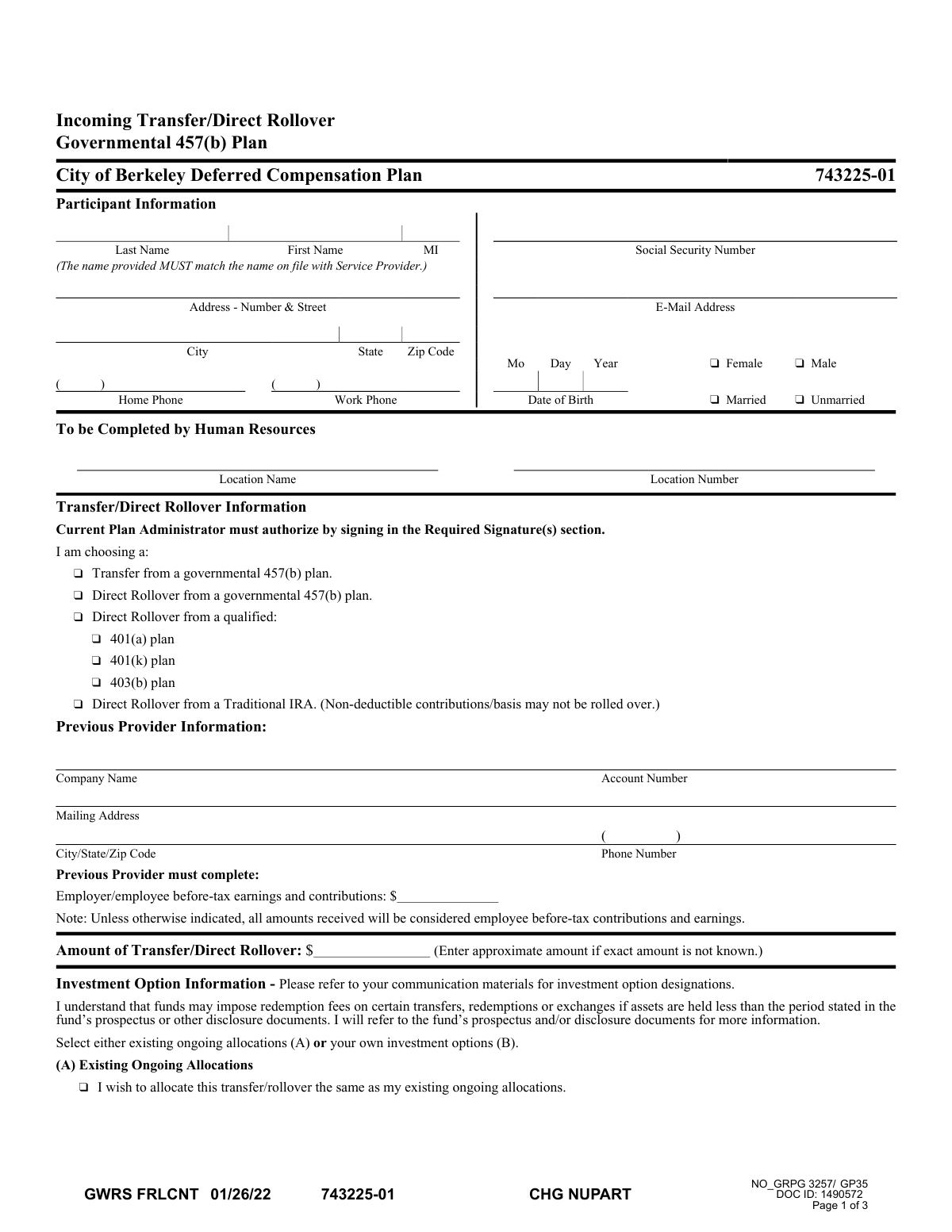
This form authorizes the transfer or direct rollover of funds from various retirement accounts, such as a 401(a), 401(k), 403(b), Traditional IRA, or another governmental 457(b) plan, into the participant's current governmental 457(b) plan. It is essential for consolidating retirement assets into a single account, simplifying management and tracking. Today, this form can be filled out quickly and accurately using AI-powered services like Instafill.ai, which can also convert non-fillable PDF versions into interactive fillable forms.
Incoming Transfer/Direct Rollover Form is part of the
government forms, rollover forms, 457 plan forms, government ID forms, government HR forms and UK government forms categories on Instafill.
Rather not fill this in by hand? Instafill is an online form filler that completes PDF forms automatically — upload the blank form, answer a few questions, and the AI fills every field.
Form specifications
| Form name: | Incoming Transfer/Direct Rollover Governmental 457(b) Plan |
| Number of pages: | 1 |
| Language: | English |
Our AI automatically handles information lookup, data retrieval, formatting, and form filling.
It takes less than a minute to fill out Incoming Transfer/Direct Rollover Form using our AI form filling.
Securely upload your data. Information is encrypted in transit and deleted immediately after the form is filled out.
Instafill Demo: How to fill out PDF forms in seconds with AI
How to Fill Out Incoming Transfer/Direct Rollover Form Online for Free in 2026
Are you looking to fill out a INCOMING TRANSFER/DIRECT ROLLOVER FORM form online quickly and accurately? Instafill.ai offers the #1 AI-powered PDF filling software of 2026, allowing you to complete your INCOMING TRANSFER/DIRECT ROLLOVER FORM form in just 37 seconds or less.
Follow these steps to fill out your INCOMING TRANSFER/DIRECT ROLLOVER FORM form online using Instafill.ai:
- 1 Navigate to Instafill.ai and upload or select the Incoming Transfer/Direct Rollover form.
- 2 Use the AI assistant to automatically fill in the 'Participant Information' section with your personal details like name, address, and Social Security Number.
- 3 Complete the 'Transfer/Direct Rollover Information' section by specifying the type of transaction and providing details about your previous retirement plan provider.
- 4 In the 'Investment Option Information' section, select how the incoming funds should be invested, either by mirroring existing allocations or by choosing new investment options and percentages.
- 5 Review the 'Participant Acknowledgements' to understand the terms of the transfer, then provide your handwritten signature and date in the 'Participant Consent' section.
- 6 Forward the form to your current employer's Plan Administrator for their required signature and approval.
- 7 Submit the fully signed form and ensure the funds are sent according to the 'Payment Instructions' provided, either by mail or wire transfer.
Our AI-powered system ensures each field is filled out correctly, reducing errors and saving you time.
Why Choose Instafill.ai for Your Fillable Incoming Transfer/Direct Rollover Form Form?
Speed
Complete your Incoming Transfer/Direct Rollover Form in as little as 37 seconds.
Up-to-Date
Always use the latest 2026 Incoming Transfer/Direct Rollover Form form version.
Cost-effective
No need to hire expensive lawyers.
Accuracy
Our AI performs 10 compliance checks to ensure your form is error-free.
Security
Your personal information is protected with bank-level encryption.
Frequently Asked Questions About Incoming Transfer/Direct Rollover Form
This form is used to move retirement funds from a previous provider, such as another governmental 457(b), a 401(k), or a Traditional IRA, into your City of Berkeley Deferred Compensation Plan with Empower Retirement.
You should fill out this form if you are a participant in the City of Berkeley Deferred Compensation Plan and want to consolidate eligible funds from a different retirement account into this plan.
A 'Transfer' is specifically for moving funds from another governmental 457(b) plan. A 'Direct Rollover' is for moving funds from other qualified plans like a 401(a), 401(k), 403(b), or a Traditional IRA.
You will need your previous provider's company name, your account number, their mailing address, and phone number. Your previous provider must also complete the section detailing the amount of before-tax earnings and contributions.
The form allows you to enter an approximate amount in the 'Amount of Transfer/Direct Rollover' field if the exact amount is not yet known.
You can either check box (A) to use your existing ongoing investment allocations or complete section (B) to select specific investment options and percentages from the provided list. If you choose section (B), your allocations must total 100%.
If the investment section is incomplete, the funds will be allocated the same as your ongoing contributions. If you do not have an account established, the funds will be invested in the plan's default investment option.
Both you (the participant) and an Authorized Plan Administrator for your current employer's plan (City of Berkeley) must sign the form. Please note that handwritten signatures are required, as electronic signatures will cause significant delays.
If mailing the form and check together, use the regular or overnight mail address for Great-West Trust Company, LLC provided in the 'Payment Instructions' section. If sending only the form, you may fax it to 1-866-633-5212.
The check from your previous provider must be made payable to 'Great-West Trust Company, LLC'. Your name, Social Security Number, and Plan Number should also be written on the check for reference.
Yes, services like Instafill.ai use AI to accurately auto-fill form fields with your information, which can save time and help prevent errors.
You can use a service like Instafill.ai to easily fill out your information online. After completing the form digitally, you must print it to obtain the required handwritten signatures before submission.
If you have a non-fillable PDF, you can use a tool like Instafill.ai to convert it into an interactive, fillable form. This allows you to type your information directly into the fields before printing.
You must review all confirmations and quarterly statements for errors and communicate any discrepancies to the service provider within 90 calendar days of the last calendar quarter for a retroactive correction.
Compliance Incoming Transfer/Direct Rollover Form
Validation Checks by Instafill.ai
Common Mistakes in Completing Incoming Transfer/Direct Rollover Form
Participants often enter a nickname, a recently changed legal name not yet on file, or make a typo in their name or Social Security Number. The form explicitly requires the name to match what the service provider has on record, so a mismatch will cause an immediate rejection and halt the transfer process. To avoid this, double-check that your full legal name and SSN are entered exactly as they appear on your account statements from the provider.
The form requires specifying the source of funds, such as a governmental 457(b), 401(k), or Traditional IRA. Many people are unsure of their previous plan type and select the wrong option. This mistake can lead to significant processing delays, rejection of the rollover, and potential adverse tax consequences. Before filling out the form, confirm the exact plan type by reviewing documents from your previous provider or contacting them directly.
Leaving fields like the previous provider's company name, mailing address, or your account number blank is a frequent error. This information is critical for Empower Retirement to locate and request your funds. Without it, the transfer cannot be initiated, causing indefinite delays until you provide the complete and correct details. Always have a recent statement from your old provider handy to copy this information accurately.
When choosing custom investment options, the form requires that the percentages add up to exactly 100% using whole numbers. People often make simple math errors or use fractions, which leads to the form being rejected and delays the investment of your funds. Since this form is a non-fillable PDF, a tool like Instafill.ai can convert it into a smart, fillable version that automatically calculates the total and flags any errors before submission.
A common point of confusion is selecting both Option (A) for existing allocations and also filling out percentages in Option (B) for new investment choices. This creates ambiguity for the processor, who may have to reject the form or make a default choice you did not intend. You must choose only one of these options to provide clear instructions for how your rollover funds should be invested.
In an increasingly digital world, many people overlook the explicit instruction that a 'handwritten signature is required.' Submitting a form with a typed or electronic signature will cause it to be rejected, leading to significant delays in the transfer process. You must print the form, sign it by hand with a pen, and then submit the physical or scanned copy as instructed.
The form requires a signature from the 'Authorized Plan Administrator for Current Employer's Plan' on page 3. Participants sometimes sign their part and send the form directly to Empower, bypassing this crucial step. This results in an incomplete form that cannot be processed. You must first sign the form and then forward it to your current employer's HR department for their approval and signature.
The multi-step submission process is often misunderstood, causing delays. The participant must sign, then forward the form to their new plan administrator, who then forwards it to Empower. Sending the form to the wrong party or at the wrong time disrupts this chain of custody. To avoid this, follow the instructions precisely: sign, give to your current plan administrator, and confirm they will forward it to Empower.
The form states it must arrive 'prior to or at the same time the funds arrive.' Often, a participant will initiate the funds transfer from their old provider without ensuring this form has been received by Empower. If the money arrives first, it will be allocated to a default investment option, which may not align with your financial goals. Coordinate with both providers to ensure the paperwork and funds are synchronized.
Participants sometimes skip the 'Amount of Transfer/Direct Rollover' field, especially if they are unsure of the exact value. While the form allows for an approximate amount, leaving it blank can cause processing issues or require follow-up communication, delaying the transaction. It is better to provide a close estimate based on your most recent account statement to give the receiving institution a necessary data point for reconciliation.
Saved over 80 hours a year
“I was never sure if my IRS forms like W-9 were filled correctly. Now, I can complete the forms accurately without any external help.”
Kevin Martin Green
Your data stays secure with advanced protection from Instafill and our subprocessors




Robust compliance program
Transparent business model
You’re not the product. You always know where your data is and what it is processed for.
ISO 27001, HIPAA, and GDPR
Our subprocesses adhere to multiple compliance standards, including but not limited to ISO 27001, HIPAA, and GDPR.
Security & privacy by design
We consider security and privacy from the initial design phase of any new service or functionality. It’s not an afterthought, it’s built-in, including support for two-factor authentication (2FA) to further protect your account.
Fill out Incoming Transfer/Direct Rollover Form with Instafill.ai
Worried about filling PDFs wrong? Instafill securely fills incoming-transferdirect-rollover-governmental-457b-plan forms, ensuring each field is accurate.
