
Yes! You can use AI to fill out New York Rental Application Form
Don't type 103 fields by hand. Tell our AI about yourself, or upload the listing or an old lease, and it fills every field in seconds. You check it, then download, print or sign.
The AI does the filling. You just check it.
No typing into boxes, nothing to install.
What this form asks for
The AI fills all of it, from your answers or your documents.
The AI checks your answers before you download
16 checks built for this form, so a wrong date or a missing answer is caught before anyone else sees it.
Validates that the Social Security Number is entered as exactly nine digits, either in the standard formatted pattern (XXX-XX-XXXX) or as a continuous nine-digit string. SSNs are required for background and credit checks, and an incorrectly formatted or incomplete SSN will prevent the landlord from running the necessary financial and criminal history investigation. If the field contains fewer than nine digits, non-numeric characters in unexpected positions, or is left blank, the form should be flagged as incomplete.
Ensures the applicant's date of birth is entered in a recognizable date format (e.g., MM/DD/YYYY) and represents a logically valid date — not a future date and not a date that would make the applicant younger than 18 years old. Since rental agreements are legal contracts, the applicant must be of legal age to enter into one. A missing, future, or implausible date of birth should cause the form to be rejected.
Verifies that if a Driver's License or ID Number is provided, the corresponding State of Issue and Expiration Date fields are also filled in, and that the expiration date is not already past. An expired ID is not considered valid for identity verification purposes, and a missing state of issue makes it impossible to verify the document's authenticity. If the ID number is present but either the state or expiration date is missing or the ID is expired, the form should be flagged for correction.
Checks that the applicant's email address follows a valid email format, containing exactly one '@' symbol, a domain name, and a top-level domain (e.g., [email protected]). The email address is a primary channel for correspondence between the landlord and applicant throughout the rental process. An improperly formatted email address will result in failed communications and should cause the form to be flagged as invalid.
Ensures that if the Landlord Contact section is filled, all three sub-fields — Landlord Name, Contact Email, and Contact Phone — are provided together. Partial landlord contact information leaves applicants unable to follow up on the rental unit and undermines the purpose of Section 1. If the landlord name is present but either the email or phone is missing, the form should generate a warning requiring at least one complete contact method.
Validates that exactly one of the two move-in date options is selected — either 'Date of Availability as assigned by the Landlord' or 'Proposed move-in date' — and that if 'Proposed move-in date' is selected, the corresponding date field is populated with a valid future date. Selecting both options or neither creates ambiguity about the applicant's intended occupancy start date. If the proposed move-in date option is checked but no date is entered, or if both options are checked simultaneously, the form should be flagged as inconsistent.
And 10 more checks
- Fixed Lease Term Date Completeness and Logical Order Validation
- Lease Term Type Single Selection Validation
- Security Deposit Option Mutual Exclusivity and Amount Validation
- Rent Amount and Payment Frequency Completeness Check
- Other Occupant Row Completeness Validation
- Other Occupant Date of Birth Valid Date Format Check
- Previous Residence Duration Logical Consistency Check
- Emergency Contact Information Completeness Check
- Application Fee Amount Positive Value and Payment Method Selection Check
- Proposed Move-in Date Not Before Date of Availability Validation
Let AI fill out your NY Rental Application
No typing. Every field filled in seconds, checked, ready to sign.
How to Fill Out NY Rental Application Online for Free in 2026
What the AI walks you through.
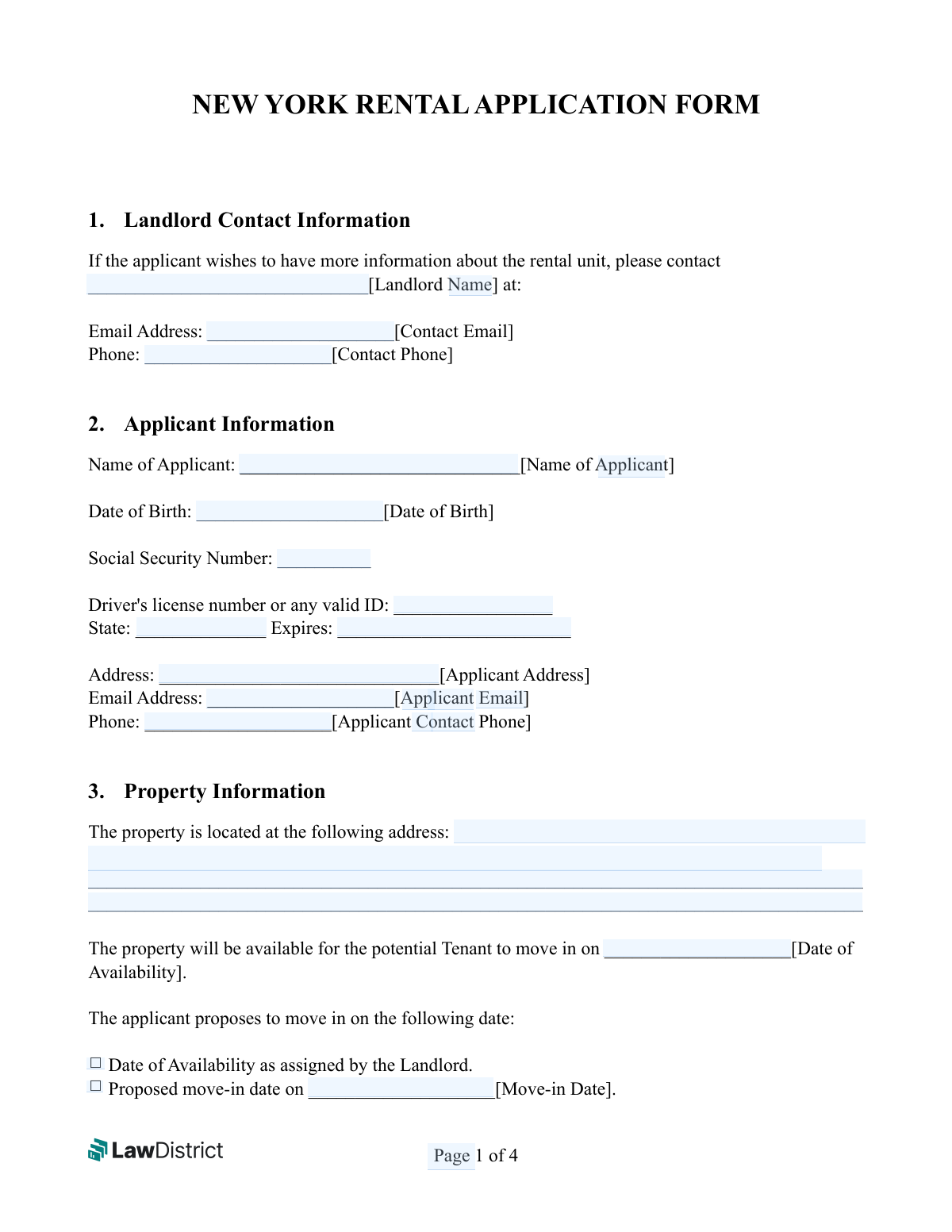
- Navigate to Instafill.ai and upload the New York Rental Application Form PDF or select it from the available form library to begin filling it out online.
- Enter the landlord's contact information in Section 1, including the landlord's full name, email address, and phone number for rental inquiries.
- Complete Section 2 with the applicant's personal information, including full legal name, date of birth, Social Security Number, driver's license or valid ID details, address, email, and phone number.
- Fill in the property information in Section 3, including the property address, date of availability, and your proposed move-in date, then specify the lease term type (fixed, month-to-month, year-to-year, or unspecified) and rent payment details in Sections 4 and 5.
- Provide security deposit details in Section 6, list any other occupants in Section 7, and enter the application fee amount and preferred payment method in Section 8.
- Complete Sections 9 and 10 with your previous residence history (addresses, lease durations, landlord contacts) and financial/banking information, then add your emergency contact details.
- Review all entered information for accuracy, then sign and date the Authority for Release of Information section to authorize the landlord to conduct background and credit checks before submitting the completed form.
Common Mistakes in Completing NY Rental Application
The ones the AI is built to catch.
Entering an incorrectly formatted Social Security Number
Leaving the driver's license state or expiration date blank
Providing an incomplete or non-specific property address
Failing to select a move-in date option or leaving the proposed date blank
Not selecting a lease term type or failing to fill in fixed-term dates
Confusing the security deposit checkboxes or leaving both unchecked
Omitting other occupants' dates of birth or relationship information
Entering incomplete or inaccurate previous residence information
Providing bank account numbers without verifying accuracy
Selecting an incorrect or no payment method for the application fee
Using a nickname or informal name instead of a full legal name
Failing to sign the application or entering an incorrect date on the authorization
Frequently Asked Questions About NY Rental Application
Is it really free for 7 days?
Can I fill other forms too?
How do I cancel?
How does the AI fill out NY Rental Application?
What happens to my information?
How complex is NY Rental Application to fill out?
What is the New York Rental Application Form used for?
Who needs to fill out this rental application?
What personal information is required on the application?
Is the application fee refundable if I am not approved?
What payment methods are accepted for the application fee?
What lease term options are available on this form?
Do I need to provide information about other people who will live with me?
What financial information do I need to provide?
What previous rental history information is required?
What does the Authority for Release of Information section mean?
Can I propose my own move-in date, or must I use the landlord's date?
Is a security deposit always required?
Can I use AI tools like Instafill.ai to fill out this form?
How do I fill out this form online using Instafill.ai?
What if the PDF version of this form is not fillable?
Get your NY Rental Application filled out by AI
$0 today. Cancel before Oct 30 and you pay nothing.
Other forms like this one
rental application forms: California/National Apartment Association Official Form B-15, Rental Application for Residents and Occupants (May 2015) with Application Agreement, Rental application (Form 22) — Residential Tenancies and Rooming Accommodation Act 2008 (Qld), Residential Rental Application (Statement of Information for Rental Applicants) — Residential Tenancies Act 1997 (Vic) s 29C; Residential Tenancies Regulations 2021 (Vic) reg 14, National Apartment Association (NAA) Rental Application for Residents and Occupants (Virginia) and Supplemental Rental Application for Units Under Government Regulated Affordable Housing Programs, Corporate Application for Rental, Northland Application for Rental – New Mexico, OREA Form 410, Rental Application Residential, DHCD PRA 811 Program Rental Application and Member Information, Arizona Department of Transportation Rental Application (Residential Lease), Ontario Real Estate Association Form 410, Rental Application – Residential, Form 410, Rental Application Residential
New York forms: Form Summons, Supreme Court of New York, Affirmation of Service (New York) (January 2024), New York State Department of State (Division of Licensing Services) Property Condition Disclosure Statement (DOS-1614-f), New York State Department of Labor (NYSDOL) Division of Labor Standards Complaint Form (LS 223), New York State Department of Labor, Division of Labor Standards Complaint Form (LS 223), New York State Employment Application: Part 1 – Pre-Interview (Form #S1000), New York State Employment Application Form, New York State Deferred Compensation Plan Outgoing Rollover, New York State Deferred Compensation Plan Benefit Distribution Request, New York State Deferred Compensation Plan Direct Rollover to a Roth IRA, Petition for Letters of Administration (New York Surrogate's Court), New York State Comptroller Form RS 5127, Designation of Beneficiary with Contingent Beneficiaries, New York Life Investments Funds Individual Retirement Account Application and NYLIFE Securities LLC Investor Profile, New York State Medicaid Enrollment Form (EMEDNY-436701), New York State Medicaid Enrollment Form, New York State Department of Health Certificate of Qualification Questionnaire - Virology, New York State Certificate of Amendment of Articles of Organization, Form ST-120, New York State and Local Sales and Use Tax Resale Certificate, New York Vehicle Registration/Title Application, Form DOS-2156, New York State Housing Discrimination Disclosure Form
rental forms: Form GST524, GST/HST New Residential Rental Property Rebate, Form GST524, GST/HST New Residential Rental Property Rebate, Form GST524, GST/HST New Residential Rental Property Rebate, Form GST524, GST/HST New Residential Rental Property Rebate, Form GST524, GST/HST New Residential Rental Property Rebate, California/National Apartment Association Official Form B-15, Rental Application for Residents and Occupants (May 2015) with Application Agreement, Rental application (Form 22) — Residential Tenancies and Rooming Accommodation Act 2008 (Qld), Residential Rental Application (Statement of Information for Rental Applicants) — Residential Tenancies Act 1997 (Vic) s 29C; Residential Tenancies Regulations 2021 (Vic) reg 14, National Apartment Association (NAA) Rental Application for Residents and Occupants (Virginia) and Supplemental Rental Application for Units Under Government Regulated Affordable Housing Programs, California Association of REALTORS® (C.A.R.) Form LR, Residential Lease or Month-to-Month Rental Agreement (Revised 12/19), Corporate Application for Rental, Northland Application for Rental – New Mexico, OREA Form 410, Rental Application Residential, DHCD PRA 811 Program Rental Application and Member Information, Arizona Department of Transportation Rental Application (Residential Lease), Parental Refusal of Blood Lead Testing for a Child, Ontario Real Estate Association Form 410, Rental Application – Residential, Form ICWA-020, Parental Notification of Indian Status, Confirmation Of Closing – Rental Property, Petition for Termination of Parental Rights
Let AI fill out your NY Rental Application
Your trial starts once a card is added. You pay nothing before Oct 30.
Our AI already knows this form, all 103 fields of it. Skip the typing: tell it about yourself, or upload what you have, and it fills the whole form in seconds.
- AI fills every field on all 4 pages, tables and checkboxes included
- No typing into boxes: answer a few questions, or upload the listing or an old lease, an old copy of this form, a photo of a document
- The AI checks the answers; you review and change anything before you download
- Download the finished PDF, print it, or sign it online
- Encrypted, and never used to train AI
Cancel before Oct 30 and you pay nothing.
A card is needed to start the trial. Cancel in two clicks from your account.
Terms · Privacy