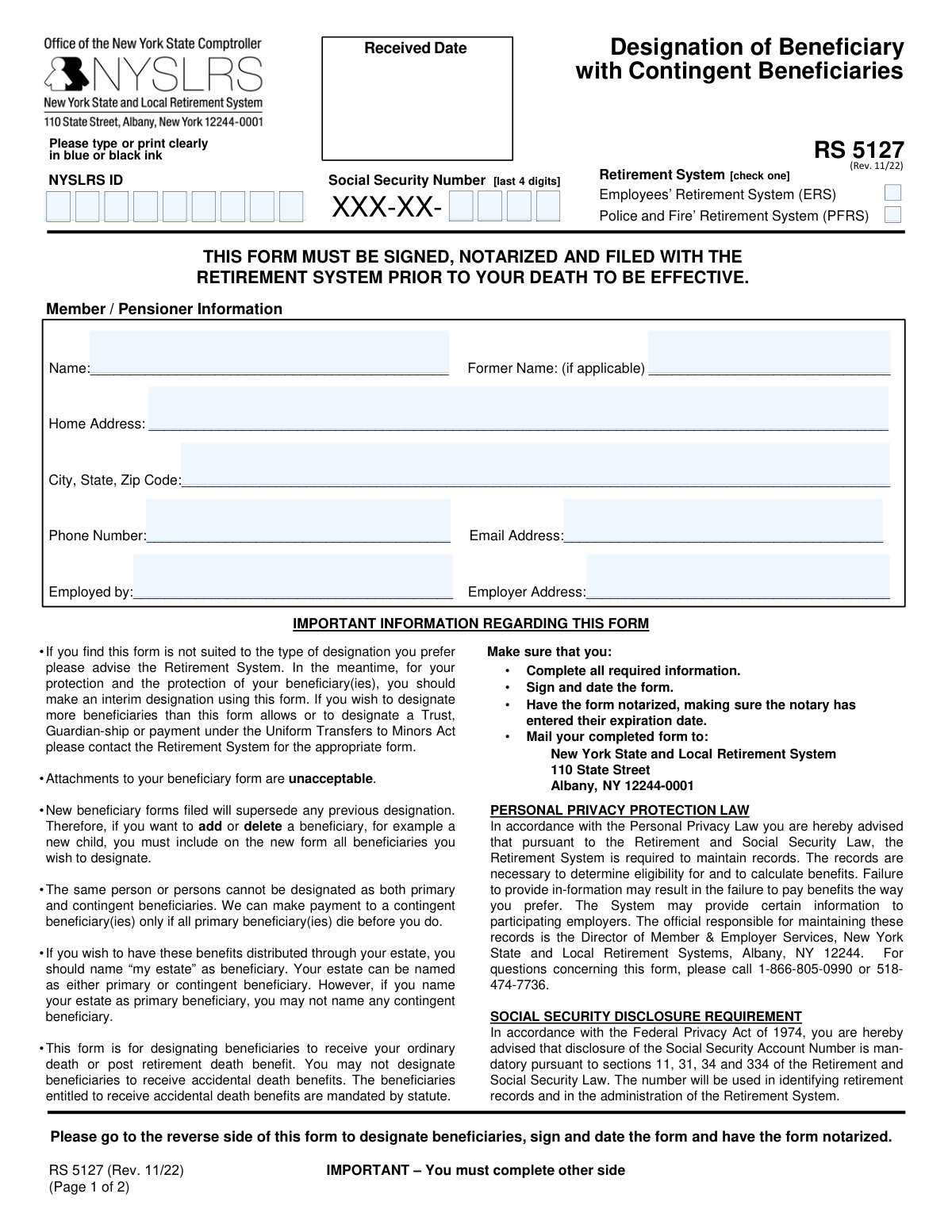
Yes! You can use AI to fill out New York State Comptroller Form RS 5127, Designation of Beneficiary with Contingent Beneficiaries
Form RS 5127 is a legal document used by members of the New York State and Local Retirement System (NYSLRS) to officially name the individuals who will receive their ordinary or post-retirement death benefits. It allows for the designation of both primary and contingent beneficiaries, ensuring that assets are distributed according to the member's wishes. Today, this form can be filled out quickly and accurately using AI-powered services like Instafill.ai, which can also convert non-fillable PDF versions into interactive fillable forms.
RS 5127 is part of the
beneficiary forms, New York forms, PA state forms, New York State forms, pension forms, beneficiary designation forms, NJ state forms, New York State retirement forms and state comptroller forms categories on Instafill.
Rather not fill this in by hand? Instafill is an online form filler that completes PDF forms automatically — upload the blank form, answer a few questions, and the AI fills every field.
Form specifications
| Form name: | New York State Comptroller Form RS 5127, Designation of Beneficiary with Contingent Beneficiaries |
| Number of pages: | 1 |
| Language: | English |
Our AI automatically handles information lookup, data retrieval, formatting, and form filling.
It takes less than a minute to fill out RS 5127 using our AI form filling.
Securely upload your data. Information is encrypted in transit and deleted immediately after the form is filled out.
Instafill Demo: How to fill out PDF forms in seconds with AI
How to Fill Out RS 5127 Online for Free in 2026
Are you looking to fill out a RS 5127 form online quickly and accurately? Instafill.ai offers the #1 AI-powered PDF filling software of 2026, allowing you to complete your RS 5127 form in just 37 seconds or less.
Follow these steps to fill out your RS 5127 form online using Instafill.ai:
- 1 Navigate to Instafill.ai and upload or select Form RS 5127, Designation of Beneficiary.
- 2 Use the AI assistant to accurately fill in your personal information, including your NYSLRS ID, Social Security number, name, and contact details.
- 3 Enter the full name, address, relationship, and birth date for each primary beneficiary you wish to designate.
- 4 Optionally, provide the same detailed information for any contingent beneficiaries who would inherit if all primary beneficiaries predecease you.
- 5 Carefully review all the information auto-filled by the AI for accuracy and completeness, ensuring there are no alterations or use of correction fluid.
- 6 Download the completed form, print it, and sign it in the designated area.
- 7 Take the signed form to a Notary Public to have it officially notarized before mailing it to the NYSLRS address provided on the form.
Our AI-powered system ensures each field is filled out correctly, reducing errors and saving you time.
Why Choose Instafill.ai for Your Fillable RS 5127 Form?
Speed
Complete your RS 5127 in as little as 37 seconds.
Up-to-Date
Always use the latest 2026 RS 5127 form version.
Cost-effective
No need to hire expensive lawyers.
Accuracy
Our AI performs 10 compliance checks to ensure your form is error-free.
Security
Your personal information is protected with bank-level encryption.
Frequently Asked Questions About RS 5127
This form is used by members of the NYS Employees' (ERS) and Police and Fire (PFRS) Retirement Systems to designate beneficiaries to receive their ordinary or post-retirement death benefit.
To be effective, this form must be signed, notarized, and filed with the Retirement System prior to your death. A new designation will supersede any previous ones on file.
Primary beneficiaries are the first in line to receive the benefit. Contingent beneficiaries will only receive the benefit if all of the designated primary beneficiaries die before you do.
You must submit a completely new Form RS 5127. This new form replaces all previous designations, so you must include all beneficiaries you currently wish to designate, not just the person being added.
No, the same person or persons cannot be designated as both primary and contingent beneficiaries on this form.
If you need to designate more beneficiaries than this form allows, or wish to designate a Trust, you must contact the Retirement System for the appropriate form. Attachments to this form are not accepted.
Yes, you can name 'my estate' as your primary beneficiary. However, if you name your estate as the primary beneficiary, you cannot name any contingent beneficiaries.
The use of correction fluid or making other alterations will render the designation invalid. You must complete a new, clean form if you make an error.
No, this form is only for designating beneficiaries for your ordinary or post-retirement death benefit. Beneficiaries for accidental death benefits are mandated by state law and cannot be changed with this form.
Yes, the form is not valid unless it is signed by you and the acknowledgement section is completed and stamped by a Notary Public.
Yes, services like Instafill.ai use AI to help you accurately auto-fill form fields with your personal and beneficiary information, saving time and reducing errors.
Upload the RS 5127 PDF to the Instafill.ai platform, and its AI will make the fields fillable. You can then type in your information, review for accuracy, and print the completed form for signature and notarization.
You can use a service like Instafill.ai, which can convert flat, non-fillable PDFs into interactive forms. This allows you to type your information directly onto the document for a clean, legible submission.
Compliance RS 5127
Validation Checks by Instafill.ai
1
Exclusive Retirement System Selection
This check ensures that the member has selected exactly one retirement system, either ERS or PFRS. The form requires a single choice to correctly file the designation. If zero or both boxes are checked, the form is ambiguous and cannot be processed, leading to rejection and requiring the member to resubmit.
2
Social Security Number Last 4 Digits Format
Validates that the 'Social Security Number [last 4 digits]' field contains exactly four numeric digits. This is a mandatory field used for record identification and verification. An incorrect format or missing value would prevent the system from matching the form to the correct member's account, causing processing failure.
3
Primary Beneficiary Designation Requirement
Ensures that at least one Primary Beneficiary is designated, or the name field contains 'my estate'. A beneficiary form without a primary beneficiary is incomplete and fails its primary purpose. If this section is blank, the form is invalid and the member's previous designation (or lack thereof) will remain in effect.
4
Beneficiary Role Exclusivity
This validation cross-references the names listed in the Primary Beneficiary section against those in the Contingent Beneficiary section. The form explicitly states that the same person cannot be designated as both. This check prevents a logically impossible designation, which would create ambiguity in benefit distribution and result in form rejection.
5
Estate as Sole Primary Beneficiary Rule
Checks if 'my estate' is listed as a primary beneficiary. If it is, this validation ensures that no contingent beneficiaries are named, as per the form's instructions. Naming contingent beneficiaries when the estate is primary is a logical contradiction that invalidates the designation, as the estate's distribution is handled separately by probate.
6
Beneficiary Birth Date Validity
Verifies that any entered beneficiary birth date is a valid calendar date and is not in the future. This information is critical for verifying the beneficiary's identity when a claim is made. An invalid or future date would be considered a data entry error and could cause significant delays or complications in paying out benefits.
7
Member Signature and Date Presence
Confirms that the 'Member / Pensioner Signature' field is signed and the 'Date' field next to it is filled. A signature and date are legal requirements to attest to the member's intent and the timeliness of the designation. An unsigned or undated form is legally invalid and will be rejected immediately.
8
Notarization Section Completeness
This check verifies that the 'ACKNOWLEDGEMENT TO BE COMPLETED BY A NOTARY PUBLIC' section is fully completed, including the state, county, date, notary signature, and stamp. Notarization is a mandatory step to authenticate the member's signature and prevent fraud. An incomplete or missing notarization renders the entire form invalid.
9
Logical Date of Signature
Validates that the date provided next to the member's signature is not a future date. The signature date attests to when the document was executed. A future date is logically impossible and indicates an error, which would invalidate the form and require correction and resubmission.
10
Completeness of Member Information
Ensures that the member's full name and home address fields are not empty. This core information is essential for identifying the member and for any necessary correspondence. Missing this data would make it difficult to process the form or contact the member about issues, leading to rejection.
11
Beneficiary Record Completeness
For each beneficiary listed (either primary or contingent), this check ensures that if a name is provided, the corresponding address and relationship fields are also filled out. This information is vital for locating and verifying the beneficiary when the benefit becomes payable. Incomplete beneficiary records can lead to significant delays and legal challenges during the payout process.
12
Phone Number Format Validation
This check verifies that all phone number fields (for the member and all beneficiaries) adhere to a standard format, such as 10 digits. While not always strictly required for validity, correct phone numbers are crucial for communication and beneficiary location. The system should flag non-standard entries to be reviewed or corrected to prevent future contact issues.
Common Mistakes in Completing RS 5127
The form explicitly states that the use of correction fluid or making alterations will render the designation invalid. People often make this mistake to fix a simple typo instead of starting over. This results in the entire form being rejected, leaving the previous beneficiary designation (or none at all) in effect. To avoid this, always start with a fresh copy of the form if you make an error; do not cross out information or use white-out.
Submitting the form without a signature, stamp, and commission expiration date from a Notary Public is a critical error. This step is a legal requirement to validate the document, and it's often forgotten or done incorrectly. An un-notarized or improperly notarized form is invalid and will be rejected, failing to update your beneficiaries. Always review the notary's section to ensure all information is present before mailing the form.
A common misunderstanding is that the form can be used to simply 'add' or 'remove' a single beneficiary. The instructions state that a new form supersedes all previous ones. If you only list a new child, for example, you may have unintentionally removed your spouse or other children from the previous designation. To avoid this, you must list every person you want to be a beneficiary on the new form, every time you make a change.
The form's rules prevent listing the same individual in both the primary and contingent sections. People make this mistake out of confusion, thinking it provides a backup. This creates a logical impossibility for payment, as contingent beneficiaries are only paid if all primary beneficiaries are deceased. This error will cause the form to be rejected, so ensure your primary and contingent beneficiaries are entirely different people or groups.
Each beneficiary entry requires a full name, address, relationship, and birth date, but people often leave fields blank if they don't have the information handy. Incomplete data can make it extremely difficult or impossible for the Retirement System to locate your beneficiary after your death. This can lead to significant payment delays and potential legal challenges. Before filling out the form, gather all the required details for each person you plan to designate.
After carefully filling out all the beneficiary information, it is easy to overlook the final step of signing and dating the form above the notary section. An unsigned or undated form is not a legal directive and is invalid on its face. This simple oversight will cause the form to be rejected immediately. Always perform a final review to ensure you have signed and dated the form in the correct space.
The form explicitly states that attachments are unacceptable and instructs the user to contact the Retirement System for a different form if more space is needed. However, some people attempt to attach a separate, typed list of beneficiaries. This will cause the entire submission to be rejected. If you have more beneficiaries than the form allows, you must contact NYSLRS to obtain the correct form for your needs.
The form requires printing clearly in blue or black ink, but rushed or messy handwriting can make names, addresses, and dates unreadable. This can lead to critical data entry errors by the processing staff, potentially sending correspondence or benefits to the wrong address or person. To prevent this, print slowly and legibly. AI-powered tools like Instafill.ai can convert this non-fillable PDF into a typed, fillable version, eliminating any handwriting issues.
At the top of the form, the member must check a box to indicate if they belong to the Employees’ Retirement System (ERS) or the Police and Fire’ Retirement System (PFRS). This is a small but crucial detail that is easily missed. Failure to check a box means the form cannot be properly routed and filed, causing processing delays until the system can be manually verified. Always double-check the header section to ensure the correct system is selected.
The form provides a specific rule that if you name 'my estate' as the primary beneficiary, you cannot name any contingent beneficiaries. People often miss this instruction and proceed to fill out the contingent beneficiary section anyway. This creates a conflict in the designation that will lead to the form's rejection or require clarification, delaying its acceptance. If you designate your estate as the primary beneficiary, you must leave the contingent section completely blank.
Saved over 80 hours a year
“I was never sure if my IRS forms like W-9 were filled correctly. Now, I can complete the forms accurately without any external help.”
Kevin Martin Green
Your data stays secure with advanced protection from Instafill and our subprocessors




Robust compliance program
Transparent business model
You’re not the product. You always know where your data is and what it is processed for.
ISO 27001, HIPAA, and GDPR
Our subprocesses adhere to multiple compliance standards, including but not limited to ISO 27001, HIPAA, and GDPR.
Security & privacy by design
We consider security and privacy from the initial design phase of any new service or functionality. It’s not an afterthought, it’s built-in, including support for two-factor authentication (2FA) to further protect your account.
Fill out RS 5127 with Instafill.ai
Worried about filling PDFs wrong? Instafill securely fills new-york-state-comptroller-form-rs-5127-designation-of-beneficiary-with-contingent-beneficiaries forms, ensuring each field is accurate.
