
Yes! You can use AI to fill out Form VTR-60, Application for Replacement License Plate(s) and/or Registration Sticker
Don't type 20 fields by hand. Tell our AI about yourself, or upload a document you already have, and it fills every field in seconds. You check it, then download, print or sign.
The AI does the filling. You just check it.
No typing into boxes, nothing to install.
What this form asks for
The AI fills all of it, from your answers or your documents.
The AI checks your answers before you download
15 checks built for this form, so a wrong date or a missing answer is caught before anyone else sees it.
Validates that First Name and Last Name are provided (and Middle Name/Suffix are optional unless required by the jurisdiction’s rules) and that all name fields contain only acceptable characters (letters, spaces, hyphens, apostrophes). This prevents unreadable records and mismatches with DMV/tax office systems. If validation fails, the submission should be rejected or flagged for correction before processing.
Checks that the County field is not blank and matches a known list of Texas counties (or a county code mapping used by the county tax assessor-collector). County is required for routing and “County Use Only” processing. If the county is missing or invalid, the form should be blocked because it may be sent to the wrong office or misfiled.
Ensures Address, City, State, and ZIP are all present and formatted correctly, and that State is a valid two-letter abbreviation (typically must be 'TX' for this Texas DMV form unless explicitly allowed otherwise). Accurate address data is needed for identity verification, correspondence, and record matching. If any component is missing/invalid, the submission should be returned for correction.
Checks that ZIP is either 5 digits or ZIP+4 (e.g., 12345 or 12345-6789) and optionally validates that it is a plausible Texas ZIP range. This reduces mailing errors and improves data quality for county processing. If the ZIP format is invalid, the system should require correction before acceptance.
If an email is entered, validates it against a standard email pattern (local@domain) and rejects clearly invalid values (missing '@', invalid domain, spaces). Email is often used for contact and status updates, so invalid emails cause communication failures. If invalid, the system should prompt the applicant to correct it or leave it blank if email is optional.
Ensures the phone number contains a valid count of digits (typically 10 for US numbers) and allows common formatting characters (parentheses, spaces, hyphens) while storing a normalized version. A valid phone number is important for resolving issues with the application quickly. If validation fails, the form should be flagged or rejected depending on whether phone is required.
And 9 more checks
- Validates Vehicle Identification Number (VIN) length and character set
- Performs VIN check-digit validation (ISO 3779) when applicable
- Validates Current TX License Plate format and Texas plate pattern rules
- Validates Prior to Replacement plate field is not identical to Current plate (if both provided)
- Validates Vehicle Year is a 4-digit year within an acceptable range
- Validates Make and Body Style are present and not free-form garbage values
- Requires at least one replacement item selection (plate/sticker options)
- Validates Signature presence and Date signed format and plausibility
- Validates certification acknowledgment is explicitly accepted
Let AI fill out your VTR-60
No typing. Every field filled in seconds, checked, ready to sign.
How to Fill Out VTR-60 Online for Free in 2026
What the AI walks you through.
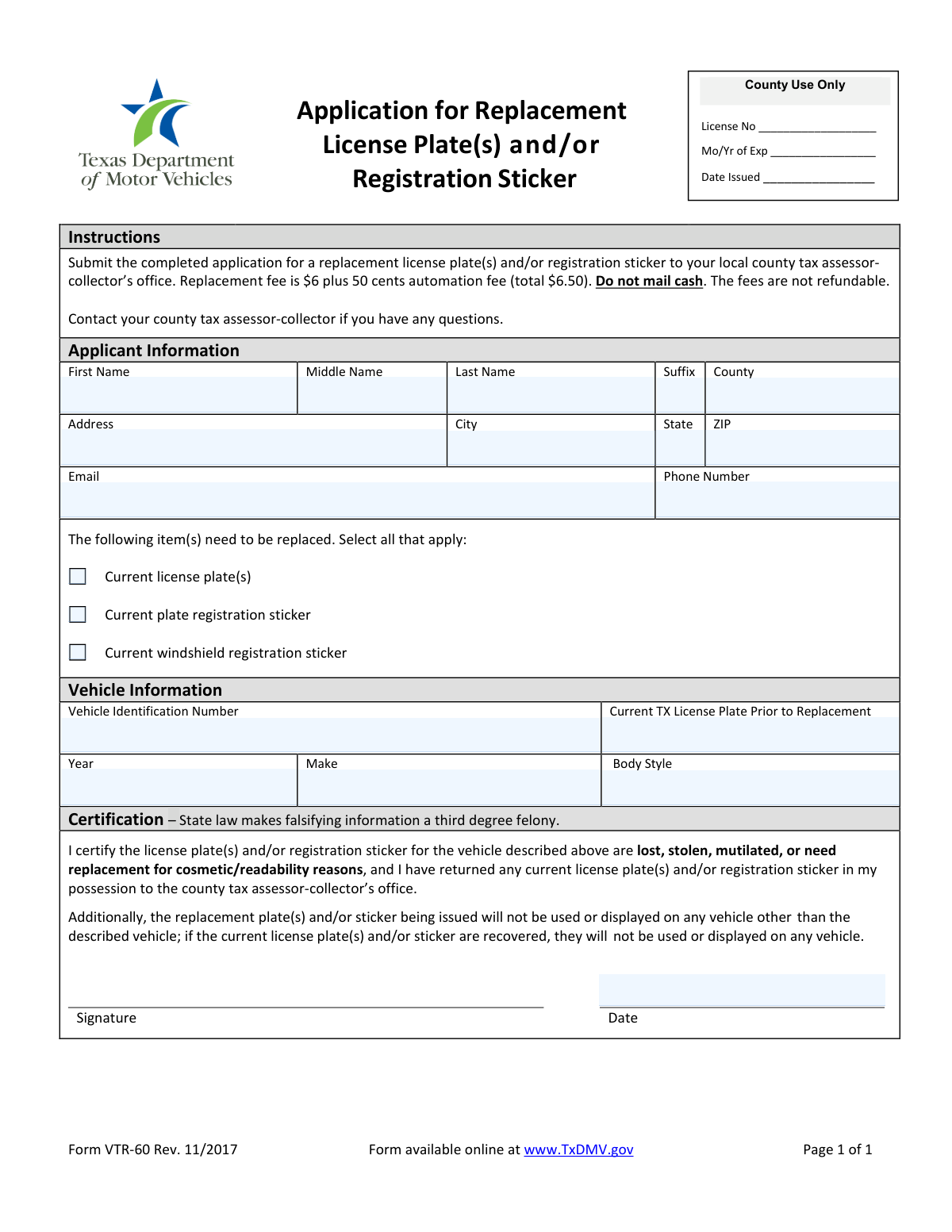
- Enter applicant information: first, middle, last name (and suffix if applicable), county, address, city, state, ZIP, email, and phone number.
- Select which item(s) you need replaced: current license plate(s), current plate registration sticker, and/or current windshield registration sticker.
- Provide vehicle information: vehicle identification number (VIN), current Texas license plate number (prior to replacement), year, make, and body style.
- Review the certification statements regarding the reason for replacement and the requirement to return any plates/stickers in your possession and not use recovered items.
- Sign and date the application to certify the information is true and correct.
- Calculate and prepare payment for the replacement fee ($6.00) plus the $0.50 automation fee (total $6.50); do not mail cash.
- Submit the completed form and fee to your local county tax assessor-collector’s office and keep a copy for your records.
Common Mistakes in Completing VTR-60
The ones the AI is built to catch.
Leaving the replacement item selection blank (or selecting the wrong item)
Incomplete applicant name fields (missing middle name, suffix, or inconsistent legal name)
Missing or outdated county and address information
Email or phone number entered in an unusable format
Incorrect or incomplete Vehicle Identification Number (VIN)
Not providing the current Texas license plate number (or mixing it up with prior plates)
Vehicle details missing or inconsistent (year, make, body style)
Failing to sign and date the certification
Misunderstanding the certification about returning recovered plates/stickers
Submitting the wrong payment amount or using cash despite instructions
Mailing the application to the wrong place or assuming it can be handled entirely online
Frequently Asked Questions About VTR-60
Is it really free for 7 days?
Can I fill other forms too?
How do I cancel?
How does the AI fill out VTR-60?
What happens to my information?
How complex is VTR-60 to fill out?
What is Form VTR-60 used for?
Who should fill out this application?
Where do I submit the completed form?
Can I mail this form and payment instead of going in person?
How much does a replacement cost?
What items can I request to replace on this form?
What vehicle information do I need to provide?
What applicant information is required?
What does “Current TX License Plate Prior to Replacement” mean?
Do I have to return my old plates or stickers if I still have them?
What if my plate or sticker was stolen—can I still apply?
What if I later find the original plate or sticker after getting a replacement?
Why does the form mention a felony for falsifying information?
Do I need to sign and date the form?
How long does it take to receive the replacement plate or sticker?
Get your VTR-60 filled out by AI
$0 today. Cancel before Nov 1 and you pay nothing.
Other forms like this one
license plate forms: Form 1776, Physician’s Statement for Disabled License Plates or Placards, California DMV Form REG 17 (Rev. 7/2012), Special Interest License Plate Application, California DMV Form REG 17 (Rev. 7/2012), Special Interest License Plate Application, Form VR-210, Application for Maryland Parking Placards/License Plates for Individuals with a Disability
registration forms: Form DE 1, Commercial Employer Account Registration, Form 69-001, Industrial Hemp Registration, Food (Registration of Premises) (Jersey) Order 2001 — Schedule 1 (Article 4(1)) — Form of Application for Registration of Food Premises, Discovery Health Practice Registration Form 2026 (DHHPR2001), Course Roster and Location Registration Form, Fidelity Change of Account Registration: Changing to an Individual, Joint, or Custodial Brokerage Account, Fidelity Change of Account Registration — Changing to a Trust, Estate, Guardian, or Conservator Brokerage Account, Fidelity Change of Account Registration — Cash Management Account, MS(R) 21A, Application for the Registration of a Ship under the (Malta) Merchant Shipping Act, 1973, Form 130-U, Application for Texas Title and/or Registration, Anmeldung zum R+V-Firmenportal Vorsorge (Registration for the R+V Company Portal for Pensions), Form SSA-1694, Entity Registration and Taxpayer Information, Form IIGAREG, Institutional Account Registration Form, Form 2, Application for Licensure and First Registration, Licensed Clinical Social Worker, BIR Form No. 1901, Application for Registration For Self-Employed (Single Proprietor/Professional), Mixed Income Individuals, Non-Resident Alien Engaged in Trade/Business, Estate and Trust, California Voter Registration Cancellation Request Form, Form MV-82, Vehicle Registration/Title Application, Form 1-S, Full Requirement Initial Charity Registration Application, New York Vehicle Registration/Title Application, Form MV-145V, Application for Severely Disabled Veteran, Severely Disabled Veteran Motorcycle Plate Decal or Disabled Veteran Registration Plate
Let AI fill out your VTR-60
Your trial starts once a card is added. You pay nothing before Nov 1.
Our AI already knows this form, all 20 fields of it. Skip the typing: tell it about yourself, or upload what you have, and it fills the whole form in seconds.
- AI fills every field on the form, checkboxes included
- No typing into boxes: answer a few questions, or upload a document you already have, an old copy of this form, a photo of a document
- The AI checks the answers; you review and change anything before you download
- Download the finished PDF, print it, or sign it online
- Encrypted, and never used to train AI
Cancel before Nov 1 and you pay nothing.
A card is needed to start the trial. Cancel in two clicks from your account.
Terms · Privacy