Yes! You can use AI to fill out Course Roster and Location Registration Form

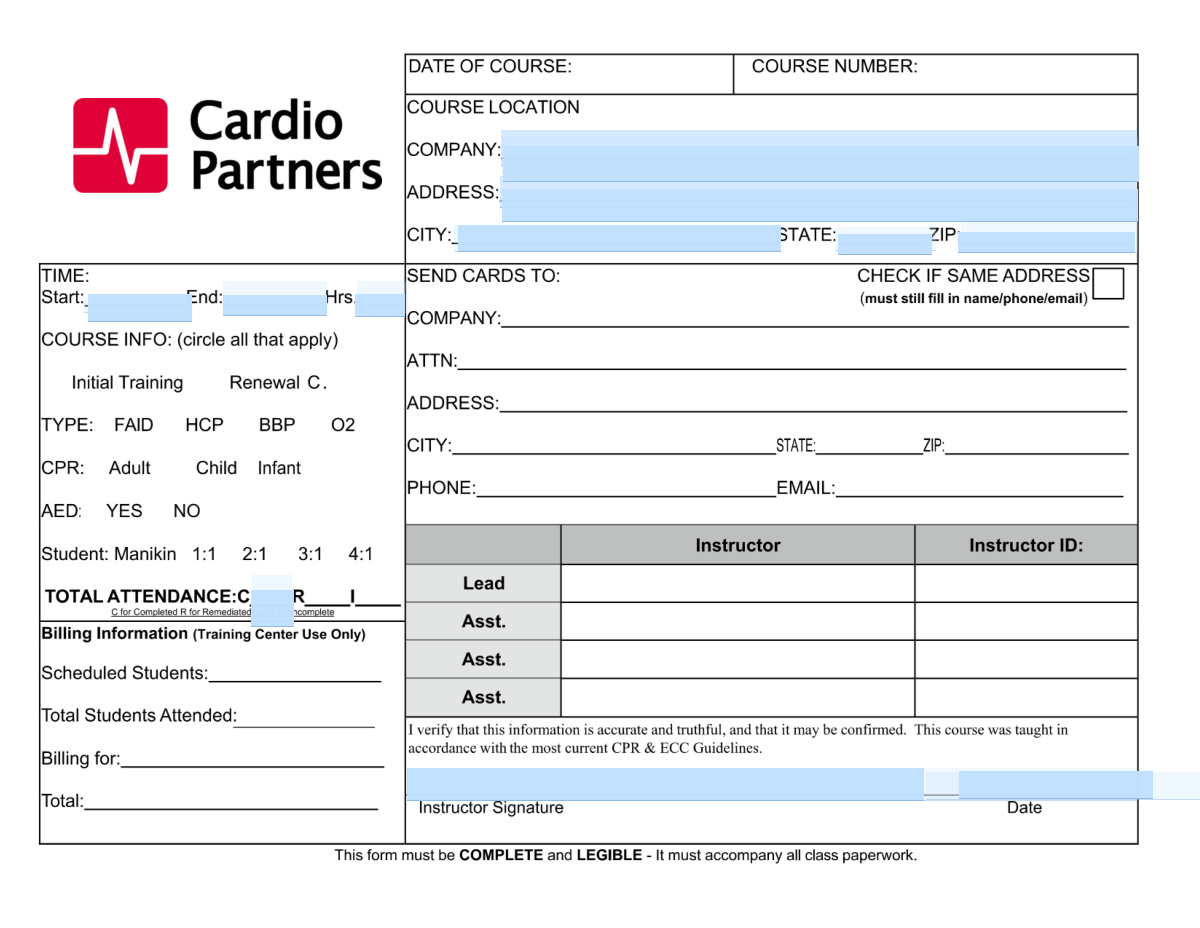
The Course Roster and Location Registration Form is an official document used by instructors and training coordinators to capture essential course logistics—including the venue address, course start and end times, and a roster of student names, emails, and phone numbers. It ensures accurate record-keeping for certification, compliance, and attendance tracking purposes. Properly completed rosters are critical for issuing participant cards and maintaining training records. Today, this form can be filled out quickly and accurately using AI-powered services like Instafill.ai, which can also convert non-fillable PDF versions into interactive fillable forms.
Our AI automatically handles information lookup, data retrieval, formatting, and form filling.
It takes less than a minute to fill out Course Roster Form using our AI form filling.
Securely upload your data. Information is encrypted in transit and deleted immediately after the form is filled out.

Form specifications

Form name: Course Roster and Location Registration Form
Number of pages: 2
Language: English
main-image

Instafill Demo: filling out a legal form in seconds

How to Fill Out Course Roster Form Online for Free in 2026

Are you looking to fill out a COURSE ROSTER FORM form online quickly and accurately? Instafill.ai offers the #1 AI-powered PDF filling software of 2026, allowing you to complete your COURSE ROSTER FORM form in just 37 seconds or less.
Follow these steps to fill out your COURSE ROSTER FORM form online using Instafill.ai:
  1. 1 Navigate to Instafill.ai and upload or select the Course Roster and Location Registration Form to begin filling it out online.
  2. 2 Enter the course location details, including the company or organization name, street address, city, state, and ZIP code in the designated fields.
  3. 3 Provide the course timing information by entering the start time, end time, and total duration of the course in hours.
  4. 4 Fill in the roster section by entering each participant's full name exactly as it should appear on their certification card for rows 1 through 6.
  5. 5 Enter the contact information for each participant, including their email address and phone number, for the applicable roster rows.
  6. 6 Review all entered information for accuracy, ensuring names, contact details, and course logistics are correct before submitting.
  7. 7 Save or download the completed form and submit it to the appropriate training coordinator or certification authority as required.

Our AI-powered system ensures each field is filled out correctly, reducing errors and saving you time.

Why Choose Instafill.ai for Your Fillable Course Roster Form Form?

Speed

Complete your Course Roster Form in as little as 37 seconds.

Up-to-Date

Always use the latest 2026 Course Roster Form form version.

Cost-effective

No need to hire expensive lawyers.

Accuracy

Our AI performs 10 compliance checks to ensure your form is error-free.

Security

Your personal information is protected with bank-level encryption.

Frequently Asked Questions About Form Course Roster Form

This form is a course roster used to register and track participants attending a training or certification course. It captures the course location, timing, and attendee contact information so that completion cards or certificates can be issued accurately.

This form is typically completed by a course instructor, training coordinator, or administrator who is organizing or hosting the course. Individual attendees may also be asked to provide their own name, email, and phone number for their respective roster row.

Enter the name of the company or organization hosting the course, followed by the full street address (including suite or room number if applicable), city, two-letter state abbreviation, and ZIP or ZIP+4 code. All fields should reflect the physical location where the course is being held.

The Course Duration field should be filled in only after you have entered both the Course Start Time and Course End Time. Simply calculate the total number of hours between the start and end times and enter that value (e.g., if the course runs from 9:00 AM to 1:00 PM, enter 4 hours).

The names entered in each roster row are used directly to generate completion cards or certificates. Any spelling errors or variations could result in an incorrectly printed card, which may cause issues with official records or employer verification.

Based on the visible form fields, this roster accommodates at least 6 participants (Rows 1 through 6). If your course has more attendees, you may need to use additional roster sheets or pages.

While the form includes email and phone fields for each participant, whether they are strictly required depends on the issuing organization's policy. It is best practice to fill in all available contact information to ensure participants can be reached if there are any issues with their registration or card.

Enter phone numbers in a standard format such as (555) 555-5555 or 555-555-5555. Including the area code is important to ensure the contact information is complete and usable.

Yes! AI-powered services like Instafill.ai can automatically fill in form fields accurately, saving you significant time especially when entering repetitive information for multiple participants. This is particularly helpful for training coordinators managing large rosters.

Simply visit Instafill.ai, upload your course roster PDF, and the AI will guide you through filling in all the required fields — including course location, timing, and participant details — quickly and accurately. Once complete, you can download and submit the filled form.

If your PDF is a flat, non-fillable document, Instafill.ai can convert it into an interactive fillable form so you can type directly into the fields. This eliminates the need to print and handwrite the information, making the process faster and more professional.

Contact the issuing organization or training administrator as soon as possible to request a correction before the completion cards are generated. Providing documentation of the correct name (such as a government-issued ID) may be required.

No, each course session should have its own separate roster form with the specific course date, time, and location filled in. Using a single form for multiple sessions could cause confusion and errors in participant records.

Enter times in a clear, consistent format such as 12-hour (e.g., 9:00 AM, 1:30 PM) or 24-hour format (e.g., 09:00, 13:30). Be consistent between the start and end time fields to avoid confusion when calculating course duration.

Submission instructions depend on the organization or certifying body that issued the form. Typically, completed rosters are submitted to the training coordinator, course sponsor, or certifying agency — either by email, fax, or through an online portal. Check the form's accompanying instructions or contact the issuing organization for specific submission details.

Compliance Course Roster Form
Validation Checks by Instafill.ai

1
Course Location Company Name is Not Empty
Validates that the Company field for the course location is filled in and contains a meaningful value rather than whitespace or placeholder text. The company name identifies the hosting organization and is essential for record-keeping and card issuance. If this field is left blank, the course location cannot be properly documented, which may invalidate the training record.
2
Course Location Address Contains Street-Level Detail
Checks that the Address field includes a recognizable street address format, such as a numeric street number followed by a street name. A complete address is required to verify the physical location where training took place, which may be subject to audit or accreditation review. Entries that contain only a city name, PO Box, or vague descriptions should be flagged for correction.
3
State Field Uses Valid Two-Letter Postal Abbreviation
Validates that the State field contains a recognized two-letter U.S. postal abbreviation (e.g., CA, TX, NY) or a valid Canadian province code. Standardized state codes ensure consistency in records and prevent mismatches when the data is processed or exported to certification systems. Entries with full state names, misspellings, or invalid codes should be rejected and corrected to the proper abbreviation.
4
ZIP Code Matches Valid US Postal Format
Ensures the ZIP field contains either a standard 5-digit ZIP code or a ZIP+4 code in the format XXXXX-XXXX, using only numeric characters and an optional hyphen. An improperly formatted ZIP code can cause address verification failures and prevent accurate geographic tracking of course locations. Entries containing letters, extra characters, or fewer than five digits should be flagged as invalid.
5
ZIP Code is Consistent with the Provided State
Cross-validates that the ZIP code entered corresponds to the state listed in the State field, using known ZIP code range mappings by state. Mismatches between ZIP and state often indicate a data entry error that could compromise the accuracy of the course location record. If the ZIP code falls outside the expected range for the given state, the submission should be flagged for manual review.
6
Course Start Time and End Time Are Both Present or Both Absent
Validates that the Course Start Time and Course End Time fields are either both filled in or both left blank, ensuring logical completeness of the time range. Providing only one of the two times creates an incomplete record that cannot be used to verify course duration or scheduling. If only one field is populated, the form should prompt the user to complete the missing time field.
7
Course End Time is Later Than Course Start Time
Checks that the Course End Time is chronologically after the Course Start Time on the same day, ensuring the time range is logically valid. An end time that precedes or equals the start time would indicate a data entry error and would make the course duration calculation meaningless. If the end time is not later than the start time, the submission should be rejected with a prompt to correct the values.
8
Course Duration is Only Filled When Start and End Times Are Present
Validates that the Course Duration (Hrs) field is populated only when both Course Start Time and Course End Time have been provided, as specified in the field instructions. Entering a duration without corresponding start and end times creates an unverifiable record that cannot be cross-checked for accuracy. If duration is filled but either time field is missing, the form should flag the inconsistency and require the missing time fields to be completed.
9
Course Duration Matches the Calculated Difference Between Start and End Times
Cross-validates that the manually entered Course Duration (Hrs) is consistent with the arithmetic difference between the Course Start Time and Course End Time. Discrepancies between the stated duration and the calculated time span may indicate a transcription error or an attempt to misrepresent the length of training. If the entered duration differs from the calculated value by more than a reasonable rounding threshold (e.g., 0.25 hours), the submission should be flagged for review.
10
At Least One Roster Row Contains a Participant Name
Ensures that a minimum of one roster row (Rows 1 through 6) has a participant name entered, confirming that the form represents an actual course with attendees. Submitting a course record with no roster entries would create an empty or meaningless training record in the system. If all name fields across all roster rows are blank, the form should be rejected with a message requiring at least one participant to be listed.
11
Roster Participant Names Contain Both First and Last Name
Validates that each populated Name field across all roster rows contains at least two words, representing a first and last name as required for card issuance. Single-word entries may represent incomplete names that would result in improperly formatted certification cards. Any name field containing only one word or consisting entirely of initials should be flagged for the submitter to provide the full legal name.
12
Roster Email Addresses Are in Valid Format
Checks that all populated email fields across roster rows conform to a standard email address format, including a local part, an '@' symbol, a domain name, and a valid top-level domain (e.g., [email protected]). Invalid email addresses will prevent the system from delivering certification cards or confirmation notices to participants. Any email field that does not match the expected pattern should be flagged and the submitter prompted to correct the address.
13
Roster Phone Numbers Are in a Recognizable Format
Validates that all populated phone number fields across roster rows contain a valid North American phone number, such as a 10-digit number with optional formatting characters like parentheses, spaces, or hyphens (e.g., (555) 123-4567 or 555-123-4567). Phone numbers with fewer than 10 digits, excessive characters, or non-numeric content other than standard separators should be flagged as invalid. Accurate phone numbers are important for follow-up communications and participant verification.
14
Email and Phone Are Not Entered for Rows Without a Name
Ensures that no email or phone data is entered in a roster row where the corresponding Name field is blank, preventing orphaned contact information from being associated with an unnamed participant. Orphaned data in empty rows can cause processing errors or create incomplete records in the certification database. If an email or phone is detected in a row with no name, the form should prompt the user to either add the participant's name or clear the contact fields for that row.
15
No Duplicate Participant Names Appear Across Roster Rows
Checks that the same full name does not appear more than once across all six roster rows, which would likely indicate a duplicate data entry error. Duplicate entries could result in multiple certification cards being issued to the same individual or inflate reported attendance numbers. If a duplicate name is detected, the form should alert the submitter and ask them to verify whether the entries represent different individuals or remove the duplicate.
16
No Duplicate Email Addresses Appear Across Roster Rows
Validates that each email address entered across all roster rows is unique, ensuring that no two participants share the same email in a single course submission. Duplicate email addresses may indicate a data entry error where the same person was listed twice, or could cause delivery conflicts when sending certification materials. If a duplicate email is found, the submission should be flagged so the submitter can confirm whether the entries are intentional or correct the error.

Common Mistakes in Completing Course Roster Form

Entering an incorrect or abbreviated company name

People often enter a shortened nickname or abbreviation of their organization instead of the full legal or official company name for the course location. This can cause confusion when verifying the training site or issuing certificates. Always use the complete, official name of the company or organization exactly as it appears on official documents. AI-powered form filling tools like Instafill.ai can help by auto-populating the correct company name from stored records, reducing the chance of inconsistency.

Omitting suite, room, or floor number in the address field

Submitters frequently enter only the street number and street name, forgetting to include the suite, room, or floor number when the course is held inside a larger building. This can make it difficult for attendees or administrators to locate the exact course venue. Always include any secondary address details such as 'Suite 200' or 'Room 4B' in the address field. Double-check the full address before submission to ensure it is complete and unambiguous.

Using the full state name instead of the two-letter postal abbreviation

A common mistake is typing out the full state name (e.g., 'California') instead of the required two-letter postal abbreviation (e.g., 'CA'). This can cause data processing errors or mismatches in automated systems that expect standardized abbreviations. Always use the official USPS two-letter state code in the State field. Tools like Instafill.ai can automatically format and validate state entries to ensure the correct abbreviation is used.

Entering an incomplete or incorrectly formatted ZIP code

People often enter only part of a ZIP code, use a ZIP code from memory that is slightly wrong, or forget to include the extended ZIP+4 format when required. An incorrect ZIP code can cause mail delivery issues or location verification failures. Always verify the exact ZIP or ZIP+4 code for the course location using a reliable source such as the USPS website. Instafill.ai can validate ZIP codes in real time to flag errors before submission.

Using inconsistent or ambiguous time formats for course start and end times

Submitters frequently mix 12-hour and 24-hour time formats, forget to include AM/PM designations, or use non-standard separators (e.g., '9.00' instead of '9:00 AM'). This ambiguity can lead to scheduling confusion or errors in official records. Always use a consistent, clear time format—preferably specifying AM or PM—for both the start and end time fields. Review both fields together to ensure they are logically consistent with each other.

Calculating course duration incorrectly or leaving it blank

Many people either skip the Course Duration (Hrs) field entirely or calculate the hours incorrectly, especially when the course spans a lunch break or crosses noon (e.g., confusing a 9:00 AM to 1:00 PM course as 5 hours instead of 4). The duration field should only be filled when both start and end times are provided, and it must accurately reflect the net instructional hours. Double-check your arithmetic and account for any breaks that may not count toward total course hours. Instafill.ai can automatically calculate duration based on the entered start and end times to eliminate manual errors.

Entering a nickname or informal name instead of the full legal name on the roster

Students or administrators often enter a preferred name, nickname, or partial name (e.g., 'Mike' instead of 'Michael James Smith') in the roster name fields, which can cause the certification card to be issued with an incorrect name. Since the name on the card must match official identification, this can create problems during audits or when verifying credentials. Always enter the participant's full legal name—first, middle initial if applicable, and last name—exactly as it should appear on their certification card.

Entering an invalid or misspelled email address for roster participants

A frequent error is mistyping an email address—such as omitting the '@' symbol, misspelling the domain (e.g., 'gmial.com' instead of 'gmail.com'), or using an outdated address—which prevents important course confirmation or certification emails from reaching the participant. This mistake often goes unnoticed until after submission. Always double-check each email address for correct spelling, proper format, and current validity before submitting the form. Instafill.ai can validate email format in real time to catch typos immediately.

Entering phone numbers in inconsistent or non-standard formats

Submitters enter phone numbers in a wide variety of formats—with or without dashes, parentheses, spaces, or country codes—which can cause issues in systems that expect a specific format (e.g., '555-123-4567' vs. '(555) 123 4567' vs. '15551234567'). Inconsistent formatting can also make it harder to contact participants if follow-up is needed. Use a consistent, standard format for all phone number fields, such as '555-123-4567' or the format specified by the form's instructions. Instafill.ai can automatically normalize phone number formatting across all roster rows.

Leaving roster rows partially filled or skipping required fields

A common mistake is filling in a participant's name but leaving their email or phone number blank, or vice versa, resulting in an incomplete roster entry. Incomplete records can delay certification processing and make it impossible to contact participants with important updates. For every roster row that is used, ensure that the name, email, and phone number fields are all fully and accurately completed. Review each row carefully before submission to confirm no fields have been accidentally skipped.

Copying and pasting the same participant's information into multiple roster rows

When filling out multiple roster rows quickly, people sometimes accidentally duplicate a participant's name, email, or phone number across two or more rows, either through copy-paste errors or inattention. This results in one person being registered multiple times while other participants are omitted from the roster. Carefully review all roster rows after entry to ensure each row contains unique participant information. Instafill.ai can flag duplicate entries across roster rows to help prevent this error.

Entering the wrong city or a city that does not match the ZIP code

Submitters sometimes enter a nearby city name or the city where their main office is located rather than the actual city of the course venue, or they enter a city that does not correspond to the ZIP code provided. This mismatch can cause administrative confusion and may invalidate the course location record. Always verify that the city name matches the physical address of the course location and is consistent with the ZIP code entered. Cross-referencing with a mapping tool or the USPS ZIP code lookup can help ensure accuracy.
Saved over 80 hours a year

“I was never sure if my IRS forms like W-9 were filled correctly. Now, I can complete the forms accurately without any external help.”

Kevin Martin Green

Your data stays secure with advanced protection from Instafill and our subprocessors

Robust compliance program

Transparent business model

You’re not the product. You always know where your data is and what it is processed for.

ISO 27001, HIPAA, and GDPR

Our subprocesses adhere to multiple compliance standards, including but not limited to ISO 27001, HIPAA, and GDPR.

Security & privacy by design

We consider security and privacy from the initial design phase of any new service or functionality. It’s not an afterthought, it’s built-in, including support for two-factor authentication (2FA) to further protect your account.

Fill out Course Roster Form with Instafill.ai

Worried about filling PDFs wrong? Instafill securely fills course-roster-and-location-registration-form forms, ensuring each field is accurate.