Yes! You can use AI to fill out ACORD 125, Commercial Insurance Application
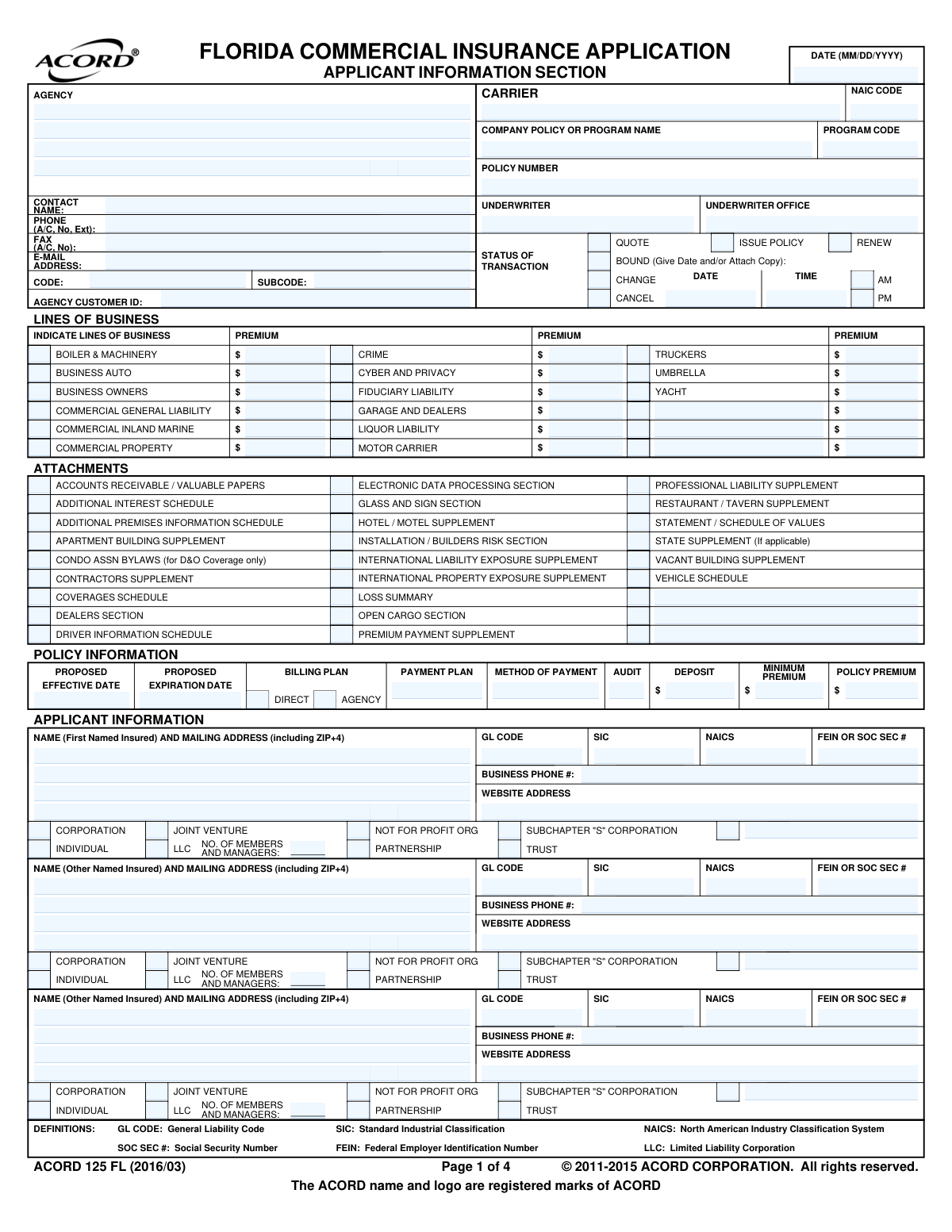
ACORD 125, the Commercial Insurance Application, is a cornerstone document used throughout the insurance industry to gather essential underwriting information for a business seeking commercial coverage. It provides a standardized format for collecting details about the applicant's entity type, business operations, physical premises, and prior insurance and loss history, which is vital for insurers to accurately assess risk and quote policies. Today, this form can be filled out quickly and accurately using AI-powered services like Instafill.ai, which can also convert non-fillable PDF versions into interactive fillable forms.
Our AI automatically handles information lookup, data retrieval, formatting, and form filling.
It takes less than a minute to fill out ACORD 125 using our AI form filling.
Securely upload your data. Information is encrypted in transit and deleted immediately after the form is filled out.
Form specifications
| Form name: | ACORD 125, Commercial Insurance Application |
| Number of fields: | 603 |
| Number of pages: | 4 |
| Language: | English |
| Categories: | ACORD forms, commercial forms, insurance application forms, insurance forms |
Instafill Demo: How to fill out PDF forms in seconds with AI
How to Fill Out ACORD 125 Online for Free in 2026
Are you looking to fill out a ACORD 125 form online quickly and accurately? Instafill.ai offers the #1 AI-powered PDF filling software of 2026, allowing you to complete your ACORD 125 form in just 37 seconds or less.
Follow these steps to fill out your ACORD 125 form online using Instafill.ai:
- 1 Navigate to Instafill.ai and upload your ACORD 125 PDF or select the template to begin.
- 2 Provide the Agency, Carrier, and Policy Information, and indicate the status of the transaction (e.g., Quote, Issue Policy).
- 3 Complete the applicant information sections, including details for all Named Insureds, their legal entity type, and contact information.
- 4 Detail all business premises, including addresses, a description of operations at each location, employee counts, and annual revenues.
- 5 Answer all questions in the General Information section and provide a complete history of prior insurance carriers and any past losses or claims.
- 6 Review all information entered by the AI and yourself for accuracy, then have the applicant and producer (agent) digitally sign and date the form to finalize the submission.
Our AI-powered system ensures each field is filled out correctly, reducing errors and saving you time.
Why Choose Instafill.ai for Your Fillable ACORD 125 Form?
Speed
Complete your ACORD 125 in as little as 37 seconds.
Up-to-Date
Always use the latest 2026 ACORD 125 form version.
Cost-effective
No need to hire expensive lawyers.
Accuracy
Our AI performs 10 compliance checks to ensure your form is error-free.
Security
Your personal information is protected with bank-level encryption.
Frequently Asked Questions About Form ACORD 125
This is a general commercial insurance application used by insurance agencies to gather information from a business to quote, issue, or renew various types of commercial insurance policies.
An insurance agent or producer typically completes this form on behalf of their client, the business applicant, using information provided by the client.
The 'First Named Insured' is the primary entity or individual on the policy. 'Other Named Insureds' are additional entities or individuals that are also covered under the same policy.
In the 'Line of Business' section, check the box next to each coverage you are applying for, such as 'Commercial General Liability' or 'Business Auto', and enter the premium amount if you have a quote.
These are standard codes that classify your business's industry. You can find your NAICS code on the US Census Bureau website, and your accountant or prior insurance documents may also have this information.
You should check the box for the 'Additional Premises Information Schedule' in the Attachments section and complete that separate schedule to list all other business locations.
An 'Additional Insured' is typically added for liability protection (e.g., a landlord). A 'Loss Payee' or 'Lienholder' has a financial interest in your property (e.g., a bank that financed your equipment) and gets paid for property damage claims.
Insurance carriers use your prior coverage and claims history to evaluate the risk of insuring your business, which is a key factor in determining your eligibility and premium rates.
The NAIC code is a unique five-digit number assigned to each insurance company by the National Association of Insurance Commissioners. It helps regulators and agents identify the specific carrier.
No, you only need to attach the supplements that are relevant to your specific business operations. For example, a restaurant would attach the 'Restaurant / Tavern Supplement'.
Yes, services like Instafill.ai use AI to accurately auto-fill form fields from your existing data sources, which saves significant time and helps prevent errors.
Simply upload the form to the Instafill.ai platform. The AI will make the document fillable, and you can then connect your data to have the information populated automatically.
You can use a service like Instafill.ai, which is designed to convert non-fillable PDFs into interactive, fillable forms that you can easily complete and manage online.
Compliance ACORD 125
Validation Checks by Instafill.ai
1
Validates FEIN or Social Security Number Format
This check ensures that the 'FEIN or Social Security #' field for each named insured is entered in a valid format. It must be either a 9-digit Federal Employer Identification Number (XX-XXXXXXX) or a 9-digit Social Security Number (XXX-XX-XXXX). Correctly formatted identification numbers are critical for legal entity verification, credit checks, and regulatory reporting. A failure would prevent proper identification of the insured and could halt the application process.
2
Ensures Logical Policy Period Dates
This validation confirms that the 'Proposed Expiration Date' is after the 'Proposed Effective Date'. A policy period cannot end before it begins, and this check prevents a fundamental logical error in defining the coverage term. If this validation fails, the form submission should be rejected as the policy term is invalid and cannot be processed by the carrier's system.
3
Requires Premium for Selected Line of Business
This check verifies that if a checkbox for a specific 'Line of Business' (e.g., 'Business Auto') is selected, the corresponding premium field (e.g., 'Business Auto Premium') contains a valid monetary value. This is important to ensure that every requested coverage has an associated premium for rating and billing. A failure would result in an incomplete quote or policy issuance, as coverage cannot be granted without a premium.
4
Enforces Single Transaction Status Selection
This validation ensures that only one checkbox from the 'Status of Transaction' section (e.g., QUOTE, ISSUE POLICY, RENEW) is selected. The purpose of the submission must be clear and unambiguous for correct processing. Selecting multiple statuses would create confusion, leading to processing errors or delays; the submission should be flagged for correction.
5
Conditional Requirement for Bound Transaction Details
This check ensures that if the 'BOUND' checkbox is selected, the 'Transaction Date' and 'Transaction Time' fields are mandatory. Binding coverage is a time-sensitive legal event that requires precise documentation for E&O purposes and to establish the exact moment coverage begins. If these fields are missing when 'BOUND' is checked, the submission is incomplete and legally insufficient.
6
Enforces Single Entity Type Selection for Named Insureds
This validation confirms that for each named insured, only one legal entity type checkbox (e.g., 'CORPORATION', 'INDIVIDUAL', 'LLC') is selected. An entity can only have one primary legal structure, and this information is fundamental for determining legal liability, ownership, and applicable regulations. A submission with multiple or no entity types selected is ambiguous and must be corrected.
7
Conditional Requirement for LLC Member/Manager Count
This check verifies that if the 'LLC' entity type is selected for a named insured, the corresponding 'Number of Members/Managers' field is filled with a numeric value. This information is often required for underwriting and rating LLCs, as the number of principals can affect risk exposure. Failure to provide this detail for an LLC will result in an incomplete application and a request for more information.
8
Validates Email Address Format
This check ensures that all email address fields (e.g., 'E‑mail Address', 'Primary E-mail Address') conform to a standard format (e.g., [email protected]). Valid email addresses are essential for delivering policy documents, notifications, and other critical correspondence electronically. An invalid format would lead to communication failures, potentially causing the insured to miss important information.
9
Validates ZIP/Postal Code Format
This validation ensures all ZIP code fields are in a valid format, typically 5 digits or 9 digits (ZIP+4). Accurate ZIP codes are crucial for mail delivery, calculating location-based rates (e.g., for property or auto), and determining applicable taxes or territories. An invalid ZIP code will cause processing errors and may result in incorrect rating or returned mail.
10
Validates NAIC Code Format
This check verifies that the 'NAIC Code' field contains a 5-digit numeric code. The NAIC code is a standard, unique identifier for insurance companies used for regulatory and reporting purposes. An incorrect or improperly formatted code would prevent the system from identifying the correct carrier, leading to data mismatches and processing failure.
11
Ensures Logical Consistency of Premises Area
This validation checks that for any given premises, the 'Occupied Area (sq ft)' does not exceed the 'Total Building Area (sq ft)'. This is a logical check to ensure data accuracy and prevent nonsensical entries. If the occupied area is larger than the total area, it indicates a data entry error that must be corrected before underwriting can accurately assess the risk.
12
Requires Explanation for Adverse History Questions
This check ensures that if a 'Yes' ('Y') response is given to a risk-related question (e.g., 'Any policy or coverage declined, cancelled or non-renewed...'), the corresponding explanation field must be filled. Underwriters require details on all adverse history to properly assess the risk and make an informed decision. A 'Yes' answer without an explanation makes the application incomplete and will trigger a follow-up or rejection.
13
Verifies Business Start Date Precedes Policy Effective Date
This validation confirms that the 'Business Start Date' is on or before the 'Proposed Effective Date' of the policy. A business cannot be insured before it legally exists or begins operations. This check prevents logical impossibilities and ensures the policy covers a valid operational period, and a failure would require correction of one or both dates.
14
Validates Sum of Premium and Deposit Amounts
This check ensures that the sum of the 'Deposit' and 'Audit Premium / Audit Amount' does not exceed the 'Policy Premium'. The total premium is the maximum expected amount, and the components should not logically add up to more than the whole. This validation prevents accounting errors and ensures the financial details of the policy are consistent and correct.
Common Mistakes in Completing ACORD 125
Users often enter a premium amount for a specific coverage, like 'Business Auto Premium', but forget to check the corresponding 'Business Auto' box, or vice-versa. This creates ambiguity for the underwriter, causing delays as they must seek clarification on which coverages are actually being requested. To avoid this, always ensure that for every premium amount entered, the associated line of business checkbox is also selected. AI-powered tools like Instafill.ai can help prevent this by validating that a premium is only entered when its corresponding coverage is checked.
The form contains numerous yes/no questions where a 'Yes' answer requires a detailed explanation in a subsequent field (e.g., 'Any past losses or claims...?'). Applicants frequently check 'Yes' but fail to provide the mandatory explanation. This automatically flags the application for manual review and follow-up, significantly delaying the quoting and binding process. Always double-check that any 'Yes' answer is accompanied by a complete and clear explanation in the designated text box.
Applicants often enter a DBA (Doing Business As) name instead of the full legal entity name, or make typos in the 'First Named Insured' field. This is a critical error that can lead to the policy being issued incorrectly, creating significant legal and claims-handling issues down the line. To prevent this, the name must be entered exactly as it appears on official business registration documents. Using a tool like Instafill.ai can help by saving and accurately auto-filling correct legal entity names across multiple forms.
The form has conditional fields, such as 'Number of Members/Managers', which should only be filled if the 'LLC' entity type is selected. A common mistake is either checking 'LLC' and leaving the number blank, or providing a number without checking the 'LLC' box. This incomplete data forces underwriters to halt processing and request clarification. Ensure that when an entity type like LLC is chosen, all its dependent fields are completed correctly.
The sections for prior insurance history and loss history are critical for underwriting but are frequently left blank or filled out with partial information. Applicants may forget policy numbers, effective dates, or fail to detail past claims, which is a major red flag for underwriters. This almost always results in an immediate request for the missing information, halting the entire quoting process. If the form is a non-fillable PDF, a tool like Instafill.ai can convert it to a fillable version, making it easier to input this detailed information.
When adding a mortgagee, lienholder, or other additional interest, users often provide just a name but omit the full address, loan number, or specific interest type (e.g., 'Lender's Loss Payable'). This prevents the carrier from properly issuing certificates or endorsements, potentially violating contractual obligations with the third party. It is crucial to complete all relevant fields, including Rank, Name, Address, and Reference/Loan Number, to ensure the interest is recorded correctly.
The form requires SIC and NAICS codes, which are often confused, guessed, or looked up from unreliable sources. Entering an incorrect code can lead to misclassification of the business risk, resulting in inaccurate premiums or even denial of coverage if the true operation is ineligible. Applicants should use official government or carrier-provided resources to find the most accurate codes for their primary business activity. AI form-fillers can help by suggesting correct codes based on the business description.
An applicant may check a box in the 'Attachments' section, such as 'VEHICLE SCHEDULE' or 'LOSS SUMMARY', but then forget to actually attach the corresponding document to their submission. This creates an incomplete application that cannot be processed until the missing documents are provided by the agent. It is essential to use the attachment checklist as a final review step to ensure all indicated documents are included with the application.
Users sometimes check multiple boxes in the 'Status of Transaction' section, such as both 'QUOTE' and 'ISSUE POLICY', or 'BOUND' without providing a date. This creates confusion about the agent's intent and the current state of the submission, requiring follow-up to clarify the action needed. Only one status should be selected, and if 'BOUND' is chosen, the transaction date and time must be included to make the request actionable.
The form allows for detailing multiple premises, and users often enter inconsistent or incomplete data, such as missing square footage for one location or forgetting to specify the 'Interest' (Owner/Tenant) for another. This lack of uniformity makes it difficult for underwriters to assess the total risk exposure accurately and can lead to rating errors. Each premises section should be filled out with the same level of detail and care. Smart tools like Instafill.ai can help maintain consistency by carrying over relevant data and flagging empty required fields across similar sections.
Saved over 80 hours a year
“I was never sure if my IRS forms like W-9 were filled correctly. Now, I can complete the forms accurately without any external help.”
Kevin Martin Green
Your data stays secure with advanced protection from Instafill and our subprocessors

Robust compliance program
Transparent business model
You’re not the product. You always know where your data is and what it is processed for.
ISO 27001, HIPAA, and GDPR
Our subprocesses adhere to multiple compliance standards, including but not limited to ISO 27001, HIPAA, and GDPR.
Security & privacy by design
We consider security and privacy from the initial design phase of any new service or functionality. It’s not an afterthought, it’s built-in, including support for two-factor authentication (2FA) to further protect your account.
Fill out ACORD 125 with Instafill.ai
Worried about filling PDFs wrong? Instafill securely fills acord-125-commercial-insurance-application forms, ensuring each field is accurate.