Yes! You can use AI to fill out R.I.S. Business Quote Questionnaire
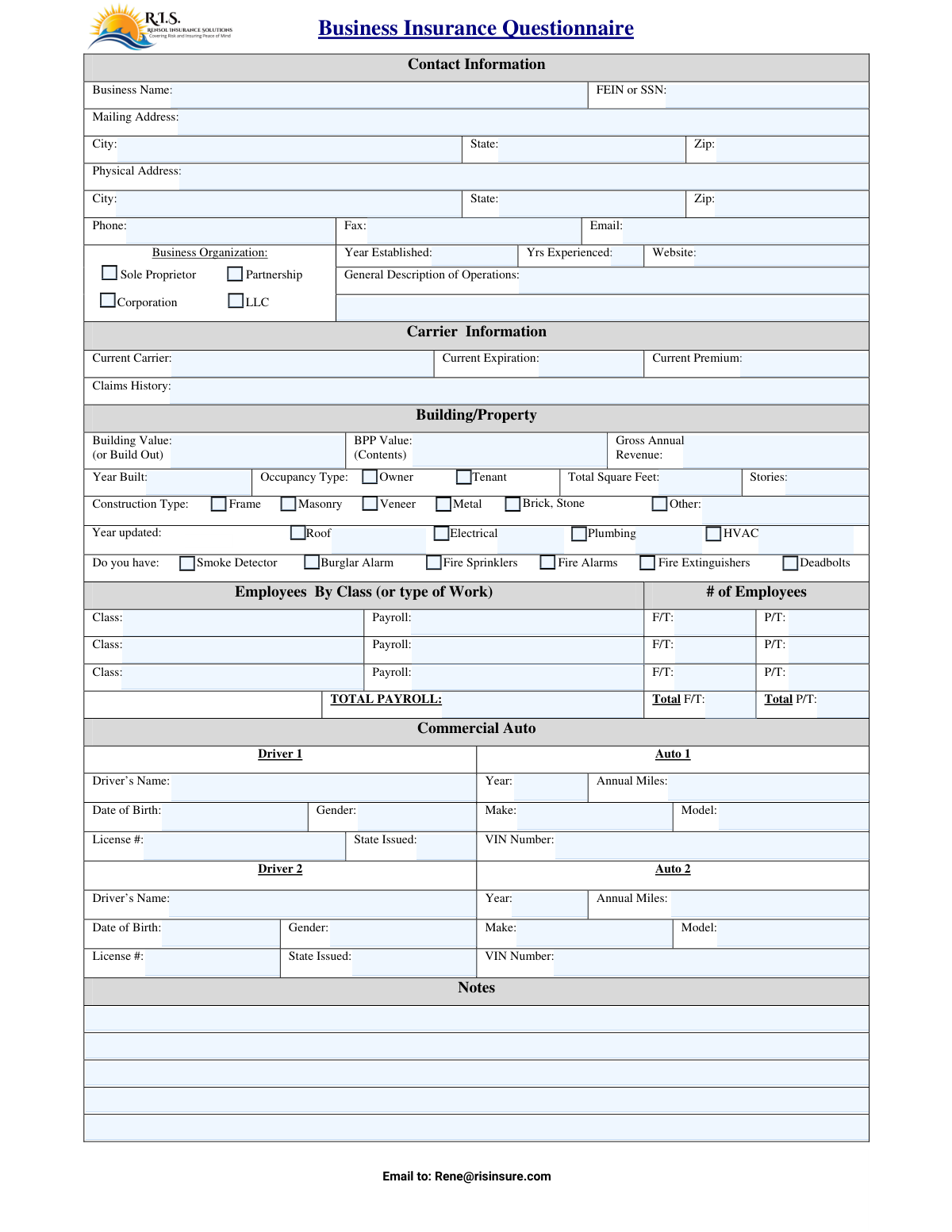
The R.I.S. Business Quote Questionnaire is a comprehensive form used by insurance providers to gather essential information about a business for the purpose of creating an insurance quote. It covers aspects like contact information, business operations, property details, employee data, and commercial auto information to assess risk and determine appropriate coverage. Completing this form accurately is crucial for obtaining a suitable and correctly priced insurance policy. Today, this form can be filled out quickly and accurately using AI-powered services like Instafill.ai, which can also convert non-fillable PDF versions into interactive fillable forms.
R.I.S. Business Quote Questionnaire is part of the
business insurance forms and insurance quote forms categories on Instafill.
Our AI automatically handles information lookup, data retrieval, formatting, and form filling.
It takes less than a minute to fill out R.I.S. Business Quote Questionnaire using our AI form filling.
Securely upload your data. Information is encrypted in transit and deleted immediately after the form is filled out.
Form specifications
| Form name: | R.I.S. Business Quote Questionnaire |
| Number of fields: | 95 |
| Number of pages: | 1 |
| Language: | English |
More forms in Business insurance forms
Instafill Demo: How to fill out PDF forms in seconds with AI
How to Fill Out R.I.S. Business Quote Questionnaire Online for Free in 2026
Are you looking to fill out a R.I.S. BUSINESS QUOTE QUESTIONNAIRE form online quickly and accurately? Instafill.ai offers the #1 AI-powered PDF filling software of 2026, allowing you to complete your R.I.S. BUSINESS QUOTE QUESTIONNAIRE form in just 37 seconds or less.
Follow these steps to fill out your R.I.S. BUSINESS QUOTE QUESTIONNAIRE form online using Instafill.ai:
- 1 Navigate to Instafill.ai and upload or select the R.I.S. Business Quote Questionnaire.
- 2 Allow the AI to scan and identify all the fields in the questionnaire, such as Business Name, FEIN, and property details.
- 3 Provide your business's contact and organizational information, including name, address, FEIN/SSN, and business structure.
- 4 Enter details about your business property, including building value, construction type, and annual revenue, as well as your current insurance and claims history.
- 5 Input information about your employees, including payroll, and provide details for any commercial vehicles and their drivers.
- 6 Carefully review all the entered information for accuracy. The AI can help flag any potential errors or missing fields before you finalize the document.
- 7 Securely download, print, or email the completed questionnaire directly to the recipient, such as [email protected], as indicated on the form.
Our AI-powered system ensures each field is filled out correctly, reducing errors and saving you time.
Why Choose Instafill.ai for Your Fillable R.I.S. Business Quote Questionnaire Form?
Speed
Complete your R.I.S. Business Quote Questionnaire in as little as 37 seconds.
Up-to-Date
Always use the latest 2026 R.I.S. Business Quote Questionnaire form version.
Cost-effective
No need to hire expensive lawyers.
Accuracy
Our AI performs 10 compliance checks to ensure your form is error-free.
Security
Your personal information is protected with bank-level encryption.
Frequently Asked Questions About Form R.I.S. Business Quote Questionnaire
This form is used to collect essential information about your business operations, property, and vehicles to provide you with an accurate business insurance quote from R.I.S.
Any business owner or authorized representative seeking a new business insurance quote should complete this form. This includes sole proprietors, partnerships, corporations, and LLCs.
Use your Federal Employer Identification Number (FEIN) if your business is a corporation, partnership, or LLC. If you operate as a sole proprietor, you can use your Social Security Number (SSN).
BPP stands for Business Personal Property. This is the total monetary value of your business's contents, such as equipment, furniture, inventory, and computers.
'Class' refers to the type of work employees do (e.g., clerical, sales, labor). You need to list the number of full-time (F/T) and part-time (P/T) employees and the total annual payroll for each class of work.
If your business does not own any vehicles for commercial use, you can leave the 'Commercial Auto' section blank. This section is only for businesses seeking commercial auto insurance.
You can submit the completed questionnaire by faxing it to 760-454-4606 or by emailing it to [email protected], as indicated at the bottom of the form.
To complete the form efficiently, have your business legal details, FEIN or SSN, gross annual revenue, property details (value, year built), employee payroll data, and vehicle information (if applicable) readily available.
If your building is older than 25 years, you must provide the year that the Roof, Electrical, Plumbing, and HVAC systems were last updated. This helps the insurer assess the property's condition.
For 'Year Established,' enter the current year. For 'Yrs Experienced,' enter your personal years of experience within your industry, as this is valuable information for the insurance underwriter.
Yes, services like Instafill.ai use AI to accurately auto-fill form fields with your saved business information, which can save you time and help prevent errors.
Simply upload the questionnaire to Instafill.ai. The platform will make the form fillable online, allowing you to type in your answers, save your progress, and then download or print the completed document.
If you have a non-fillable PDF, you can use a tool like Instafill.ai. It can convert flat PDFs into interactive, fillable forms that you can easily complete on your computer.
Provide a brief but clear summary of your business's primary activities. For example, 'Retail clothing store,' 'Residential plumbing contractor,' or 'Web design and marketing services.'
Compliance R.I.S. Business Quote Questionnaire
Validation Checks by Instafill.ai
1
Validates FEIN or SSN Format
This check ensures the Federal Employer Identification Number (FEIN) or Social Security Number (SSN) is entered in a valid format, typically as a 9-digit number. This is critical for correctly identifying the business entity for legal and insurance purposes. An invalid identifier will prevent the quote from being processed and may lead to incorrect risk assessment.
2
Ensures Valid Email Address Format
This validation confirms that the email address provided follows the standard '[email protected]' structure. A valid email is essential for sending the quote, policy documents, and other important communications to the client. If the format is incorrect, the business will not receive their quote or subsequent correspondence.
3
Logical Consistency Between Year Established and Years Experienced
This check verifies that the 'Yrs Experienced' value is not greater than the number of years the business has been established (Current Year - Year Established). This ensures the data is logical and credible, which is important for underwriting and assessing the business's stability and risk profile. Inconsistent data can flag the application for manual review or lead to an inaccurate quote.
4
Validates Zip Code Format
This validation ensures that all Zip Code fields contain either a 5-digit or 9-digit (ZIP+4) numeric value. Correct zip codes are crucial for accurately determining geographic risk factors, calculating premiums, and ensuring mail delivery. An invalid zip code will result in processing errors and could lead to an incorrect premium calculation.
5
Validates Vehicle Identification Number (VIN) Format
This check confirms that the Vehicle Identification Number (VIN) is a 17-character alphanumeric string, as per the international standard. A valid VIN is required to accurately identify the vehicle's specifications and history, which is fundamental for calculating commercial auto insurance premiums. An incorrect VIN will prevent the system from retrieving vehicle details and will halt the auto quoting process.
6
Verifies Driver is of Legal Driving Age
This validation calculates the driver's age based on the 'Date of Birth' provided to ensure they meet the minimum legal driving age requirements. Insuring an underage driver is illegal and presents an unacceptable risk. This check prevents the submission of non-compliant applications and protects both the insurer and the client.
7
Verifies Employee Count Summation
This check ensures that the sum of the individual 'F/T' (Full-Time) and 'P/T' (Part-Time) employee counts for each class correctly adds up to the 'Total F/T' and 'Total P/T' fields. Accurate employee counts are critical for calculating workers' compensation and liability premiums. A mismatch indicates a data entry error that must be corrected to ensure the final quote is accurate.
8
Verifies Total Payroll Calculation
This validation confirms that the 'TOTAL PAYROLL' field is the correct sum of all individual 'Payroll' amounts listed for each employee class. Payroll data is a primary factor in determining workers' compensation premiums, so its accuracy is paramount. An incorrect total will lead to a significantly flawed quote and potential compliance issues.
9
Ensures Business Name is Provided
This check verifies that the 'Business Name' field is not left empty, as it is a mandatory field for identifying the applicant. The business name is the primary identifier for the policy and all related correspondence. A submission without a business name is incomplete and cannot be processed.
10
Checks for Required Updates on Older Buildings
This validation checks if the 'Year Built' is more than 25 years ago. If it is, the system should verify that the 'Year updated' fields for key systems like Roof, Electrical, and HVAC are filled out. This information is vital for assessing property risk, as older, un-updated systems increase the likelihood of claims.
11
Validates Phone Number Format
This check ensures the 'Phone' number is entered in a recognizable format, such as a 10-digit number, optionally with parentheses, spaces, or hyphens. A valid phone number is a key piece of contact information needed for follow-up questions and communicating quote details. An invalid number hinders communication and can delay the application process.
12
Validates State Abbreviation Format
This check ensures that the 'State' fields for addresses and driver's licenses use a valid two-letter postal abbreviation. Correct state codes are essential for address verification, determining regulatory requirements, and calculating location-based risk. Using an invalid code will cause address validation to fail and may result in incorrect rating.
13
Requires Specification for 'Other' Construction Type
This validation rule ensures that if the 'Other' option is selected for 'Construction Type', the adjacent text field must be filled in with a description. The type of construction is a major factor in property insurance rating, and an undefined 'Other' type leaves a critical data point missing. This check forces the user to provide the necessary detail for an accurate risk assessment.
14
Ensures Complete Auto and Driver Information
This check verifies that if any information for a specific vehicle (e.g., 'Year', 'Make') is entered, then all corresponding required fields for that vehicle and its assigned driver (e.g., 'VIN Number', 'Driver's Name', 'Date of Birth') are also completed. Incomplete records for a vehicle or driver make it impossible to rate for commercial auto coverage. This rule enforces data integrity for the auto section of the quote.
Common Mistakes in Completing R.I.S. Business Quote Questionnaire
Applicants often provide an overly simplistic or ambiguous 'General Description of Operations,' such as 'consulting' or 'services.' This happens because they may not realize the level of detail needed for accurate risk assessment. A vague description can lead to misclassification, resulting in an incorrect premium quote or even the denial of a future claim if the actual operations are riskier than described. To avoid this, be as specific as possible about all services offered, materials used, and customer types served.
People frequently enter the same value for 'Year Established' and 'Yrs Experienced' or mix them up. A business may have been established recently, but the owner could have decades of industry experience, which is a crucial factor for underwriters. This confusion can misrepresent the stability and expertise of the business, potentially leading to higher premiums. Always list the year the legal business entity was formed under 'Year Established' and the primary owner's total years in that specific industry under 'Yrs Experienced.'
Business owners may intentionally or unintentionally undervalue their property ('Building Value') and its contents ('BPP Value') to lower their quoted premium. This is a significant risk, as it can lead to being severely underinsured in the event of a total loss, leaving the business unable to fully recover. To prevent this, calculate the full replacement cost for the building and create a detailed inventory of all business personal property, including equipment, furniture, and stock, to determine an accurate value.
This form requires breaking down employees by 'Class' (type of work) and their associated payroll, which is critical for calculating workers' compensation insurance. Common errors include lumping different job roles together, miscalculating payroll for each class, or making arithmetic errors in the totals. Such mistakes can lead to an inaccurate quote and significant penalties or back-payments after an end-of-year payroll audit. Carefully separate employees into distinct work classifications (e.g., 'Clerical,' 'Sales,' 'Driver') and double-check all payroll calculations.
When filling out the Commercial Auto section, applicants often make typos in the Vehicle Identification Number (VIN), misstate a driver's license number, or forget to list all employees who might drive a company vehicle. A single incorrect digit in a VIN can prevent the vehicle from being properly rated and insured, and failing to list a driver can result in a claim being denied. It is essential to gather all driver's licenses and vehicle registration documents to ensure every detail is entered accurately.
Many business owners, especially tenants, do not know the specific 'Construction Type' or the year that major systems like the roof or electrical were last updated. Guessing on this information can lead to an inaccurate property insurance rating. Property owners should consult their building records; tenants should request this information from their landlord. If the form is a non-fillable PDF, a tool like Instafill.ai can convert it into an interactive version, making it easier to fill and review these details.
Applicants may accidentally transpose numbers or provide an SSN when a Federal Employer Identification Number (FEIN) is required for their business structure (e.g., for a Corporation or LLC). This simple data entry error can cause significant delays in the quoting and binding process, as the insurer cannot verify the business's identity. Sole proprietors should use their SSN, while other entities must use their FEIN. AI-powered form fillers like Instafill.ai can help prevent this by validating number formats and saving correct information for future use.
The 'Current Carrier,' 'Current Expiration,' and 'Current Premium' fields are often left blank because the applicant doesn't have the information readily available. This data is vital for the agent to understand your insurance history, look for coverage gaps, and provide a competitive comparison quote. Without it, the agent is quoting in the dark, which may not result in the best possible terms. Before filling out the form, locate your current insurance policy's declarations page to ensure you can provide this information accurately.
Applicants sometimes enter their net income or profit instead of their 'Gross Annual Revenue.' Gross revenue represents the total income generated from all business activities before any expenses are deducted and is a key metric for rating general liability insurance. Providing the wrong figure can lead to an incorrect premium and potential compliance issues. Always refer to your business's profit and loss statement to find the correct top-line revenue figure for the last 12 months.
Saved over 80 hours a year
“I was never sure if my IRS forms like W-9 were filled correctly. Now, I can complete the forms accurately without any external help.”
Kevin Martin Green
Your data stays secure with advanced protection from Instafill and our subprocessors




Robust compliance program
Transparent business model
You’re not the product. You always know where your data is and what it is processed for.
ISO 27001, HIPAA, and GDPR
Our subprocesses adhere to multiple compliance standards, including but not limited to ISO 27001, HIPAA, and GDPR.
Security & privacy by design
We consider security and privacy from the initial design phase of any new service or functionality. It’s not an afterthought, it’s built-in, including support for two-factor authentication (2FA) to further protect your account.
Fill out R.I.S. Business Quote Questionnaire with Instafill.ai
Worried about filling PDFs wrong? Instafill securely fills ris-business-quote-questionnaire forms, ensuring each field is accurate.
