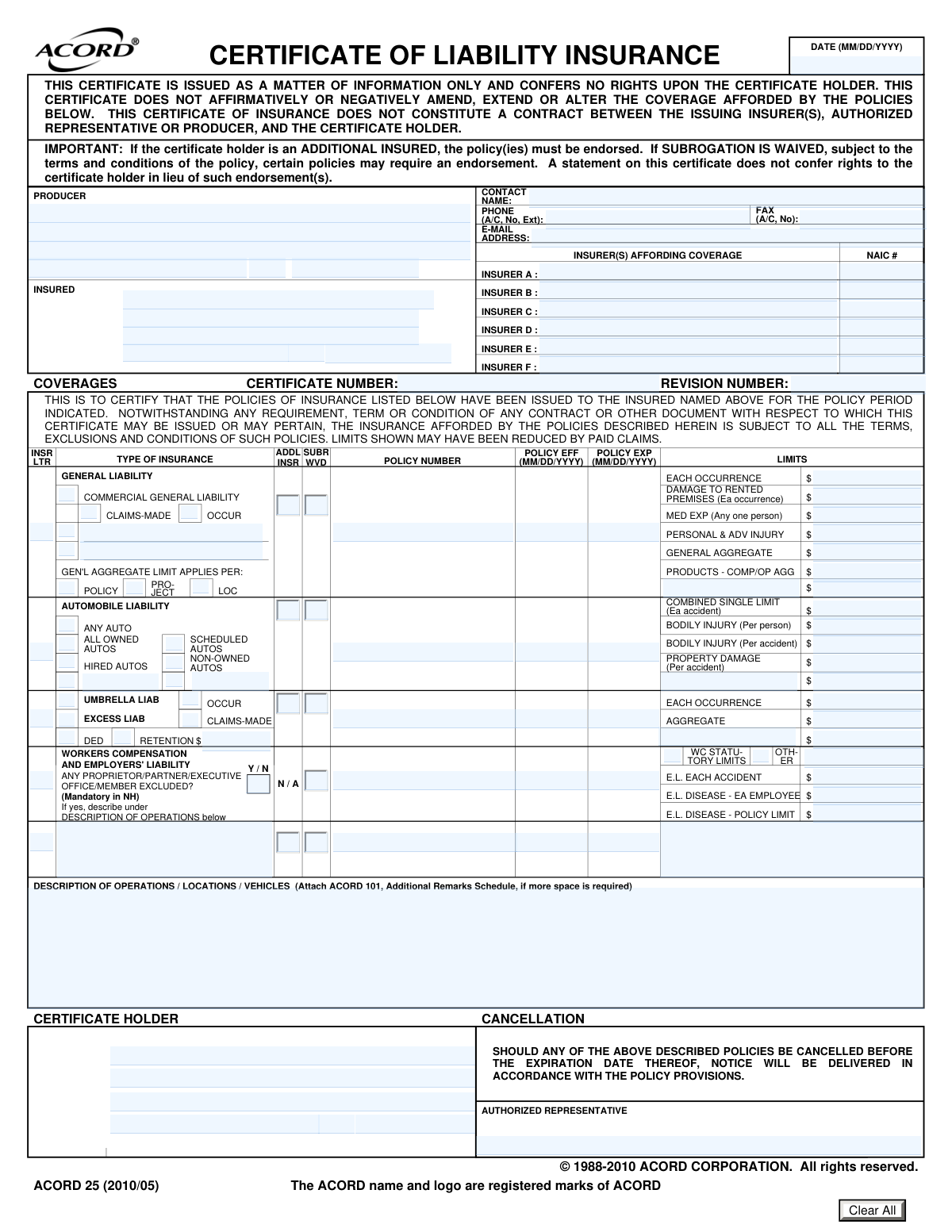
Yes! You can use AI to fill out ACORD 25, Certificate of Liability Insurance

The ACORD 25 form, officially known as the Certificate of Liability Insurance, is a document that summarizes an individual's or organization's insurance coverage. It is commonly used in business to provide proof of insurance to clients, contractors, or other stakeholders, detailing policy types like general liability, auto liability, and workers' compensation. This certificate is essential for verifying financial protection before entering into contracts or projects. Today, this form can be filled out quickly and accurately using AI-powered services like Instafill.ai, which can also convert non-fillable PDF versions into interactive fillable forms.
Our AI automatically handles information lookup, data retrieval, formatting, and form filling.
It takes less than a minute to fill out ACORD 25 using our AI form filling.
Securely upload your data. Information is encrypted in transit and deleted immediately after the form is filled out.

Form specifications

Form name: ACORD 25, Certificate of Liability Insurance
Number of pages: 1
Language: English
Categories: insurance forms, ACORD forms
main-image

Instafill Demo: How to fill out PDF forms in seconds with AI

How to Fill Out ACORD 25 Online for Free in 2026

Are you looking to fill out a ACORD 25 form online quickly and accurately? Instafill.ai offers the #1 AI-powered PDF filling software of 2026, allowing you to complete your ACORD 25 form in just 37 seconds or less.
Follow these steps to fill out your ACORD 25 form online using Instafill.ai:
  1. 1 Navigate to Instafill.ai and upload your ACORD 25 PDF or select it from the template library.
  2. 2 Provide the Producer (your insurance agent) and Insured (your business) information. The AI can help auto-fill this from your saved profile.
  3. 3 List the insurance companies (Insurers A, B, C, etc.) providing coverage and their corresponding NAIC numbers.
  4. 4 Detail the specific coverages, including policy numbers, effective/expiration dates, and liability limits for General Liability, Automobile Liability, Umbrella/Excess Liability, and Workers' Compensation.
  5. 5 In the 'Description of Operations' section, specify the nature of your work, locations, and any vehicles. Also, indicate if the certificate holder is an 'Additional Insured' or if 'Subrogation is Waived' for relevant policies.
  6. 6 Enter the complete name and address of the Certificate Holder (the entity requesting proof of insurance).
  7. 7 Review all AI-populated information for accuracy, then have the authorized representative sign the form before downloading or sharing the completed certificate.

Our AI-powered system ensures each field is filled out correctly, reducing errors and saving you time.

Why Choose Instafill.ai for Your Fillable ACORD 25 Form?

Speed

Complete your ACORD 25 in as little as 37 seconds.

Up-to-Date

Always use the latest 2026 ACORD 25 form version.

Cost-effective

No need to hire expensive lawyers.

Accuracy

Our AI performs 10 compliance checks to ensure your form is error-free.

Security

Your personal information is protected with bank-level encryption.

Frequently Asked Questions About Form ACORD 25

The ACORD 25 form, also known as a Certificate of Liability Insurance (COI), is used to provide proof of insurance coverage. It summarizes the types and limits of insurance policies held by the 'Insured' for a third party, known as the 'Certificate Holder'.

The 'Producer' is the insurance agent or broker issuing the certificate. The 'Insured' is the individual or company covered by the insurance policies. The 'Certificate Holder' is the person or entity requesting the certificate as proof of insurance.

No, this certificate is for informational purposes only and does not grant any rights to the certificate holder. To become an 'Additional Insured', the policy must be officially endorsed by the insurer, which should be noted in the 'ADDL INSR' column.

An 'Occurrence' policy covers incidents that happen during the policy period, no matter when the claim is filed. A 'Claims-Made' policy covers claims that are both made and reported during the policy period.

This section is used to provide specific details relevant to the certificate holder, such as job site locations, project numbers, or specific vehicles. It can also be used to describe endorsements or waivers that apply to the certificate holder.

The NAIC number is a unique code assigned to each insurance company by the National Association of Insurance Commissioners. You can typically find this number on your policy declaration page or by asking your insurance producer.

'ADDL INSR' indicates if the certificate holder is an 'Additional Insured' on that policy. 'SUBR WVD' indicates if 'Subrogation is Waived', meaning the insurance company gives up its right to sue the certificate holder to recover paid claims.

You will need the policy number, effective and expiration dates, and coverage limits for each applicable insurance type, such as Commercial General Liability, Automobile Liability, and Workers Compensation.

The form states that notice will be delivered according to the policy provisions if a policy is canceled. However, this is not a legally binding contract, and you should confirm notification procedures with the producer.

Yes, services like Instafill.ai use AI to auto-fill form fields accurately and save time. These tools can help you quickly populate the certificate with the correct policy information.

You can use a service like Instafill.ai to upload the PDF and fill it out online. The platform makes the form interactive, allowing you to type directly into the fields and then save or share the completed document.

If you have a non-fillable or 'flat' PDF, you can use a tool like Instafill.ai to instantly convert it into an interactive, fillable form. This allows you to easily complete, sign, and manage the document digitally.

Compliance ACORD 25
Validation Checks by Instafill.ai

1
Policy Date Chronology
This check ensures that for each listed policy, the 'Policy Expiration Date' is on or after the 'Policy Effective Date'. A policy cannot expire before it becomes effective, and incorrect dates would render the certificate invalid. If this validation fails, it indicates a data entry error that must be corrected to reflect the true policy period.
2
Certificate Date Validity
This validation verifies that the main 'DATE (MM/DD/YYYY)' of the certificate falls within the effective and expiration dates of all active policies listed. It is crucial for confirming that the certificate is being issued during a period when the insurance coverage is actually in force. A failure suggests the certificate may be certifying coverage that is either not yet active or has already expired.
3
NAIC Number Format
This check validates that each 'NAIC #' field contains a properly formatted National Association of Insurance Commissioners number, which is typically a 5-digit code. This number is a unique identifier for an insurance company, and its accuracy is vital for regulatory verification and correctly identifying the underwriter. An invalid format could lead to misidentification of the insurer.
4
Insurer Letter to Insurer Linkage
This validation ensures that if an 'INSR LTR' field is populated for a specific coverage type, the corresponding insurer (A-F) has its name and NAIC number filled in the 'INSURER(S) AFFORDING COVERAGE' section. This creates a necessary link between a line of coverage and the company providing it. Failure to link them makes it impossible to determine which insurer is responsible for that specific policy.
5
Producer Information Completeness
This check confirms that the producer's name, full address (street, city, state, zip), and phone number are all provided. The producer is the entity issuing the certificate, and their complete contact information is essential for verification and communication. Missing information would make it difficult for the certificate holder to contact the agent or broker with questions.
6
Insured Information Completeness
This validation ensures the 'Insured Name' and the full insured address (street, city, state, zip) are present. The insured is the primary entity covered by the policies listed on the certificate. Without this fundamental information, the certificate fails to identify who is insured, making it useless.
7
General Liability Coverage Basis Selection
This check verifies that for the 'COMMERCIAL GENERAL LIABILITY' section, exactly one of the 'CLAIMS-MADE' or 'OCCURRENCE' options is selected. These are mutually exclusive policy types that determine how claims are covered, so selecting both or neither creates critical ambiguity. A validation failure indicates the policy type is not clearly defined and must be corrected.
8
Automobile Liability Limit Structure
This validation ensures that for Automobile Liability, either the 'COMBINED SINGLE LIMIT' is populated, or the split limits ('BODILY INJURY (Per person)', 'BODILY INJURY (Per accident)', 'PROPERTY DAMAGE') are populated, but not both. These represent two different ways of structuring liability limits, and providing both is contradictory. The system should enforce the selection of one structure to avoid confusion.
9
Workers Compensation Exclusion Explanation
This check validates that if the 'PROPRIETOR/PARTNER/EXECUTIVE OFFICE/MEMBER EXCLUDED?' field is answered 'Y' (Yes), then the 'DESCRIPTION OF OPERATIONS / LOCATIONS / VEHICLES' field must contain text. The form mandates that an exclusion must be described, so this check enforces that rule. A failure means required explanatory information is missing.
10
Coverage and Policy Details Consistency
This validation ensures that if any coverage section is filled out (e.g., General Liability limits are entered), then the corresponding 'POLICY NUMBER', 'POLICY EFF', and 'POLICY EXP' dates must also be provided. Listing coverage limits without the associated policy details is incomplete and unverifiable. This check guarantees that every specified coverage is tied to a concrete policy.
11
Monetary Limit Field Format
This check verifies that all fields intended for monetary limits (e.g., 'EACH OCCURRENCE', 'GENERAL AGGREGATE', etc.) contain only valid numeric or currency data. Entering text or invalid characters in these fields would prevent proper data processing and could be misinterpreted. This ensures the financial limits of the policy are clear and machine-readable.
12
Producer Email Address Format
This validation confirms that the 'Producer Email Address' field contains a string that conforms to the standard email format (e.g., '[email protected]'). An invalid email address prevents electronic communication with the producer, which is a primary contact method. This check ensures the contact information is functional.
13
Certificate Holder Presence
This check ensures that the 'Certificate Holder Name and Address' fields are not empty. A Certificate of Insurance is created for a specific entity (the holder) as proof of insurance. Without a designated holder, the document has no recipient or purpose.
14
Phone and Fax Number Format
This validation checks that the 'Producer Phone Number' and 'Producer Fax Number' fields follow a recognizable phone number pattern (e.g., including an area code). This ensures the contact numbers are valid and usable for communication. Incorrectly formatted numbers can lead to failed communication attempts with the producer.

Common Mistakes in Completing ACORD 25

Using a DBA Instead of the Legal Insured Name

Users often enter their company's trade name or 'Doing Business As' (DBA) name in the 'INSURED' field instead of the full legal entity name. This happens because the trade name is more commonly used, but it creates a mismatch with the name on the actual insurance policy. This can lead to the certificate being rejected for contractual purposes, as it fails to properly identify the covered legal entity.

Falsely Indicating 'Additional Insured' or 'Subrogation Waived' Status

A frequent and serious error is checking the 'ADDL INSR' or 'SUBR WVD' boxes without the required endorsement being active on the policy. People do this to meet a contract requirement, not realizing it misrepresents the coverage. The certificate itself confers no rights; without the backing endorsement, the certificate holder is not protected, leading to breach of contract and significant uninsured risk.

Leaving the 'Description of Operations' Section Blank

This section is often left empty, but it is critical for providing context required by the certificate holder. It should be used to specify the project name, job number, location, or contract number to link the certificate to a specific agreement. Failing to provide this information can result in the certificate being rejected as incomplete or too generic, causing project delays.

Entering Incorrect or Missing NAIC Numbers

Each insurer is assigned a unique NAIC (National Association of Insurance Commissioners) number, which is often omitted or entered incorrectly. This happens because it's a technical detail that requires looking up the information on the policy documents. Without the correct NAIC number, the certificate holder cannot easily verify the insurer's identity and financial standing, which may cause them to reject the certificate.

Confusing 'Claims-Made' and 'Occurrence' Coverage

Incorrectly checking the box for 'CLAIMS-MADE' when the policy is 'OCCURRENCE' (or vice-versa) is a common misunderstanding of a fundamental insurance term. This misrepresents the conditions under which a claim will be covered, as an 'Occurrence' policy covers incidents happening during the policy period regardless of when they are reported. A certificate holder requiring a specific type will reject a certificate showing the wrong one.

Mismatched Policy Effective and Expiration Dates

Simple data entry errors in the policy effective (EFF) and expiration (EXP) date fields are very common, often due to typos or referencing an old policy. This can wrongly suggest that coverage is active when it has expired, or that it has not yet begun. Such inaccuracies can lead to compliance failures and disputes over whether a claim occurred within the covered period.

Incorrectly Selecting Automobile Liability Coverage Types

Users often check the 'ANY AUTO' box when the policy only covers 'SCHEDULED AUTOS' or 'HIRED AUTOS'. This mistake happens when the filler either doesn't understand the distinction or checks what a contract requires instead of what the policy actually provides. This misrepresents the scope of coverage and can leave the insured in breach of contract and uninsured for accidents involving vehicles not explicitly covered by the policy.

Entering Inaccurate Policy Limits

The liability limits entered on the certificate must exactly match the limits on the policy declarations page. Mistakes occur from typos or from intentionally entering higher limits to meet a contractual minimum without actually purchasing the additional coverage. This is a serious misrepresentation that can lead to legal action and significant financial exposure if a claim exceeds the actual policy limit.

Failing to Detail Workers' Compensation Exclusions

When a proprietor, partner, or executive officer is excluded from Workers' Compensation coverage, the 'Y/N' box must be marked 'Y', and a description must be provided in the 'DESCRIPTION OF OPERATIONS' section. Fillers often mark 'Y' but forget to add the mandatory description, or they are unsure of the exclusion status altogether. This makes the form incomplete and can cause confusion regarding who is covered in the event of a workplace injury.

Incomplete or Incorrect Certificate Holder Information

The certificate holder's full, correct legal name and address are frequently entered with typos or are incomplete. This often happens when working from memory or incomplete notes. An incorrect name or address can render the certificate invalid for the intended party or cause it to be mailed to the wrong location, delaying projects and creating administrative hurdles. AI-powered tools like Instafill.ai can help prevent many of these data entry and formatting errors, and can also convert flat, non-fillable PDF forms into interactive versions.
Saved over 80 hours a year

“I was never sure if my IRS forms like W-9 were filled correctly. Now, I can complete the forms accurately without any external help.”

Kevin Martin Green

Your data stays secure with advanced protection from Instafill and our subprocessors

Robust compliance program

Transparent business model

You’re not the product. You always know where your data is and what it is processed for.

ISO 27001, HIPAA, and GDPR

Our subprocesses adhere to multiple compliance standards, including but not limited to ISO 27001, HIPAA, and GDPR.

Security & privacy by design

We consider security and privacy from the initial design phase of any new service or functionality. It’s not an afterthought, it’s built-in, including support for two-factor authentication (2FA) to further protect your account.

Fill out ACORD 25 with Instafill.ai

Worried about filling PDFs wrong? Instafill securely fills acord-25-certificate-of-liability-insurance-1 forms, ensuring each field is accurate.