Yes! You can use AI to fill out ACORD 25, Certificate of Liability Insurance

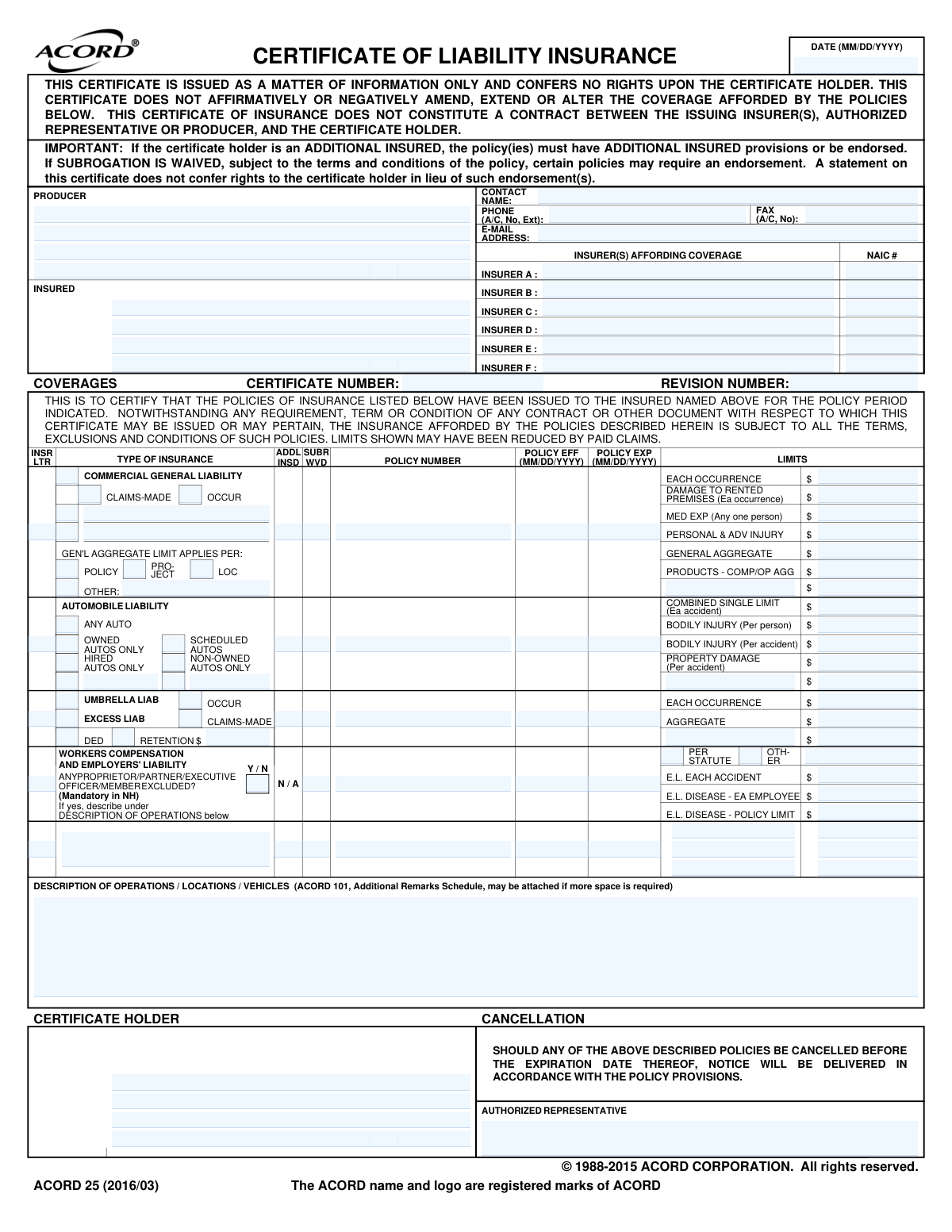
The ACORD 25, Certificate of Liability Insurance, is a standardized document used to provide a summary of a business's insurance policies to third parties, known as certificate holders. It serves as proof that the insured party has specific liability insurance coverage, outlining policy types, limits, and effective dates. This is crucial for businesses to demonstrate financial responsibility and meet contractual requirements before engaging in work. Today, this form can be filled out quickly and accurately using AI-powered services like Instafill.ai, which can also convert non-fillable PDF versions into interactive fillable forms.
ACORD 25 is part of the ACORD forms and liability insurance forms categories on Instafill.
Our AI automatically handles information lookup, data retrieval, formatting, and form filling.
It takes less than a minute to fill out ACORD 25 using our AI form filling.
Securely upload your data. Information is encrypted in transit and deleted immediately after the form is filled out.

Form specifications

Form name: ACORD 25, Certificate of Liability Insurance
Number of fields: 129
Number of pages: 1
Language: English
main-image

Instafill Demo: How to fill out PDF forms in seconds with AI

How to Fill Out ACORD 25 Online for Free in 2026

Are you looking to fill out a ACORD 25 form online quickly and accurately? Instafill.ai offers the #1 AI-powered PDF filling software of 2026, allowing you to complete your ACORD 25 form in just 37 seconds or less.
Follow these steps to fill out your ACORD 25 form online using Instafill.ai:
  1. 1 Navigate to Instafill.ai and upload or select the ACORD 25 Certificate of Liability Insurance form.
  2. 2 Allow the AI to scan and identify all the fields, including Producer, Insured, Insurers, and various coverage sections.
  3. 3 Provide your insurance agent (Producer) and your business (Insured) details as prompted by the AI assistant.
  4. 4 Enter the details for each applicable insurance policy, such as Commercial General Liability, Automobile Liability, and Workers Compensation, including policy numbers and coverage limits.
  5. 5 Input the information for the Certificate Holder (the entity requesting proof of insurance) in the designated section.
  6. 6 Add any required special provisions, endorsements, or descriptions of operations in the 'Description of Operations' box.
  7. 7 Review all auto-filled information for accuracy, then have the authorized representative electronically sign and date the form before downloading or sharing it.

Our AI-powered system ensures each field is filled out correctly, reducing errors and saving you time.

Why Choose Instafill.ai for Your Fillable ACORD 25 Form?

Speed

Complete your ACORD 25 in as little as 37 seconds.

Up-to-Date

Always use the latest 2026 ACORD 25 form version.

Cost-effective

No need to hire expensive lawyers.

Accuracy

Our AI performs 10 compliance checks to ensure your form is error-free.

Security

Your personal information is protected with bank-level encryption.

Frequently Asked Questions About Form ACORD 25

A Certificate of Liability Insurance, or COI, is a document that provides proof of your insurance coverage to a third party. You typically need one when a client, landlord, or partner requires verification that you have adequate insurance before starting a project or contract.

This form must be completed and issued by your insurance agent or broker, who is listed as the 'Producer' on the certificate. The insured party cannot fill out or alter this form themselves.

The 'Insured' is the person or company whose insurance policies are listed on the certificate. The 'Certificate Holder' is the person or entity who is requesting proof of your insurance coverage.

No, this certificate is for informational purposes only and does not grant any rights or coverage to the certificate holder. To be covered, you must be specifically named as an 'Additional Insured' via an endorsement to the policy.

This indicates that the certificate holder has been added to the insured's policy, extending the policy's coverage to also protect the certificate holder. This requires a specific endorsement to the insurance policy.

This means the insurance company gives up its right to sue the certificate holder to recover damages it has paid out for a claim. This is a common requirement in contracts to prevent the insurer from coming after the third party.

You need to provide your agent with the full legal name and address of the person or company requesting the certificate (the Certificate Holder). You should also inform your agent of any special requirements, like being named as an Additional Insured.

The form states that if a policy is canceled, a notice will be delivered according to the policy's provisions. The certificate holder is typically notified, but the terms of that notification are dictated by the policy itself, not the certificate.

This section is used to add specific details relevant to the contract or job, such as a project name, job site address, or specific vehicle information. It helps link the insurance coverage to a particular operation.

While you cannot fill it out yourself, your insurance agent can use services like Instafill.ai. These tools use AI to accurately auto-fill form fields from client data, saving time and reducing errors.

If you need to manage or extract data from the certificate, you can use a service like Instafill.ai. It can convert non-fillable PDFs into interactive, fillable forms, making the information easier to work with.

Your agency can upload the ACORD 25 form to Instafill.ai, which automatically identifies all the fields. They can then connect their data sources to instantly populate the Producer, Insured, and policy details, and then download the completed certificate.

Compliance ACORD 25
Validation Checks by Instafill.ai

1
Logical Policy Period
Verifies that for each listed policy, the expiration date is chronologically after the effective date. An expiration date that occurs before the effective date is a logical impossibility and indicates a significant data entry error. This check prevents the processing of nonsensical policy periods which could lead to incorrect coverage assessments.
2
Certificate Issuance Date Validity
Ensures the certificate's issuance date (Form_CompletionDate_A) is not after the expiration date of all listed policies. Issuing a certificate for coverage that has already entirely expired is misleading and serves no practical purpose. This validation flags potentially stale or irrelevant certificates for review.
3
Insurer Letter Cross-Reference
Validates that the insurer letter (e.g., 'A', 'B') assigned to a specific coverage line (e.g., GeneralLiability_InsurerLetterCode_A) exists in the main list of insurers at the top of the form. This is crucial for correctly linking a policy to the company that underwrites it. A mismatch would make it impossible to identify the responsible carrier for a given coverage.
4
NAIC Code Format Validation
Checks that the National Association of Insurance Commissioners (NAIC) code for each listed insurer is a valid 5-digit number. The NAIC code is a standard, unique identifier for insurance companies, critical for regulatory reporting and accurate company identification. Incorrect formats can lead to misidentification of the insurer.
5
Producer and Insured Information Completeness
Verifies that the Producer and Insured sections contain at least a name and a full address. This information is fundamental to the certificate's purpose, identifying the agent who issued it and the entity that is covered. Incomplete information makes the certificate unusable for verification purposes.
6
Coverage and Policy Linkage
Verifies that if a monetary limit is specified for any coverage type (e.g., GeneralLiability_EachOccurrence_LimitAmount_A > 0), the associated policy number and insurer letter are also filled out. A limit amount is meaningless without knowing which policy and which insurer it applies to. This check prevents incomplete entries that would create ambiguity about the source of coverage.
7
Mutually Exclusive Coverage Type (Occurrence/Claims-Made)
Ensures that for coverages like Commercial General Liability, either 'Occurrence' or 'Claims-Made' is selected, but not both or neither. These are mutually exclusive policy types that determine when a claim is covered, making it a critical piece of information. Ambiguity here could lead to significant disputes over claim eligibility.
8
Workers' Compensation Exclusion Justification
This validation checks that if the 'ANY PROPRIETOR/PARTNER/EXECUTIVE OFFICER/MEMBER EXCLUDED?' box is checked 'Yes', a corresponding explanation is provided in the 'DESCRIPTION OF OPERATIONS' section. This is often a regulatory requirement and is critical for understanding the true scope of the coverage. Failure to explain the exclusion could render the certificate misleading.
9
Valid Currency Format for Limits
Confirms that all fields representing coverage limits are entered as valid numerical values, potentially formatted as currency. Non-numeric characters or text in these fields would prevent calculations and comparisons, making it impossible to assess the adequacy of coverage. This ensures the financial data on the form is machine-readable and accurate.
10
Additional Insured/Waiver and Certificate Holder Linkage
Validates that if a policy is marked as providing 'Additional Insured' status or a 'Waiver of Subrogation,' the Certificate Holder field is filled. These provisions are granted specifically to the certificate holder, so their identity is non-negotiable. Checking these boxes without naming a certificate holder is a logical contradiction.
11
Automobile Liability Scope Definition
If an Automobile Liability policy is listed with limits, this check ensures that at least one box defining the scope of coverage (e.g., 'ANY AUTO', 'HIRED AUTOS ONLY') is selected. Simply listing a policy number without specifying which vehicles are covered makes the entry incomplete. This validation ensures the type of auto liability coverage is clearly defined.
12
Valid Date Format (MM/DD/YYYY)
Checks that all date fields (e.g., Policy_GeneralLiability_EffectiveDate_A) are entered in the specified MM/DD/YYYY format. This ensures data consistency and prevents errors in date-based calculations or record-keeping. Submissions with invalid formats should be rejected for correction.
13
Valid Email Address Format
Checks that the producer's email address (Producer_ContactPerson_EmailAddress_A) follows the standard [email protected] format. A valid email is crucial for electronic communication, sending notices, or requesting clarifications about the policy. An invalid format would cause communication attempts to fail.
14
Certificate Holder Completeness
Ensures the Certificate Holder's name and address are provided, as this is the entity to whom proof of insurance is being provided. This information is essential for the document to fulfill its purpose. A missing Certificate Holder means the document has no specified recipient for the information it contains.

Common Mistakes in Completing ACORD 25

Entering an Incorrect Certificate Holder Name or Address

This mistake occurs when the user enters an abbreviated name, an incorrect legal entity, or the wrong address for the party requesting the certificate. It often happens due to haste or not having the precise contractual details available. An incorrect certificate holder name can lead to the certificate being rejected, causing project delays and potential contractual breaches.

Failing to Properly Designate Additional Insured Status

A frequent error is forgetting to check the 'ADDL INSD' box for a specific policy or failing to name the additional insured entity in the 'Description of Operations' section. This happens because the user may not understand the contractual requirement to extend coverage to another party. Without this proper designation, the certificate holder has no protection under the insured's policy, resulting in non-compliance and significant financial risk.

Providing a Vague or Incomplete 'Description of Operations'

The 'Description of Operations / Locations / Vehicles' box is often filled with generic text or left too sparse, failing to meet specific contractual requirements. This section is critical for listing project names, job numbers, and explicitly naming additional insureds. A vague description can render the certificate useless for its intended purpose, leading to rejection and liability disputes.

Entering Incorrect Policy Numbers or Dates

Simple typographical errors in policy numbers or effective/expiration dates are extremely common but can have serious consequences. An incorrect policy number prevents verification, while wrong dates might show a policy as expired or not yet active, leading to immediate rejection. This often happens due to manual data entry mistakes, which can be minimized by using AI-powered form-filling tools like Instafill.ai that save and auto-fill correct policy information.

Mismatching Insurers with Coverage Types

The form requires assigning a letter (A, B, C, etc.) to each insurer and then using that letter to link them to specific coverages. Users often mix up these letters, list the wrong NAIC code, or forget to list an insurer entirely, creating confusion about which company underwrites which policy. This causes delays in verification and processing, and can be avoided by carefully cross-referencing the insurer list with the coverage sections.

Incorrectly Selecting 'Occurrence' vs. 'Claims-Made'

For General Liability, users may not know the difference between 'Occurrence' and 'Claims-Made' policies and guess, leading to a misrepresentation of the coverage. An 'Occurrence' policy covers incidents happening during the policy period, regardless of when the claim is filed, while a 'Claims-Made' policy only covers claims filed during the policy period. Marking this incorrectly can lead to denied claims and significant legal disputes.

Forgetting to Indicate Waiver of Subrogation

Many contracts require a Waiver of Subrogation, which prevents the insurer from suing the certificate holder to recover losses, but users often overlook checking the 'SUBR WVD' box. This omission, even when a waiver endorsement exists on the policy, can constitute a breach of contract. This leaves the certificate holder exposed to legal action from the insurer in the event of a claim.

Confusing the 'Producer' and 'Insured' Sections

Individuals unfamiliar with this form sometimes mistakenly enter the insured company's information in the 'Producer' section. The Producer is the insurance agent or broker issuing the certificate, while the Insured is the policyholder. This simple mix-up creates confusion and requires the form to be re-issued, causing unnecessary delays.

Entering Incorrect Coverage Limit Amounts

Manually entering dollar amounts for coverage limits is prone to typos, such as adding or omitting a zero, which drastically misrepresents the amount of coverage. Another error is listing limits that do not meet the minimums required by a contract. This can lead to immediate rejection of the certificate and a breach of contractual insurance requirements. AI-powered tools like Instafill.ai can help prevent these errors by validating data against requirements.

Omitting the Authorized Representative Signature

A Certificate of Liability Insurance is not valid until it is signed by an authorized representative of the producer. This crucial step is often forgotten, especially when forms are filled out digitally and then emailed. An unsigned certificate is merely a draft and will be rejected, halting any transaction that depends on it. If the form is a non-fillable PDF, a tool like Instafill.ai can convert it to a fillable version where a digital signature can be easily applied.
Saved over 80 hours a year

“I was never sure if my IRS forms like W-9 were filled correctly. Now, I can complete the forms accurately without any external help.”

Kevin Martin Green

Your data stays secure with advanced protection from Instafill and our subprocessors

Robust compliance program

Transparent business model

You’re not the product. You always know where your data is and what it is processed for.

ISO 27001, HIPAA, and GDPR

Our subprocesses adhere to multiple compliance standards, including but not limited to ISO 27001, HIPAA, and GDPR.

Security & privacy by design

We consider security and privacy from the initial design phase of any new service or functionality. It’s not an afterthought, it’s built-in, including support for two-factor authentication (2FA) to further protect your account.

Fill out ACORD 25 with Instafill.ai

Worried about filling PDFs wrong? Instafill securely fills acord-25-certificate-of-liability-insurance-3 forms, ensuring each field is accurate.