Yes! You can use AI to fill out ACORD 27, Evidence of Property Insurance
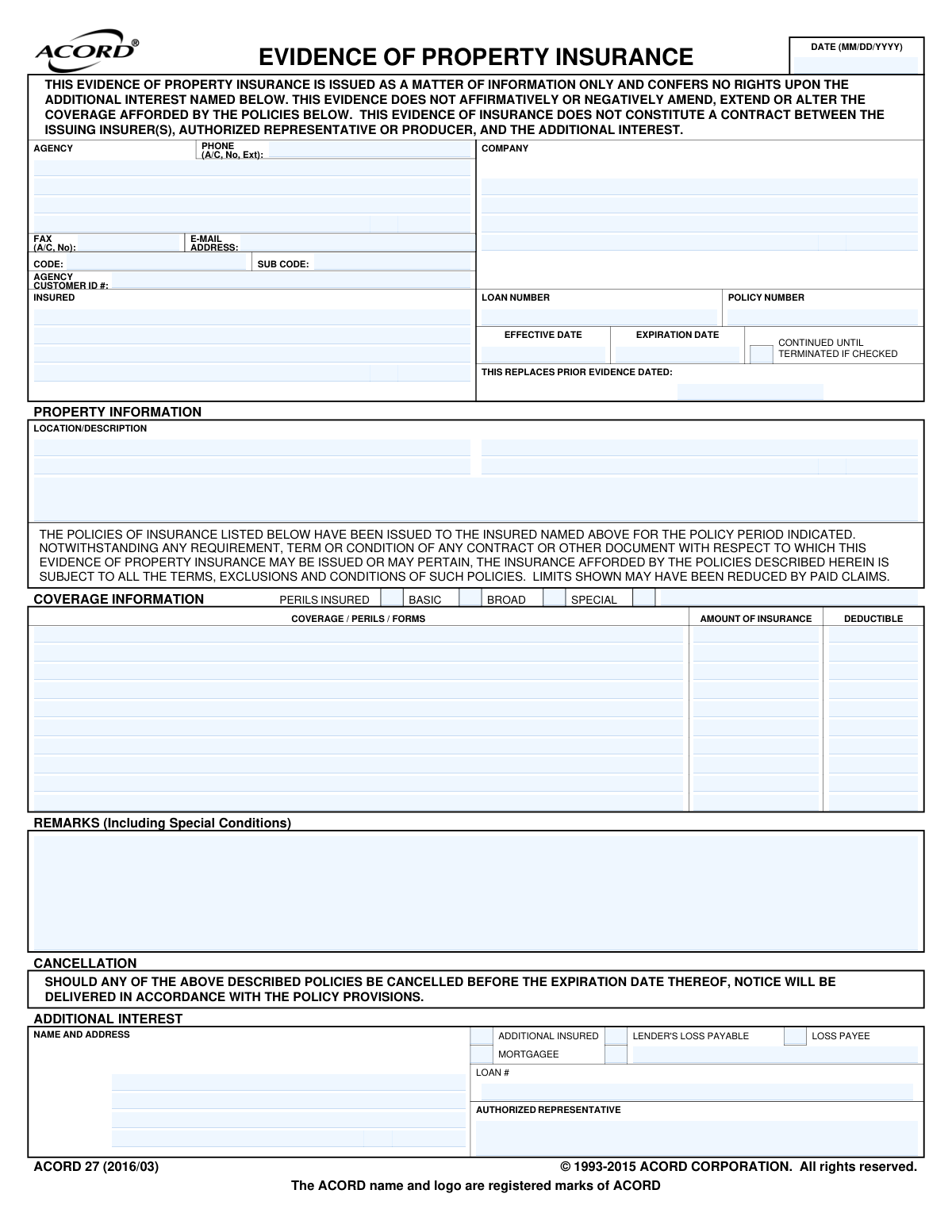
The ACORD 27, Evidence of Property Insurance form, is a document that summarizes the property insurance coverage for a specific location. It is not a contract but serves as informational proof to parties with an interest in the property, like a mortgage lender, confirming that insurance is in place. This form details the insured, the property, policy limits, and any additional interests. Today, this form can be filled out quickly and accurately using AI-powered services like Instafill.ai, which can also convert non-fillable PDF versions into interactive fillable forms.
Our AI automatically handles information lookup, data retrieval, formatting, and form filling.
It takes less than a minute to fill out ACORD 27 using our AI form filling.
Securely upload your data. Information is encrypted in transit and deleted immediately after the form is filled out.
Form specifications
| Form name: | ACORD 27, Evidence of Property Insurance |
| Number of fields: | 89 |
| Number of pages: | 1 |
| Language: | English |
More forms in ACORD forms
Instafill Demo: How to fill out PDF forms in seconds with AI
How to Fill Out ACORD 27 Online for Free in 2026
Are you looking to fill out a ACORD 27 form online quickly and accurately? Instafill.ai offers the #1 AI-powered PDF filling software of 2026, allowing you to complete your ACORD 27 form in just 37 seconds or less.
Follow these steps to fill out your ACORD 27 form online using Instafill.ai:
- 1 Navigate to Instafill.ai and upload your ACORD 27 form or select it from the template library.
- 2 Provide the insurance agency (producer) and insured's information. The AI can assist by pre-filling known details.
- 3 Enter the specific policy information, including the policy number, company, and the effective and expiration dates.
- 4 Input the details of the insured property, including its location and a brief description.
- 5 Specify the coverage information, including the types of perils covered (Basic, Broad, Special), coverage amounts, and deductibles for the property.
- 6 Identify any additional interests, such as a mortgagee or loss payee, by providing their name, address, and loan number.
- 7 Review all the AI-populated fields for accuracy, have the authorized representative sign the form electronically, and then download or share the completed document.
Our AI-powered system ensures each field is filled out correctly, reducing errors and saving you time.
Why Choose Instafill.ai for Your Fillable ACORD 27 Form?
Speed
Complete your ACORD 27 in as little as 37 seconds.
Up-to-Date
Always use the latest 2026 ACORD 27 form version.
Cost-effective
No need to hire expensive lawyers.
Accuracy
Our AI performs 10 compliance checks to ensure your form is error-free.
Security
Your personal information is protected with bank-level encryption.
Frequently Asked Questions About Form ACORD 27
This form, also known as ACORD 27, serves as proof that a property is insured. It is typically requested by a third party, such as a mortgage lender or landlord, to verify your insurance coverage details.
The form must be completed and signed by the insurance producer (your agent or broker) or an authorized representative of the insurance company. The insured property owner cannot fill out this form themselves.
No, this form is for informational purposes only and does not alter, amend, or extend your coverage. It is simply a snapshot of your policy details on the date it was issued and is not a contract.
The 'Additional Interest' is the person or entity, other than you, who has a financial stake in the property and needs proof of insurance. This is most often a mortgage lender (listed as Mortgagee) or a lienholder (listed as Loss Payee).
You'll need to provide the full name and address of the party requesting the form (the Additional Interest). Be sure to also include any specific loan numbers or reference IDs they require to be on the document.
These terms describe the scope of risks covered by your policy. 'Basic' covers a specific, limited list of perils, 'Broad' covers that list plus a few more, and 'Special' covers all risks except those specifically excluded in the policy.
Contact your insurance agent immediately. The lender may require different coverage amounts or need to be listed in a specific way, and your agent can issue a corrected form to meet their requirements.
This clause states that if your insurance policy is cancelled before its expiration date, the insurance company will provide notice to the interested parties. The specifics of how and when that notice is delivered are governed by the terms within the actual policy.
Your insurance agent will typically send the completed form directly to the requesting party (the Additional Interest) via email or mail. It's a good idea to request a copy for your own records as well.
Yes, an insurance agent or producer can use services like Instafill.ai to save time and improve accuracy. The AI can auto-fill form fields with insured details, policy numbers, and coverage amounts from their records.
Your agent can upload the ACORD 27 form to Instafill.ai, and the platform's AI will automatically identify and populate the required fields. The agent then just needs to review the information, sign, and send the completed document.
If you have a non-fillable or 'flat' PDF, a service like Instafill.ai can convert it into an interactive, fillable form. This allows the authorized agent to easily enter the necessary information digitally without having to print and scan.
This is a standard disclaimer indicating that the total amount of coverage available may be less than the amount listed if claims have already been paid out during the current policy period. It informs the additional interest that the full limit may not be available.
Compliance ACORD 27
Validation Checks by Instafill.ai
1
Ensures Policy Expiration Date is after the Effective Date
This validation checks that the `Policy_ExpirationDate_A` occurs after the `Policy_EffectiveDate_A`. A policy period cannot have an end date that is before its start date, which is critical for determining if coverage is active. If this validation fails, the system should flag the dates for correction as it indicates a significant data entry error.
2
Validates the Form Completion Date format and logical range
This check ensures the `Form_CompletionDate_A` is a valid date in MM/DD/YYYY format and is not a date in the future or an unreasonably distant past date. This is important for establishing the document's creation timeline and authenticity. A failure would prevent processing and require the user to enter a valid, current date.
3
Requires a description if 'Other' policy type is selected
This validation rule enforces that if the `Policy_PolicyType_OtherIndicator_A` checkbox is selected, the corresponding `Policy_PolicyType_OtherDescription_A` text field must not be empty. This is crucial for understanding the nature of non-standard policy types which are not covered by the basic, broad, or special categories. Without this description, the coverage information is incomplete and ambiguous.
4
Ensures the Insured's full name is provided
This check verifies that the `NamedInsured_FullName_A` field is not empty. The insured's name is a fundamental piece of information required to identify the policyholder and the subject of the insurance contract. Failure to provide this information makes the entire document invalid and unusable for verification purposes.
5
Ensures the Policy Number is provided
This validation confirms that the `Policy_PolicyNumberIdentifier_A` field contains a value. The policy number is the primary unique identifier for the insurance contract and is essential for retrieving policy details and filing claims. An empty policy number field would halt processing until it is supplied.
6
Validates the Producer's email address format
This check ensures that the value entered in `Producer_ContactPerson_EmailAddress_A` conforms to a standard email address format (e.g., [email protected]). Proper email formatting is necessary for ensuring that communications to the agency or producer are deliverable. An invalid format would trigger an error, prompting the user to correct the entry before submission.
7
Ensures coverage description is present if amount or deductible is entered
This validation checks that for any given coverage row, if either its `LimitAmount` or `DeductibleAmount` contains a value, the corresponding `CoverageDescription` field must also be filled. This prevents financial data from being orphaned without a description of what it applies to. A failure indicates incomplete data entry for a specific coverage line item.
8
Validates that the Amount of Insurance is a valid positive number
This check verifies that values in the `EvidenceOfProperty_LimitAmount_A` (and subsequent rows) are valid, non-negative numeric or currency values. This is critical for understanding the financial scope of the policy's coverage. Non-numeric characters or negative values would cause calculation errors and misinterpretation of the policy limits.
9
Ensures the 'Prior Evidence Dated' is before the current form's date
If a date is provided in `EvidenceOfProperty_PriorEvidenceDate_A`, this validation ensures it is on or before the `Form_CompletionDate_A`. This maintains a logical timeline, as a document being replaced cannot be dated after its replacement. This check is important for maintaining an accurate and trustworthy document history.
10
Requires at least one 'Perils Insured' type to be selected
This validation ensures that at least one of the checkboxes for perils insured (`Policy_PolicyType_BasicIndicator_A`, `BroadIndicator_A`, or `SpecialIndicator_A`) is checked. This information is fundamental to understanding the scope of coverage provided by the policy. If no peril type is indicated, the nature of the property insurance is unknown and the form is incomplete.
11
Requires an interest type if an Additional Interest is named
This check verifies that if the `AdditionalInterest_FullName_A` field is populated, at least one of the interest type checkboxes (e.g., `MortgageeIndicator_A`, `LossPayeeIndicator_A`) must be selected. This is crucial to define the legal standing and rights of the additional party, such as a lender. Without this specification, the role of the additional interest is ambiguous.
12
Validates the Producer's phone number format
This check ensures the `Producer_ContactPerson_PhoneNumber_A` field contains a valid phone number structure, including area code and number. Correctly formatted phone numbers are essential for enabling direct contact with the insurance agency for verification or inquiries. An invalid format would prevent successful communication and should be corrected.
13
Ensures postal codes are in a valid format
This validation checks that all postal code fields, such as `NamedInsured_MailingAddress_PostalCode_A`, adhere to the expected format (e.g., 5-digit or ZIP+4 for the US). Correct postal codes are essential for mail delivery and location-based risk assessment. An invalid format could lead to returned mail and communication delays.
14
Requires a description if 'Other' additional interest type is selected
This rule enforces that if the `AdditionalInterest_Interest_OtherIndicator_A` checkbox is selected, the `AdditionalInterest_Interest_OtherDescription_A` text field must be filled. This is necessary to clarify the specific nature of the additional interest when it doesn't fit standard categories. Omitting this description would create ambiguity regarding the party's rights and role.
Common Mistakes in Completing ACORD 27
Users often enter the insured's mailing address from the 'INSURED' section into the 'PROPERTY INFORMATION' section, instead of the actual physical location of the insured property. This is a critical error as the interested party, such as a mortgagee, needs to verify insurance on the specific collateral property, not where the policyholder receives mail. To avoid this, always double-check that the address under 'LOCATION/DESCRIPTION' corresponds to the actual insured site, not a P.O. Box or mailing address.
The form requires specifying the interested party's role by checking 'MORTGAGEE', 'LOSS PAYEE', 'ADDITIONAL INSURED', or another status. Users frequently select the wrong one, such as 'Loss Payee' when 'Mortgagee' is required by the lender. These designations have different legal rights regarding policy changes and claim payments, and a mismatch will cause the form to be rejected. Always confirm the required designation from the loan agreement or the party requesting the evidence.
Manual entry of long numeric strings for the 'POLICY NUMBER' and 'LOAN NUMBER' fields often leads to typos or transposed digits. An incorrect number prevents the receiving party, like a bank, from matching the insurance evidence to their records, causing significant processing delays and compliance failures. Carefully proofread these numbers character-by-character before submission. Using an AI tool like Instafill.ai can reduce these errors by automatically populating data from a verified source, minimizing manual entry.
The 'COVERAGE INFORMATION' table is often filled with amounts that do not meet the lender's requirements. For example, the 'AMOUNT OF INSURANCE' might be less than the loan value, or the 'DEDUCTIBLE' might be higher than the maximum allowed in the loan agreement. This results in the form being rejected, delaying loan closings or other transactions. Always verify the required coverage amounts and deductibles against the requesting party's insurance requirements.
People often list their local insurance agent's name (the 'PRODUCER' or 'AGENCY') in the 'COMPANY' field. The 'COMPANY' field is reserved for the actual insurance carrier that underwrites the policy (e.g., Travelers, Chubb, etc.). This mistake causes confusion, as the interested party needs to know the financially responsible entity backing the policy. Ensure the producer/agency information is kept separate from the underwriting company's details.
The names of the 'INSURED' and 'ADDITIONAL INTEREST' must be the full, correct legal names as they appear on deeds and loan documents. Using abbreviations, DBAs, or slightly incorrect names (e.g., 'My Bank' instead of 'My Bank, N.A. ISAOA/ATIMA') can cause a mismatch in legal records, leading to the form's rejection. Always use the complete and accurate legal entity name.
The form includes checkboxes for 'PERILS INSURED' (BASIC, BROAD, SPECIAL). Lenders and other interested parties almost always require 'SPECIAL' form coverage, which is the most comprehensive. Failing to check the correct box or leaving this section blank makes the form incomplete and will likely lead to its rejection, as the quality of coverage cannot be verified.
The 'EFFECTIVE DATE' and 'EXPIRATION DATE' must be accurate and demonstrate continuous coverage for the period required by the interested party. A common mistake is entering a past expiration date or a future effective date that creates a coverage gap. This immediately invalidates the evidence for current purposes and can put the insured in default of their loan agreement. AI form-filling tools can help by validating date formats and flagging potential gaps in coverage.
The 'AUTHORIZED REPRESENTATIVE' field must be signed by an authorized person from the insurance agency to be valid. An unsigned form is not an official document and provides no proof of insurance, causing it to be sent back and delaying the entire process. If the form is only available as a flat non-fillable PDF, note that Instafill.ai can convert it into a fillable version, making it easier to add digital signatures and complete all required fields.
Many lenders require a specific 'ISAOA / ATIMA' (Its Successors And/Or Assigns As Their Interests May Appear) clause to be included with their name and address in the 'ADDITIONAL INTEREST' section. Omitting this precise language is a very common reason for rejection. The lender's name and address must be listed exactly as stipulated in their insurance requirement documents to ensure compliance.
Saved over 80 hours a year
“I was never sure if my IRS forms like W-9 were filled correctly. Now, I can complete the forms accurately without any external help.”
Kevin Martin Green
Your data stays secure with advanced protection from Instafill and our subprocessors

Robust compliance program
Transparent business model
You’re not the product. You always know where your data is and what it is processed for.
ISO 27001, HIPAA, and GDPR
Our subprocesses adhere to multiple compliance standards, including but not limited to ISO 27001, HIPAA, and GDPR.
Security & privacy by design
We consider security and privacy from the initial design phase of any new service or functionality. It’s not an afterthought, it’s built-in, including support for two-factor authentication (2FA) to further protect your account.
Fill out ACORD 27 with Instafill.ai
Worried about filling PDFs wrong? Instafill securely fills acord-27-evidence-of-property-insurance forms, ensuring each field is accurate.