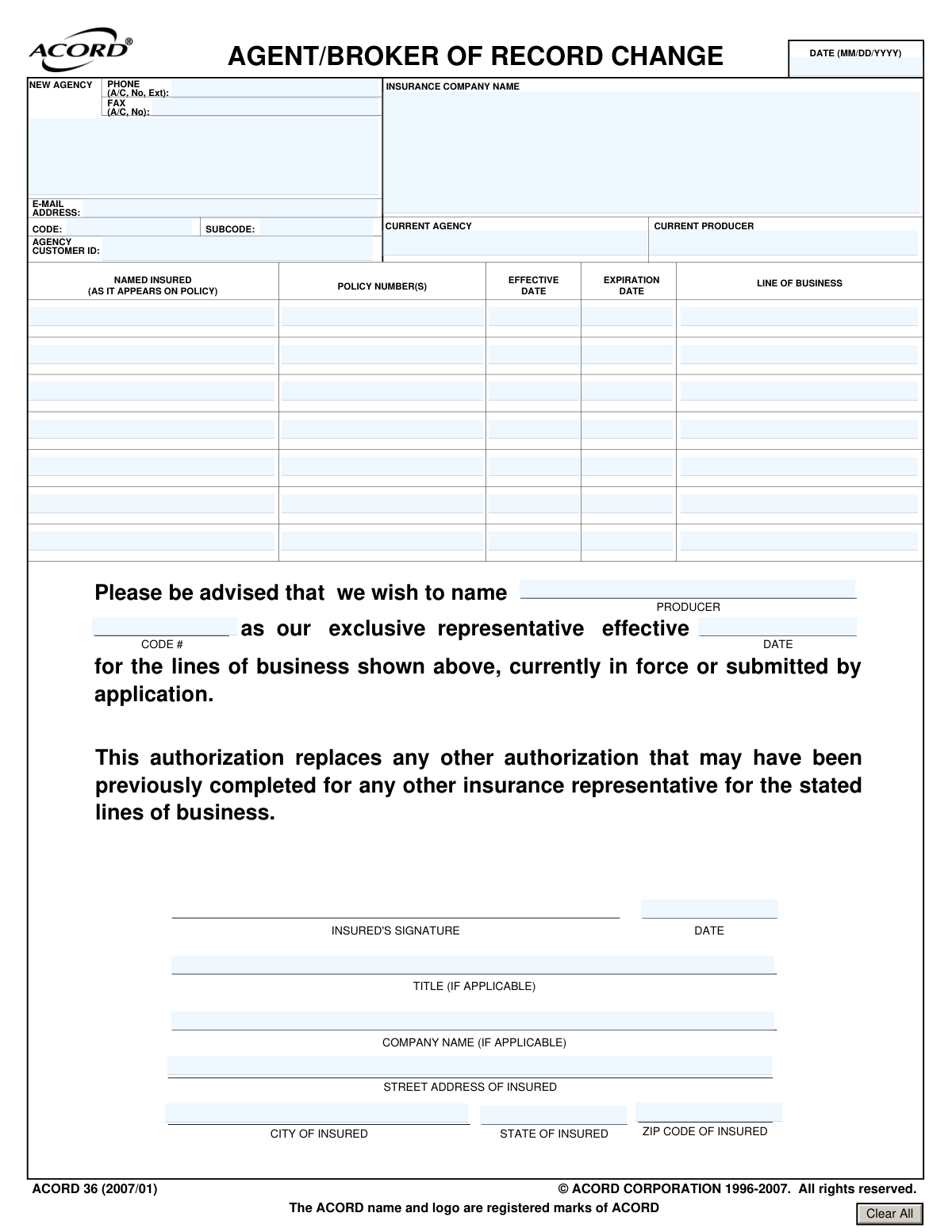
Yes! You can use AI to fill out ACORD 36, Agent/Broker of Record Change
ACORD 36 is a standardized insurance industry form used by a policyholder to notify an insurance carrier of a change in their agent or broker of record. This document legally transfers the authority to service the policyholder's account, access information, and receive commissions from the current agent to a new one. Today, this form can be filled out quickly and accurately using AI-powered services like Instafill.ai, which can also convert non-fillable PDF versions into interactive fillable forms.
Our AI automatically handles information lookup, data retrieval, formatting, and form filling.
It takes less than a minute to fill out ACORD 36 using our AI form filling.
Securely upload your data. Information is encrypted in transit and deleted immediately after the form is filled out.
Form specifications
| Form name: | ACORD 36, Agent/Broker of Record Change |
| Number of pages: | 1 |
| Language: | English |
| Categories: | ACORD forms, broker forms |
Instafill Demo: How to fill out PDF forms in seconds with AI
How to Fill Out ACORD 36 Online for Free in 2026
Are you looking to fill out a ACORD 36 form online quickly and accurately? Instafill.ai offers the #1 AI-powered PDF filling software of 2026, allowing you to complete your ACORD 36 form in just 37 seconds or less.
Follow these steps to fill out your ACORD 36 form online using Instafill.ai:
- 1 Navigate to Instafill.ai and upload or select the ACORD 36 form.
- 2 Enter the insurance company name and the named insured's information exactly as it appears on the policy.
- 3 List the specific lines of business, policy numbers, and effective/expiration dates for which the change is being made.
- 4 Provide the names of the current agency/producer and the new agency being appointed.
- 5 Enter the contact information for the new agency, including address, phone, and email.
- 6 The insured or an authorized representative must sign and date the form to validate the change.
- 7 Review all entered information for accuracy before downloading, printing, or sharing the completed form with the insurance carrier.
Our AI-powered system ensures each field is filled out correctly, reducing errors and saving you time.
Why Choose Instafill.ai for Your Fillable ACORD 36 Form?
Speed
Complete your ACORD 36 in as little as 37 seconds.
Up-to-Date
Always use the latest 2026 ACORD 36 form version.
Cost-effective
No need to hire expensive lawyers.
Accuracy
Our AI performs 10 compliance checks to ensure your form is error-free.
Security
Your personal information is protected with bank-level encryption.
Frequently Asked Questions About Form ACORD 36
This form, also known as ACORD 36, is used to officially notify your insurance company that you are changing the agent or brokerage firm that represents you for specific insurance policies.
The policyholder, referred to as the 'Named Insured' on the form, must complete and sign it when they want to appoint a new insurance agent to manage their existing policies.
You will need your full name as it appears on your policy, your address, the insurance company's name, and details for each policy including the policy number, line of business, and effective/expiration dates.
This means you are giving the new agent sole authority to represent you for the listed insurance policies. This authorization replaces any permission you had previously given to another agent for those specific lines of business.
No, submitting this form does not cancel your insurance coverage. It only changes the agent or broker who services your policy and communicates with the insurance company on your behalf.
The completed and signed form should be sent to your insurance company. It is also a good practice to provide a copy to both your new agent and your former agent for their records.
The change becomes effective on the date you write on the 'effective' line of the form. If you leave it blank, the change typically becomes effective once the insurance company receives and processes your request.
You can list multiple policies on a single form. Use the provided table to enter the policy number, line of business, and dates for each policy you are transferring to the new agent.
An officer or authorized individual of the company must sign the form. They should also include their title to confirm they have the authority to make this change on behalf of the company.
Yes, the form requires you to fill in the names of your 'Current Agency' or 'Current Producer' as well as the 'New Agency' you are appointing.
Yes, services like Instafill.ai use AI to accurately auto-fill form fields using your saved information, which can save time and help prevent errors.
You can use a service like Instafill.ai to upload the form, and their AI will help you fill in the required fields like your name, address, and policy details quickly and accurately.
If you have a non-fillable or 'flat' PDF, you can upload it to a platform like Instafill.ai. Their technology can convert it into an interactive, fillable form that you can easily complete and sign online.
Compliance ACORD 36
Validation Checks by Instafill.ai
1
Ensures Named Insured is Provided
This check verifies that the 'NAMED INSURED' field is not empty. The insured's name is essential for identifying the correct policyholder and ensuring the change of agent is applied to the right account. A missing name would render the form invalid and unprocessable.
2
Requires At Least One Policy Number
This validation ensures that the 'POLICY NUMBER(S)' field contains at least one entry. The policy number is the primary identifier for the insurance contract being modified. Without this information, the insurance company cannot locate the policy and execute the agent change request.
3
Validates Date Format (MM/DD/YYYY)
This check confirms that all date fields, including 'EFFECTIVE DATE', 'EXPIRATION DATE', and the signature 'DATE', adhere to the MM/DD/YYYY format. Consistent date formatting is crucial for accurate data processing and record-keeping. Submissions with invalid date formats will be rejected to maintain data integrity.
4
Verifies Expiration Date is After Effective Date
This is a logical check to ensure that for any given policy, the 'EXPIRATION DATE' occurs after the 'EFFECTIVE DATE'. This validation prevents data entry errors that would represent an impossible policy term. An illogical date range would cause the submission to be flagged for manual review or correction.
5
Ensures New Agency Name is Provided
This validation confirms that the 'NEW AGENCY' field has been filled out. This information is the primary purpose of the form, as it designates the new representative for the insured. A submission lacking the new agency's name is fundamentally incomplete and cannot be processed.
6
Verifies Presence of Insured's Signature
This check ensures that the 'INSURED'S SIGNATURE' field is not blank. The signature provides the legal authorization necessary to make changes to the policy representation. A form submitted without the insured's signature is not legally binding and will be rejected.
7
Requires Date of Insured's Signature
This validation verifies that the 'DATE' field adjacent to the 'INSURED'S SIGNATURE' is completed. This date establishes a clear timeline for when the authorization was granted, which is critical for legal and auditing purposes. A missing signature date creates ambiguity and may lead to the rejection of the form.
8
Validates Insured's ZIP Code Format
This check ensures the 'ZIP CODE OF INSURED' field contains a valid 5-digit or 9-digit (ZIP+4) postal code. A correctly formatted ZIP code is essential for accurate address verification and proper mail delivery of policy documents. An invalid format will trigger an error and require correction before submission.
9
Validates New Agency E-mail Format
This check verifies that the 'E-MAIL' address provided for the new agency follows a standard format (e.g., [email protected]). A valid email is crucial for electronic communication, sending confirmations, and future correspondence with the new agent. An improperly formatted email address will be flagged to prevent communication failures.
10
Ensures Title is Provided for Company Signature
This is a conditional check that ensures if 'COMPANY NAME (IF APPLICABLE)' is filled out, the signatory's 'TITLE (IF APPLICABLE)' is also provided. This is crucial for business policies to verify that the person signing has the authority to act on behalf of the company. A missing title for a corporate insured can question the validity of the authorization.
11
Requires Line of Business for Each Policy
This validation ensures that for every 'POLICY NUMBER' listed, a corresponding 'LINE OF BUSINESS' is also specified. This detail is necessary for the insurance carrier to route the change request to the correct internal department (e.g., Commercial Auto, General Liability). Forms with missing Line of Business information will be delayed or rejected.
12
Verifies New and Current Agencies are Different
This logical check compares the 'NEW AGENCY' and 'CURRENT AGENCY' fields to ensure they are not the same. Submitting a form to appoint an agency that is already the agent of record is a redundant action. This validation prevents processing of erroneous or pointless requests.
13
Ensures Insurance Company Name is Provided
This check validates that the 'INSURANCE COMPANY NAME' field is not empty. This information is fundamental, as it identifies the carrier that needs to process the agent of record change. Without the insurance company's name, the form cannot be routed to the correct entity for action.
14
Validates New Agency Phone Number Format
This check ensures the 'PHONE' number for the new agency is entered in a standard format, including an area code (e.g., (XXX) XXX-XXXX). A valid phone number is vital for the insurer to be able to contact the new agent regarding the policy. An incorrectly formatted number could hinder communication and delay processing.
Common Mistakes in Completing ACORD 36
Users often enter a DBA, a shortened company name, or an individual's name instead of the exact legal entity name as it appears on the policy. This mismatch prevents the insurance carrier from locating the correct policy, leading to an immediate rejection of the form. To avoid this, you must copy the 'Named Insured' precisely from the policy declarations page, including all suffixes like 'Inc.' or 'LLC'.
An insured may forget to list all policies they wish to transfer or use a generic term like 'Business Insurance' instead of the specific 'Line of Business' (e.g., 'Commercial General Liability'). This results in the old agent remaining on the unlisted policies, causing service confusion and potential coverage gaps. Always review your active policies and list each policy number with its corresponding, specific line of business as stated on the policy documents.
Leaving the effective date blank, entering a date in the past, or using a non-standard format creates ambiguity about when the agent change should occur. Insurance carriers will reject forms with unclear dates, as this impacts commission payments and legal service responsibilities, delaying the entire transfer. Always enter a specific, current or near-future date in the required MM/DD/YYYY format to ensure a smooth transition.
The form requires complete details for both the 'New Agency' and 'Current Agency,' including producer codes. People often provide incomplete names or don't know the producer codes, making it impossible for the carrier to process the change. This halts the transfer, as the carrier cannot identify who to assign the policies to or who to remove. Confirm all agency names and codes with your new agent before filling out the form.
For a commercial policy, the form is often signed by an individual without the authority to make such changes, or the signer's title is omitted. This renders the document legally invalid, and the insurance company will reject it to protect all parties. The form must be signed by a legally authorized representative of the insured company (e.g., Owner, President, CEO), and their title must be included to prove their capacity to sign.
In a rush, it's easy to mistakenly enter the incoming agent's details in the 'Current Agency' section and vice-versa. This simple error will cause the form to be rejected, as the request would be nonsensical from the carrier's perspective. To prevent this, carefully double-check that the agent you are appointing is listed under 'NEW AGENCY' and the one being replaced is under 'CURRENT AGENCY'.
The insured sometimes forgets to fill in the 'Insurance Company Name' field, especially when completing forms for multiple carriers. A form without the carrier's name is un-actionable and will be discarded, as no one knows who is supposed to be receiving the instruction. A separate, complete form must be submitted to each distinct insurance company that holds your policies.
This ACORD form is often a non-fillable PDF, leading to illegible handwriting, especially for long policy numbers or names. This guarantees rejection, as the carrier's staff cannot guess the information. To avoid this, use a tool like Instafill.ai, which can convert flat PDFs into digitally fillable forms, ensuring all entries are typed, legible, and free of typos.
The form explicitly requests the MM/DD/YYYY format for all dates, but users frequently use other conventions like DD/MM/YYYY or write out the month. This can cause data entry errors and processing delays while the carrier seeks clarification, especially for ambiguous dates like '03/04/2024'. Using an AI-powered form filling tool like Instafill.ai can help prevent this by automatically validating and formatting dates correctly.
The form has a table to list policy numbers, but users sometimes write 'All' or 'All applicable policies' instead of itemizing each one. Carriers require explicit policy numbers for tracking and auditing purposes and will reject such vague requests. This failure to itemize can leave some policies with the old agent, splitting the account and creating confusion. You must list every single policy number that is being transferred to the new agent.
Saved over 80 hours a year
“I was never sure if my IRS forms like W-9 were filled correctly. Now, I can complete the forms accurately without any external help.”
Kevin Martin Green
Your data stays secure with advanced protection from Instafill and our subprocessors

Robust compliance program
Transparent business model
You’re not the product. You always know where your data is and what it is processed for.
ISO 27001, HIPAA, and GDPR
Our subprocesses adhere to multiple compliance standards, including but not limited to ISO 27001, HIPAA, and GDPR.
Security & privacy by design
We consider security and privacy from the initial design phase of any new service or functionality. It’s not an afterthought, it’s built-in, including support for two-factor authentication (2FA) to further protect your account.
Fill out ACORD 36 with Instafill.ai
Worried about filling PDFs wrong? Instafill securely fills acord-36-agentbroker-of-record-change forms, ensuring each field is accurate.