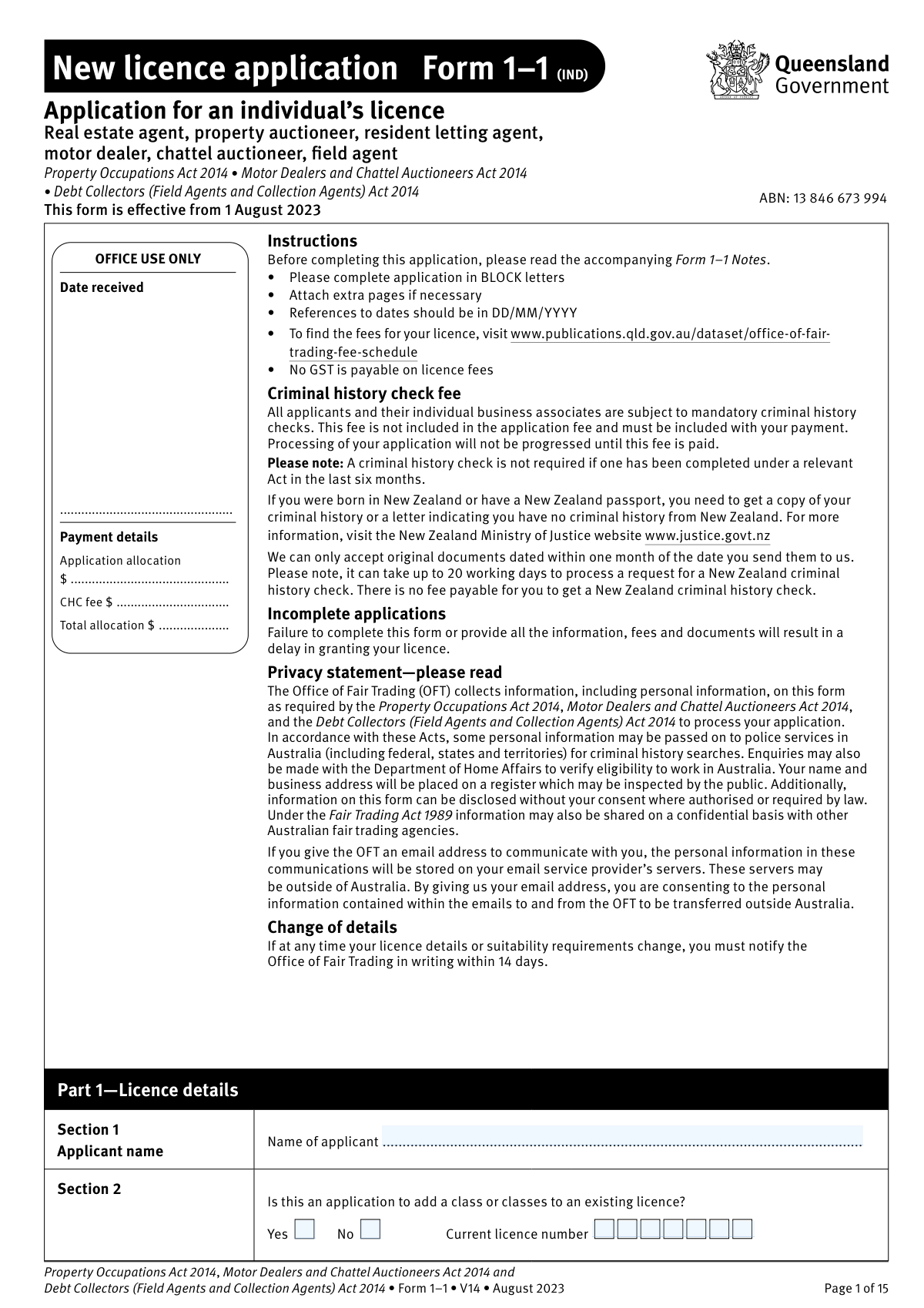
Yes! You can use AI to fill out New licence application – Form 1–1 (IND), Application for an individual’s licence (Real estate agent, property auctioneer, resident letting agent, motor dealer, chattel auctioneer, field agent)
Form 1–1 (IND) is the Queensland Office of Fair Trading application used by individuals seeking a new occupational licence (or to add licence classes) under the Property Occupations Act 2014, Motor Dealers and Chattel Auctioneers Act 2014, and/or Debt Collectors (Field Agents and Collection Agents) Act 2014. It collects your personal details, licence class selections, business/trading arrangements, places of business, qualifications (where required), and suitability disclosures. The form also authorises mandatory criminal history checks and requires supporting documents and fees before processing. Submitting a complete and accurate Form 1–1 is essential to avoid delays and to legally perform licensable activities only after the licence is issued.
Our AI automatically handles information lookup, data retrieval, formatting, and form filling.
It takes less than a minute to fill out Form 1–1 (IND) using our AI form filling.
Securely upload your data. Information is encrypted in transit and deleted immediately after the form is filled out.
Form specifications
| Form name: | New licence application – Form 1–1 (IND), Application for an individual’s licence (Real estate agent, property auctioneer, resident letting agent, motor dealer, chattel auctioneer, field agent) |
| Number of pages: | 15 |
| Filled form examples: | Form Form 1–1 (IND) Examples |
| Language: | English |
Instafill Demo: filling out a legal form in seconds
How to Fill Out Form 1–1 (IND) Online for Free in 2026
Are you looking to fill out a FORM 1–1 (IND) form online quickly and accurately? Instafill.ai offers the #1 AI-powered PDF filling software of 2026, allowing you to complete your FORM 1–1 (IND) form in just 37 seconds or less.
Follow these steps to fill out your FORM 1–1 (IND) form online using Instafill.ai:
- 1 Select the licence type(s) and term: indicate whether this is a new licence or adding classes to an existing licence, tick the relevant licence category (property, motor dealer/chattel auctioneer, or field agent), and choose a 1-year or 3-year term.
- 2 Enter applicant identity details: complete your name, any previous names, date/place of birth, and citizenship/visa work-rights information; prepare certified ID copies in your current name (or originals for in-person lodgement to be copied and certified).
- 3 Provide contact and address information: add phone/email, preferred contact method, residential address (no PO box), and postal address (if different).
- 4 Add eligibility and background information: upload training/qualification evidence or prior equivalent licence details (if applicable), then complete the suitability checklist and provide written explanations for any “Yes” answers.
- 5 Complete trading and business structure sections: choose your trading particulars (sole trader, working director, partnership, or employed licensee) and fill the corresponding parts (places of business, corporation/partnership/employer details, and business associate/partner details as required).
- 6 Attach special requirements and declarations: if applying as a field agent, include two certified passport photos and the certifier details; sign and date the applicant declaration consenting to criminal history checks and confirming accuracy.
- 7 Pay and lodge the application: complete payer/payment details, include the application fee plus the criminal history check fee(s), and submit all pages and attachments by mail or in person to the Office of Fair Trading/Industry Licensing Unit.
Our AI-powered system ensures each field is filled out correctly, reducing errors and saving you time.
Why Choose Instafill.ai for Your Fillable Form 1–1 (IND) Form?
Speed
Complete your Form 1–1 (IND) in as little as 37 seconds.
Up-to-Date
Always use the latest 2026 Form 1–1 (IND) form version.
Cost-effective
No need to hire expensive lawyers.
Accuracy
Our AI performs 10 compliance checks to ensure your form is error-free.
Security
Your personal information is protected with bank-level encryption.
Frequently Asked Questions About Form Form 1–1 (IND)
Form 1–1 (IND) is used by an individual to apply for a new Queensland licence (or add classes to an existing licence) for real estate agent, auctioneer (real property), resident letting agent, motor dealer, chattel auctioneer, or field agent (debt collection) activities.
Do not use Form 1–1 if you need a corporation licence. Corporation licence applicants must use New licence application Form 1–2 instead.
Yes. In Part 1, Section 2 you can indicate you are adding class/es to an existing licence and provide your current licence number, then select the additional class/es you want.
You can apply for property occupation licences (e.g., real estate agent, resident letting agent, auctioneer (real property), limited real estate agent), motor dealer/chattel auctioneer licences (e.g., motor dealer, wrecker, broker, chattel auctioneer), and the debt collector occupation of field agent.
You must provide proof of identification in your current name (e.g., driver licence, passport, Australian citizenship certificate, or birth certificate/extract). If lodging by mail, provide a certified true copy; if lodging in person, you can show originals to be copied and certified at the counter.
If you are not an Australian citizen, you must supply a certified copy of your international passport. The Office of Fair Trading may also check your work rights with the Department of Home Affairs.
Most licence types require you to have completed the approved training units/modules and attach evidence (e.g., statement of attainment or transcript). Motor dealer (broker) and field agent licences have no prescribed educational requirements.
If you held an equivalent licence that expired less than two years ago, you can list the previous licence details in Part 4 instead of attaching training modules. Include the licence number and the period it was held.
You must pay the application and licence issue fees (based on a 1-year or 3-year term) plus a separate criminal history check (CHC) fee. No GST is payable on licence fees, and your application will not progress until the CHC fee is paid.
A criminal history check is mandatory for all applicants and any listed individual business associates. A new CHC is not required if one was completed under a relevant Act within the last six months.
You must obtain a New Zealand criminal history check or a letter stating you have no criminal history from the New Zealand Ministry of Justice. The Office of Fair Trading can only accept original NZ documents dated within one month of when you send them, and NZ processing can take up to 20 working days.
A PO Box is not acceptable for residential address or places of business. The principal place of business must be a physical location where documents can be served personally (not a virtual office/mail centre).
In Part 5, select the option that matches how you will operate: sole trader (you operate under your own name/business name), working director (you operate through a corporation and the corporation must be licensed), partnership (partners/corporate partners must be licensed), or employed licensee (you work for a licensed employer). Then complete the additional parts listed for that option.
Complete Part 9 with your employer’s legal name and licence number (not a business name), and your employer must sign and date the form (a director/person in charge if the employer is a corporation). If your employment address is a new place of business, your employer must also provide a letter to add the address to their licence and confirm whether you will be the licensed person in charge.
Yes. Field agent applicants must provide two recent passport photos, placed in an envelope and stapled to the front of the application; the back of each photo must be certified with the required wording and signed by a person aged 18+ who has known you for at least 12 months and is not related to you.
Normal processing time is 4–6 weeks, but it may take longer if information/fees are missing or police checks are delayed. You cannot perform the functions of a licensee until the licence has been issued.
You can lodge by mail to the Industry Licensing Unit (GPO Box 3111, Brisbane QLD 4001) or in person at a Fair Trading Office or Queensland Government Service Office. Payment can be made in person by cash, or by debit/credit card, cheque, or money order; do not send cash by mail.
No. The Office of Fair Trading cannot accept card details by phone or email (including attachments); if an email contains card details it will be deleted and your application/payment will not be processed.
If you answer ‘Yes’ to any suitability question in Part 11, you must provide full details in writing. Disclosure does not automatically disqualify you, but failing to disclose can lead to cancellation and possible prosecution.
Incomplete applications delay processing and the Office of Fair Trading may need to write to you for missing items. If you do not respond within a reasonable timeframe, the application may be deemed withdrawn and you may need to reapply.
If you withdraw before a licence is issued or the application is refused, the application fee is not refundable and any criminal history check fees for checks already conducted are not refundable. Other fees may be refunded according to the form’s refund conditions.
Yes. If your licence details, address, or suitability requirements change, you must notify the Office of Fair Trading in writing within 14 days, or you may be fined.
Compliance Form 1–1 (IND)
Validation Checks by Instafill.ai
1
Applicant name completeness and character validation
Ensures the applicant’s surname and given names are provided and contain only valid name characters (letters, spaces, hyphens, apostrophes) and are not placeholder text (e.g., “N/A”, “same as above”). This is critical because the licence and criminal history check must be performed against the applicant’s legal identity. If validation fails, the submission should be rejected or routed for manual review and the applicant prompted to correct the name fields.
2
Add-class-to-existing-licence logic and current licence number requirement
Validates that if the applicant answers “Yes” to adding class(es) to an existing licence, a current licence number is provided and matches the expected licence number format for the jurisdiction. It also checks that if “No” is selected, the current licence number field is blank to avoid ambiguity. If this validation fails, the application should be flagged as incomplete because the processing pathway and fees depend on whether this is a new licence or an add-on.
3
Licence class selection (at least one) and mutual exclusivity rules
Checks that at least one licence class is selected across Property occupations, Motor dealer/chattel auctioneer occupations, and Debt collector occupations. It should also enforce any system-defined mutual exclusivity or dependency rules (e.g., preventing contradictory selections if the business rules disallow certain combinations). If no class is selected or an invalid combination is chosen, the application cannot be assessed and should be returned for correction.
4
Licence term selection consistency with application type
Ensures the applicant selects exactly one licence term option (1 year or 3 years) for new licences, and selects “Additional class/es to an existing licence” only when the add-class question is “Yes.” This matters because term drives fee calculation and licence issue details. If validation fails, the system should block submission and request a corrected term selection.
5
Date format validation for all date fields (DD/MM/YYYY) and real calendar dates
Validates that all dates (date of birth, previous licence periods, employer signature date, applicant declaration date, photo certifier date) are in DD/MM/YYYY format and represent real calendar dates (e.g., not 31/02/2025). This prevents downstream processing errors and ensures legal declarations and eligibility checks are time-valid. If validation fails, the system should reject the entry and require correction before submission.
6
Applicant age eligibility (must be at least 18 years old)
Calculates the applicant’s age from the date of birth and confirms they are at least 18 on the application/declaration date. The notes state applicants must be at least 18 to obtain a licence (including field agent). If the applicant is under 18 or the dates are inconsistent, the application should be blocked as ineligible.
7
Other/previous name disclosure completeness
If the applicant indicates they have been known by another name, validates that previous name(s) are provided and a reason for change is supplied where the form requests it. This is important for accurate criminal history checks and identity matching across records. If validation fails, the application should be marked incomplete and the applicant prompted to provide the missing identity history.
8
Identity document details presence and internal consistency (DL/passport fields)
Validates that at least one identity document pathway is supported by entered details (e.g., driver licence number with place of issue, or passport number with passport country and passport type). It also checks that passport type is one of the allowed values (Government/Private/UN refugee) and that document numbers meet basic length/character constraints. If validation fails, the application should be held because certified identification is mandatory and incomplete document details increase the risk of failed verification.
9
Citizenship/visa work-rights logic and required passport attachment trigger
Checks that if the applicant answers “No” to Australian citizen, the system requires an international passport to be provided/attached (as per notes) and captures sufficient passport details. This supports eligibility-to-work verification with the Department of Home Affairs. If validation fails, the application should be rejected as missing mandatory evidence for non-citizens.
10
Contact details format validation and preferred contact method dependency
Validates phone numbers (business/after-hours/mobile) for allowable characters and plausible length, and validates email address format when provided. If “Preferred contact method” is Email, an email address must be present; if phone is preferred, at least one corresponding phone number must be present. If validation fails, the application should be flagged because the agency may be unable to request missing information, delaying processing.
11
Residential address must be a physical address (no PO Box) and postcode/state validation
Ensures the residential address is not a PO Box and includes suburb, state, and postcode, with postcode matching expected Australian formats (4 digits) and state being a valid Australian state/territory code. The form explicitly states PO Box is not acceptable for residential address. If validation fails, the application should be returned for correction because service and identity requirements rely on a physical address.
12
Postal address completeness and 'as above' handling
If the postal address is different from residential, validates full postal address fields (address, suburb, state, postcode). If the applicant enters “as above,” the system should copy/confirm the residential address and ensure it is complete. If validation fails, the application should be flagged as incomplete because correspondence and notices may not be deliverable.
13
Qualifications/previous licence requirement based on selected licence class
Validates that applicants either (a) indicate completed required training modules and attach evidence, or (b) provide previous equivalent Queensland licence details with valid periods, except where the notes state no educational requirements (motor dealer (broker) and field agent). This is essential to confirm eligibility before issuing a licence. If validation fails, the application should be blocked or routed for follow-up because the applicant may not meet statutory qualification requirements.
14
Previous licence period logic (from/to order and recency rule trigger)
Checks that each previous licence period has both ‘from’ and ‘to’ dates, and that ‘from’ is not after ‘to.’ It should also flag when the previous licence expired more than two years ago (per notes) so the system requires training evidence instead of relying on equivalency. If validation fails, the application should be marked incomplete or ineligible until corrected documentation is provided.
15
Trading particulars selection drives required sections and mandatory fields
Validates that exactly one trading type is selected (Sole Trader, Working Director, Partnership, Employed Licensee) and enforces completion of the corresponding parts (e.g., Part 6 for places of business; Part 7 for corporation details for working director; Part 8/10 for partnership; Part 9 for employed licensee). This prevents missing legally required information about how the licensee will operate. If validation fails, the system should block submission and list the missing dependent sections/fields.
16
Places of business validation: physical address, person-in-charge constraints, and attachment trigger
Ensures principal and other places of business are physical addresses (no PO Box/virtual office), include suburb/state/postcode, and that a person in charge name and licence number are provided where required by the notes. It also enforces the rule that a person cannot be in charge at more than one place of business and requires an attachment if more than two places of business are indicated. If validation fails, the application should be flagged because compliance and service-of-documents requirements cannot be met.
Common Mistakes in Completing Form 1–1 (IND)
Applicants often tick the wrong category (e.g., real estate agent vs resident letting agent, or motor dealer vs motor dealer (broker)) because the classes sound similar and the definitions are in the Notes. Choosing the wrong class can lead to incorrect fees, missing qualification evidence, and delays or refusal because the eligibility requirements differ by class. To avoid this, read the licence class definitions in the Notes and tick only the class(es) you genuinely need to perform, then ensure the rest of the form parts you complete match that selection.
People frequently answer “Yes” to adding a class but forget to provide the current licence number, or they answer “No” even though they already hold a licence and are only adding another class. This creates processing confusion and can result in the wrong fee being charged (additional class vs new licence) and requests for clarification. Double-check whether you are applying for a brand-new licence or adding classes, and if adding, always include the current licence number.
The form requires dates in DD/MM/YYYY, but applicants often use other formats (MM/DD/YYYY), write text dates, or omit the year—especially in licence history periods and signatures. Incorrect date formats can cause misinterpretation of eligibility windows (e.g., “held within the last two years”) and trigger follow-up requests. Always write every date as two-digit day, two-digit month, four-digit year (e.g., 03/02/2026) and ensure all “from/to” periods are complete.
A very common issue is attaching plain photocopies of ID when lodging by mail, or having copies certified by an ineligible person, or missing the certifier’s original signature on the copy. This makes the identification unacceptable and the application cannot be progressed until compliant certified ID is provided. If lodging by mail, send certified true copies only (JP/Commissioner for Declarations/barrister-solicitor/Notary Public) with the certifier’s original signature; if lodging in person, bring originals to be copied and certified at the counter.
Applicants often skip the “known by any other name” section, especially after marriage, deed poll changes, or using anglicised names, assuming it is optional. This can cause criminal history checks and identity verification to fail or return incomplete results, leading to delays and requests for additional evidence. List all previous names exactly as they appeared on official documents and provide a clear reason for the change so checks can be completed accurately.
The form repeatedly states that PO Boxes are not acceptable for residential addresses and places of business, yet applicants still provide them for convenience or privacy. This can invalidate the address for service requirements and force the Office of Fair Trading to request corrected details, delaying approval. Use a physical street address for residential and each place of business (a location where documents can be served personally), and use the postal address section for PO Boxes if needed.
Applicants often tick “sole trader,” “working director,” “partnership,” or “employed licensee” incorrectly, then complete sections that don’t apply (or miss required parts like Part 7 for corporations, Part 9 for employed licensees, or Part 10 for each partner). This happens because the form branches and the instruction “complete from Part 11 onwards” depends on earlier selections. To avoid rework, decide your operating structure first, tick only the correct option, and follow the form’s instructions on which Parts must be completed for that structure.
Part 9 explicitly says “DO NOT GIVE A BUSINESS NAME,” but applicants commonly enter a trading name rather than the legal entity (individual or corporation) that holds the licence. This can prevent verification of the employer’s licence and may invalidate the employment declaration, causing delays. Enter the employer’s full legal name (corporation name if they operate under a corporation licence, or the individual’s name if individually licensed) and include the correct employer licence number.
Applicants frequently leave the “name of person in charge” and licence number blank, nominate someone who is not appropriately licensed, or attempt to have one person in charge of multiple places of business (which is not allowed). This is a common misunderstanding of operational requirements and can block approval until corrected. Provide a licensed person in charge for each place of business (where required), ensure the licence number is included, and remember a person cannot be in charge at more than one place of business.
Many applicants tick “Yes—completed modules” but attach the wrong document (e.g., enrolment confirmation) or a statement that doesn’t list the specific units/modules completed. Because the form requires proof that the exact approved units were successfully completed, incomplete evidence leads to requests for additional documents and delays. Attach a certificate of completion/statement of attainment/official transcript that clearly lists the relevant units/modules, and confirm they match the approved requirements for the licence class you selected.
Applicants sometimes answer “No” because they think traffic matters don’t count, they believe a “no conviction recorded” outcome doesn’t need disclosure, or they assume old matters are irrelevant—then omit required explanations. Providing incorrect or misleading information can lead to refusal, cancellation after grant, and possible prosecution, and it almost always triggers delays once discrepancies appear in checks. If unsure, answer “Yes” and attach full written details (dates, jurisdiction, outcome, and context) for each relevant question for you and any business associates.
Applications are commonly delayed because the criminal history check (CHC) fee is not included (or not multiplied for each person listed), the payment section is left blank, or applicants email card details despite the form stating such emails will be deleted and payment not processed. Since processing will not progress until CHC fees are paid, these mistakes can stop the application entirely. Use the current fee schedule, calculate CHC per required person, complete the payment page, and submit card details only on the form (or pay in person/by cheque or money order), never by email or phone.
Saved over 80 hours a year
“I was never sure if my IRS forms like W-9 were filled correctly. Now, I can complete the forms accurately without any external help.”
Kevin Martin Green
Your data stays secure with advanced protection from Instafill and our subprocessors
Robust compliance program
Transparent business model
You’re not the product. You always know where your data is and what it is processed for.
ISO 27001, HIPAA, and GDPR
Our subprocesses adhere to multiple compliance standards, including but not limited to ISO 27001, HIPAA, and GDPR.
Security & privacy by design
We consider security and privacy from the initial design phase of any new service or functionality. It’s not an afterthought, it’s built-in, including support for two-factor authentication (2FA) to further protect your account.
Fill out Form 1–1 (IND) with Instafill.ai
Worried about filling PDFs wrong? Instafill securely fills new-licence-application-form-11-ind-application-fo forms, ensuring each field is accurate.