Yes! You can use AI to fill out Transamerica Change of Servicing Agent Authorization Form
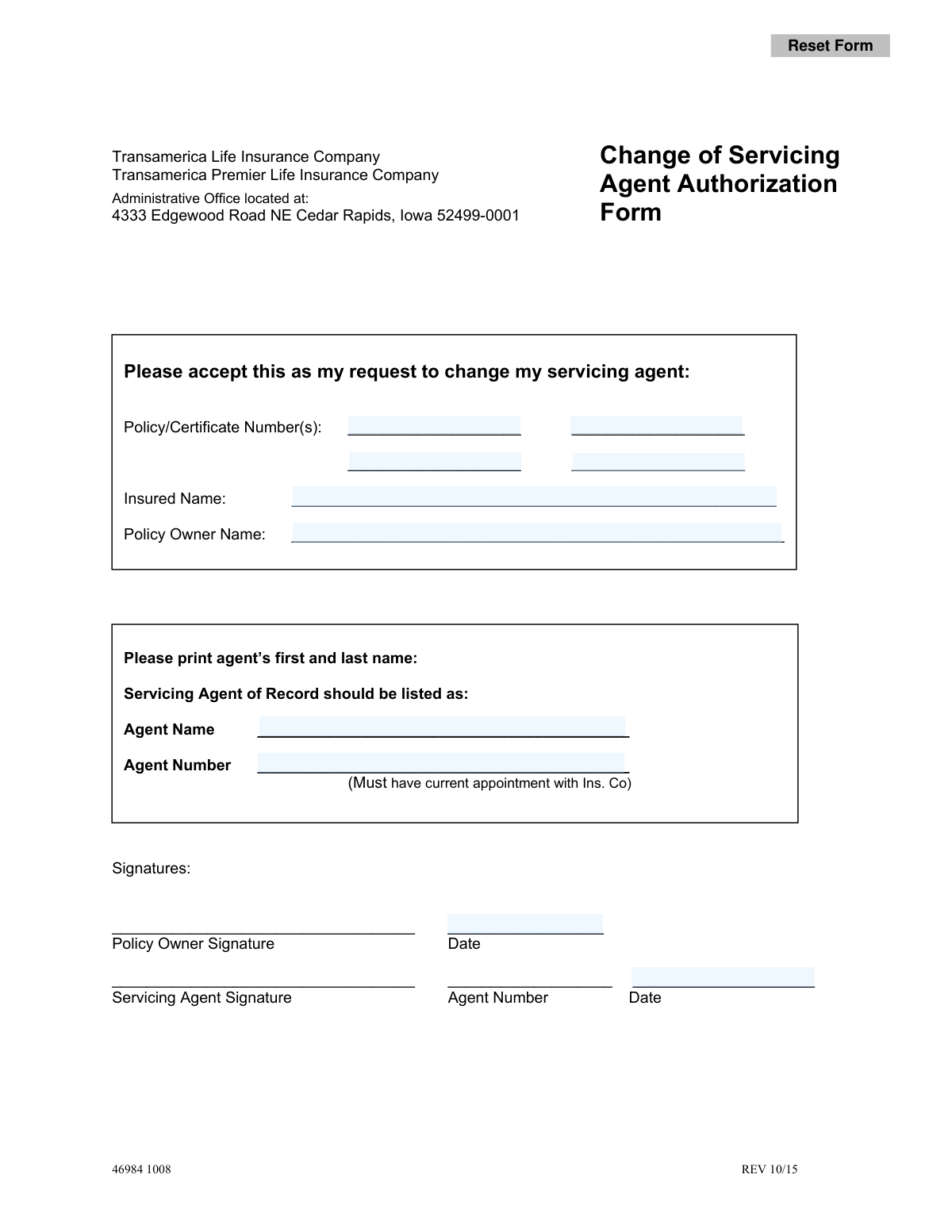
This form is a formal request submitted by a policy owner to Transamerica Life Insurance Company or Transamerica Premier Life Insurance Company to designate a new servicing agent for their policy. It is crucial for ensuring that the correct agent is recognized for servicing the account, receiving communications, and handling policy-related matters. Today, this form can be filled out quickly and accurately using AI-powered services like Instafill.ai, which can also convert non-fillable PDF versions into interactive fillable forms.
Rather not fill this in by hand? Instafill is an online form filler that completes PDF forms automatically — upload the blank form, answer a few questions, and the AI fills every field.
Form specifications
| Form name: | Transamerica Change of Servicing Agent Authorization Form |
| Number of pages: | 1 |
| Language: | English |
Our AI automatically handles information lookup, data retrieval, formatting, and form filling.
It takes less than a minute to fill out 46984 1008 REV 10/15 using our AI form filling.
Securely upload your data. Information is encrypted in transit and deleted immediately after the form is filled out.
Instafill Demo: How to fill out PDF forms in seconds with AI
How to Fill Out 46984 1008 REV 10/15 Online for Free in 2026
Are you looking to fill out a 46984 1008 REV 10/15 form online quickly and accurately? Instafill.ai offers the #1 AI-powered PDF filling software of 2026, allowing you to complete your 46984 1008 REV 10/15 form in just 37 seconds or less.
Follow these steps to fill out your 46984 1008 REV 10/15 form online using Instafill.ai:
- 1 Navigate to Instafill.ai and upload the Change of Servicing Agent Authorization Form.
- 2 Use the AI assistant to accurately input all relevant Policy/Certificate Numbers.
- 3 Enter the full names of the Insured and the Policy Owner in the designated fields.
- 4 Provide the new Servicing Agent's full name and their corresponding Agent Number.
- 5 The Policy Owner must digitally sign and date the form in the appropriate section.
- 6 The new Servicing Agent must also sign, date, and provide their agent number on the form.
- 7 Review all entered information for accuracy before downloading, printing, and submitting the completed form to Transamerica's administrative office.
Our AI-powered system ensures each field is filled out correctly, reducing errors and saving you time.
Why Choose Instafill.ai for Your Fillable 46984 1008 REV 10/15 Form?
Speed
Complete your 46984 1008 REV 10/15 in as little as 37 seconds.
Up-to-Date
Always use the latest 2026 46984 1008 REV 10/15 form version.
Cost-effective
No need to hire expensive lawyers.
Accuracy
Our AI performs 10 compliance checks to ensure your form is error-free.
Security
Your personal information is protected with bank-level encryption.
Frequently Asked Questions About 46984 1008 REV 10/15
This form is used to formally notify Transamerica that you, the policy owner, wish to change the agent responsible for servicing your life insurance policy.
The policy owner must complete the form with their information and signature. The new servicing agent you are appointing must also sign and provide their agent number.
You will need your policy or certificate number(s), the full name of the insured person, the policy owner's name, and the full name and agent number of your new servicing agent.
The 'Insured Name' is the person whose life is covered by the policy. The 'Policy Owner Name' is the person or entity who owns the policy and has the right to make changes to it; they may be different from the insured.
Your policy number is located on your original policy documents, annual statements, or other official correspondence you have received from Transamerica.
The 'Agent Number' is a unique identifier assigned to the agent by Transamerica. Your new agent will know their number and must provide it on the form.
This means your chosen agent must be actively contracted and authorized to do business with Transamerica. You cannot assign an agent who is not officially appointed by the insurance company.
The form has space for four policy numbers. If you have more, you can either fill out a second form or attach a separate, signed page listing the additional policy numbers.
You should send the fully completed and signed form to the Transamerica Administrative Office at 4333 Edgewood Road NE, Cedar Rapids, Iowa 52499-0001.
Processing times can vary, but once Transamerica receives the correctly completed form, the change is typically processed within several business days. You can contact customer service for a more specific timeframe.
Yes, you can use services like Instafill.ai, which leverage AI to accurately auto-fill form fields, saving you time and reducing the chance of errors.
Tools like Instafill.ai can convert non-fillable PDFs into interactive, fillable forms. Simply upload the document to the platform to make the fields editable.
Upload the Transamerica Change of Servicing Agent form to Instafill.ai. The service will automatically detect the fields, allowing you to type your information, add signatures, and download the completed PDF.
Compliance 46984 1008 REV 10/15
Validation Checks by Instafill.ai
1
Requires at least one Policy/Certificate Number
This check ensures that at least one of the four 'Policy/Certificate Number' fields is filled out. The form's purpose is to modify a specific policy, so without a number, the request is ambiguous and cannot be processed. Failure to provide a policy number will result in the form being rejected as incomplete.
2
Validates Policy/Certificate Number Format and Existence
This validation verifies that each entered policy number conforms to the expected format for Transamerica policies and exists within the system. It cross-references the number against the company's database to confirm it is a valid, active policy. An invalid or non-existent number will halt the process, as the change cannot be applied to a policy that cannot be found.
3
Ensures Policy Owner Name is Provided
This check confirms that the 'Policy Owner Name' field is not empty. The policy owner is the only individual with the legal authority to request changes to the policy. A missing name makes the authorization invalid and will cause the form to be rejected immediately.
4
Ensures Insured Name is Provided
This validation verifies that the 'Insured Name' field is completed. The insured's name is a primary identifier for the policy, which is crucial for verification, especially when the policy owner and the insured are different people. This helps prevent administrative errors and ensures the change is applied to the correct policy.
5
Verifies Policy Number(s) Match Policy Owner
This is a critical integrity check that performs a system lookup to confirm the provided 'Policy/Certificate Number(s)' are associated with the 'Policy Owner Name' on the form. This prevents fraudulent or erroneous changes from being made to the wrong policies. A mismatch indicates a significant error and must stop the request from being processed.
6
Requires New Servicing Agent's Full Name
This check validates that the 'Agent Name' field for the new servicing agent is filled out. The primary purpose of the form is to assign a new agent, making this information fundamental to the request. An empty field makes the form's intent impossible to fulfill and will cause the submission to be rejected.
7
Validates New Servicing Agent's Number
This validation ensures the 'Agent Number' for the new agent is provided and follows the correct format. This number is the unique identifier for the agent within the company's system. A missing, incomplete, or incorrectly formatted number will prevent the system from identifying the agent and processing the change.
8
Verifies New Agent's Current Appointment Status
This check performs a backend lookup to confirm that the agent specified by the 'Agent Number' has a current, active appointment with Transamerica, as explicitly required on the form. Attempting to assign an inactive or non-appointed agent would violate business and compliance rules. This validation prevents invalid requests from entering the system.
9
Cross-Validates New Agent Name and Agent Number
This validation checks the internal system to ensure the provided 'Agent Name' and 'Agent Number' correspond to the same individual. This prevents data entry errors where a correct name might be paired with an incorrect number, or vice-versa. Ensuring this match is vital for assigning the policy to the intended agent.
10
Confirms Policy Owner Signature is Present
This check verifies that the 'Policy Owner Signature' field has been signed. A signature is a legal requirement to authorize the change of servicing agent, serving as proof of the owner's consent. A missing signature invalidates the entire request, leading to its rejection for being incomplete and unauthorized.
11
Validates Policy Owner Signature Date
This check ensures the 'Date' field next to the Policy Owner's signature is filled in with a valid date (e.g., MM/DD/YYYY). The date establishes when the authorization was given and is legally important. The validation also ensures the date is not in the future or an unreasonably distant past date.
12
Confirms New Servicing Agent Signature is Present
This validation checks for a signature in the 'Servicing Agent Signature' field. The new agent's signature indicates their acknowledgment and acceptance of the servicing responsibilities for the policy. This is a necessary step for completing the transfer of agency and ensuring all parties are in agreement.
13
Ensures Consistency of Agent Number Fields
This check validates that the 'Agent Number' entered in the main section for the new agent matches the 'Agent Number' written next to the servicing agent's signature. This simple cross-reference helps catch transcription errors and confirms the identity of the signing agent. An inconsistency would require clarification before the request can be processed.
14
Ensures Logical Consistency Between Signature Dates
This validation compares the 'Policy Owner Signature Date' and the 'Servicing Agent Signature Date'. Logically, the agent's acceptance date should be on or after the policy owner's request date. This check prevents illogical submissions where the agent appears to have accepted the role before the owner requested the change.
Common Mistakes in Completing 46984 1008 REV 10/15
Users often mistype policy numbers or omit digits, which happens when rushing or misreading documents. This is the most common reason for rejection, as the insurance company cannot identify the account to be updated. To prevent this, carefully cross-reference the number with your official policy statement. AI-powered form fillers like Instafill.ai can help by securely storing and accurately auto-filling this information, reducing the risk of typos.
People frequently write the same name in both fields, but the Insured (the person covered) and the Policy Owner (the person with legal authority to make changes) can be different. If the wrong person is listed as the owner, the request is invalid and will be denied. Always verify the distinct roles on your policy declaration page before filling out the form.
A common critical error is having the Insured sign the form when they are not the Policy Owner. Only the signature of the legal Policy Owner is valid for authorizing changes. This mistake voids the request and requires a new, correctly signed form, causing significant delays. Ensure the person who signs in the 'Policy Owner Signature' field is the one listed as the owner in the policy records.
Policy owners may assume any agent can service their policy, but the form explicitly states the agent must have a 'current appointment with Ins. Co'. Submitting a request for an unappointed agent leads to an automatic rejection. Before completing the form, you must confirm with your new agent that they are actively appointed to represent Transamerica.
The new agent's full name and, crucially, their agent number are often left blank, misspelled, or entered incorrectly. The insurance company uses the agent number as a unique identifier to process the change in their system. Without this correct information, the form is considered incomplete and cannot be processed, halting the agent transfer.
It is very common for applicants to overlook one of the multiple signature or date fields on the form, particularly the agent's signature. An unsigned or undated form is legally incomplete and will be immediately returned by the administrative office. Always perform a final review to ensure both the policy owner and the new servicing agent have signed and dated in their respective fields.
When a form is printed and filled out by hand, poor or rushed handwriting can make names and numbers unreadable. This leads to data entry errors by the processing team, resulting in rejections or incorrect updates. To avoid this, use a tool like Instafill.ai, which can convert this non-fillable PDF into a digital version, allowing you to type directly into the fields for perfect clarity.
The form provides space for multiple policy numbers, but users with several policies sometimes only list one, assuming the change will apply to all. The change will only be processed for the specific policy numbers listed on the form. This oversight requires submitting additional paperwork to update the remaining policies, creating more work and delays.
This form has a revision date (REV 10/15), and insurance companies periodically update their documents. Submitting an old version found online or in old files may lead to rejection, as it might lack required fields or disclosures present in the current version. Always obtain the latest form directly from the insurance company's website or your agent to ensure compliance.
Saved over 80 hours a year
“I was never sure if my IRS forms like W-9 were filled correctly. Now, I can complete the forms accurately without any external help.”
Kevin Martin Green
Your data stays secure with advanced protection from Instafill and our subprocessors




Robust compliance program
Transparent business model
You’re not the product. You always know where your data is and what it is processed for.
ISO 27001, HIPAA, and GDPR
Our subprocesses adhere to multiple compliance standards, including but not limited to ISO 27001, HIPAA, and GDPR.
Security & privacy by design
We consider security and privacy from the initial design phase of any new service or functionality. It’s not an afterthought, it’s built-in, including support for two-factor authentication (2FA) to further protect your account.
Fill out 46984 1008 REV 10/15 with Instafill.ai
Worried about filling PDFs wrong? Instafill securely fills transamerica-change-of-servicing-agent-authorization-form forms, ensuring each field is accurate.
