Yes! You can use AI to fill out RECO Information Guide: Working with a real estate agent
The RECO Information Guide is a mandatory document in Ontario provided by real estate agents to potential clients. It details the benefits of representation, the risks of self-representation, the specifics of representation agreements, and the process for making a complaint. This guide ensures buyers and sellers are fully informed of their rights and the agent's responsibilities before entering a professional relationship. Today, this form can be filled out quickly and accurately using AI-powered services like Instafill.ai, which can also convert non-fillable PDF versions into interactive fillable forms.
RECO Information Guide is part of the
agent forms, estate forms, NJ state forms, PA state forms, real estate forms and state ID forms categories on Instafill.
Our AI automatically handles information lookup, data retrieval, formatting, and form filling.
It takes less than a minute to fill out RECO Information Guide using our AI form filling.
Securely upload your data. Information is encrypted in transit and deleted immediately after the form is filled out.
Form specifications
| Form name: | RECO Information Guide: Working with a real estate agent |
| Number of fields: | 10 |
| Number of pages: | 13 |
| Filled form examples: | Form RECO Information Guide Examples |
| Language: | English |
More forms in Agent forms
Instafill Demo: How to fill out PDF forms in seconds with AI
How to Fill Out RECO Information Guide Online for Free in 2026
Are you looking to fill out a RECO INFORMATION GUIDE form online quickly and accurately? Instafill.ai offers the #1 AI-powered PDF filling software of 2026, allowing you to complete your RECO INFORMATION GUIDE form in just 37 seconds or less.
Follow these steps to fill out your RECO INFORMATION GUIDE form online using Instafill.ai:
- 1 Navigate to Instafill.ai and upload the RECO Information Guide or select it from the template library.
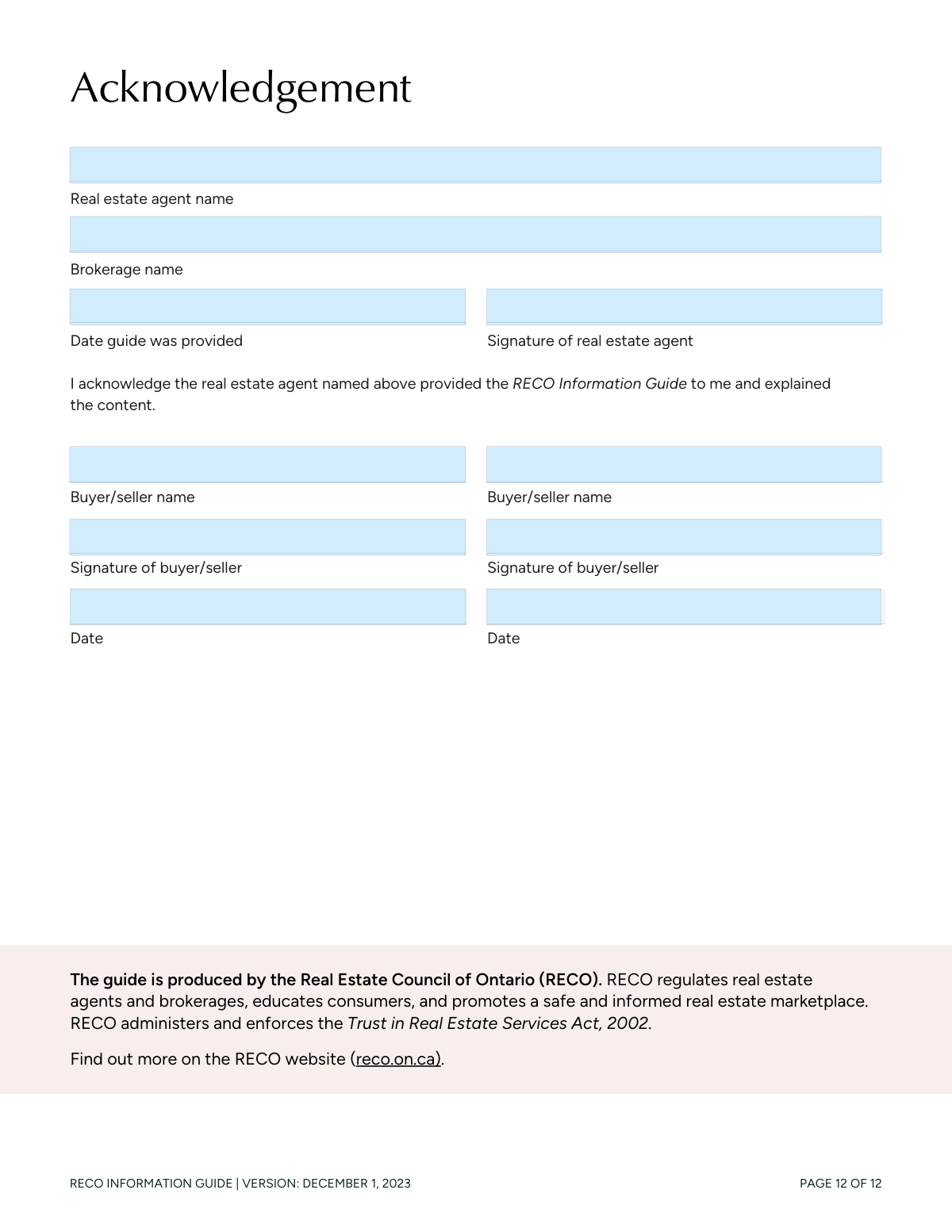
- 2 Use the AI assistant to automatically identify and label the fields on the acknowledgement page, such as agent name, brokerage, and buyer/seller details.
- 3 Enter the real estate agent's name, brokerage name, and the date the guide was provided in the designated fields.
- 4 Provide the names of the buyers or sellers and the date of acknowledgement in the respective sections.
- 5 Review all the information you've entered for accuracy, ensuring all names and dates are correct.
- 6 Electronically sign the document in the signature fields for the agent and the buyer/seller.
- 7 Download, print, or securely share the completed and signed RECO Information Guide with all relevant parties.
Our AI-powered system ensures each field is filled out correctly, reducing errors and saving you time.
Why Choose Instafill.ai for Your Fillable RECO Information Guide Form?
Speed
Complete your RECO Information Guide in as little as 37 seconds.
Up-to-Date
Always use the latest 2026 RECO Information Guide form version.
Cost-effective
No need to hire expensive lawyers.
Accuracy
Our AI performs 10 compliance checks to ensure your form is error-free.
Security
Your personal information is protected with bank-level encryption.
Frequently Asked Questions About Form RECO Information Guide
This guide explains the benefits and risks of working with a real estate agent in Ontario. An agent is required to give you this guide and walk you through it before providing any services or assistance.
Signing the last page only acknowledges that you have received and discussed the guide with the agent. It does not lock you into a contract with them; that requires a separate representation agreement.
A 'client' has signed a representation agreement, and the agent must act in their best interests. A 'self-represented party' has not signed an agreement, and the agent they are dealing with is legally obligated to work for the other person in the transaction.
It is a binding contract between you and a real estate brokerage that outlines the services provided, fees, and the agent's duties to you. You must sign this agreement to officially hire a brokerage.
Multiple representation occurs when a single brokerage or agent represents more than one client in the same transaction, such as the buyer and the seller. This creates a conflict of interest, and you must consent to it in writing after the risks are disclosed.
A holdover clause may require you to pay commission to your former brokerage if you buy or sell a property shortly after your agreement expires to a party introduced to you by the agent. Make sure you understand the length of this period before signing.
In brokerage representation, the entire brokerage represents you. In designated representation, a specific agent (or agents) is your sole representative, which helps reduce the chances of multiple representation occurring.
If you represent yourself, you are responsible for all aspects of the transaction, including pricing, negotiations, and paperwork, without professional advice. The agent on the other side is obligated to act in their client's best interest, not yours.
First, contact the broker of record at the agent's brokerage. If the issue is not resolved, you can file a formal complaint with the Real Estate Council of Ontario (RECO).
Sellers must disclose the number of competing offers, but they decide whether to share any other details, like price or conditions. As a buyer, you can choose whether to participate in a process where your offer details might be shared.
You will need to provide your full name, signature, and the date to confirm you received the guide. The agent will fill in their name, brokerage, and signature as well.
Yes, services like Instafill.ai use AI to accurately auto-fill form fields with your information, such as your name and the current date, which saves time and helps prevent errors.
You can use a service like Instafill.ai to complete the form digitally. Simply upload the document, and you can type directly into the fields for your name, date, and add a digital signature.
If you have a non-fillable or 'flat' PDF, you can upload it to a platform like Instafill.ai. Its technology can convert the document into an interactive, fillable form that you can complete and sign online.
Compliance RECO Information Guide
Validation Checks by Instafill.ai
1
Agent Name and Brokerage Presence
This validation ensures that both the 'Real Estate Agent Name' and 'Brokerage Name' fields are not empty. These fields are critical for identifying the licensed professional and the brokerage responsible for the interaction, which is a fundamental requirement for regulatory compliance and accountability. A failure would mean the form is incomplete and cannot be processed, as the primary parties are not identified.
2
Valid 'Date Guide Provided' Format and Logic
This check verifies that the 'Date Guide Provided' is in a valid date format (e.g., YYYY-MM-DD) and is not a date in the future. It is logically impossible for the guide to be provided on a future date. This ensures data accuracy and prevents errors that would make the record of the transaction timeline invalid.
3
Agent Signature Completeness
This validation confirms that the 'Real Estate Agent Signature' field has been completed. The agent's signature is a formal declaration that they have fulfilled their duty to provide and explain the guide as required by the Real Estate Council of Ontario (RECO). An absent signature invalidates the agent's side of the acknowledgement.
4
First Buyer/Seller Acknowledgment Completeness
This check ensures that the 'First Buyer/Seller Name', 'First Buyer/Seller Signature', and 'First Buyer/Seller Date' fields are all filled out. At least one buyer or seller must acknowledge the guide for it to be valid. Missing any of this information for the primary client makes their acknowledgement incomplete and legally insufficient.
5
First Buyer/Seller Signature Matches Name
This validation compares the 'First Buyer/Seller Name' field with the 'First Buyer/Seller Signature' field, which is a typed name. The values must match to serve as a valid electronic signature, confirming the identity of the person acknowledging the document. A mismatch would fail the validation, as it suggests an error or that the signature was not provided by the named individual.
6
Logical Buyer/Seller Acknowledgment Date
This check ensures the 'First Buyer/Seller Date' is on or after the 'Date Guide Provided'. A client cannot acknowledge receipt of a document before it was given to them. This validation maintains the chronological integrity of the process and prevents logical errors in the official record.
7
Conditional Validation for Second Buyer/Seller
This validation rule checks that if the 'Second Buyer/Seller Name' field is populated, then the corresponding 'Second Buyer/Seller Signature' and 'Second Buyer/Seller Acknowledgment Date' fields must also be filled. This ensures that if a second party is listed, their acknowledgement is captured completely. An incomplete entry for the second party would require correction before the form can be considered fully executed.
8
Logical Second Buyer/Seller Acknowledgment Date
Similar to the first buyer/seller, this check ensures that if a 'Second Buyer/Seller Acknowledgment Date' is entered, it must be on or after the 'Date Guide Provided'. This maintains logical consistency for all parties involved in the acknowledgement. A date preceding the provision date would be flagged as an error.
9
Unique Buyer/Seller Names
This validation verifies that the 'First Buyer/Seller Name' is not identical to the 'Second Buyer/Seller Name'. This check is important to prevent data entry errors, such as accidentally entering the same person's details twice. If duplicate names are found, the system should prompt the user to confirm if there are indeed two different parties with the same name.
10
Form Version Check
This validation confirms that the form being used is the current version, indicated as 'VERSION: DECEMBER 1, 2023'. Using outdated forms can lead to non-compliance with new laws or regulations, such as the designated representation rules mentioned in the guide. This check ensures all parties are operating under the most recent and legally correct guidelines.
11
Signature Field Integrity
This check ensures that the signature fields contain a valid entry, whether it's a digital signature, an uploaded image, or a typed name as specified. For the buyer/seller, it specifically validates that the typed name is not just random characters but appears to be a plausible name. This prevents users from bypassing the signature requirement with placeholder text, ensuring a clear intent to sign.
12
Date Consistency Across All Parties
This validation ensures that all date fields ('Date Guide Provided', 'First Buyer/Seller Date', 'Second Buyer/Seller Acknowledgment Date') are chronologically consistent with each other. Specifically, both buyer/seller acknowledgment dates must be on or after the date the guide was provided. This provides a holistic check of the timeline of events recorded on the form, reinforcing its accuracy.
Common Mistakes in Completing RECO Information Guide
Clients often enter nicknames or incomplete names (e.g., "Jen and Mike") instead of their full legal names. This happens out of habit or because they don't realize this is a formal document. Using non-legal names can create ambiguity and may not properly link the acknowledgement to the individuals involved in the transaction, potentially causing issues with future legal agreements. Always use the full legal names as they appear on government-issued identification to ensure all documents are valid and consistent.
When two clients are involved (e.g., a couple buying a home), it's common for one person to sign but forget to have the second person complete their section. This oversight leaves the agent without a valid acknowledgement from all parties, creating a compliance gap and potential liability. To avoid this, ensure that every individual client listed on the eventual purchase agreement signs and dates their respective acknowledgement section on this form.
People frequently enter incorrect dates, such as dating their signature for a day before the agent provided the guide, or all parties using the same date even if they signed on different days. This happens when rushing or when one person fills in all the date fields at once. These inaccuracies create a confusing and unreliable record of events, which can be problematic in a dispute or audit. Each person should enter the actual date they are signing the document to maintain a clear and truthful timeline.
An agent or client may rush and enter a misspelled, incomplete, or incorrect name for the agent or their brokerage. This can make it difficult to verify the agent's registration with RECO or to identify the responsible brokerage in case of a complaint or legal issue. To prevent this, the agent's full registered name and the complete legal name of the brokerage should be carefully entered and double-checked against their official registration.
With digital forms, the typed signature in the signature field often does not exactly match the full legal name printed in the name field due to typos or using a shortened version. This discrepancy can raise questions about the validity of the signature and the identity of the person providing acknowledgement. It is crucial to ensure the typed signature is a precise match for the full printed name to create a clear and legally sound electronic record.
In an attempt to be efficient, some agents pre-fill the date field for the client's signature, assuming when the client will sign it. This is a significant error, as it misrepresents the actual date of acknowledgement and undermines the document's integrity. The date field must be filled out by the client at the moment of signing to accurately reflect when they provided their acknowledgement.
Many clients sign the acknowledgement page without reading the guide or having it properly explained, viewing it as just another piece of paper. This is a critical error, as the guide contains vital information about representation, risks, and fees that directly impacts their rights and financial obligations. Clients should insist on having the agent walk them through the guide and ask questions until they fully understand its contents before signing.
The agent or brokerage name entered on this guide might differ from the information on the subsequent Representation Agreement or other formal documents. This often happens due to clerical errors or if the agent is part of a team with a different official name. Such inconsistencies create a confusing paper trail and can complicate matters during a compliance audit or dispute. Ensuring all client-facing documents have consistent and accurate representative information is essential.
Users often enter dates in ambiguous numerical formats like 04/05/24, which could be interpreted as either April 5th or May 4th depending on regional conventions. This ambiguity can lead to disputes over timelines and deadlines. To avoid confusion, it is best practice to use a clear and unambiguous format, such as spelling out the month (e.g., "April 5, 2024"). AI-powered form-filling tools like Instafill.ai can help prevent this by automatically standardizing dates into a clear format.
When a form is only available as a non-fillable PDF, users often resort to printing, hand-writing, and scanning, or using clunky PDF editor tools. This results in submissions that are messy, difficult to read, and prone to errors or omissions due to misaligned text. To ensure a clean, professional, and accurate submission, tools like Instafill.ai can convert flat, non-fillable PDFs into an interactive, fillable format, making the process seamless and error-free.
Saved over 80 hours a year
“I was never sure if my IRS forms like W-9 were filled correctly. Now, I can complete the forms accurately without any external help.”
Kevin Martin Green
Your data stays secure with advanced protection from Instafill and our subprocessors

Robust compliance program
Transparent business model
You’re not the product. You always know where your data is and what it is processed for.
ISO 27001, HIPAA, and GDPR
Our subprocesses adhere to multiple compliance standards, including but not limited to ISO 27001, HIPAA, and GDPR.
Security & privacy by design
We consider security and privacy from the initial design phase of any new service or functionality. It’s not an afterthought, it’s built-in, including support for two-factor authentication (2FA) to further protect your account.
Fill out RECO Information Guide with Instafill.ai
Worried about filling PDFs wrong? Instafill securely fills reco-information-guide-working-with-a-real-estate-agent forms, ensuring each field is accurate.



