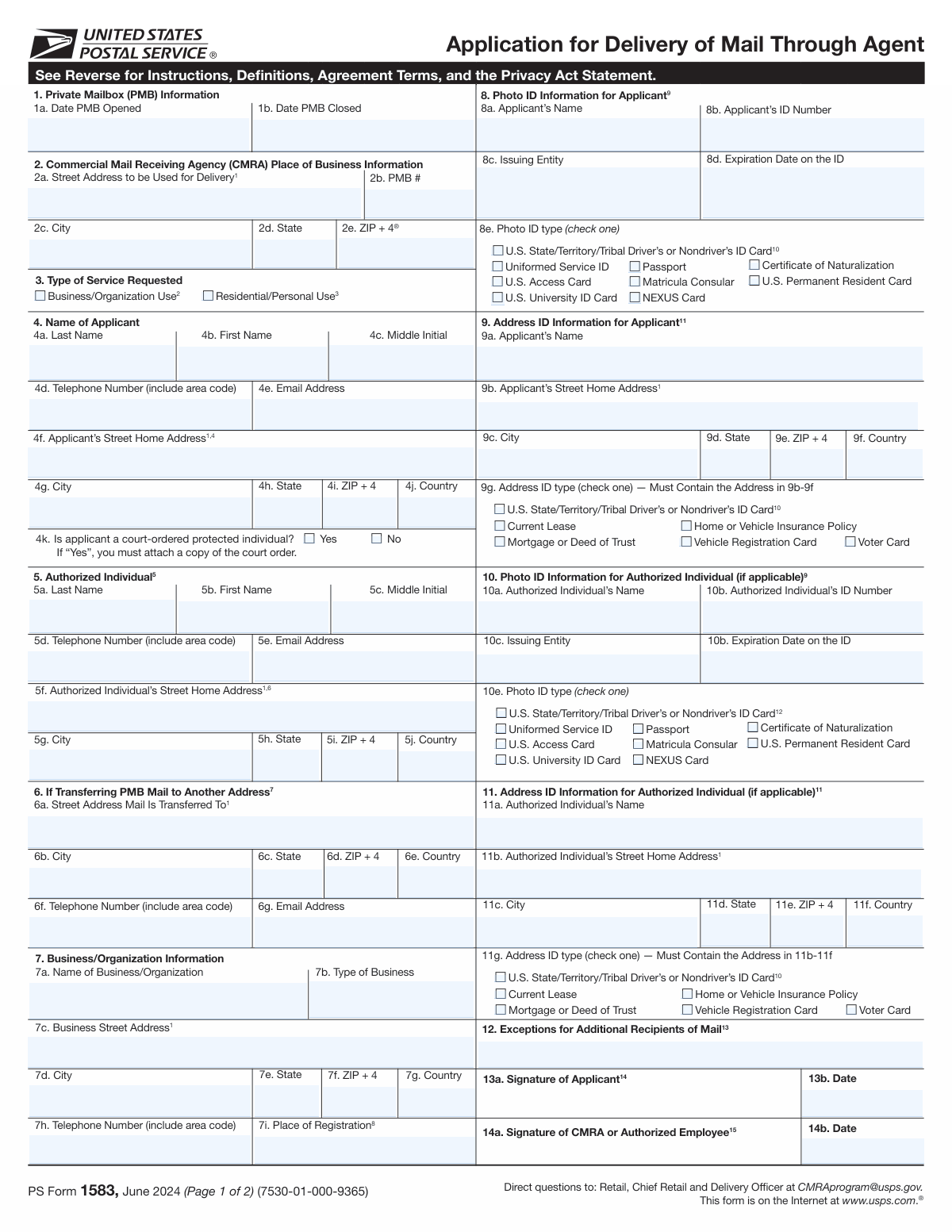
Yes! You can use AI to fill out Form 1583, Application for Delivery of Mail Through Agent

USPS Form 1583, Application for Delivery of Mail Through Agent, is a mandatory document required by the United States Postal Service to authorize a Commercial Mail Receiving Agency (CMRA) to receive mail on your behalf. This form is crucial for establishing a private mailbox (PMB) service, as it provides a legal record of who is authorized to receive mail at that address, helping to prevent fraud. Today, this form can be filled out quickly and accurately using AI-powered services like Instafill.ai, which can also convert non-fillable PDF versions into interactive fillable forms.
Our AI automatically handles information lookup, data retrieval, formatting, and form filling.
It takes less than a minute to fill out PS Form 1583 using our AI form filling.
Securely upload your data. Information is encrypted in transit and deleted immediately after the form is filled out.

Form specifications

Form name: Form 1583, Application for Delivery of Mail Through Agent
Number of fields: 108
Number of pages: 2
Language: English
main-image

Instafill Demo: How to fill out PDF forms in seconds with AI

How to Fill Out PS Form 1583 Online for Free in 2026

Are you looking to fill out a PS FORM 1583 form online quickly and accurately? Instafill.ai offers the #1 AI-powered PDF filling software of 2026, allowing you to complete your PS FORM 1583 form in just 37 seconds or less.
Follow these steps to fill out your PS FORM 1583 form online using Instafill.ai:
  1. 1 Navigate to Instafill.ai and upload your PS Form 1583, or select it from the platform's template library.
  2. 2 Provide applicant details by filling in your name, home address, and contact information in the designated sections.
  3. 3 Enter your identification information, specifying the two forms of ID (one photo ID and one address ID) you will present for verification.
  4. 4 Input the Commercial Mail Receiving Agency (CMRA) address and the Private Mailbox (PMB) number assigned to you.
  5. 5 If the mailbox is for a business, complete the sections for the organization's details and information for any other authorized individuals.
  6. 6 Carefully review all entered information for accuracy, then electronically sign and date the form before having it notarized.
  7. 7 Download the completed and notarized form to submit to your CMRA according to their instructions.

Our AI-powered system ensures each field is filled out correctly, reducing errors and saving you time.

Why Choose Instafill.ai for Your Fillable PS Form 1583 Form?

Speed

Complete your PS Form 1583 in as little as 37 seconds.

Up-to-Date

Always use the latest 2026 PS Form 1583 form version.

Cost-effective

No need to hire expensive lawyers.

Accuracy

Our AI performs 10 compliance checks to ensure your form is error-free.

Security

Your personal information is protected with bank-level encryption.

Frequently Asked Questions About Form PS Form 1583

This form is an application to authorize a Commercial Mail Receiving Agency (CMRA) to receive mail on your behalf. It is required when you open a private mailbox (PMB) for personal or business use.

Any individual or business that wants to rent a private mailbox (PMB) at a CMRA must complete this form. Both the applicant and the CMRA agent will need to provide information and signatures.

You will need two forms of identification: a valid photo ID (like a driver's license or passport) and a separate document that verifies your current home address (like a current lease, vehicle registration, or insurance policy).

No, that is not a problem as long as the ID is unexpired. You must provide a separate, acceptable document like a current lease, mortgage statement, or vehicle insurance policy to verify your current home address.

For business use, you must provide the business name, address, and type of business. You also need to list any individuals authorized to receive mail and provide their identification details.

The 'Authorized Individual' is a person designated by a business or organization to receive mail on its behalf. This section only needs to be filled out if the mailbox is for business or organizational use.

CMRA stands for Commercial Mail Receiving Agency. It is a private business, such as The UPS Store or an independent mail center, that provides mailbox rental services to the public.

The form includes a section for a notary public, which is typically required if you are submitting the application remotely and cannot present your IDs to the CMRA agent in person. Check with your specific CMRA for their policy on in-person vs. remote verification.

This section is used to specify where your mail should be forwarded if you close your private mailbox. You need to provide a complete address for this purpose.

Acceptable photo IDs include a U.S. driver's or non-driver's ID card, passport, Uniformed Service ID, U.S. Permanent Resident Card, and several other options listed on the form. The ID must be current and not expired.

Yes, AI-powered services like Instafill.ai can help you fill out this form quickly and accurately. These tools can extract information from your documents and auto-fill the required fields, saving you time and reducing errors.

Simply upload the form to the Instafill.ai platform. The AI will identify the fields, and you can then have it automatically populate your information, making the process fast and straightforward.

You can use a service like Instafill.ai, which can convert flat, non-fillable PDFs into interactive, fillable forms. This allows you to type your information directly into the fields online before printing.

Compliance PS Form 1583
Validation Checks by Instafill.ai

1
PMB Close Date After Open Date
This check ensures that the 'Date PMB Closed' is not earlier than the 'Date PMB Opened'. This maintains logical chronological order for the mailbox's service period. If the close date precedes the open date, the form submission should be rejected as it represents an impossible scenario.
2
Applicant Photo ID Not Expired
Validates that the 'ID Expiration Date' for the applicant's photo ID is not in the past. An expired identification document is not considered valid for identity verification purposes. A failure in this check should prevent form submission and prompt the user to provide a current, valid ID.
3
Exclusive Service Type Selection
This validation ensures that the user selects either 'Business/Organization Use' or 'Residential/Personal Use', but not both. These options are mutually exclusive and define the fundamental type of service being requested. If zero or both options are selected, the form should display an error and require the user to make a single, valid choice.
4
Conditional Business Information Requirement
If 'Business/Organization Use' is selected, this check verifies that all required business-related fields, such as 'Business/Organization Name', 'Type of Business', and 'Business Address', are completed. This is critical for properly registering and servicing a business account. Failure to provide this information should block submission until the required fields are filled.
5
Single Applicant Photo ID Type Selection
Verifies that exactly one checkbox is selected from the 'Applicant Photo ID Type' group. The form requires the applicant to specify a single primary identification document for verification. If more than one or no ID type is selected, an error message should guide the user to choose only one.
6
ZIP+4 Code Format Validation
This check ensures that all ZIP+4 fields (e.g., 'CMRA ZIP+4', 'ZIP+4 (Applicant Street Home Address)') adhere to a valid format, such as 'NNNNN' or 'NNNNN-NNNN'. Correctly formatted ZIP codes are essential for accurate mail delivery and address verification. An invalid format should trigger an error message requesting the user to correct the entry.
7
Applicant Name Consistency
Compares the 'Applicant Name (as on Photo ID)' field with the combined 'First Name', 'Middle Initial', and 'Last Name' fields. This cross-reference ensures the name data is consistent and accurately captured from the identification document. A mismatch could indicate a data entry error and should prompt a review or correction.
8
Telephone Number Format
Validates that all telephone number fields, such as 'Telephone Number (Include Area Code)', follow a standard 10-digit format (e.g., (NNN) NNN-NNNN or NNN-NNN-NNNN). This ensures the contact information is usable and correctly formatted for communication. If the format is incorrect, the system should prompt the user for a valid phone number.
9
Conditional Authorized Individual Requirement
If 'Business/Organization Use' is selected, this validation confirms that the entire 'Authorized Individual' section is filled out, including name, contact information, and photo ID details. For business accounts, having a designated authorized individual is a mandatory requirement. The form should not be submittable without this complete section if the service is for a business.
10
Signature Date Chronology
Ensures the 'Applicant Signature Date' is on or before the 'CMRA/Authorized Employee Signature Date'. The applicant must sign the application before the CMRA agent can witness and countersign it. An illogical date sequence would invalidate the process, so the form should flag this error for correction.
11
Notary Commission Validity
This check verifies that the 'Notary Commission Expiration Date' is after the date the notarization was performed. A notary cannot legally perform their duties with an expired commission. If the commission is expired, the notarization is invalid, and the form submission should be rejected.
12
Email Address Syntax Validation
This check ensures that all email address fields, like 'Email Address (Applicant Contact Information)', contain a syntactically valid email format (e.g., '[email protected]'). A valid email is crucial for electronic communication and notifications related to the service. An invalid format should trigger an error and require the user to correct the entry before proceeding.
13
Protected Individual Status Selection
Validates that exactly one of the 'Protected Individual Status' options ('Yes' or 'No') is selected. This is a mandatory declaration that affects how the applicant's information may be handled. The form should not be considered complete until one of these mutually exclusive options is chosen.
14
Notarization Date Logic
Verifies that the notarization date (composed of 'Notarization Day', 'Month', and 'Year') is on or after the 'Applicant Signature Date'. The notarization act legally confirms the identity of the person signing the document on a specific date. If the signature date is after the notarization date, the sequence is invalid and must be corrected.
15
Address Consistency Check
This validation compares the applicant's home address fields ('Street Home Address', 'City', 'State', 'ZIP+4') with the corresponding address fields from the Address ID section. This is particularly important if the Address ID provided is expected to show the current home address, like a driver's license. A mismatch can indicate outdated information or a data entry error and should prompt the user for review.

Common Mistakes in Completing PS Form 1583

Name Does Not Match Photo ID Exactly

Applicants often enter a preferred name, nickname, or initial instead of their full legal name exactly as it appears on their photo ID. This discrepancy between the 'Applicant Name (as on Photo ID)' field and the actual ID document will cause the application to be rejected during the verification stage. To avoid this, meticulously copy your name, including any middle names or initials, precisely as it is printed on the identification you will be presenting.

Mismatch Between Home Address and Address ID Document

This form requires two address entries: the applicant's current home address and the address listed on their proof-of-address document (Address ID). A common error is entering the current address in both sections, even if the Address ID (like a driver's license) shows an older address. This mismatch leads to verification failure. Ensure the address entered in the 'Address ID Information' section is an exact copy of the address on the document you are using for verification, even if it's not where you currently live.

Incomplete Business or Authorized Individual Sections

When an applicant checks 'Business/Organization Use', a series of conditional fields for the business and any 'Authorized Individual' become mandatory. Applicants frequently overlook these sections, leaving them blank or partially filled. This renders the application incomplete and guarantees its rejection. If applying for a business, you must complete all fields related to the business name, address, and provide full details for each authorized individual.

Omitting the ZIP+4 Extension

The form repeatedly requests the 'ZIP+4' code for multiple addresses, including the CMRA, the applicant's home, and the business address. Many people only enter the standard 5-digit ZIP code, as they may not know or remember the +4 extension. While seemingly minor, omitting the +4 can delay mail processing and may cause the form to be flagged as incomplete. Always look up the full nine-digit ZIP code for all addresses provided.

Confusing Photo ID and Address ID Types

The form has two separate sections to specify the type of identification being used: one for the 'Applicant Photo ID' and another for the 'Address ID'. Users often get confused and check the same box in both sections, even if they are using two different documents (e.g., a passport for photo ID and a utility bill for address ID). This causes confusion and can halt the application process. Carefully read the heading for each section and check the box corresponding to the specific document being used for that purpose.

Forgetting to Attach Court Order for Protected Status

Applicants who are under a court-ordered protection program sometimes check 'Yes' for 'Protected Individual Status' but forget to include the required documentation. The form instructions state that a copy of the court order must be attached for this status to be honored. Failing to provide this documentation will, at best, cause significant delays and, at worst, lead to the application being processed without the necessary protections in place.

Improper Notarization Procedure

This form requires notarization, which involves several potential mistakes, such as the applicant signing the document before appearing in front of the notary, or the notary failing to complete their section correctly (e.g., missing seal, incorrect date, or expired commission). An improperly notarized form is legally invalid and will be rejected immediately. Always sign the form in the physical presence of the notary and verify that the notary has filled out their information completely and affixed their official seal.

Using Vague Terms for 'ID Issuing Entity'

When asked for the 'ID Issuing Entity', applicants often write a generic or abbreviated term like 'DMV' or 'State Government'. This is not specific enough for verification purposes, as there are dozens of such agencies. The correct entry is the full, official name of the agency, such as 'Texas Department of Public Safety' or 'U.S. Department of State'. Using a vague term can lead to processing delays while the agent tries to determine the correct authority.

Inconsistent or Incorrect Date Formats

The form contains multiple date fields, such as 'ID Expiration Date', 'Date PMB Opened', and 'Signature Date'. Users often enter dates in various formats (e.g., MM/DD/YY, DD-MM-YYYY, Month DD, YYYY), which can lead to data entry errors on the receiving end. Furthermore, entering an expired date for the 'ID Expiration Date' is a common mistake that will automatically invalidate the ID. To prevent this, use a consistent MM/DD/YYYY format and double-check that all documents are currently valid. AI-powered tools like Instafill.ai can automatically format dates correctly to prevent these errors.

Missing or Inaccurate CMRA Information

The applicant is responsible for providing the correct information for the Commercial Mail Receiving Agency (CMRA), including the 'CMRA Street Address for Delivery' and the assigned 'PMB Number'. Applicants may guess, use an incomplete address, or enter the wrong PMB number provided by the CMRA. Any error in this section will result in mail being misdirected or the application being rejected by the CMRA itself. Always confirm the exact address, ZIP+4, and your assigned PMB number with the CMRA before filling out the form.
Saved over 80 hours a year

“I was never sure if my IRS forms like W-9 were filled correctly. Now, I can complete the forms accurately without any external help.”

Kevin Martin Green

Your data stays secure with advanced protection from Instafill and our subprocessors

Robust compliance program

Transparent business model

You’re not the product. You always know where your data is and what it is processed for.

ISO 27001, HIPAA, and GDPR

Our subprocesses adhere to multiple compliance standards, including but not limited to ISO 27001, HIPAA, and GDPR.

Security & privacy by design

We consider security and privacy from the initial design phase of any new service or functionality. It’s not an afterthought, it’s built-in, including support for two-factor authentication (2FA) to further protect your account.

Fill out PS Form 1583 with Instafill.ai

Worried about filling PDFs wrong? Instafill securely fills form-1583-application-for-delivery-of-mail-through-agent forms, ensuring each field is accurate.