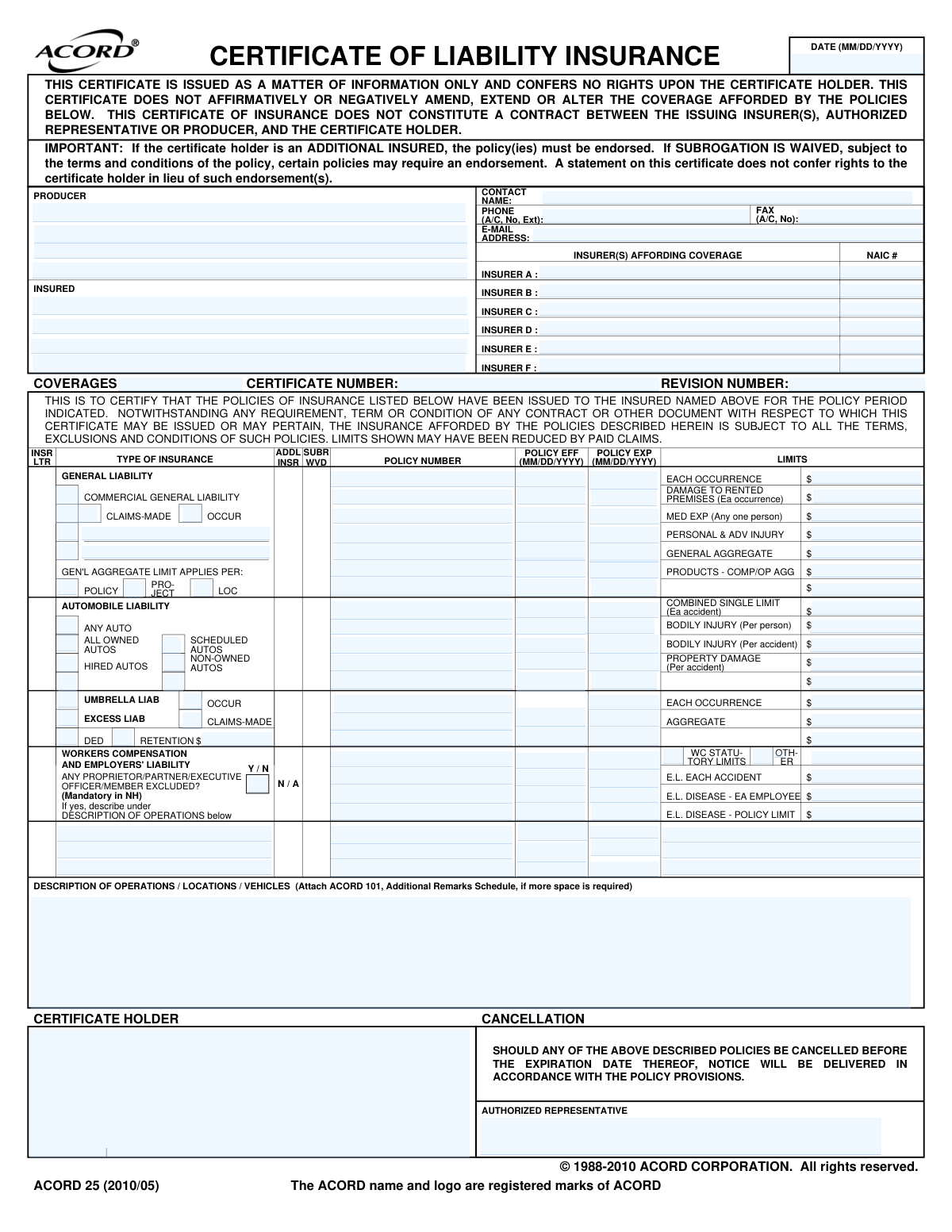
Yes! You can use AI to fill out ACORD 25, Certificate of Liability Insurance
The ACORD 25, also known as the Certificate of Liability Insurance, is a document that summarizes an individual's or organization's insurance coverage. It is commonly used to provide proof of insurance to clients, vendors, or government entities, detailing policy types, limits, and effective dates without disclosing the full policy terms. Today, this form can be filled out quickly and accurately using AI-powered services like Instafill.ai, which can also convert non-fillable PDF versions into interactive fillable forms.
Our AI automatically handles information lookup, data retrieval, formatting, and form filling.
It takes less than a minute to fill out ACORD 25 using our AI form filling.
Securely upload your data. Information is encrypted in transit and deleted immediately after the form is filled out.
Form specifications
| Form name: | ACORD 25, Certificate of Liability Insurance |
| Number of pages: | 1 |
| Language: | English |
| Categories: | insurance forms, ACORD forms |
Instafill Demo: How to fill out PDF forms in seconds with AI
How to Fill Out ACORD 25 Online for Free in 2026
Are you looking to fill out a ACORD 25 form online quickly and accurately? Instafill.ai offers the #1 AI-powered PDF filling software of 2026, allowing you to complete your ACORD 25 form in just 37 seconds or less.
Follow these steps to fill out your ACORD 25 form online using Instafill.ai:
- 1 Navigate to Instafill.ai and upload or select the ACORD 25 form.
- 2 Provide your business information for the 'Producer' and 'Insured' sections, allowing the AI to pre-fill known details.
- 3 Enter the names and NAIC numbers for each insurance carrier providing coverage.
- 4 Input the specific policy details for each coverage type, including General Liability, Automobile Liability, Umbrella, and Workers Compensation, specifying policy numbers, effective dates, and limits.
- 5 Use the 'Description of Operations' section to detail the specific activities, locations, or vehicles covered by the policy.
- 6 Enter the name and address of the 'Certificate Holder'—the entity requesting proof of insurance.
- 7 Review all the information populated by the AI for accuracy, then download, print, or share the completed Certificate of Liability Insurance.
Our AI-powered system ensures each field is filled out correctly, reducing errors and saving you time.
Why Choose Instafill.ai for Your Fillable ACORD 25 Form?
Speed
Complete your ACORD 25 in as little as 37 seconds.
Up-to-Date
Always use the latest 2026 ACORD 25 form version.
Cost-effective
No need to hire expensive lawyers.
Accuracy
Our AI performs 10 compliance checks to ensure your form is error-free.
Security
Your personal information is protected with bank-level encryption.
Frequently Asked Questions About Form ACORD 25
This form, often called a COI, serves as proof of insurance at a specific point in time. It summarizes the types and limits of liability coverage held by the 'Insured' for the benefit of a third party, known as the 'Certificate Holder'.
The insurance agent or broker, referred to as the 'Producer' on the form, is responsible for completing and issuing the Certificate of Liability Insurance. They do this at the request of their client, the 'Insured'.
The 'Insured' is the individual or business that holds the insurance policies listed on the certificate. The 'Certificate Holder' is the entity requesting proof of insurance, such as a client, landlord, or general contractor.
You will need the full legal name and address of the certificate holder. You must also inform your agent of any special requirements, such as specific coverage limits, additional insured status, or a waiver of subrogation.
Being named an 'Additional Insured' extends coverage from the insured's policy to the certificate holder, but only for liability arising from the insured's operations. This status must be granted through a formal policy endorsement, not just by noting it on the certificate.
An 'Occurrence' policy covers incidents that happen during the policy period, no matter when the claim is filed. A 'Claims-Made' policy covers claims that are made and reported during the policy period.
This section is used to specify details for the certificate holder, such as a project name, job site address, or vehicle information. It is also where special provisions like additional insured status or waivers of subrogation are often described.
The NAIC number is a unique code assigned by the National Association of Insurance Commissioners to identify each insurance company. Your insurance producer will fill in this number for each insurer providing coverage.
A waiver of subrogation means the insured's insurance company gives up its right to sue the certificate holder to recover funds paid for a claim. This is a contractual requirement that must be supported by an endorsement on the actual policy.
The certificate states that notice will be delivered 'in accordance with the policy provisions' if a policy is cancelled. It does not create a separate contractual obligation to notify the certificate holder outside of what the policy itself dictates.
Yes, services like Instafill.ai use AI to help insurance producers accurately auto-fill form fields from existing client data. This can significantly reduce the time spent on manual data entry and minimize errors.
To fill the form online, upload the ACORD 25 PDF to the Instafill.ai platform. The AI will make the document interactive, allowing you to easily click and type in each field or connect a data source to populate the information automatically.
If you have a non-fillable or 'flat' PDF, you can use a tool like Instafill.ai to make it interactive. Simply upload the file, and the platform's AI will convert it into a smart, fillable form that you can complete online.
Compliance ACORD 25
Validation Checks by Instafill.ai
1
Policy Period Chronology
This check ensures that for every listed policy, the 'Policy Expiration Date' is chronologically after the 'Policy Effective Date'. An invalid period, where the expiration is before the effective date, is a logical impossibility and indicates a significant data entry error. Failure would render the certificate invalid as it would not represent a valid period of coverage, leading to rejection of the form.
2
Standard Date Format (MM/DD/YYYY)
This validation verifies that all date fields, including the 'Date of Certificate', 'Policy Effective Date', and 'Policy Expiration Date', adhere strictly to the MM/DD/YYYY format. This is crucial for system interoperability, accurate record-keeping, and avoiding misinterpretation of coverage periods. Submissions with incorrect date formats would be rejected for manual correction.
3
NAIC Number Format and Validity
This check validates that the NAIC (National Association of Insurance Commissioners) number for each insurer is a 5-digit numeric code. The NAIC number is a unique identifier for insurance companies, and an incorrect format can lead to misidentification of the carrier. Failure to provide a valid NAIC number would prevent proper verification of the insurer's identity and status.
4
Insurer Letter Cross-Reference
This validation ensures that any 'INSR LTR' (Insurer Letter) specified in the main coverages table (e.g., 'A', 'B', 'C') corresponds to an insurer with a name and NAIC number defined in the 'INSURER(S) AFFORDING COVERAGE' section. This link is critical for associating a specific coverage and its limits with the correct underwriting company. A mismatch would make it impossible to determine which insurer is providing the coverage, causing the form to be rejected.
5
Producer Phone Number Formatting
This check ensures that the 'Producer Phone Number' field is entered in a consistent, valid format, such as a standard 10-digit number, optionally with an extension. Proper formatting is essential for successful communication and contact with the producer. Submissions with invalid formats could lead to processing delays if the producer needs to be contacted for clarification.
6
Producer and Insured Information Completeness
This validation confirms that the 'Producer Name', 'Producer Address', and 'Insured' name and address fields are all provided. The producer is the source of the certificate, and the insured is the subject. Missing any of this core information makes the document fundamentally incomplete and invalid, as it's impossible to know who issued it or for whom it was issued.
7
Mutually Exclusive Policy Basis (Claims-Made vs. Occurrence)
This validation ensures that for a single line of coverage, such as 'COMMERCIAL GENERAL LIABILITY', only one of the 'Claims-Made' or 'Occurrence' checkboxes can be selected. A policy cannot be both types simultaneously. Selecting both indicates a data entry error that creates ambiguity about the nature of the coverage, requiring correction before the certificate can be accepted.
8
Coverage Line Item Completeness
This rule checks that if a monetary limit (e.g., 'Each Occurrence Limit Amount') is entered for any line of coverage, then the corresponding 'Insurer Letter', 'Policy Number', 'Policy Effective Date', and 'Policy Expiration Date' for that line must also be filled out. A limit amount is meaningless without the context of the policy that provides it. Incomplete rows would be flagged for missing critical policy details.
9
Certificate Issuance Date Validity
This validation checks that the 'Date of Certificate' is not after the 'Policy Expiration Date' of the policies listed. Issuing a certificate of insurance for a policy that has already expired is illogical and misleading. This check prevents the creation of invalid documents and ensures the information presented is timely and relevant.
10
Producer Email Address Format Validation
This check verifies that the 'Producer Email Address' field contains a string that conforms to the standard email address format (e.g., [email protected]). An invalid email address prevents digital communication, which is a primary method for resolving issues or sending notifications. The system should reject submissions with malformed email addresses to ensure a valid point of contact is on file.
11
General Aggregate Limit Application Specificity
This validation ensures that if a value is present for the 'GENERAL AGGREGATE' limit, then at least one of the corresponding application checkboxes ('PER: POLICY', 'PRO-JECT', 'LOC') is also selected. This information is crucial as it defines the scope of how the aggregate limit is applied, which can significantly impact the total available coverage. A missing selection creates ambiguity and requires clarification.
12
Monetary Value Format
This check ensures that all fields representing monetary limits (e.g., 'Each Occurrence Limit Amount', 'General Aggregate Limit Amount') contain only valid numeric characters, currency symbols, and separators. Non-numeric data in these fields would cause calculation errors and make the coverage limits impossible to interpret. The validation prevents data corruption and ensures the financial information is machine-readable.
13
Workers Compensation Exclusion Explanation
This rule validates that if the 'OFFICER/MEMBER EXCLUDED?' checkbox is answered 'Y' (Yes), then a corresponding explanation must be provided in the 'DESCRIPTION OF OPERATIONS / LOCATIONS / VEHICLES' section. This is often a regulatory requirement to clarify who is not covered by the workers' compensation policy. Failure to provide this detail can lead to compliance issues and misrepresentation of coverage.
14
Automobile Liability Coverage Specification
This check ensures that if any limits are provided in the 'AUTOMOBILE LIABILITY' section, at least one of the auto type checkboxes ('ANY AUTO', 'ALL OWNED AUTOS', 'SCHEDULED AUTOS', etc.) is selected. The limits are meaningless without knowing what types of vehicles the liability coverage applies to. A failure to specify the auto type would result in an incomplete and ambiguous declaration of coverage.
Common Mistakes in Completing ACORD 25
Users often mistakenly enter the policyholder's information in the 'Certificate Holder' box. The 'Insured' is the one covered by the policy, while the 'Certificate Holder' is the third party requesting proof of insurance. This critical error makes the certificate invalid for its intended recipient, leading to rejection, project delays, and contractual issues. Always verify that the entity requesting the certificate is listed as the Certificate Holder.
This free-text field is frequently left blank or filled with generic text. However, certificate holders often require specific contractual language, such as project numbers, location details, or explicit confirmation of additional insured status. An insufficient description can lead to immediate rejection for not meeting contractual obligations. To avoid this, carefully review the requesting party's requirements and include all necessary details, attaching an ACORD 101 if more space is needed.
Failing to check the 'ADDL INSR' (Additional Insured) or 'SUBR WVD' (Subrogation Waived) boxes next to the relevant policy line is a very common oversight. These statuses are crucial contractual requirements, and simply mentioning them in the description box is often not enough without the corresponding policy endorsement being in place. This mistake can result in a breach of contract and leave the certificate holder exposed in the event of a claim. Always confirm these requirements and mark the boxes accordingly for each applicable coverage.
Entering dates in the wrong format (e.g., DD-MM-YYYY) instead of the required MM/DD/YYYY, or swapping the policy effective and expiration dates, is a frequent error. Incorrect dates can misrepresent the coverage period, potentially showing a policy as expired when it is active. This leads to confusion, rejection of the certificate, and requests for a corrected version. Always double-check the dates against the policy documents and adhere to the specified format.
The form uses letters (A, B, C, etc.) to link an insurer listed at the top to a specific policy in the coverages grid. Users often forget to enter the letter in the 'INSR LTR' column or use the wrong one. This makes it impossible to verify which company underwrites which coverage, rendering the certificate ambiguous and likely to be rejected. To prevent this, systematically assign letters to insurers and then carefully reference the correct letter for each policy line.
The NAIC number is a unique code identifying an insurance company, crucial for verification by the certificate holder. People often leave this field blank, guess the number, or mistakenly enter a policy number. A missing or incorrect NAIC number slows down the validation process and can raise questions about the insurer's legitimacy. The correct NAIC number should be sourced directly from the policy documents to ensure accuracy.
In the Automobile Liability section, users must check boxes to specify the type of auto coverage (e.g., 'Any Auto', 'Hired Autos', 'Non-Owned Autos'). A common mistake is failing to select the correct type as required by a contract; for instance, checking only 'Scheduled Autos' when 'Any Auto' is required. This misrepresents the scope of coverage and can lead to non-compliance and disputes. Always confirm the required auto coverage and mark all applicable boxes.
The distinction between 'Claims-Made' and 'Occurrence' policies is fundamental, yet users often check the wrong box or leave both blank. An 'Occurrence' policy covers incidents happening during the policy period, while a 'Claims-Made' policy only covers claims filed during that period. Misidentifying the policy type creates a significant misunderstanding of the coverage, which can have severe consequences. This information is clearly stated on the policy and must be transcribed accurately.
A Certificate of Insurance is not considered valid until it is signed and dated by an authorized representative of the producer (insurance agency). Forgetting to sign the form is a simple but critical error that invalidates the entire document. An unsigned certificate will be immediately rejected by the certificate holder, halting progress until a valid copy is provided. Always perform a final check to ensure the 'Authorized Representative' field is signed.
When entering monetary limits, users often make typos like adding extra zeros, omitting zeros, or placing a limit in the wrong field (e.g., putting the 'General Aggregate' limit in the 'Each Occurrence' box). These errors misrepresent the policy's coverage amounts, which can have serious contractual and legal ramifications. To avoid this, transcribe all limit amounts carefully as pure numbers without commas or currency symbols. AI-powered form filling tools like Instafill.ai can help prevent these errors by automatically validating and formatting data, and can convert flat PDFs into fillable versions.
Saved over 80 hours a year
“I was never sure if my IRS forms like W-9 were filled correctly. Now, I can complete the forms accurately without any external help.”
Kevin Martin Green
Your data stays secure with advanced protection from Instafill and our subprocessors

Robust compliance program
Transparent business model
You’re not the product. You always know where your data is and what it is processed for.
ISO 27001, HIPAA, and GDPR
Our subprocesses adhere to multiple compliance standards, including but not limited to ISO 27001, HIPAA, and GDPR.
Security & privacy by design
We consider security and privacy from the initial design phase of any new service or functionality. It’s not an afterthought, it’s built-in, including support for two-factor authentication (2FA) to further protect your account.
Fill out ACORD 25 with Instafill.ai
Worried about filling PDFs wrong? Instafill securely fills acord-25-certificate-of-liability-insurance-2 forms, ensuring each field is accurate.