Yes! You can use AI to fill out ACORD 147, Installation/Builders Risk Section
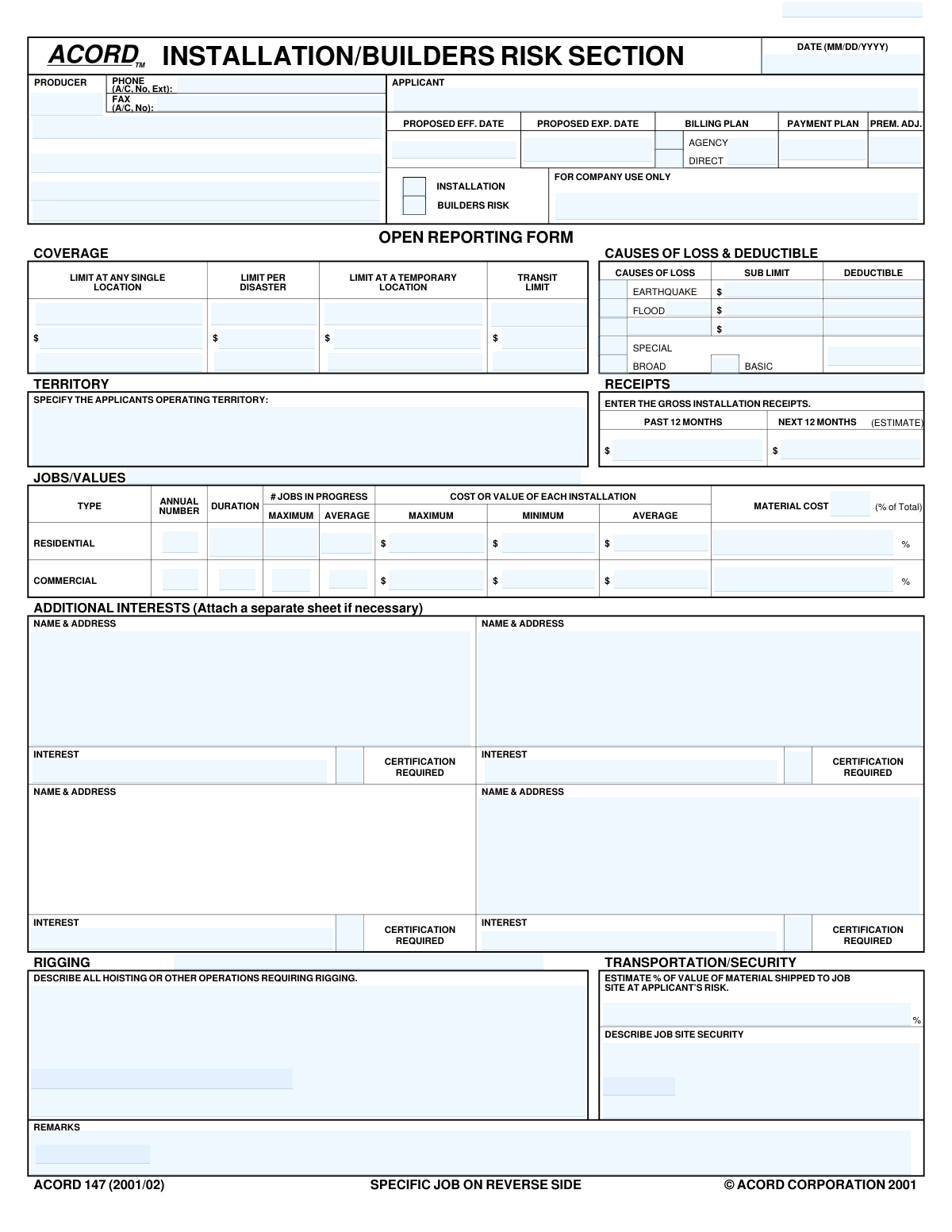
ACORD Form 147, the Installation/Builders Risk Section, is a supplemental insurance application used by producers and applicants to provide detailed information for underwriting policies that cover property during construction or installation. It captures critical data such as project values, job site security, transportation risks, and desired coverage limits for perils like floods or earthquakes. Today, this form can be filled out quickly and accurately using AI-powered services like Instafill.ai, which can also convert non-fillable PDF versions into interactive fillable forms.
ACORD 147 is part of the
ACORD forms, builders risk forms, construction insurance forms, installation risk forms, SEC forms and Section 8 forms categories on Instafill.
Our AI automatically handles information lookup, data retrieval, formatting, and form filling.
It takes less than a minute to fill out ACORD 147 using our AI form filling.
Securely upload your data. Information is encrypted in transit and deleted immediately after the form is filled out.
Form specifications
| Form name: | ACORD 147, Installation/Builders Risk Section |
| Number of fields: | 156 |
| Number of pages: | 2 |
| Language: | English |
Instafill Demo: How to fill out PDF forms in seconds with AI
How to Fill Out ACORD 147 Online for Free in 2026
Are you looking to fill out a ACORD 147 form online quickly and accurately? Instafill.ai offers the #1 AI-powered PDF filling software of 2026, allowing you to complete your ACORD 147 form in just 37 seconds or less.
Follow these steps to fill out your ACORD 147 form online using Instafill.ai:
- 1 Navigate to Instafill.ai and upload or select the ACORD 147 form.
- 2 Provide applicant, producer, and policy information in the top section, including names, contact details, and proposed effective dates.
- 3 Select the desired coverage (Installation or Builders Risk) and specify the Causes of Loss (e.g., Basic, Special, Flood) along with deductibles and coverage limits.
- 4 Complete the 'Open Reporting Form' section with details about the applicant's general operations, including territory, receipts, and typical job values.
- 5 If applicable, fill out the 'Specific Job' section on the reverse side with details about a particular project, including contract amount, job description, and timeline.
- 6 List any Additional Interests, such as mortgagees or lienholders, and indicate if certification is required.
- 7 Review all the information populated by the AI for accuracy, make any final adjustments, and then download, print, or submit the completed form.
Our AI-powered system ensures each field is filled out correctly, reducing errors and saving you time.
Why Choose Instafill.ai for Your Fillable ACORD 147 Form?
Speed
Complete your ACORD 147 in as little as 37 seconds.
Up-to-Date
Always use the latest 2026 ACORD 147 form version.
Cost-effective
No need to hire expensive lawyers.
Accuracy
Our AI performs 10 compliance checks to ensure your form is error-free.
Security
Your personal information is protected with bank-level encryption.
Frequently Asked Questions About Form ACORD 147
The ACORD 147 form is an application used to obtain insurance coverage for either installation projects or builders risk, which covers buildings during construction or renovation. It helps insurers understand the scope and risks of your work to provide an accurate quote.
Contractors, builders, or any business that installs property or undertakes construction projects needs to complete this form, typically with their insurance agent, to apply for coverage.
Select 'Installation' if you are insuring materials and labor for a specific installation project, often within an existing structure. Choose 'Builders Risk' for broader coverage on a new construction or major renovation project from the ground up.
In this section, you must provide your total revenue from all installation jobs over the past 12 months and an estimate of your expected revenue for the next 12 months. This information helps the insurer gauge the volume of your business.
This section requires details about your typical residential and commercial jobs, including the annual number of jobs, their average duration, and the minimum, average, and maximum cost or value of each installation.
An 'Additional Interest' is a third party, such as a lender, property owner, or general contractor, who has a financial stake in the project. They are listed on the policy to be notified in case of a loss, which is often a contractual requirement.
Provide a detailed description of any work involving cranes, hoists, or special rigging, including the equipment used and the types of lifts performed. These are high-risk activities that require specific underwriting attention.
The 'Open Reporting Form' side is used to apply for a policy that covers all of your jobs over a policy period. The 'Specific Job' side is used to apply for coverage for a single, particular project.
These terms define the scope of your coverage by listing which perils (causes of damage) are covered. 'Basic' is the most limited, 'Special' (or 'all-risk') is the broadest, and 'Broad' falls in between.
Describe the measures you take to protect the job site from theft or vandalism, such as fencing, lighting, security guards, or alarm systems. Providing details on robust security can positively impact your premium.
Yes, services like Instafill.ai use AI to accurately auto-fill form fields from your existing documents, which can save significant time and reduce errors when completing complex forms like this one.
You can use a service like Instafill.ai to upload the ACORD 147 PDF. The platform makes the form interactive and helps you fill it out quickly online, then allows you to download or share the completed document.
Instafill.ai can convert flat, non-fillable PDFs into interactive, fillable forms. Simply upload your document, and the tool will automatically detect the fields for you to complete online.
Compliance ACORD 147
Validation Checks by Instafill.ai
1
Ensures Proposed Expiration Date is after Proposed Effective Date
This validation confirms that the 'Proposed Expiration Date' is chronologically later than the 'Proposed Effective Date'. A policy cannot expire before it begins, so this check ensures a valid and logical policy term. If this check fails, the policy term is invalid, which would lead to incorrect coverage periods and billing cycles, requiring manual correction.
2
Validates Date Format (MM/DD/YYYY)
This check ensures that all date fields, such as 'Form Date', 'Proposed Effective Date', and 'Completion Date', adhere to the MM/DD/YYYY format. Consistent and valid date formatting is crucial for accurate data processing, policy term calculation, and system integration. An invalid format would cause the submission to be rejected or require manual correction.
3
Requires Earthquake Details if Earthquake Coverage is Selected
This validation checks that if the 'Earthquake' checkbox is selected as a cause of loss, then the corresponding 'Earthquake Deductible' and 'Earthquake Sub-Limit' fields must contain valid monetary values. This is important for defining the terms of the coverage accurately. Failure to provide these values would result in an incomplete and un-rateable policy submission for that specific peril.
4
Requires Flood Details if Flood Coverage is Selected
This validation ensures that if the 'Flood' checkbox is selected, the 'Flood Deductible' and 'Flood Sub-Limit' fields are populated with monetary values. Similar to earthquake coverage, these values are essential for defining the policy's financial terms and risk exposure. An incomplete submission for this peril would prevent the policy from being issued correctly.
5
Ensures Additional Interest Details are Complete when Certification is Required
This rule verifies that if an 'Additional Interest - Certification Required' checkbox is ticked, the corresponding 'Name & Address' and 'Interest' fields for that party are also filled out. It is critical to know who the additional interest is and what their relationship to the policy is (e.g., mortgagee, lienholder) when a certificate is requested. Missing this information would prevent the generation of a valid certificate and could lead to compliance issues.
6
Validates Logical Range for Job Cost Values
This check verifies that for both Residential and Commercial job types, the 'Average' cost or value is numerically between the 'Minimum' and 'Maximum' cost or value. This ensures the data provided is logical and internally consistent. An average value that is lower than the minimum or higher than the maximum indicates a data entry error that needs correction for accurate risk assessment.
7
Ensures Transportation Method Percentages Sum to 100%
This validation confirms that for any given shipment line under the 'TRANSPORTATION' section, the sum of '% For Applicant's Vehicles' and '% By Common/Contract Carrier' equals 100%. This is crucial for understanding the complete risk profile of materials in transit. A sum other than 100% indicates an incomplete or erroneous breakdown of transportation methods, requiring correction before the risk can be properly underwritten.
8
Verifies Applicant Name is Provided
This check ensures that the 'Applicant' field, representing the full legal name of the named insured, is not empty. The applicant's name is a fundamental piece of information required to identify the policyholder and create a legally binding contract. A submission without an applicant name is fundamentally incomplete and cannot be processed.
9
Validates Producer Phone and Fax Number Format
This rule checks that the 'Producer Phone' and 'Producer Fax' numbers are entered in a valid format, including area code (A/C) and number. Correct contact information is essential for communication between the insurance company and the producer regarding the application. An invalid format could hinder communication, delaying the quoting and binding process.
10
Ensures Job Completion Date is after Commencement Date
For a specific job, this validation confirms that the 'Completion Date' is on or after the 'Commencement Date'. A project cannot be completed before it starts, and this check prevents logical errors in defining the project timeline. This timeline is critical for determining the period of risk for builders risk or installation coverage.
11
Ensures Gross Installation Receipts are Provided
This check verifies that both 'Past 12 Months' and 'Next 12 Months (Estimate)' gross installation receipts fields contain a monetary value. This information is fundamental for underwriters to assess the scale of the applicant's business, project future activity, and determine an appropriate premium. Missing receipt data would likely halt the underwriting process until it is supplied.
12
Requires at least one Coverage Type Selection
This validation ensures that either the 'Installation' or 'Builders Risk' checkbox is selected. The form is specifically for these types of coverage, so at least one must be chosen to define the purpose of the application. Without a selection, the underwriter does not know what type of risk to evaluate, making the submission invalid.
13
Requires at least one Cause of Loss Selection
This check verifies that at least one cause of loss (e.g., Basic, Broad, Special, Flood, Earthquake) is selected. The causes of loss define the perils the policy covers, which is a core component of the insurance contract. A submission without any selected cause of loss is incomplete as it doesn't specify what is being insured against.
14
Validates all monetary fields contain valid currency values
This rule scans all fields intended to hold dollar amounts (e.g., Limits, Deductibles, Receipts, Contract Amount) to ensure they contain only valid numeric currency data. This is critical for all financial calculations related to the policy, including premium, limits, and potential claim payouts. Non-numeric or improperly formatted data would cause calculation errors and system rejection.
Common Mistakes in Completing ACORD 147
Applicants often check a box for a specific cause of loss, such as 'Flood' or 'Earthquake', but then fail to enter the corresponding 'Sub Limit' and 'Deductible' amounts in the same row. This happens because the filer focuses on selecting the coverage type without completing the associated financial details. This omission results in an incomplete application, as the underwriter cannot determine the terms of the requested coverage, leading to processing delays and follow-up requests. To avoid this, always review the entire row for any selected cause of loss and ensure all related fields are filled.
Providing overly brief or non-specific answers in descriptive fields like 'Describe All Hoisting Or Other Operations Requiring Rigging' or 'Describe Job Site Security' is a frequent error. Applicants might write 'Standard rigging' or 'Fenced site,' which lacks the detail needed for proper risk assessment. This ambiguity can lead to underwriters making conservative assumptions, potentially resulting in higher premiums or requests for more information. To prevent this, provide detailed descriptions including equipment used, security personnel hours, types of fencing, alarm systems, and specific procedures.
The financial figures provided in different sections do not logically align with each other. For example, the 'Gross Installation Receipts' may be drastically inconsistent with the calculated total from the 'Annual Number' of jobs multiplied by the 'Average' cost per installation. This mistake happens when applicants estimate figures for different sections independently without cross-referencing. It raises red flags for underwriters, questioning the accuracy of the entire application and causing delays for verification. Always double-check that your financial entries present a cohesive and realistic picture of your business operations.
An applicant correctly enters the name and address of an 'Additional Interest' but leaves the 'Interest' field blank. This field is crucial as it defines the party's legal standing (e.g., 'Mortgagee', 'Lienholder', 'Loss Payee'). This omission occurs because the applicant may not understand the importance of defining the relationship. Without this information, the insurer cannot issue a correct certificate or endorsement, potentially putting the applicant in breach of their contract with the additional interest. Always specify the exact nature of the interest for every party listed.
Applicants mistakenly enter details for a single, specific project on the first page ('Open Reporting Form') instead of the second page ('Specific Job'). The first page is intended to capture data about the applicant's overall annual operations, while the second is for underwriting a particular job. This error leads to a misrepresentation of the applicant's typical business volume and risk profile, resulting in an inaccurate quote. To avoid this, use the first page for annual averages and totals and the second page for the details of one-off projects requiring specific coverage.
Applicants provide a figure for 'Gross Installation Receipts' that is either a net figure (after costs) or doesn't align with the requested 12-month period. People often think in terms of calendar years or profit, not the specific rolling 12-month gross revenue required for underwriting. This can lead to under- or over-insuring and incorrect premium calculations. Ensure you are providing the total revenue from installations for the exact period requested (past 12 months and estimated next 12 months) before deducting any expenses.
In the 'Specify The Applicants Operating Territory' field, an applicant enters a vague description like 'USA' or 'West Coast.' This is insufficient for an underwriter who needs to assess risk based on specific jurisdictions, weather patterns, and legal environments. This lack of specificity causes delays as the insurer will require clarification. To avoid this, list the specific states, provinces, or major metropolitan areas where work is performed, noting any areas you do not operate in.
The applicant fails to complete the 'Estimate % of Value of Material Shipped to Job Site at Applicant’s Risk' field. This detail is critical for installation and builders risk policies, as it determines the extent of transit exposure the insurer is taking on. This is often overlooked as applicants focus on the on-site risks. The consequence is an incomplete risk profile, which may delay quoting or result in inadequate transit coverage. Always estimate and enter the percentage of materials for which you are responsible during shipment.
The applicant checks the 'Certification Required' box but fails to fill in the 'Interest' field for an additional interest, or vice-versa, which is a common conditional logic error. This prevents the insurer from processing the certification request, causing compliance issues for the applicant. To avoid this, ensure that if you require a certificate for an additional interest, you have also clearly defined their specific 'Interest' (e.g., mortgagee). AI-powered form filling tools like Instafill.ai can help prevent these errors by automatically validating data and prompting for required information based on user selections.
An applicant leaves critical limit fields like 'Limit at Any Single Location' or 'Transit Limit' empty, assuming a 'standard' limit will be applied or not knowing what value to enter. This forces the underwriter to guess or halt the process, delaying the quote. It's crucial to determine the maximum value at risk at any one job site or in transit and enter those figures to ensure coverage is adequate. If the form is a non-fillable PDF, tools like Instafill.ai can convert it into an interactive version, making it easier to spot and fill all required fields.
Saved over 80 hours a year
“I was never sure if my IRS forms like W-9 were filled correctly. Now, I can complete the forms accurately without any external help.”
Kevin Martin Green
Your data stays secure with advanced protection from Instafill and our subprocessors




Robust compliance program
Transparent business model
You’re not the product. You always know where your data is and what it is processed for.
ISO 27001, HIPAA, and GDPR
Our subprocesses adhere to multiple compliance standards, including but not limited to ISO 27001, HIPAA, and GDPR.
Security & privacy by design
We consider security and privacy from the initial design phase of any new service or functionality. It’s not an afterthought, it’s built-in, including support for two-factor authentication (2FA) to further protect your account.
Fill out ACORD 147 with Instafill.ai
Worried about filling PDFs wrong? Instafill securely fills acord-147-installationbuilders-risk-section forms, ensuring each field is accurate.
