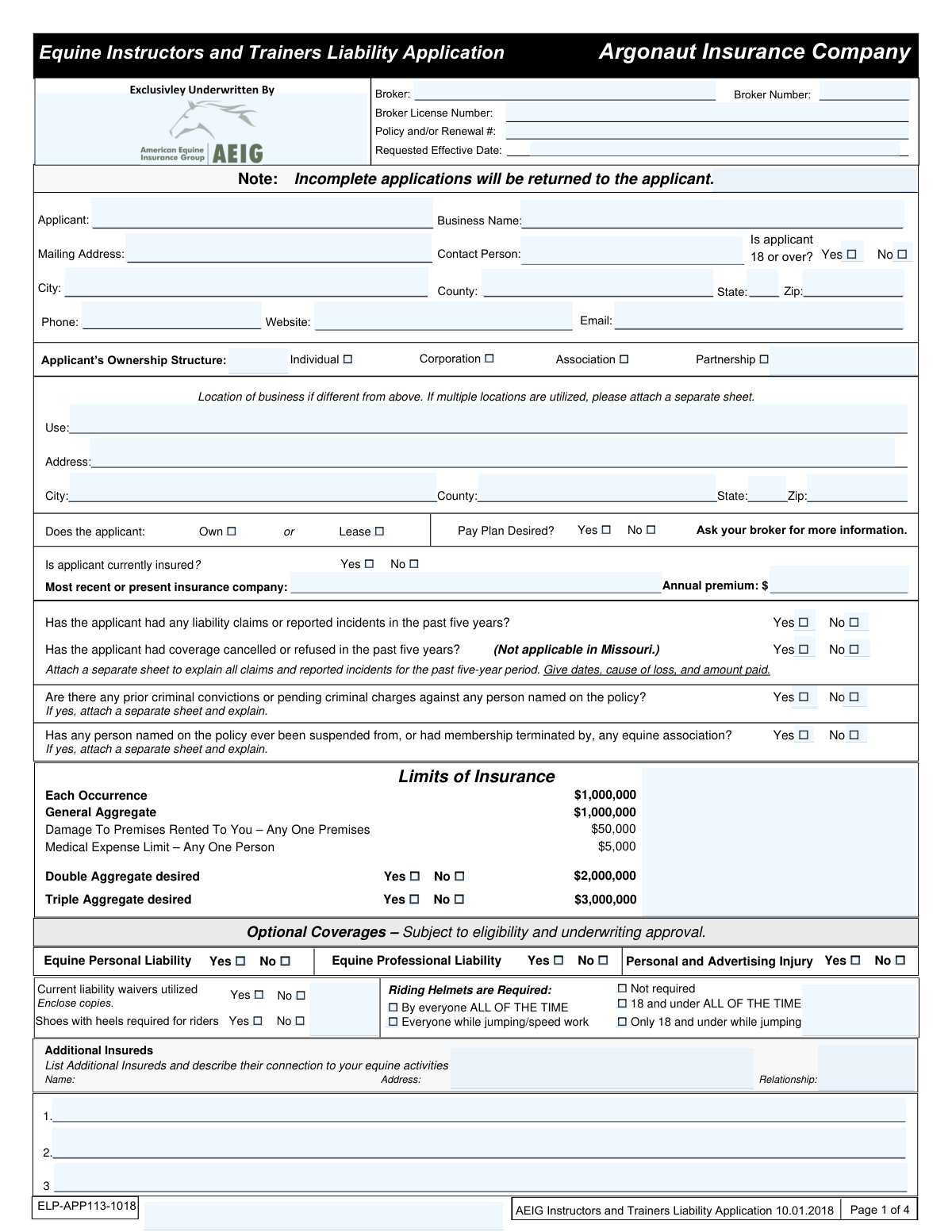
Yes! You can use AI to fill out Argonaut Insurance Company, Equine Instructors and Trainers Liability Application
This form is an application for equine professionals, such as instructors and trainers, to obtain liability insurance from Argonaut Insurance Company. It gathers detailed information about the applicant's business operations, experience, revenue, prior claims history, and desired coverage limits to underwrite a policy. Today, this form can be filled out quickly and accurately using AI-powered services like Instafill.ai, which can also convert non-fillable PDF versions into interactive fillable forms.
Our AI automatically handles information lookup, data retrieval, formatting, and form filling.
It takes less than a minute to fill out ELP-APP113-1018 using our AI form filling.
Securely upload your data. Information is encrypted in transit and deleted immediately after the form is filled out.
Form specifications
| Form name: | Argonaut Insurance Company, Equine Instructors and Trainers Liability Application |
| Number of pages: | 4 |
| Language: | English |
| Categories: | insurance forms, insurance application forms, company forms |
Instafill Demo: How to fill out PDF forms in seconds with AI
How to Fill Out ELP-APP113-1018 Online for Free in 2026
Are you looking to fill out a ELP-APP113-1018 form online quickly and accurately? Instafill.ai offers the #1 AI-powered PDF filling software of 2026, allowing you to complete your ELP-APP113-1018 form in just 37 seconds or less.
Follow these steps to fill out your ELP-APP113-1018 form online using Instafill.ai:
- 1 Navigate to Instafill.ai and upload or select the Equine Instructors and Trainers Liability Application.
- 2 Provide your personal, contact, and business information. The AI will assist in populating fields for your name, address, ownership structure, and broker details.
- 3 Detail your equine operations by answering questions about your experience, the number of horses you own or lease, and the types of activities you conduct (e.g., training, riding instruction, clinics).
- 4 Answer the series of yes/no questions regarding prior insurance history, liability claims, and any past disciplinary actions.
- 5 Select your desired insurance limits and any optional coverages, such as Care, Custody, or Control (CCC), by checking the appropriate boxes.
- 6 Carefully review all the information auto-filled by the AI for accuracy, then provide your electronic signature and the date in the declaration section.
- 7 Download the completed, signed application to share with your insurance broker or submit directly as required.
Our AI-powered system ensures each field is filled out correctly, reducing errors and saving you time.
Why Choose Instafill.ai for Your Fillable ELP-APP113-1018 Form?
Speed
Complete your ELP-APP113-1018 in as little as 37 seconds.
Up-to-Date
Always use the latest 2026 ELP-APP113-1018 form version.
Cost-effective
No need to hire expensive lawyers.
Accuracy
Our AI performs 10 compliance checks to ensure your form is error-free.
Security
Your personal information is protected with bank-level encryption.
Frequently Asked Questions About Form ELP-APP113-1018
This form is an application for liability insurance specifically designed for equine professionals, such as instructors, trainers, and judges, to protect their business operations.
Any individual or business providing professional equine services like riding instruction, horse training, officiating, or running riding clinics should complete this application to obtain liability coverage.
CCC coverage protects you financially if a non-owned horse in your care is injured or dies. You should select this coverage if you board, train, or handle horses owned by others.
You must include copies of your current liability waiver forms. Additionally, you'll need to attach separate sheets to explain any prior liability claims, criminal convictions, or terminations from equine associations.
Yes, you can still apply for coverage. You must disclose all claims from the past five years on a separate sheet, detailing the date, cause of loss, and amount paid.
The policy will only cover exposures and activities that are declared on the application. Any activities not disclosed are not covered, so it is critical to be thorough.
The form has space for one business location different from your mailing address. If you use more than one additional location, you must attach a separate sheet with the address and use for each one.
Use the 'Additional Insureds' section on the first page to list the person or entity's name, address, and their relationship to your equine activities, such as 'property owner'.
To cover your day camps, you must check 'Yes' in the Equestrian Day Camps section and complete the separate Equestrian Day Camp Supplemental Application.
You should submit the completed and signed application through your insurance broker. The form includes sections for your broker's information and signature.
Yes, services like Instafill.ai use AI to accurately auto-fill form fields, which can save you time and help ensure the information is entered correctly on this detailed application.
You can use a service like Instafill.ai to complete the form digitally. Simply upload the PDF to their platform, and you can type your information directly into the fillable fields.
If you have a non-fillable or 'flat' PDF, you can use a tool like Instafill.ai to convert it into an interactive, fillable form. This allows you to easily complete, save, and share your application electronically.
Your annual gross revenue from all equine activities is a key factor underwriters use to assess the size and risk of your operation. You must provide a detailed breakdown for training, instruction, sales, and other services.
The form lists standard liability limits, but you can also request double or triple aggregates. You should discuss your specific operations and risks with your insurance broker to select the appropriate coverage limits for your needs.
Compliance ELP-APP113-1018
Validation Checks by Instafill.ai
1
Conditional Requirement for Prior History Explanations
This check verifies that if the applicant answers 'Yes' to having prior liability claims, criminal convictions, or equine association suspensions, a corresponding explanation has been provided. These disclosures are critical for underwriting to accurately assess the applicant's risk profile. If an explanation is missing for a 'Yes' answer, the application is considered incomplete and must be returned to the applicant for additional information.
2
Gross Revenue Summation Accuracy
This validation ensures that the value entered in the 'Total Annual Gross Revenue' field is equal to the sum of the individual revenue fields (Training, Riding Instruction, Horse Sales, Riding Clinics, Officiating). This is important for verifying the accuracy of the financial data used to calculate the premium. A mismatch would indicate a data entry error and could lead to incorrect rating, requiring correction before processing.
3
Conditional Requirement for Current Insurance Details
This check confirms that if the applicant indicates they are currently insured by selecting 'Yes', the fields for 'Most recent or present insurance company' and 'Annual premium' are filled out. This information provides the underwriter with the applicant's insurance history, which is a key factor in risk assessment and pricing. Failure to provide these details when required will result in the application being flagged as incomplete.
4
Applicant Minimum Age Verification
This validation ensures that the 'Is applicant 18 or over?' box is checked 'Yes'. Insurance policies are legal contracts, and applicants must be of legal age to enter into one. If the applicant is under 18, the application is invalid and cannot be processed, as it would require a legal guardian's involvement which is not accounted for on this form.
5
Conditional Completeness for CCC Coverage
If 'Yes' is selected for 'Is CARE, CUSTODY, OR CONTROL (CCC) coverage desired?', this check validates that at least one CCC limit option is selected and that the fields for 'Average number of non-owned horses', 'Maximum number of non-owned horses', and 'Maximum value of an individual non-owned horse' are all completed. This information is essential for rating and issuing the specific CCC coverage. An incomplete CCC section will prevent the policy from being quoted correctly.
6
Requested Effective Date Format and Logic
This validation checks that the 'Requested Effective Date' is a valid date and is not in the past. An insurance policy cannot be backdated through a standard application process. This ensures the requested start of coverage is intentional and feasible. An invalid format or a past date will trigger an error and require the user to input a valid future or current date.
7
State-Specific Rule for Cancellation Question (Missouri)
This check enforces the rule stated on the form: '(Not applicable in Missouri.)'. If the applicant's state is identified as 'MO', the validation for the question 'Has the applicant had coverage cancelled or refused in the past five years?' should be disabled. This ensures compliance with state-specific regulations and prevents penalizing an applicant for a question that does not apply to them.
8
Logical Consistency of Experience Years
This validation verifies that the 'Years experience with horses' is greater than or equal to the 'Professional years operating this type of an operation as a business'. It is logically impossible to have more years of professional business experience than total experience. A failure indicates a data entry error that needs correction to ensure the applicant's experience level is accurately represented.
9
Conditional Revenue Entry for Declared Activities
This check ensures that if an applicant marks 'Yes' for any specific equine activity (e.g., Training, Riding Instruction, Horse Sales), the corresponding revenue field for that activity must contain a numeric value (even if it is zero). This confirms that all declared exposures are financially quantified for the underwriter. Missing revenue data for a declared activity will halt processing until the information is provided.
10
Day Camp Supplemental Application Requirement
This validation checks if the 'Equestrian Day Camps - Yes' box is selected. If it is, the system must flag that the separate 'Equestrian Day Camp Supplemental Application' is required for the submission to be complete. This is a critical completeness check because the main application does not collect the detailed information needed to underwrite the specific risks of a day camp.
11
Applicant Signature and Date Completeness
This validation confirms that the 'Applicant's Signature' and 'Date' fields on the final page are not empty. An applicant's signature is legally required to attest to the truthfulness of the provided information and to make the application a binding document. An unsigned or undated application is invalid and cannot be processed.
12
Exclusive Selection of Aggregate Limit Options
This check ensures that the applicant has not selected 'Yes' for both 'Double Aggregate desired' and 'Triple Aggregate desired'. These are mutually exclusive options for the policy's liability limit. Selecting both creates a contradiction, and the system should prompt the user to choose only one or neither before the application can be submitted.
13
Horse Sales Data Consistency Check
If 'Horse Sales - Yes' is selected, this validation verifies that the 'Total Horses Sold Annually' field equals the sum of 'Horses Sold Annually (Owned by You)' and 'Horses Sold Annually (Owned by Others)'. This cross-check ensures the integrity and accuracy of the sales activity data. A discrepancy would indicate a reporting error that must be corrected.
14
State-Specific Broker Signature Requirement (New Hampshire)
This validation enforces the rule noted on the form that the 'Broker Signature' is required for applications from New Hampshire. If the applicant's state is 'NH', the system must check that the broker signature field is completed. This is a compliance check to ensure all state-specific requirements are met before the application is accepted for underwriting.
Common Mistakes in Completing ELP-APP113-1018
Applicants often check 'Yes' to questions about prior claims, criminal history, or the use of liability waivers but forget to attach the required explanatory documents or copies. This is a critical omission because underwriters cannot assess the risk without this information, leading to the application being returned. To avoid this, create a checklist of all required attachments before submission; since this form is a non-fillable PDF, using a tool like Instafill.ai can convert it into a smart form that flags fields requiring an attachment.
A frequent error occurs in the 'Annual Gross Revenues' section where the sum of individual activities (Training, Instruction, Sales, etc.) does not match the 'Total Annual Gross Revenue' figure. This mathematical error raises red flags about the applicant's record-keeping and can delay the underwriting process for clarification. Double-check all calculations before submitting; advanced form-filling tools can automatically perform these calculations and validate the totals to prevent such discrepancies.
Applicants may provide overly brief answers in fields like 'Description of your operation,' failing to list all activities such as boarding, off-site clinics, or day camps. The policy explicitly states that 'EXPOSURES NOT DECLARED ARE NOT COVERED,' meaning a claim arising from an unlisted activity could be denied. To prevent this, be exhaustive and detail every single service you offer, no matter how infrequent, to ensure all risks are properly disclosed and covered.
The CCC section is complex, leading applicants to incorrectly report the number and maximum value of non-owned horses they handle. This can result in selecting inadequate coverage, leaving the business financially exposed if a client's high-value horse is injured or killed. Carefully consider the absolute maximum value of any single horse you might train or board, not just the average, and select the appropriate limit.
Applicants sometimes provide conflicting information, such as checking 'No' for 'Riding Instruction' but then entering revenue figures in the 'Riding Instruction' line item. Such contradictions force the underwriter to return the application for correction, delaying coverage. Review the entire application to ensure all related fields are consistent; AI-powered tools like Instafill.ai can help by using conditional logic to highlight or prevent such contradictory entries.
The form asks for the business location if it's different from the mailing address and requires an attachment for multiple locations. Applicants who train at various client barns or showgrounds may forget to list all of them. This is a critical oversight, as activities at undeclared locations may not be covered by the policy.
A surprising number of applications are submitted without the applicant's signature and date on the final page. An unsigned application is legally invalid and will be returned immediately, halting the entire process and delaying the requested effective date. Always perform a final review of the document, paying special attention to the signature block before sending it.
Confusion often arises between the 'Applicant' name, 'Business Name,' and 'Contact Person.' An individual might list their personal name as the applicant when the business is legally a corporation or LLC. This can cause legal and administrative issues with the policy, so ensure the 'Applicant' field contains the correct legal entity seeking insurance.
Many questions require a detailed explanation on a separate sheet if 'Yes' is selected, such as for prior claims or criminal charges. Applicants frequently check 'Yes' but fail to provide the mandatory follow-up details. This renders the application incomplete and guarantees it will be sent back for more information, delaying the quoting process.
In sections like 'Limits of Insurance' or the 'Care, Custody, or Control' table, applicants must actively select their desired coverage limits by checking a box. Some applicants overlook these selections, leaving the underwriter to guess which level of coverage is needed. This necessitates a follow-up and delays the quote, so carefully review all tables to ensure you have explicitly selected the desired insurance limits.
Saved over 80 hours a year
“I was never sure if my IRS forms like W-9 were filled correctly. Now, I can complete the forms accurately without any external help.”
Kevin Martin Green
Your data stays secure with advanced protection from Instafill and our subprocessors

Robust compliance program
Transparent business model
You’re not the product. You always know where your data is and what it is processed for.
ISO 27001, HIPAA, and GDPR
Our subprocesses adhere to multiple compliance standards, including but not limited to ISO 27001, HIPAA, and GDPR.
Security & privacy by design
We consider security and privacy from the initial design phase of any new service or functionality. It’s not an afterthought, it’s built-in, including support for two-factor authentication (2FA) to further protect your account.
Fill out ELP-APP113-1018 with Instafill.ai
Worried about filling PDFs wrong? Instafill securely fills argonaut-insurance-company-equine-instructors-and-trainers-liability-application forms, ensuring each field is accurate.