Yes! You can use AI to fill out Form SSA-2-BK, Application for Wife's or Husband's Insurance Benefits

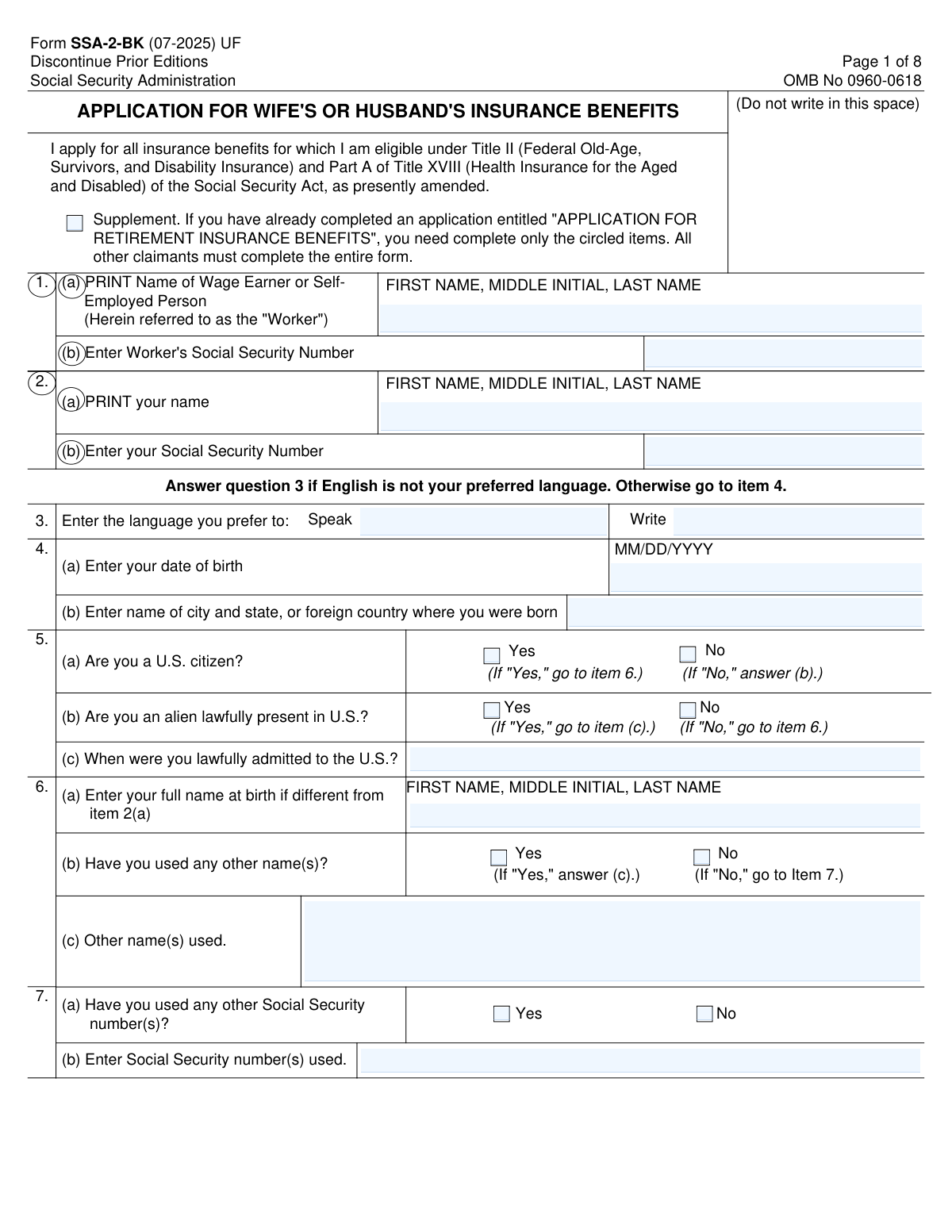
Form SSA-2-BK is the Social Security Administration's official application for individuals to claim insurance benefits as the wife, husband, or divorced spouse of an eligible worker. It gathers necessary personal, marital, and work history information to determine eligibility and calculate benefit amounts. Today, this form can be filled out quickly and accurately using AI-powered services like Instafill.ai, which can also convert non-fillable PDF versions into interactive fillable forms.
Our AI automatically handles information lookup, data retrieval, formatting, and form filling.
It takes less than a minute to fill out SSA-2-BK using our AI form filling.
Securely upload your data. Information is encrypted in transit and deleted immediately after the form is filled out.

Form specifications

Form name: Form SSA-2-BK, Application for Wife's or Husband's Insurance Benefits
Number of pages: 8
Language: English
Categories: insurance forms, benefit forms, SSA forms, insurance application forms
main-image

Instafill Demo: How to fill out PDF forms in seconds with AI

How to Fill Out SSA-2-BK Online for Free in 2026

Are you looking to fill out a SSA-2-BK form online quickly and accurately? Instafill.ai offers the #1 AI-powered PDF filling software of 2026, allowing you to complete your SSA-2-BK form in just 37 seconds or less.
Follow these steps to fill out your SSA-2-BK form online using Instafill.ai:
  1. 1 Navigate to Instafill.ai and upload or select the Form SSA-2-BK.
  2. 2 Provide your personal details, including your full name, Social Security Number, date of birth, and citizenship status.
  3. 3 Enter the worker's (your spouse's or ex-spouse's) full name and Social Security Number.
  4. 4 Detail your marriage history, including dates, locations, and how previous marriages ended.
  5. 5 Report your employment history and earnings for the past three years to determine how work may affect your benefits.
  6. 6 Answer questions regarding Medicare Part B enrollment and when you wish for your benefits to begin.
  7. 7 Review the information auto-filled by the AI for accuracy, then sign and submit the completed form to the Social Security Administration.

Our AI-powered system ensures each field is filled out correctly, reducing errors and saving you time.

Why Choose Instafill.ai for Your Fillable SSA-2-BK Form?

Speed

Complete your SSA-2-BK in as little as 37 seconds.

Up-to-Date

Always use the latest 2026 SSA-2-BK form version.

Cost-effective

No need to hire expensive lawyers.

Accuracy

Our AI performs 10 compliance checks to ensure your form is error-free.

Security

Your personal information is protected with bank-level encryption.

Frequently Asked Questions About Form SSA-2-BK

This form is the official application to claim Social Security insurance benefits as the current or divorced spouse of an eligible worker. It also allows you to apply for Medicare Part A and B if you are eligible.

You should complete this form if you are applying for spousal benefits based on the work record of a current or former spouse who is entitled to Social Security retirement or disability benefits. This includes divorced spouses who meet certain criteria.

If you have already filed an 'Application for Retirement Insurance Benefits' for your own work record, you only need to complete the circled items on this form. All other applicants must complete the entire form.

You must provide details about your marriage to the worker you are claiming benefits on, as well as any other marriages, especially those lasting 10 years or more. Use the 'Remarks' section if you run out of space.

Your earnings can affect the amount of benefits you receive if you are under your full retirement age. The Social Security Administration uses this information to determine if any deductions apply to your monthly benefit payments.

You can choose to start benefits at the earliest possible month, which may result in a permanent reduction if you are under full retirement age. Alternatively, you can delay them to avoid a reduction or specify a different start month.

No, enrollment in Medicare Part B (Medical Insurance) is optional, but you should carefully consider your decision. If you don't enroll when first eligible, you may face a late enrollment penalty for as long as you have the coverage.

You will likely need to provide original or certified copies of your birth certificate, marriage certificate(s), and divorce decree(s) if applicable. The SSA will inform you of the specific documents required for your claim.

The SSA will provide an estimated timeframe on your claim receipt after you submit the form. Processing times can vary, and some claims may take longer if additional information is needed.

You should send or bring the completed and signed form to your local Social Security office. You can find your local office's address on the SSA website or by calling them at 1-800-772-1213.

Yes, you may be eligible for benefits as a divorced spouse if your marriage lasted 10 years or longer, you are currently unmarried, and you are at least 62 years old. You must provide details about your marriage and divorce in Item 11.

Yes, services like Instafill.ai use AI to help you accurately auto-fill forms like this one, which can save you time and help prevent errors. This ensures your information is entered correctly before you print and sign the form.

Simply upload the SSA-2-BK PDF to the Instafill.ai platform. The AI will identify all the form fields, allowing you to provide your information through a simple interface to have the form filled out automatically and accurately.

If you have a flat, non-fillable PDF, you can use a service like Instafill.ai. It can convert the static form into an interactive, fillable one, allowing you to easily type your information directly into the correct fields.

Compliance SSA-2-BK
Validation Checks by Instafill.ai

1
Validates Social Security Number Format and Uniqueness
This check ensures that the Social Security Numbers entered for both the worker (Item 1b) and the applicant (Item 2b) are in a valid 9-digit format (XXX-XX-XXXX or XXXXXXXXX). It also verifies that the applicant's SSN is not identical to the worker's SSN, as this application is for spousal benefits. Failure to provide a valid, unique SSN will prevent the application from being processed and linked to the correct Social Security records.
2
Ensures Applicant's Date of Birth is a Valid Past Date
This validation confirms that the applicant's date of birth (Item 4a) is entered in the correct MM/DD/YYYY format and represents a real calendar date. It also checks that the date is in the past and not a future date. An invalid or future date of birth would make it impossible to determine eligibility for benefits, which is heavily dependent on age.
3
Conditional Requirement for Alien Status Information
This check enforces the form's conditional logic for citizenship. If the applicant indicates they are not a U.S. citizen (Item 5a is 'No'), then they must answer whether they are lawfully present (Item 5b). Furthermore, if they answer 'Yes' to being lawfully present, they must provide their date of lawful admission (Item 5c). Missing this information can delay or prevent the determination of benefit eligibility for non-citizens.
4
Conditional Requirement for Other Names Used
This validation ensures that if an applicant checks 'Yes' for having used other names (Item 6b), the corresponding field to list those names (Item 6c) is not left empty. This is critical for the SSA to perform a comprehensive search of its records and correctly identify all relevant earnings and history for the applicant. If this field is left blank after indicating 'Yes', the application will be considered incomplete.
5
Logical Consistency of Marriage Dates
This check verifies the logical sequence of marriage dates provided in Item 11. For any given marriage, the 'When' date for how the marriage ended must be on or after the 'When' date the marriage began. An end date that precedes a start date is a logical impossibility and indicates a data entry error that must be corrected for the marriage history to be valid.
6
Verifies Marriage End Status and Date Consistency
This validation ensures that if 'How marriage ended' (Item 11a) is listed as 'Not Ended', the corresponding fields for the end date and end location are left blank. Conversely, if the marriage has ended, a reason must be provided and the 'Not Ended' text should not be used. This prevents contradictory information and ensures the applicant's current marital status is clear for eligibility determination.
7
Age-Based Logic for Answering Disability Question 8
This check validates the instruction that Question 8 should not be answered if the applicant is one year past their full retirement age or older. The system would calculate the applicant's age based on their date of birth (Item 4a) and compare it to the full retirement age rules. If an applicant who should skip this question provides an answer, it could lead to unnecessary processing or confusion and will be flagged for review.
8
Age-Based Logic for Answering Medicare Question 18
This validation enforces the rule that Question 18 (enrollment in Medicare Part B) should only be completed if the applicant is within 3 months of age 65 or older. The system checks the applicant's date of birth (Item 4a) against the current date to determine eligibility to answer this question. Answering this question when not eligible can lead to incorrect processing of Medicare enrollment.
9
Validates Employment Date Logic
For each employer listed in Item 13, this check ensures the 'Work Ended' date is not earlier than the 'Work Began' date. This maintains the logical integrity of the applicant's work history. An illogical date sequence would require correction before earnings records can be properly evaluated.
10
Ensures Mutual Exclusivity of Benefit Start Date Choices
This check verifies that in Item 17, the applicant has selected only one of the three options (a, b, or c) for when they want their benefits to begin. If option (c) is chosen, the validation also ensures that a specific date has been entered in the provided space. Selecting multiple options or selecting (c) without a date creates ambiguity and will halt the claim until a clear choice is made.
11
Completeness of Direct Deposit Information
This validation checks the Direct Deposit section. If the applicant has not selected 'Enroll in Direct Express' or 'Direct Deposit Refused', then the Routing Transit Number, Account Number, and account type (Checking or Savings) must all be provided. The routing number is also checked to ensure it is a 9-digit number. Incomplete information will prevent the setup of electronic payments, delaying benefit delivery if the claim is approved.
12
Conditional Requirement for Disability Onset Date
This check ensures that if an applicant answers 'Yes' to being unable to work due to a condition (Item 8a), they must provide a date in Item 8b for when the condition became severe. This date is crucial for determining potential disability eligibility and the onset date for benefits. Leaving this date blank after answering 'Yes' makes the section incomplete and requires follow-up.
13
Consistency Between Total Earnings and Exempt Months
This validation cross-references the total earnings entered (Items 14a, 15a, 16a) with the exempt months checked (Items 14b, 15b, 16b). For example, if an applicant reports $0 in earnings for a year, the 'ALL' box for exempt months should be checked. Significant earnings reported alongside a check in the 'ALL' box would be a contradiction, flagging the section for review to ensure accurate benefit calculation.
14
Conditional Requirement for Foreign Social Security Credits
This check validates the logic in Item 10. If the applicant answers 'Yes' to having Social Security credits in another country (Item 10a), then the field to list those countries (Item 10b) must be filled out. This information is required to determine if a Totalization Agreement applies, which can affect the benefit amount. An incomplete entry will require clarification before the benefit can be correctly calculated.

Common Mistakes in Completing SSA-2-BK

Incomplete or Incorrect Marriage History

Applicants often fail to provide a complete and accurate history of all relevant marriages in Item 11. This includes omitting marriages that lasted over 10 years, forgetting maiden names, or providing incorrect dates and locations for marriage and divorce. Since eligibility for spousal benefits can depend on the duration and status of past marriages, these errors can lead to significant processing delays or an incorrect benefit determination. To avoid this, carefully gather all marriage and divorce certificates before filling out the form and list each marriage in the correct subsection as instructed.

Incorrectly Reporting Earnings and Exempt Months

Items 14, 15, and 16, which deal with annual earnings and 'exempt months,' are frequently filled out incorrectly. Applicants often miscalculate their expected earnings or misunderstand the specific monthly earnings limit that determines an exempt month. This can result in an overpayment of benefits, which the Social Security Administration will require to be repaid, or an underpayment, causing financial hardship. It is crucial to read the 'How Work Affects Your Benefits' publication to find the correct monthly limit and carefully review your pay stubs to accurately mark the exempt months.

Choosing a Suboptimal Benefit Start Date

Item 17 presents a critical financial decision about when to start receiving benefits, and many applicants make a choice without fully understanding the long-term consequences. Selecting option (a) to receive benefits at the earliest possible month results in a permanent reduction in the monthly payment amount. This decision is often irreversible and can impact income for the rest of your life. Before answering, applicants should use the SSA's online calculators or consult with an advisor to understand the financial difference between starting early with a reduction versus waiting for the full benefit amount.

Uninformed Medicare Part B Enrollment Decision

When answering Item 18, some applicants decline Medicare Part B to avoid the monthly premium, not realizing they could face a life-long late enrollment penalty if they don't have other qualifying coverage. This penalty increases the Part B premium for as long as they have the coverage. It is vital to understand the rules around the Special Enrollment Period and the consequences of delaying enrollment before checking 'No,' as this can be a very costly mistake over time.

Mismatched Personal Identification Information

Applicants frequently make simple data entry errors, such as transposing digits in their or the worker's Social Security Number (SSN) in Items 1 and 2. Another common mistake is failing to list all previously used names in Item 6, such as maiden or former married names. The SSA uses this information to verify identity and locate all relevant earnings records; any discrepancy can cause significant delays or prevent the system from correctly calculating the benefit amount. Always double-check SSNs against the official card and list every name ever used for work or legal purposes.

Ignoring Conditional 'If/Then' Instructions

This form contains numerous conditional instructions, such as 'If 'Yes,' go to item 6' or 'DO NOT ANSWER QUESTION 8 IF...'. Applicants often miss these directions, leading them to fill out unnecessary sections or skip required ones. This creates confusion and can cause the application to be returned for correction, delaying the entire process. AI-powered form-filling tools like Instafill.ai can prevent this by automatically hiding or showing relevant sections based on your answers, ensuring you complete the form correctly the first time.

Entering Incorrect Bank Routing or Account Numbers

A simple typo in the Direct Deposit section can cause major problems, leading to payments being rejected or sent to the wrong account. This results in significant delays in receiving benefits while the error is investigated and corrected. To avoid this, carefully copy the numbers from a check or a bank statement, and then double-check the entry. Using a tool like Instafill.ai can help by validating the format of routing numbers and prompting you to confirm your entries.

Not Utilizing the 'Remarks' Section for Clarification

Applicants often leave the 'Remarks' section blank even when their situation is complex, such as having multiple marriages to the same person or needing to explain a common-law marriage. The form specifically directs users to this section for additional details, and failing to use it can lead to an incomplete picture of your eligibility. Providing clear, detailed explanations in the 'Remarks' section can prevent follow-up questions from the SSA and speed up your claim.

Misunderstanding the 'Supplement' Application Path

The very first instruction on the form states that if you've already filed for Retirement Insurance Benefits, you only need to complete the 'circled items.' Many applicants either miss this instruction and fill out the entire 8-page form unnecessarily, or they mistakenly believe they qualify for the shorter path when they don't. This leads to wasted time or an incomplete application that must be redone. It is crucial to determine if you have a prior 'APPLICATION FOR RETIREMENT INSURANCE BENEFITS' on file before you begin.

Forgetting to Sign and Date the Application

It may seem obvious, but a surprising number of applications are submitted without a signature or date. An unsigned application is not valid and cannot be processed by the Social Security Administration. This simple oversight will cause your application to be immediately returned, delaying your benefits by weeks or even months. Always perform a final review of the entire form before submission, paying special attention to the signature block on page 6. If the form is a non-fillable PDF, a tool like Instafill.ai can convert it to a fillable version, making it easier to manage and review before printing for a final signature.
Saved over 80 hours a year

“I was never sure if my IRS forms like W-9 were filled correctly. Now, I can complete the forms accurately without any external help.”

Kevin Martin Green

Your data stays secure with advanced protection from Instafill and our subprocessors

Robust compliance program

Transparent business model

You’re not the product. You always know where your data is and what it is processed for.

ISO 27001, HIPAA, and GDPR

Our subprocesses adhere to multiple compliance standards, including but not limited to ISO 27001, HIPAA, and GDPR.

Security & privacy by design

We consider security and privacy from the initial design phase of any new service or functionality. It’s not an afterthought, it’s built-in, including support for two-factor authentication (2FA) to further protect your account.

Fill out SSA-2-BK with Instafill.ai

Worried about filling PDFs wrong? Instafill securely fills form-ssa-2-bk-application-for-wifes-or-husbands-insurance-benefits forms, ensuring each field is accurate.