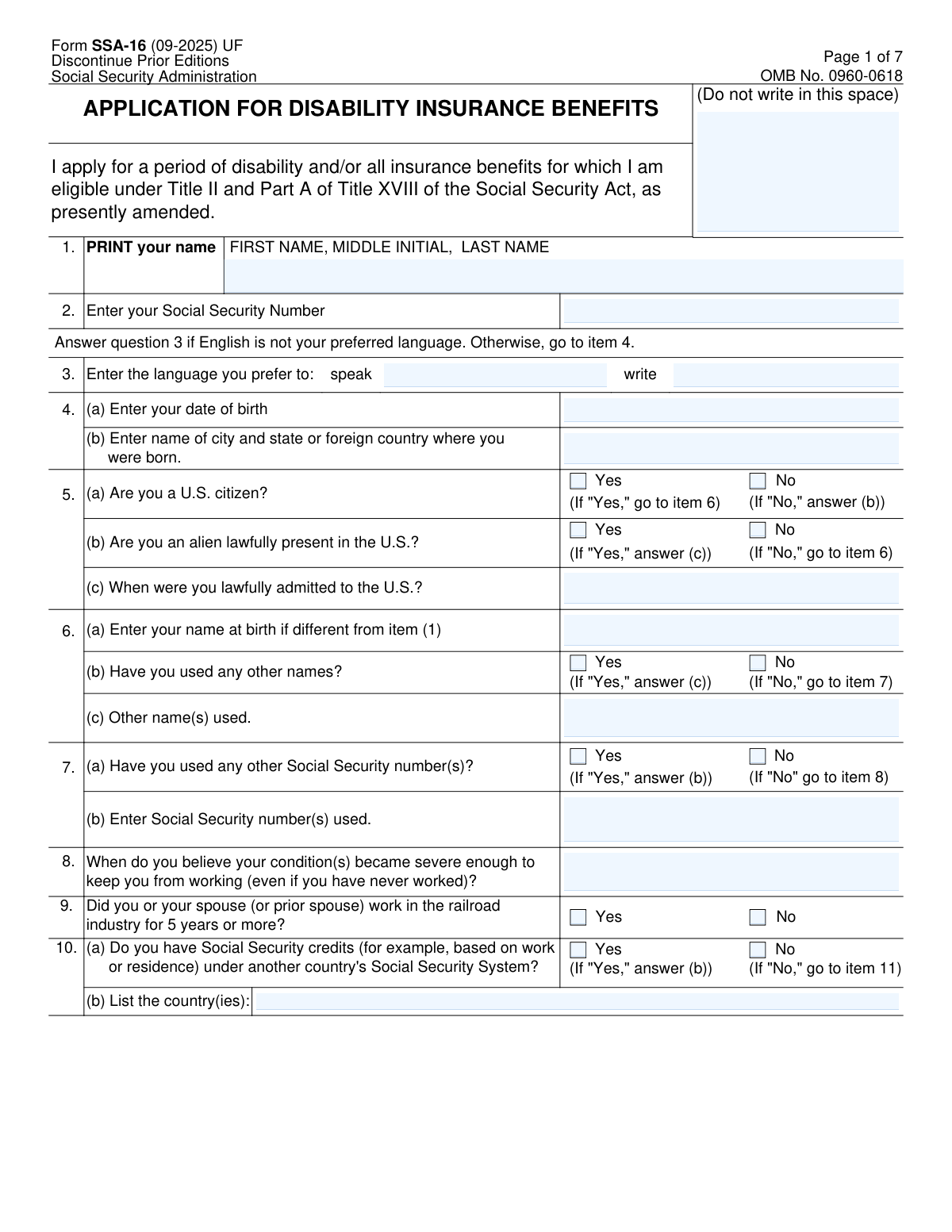
Yes! You can use AI to fill out Form SSA-16, Application for Disability Insurance Benefits

Form SSA-16, Application for Disability Insurance Benefits, is the official document submitted to the Social Security Administration (SSA) to claim disability benefits. It is a critical form for individuals whose medical conditions prevent them from working, as it initiates the process for the SSA to determine eligibility for financial assistance and Medicare coverage. Today, this comprehensive form can be filled out quickly and accurately using AI-powered services like Instafill.ai, which can also convert non-fillable PDF versions into interactive fillable forms.
Our AI automatically handles information lookup, data retrieval, formatting, and form filling.
It takes less than a minute to fill out SSA-16 using our AI form filling.
Securely upload your data. Information is encrypted in transit and deleted immediately after the form is filled out.

Form specifications

Form name: Form SSA-16, Application for Disability Insurance Benefits
Number of fields: 148
Number of pages: 7
Language: English
main-image

Instafill Demo: How to fill out PDF forms in seconds with AI

How to Fill Out SSA-16 Online for Free in 2026

Are you looking to fill out a SSA-16 form online quickly and accurately? Instafill.ai offers the #1 AI-powered PDF filling software of 2026, allowing you to complete your SSA-16 form in just 37 seconds or less.
Follow these steps to fill out your SSA-16 form online using Instafill.ai:
  1. 1 Navigate to Instafill.ai and upload or select the Form SSA-16.
  2. 2 Provide your personal identification details, such as your full name, Social Security Number, and date of birth, by answering simple questions.
  3. 3 Enter your marital history and information about any dependent children as prompted by the AI assistant.
  4. 4 Detail your work history, including employment for the last two years and any self-employment, letting the AI guide you through the required fields.
  5. 5 Answer questions about your disability, including the date it began, and disclose any other disability benefits you have filed for.
  6. 6 Review all the information auto-filled into the form for accuracy, then provide your financial institution details for direct deposit.
  7. 7 Securely download, print, and sign the completed SSA-16 form before submitting it to your local Social Security office as instructed.

Our AI-powered system ensures each field is filled out correctly, reducing errors and saving you time.

Why Choose Instafill.ai for Your Fillable SSA-16 Form?

Speed

Complete your SSA-16 in as little as 37 seconds.

Up-to-Date

Always use the latest 2026 SSA-16 form version.

Cost-effective

No need to hire expensive lawyers.

Accuracy

Our AI performs 10 compliance checks to ensure your form is error-free.

Security

Your personal information is protected with bank-level encryption.

Frequently Asked Questions About Form SSA-16

Form SSA-16 is the official Application for Disability Insurance Benefits (DIB). It is used to apply for a period of disability and any insurance benefits you may be eligible for under the Social Security Act due to a condition that prevents you from working.

You should complete this form if you have a medical condition that is expected to keep you from working for at least 12 months and you have worked long enough under Social Security to be insured.

You should have your Social Security number, birth certificate, details of your marriage and divorce history, names and birth dates of your children, and your recent employment and earnings history. You will also need to know the date your condition became severe enough to stop you from working.

Enter the date you believe your illness, injury, or condition became severe enough to prevent you from working, even if you were still employed. This is known as your disability onset date and is crucial for your claim.

Your marital history is required because you might be eligible for benefits based on a spouse's or ex-spouse's work record, particularly if a marriage lasted 10 years or more. This information helps the SSA determine all potential benefits you could receive.

You only need to list unmarried children who are under 18, age 18-19 and in school full-time, or who became disabled before age 22. These children may be eligible for benefits on your record if your claim is approved.

Yes, in item 21, you must report any money you received or expect to receive from an employer after the date you became unable to work. This includes sick pay, vacation pay, and other special payments.

The instructions state that you should send or bring the completed and signed form to your local Social Security office. You can find your local office's location on the SSA website or by calling their toll-free number.

Processing times can vary significantly depending on the complexity of your case and the need for additional medical information. The receipt on page 7 of the form will be filled out by the SSA office to give you a more specific timeframe.

The 'Remarks' section on page 5 is provided for additional explanations. If you run out of space there, you can attach a separate sheet of paper with the additional information, making sure to reference the item number you are explaining.

Yes, services like Instafill.ai use AI to help you accurately auto-fill form fields, which can save time and reduce errors. This is especially helpful for ensuring your personal, employment, and medical history details are entered correctly.

You can upload the SSA-16 PDF to the Instafill.ai platform, where its AI will identify all the fields. You can then answer the questions in a simple, step-by-step process, and the tool will populate the official form with your answers.

If you have a non-fillable or 'flat' PDF, you can use a service like Instafill.ai to make it interactive. The platform converts the static document into a fillable form, allowing you to type your answers directly into the fields before printing for signature.

After submission, your application is reviewed by the Social Security Administration and then sent to a state agency, Disability Determination Services (DDS). The DDS will gather and evaluate your medical records to make a decision on your disability claim.

Compliance SSA-16
Validation Checks by Instafill.ai

1
Validates Social Security Number Format
Checks that the Social Security Number in item 2 is exactly nine digits and contains only numerals. This is critical for uniquely identifying the applicant in the Social Security Administration's systems and accessing their earnings record. A failure would prevent the application from being processed as the applicant cannot be correctly identified.
2
Ensures Date of Birth is a Valid Past Date
Validates that the date of birth entered in item 4(a) is a real date that occurred before the current date. This prevents impossible data, such as a future date of birth, from being entered. If this check fails, the form is rejected for correction as it indicates a significant data entry error.
3
Validates Logical Consistency of Disability Onset Date
This check ensures the date entered in item 8 (when the condition became severe) is a valid date that is after the applicant's date of birth (item 4a) and not in the future. This date is fundamental to establishing the period of disability and eligibility for benefits. An illogical date would make it impossible to adjudicate the claim and requires immediate correction.
4
Enforces Conditional Logic for Citizenship Status
Verifies that if an applicant answers 'No' to being a U.S. citizen in item 5(a), they must then provide an answer for item 5(b) regarding their lawful presence. Furthermore, if they answer 'Yes' to 5(b), they must complete 5(c). This ensures the form's branching logic is followed correctly to gather all necessary information for non-citizen applicants.
5
Requires Other SSN Entry When Indicated
This validation confirms that if the applicant checks 'Yes' in item 7(a) indicating they have used other Social Security Numbers, then item 7(b) must contain at least one entry. This is important for consolidating all of an individual's earnings records under the correct primary SSN. If 7(b) is left blank after a 'Yes' in 7(a), the form is considered incomplete.
6
Verifies Prior Marriage End Date is After Start Date
For any prior marriages listed in item 11(c), this check ensures the 'When marriage ended' date is chronologically after the 'When marriage began' date. This maintains logical data integrity for life events, which is crucial for determining eligibility for spousal or survivor benefits. An illogical date sequence would be flagged as an error requiring the applicant to review and correct their entries.
7
Validates Employment Start and End Dates
For each employer listed in item 14, this check verifies that the 'Work Ended' date is not before the 'Work Began' date. This ensures the work history is chronologically accurate, which is essential for evaluating recent work activity and earnings. If an end date precedes a start date, the entry is flagged as a potential error for user correction.
8
Cross-Validates Disability and Return-to-Work Dates
This check ensures that if an applicant answers 'No' to being unable to work in item 17(a), the date they became able to work (item 17b) must be after the date their disability began (item 8). This logical consistency is vital for defining the exact period of disability being claimed. A failure indicates a contradiction in the applicant's statement and would require clarification.
9
Ensures Specification of Other Filed Benefits
Validates that if an applicant answers 'Yes' to item 20(a), indicating they have filed for other public disability benefits, they must check at least one of the benefit types listed in item 20(b). This information is required to determine potential offsets to Social Security benefits. Answering 'Yes' to 20(a) without completing 20(b) results in an incomplete application.
10
Confirms Signature Date is Not in the Future
This check verifies that the signature date on page 5 is not a future date. The signature date legally attests to the truthfulness of the information on that day and establishes the official filing date of the application. A future date is invalid and would cause the form submission to be rejected until a valid, current or past date is provided.
11
Validates Financial Institution Routing Number
This validation ensures the Routing Transit Number provided for Direct Deposit is exactly nine digits long and contains only numbers. This is a strict requirement from the financial industry for correctly routing electronic payments. An incorrect format would cause direct deposit to fail, so the system must reject any entry that does not meet this format.
12
Validates Marriage Information Completeness
This check ensures that if an applicant answers 'Yes' to being married in item 11(a), they must provide details in the subsequent sections (11b, 11c) or explicitly write 'None' where applicable. This prevents applicants from skipping critical sections that determine eligibility for spousal benefits. An omission would trigger a completeness error, halting processing until the required information is supplied.
13
Enforces Self-Employment Details Entry
Verifies that if an applicant answers 'Yes' to being self-employed in item 15(a), they must provide details in item 15(b), including the year and type of business. This information is necessary to properly assess self-employment income and its impact on eligibility. A 'Yes' answer without the corresponding details in 15(b) would render the section incomplete and require user correction.
14
Validates Format of Annual Earnings Fields
This check ensures that the earnings amounts entered in items 16(a) and 16(b) are either valid numerical currency values or the literal string 'None'. This prevents non-numeric characters or ambiguous entries from being submitted, ensuring data quality for income calculations. An invalid entry would be flagged, prompting the user to enter a valid number or 'None'.

Common Mistakes in Completing SSA-16

Providing an Inaccurate Disability Onset Date

In Item 8, applicants often confuse their disability onset date with their last day of work or diagnosis date. This date is critical as it establishes the potential start of benefits and the period of back pay. An incorrect date can significantly reduce the benefits you are owed or even impact your eligibility. To avoid this, carefully consider when your condition truly became severe enough to prevent you from working, not just when you stopped working.

Incomplete or Inaccurate Marital History

The marital history section (Item 11) is complex, and applicants frequently omit prior marriages, especially if they were short-lived or ended long ago. This information is vital for determining potential eligibility for benefits on a spouse's record. Failing to provide a complete history can lead to a loss of benefits or significant delays while the SSA seeks clarification. It is crucial to list all marriages and use the 'Remarks' section if you run out of space.

Omitting Eligible Children or Dependents

Applicants often forget to list all potentially eligible children in Item 12, including stepchildren, adopted children, or adult children who became disabled before age 22. This oversight is critical because these dependents may be entitled to receive benefits on your record. Forgetting to list them means they will not be considered for benefits, resulting in a significant financial loss for the family. Always list every child who meets any of the listed criteria.

Incorrectly Reporting Recent Work History

When completing Item 14, people sometimes forget short-term jobs or provide incomplete employer addresses for the last two years. The SSA uses this information to verify recent work activity and earnings, which is a key part of the disability evaluation. Incomplete or inaccurate data can delay this verification process and your claim's processing. To avoid this, gather your employment records for the specified period and list every employer accurately.

Inaccurate Reporting of Earnings

In Items 15 and 16, applicants often estimate their earnings, report net instead of gross pay, or forget to include self-employment income. This information is used to determine if you were engaging in Substantial Gainful Activity (SGA), and errors can lead to an incorrect denial of benefits or an overpayment that must be repaid. Always refer to tax documents (W-2s, Schedule C) and pay stubs to provide exact figures.

Failing to Disclose Other Disability Benefit Filings

In Item 20, applicants may not report that they have filed, or even just intend to file, for other benefits like Workers' Compensation, VA benefits, or SSI. The receipt of other public disability benefits can affect the amount of your Social Security disability benefit. Failing to disclose this can lead to a large overpayment that you will be legally required to pay back to the SSA.

Transposing Digits in Social Security or Bank Account Numbers

A simple data entry error, like transposing two digits in a Social Security Number (Item 2) or a bank routing number (Page 5), can have major consequences. An incorrect SSN will halt the entire application process, while incorrect bank details will cause benefit payments to be rejected or lost. AI-powered tools like Instafill.ai can help prevent these errors by validating number formats and ensuring accuracy before submission.

Forgetting to Sign the Application

Submitting an unsigned application is a common and critical mistake that renders the entire form invalid. The SSA cannot process an unsigned application, meaning your claim will not even enter the system until a signed copy is received, causing unnecessary and lengthy delays. Always do a final check to ensure you have provided a wet signature in ink on page 5 before mailing the form.

Submitting an Illegible Handwritten Form

This form is often provided as a non-fillable PDF, leading people to fill it out by hand, which can result in illegible entries. If SSA staff cannot read your name, dates, or medical information, they cannot process your claim, leading to delays or rejection. To avoid this, it is best to type your answers. AI tools like Instafill.ai can convert a flat PDF into an interactive, fillable form, ensuring all your entries are clear and legible.

Not Reporting Post-Work Payments from an Employer

Applicants frequently forget to report payments like accrued vacation pay, sick pay, or severance that they received after they stopped working (Item 21). The SSA may consider this income, which can affect the official disability onset date and your eligibility for benefits in certain months. Be sure to review your final pay stubs and report any and all money received from an employer after your last day of work.
Saved over 80 hours a year

“I was never sure if my IRS forms like W-9 were filled correctly. Now, I can complete the forms accurately without any external help.”

Kevin Martin Green

Your data stays secure with advanced protection from Instafill and our subprocessors

Robust compliance program

Transparent business model

You’re not the product. You always know where your data is and what it is processed for.

ISO 27001, HIPAA, and GDPR

Our subprocesses adhere to multiple compliance standards, including but not limited to ISO 27001, HIPAA, and GDPR.

Security & privacy by design

We consider security and privacy from the initial design phase of any new service or functionality. It’s not an afterthought, it’s built-in, including support for two-factor authentication (2FA) to further protect your account.

Fill out SSA-16 with Instafill.ai

Worried about filling PDFs wrong? Instafill securely fills form-ssa-16-application-for-disability-insurance-benefits forms, ensuring each field is accurate.