Yes! You can use AI to fill out Form 590, Commercial – Sale MLS® Data Information Form
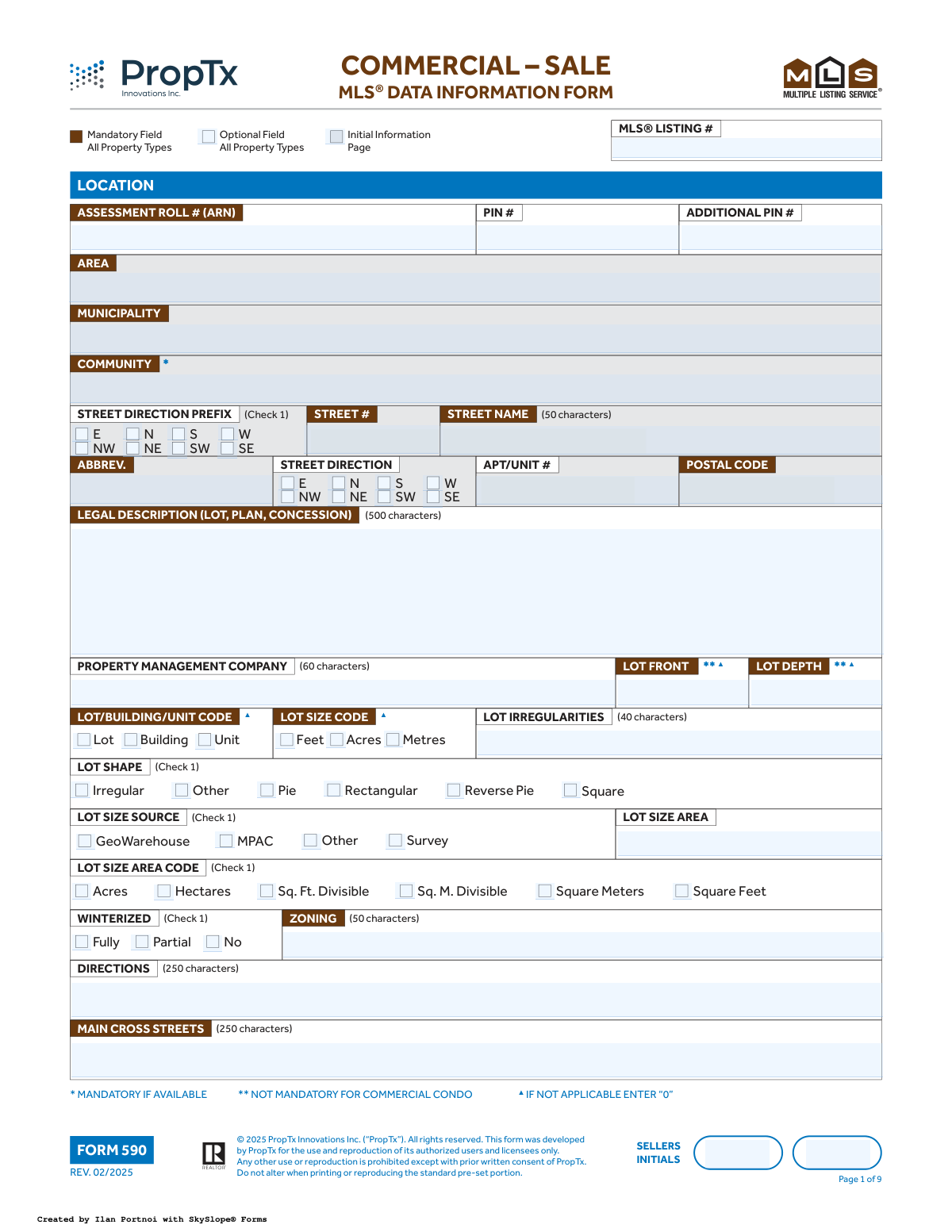
Form 590, the Commercial – Sale MLS® Data Information Form, is a comprehensive document used by real estate professionals to gather all necessary details about a commercial property being listed for sale. It captures critical data including property identification, legal descriptions, zoning, financial information, physical characteristics, and showing instructions to create an accurate MLS listing. Today, this form can be filled out quickly and accurately using AI-powered services like Instafill.ai, which can also convert non-fillable PDF versions into interactive fillable forms.
Form 590 is part of the
commercial forms category on Instafill.
Our AI automatically handles information lookup, data retrieval, formatting, and form filling.
It takes less than a minute to fill out Form 590 using our AI form filling.
Securely upload your data. Information is encrypted in transit and deleted immediately after the form is filled out.
Form specifications
| Form name: | Form 590, Commercial – Sale MLS® Data Information Form |
| Number of fields: | 596 |
| Number of pages: | 9 |
| Filled form examples: | Form Form 590 Examples |
| Language: | English |
More forms in Commercial forms
Instafill Demo: How to fill out PDF forms in seconds with AI
How to Fill Out Form 590 Online for Free in 2026
Are you looking to fill out a FORM 590 form online quickly and accurately? Instafill.ai offers the #1 AI-powered PDF filling software of 2026, allowing you to complete your FORM 590 form in just 37 seconds or less.
Follow these steps to fill out your FORM 590 form online using Instafill.ai:
- 1 Navigate to Instafill.ai and upload or select the Commercial – Sale MLS® Data Information Form (Form 590).
- 2 Use the AI assistant to automatically populate initial property details such as address, PIN, legal description, and assessment roll number from public records.
- 3 Review the pre-filled data and complete the 'Initial Information' and 'Amounts/Dates' sections, including list price, taxes, and key contract dates.
- 4 Proceed to the 'Details' section, specifying the property type, category, use, and physical attributes like area, sprinklers, and utilities.
- 5 Fill in any applicable financial information, remarks for clients, inclusions/exclusions, and specific instructions for other realtors.
- 6 Complete the 'Other' section with information on internet distribution, showing requirements, and contact permissions.
- 7 Have the seller(s) review the completed form, provide their initials on each page, and then digitally sign and date the final page to authorize the listing.
Our AI-powered system ensures each field is filled out correctly, reducing errors and saving you time.
Why Choose Instafill.ai for Your Fillable Form 590 Form?
Speed
Complete your Form 590 in as little as 37 seconds.
Up-to-Date
Always use the latest 2026 Form 590 form version.
Cost-effective
No need to hire expensive lawyers.
Accuracy
Our AI performs 10 compliance checks to ensure your form is error-free.
Security
Your personal information is protected with bank-level encryption.
Frequently Asked Questions About Form Form 590
Form 590, the Commercial Sale MLS® Data Information Form, is used by real estate professionals to gather detailed information about a commercial property to create a comprehensive listing on the Multiple Listing Service (MLS®).
The listing brokerage or salesperson completes the form based on information provided by the property seller. The seller must then review the information, initial each page, and sign the final page to confirm its accuracy.
To fill out this form, it is helpful to have your property tax bill for the Assessment Roll Number (ARN), a property survey for lot dimensions, and financial statements if you are selling an associated business.
These symbols indicate mandatory fields required for the MLS® listing. For example, '▲' means you must enter '0' if the field is not applicable, while '♦' indicates that at least one of a pair of fields is mandatory.
These fields classify the property from general to specific. 'Type' is the main classification (e.g., Industrial, Farm), 'Category' is a sub-classification (e.g., Industrial Condo), and 'Use' defines the specific business activity (e.g., Warehouse, Restaurant).
This section is mandatory only when the 'Type' is 'Sale of Business'. It captures key financial data like gross income, operating expenses, and net income to provide to qualified buyers.
Initialing each page serves as the seller's acknowledgment that they have reviewed and verified the accuracy of the information on that page. This ensures the integrity of the data being entered into the public MLS® listing.
The 'Inclusions' field lists all items that are included in the sale price of the property, such as specific machinery or fixtures. 'Exclusions' lists any items the seller will be keeping and are not part of the sale.
No, you have control over this. On page 9, you can select 'Yes' or 'No' for the 'Display Address on Internet' option to protect your privacy if desired.
'Remarks for Clients' is information that will be visible to the public on consumer-facing websites. 'Realtor Only Remarks' contains confidential notes intended only for other real estate professionals, such as specific offer instructions.
Yes, services like Instafill.ai use AI to auto-fill form fields accurately and save time. This can be especially helpful for a long and detailed form like the MLS® Data Information Form.
Simply upload the Form 590 PDF to the Instafill.ai platform. The AI will identify all the fields, allowing you to fill them out quickly, save your progress, and ensure all mandatory sections are complete.
You can use a service like Instafill.ai, which is designed to convert flat, non-fillable PDFs into interactive, fillable forms. This allows you to easily type your information directly into the required fields online.
Compliance Form 590
Validation Checks by Instafill.ai
1
Conditional Possession Information Requirement
This validation ensures that either the 'Possession Date' is filled out or the 'Possession Remarks' field contains text. The form indicates with a '♦' symbol that one of these two fields is mandatory. This is crucial for providing clear possession terms to potential buyers. If neither field is completed, the form submission will fail, prompting the user to provide the necessary information.
2
Contract Expiry Date Logical Consistency
This check verifies that the 'Expiry Date' is on or after the 'Contract Commencement Date'. A contract cannot expire before it begins. This logical validation prevents data entry errors that would create an invalid contract term. If the expiry date precedes the commencement date, an error message will be displayed, requiring the user to correct the dates before proceeding.
3
Canadian Postal Code Format Validation
This validation ensures the 'POSTAL CODE' field adheres to the standard Canadian A#A #A# format (e.g., M5V 2T6). Correctly formatted postal codes are essential for mail delivery, geolocation services, and data integrity within the system. A submission with an incorrectly formatted postal code will be rejected, and the user will be instructed to enter a valid postal code.
4
Mandatory Fields for 'Sale of Business' Type
This check enforces that if the property 'TYPE' is selected as 'Sale of Business', then all fields marked with '♦' on page 8 (e.g., 'Financial Statement', 'Chattels', 'Employees', 'Seats') must be completed. This information is fundamental to evaluating a business for sale. Failure to provide this mandatory data will block the form submission until all required fields for a 'Sale of Business' listing are filled.
5
Conditional 'Use' for 'Institutional' Category
This validation enforces the rule that if the 'CATEGORY' is selected as 'Institutional', the 'USE' must be one of the options marked with '*T1' (Bank, Church, School, Other). This ensures that the property's use is correctly classified within its institutional category. Selecting a non-T1 use for an institutional category will result in a validation error, forcing the user to select a valid combination.
6
Shipping Door Dimensions Dependency
This check ensures that if a number greater than zero is entered for any of the shipping door count fields (e.g., 'TRUCK LEVEL SHIPPING DOORS #'), the corresponding dimension fields (Height and Width) become mandatory. It is illogical to have doors without dimensions. If the door count is positive but dimensions are missing, the submission will be flagged with an error, requiring the user to provide the measurements.
7
Total Area and Area Code Co-dependency
This validation verifies that if a value is entered into the 'TOTAL AREA' field (marked with ◘3), a corresponding 'TOTAL AREA CODE' (e.g., Sq Ft, Acres) must also be selected. Conversely, if an area code is selected, the area value must be provided. This ensures that the area measurement is complete and unambiguous. An incomplete pair will trigger an error, preventing submission.
8
Rental Term Range Validity
This check ensures that the value in 'Maximum Rental Term Months' is greater than or equal to the value in 'Minimum Rental Term Months'. This logical validation prevents the creation of an impossible rental term range. If the minimum term exceeds the maximum, the system will display an error and require the user to correct the values.
9
Expense Year and Type Dependency
This validation enforces the rule marked '♦♦' that if any financial amount is entered into an expense field (e.g., 'Taxes Expense', 'Hydro Expense'), then both the 'Year Expense' field and a selection for 'Expenses Actual/Estimated' become mandatory. This provides essential context for the financial data provided. Submitting expense figures without the corresponding year and type will result in a validation failure.
10
URL Field Format Validation
This check verifies that all fields intended for URLs (e.g., 'Unbranded Virtual Tour URL 1', 'Sales Brochure URL') contain a valid web address format, typically starting with 'http://' or 'https://'. This ensures that links provided in the listing are functional and lead to the correct resources. An invalid URL format will trigger an error, prompting the user to correct the link.
11
Enforces '0' for Not Applicable Numeric Fields
This validation enforces the rule marked with '▲', which states that if a numeric field like 'Lot Front' or 'Lot Depth' is not applicable, it must be filled with the value '0' instead of being left blank. This maintains data consistency and differentiates between data that is missing and data that is intentionally zero. A blank field marked with '▲' will cause a validation error.
12
Mandatory Condo Maintenance Fee
This check validates that the 'Condo Maintenance Fees Monthly' field is filled if the property 'CATEGORY' is 'Commercial Condo' or 'Industrial Condo'. This fee is a critical financial detail for potential buyers of a condo unit. If the category is a condo type and this field is empty, the form submission will be blocked until the fee amount is entered.
13
Single Selection Enforcement for Checkbox Groups
This validation ensures that for any group of checkboxes marked with '(Check 1)', such as 'Lot Shape' or 'Heat Type', only one option can be selected. This prevents contradictory or ambiguous data entries. If a user attempts to select more than one option in such a group, the system will either prevent the action or flag an error upon submission.
14
Maximum Selection Enforcement for Checkbox Groups
This validation ensures that for any group of checkboxes with a maximum selection limit, such as 'AREA INFLUENCES (Max 2)', the user cannot select more than the specified number of options. This rule maintains the intended structure and relevance of the data. Attempting to select more than the allowed number of items will result in a user-facing error, forcing them to deselect options to meet the requirement.
Common Mistakes in Completing Form 590
This form uses symbols (e.g., ◘5, ♦) to indicate that a field is mandatory only if a specific property type is selected. Users often overlook these instructions and fail to provide required information, such as shipping door dimensions for an 'Industrial' property. This results in an incomplete listing that may be rejected by the MLS system, delaying market exposure. To avoid this, carefully cross-reference all selections with the conditional rules; if the form is a non-fillable PDF, AI-powered tools like Instafill.ai can convert it to a fillable version and automatically enforce these dependencies to ensure completeness.
This mistake occurs when a user enters a numeric value in a field like 'Total Area' but selects the wrong corresponding unit from the 'Total Area Code' checklist (e.g., entering '2' and checking 'Square Feet' instead of 'Acres'). This leads to a gross misrepresentation of the property size, which can mislead buyers and create legal liabilities. Always double-check that the number entered aligns logically with the unit of measure selected. Using a tool like Instafill.ai can help by validating related fields against each other to catch such inconsistencies.
The form explicitly instructs users to enter '0' for certain fields if they are not applicable, marked with a '▲' symbol (e.g., 'Lot Front' for a condo). Many people miss this instruction and leave the field blank, which can cause data processing errors or be interpreted as missing information. This can delay the listing process until the form is corrected. To prevent this, carefully read all field-specific instructions and enter '0' where required.
The 'Legal Description' field requires the official property description, which is often long and complex. Users may try to abbreviate it, use the common street address, or copy it incorrectly from an unreliable source. An incorrect legal description can cause significant problems during title search and closing, potentially derailing the transaction. This information should be copied precisely from official documents like the deed or a recent survey.
The form states that 'ONE OF POSSESSION DATE OR POSSESSION REMARKS IS MANDATORY'. A common error is to either leave both blank or fill in both, creating ambiguity about the seller's intentions for possession. This can lead to confusion and disputes during offer negotiations. To avoid this, decide on one clear path: either provide a specific date or use the remarks field for flexible terms, but not both.
This multi-page document requires the seller's initials at the bottom of each page to acknowledge the information presented. It is very common for one or more pages to be missed, especially in a long form like this. A missing initial can invalidate the information on that page or cause the entire listing agreement to be rejected by the brokerage, requiring the agent to go back to the client for correction and causing delays.
Fields like 'PIN #' and 'Assessment Roll # (ARN)' are unique identifiers used to link the listing to the correct property in various databases. A simple typo, such as transposing two numbers, can cause the listing to be associated with the wrong property or be rejected by the system entirely. These numbers must be transcribed with extreme care from official sources. AI form-filling tools like Instafill.ai can help by cross-validating these numbers against public records to ensure accuracy.
The 'Details' section has a complex, hierarchical classification system (Type -> Category -> Use) with specific dependencies. Users often select combinations that are not valid, such as selecting 'Farm' as the Type and 'Warehouse' as the Use. This creates a logically inconsistent and inaccurate listing, which can be misleading and cause the property to be marketed to the wrong audience. It is crucial to follow the logic of the form carefully.
When the 'Sale of Business' type is selected, a large number of fields in the 'Financial Information' section become mandatory, as indicated by the '♦' symbol. Agents sometimes overlook this and fail to enter crucial data like 'Gross Income/Sales' or 'Operating Expense'. This omission makes it impossible for potential buyers to evaluate the business's viability, rendering the listing ineffective. Smart form tools can automatically flag these required fields based on the 'Sale of Business' selection.
The form includes fields for various URLs, such as virtual tours, with specific fields for 'Unbranded' versions. A frequent error is pasting incorrect or broken links, which frustrates potential buyers. Another common issue is placing branded content in the 'Unbranded Virtual Tour URL' field, which violates MLS rules and can lead to the listing being flagged or removed. All URLs should be tested before submission, and branding rules must be strictly followed.
Saved over 80 hours a year
“I was never sure if my IRS forms like W-9 were filled correctly. Now, I can complete the forms accurately without any external help.”
Kevin Martin Green
Your data stays secure with advanced protection from Instafill and our subprocessors

Robust compliance program
Transparent business model
You’re not the product. You always know where your data is and what it is processed for.
ISO 27001, HIPAA, and GDPR
Our subprocesses adhere to multiple compliance standards, including but not limited to ISO 27001, HIPAA, and GDPR.
Security & privacy by design
We consider security and privacy from the initial design phase of any new service or functionality. It’s not an afterthought, it’s built-in, including support for two-factor authentication (2FA) to further protect your account.
Fill out Form 590 with Instafill.ai
Worried about filling PDFs wrong? Instafill securely fills form-590-commercial-sale-mls-data-information-form forms, ensuring each field is accurate.



