Yes! You can use AI to fill out ACORD 175, Commercial Policy Change Request

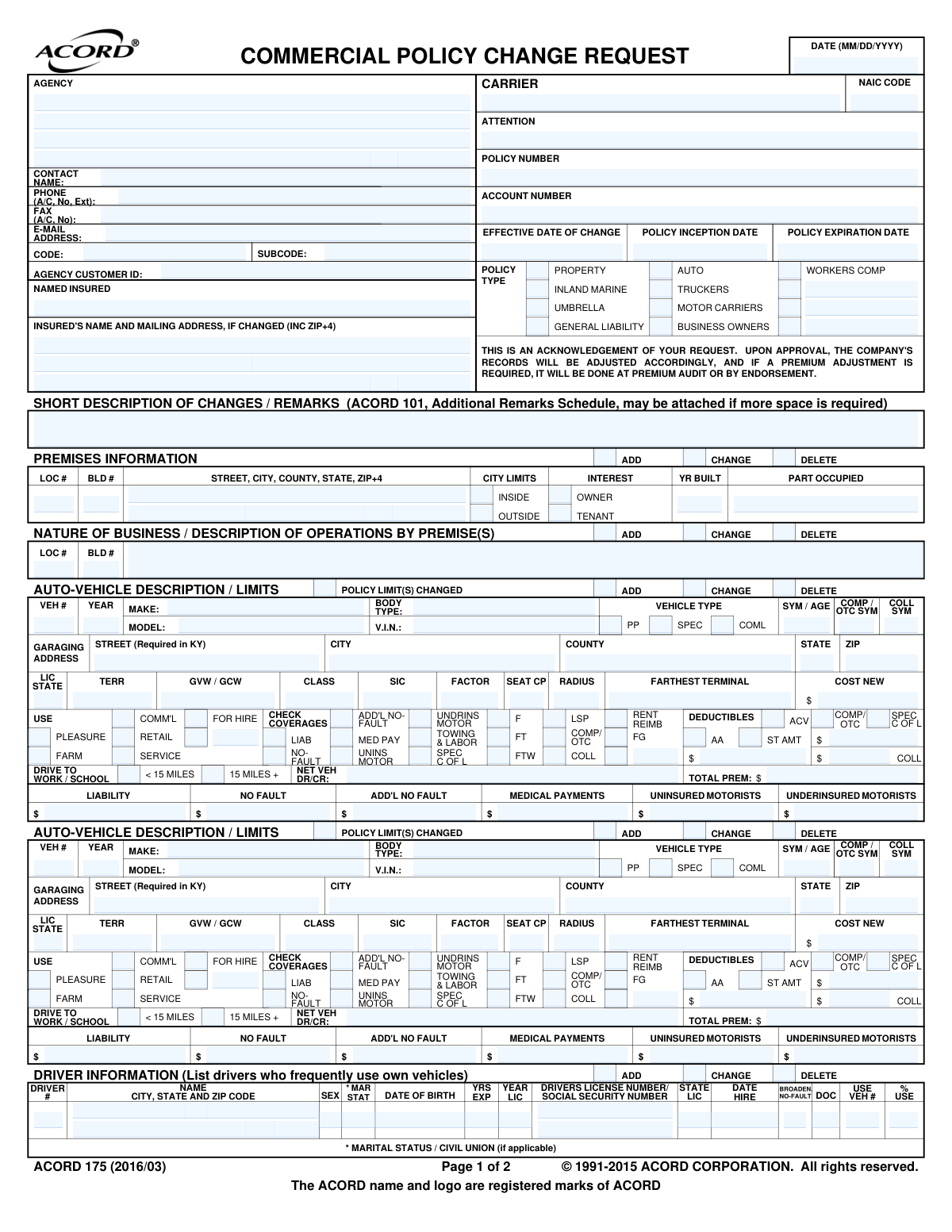
ACORD Form 175, the Commercial Policy Change Request, is a standardized document used by insurance agents and policyholders to formally request modifications to a commercial insurance policy. These changes can include adding or removing vehicles, updating property information, changing coverage limits, or adding additional interests. Using this form ensures that all parties have a clear, written record of the requested changes, which is crucial for maintaining accurate coverage and avoiding disputes. Today, this form can be filled out quickly and accurately using AI-powered services like Instafill.ai, which can also convert non-fillable PDF versions into interactive fillable forms.
ACORD 175 is part of the commercial insurance forms, farm insurance forms, insurance request forms and policy change forms categories on Instafill.
Our AI automatically handles information lookup, data retrieval, formatting, and form filling.
It takes less than a minute to fill out ACORD 175 using our AI form filling.
Securely upload your data. Information is encrypted in transit and deleted immediately after the form is filled out.

Form specifications

Form name: ACORD 175, Commercial Policy Change Request
Number of fields: 422
Number of pages: 1
Language: English
main-image

Instafill Demo: How to fill out PDF forms in seconds with AI

How to Fill Out ACORD 175 Online for Free in 2026

Are you looking to fill out a ACORD 175 form online quickly and accurately? Instafill.ai offers the #1 AI-powered PDF filling software of 2026, allowing you to complete your ACORD 175 form in just 37 seconds or less.
Follow these steps to fill out your ACORD 175 form online using Instafill.ai:
  1. 1 Navigate to Instafill.ai and upload your ACORD 175 form or select it from the template library.
  2. 2 Enter the agency, insured, and carrier information, along with the policy number and the effective date of the change.
  3. 3 Indicate the type of policy being changed (e.g., Auto, Property, General Liability) and provide a brief description of the changes in the remarks section.
  4. 4 Complete the specific sections corresponding to your request, such as adding vehicle details, updating premises information, or modifying driver information.
  5. 5 If adding or changing an additional interest like a lienholder or mortgagee, fill out the 'Additional Interest' section with their details and the nature of their interest.
  6. 6 Review all entered information for accuracy. The insured must sign the form, especially if the change involves a reduction or deletion of coverage.
  7. 7 Download, print, or securely share the completed and signed ACORD 175 form with your insurance provider to process the policy change.

Our AI-powered system ensures each field is filled out correctly, reducing errors and saving you time.

Why Choose Instafill.ai for Your Fillable ACORD 175 Form?

Speed

Complete your ACORD 175 in as little as 37 seconds.

Up-to-Date

Always use the latest 2026 ACORD 175 form version.

Cost-effective

No need to hire expensive lawyers.

Accuracy

Our AI performs 10 compliance checks to ensure your form is error-free.

Security

Your personal information is protected with bank-level encryption.

Frequently Asked Questions About Form ACORD 175

The ACORD 175, or Commercial Policy Change Request, is used to formally request modifications to an existing commercial insurance policy, such as adding a vehicle, changing coverage limits, or updating a business location.

This form is typically completed by an insurance agent or producer on behalf of their client (the insured business) to communicate requested changes to the insurance carrier.

No, this form is an acknowledgement of your request. The change is only finalized upon approval from the insurance company, after which they will adjust your policy records.

The insured's signature is mandatory for any request that involves a deletion or reduction in coverage. This ensures the policyholder has formally approved the decrease in protection.

You will need the vehicle's year, make, model, VIN, garaging address, and cost new. You also need to specify its intended use (e.g., service, retail) and the desired coverages and deductibles.

Use the 'DRIVER INFORMATION' section to provide the new driver's full name, date of birth, gender, marital status, and their driver's license number and state of issuance.

If the 'SHORT DESCRIPTION OF CHANGES / REMARKS' section is not large enough, you can attach an ACORD 101, Additional Remarks Schedule, to provide more detailed information.

The form notes that if a premium adjustment is required, it will be processed by the insurance company either through a policy endorsement or during your next premium audit.

Complete the 'ADDITIONAL INTEREST' section with the name and address of the entity, specify their interest (e.g., Lienholder, Loss Payee), and identify the specific vehicle or property item.

Yes, you can request changes for multiple policy types on a single ACORD 175. Simply check the boxes for all applicable policies (e.g., AUTO, GENERAL LIABILITY) and fill out the relevant sections for each.

Yes, services like Instafill.ai use AI to accurately auto-fill form fields from your saved data, which can save significant time and reduce errors when completing this form.

You can use a service like Instafill.ai to upload the ACORD 175 PDF. The platform will convert it into an interactive, fillable format that you can complete, save, and manage online.

Tools like Instafill.ai are designed to solve this problem. They can convert flat, non-fillable PDFs into interactive forms, allowing you to easily type your information into the fields.

Compliance ACORD 175
Validation Checks by Instafill.ai

1
Validates Vehicle Identification Number (VIN) Format
This check ensures that the Vehicle Identification Number (VIN) entered in the 'V.I.N.' field is exactly 17 characters long and contains only valid alphanumeric characters, excluding I, O, and Q. A valid VIN is critical for accurately identifying a specific vehicle for coverage, claims, and state registration purposes. If the VIN is invalid, the form submission should be rejected with an error message prompting the user to correct the entry.
2
Ensures Logical Order of Policy Dates
This validation verifies that the 'Effective Date of Change' is not before the 'Policy Inception Date' and not after the 'Policy Expiration Date'. This is important to ensure that any requested policy modification falls within the active term of the policy. A failure would indicate a data entry error, and the request should be flagged for review as the change cannot be processed outside the policy period.
3
Verifies Driver's Minimum Age
This check calculates the age of the driver based on the 'Date of Birth' field to ensure they meet the minimum legal driving age (e.g., 16 years). This is crucial for underwriting and risk assessment, as insuring an underage driver is illegal and poses a significant liability. If the driver is underage, the submission should be blocked until a valid date of birth is provided.
4
Requires Signature for Coverage Deletion or Reduction
This validation confirms that the 'Insured's Signature' field is not empty if any 'DELETE' checkbox is marked or if a policy limit is being reduced. This is a critical compliance and legal requirement to have documented proof of the insured's consent for any reduction in their coverage. A missing signature under these conditions must halt the process and require the user to obtain and provide the signature.
5
Validates NAIC Code Format
This check ensures the 'NAIC Code' field contains a valid 5-digit numeric code. The NAIC code is a unique identifier for insurance companies, and its accuracy is essential for regulatory reporting and correct routing of information. An invalid format would prevent proper identification of the carrier and should trigger an error.
6
Ensures Building Improvement Year is Logically Sound
This validation compares the year of any building improvements (e.g., 'WIRING, YR:', 'ROOFING, YR:') against the 'YR BUILT' of the building. The improvement year must be greater than or equal to the year the building was constructed. This prevents logical impossibilities in the data and ensures the integrity of property information for valuation and risk assessment.
7
Requires Action Indicator for Section Changes
This check ensures that for any major section where data is entered (e.g., Vehicle Description, Driver Information, Premises Information), one of the corresponding 'ADD', 'CHANGE', or 'DELETE' checkboxes is selected. This clarifies the user's intent and is essential for the system to know how to process the provided information. Submissions with data in a section but no action indicated should be flagged for clarification.
8
Validates Social Security Number Format
This check verifies that the 'Social Security Number' field in the Driver Information section follows the standard 9-digit format (XXX-XX-XXXX or XXXXXXXXX). Accurate SSN data is vital for identity verification, MVR reports, and compliance. If the format is incorrect, the system should return an error to protect data integrity and prevent downstream processing issues.
9
Enforces Conditional Requirement for 'Other' Descriptions
This validation ensures that if an 'Other' checkbox is selected in any section (e.g., Policy Type, Vehicle Use), the corresponding description field is not left empty. This is important for capturing specific, non-standard information that is necessary for correct policy rating and coverage. A failure to provide a description should prompt the user to either fill in the details or uncheck the 'Other' box.
10
Verifies Consistency of Workers Compensation Data
This check ensures that if the '# OF EMPLOYEES' (Full Time or Part Time) is greater than zero in the Workers Compensation section, the 'ESTIMATED ANNUAL REMUNERATION' field must also contain a value greater than zero. Remuneration is the basis for calculating workers' compensation premiums, so it's essential that it's provided when employees are listed. A mismatch would result in an inability to rate the policy correctly.
11
Validates State and ZIP Code Combination
This check validates that the entered ZIP code is a valid code for the selected state in any address block (e.g., Insured's Mailing Address, Garaging Address). This improves data quality, ensures mail can be delivered, and helps in accurate territory rating. An invalid combination should trigger a warning or error, prompting the user to review the address information.
12
Enforces Kentucky-Specific Garaging Address Requirement
This validation specifically checks if the 'STATE' for the 'GARAGING ADDRESS' is 'KY'. If it is, the 'STREET' field must not be empty, as explicitly required on the form. This rule is crucial for state-specific compliance and accurate vehicle rating in Kentucky. Failure to provide the street address for a KY-garaged vehicle should block the submission.
13
Requires Link for Additional Interest
This check ensures that when an 'ADDITIONAL INTEREST' is added, it is properly linked to an item on the policy by providing an 'INTEREST IN ITEM NUMBER' (e.g., for a specific Vehicle, Building, or piece of Equipment). An unlinked interest is ambiguous and cannot be properly applied to the policy. The submission should be rejected if an additional interest is provided without specifying which property it applies to.
14
Validates Date Format Across All Date Fields
This validation ensures that all date fields on the form, such as 'DATE (MM/DD/YYYY)', 'POLICY EXPIRATION DATE', and 'DATE OF BIRTH', adhere to the specified MM/DD/YYYY format. Consistent and valid date formatting is fundamental for all time-based calculations, record keeping, and system processing. Any date not matching this format should be flagged as an error to be corrected before submission.

Common Mistakes in Completing ACORD 175

Entering an Incorrect Vehicle Identification Number (VIN)

The 17-digit VIN is complex and highly susceptible to data entry errors, such as transposing numbers or mistaking letters for numbers (e.g., 'O' for '0', 'I' for '1'). This often happens when manually transcribing the number from a registration document or photo. An incorrect VIN can result in the wrong vehicle being insured, a policy change being rejected, or a complete lack of coverage for the intended vehicle in the event of a claim. To avoid this, carefully double-check the VIN against the vehicle's official title or registration. AI-powered tools like Instafill.ai can help by automatically validating the VIN's format and checksum to catch errors instantly.

Misusing the 'ADD/CHANGE/DELETE' Selections

Nearly every section of this form requires the user to specify whether they are adding, changing, or deleting an item (e.g., a vehicle, driver, or location). People often select the wrong option, such as checking 'ADD' when they mean to 'CHANGE' an existing vehicle's details. This leads to confusion, creating duplicate records, deleting the wrong information, or delaying the request. To prevent this, carefully consider the action you want the insurance carrier to take: use 'ADD' for brand new items, 'CHANGE' for modifying existing items, and 'DELETE' for removing them entirely from the policy.

Providing Incomplete 'Additional Interest' Information

When adding a lienholder, lessor, or mortgagee, people frequently omit critical information like the full legal name, complete address, loan number, or the specific item of interest (e.g., which vehicle or building). This mistake occurs when the filer doesn't have the loan documents handy. The consequence is a delay in processing the request, as the carrier cannot issue proof of insurance or properly protect the interest of the financial institution, which may violate a loan covenant. Before filling out this section, gather all relevant loan or lease agreements to ensure you have the correct name, address, and reference number.

Forgetting the Insured's Signature for Coverage Reductions

The form explicitly states that any deletion or reduction in coverage requires the insured's signature, a detail that is very easy to miss on the second page. Agents or insureds often complete the form but forget to sign when removing a vehicle or lowering liability limits. Without a signature, the insurance company cannot legally process the request to reduce coverage. This results in the request being rejected, forcing the unwanted coverage and premium to remain on the policy until a signed form is received.

Listing an Incorrect Garaging Address

Users often mistakenly list their mailing address as the garaging address, even if the vehicle is primarily kept elsewhere. Insurance premiums are heavily influenced by the territory where a vehicle is garaged, so this information must be precise. Using the wrong address can lead to incorrect premiums and, more severely, could be considered misrepresentation, potentially leading to a claim denial or policy cancellation. Always provide the physical address where the vehicle is kept overnight. If the form is a non-fillable PDF, tools like Instafill.ai can convert it into a fillable version to make entering this detailed information easier.

Misclassifying Vehicle Use

The 'USE' checkboxes (e.g., Pleasure, Comm'l, Service, For Hire) are often a point of confusion. A user might classify a truck used for a side business as 'Pleasure' because it's also their personal vehicle, not understanding the insurance implications. This misclassification leads to incorrect rating and can have catastrophic consequences, such as the denial of a claim if an accident occurs during a non-declared commercial activity. It is crucial to be completely transparent about how a vehicle is used and to consult with an agent if the definitions are unclear.

Incorrect Driver Information (DOB, License #)

Simple typos in a driver's date of birth or license number are extremely common but cause significant processing issues. This often happens when filling out the form from memory instead of referencing the physical license. An incorrect license number or DOB will prevent the insurance company from running a Motor Vehicle Report (MVR), which is essential for rating and underwriting. The request will be delayed until the correct information is provided. Always use the physical driver's license to ensure the name, date of birth, and license number are entered exactly as they appear.

Confusing Policy Dates

The form includes fields for 'POLICY INCEPTION DATE', 'POLICY EXPIRATION DATE', and 'EFFECTIVE DATE OF CHANGE'. Users can easily get these confused, for instance, by putting the current date as the effective date when they want the change to happen at a future date. This can cause the change to be processed incorrectly, leading to billing errors or dangerous gaps in coverage. To avoid this, carefully distinguish between the overall policy term dates and the specific date you want the requested change to take effect.

Vague or Ambiguous Remarks

The 'SHORT DESCRIPTION OF CHANGES / REMARKS' section is often used improperly, with filers writing vague notes like 'add truck' or 'see attached' without context. This happens when users either rush or assume the detailed sections are self-explanatory. This ambiguity forces the underwriter to guess the user's intent or make follow-up calls, delaying the entire process. This section should be used to provide a clear, concise summary that complements the detailed sections, such as 'Add 2024 Ford F-150 listed in Vehicle section 1, effective 10/25/2024.'

Incorrect Workers Compensation Class Codes

In the Workers Compensation section, business owners who are not experts in insurance often guess or use incorrect class codes for their employees. The system of classification codes is complex and specific to job duties and risk. Using the wrong code will lead to an inaccurate premium calculation, which will be discovered during the annual premium audit, often resulting in a large, unexpected bill for the employer. Business owners should always work with their insurance agent to determine the precise, correct class codes for each employee's duties.
Saved over 80 hours a year

“I was never sure if my IRS forms like W-9 were filled correctly. Now, I can complete the forms accurately without any external help.”

Kevin Martin Green

Your data stays secure with advanced protection from Instafill and our subprocessors

Robust compliance program

Transparent business model

You’re not the product. You always know where your data is and what it is processed for.

ISO 27001, HIPAA, and GDPR

Our subprocesses adhere to multiple compliance standards, including but not limited to ISO 27001, HIPAA, and GDPR.

Security & privacy by design

We consider security and privacy from the initial design phase of any new service or functionality. It’s not an afterthought, it’s built-in, including support for two-factor authentication (2FA) to further protect your account.

Fill out ACORD 175 with Instafill.ai

Worried about filling PDFs wrong? Instafill securely fills acord-175-commercial-policy-change-request forms, ensuring each field is accurate.