
Yes! You can use AI to fill out Request for Investigation of Unemployment Insurance Fraud
Don't type 42 fields by hand. Tell our AI about yourself, or upload your resume, and it fills every field in seconds. You check it, then download, print or sign.
The AI does the filling. You just check it.
No typing into boxes, nothing to install.
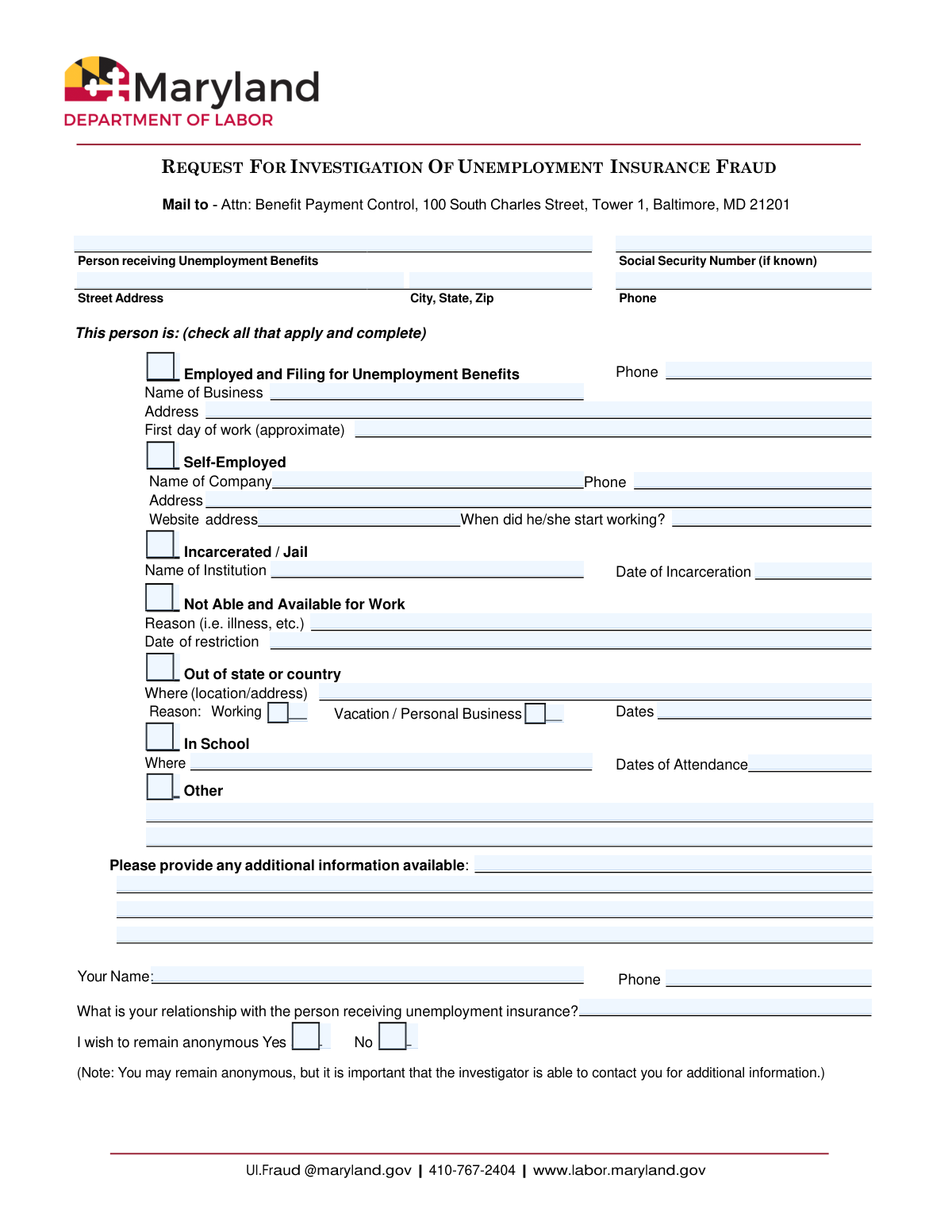
What this form asks for
The AI fills all of it, from your answers or your documents.
The AI checks your answers before you download
14 checks built for this form, so a wrong date or a missing answer is caught before anyone else sees it.
This check ensures that if a Social Security Number is entered, it conforms to the standard 9-digit format, either as XXXXXXXXX or XXX-XX-XXXX. Correct formatting is crucial for accurately identifying the individual in government databases and avoiding processing errors. A failed validation would prompt the user to correct the entry before submission.
This validation verifies that the 'Claimant Name' field is not left blank. The claimant's full name is the primary identifier for initiating an investigation, and its absence would make the submission unusable. If this field is empty, the form cannot be submitted, and the user will be notified that the name is a required field.
This check confirms that the user has selected at least one of the primary checkboxes indicating the type of alleged fraud (e.g., 'Employed and Filing', 'Incarcerated', 'Self-Employed'). A submission without a specified reason lacks the necessary context for an investigation to begin. The system will prevent submission and display an error if no reason is checked.
If the 'Employed and Filing for Unemployment Benefits' box is checked, this validation ensures that the 'Name of Business' and 'First day of work' fields are filled out. This information is essential for investigators to verify the claimant's employment status. Failure to provide these details will result in a prompt asking the user to complete the required employment information.
When the 'Incarcerated / Jail' box is checked, this rule verifies that the 'Name of Institution' and 'Date of Incarceration' fields are completed. These details are critical for cross-referencing correctional facility records to confirm the claimant's status. If these fields are empty, the form will prompt the user to provide the necessary incarceration details.
This validation rule checks all date fields (e.g., 'First day of work', 'Date of Incarceration', 'Work Restriction Date') to ensure the entered dates are not in the future. Fraud investigations are based on past or current events, so a future date is logically invalid and likely a user error. If a future date is entered, an error message will appear, requiring the user to enter a date that is today or in the past.
And 8 more checks
- Enforces Reporter Contact Info if Not Anonymous
- Validates Reporter Phone Number Format
- Validates Claimant's ZIP Code Format
- Ensures Reason is Selected for 'Out of state or country'
- Validates Conditional Fields for 'Self-Employed'
- Ensures Anonymity Choice is Mutually Exclusive
- Validates Website URL Format
- Requires Details for 'Other' Fraud Reason
Let AI fill out your Maryland UI Fraud Investigation Request
No typing. Every field filled in seconds, checked, ready to sign.
How to Fill Out Maryland UI Fraud Investigation Request Online for Free in 2026
What the AI walks you through.
- Navigate to Instafill.ai and upload or select the Maryland Request for Investigation of Unemployment Insurance Fraud form.
- Provide the personal details of the individual suspected of fraud, including their name, address, and Social Security Number if available.
- Check the box that corresponds to the reason for your suspicion (e.g., 'Employed and Filing', 'Incarcerated', 'Out of state') and fill in the required details for that section.
- Enter any additional information or specific details about the suspected fraudulent activity in the designated fields.
- Provide your name and contact information, or select the option to remain anonymous, though providing contact details can help the investigation.
- Review all the information populated by the AI to ensure it is accurate and complete.
- Submit the completed form to the Maryland Department of Labor's Benefit Payment Control unit via mail as indicated on the form.
Common Mistakes in Completing Maryland UI Fraud Investigation Request
The ones the AI is built to catch.
Incomplete or Vague Claimant Identification
Missing Details for Checked Fraud Categories
Conflicting Anonymity Preference
Using Imprecise Dates or Timeframes
Providing Unverifiable Employer Information
Ignoring the 'Additional Information' Section
Incorrectly Categorizing Employment Type
Failing to Check Any Fraud Category Box
Illegible Handwriting on Printed Forms
Frequently Asked Questions About Maryland UI Fraud Investigation Request
Is it really free for 7 days?
Can I fill other forms too?
How do I cancel?
How does the AI fill out Maryland UI Fraud Investigation Request?
What happens to my information?
How complex is Maryland UI Fraud Investigation Request to fill out?
What is the purpose of the 'Request for Investigation of Unemployment Insurance Fraud' form?
Who should fill out this form?
Do I need to know the person's Social Security Number to submit this form?
Can I report someone for unemployment fraud anonymously?
How and where do I submit this form?
What if I don't have all the details requested on the form?
How do I report someone who is working while collecting unemployment benefits?
What happens after I submit a fraud report?
Can I use an AI tool to help me fill out this form?
How can I fill out this form online?
The PDF version of this form I found isn't fillable. What can I do?
What if the person is committing fraud in a way not listed, like being incarcerated or out of the country?
What should I write for 'What is your relationship with the person receiving unemployment insurance?'
Get your Maryland UI Fraud Investigation Request filled out by AI
$0 today. Cancel before Nov 10 and you pay nothing.
Other forms like this one
insurance forms: Form 1095-A, Health Insurance Marketplace Statement, Form SSA-4-BK, Application for Child's Insurance Benefits, Form SSA-10, Application for Widow's or Widower's Insurance Benefits, Form 1095-C, Employer-Provided Health Insurance Offer and Coverage, National Integrity Life Insurance Company Ownership Change Request Form (NI-77-0039-2505), Record of Advice and Needs Analysis (Non-Life Insurance — Personal and Commercial Lines), Form 7206 (2025), Self-Employed Health Insurance Deduction, Continental American Insurance Company (CAIC) / Aflac Group Critical Illness Claim Form (with Attending Physician’s Statement, HIPAA Authorization to Obtain Information, and Electronic Funds Transaction Authorization), Prudential Group Disability Insurance – Education and Employment History Form (GL.2009.009, Ed. 06/2017), acord-25-201603-certificate-of-liability-insurance-1, Brotherhood Mutual Insurance Company Ministry Driver Screening Form (A99), Assurity Life Insurance Company Disability Claim Form — Attending Physician’s Statement, Amateur Sports / Activities Accident Insurance Quote Request Form (Philadelphia Insurance Companies), Martial Arts Studio General Liability and Property Application (Fitness and Wellness Insurance / Philadelphia Insurance Companies) (03/2011), The Prudential Insurance Company of America Group Disability Insurance – Education and Employment History Form (GL.2009.009, Ed. 06/2017), VA Form 29-357, Claim for Disability Insurance Benefits (Government Life Insurance), CMS-1500 (02-12), Health Insurance Claim Form (NUCC Approved) (OMB 0938-1197), Prudential Group Disability Insurance – Education and Employment History Form (GL.2009.009, Ed. 06/2017), HDFC ERGO General Insurance Company Limited – Request for Cashless Hospitalisation for Health Insurance (Policy Part – C), Beneficiary Designation/Change - Principal Life Insurance Company
employment forms: Form I-765, Application for Employment Authorization, Form CMS L564, Request for Employment Info, Form OF-306, Declaration for Federal Employment, Form NYS DHR, Employment Complaint Form, Form AO 78, Application for Employment, Illinois State Board of Education (ISBE) Application for Employment (ISBE 61-08), Prudential Group Disability Insurance – Education and Employment History Form (GL.2009.009, Ed. 06/2017), HR-Pol-Rec&Res-04 Employment Application Form (Recruitment of Permanent Employees), City of Carlinville Application for Employment (An Equal Opportunity Employer), U.S. Equal Employment Opportunity Commission (EEOC) Form 453, Recommendation for Recognition, The Prudential Insurance Company of America Group Disability Insurance – Education and Employment History Form (GL.2009.009, Ed. 06/2017), St. Paul’s Hospital Application for Employment (職位申請表) – SPHF-HRD-035, U.S. Equal Employment Opportunity Commission (EEOC) Form 453, Recommendation for Recognition, Prudential Group Disability Insurance – Education and Employment History Form (GL.2009.009, Ed. 06/2017), Claim for Special Employment Advance (SU514), New York State Employment Application: Part 1 – Pre-Interview (Form #S1000), New York State Employment Application Form, Sidney Sussex College Cambridge, Application for Employment, Z83, Application for Employment in the Republic of South Africa Government Department, ENVIRONMENTAL MONITORING LABORATORY, LLC Employment Application
insurance request forms: National Integrity Life Insurance Company Ownership Change Request Form (NI-77-0039-2505), Amateur Sports / Activities Accident Insurance Quote Request Form (Philadelphia Insurance Companies), HDFC ERGO General Insurance Company Limited – Request for Cashless Hospitalisation for Health Insurance (Policy Part – C), Form CMS-40B, Request for Enrollment in Medicare Part B (Medical Insurance), Form CMS-1763, Request for Termination of Premium Hospital and/or Supplementary Medical Insurance, ACORD 35, Cancellation Request / Policy Release, ACORD 175, Commercial Policy Change Request
Let AI fill out your Maryland UI Fraud Investigation Request
Your trial starts once a card is added. You pay nothing before Nov 10.
Our AI already knows this form, all 42 fields of it. Skip the typing: tell it about yourself, or upload what you have, and it fills the whole form in seconds.
- AI fills every field on the form, checkboxes included
- No typing into boxes: answer a few questions, or upload your resume, an old copy of this form, a photo of a document
- The AI checks the answers; you review and change anything before you download
- Download the finished PDF, print it, or sign it online
- Encrypted, and never used to train AI
Cancel before Nov 10 and you pay nothing.
A card is needed to start the trial. Cancel in two clicks from your account.
Terms · Privacy