
Instafill.ai
7 days free
AI form filling · 299 fields · 6 pages · done in seconds

Yes! You can use AI to fill out Sidney Sussex College Cambridge, Application for Employment

Don't type 299 fields by hand. Tell our AI about yourself, or upload your resume, and it fills every field in seconds. You check it, then download, print or sign.
7 days free, then $19.99/month · Cancel anytime
AI fills it, no typingEncrypted, never used to train AICancel in two clicks
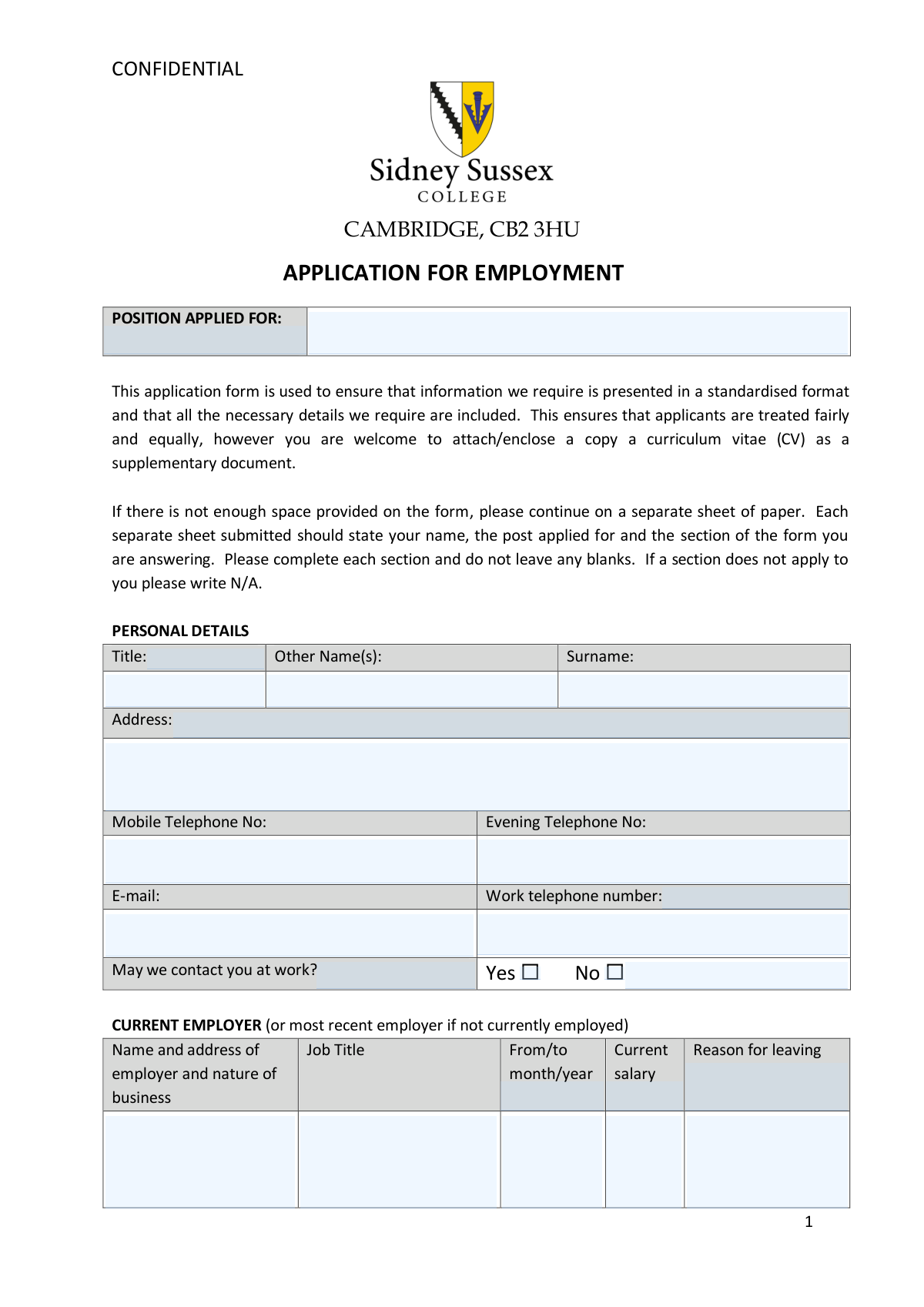
Sidney Sussex College Cambridge, Application for Employment, page 1
Complex · 76/100Form Complexity Index

The AI does the filling. You just check it.

No typing into boxes, nothing to install.

Tell the AI about youAnswer a few questions in plain words, or upload your resume. That is all the typing there is.
AI fills every field in secondsIt puts each answer in the right box on every page, tables and checkboxes included.
Check it and downloadReview every field, change anything, then download, print or sign the PDF.

What this form asks for

The AI fills all of it, from your answers or your documents.

The Sidney Sussex College Cambridge Application for Employment is a confidential, standardised form required for all job applicants seeking positions at Sidney Sussex College, Cambridge (CB2 3HU). It collects personal details, employment history, education and training, suitability statements, references, legal declarations, and eligibility to work in the UK, ensuring all candidates are assessed fairly and equally. The form is an important part of the College's recruitment process, as it provides a consistent basis for shortlisting and interviewing candidates. Today, this form can be filled out quickly and accurately using AI-powered services like Instafill.ai, which can also convert non-fillable PDF versions into interactive fillable forms.
Fillable fields299
Pages6
Sections34
Tables and lists1
Questions that depend on earlier answers1
Form Complexity IndexComplex, 76/100

The AI checks your answers before you download

16 checks built for this form, so a wrong date or a missing answer is caught before anyone else sees it.

Required Personal Name Fields Are Completed

Validates that the First Name/Given Name(s) and Surname/Family Name fields are both populated and not left blank. These fields are essential for identifying the applicant and addressing correspondence correctly. If either field is missing, the application cannot be processed or attributed to the correct individual, and the form should be rejected or returned for completion.

Position Applied For Is Specified

Checks that the 'Position Applied For' field contains a meaningful job title or role description and is not left blank or filled with placeholder text. Without this information, HR cannot route the application to the correct hiring manager or assess the applicant against the right job criteria. A blank or vague entry (e.g., 'any') should trigger a validation warning requiring the applicant to specify the exact role.

Valid Email Address Format

Validates that the email address field conforms to a standard email format, containing exactly one '@' symbol, a domain name, and a valid top-level domain (e.g., [email protected]). An incorrectly formatted email address will prevent the employer from sending interview invitations or correspondence electronically. The field should be flagged if it contains spaces, missing domain parts, or disallowed characters.

Valid UK Telephone Number Format for All Phone Fields

Checks that all provided telephone numbers — mobile, evening, and work — conform to a valid UK telephone number format, typically 10–11 digits, optionally beginning with +44 or 0, and containing only numeric characters and permitted separators such as spaces or hyphens. Invalid formats may result in the employer being unable to contact the applicant for interview scheduling. Any field containing letters, incorrect digit counts, or malformed international prefixes should be flagged.

Work Telephone Number Required Only When Contact at Work Is Permitted

Validates that if the applicant has checked 'Yes' to 'May we contact you at work?', the work telephone number field must also be completed. Conversely, if 'No' is selected, the work telephone number field is not required. This logical consistency check ensures that the employer has the necessary contact information when permission to call at work has been granted, and avoids confusion when the field is filled but permission is denied.

At Least One Contact Method Is Provided

Ensures that the applicant has supplied at least one valid contact method — either a mobile telephone number, an evening telephone number, or an email address. Without any means of contact, the employer cannot communicate shortlisting decisions, interview invitations, or requests for further information. If all three contact fields are blank, the form should be flagged as incomplete and the applicant prompted to provide at least one.

And 10 more checks
  • Current or Most Recent Employer Section Is Completed
  • Employment Date Format Is Month and Year Only
  • Employment Dates Are Chronologically Consistent
  • Previous Employment Listed in Most Recent First Order
  • Dismissal Disclosure Requires Supporting Details
  • Conflicts of Interest Disclosure Requires Supporting Details
  • Legal Convictions Disclosure Requires Supporting Details
  • UK Work Eligibility Must Be Confirmed and Supporting Documents Indicated
  • Two Referees Must Be Provided with Complete Contact Details
  • Suitability Statement Must Not Be Left Blank

Let AI fill out your Sidney Sussex College Employment Application

No typing. Every field filled in seconds, checked, ready to sign.

7 days free, then $19.99/month · Cancel anytime

How to Fill Out Sidney Sussex College Employment Application Online for Free in 2026

What the AI walks you through.

  1. Navigate to Instafill.ai and upload the Sidney Sussex College Application for Employment PDF, or select it from the available forms library to begin filling it out online.
  2. Complete the Personal Details section by entering your title, first name, other names, surname, full postal address, mobile telephone number, evening telephone number, email address, and work telephone number (if applicable).
  3. Fill in the Current Employer section with your employer's name and address, job title, employment dates, current salary, reason for leaving, and a description of your main duties, responsibilities, and achievements.
  4. Enter details of all Previous Employment positions (most recent first), including employer name and address, job title, key responsibilities and achievements, employment dates, leaving salary, and reason for leaving for each role.
  5. Complete the Suitability for Employment and Additional Information sections, explaining why you are applying for the post and how your skills, abilities, and experience make you suitable, along with any other relevant supporting information.
  6. Fill in the Education and Professional Training section listing all qualifications (GCSEs, A-Levels, degrees, professional qualifications), work-related training courses, and IT skills, then complete the General Information fields including notice period and holiday commitments.
  7. Provide details for the References section with two referees' contact information, answer the Conflicts of Interest, Legal Convictions, and Eligibility for Employment in the UK questions, indicate how you heard about the vacancy, sign and date the Declaration, then review and submit your completed application.

Common Mistakes in Completing Sidney Sussex College Employment Application

The ones the AI is built to catch.

Leaving blank fields instead of writing N/A
Many applicants skip sections that don't apply to them, leaving fields completely empty. The form explicitly instructs that no blanks should be left and that inapplicable sections must be marked 'N/A'. Leaving blanks can make the application appear incomplete or careless, and may cause it to be rejected before review. Always write 'N/A' in any field that does not apply to your situation. Tools like Instafill.ai can help by automatically flagging empty required fields before submission.
Using incorrect date format for employment periods
Applicants frequently enter employment dates in formats such as '01/2019' or '2019-2021' rather than the required 'month/year' format (e.g., 'Jan 2019 – Mar 2021'). This inconsistency makes it difficult for HR staff to quickly verify employment history and can raise questions about accuracy. Always use the abbreviated month name followed by the four-digit year, separated by a dash or hyphen, for both start and end dates. Instafill.ai can automatically format date entries to match the required convention.
Omitting the nature of business for each employer
The employer name and address fields specifically request a description of the 'nature of business,' yet many applicants only provide the company name and address. Without this context, the hiring panel cannot assess the relevance of your experience to the role at Sidney Sussex College. Always include a brief description such as 'higher education institution,' 'retail company,' or 'NHS hospital trust' alongside the employer's name and address.
Failing to list previous employment in reverse chronological order
The form clearly states that previous positions should be listed 'most recent first,' but applicants often list jobs in the order they occurred, starting with the oldest. This forces reviewers to work backwards through your history and can obscure your most relevant recent experience. Review your employment history before completing the form and ensure each row is filled starting with your most recent role and working backwards.
Providing a vague or generic suitability statement
The 'Suitability for Employment' section asks applicants to specifically outline why they are applying and how their skills, abilities, achievements, and experience make them suitable. Many applicants write generic statements that could apply to any job, failing to reference the specific role or the College. This is one of the most important sections of the form and should be tailored to the position applied for, drawing direct connections between your experience and the job requirements.
Not disclosing unspent convictions when required
Some applicants incorrectly assume minor cautions, reprimands, or bind-overs do not need to be declared, or they confuse 'spent' and 'unspent' convictions under the Rehabilitation of Offenders Act 1974. Failing to disclose an unspent conviction is a serious omission that could result in dismissal if discovered after appointment. Carefully review the legal definition of 'unspent' before answering this question, and if in doubt, seek guidance or disclose with a brief explanation.
Providing an incomplete or unsuitable referee
The form requires one referee to be the current or most recent employer, yet applicants sometimes list personal friends, colleagues at the same level, or former tutors from many years ago as their primary referee. Additionally, many applicants forget to include a daytime telephone number and email address for each referee, or fail to indicate whether the referee may be contacted prior to interview. Ensure your first referee is your current or most recent line manager or employer, and provide complete contact details for both referees.
Entering an incomplete postal address without a postcode
Applicants often omit the postcode from their home address, or provide only a partial address such as a street name without a house number or town. Since the College may correspond by post, an incomplete address could mean important correspondence is lost. Always include your full address: house number and street name, any flat or apartment number, town or city, county, and full postcode.
Providing vague or missing IT skills information
The IT skills section asks applicants to specify each software package used and their skill level (basic, intermediate, advanced) or any qualification gained. Many applicants write only 'proficient in Microsoft Office' without listing individual applications such as Word, Excel, Outlook, or PowerPoint, and without indicating their level. This vagueness makes it impossible for the panel to assess your technical competence. List each application separately with a clear skill level, and include any relevant qualifications such as ECDL or Microsoft certifications.
Failing to note existing holiday commitments
The 'General Information' section asks applicants to declare any existing holiday commitments, but this field is frequently left blank or marked N/A even when the applicant does have pre-booked holidays. Omitting this information can cause problems after an offer is made if the College is unable to accommodate previously booked leave. Be transparent and list any confirmed holiday dates so that arrangements can be discussed openly during the offer stage.
Not attaching or referencing supporting documentation for qualifications
The form notes that Sidney Sussex College will require original evidence of all degrees, professional, and work-related qualifications to be brought to interview if shortlisted. Many applicants list qualifications without ensuring they have the original certificates available, or they fail to list all relevant qualifications including GCSEs and O-Levels as instructed. List every qualification gained, including the awarding institution and year, and ensure you have original documents ready to present at interview.
Omitting or incorrectly completing the work contact permission field
Applicants often forget to tick either 'Yes' or 'No' for the question 'May we contact you at work?' and fail to provide their work telephone number if they have answered 'Yes.' Conversely, some applicants provide a work number but do not tick 'Yes,' creating an inconsistency. If you do not wish to be contacted at work, tick 'No' and ensure your mobile or evening number is clearly provided as an alternative. Instafill.ai can help by cross-validating related fields to ensure consistency across contact permission answers.

Frequently Asked Questions About Sidney Sussex College Employment Application


Is it really free for 7 days?
Yes. You pay $0 today. Cancel before Oct 30 and you are never charged. Keep it, and it is $19.99 a month for 5 fills of your Sidney Sussex College Employment Application.
Can I fill other forms too?
This plan is for your Sidney Sussex College Employment Application: your own AI agent fills it as often as 5 times a month. To fill other forms and upload your own, choose a Professional plan from your account.
How do I cancel?
From your account, in two clicks, any time. No email, no call.
How does the AI fill out Sidney Sussex College Employment Application?
You answer a few questions in plain words, or upload your resume. The AI reads what you give it and puts each answer into the right field of Sidney Sussex College Employment Application, on every page, in seconds. It checks the answers against the form's own rules, and you review and change anything before you download, print or sign.
What happens to my information?
It is encrypted in transit and at rest, and it is never used to train AI.
How complex is Sidney Sussex College Employment Application to fill out?
Sidney Sussex College Employment Application has a Form Complexity Index of 76 out of 100, in the complex tier: 299 fillable fields across 6 pages. Instafill.ai's AI fills it in under a minute, with every field there for you to review before you download.
What is this application form for and who needs to complete it?
This is an employment application form for Sidney Sussex College in Cambridge (CB2 3HU). Anyone wishing to apply for a position at the College must complete this form, as it ensures all applicants provide information in a standardised format so they can be assessed fairly and equally.
Can I submit a CV instead of filling out this form?
No, you must complete the application form as it is required to ensure all necessary information is presented in a standardised format. However, you are welcome to attach or enclose a CV as a supplementary document alongside the completed form.
What should I do if there is not enough space on the form?
If you run out of space in any section, continue your answer on a separate sheet of paper. Each additional sheet must clearly state your name, the post you are applying for, and the section of the form you are answering.
What employment history do I need to include?
You must provide details of your current or most recent employer, plus all previous positions held since completing your full-time education, listed in reverse chronological order (most recent first). For each role, include the employer's name and address, job title, key responsibilities and achievements, employment dates, leaving salary, and reason for leaving.
Do I need to declare previous dismissals or criminal convictions?
Yes, the form asks whether you have been dismissed from any previous employment and requires details if you answer yes. You must also declare any unspent convictions, cautions, reprimands, warnings, or bind-overs under the Rehabilitation of Offenders Act 1974. For certain positions, an offer may be subject to a satisfactory Disclosure and Barring Service (DBS) check.
What documents do I need to prove my eligibility to work in the UK?
You can demonstrate your right to work in the UK by providing either a valid passport (non-UK nationals must also provide a passport and an Online Share Code), or for UK and Irish nationals only, both a birth certificate and a document showing your National Insurance number (not a temporary one).
How many references do I need to provide, and who should they be?
You must provide two referees. One should be your current or most recent employer; the second should be your penultimate employer, a college tutor, or a teacher. School or college leavers may give the name of a teacher or tutor. You can indicate whether each referee may be contacted prior to interview.
What qualifications and training information do I need to include?
List all academic qualifications (GCSEs, O-Levels, A-Levels, NVQs, Degrees) and professional qualifications in reverse chronological order, along with the name of the school, college, or university attended. Also list all relevant work-related training courses, including dates and any qualifications gained. If shortlisted, you will be required to bring original evidence of all degrees and professional qualifications to interview.
What should I write in the 'Suitability for Employment' section?
In this section, you should explain why you are applying for the specific post and describe how your skills, abilities, achievements, and experience make you the right candidate. This is your opportunity to make a strong case for your application, so be specific and relate your experience directly to the role.
Do I need to disclose a disability on this form?
The form asks whether you consider yourself disabled under the Disability Discrimination Act (DDA), which covers physical or mental impairments that have a substantial and long-term adverse effect on normal day-to-day activities. If you answer yes, you are invited to indicate any facilities or adjustments you may require in order to attend an interview.
What is the Conflicts of Interest section asking about?
This section asks whether you have any personal relationships with current members of staff at Sidney Sussex College, including immediate family, close friendships, or close business, commercial, or financial relationships. If yes, you must provide details so the College can assess any potential conflict.
Where and how do I submit my completed application form?
You can submit your completed application form by post to the HR Department, Sidney Sussex College, Cambridge, CB2 3HU, or electronically by email to [email protected]. Ensure all sections are completed and any supporting documents are included.
Can I use AI tools like Instafill.ai to help fill out this form?
Yes, AI-powered services like Instafill.ai can help you accurately auto-fill the form fields, saving you time and reducing the risk of errors. Instafill.ai can also convert flat, non-fillable PDF versions of this form into interactive fillable forms, making the process even easier.
How do I fill out this form online using Instafill.ai?
Simply upload the application form PDF to Instafill.ai, and the AI will guide you through each field, auto-filling information where possible based on your profile. If the PDF is a flat, non-fillable document, Instafill.ai can convert it into an interactive form so you can type directly into the fields, then download or submit the completed form.
What happens after I submit my application?
If you are shortlisted, Sidney Sussex College will contact your referees (unless you have indicated otherwise) and invite you to interview, where you will need to bring original evidence of your qualifications. Any job offer is subject to receipt of two satisfactory references, and may also be subject to a DBS check and/or medical report, as well as a probationary period.
Encrypted in transit and at restNever used to train AIDelete your forms any time

Get your Sidney Sussex College Employment Application filled out by AI

$0 today. Cancel before Oct 30 and you pay nothing.

Other forms like this one

employment forms: Form I-765, Application for Employment Authorization, Form CMS L564, Request for Employment Info, Form OF-306, Declaration for Federal Employment, Form NYS DHR, Employment Complaint Form, Form AO 78, Application for Employment, Illinois State Board of Education (ISBE) Application for Employment (ISBE 61-08), Prudential Group Disability Insurance – Education and Employment History Form (GL.2009.009, Ed. 06/2017), HR-Pol-Rec&Res-04 Employment Application Form (Recruitment of Permanent Employees), City of Carlinville Application for Employment (An Equal Opportunity Employer), U.S. Equal Employment Opportunity Commission (EEOC) Form 453, Recommendation for Recognition, The Prudential Insurance Company of America Group Disability Insurance – Education and Employment History Form (GL.2009.009, Ed. 06/2017), St. Paul’s Hospital Application for Employment (職位申請表) – SPHF-HRD-035, U.S. Equal Employment Opportunity Commission (EEOC) Form 453, Recommendation for Recognition, Prudential Group Disability Insurance – Education and Employment History Form (GL.2009.009, Ed. 06/2017), Claim for Special Employment Advance (SU514), New York State Employment Application: Part 1 – Pre-Interview (Form #S1000), New York State Employment Application Form, Z83, Application for Employment in the Republic of South Africa Government Department, ENVIRONMENTAL MONITORING LABORATORY, LLC Employment Application, Vanguard 403(b)(7) ERISA Retirement Plan Distribution Request (Retirement / Severance from Employment / Disability)

employment application forms: Form I-765, Application for Employment Authorization, Form AO 78, Application for Employment, Illinois State Board of Education (ISBE) Application for Employment (ISBE 61-08), HR-Pol-Rec&Res-04 Employment Application Form (Recruitment of Permanent Employees), City of Carlinville Application for Employment (An Equal Opportunity Employer), St. Paul’s Hospital Application for Employment (職位申請表) – SPHF-HRD-035, New York State Employment Application: Part 1 – Pre-Interview (Form #S1000), New York State Employment Application Form, Z83, Application for Employment in the Republic of South Africa Government Department, ENVIRONMENTAL MONITORING LABORATORY, LLC Employment Application, Brighton Police Department Police Officer Employment Application, Form OF-612, Optional Application for Federal Employment, King Faisal Specialist Hospital and Research Centre (General Organization) Employment Application Form, Form I-765, Application For Employment Authorization, State of New Jersey Application for Employment (Form DPF-663), Standard Application for Employment, NYS Employment Application: Part 1 Pre-Interview Form #S1000, Application for a Residency and Employment Rights Certificate, Application to Suspend Employment/Occupational Disabilities Related to Criminal Convictions (CN: 12535), Form ETA-9089 – Appendix A: Foreign Worker Information, Application for Permanent Employment Certification

college application forms: Melbourne City College Australia Education Agent Application Form, South Sydney College International Student Application Form, Application for Prior Learning Assessment

college HR forms: Melbourne City College Australia Education Agent Application Form, South Sydney College International Student Application Form, Rollover Request — 529 College Savings Plan, Fidelity Investments Withdrawals—529 College Savings Plan, The Vanguard 529 College Savings Plan: Power of Attorney, The Vanguard 529 College Savings Plan Agent Authorization/Limited Power of Attorney, The Vanguard 529 College Savings Plan Direct Rollover Out to Roth IRA Form, The Vanguard 529 College Savings Plan Transfer Due to Death of Account Owner Form, The Vanguard 529 College Savings Plan Incoming Direct Rollover Form, The Vanguard 529 College Savings Plan: Withdrawal Request Form, Merrill Lynch 529 College Savings Plan Withdrawal Request Form, Form 529TCF, The Vanguard 529 College Savings Plan, Trustee Certification, Fidelity Institutional 529 College Savings Plan Beneficiary Change, 529 College Savings Plan Beneficiary Change Form, CollegeAdvantage Direct 529 Savings Plan Beneficiary Change Form

7 days free, then $19.99/month · Cancel anytime