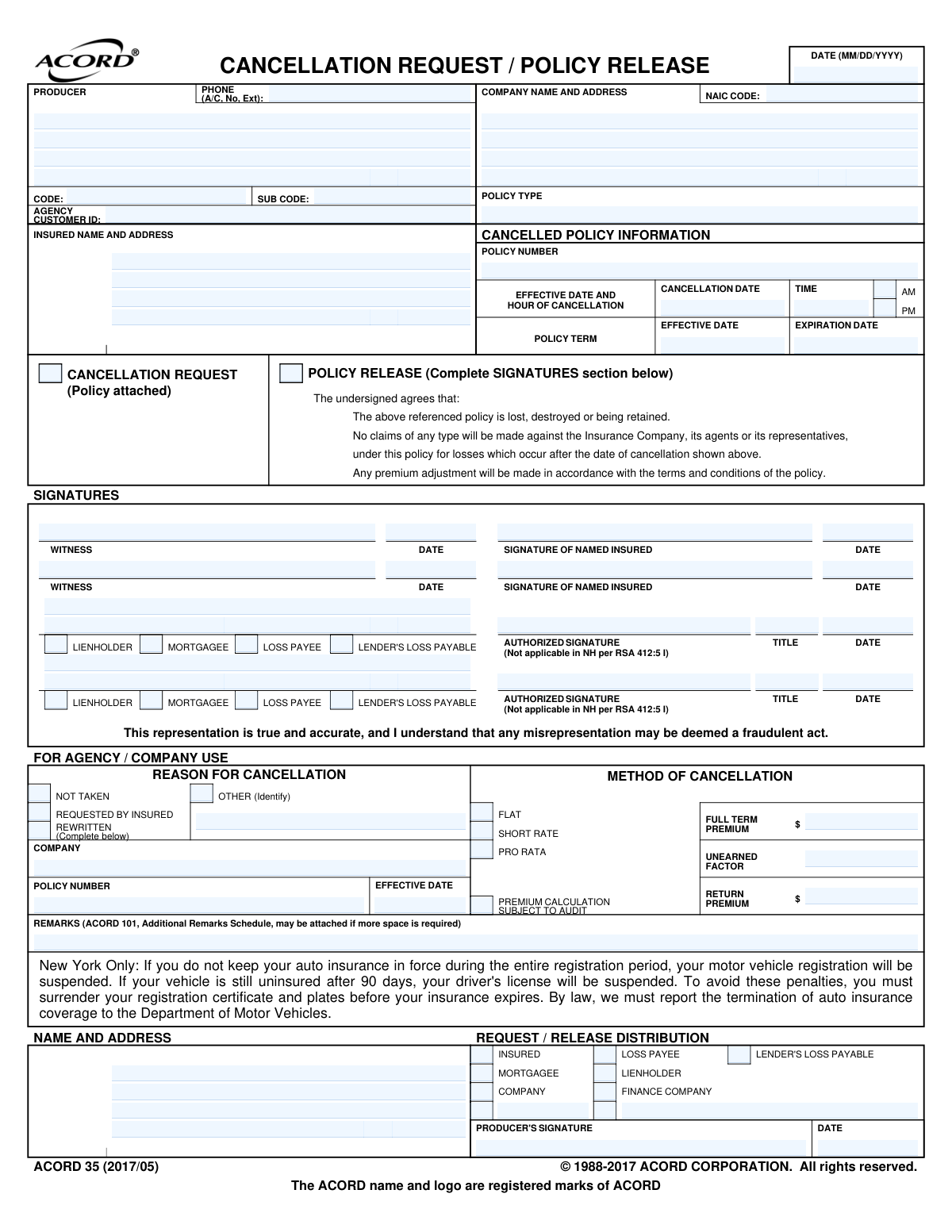
Yes! You can use AI to fill out ACORD 35, Cancellation Request / Policy Release

ACORD Form 35, also known as the Cancellation Request / Policy Release, is a crucial document in the insurance industry used by a policyholder to formally request the termination of their insurance coverage. It provides a standardized way to communicate the cancellation, specifying the exact date and time it should take effect, and releases the insurance company from liability for future claims. Today, this form can be filled out quickly and accurately using AI-powered services like Instafill.ai, which can also convert non-fillable PDF versions into interactive fillable forms.
ACORD 35 is part of the insurance request forms and policy service forms categories on Instafill.
Our AI automatically handles information lookup, data retrieval, formatting, and form filling.
It takes less than a minute to fill out ACORD 35 using our AI form filling.
Securely upload your data. Information is encrypted in transit and deleted immediately after the form is filled out.

Form specifications

Form name: ACORD 35, Cancellation Request / Policy Release
Number of fields: 102
Number of pages: 1
Language: English
main-image

Instafill Demo: How to fill out PDF forms in seconds with AI

How to Fill Out ACORD 35 Online for Free in 2026

Are you looking to fill out a ACORD 35 form online quickly and accurately? Instafill.ai offers the #1 AI-powered PDF filling software of 2026, allowing you to complete your ACORD 35 form in just 37 seconds or less.
Follow these steps to fill out your ACORD 35 form online using Instafill.ai:
  1. 1 Navigate to Instafill.ai and upload or select the ACORD 35 form.
  2. 2 Provide the insured's name and address, as well as the insurance company and producer details.
  3. 3 Enter the policy information, including the policy number and the original effective and expiration dates.
  4. 4 Specify the exact date and time you wish for the cancellation to become effective.
  5. 5 Indicate whether it is a Cancellation Request or a Policy Release and state the reason for cancellation.
  6. 6 Review all the information auto-filled by the AI for accuracy, including any premium calculation details.
  7. 7 Electronically sign the form as the named insured, add a witness signature if required, and then download or submit the completed document.

Our AI-powered system ensures each field is filled out correctly, reducing errors and saving you time.

Why Choose Instafill.ai for Your Fillable ACORD 35 Form?

Speed

Complete your ACORD 35 in as little as 37 seconds.

Up-to-Date

Always use the latest 2026 ACORD 35 form version.

Cost-effective

No need to hire expensive lawyers.

Accuracy

Our AI performs 10 compliance checks to ensure your form is error-free.

Security

Your personal information is protected with bank-level encryption.

Frequently Asked Questions About Form ACORD 35

The ACORD 35 form, also known as a Cancellation Request / Policy Release, is used by a policyholder to formally request the termination of their insurance policy before its scheduled expiration date.

The policyholder, referred to as the 'Named Insured' on the form, is responsible for completing and signing this form to initiate the cancellation of their insurance policy.

You will need your insurance policy number, the policy's effective and expiration dates, and the full name and address of your insurance company and agency. You must also decide on the specific date and time you want the cancellation to take effect.

A 'Cancellation Request' is a standard request to end your policy, with premium adjustments made according to its terms. A 'Policy Release' is a more binding agreement that you will make no future claims, often used when the physical policy document is lost or destroyed.

This is the exact date and time your insurance coverage will stop. It is crucial to ensure you have new coverage in place by this time to avoid any lapse in protection.

The named insured on the policy must sign and date the form. Depending on the policy and state requirements, a witness or interested parties like a mortgagee or lienholder may also need to provide a signature.

You may be entitled to a refund of unearned premium, which will be calculated by your insurance company. The method of calculation (e.g., pro-rata, short rate) is noted in the 'For Agency / Company Use' section and depends on your policy's terms.

You should submit the completed and signed form to your insurance agent or directly to the insurance company that issued the policy. Always confirm the correct submission procedure with your agent to avoid delays.

No, this section is to be completed by your insurance agency or company. They use it to process the cancellation, calculate any premium adjustments, and note the reason for cancellation.

For New York residents, this is a legal notice stating that if you cancel your auto insurance, you must surrender your vehicle's license plates. Failure to do so will result in the suspension of your vehicle registration and, eventually, your driver's license.

Yes, services like Instafill.ai use AI to help you accurately auto-fill form fields with your saved information, which saves time and reduces the chance of errors.

Simply upload the ACORD 35 PDF to Instafill.ai. The platform will make the document interactive, allowing you to easily type in your information, add a digital signature, and then download or print the completed form.

If you have a non-fillable or 'flat' PDF, you can upload it to a service like Instafill.ai. It will automatically convert the document into an interactive, fillable form that you can complete on your computer or mobile device.

Compliance ACORD 35
Validation Checks by Instafill.ai

1
Ensures Cancellation Date is within Policy Term
This validation checks that the 'EFFECTIVE DATE OF CANCELLATION' (CancelNonRenew_CancelNonRenewDate_A) falls between the policy's effective date (Policy_EffectiveDate_A) and expiration date (Policy_ExpirationDate_A). A cancellation date outside of the policy term is logically invalid and indicates a significant data entry error. If this validation fails, the request cannot be processed as the system cannot determine which policy instance to act upon.
2
Validates Policy Number Presence
This check verifies that the 'POLICY NUMBER' field (Policy_PolicyNumberIdentifier_A) is not empty. The policy number is the unique identifier for the contract being cancelled, and its absence makes the entire request ambiguous and impossible to process. Failure to provide a policy number must result in an immediate rejection of the form for correction.
3
Requires Insured Signature for Cancellation Request
This check confirms that if the 'CANCELLATION REQUEST' box (CancelNonRenew_CancellationRequestIndicator_A) is checked, the 'SIGNATURE OF NAMED INSURED' field (NamedInsured_Signature_A) is not empty. This is a critical control to prevent unauthorized cancellations and potential fraud, ensuring the request is genuinely from the policyholder. A missing signature on a cancellation request renders it invalid and legally non-binding.
4
Enforces Mutually Exclusive Cancellation Reason
This validation ensures that only one option from the 'REASON FOR CANCELLATION' section (e.g., Not Taken, Requested by Insured, Rewritten, Other) is selected. This prevents ambiguity in the reason for termination, which affects downstream processing, reporting, and premium calculations. If multiple reasons are selected, the form should be rejected for clarification.
5
Requires Description for 'Other' Cancellation Reason
This check ensures that if the 'OTHER' reason for cancellation (CancelNonRenew_OtherIndicator_A) is selected, the corresponding description field (CancelNonRenew_OtherDescription_A) is populated. This provides necessary context for non-standard cancellations that is vital for underwriting and compliance records. An empty description for an 'Other' reason makes the data incomplete and requires manual follow-up.
6
Validates All Date Formats
This validation ensures all date fields on the form (e.g., CancelNonRenew_CancelNonRenewDate_A, Policy_EffectiveDate_A, NamedInsured_SignatureDate_A) adhere to a standard MM/DD/YYYY format. Inconsistent or invalid date formats can cause system crashes, incorrect term calculations, and processing failures. This check is fundamental for data integrity and system stability.
7
Verifies Rewritten Policy Details are Provided
This check confirms that if the cancellation reason is 'REWRITTEN' (CancelNonRenew_RewrittenIndicator_A), then the new policy number (Policy_PolicyNumberIdentifier_B) and new effective date (Policy_EffectiveDate_B) are provided. This information is crucial for tracking continuous coverage and for the agency's business records. Missing information for a rewritten policy creates a gap in the client's record.
8
Checks for Logical Policy Term Dates
This validation verifies that the 'EXPIRATION DATE' (Policy_ExpirationDate_A) is on or after the 'EFFECTIVE DATE' (Policy_EffectiveDate_A). An expiration date that occurs before the effective date is a logical impossibility and indicates a severe data entry error. This prevents the processing of nonsensical policy data and ensures the basic contract parameters are correct.
9
Validates NAIC Code Format
This check ensures that the 'NAIC CODE' (Insurer_NAICCode_A) is a 5-digit numeric code. The NAIC code is a standard identifier for insurance carriers, and an invalid format can lead to incorrect company identification and routing errors. This ensures the cancellation request is directed to the correct insurance company's system.
10
Ensures Cancellation Time AM/PM Selection
This validation ensures that if a cancellation time (CancelNonRenew_CancelNonRenewTime_A) is specified, either the AM (CancelNonRenew_CancelNonRenewTimeMorningIndicator_A) or PM (CancelNonRenew_CancelNonRenewTimeAfternoonOrEveningIndicator_A) indicator is also selected. The exact time of cancellation is legally significant for determining when coverage ends. An ambiguous time can lead to disputes over claims occurring on the cancellation date.
11
Requires Signature Date for Insured Signature
This check ensures that if the 'SIGNATURE OF NAMED INSURED' (NamedInsured_Signature_A) is present, the corresponding 'DATE' field (NamedInsured_SignatureDate_A) is also filled. The date of the signature establishes when the request was authorized by the insured, which is a critical piece of evidence for the transaction's validity. A signature without a date is incomplete and may be challenged.
12
Validates Request Type Selection
This check verifies that at least one of the primary action boxes, 'CANCELLATION REQUEST' (CancelNonRenew_CancellationRequestIndicator_A) or 'POLICY RELEASE' (CancelNonRenew_PolicyReleaseIndicator_A), is checked. The form's purpose is undefined without this selection, making it impossible to determine the user's intent. The submission should be rejected as incomplete if neither box is checked.
13
Requires Lienholder Signature for Policy Release
This check validates that if 'POLICY RELEASE' (CancelNonRenew_PolicyReleaseIndicator_A) is checked and a lienholder or mortgagee is listed, their signature (e.g., AdditionalInterest_Signature_A) is present. The lienholder has a financial interest in the policy, and their release is required to fully absolve the insurance company of obligations. Failure to obtain this signature can lead to legal and financial complications if a loss occurs.

Common Mistakes in Completing ACORD 35

Entering an Ambiguous or Incorrect Cancellation Date and Time

Users often enter a date without specifying the time or AM/PM, or they input a date that creates a lapse in coverage. This happens due to oversight or not coordinating with the start of a new policy. The consequence is a potential gap in insurance protection or paying for overlapping coverage, both of which have significant financial risk. To avoid this, always specify the exact date and time (e.g., 12:01 AM) and ensure it aligns perfectly with your new policy's effective date.

Omitting or Mismatching the Policy Number

The policy number is the primary identifier for the contract, but it is frequently entered incorrectly or left blank. This occurs when filers don't have their documents handy and guess, or make a simple transcription error. Without the correct policy number, the insurance company cannot locate the policy to be cancelled, leading to processing failure, continued billing, and the policy remaining active. Always reference your policy declarations page or ID card to ensure the number is exact.

Using an Incomplete or Incorrect Insured Name

Filers may use a nickname, a single name when the policy lists multiple insureds (e.g., spouses), or an incorrect business entity name. The name on the cancellation request must exactly match the 'Named Insured' on the policy documents for verification. A mismatch will cause the request to be rejected, delaying the cancellation process until a corrected form is submitted. Always verify the full, legal name(s) as they appear on your policy.

Missing Required Signatures

A cancellation request is a legal document that is invalid without the proper signatures, yet this is one of the most common oversights. All individuals listed as 'Named Insured' must sign, and in some cases, a witness or lienholder signature is also required. Forgetting a signature renders the entire form void, meaning the policy will not be cancelled and will remain in force. Carefully review the signature section before submission to ensure all required parties have signed and dated the form.

Selecting the Wrong Reason for Cancellation

The form provides options like 'Requested by Insured', 'Rewritten', and 'Not Taken', which users may not fully understand. The selected reason directly impacts how any potential premium refund is calculated, with some reasons triggering a 'short-rate' penalty. Choosing incorrectly can result in a smaller refund than expected. To avoid this, understand that 'Requested by Insured' is for standard cancellations, while 'Rewritten' is for replacement by the same company, and 'Not Taken' is for a policy that was never accepted.

Failing to Address Lienholder or Mortgagee Interests

When a vehicle or property has a loan, the lender (lienholder/mortgagee) is an interested party on the policy and must be notified of the cancellation. Filers often forget to list these parties or fail to secure their signature if it's required for a policy release. This can put the insured in breach of their loan agreement and may cause the lender to 'force-place' expensive insurance on the collateral. Always list any lienholders and confirm if their signature is needed to release their interest.

Submitting a Form with Illegible Handwriting

When a PDF form is printed and filled out by hand, poor handwriting can make critical information like policy numbers, names, and dates impossible to read accurately. This leads to data entry errors by the processing agent, causing delays, rejections, or even cancellation of the wrong policy. To prevent this, print clearly in block letters or, ideally, use a tool like Instafill.ai which can convert non-fillable PDFs into fillable versions, allowing you to type information for perfect clarity.

Misunderstanding 'Cancellation Request' vs. 'Policy Release'

The form presents two distinct actions, and filers may not understand the difference. A 'Cancellation Request' is a simple directive to terminate the policy, while a 'Policy Release' is a broader legal agreement that releases the insurer from all future claims, often used when the original policy document is lost. Selecting the wrong option can cause processing confusion or have unintended legal consequences. For most situations, such as switching insurance carriers, 'Cancellation Request' is the appropriate choice.

Using Incorrect Date Formats

The form explicitly requests the MM/DD/YYYY format, but users often deviate, using DD/MM/YYYY or writing out the month, which can create ambiguity. A date like '02/03/2024' could be interpreted as either February 3rd or March 2nd, potentially causing the cancellation to occur on the wrong day. This can lead to coverage gaps or billing disputes. To avoid this, strictly adhere to the specified format for all date fields. AI-powered tools like Instafill.ai can help by automatically validating and formatting dates correctly.
Saved over 80 hours a year

“I was never sure if my IRS forms like W-9 were filled correctly. Now, I can complete the forms accurately without any external help.”

Kevin Martin Green

Your data stays secure with advanced protection from Instafill and our subprocessors

Robust compliance program

Transparent business model

You’re not the product. You always know where your data is and what it is processed for.

ISO 27001, HIPAA, and GDPR

Our subprocesses adhere to multiple compliance standards, including but not limited to ISO 27001, HIPAA, and GDPR.

Security & privacy by design

We consider security and privacy from the initial design phase of any new service or functionality. It’s not an afterthought, it’s built-in, including support for two-factor authentication (2FA) to further protect your account.

Fill out ACORD 35 with Instafill.ai

Worried about filling PDFs wrong? Instafill securely fills acord-35-cancellation-request-policy-release forms, ensuring each field is accurate.