Yes! You can use AI to fill out Transamerica Policy Service Request (Form MPS61008T)
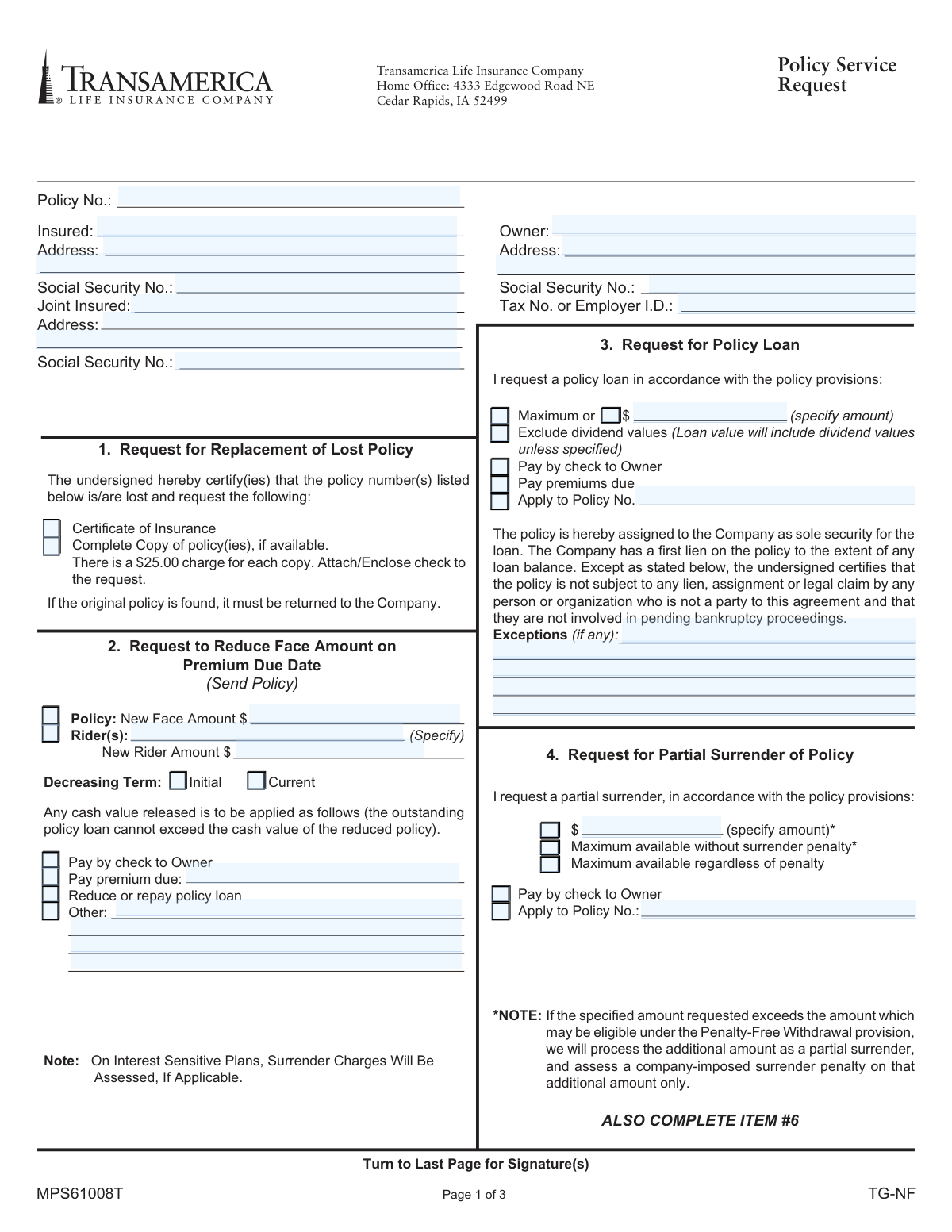
Form MPS61008T, the Policy Service Request from Transamerica Life Insurance Company, is a crucial document for policyholders who need to make various administrative and financial changes to their existing life insurance policies. It allows for actions like taking a policy loan, partially or fully surrendering a policy, changing dividend options, and updating premium billing information without requiring new medical evidence. Today, this form can be filled out quickly and accurately using AI-powered services like Instafill.ai, which can also convert non-fillable PDF versions into interactive fillable forms for your convenience.
Rather not fill this in by hand? Instafill is an online form filler that completes PDF forms automatically — upload the blank form, answer a few questions, and the AI fills every field.
Form specifications
| Form name: | Transamerica Policy Service Request (Form MPS61008T) |
| Number of pages: | 1 |
| Language: | English |
Our AI automatically handles information lookup, data retrieval, formatting, and form filling.
It takes less than a minute to fill out MPS61008T using our AI form filling.
Securely upload your data. Information is encrypted in transit and deleted immediately after the form is filled out.
Instafill Demo: How to fill out PDF forms in seconds with AI
How to Fill Out MPS61008T Online for Free in 2026
Are you looking to fill out a MPS61008T form online quickly and accurately? Instafill.ai offers the #1 AI-powered PDF filling software of 2026, allowing you to complete your MPS61008T form in just 37 seconds or less.
Follow these steps to fill out your MPS61008T form online using Instafill.ai:
- 1 Navigate to Instafill.ai and upload or select the Transamerica Policy Service Request form (MPS61008T).
- 2 Use the AI assistant to identify the specific section(s) you need to complete based on your request, such as 'Request for Policy Loan' or 'Full Surrender of Policy'.
- 3 Enter the required Insured and Owner information, including names, addresses, and Social Security or Tax ID numbers.
- 4 Complete the details for your specific request, such as the loan amount or surrender options, and make any necessary elections, like for tax withholding in Section 6.
- 5 If you reside in a community property state, complete Section 13 regarding your marital status.
- 6 Carefully review all the information you have entered for accuracy, then sign and date the form in the designated signature section on the last page.
- 7 Download your completed form and submit it to Transamerica Life Insurance Company as instructed.
Our AI-powered system ensures each field is filled out correctly, reducing errors and saving you time.
Why Choose Instafill.ai for Your Fillable MPS61008T Form?
Speed
Complete your MPS61008T in as little as 37 seconds.
Up-to-Date
Always use the latest 2026 MPS61008T form version.
Cost-effective
No need to hire expensive lawyers.
Accuracy
Our AI performs 10 compliance checks to ensure your form is error-free.
Security
Your personal information is protected with bank-level encryption.
Frequently Asked Questions About MPS61008T
This form is used by policyholders to request various changes to their life insurance policy that do not require new evidence of insurability. This includes taking a policy loan, changing premium billing, surrendering the policy, or canceling a rider.
The policy owner must complete and sign the form. If the policy has been assigned, the assignee must also sign, and for any withdrawals, a spouse's signature may be required if you live in a community property state.
To get a replacement, complete Section 1, 'Request for Replacement of Lost Policy'. Be aware there is a $25.00 charge for each copy, and you should enclose a check with your request.
Complete Section 3, 'Request for Policy Loan', and specify either the maximum amount available or a specific dollar figure. Your policy will serve as the sole security for the loan.
A partial surrender (Section 4) allows you to withdraw a portion of your policy's value while keeping the policy active. A full surrender (Section 5) terminates your policy completely in exchange for its net cash value.
The money you receive could be subject to federal income tax on the taxable portion. You must complete Section 6, 'Notice of Withholding', to choose whether or not to have federal income tax withheld from your payment.
Use Section 11, 'Change Premium Billing Information', to change your payment mode to annually, semi-annually, quarterly, or monthly. You can also use this section to set up pre-authorized withdrawals.
If you live in a state like AZ, CA, ID, LA, NV, NM, TX, WA, or WI and are requesting a withdrawal, you must complete Section 13. This involves confirming your marital status and may require your spouse's signature.
Yes, certain transactions like loans and surrenders can have significant tax implications and may cause your policy to become a Modified Endowment Contract (MEC). It is highly recommended that you consult a qualified tax advisor before making changes.
The completed and signed form should be sent to the Transamerica Home Office at 4333 Edgewood Road NE, Cedar Rapids, IA 52499. Depending on your request, you may also need to enclose your policy or a check.
To cancel a rider, fill out Section 8, 'Request to Cancel Rider', and list the specific rider(s) you wish to terminate. The form indicates that you should send your policy document along with this request.
Yes, services like Instafill.ai use AI to auto-fill form fields accurately and save time. This can help you complete the form more efficiently and reduce the chance of errors.
To fill the form online, upload the PDF to the Instafill.ai platform. The service will make the document interactive, allowing you to type your information, sign electronically, and download the completed form.
If your PDF is not fillable, you can use a tool like Instafill.ai to convert it into an interactive, fillable form. This allows you to easily type your information directly into the fields instead of printing and writing by hand.
Compliance MPS61008T
Validation Checks by Instafill.ai
1
Conditional Requirement for Withholding Notice
This check ensures that if a user requests a Partial Surrender (Section 4) or a Full Surrender (Section 5), they must also complete Section 6 (Notice of Withholding). These transactions have tax implications, and the policyholder must make an explicit choice regarding tax withholding. If this validation fails, the form submission should be rejected with an error message indicating that Section 6 is required for any surrender of policy value.
2
Community Property State Declaration for Withdrawals
Verifies that for any request involving a withdrawal of policy values (e.g., Policy Loan, Partial/Full Surrender), the user has answered the 'change in marital status' question in Section 13. This is critical in community property states to ensure spousal consent is properly handled and ownership rights are respected. Failure to complete this section for a relevant transaction will halt processing until the information is provided.
3
SSN and Tax ID Format Validation
This check validates that the Social Security Number fields follow the ###-##-#### format and the Tax No. or Employer I.D. field follows the ##-####### format. Correctly formatted identification numbers are essential for accurate tax reporting and identity verification. An invalid format will trigger an error, prompting the user to correct the entry before submission.
4
Owner Signature and Date Presence
Ensures that the 'Owner' signature line is signed and the adjacent 'Date' field is populated with a valid, non-future date. A signature and date are legally required to authorize any policy changes, serving as proof of the owner's consent and the time of the request. A missing signature or date will render the entire request invalid.
5
Monetary Amount Format Validation
For all fields where a specific dollar amount can be entered (e.g., Policy Loan amount, Partial Surrender amount), this check verifies the input is a valid positive number. This prevents data entry errors and ensures that financial transactions are processed with accurate, machine-readable values. Non-numeric or negative values will be flagged as invalid.
6
Logical Consistency in Premium Billing Change
If 'Pre-Authorized Withdrawal' is selected in Section 11b, this validation confirms that the premium payment mode in Section 11a is either 'Quarterly' or 'Monthly'. The form explicitly limits this billing type to those frequencies. This check prevents the selection of incompatible options and ensures the billing setup request is valid.
7
Conditional Details for Marital Status Change
In Section 13, if the user checks 'Yes' to a change in marital status, this validation verifies that the 'particulars' text box is not empty. This ensures that the company receives the necessary context (e.g., marriage, divorce) to determine if additional documentation or spousal signatures are required. A 'Yes' response without details will be considered an incomplete entry.
8
Policy Number Presence and Validation
This check confirms that a policy number has been provided on the form, as it is the primary identifier for the contract being modified. The system should also validate this number against the company's database to ensure it is an active and valid policy. A missing or invalid policy number makes the request impossible to process.
9
Completeness of Owner Information
Verifies that the Owner's Name, Address, and either a Social Security Number or Tax ID are all populated. This core information is mandatory for identifying the policyholder and processing the request in compliance with legal and financial regulations. Incomplete owner information will result in the rejection of the form.
10
Mutually Exclusive Request Selection
This validation ensures that the user has not filled out logically conflicting request sections on the same form. For example, a user cannot request both a 'Full Surrender of Policy' (Section 5) and a 'Request for Policy Loan' (Section 3). Detecting such conflicts prevents processing ambiguity and requires the user to submit separate, clear requests.
11
Completeness of Policy Loan Request
When Section 3 (Request for Policy Loan) is filled, this check verifies that the user has selected either the 'Maximum' available loan or specified a valid dollar amount. One of these two options must be chosen to define the loan amount. The request is considered incomplete if neither option is selected or if an amount is missing when specified.
12
Rider Cancellation Specificity
If Section 8 (Request to Cancel Rider) is used, this check validates that the name of at least one rider has been entered. A request to cancel a rider without specifying which one is ambiguous and cannot be acted upon. The form should be returned if this section is checked but no rider names are provided.
13
Completeness of 'Other Financial Transactions'
For a request in Section 9, this check ensures all necessary parts are complete: an amount is specified (full or specific $), a source fund is selected, and an application method is chosen. All three pieces of information are required to define the transaction. An incomplete request in this section will be flagged for correction.
14
Corporate Signature Requirement Validation
If the owner is a corporation, this check verifies that the signature section is completed according to the instructions. It ensures an officer other than the insured has signed, their title is provided, and a corporate signature resolution is attached. This is crucial for validating that the request is properly authorized by the corporate entity.
Common Mistakes in Completing MPS61008T
Users often forget to obtain all required signatures, such as from a joint owner, an assignee, or a spouse in a community property state. A missing signature is a primary reason for immediate rejection, as it legally invalidates the request and requires the form to be sent back for correction. To avoid this, carefully review the signature page to identify all required parties; AI-powered tools like Instafill.ai can highlight required signature fields to ensure none are missed.
Policyholders residing in community property states (e.g., CA, TX, WA) often overlook Section 13 when requesting a loan or surrender. Failing to disclose a change in marital status or obtain a spouse's signature when required will halt the processing of any financial transaction. This is a legal requirement, and overlooking it results in guaranteed delays until a properly completed form is submitted.
When requesting a full or partial surrender (Sections 4 or 5), it is mandatory to complete Section 6, the 'Notice of Withholding.' Many people skip this section, assuming it's optional, which stops the entire request because the company cannot legally distribute funds without this directive. You must explicitly choose whether or not to have federal taxes withheld to prevent your request from being put on hold.
In Sections 3 and 4, users might write a vague term like 'Maximum' instead of checking the specific 'Maximum available' box, or request an amount that exceeds the policy's value. This ambiguity forces the company to contact the policyholder for clarification, delaying the transaction by days or weeks. To avoid this, either check the precise box for the maximum amount or call the company to confirm the available value before specifying a number.
In Section 4 (Partial Surrender), filers often confuse 'Maximum available without surrender penalty' with 'Maximum available regardless of penalty.' Choosing the latter without understanding the terms can result in significant, unexpected fees being deducted from their proceeds. It is crucial to review your policy's terms or contact an agent before selecting an option that may incur penalties.
Several sections, such as 'Reduce Face Amount' (Section 2) and 'Cancel Rider' (Section 8), explicitly state '(Send Policy).' Policyholders frequently overlook this instruction and only mail the form, leading to an incomplete request that cannot be processed. The company cannot make these specific changes without the original policy document, causing significant delays until it is received.
When completing Section 8 to cancel a rider, people often use vague descriptions like 'the extra coverage' instead of the official rider name (e.g., 'Accidental Death Benefit Rider'). This forces the service team to guess or contact the owner for clarification, delaying the cancellation process. To prevent this, refer to your policy documents to find the exact name of the rider you wish to terminate.
A common error is using Section 10 ('Dividend Options') to request a cash payment from existing accumulated dividends. Section 10 is only for directing how *future* dividends are applied, while withdrawing *current* dividend values requires using Section 9 ('Other Financial Transactions'). This misunderstanding leads to the request being processed incorrectly or not at all, as the intended action does not match the selected section.
This form is often a non-fillable PDF, forcing users to print and complete it by hand, which can lead to illegible entries for names, addresses, and dollar amounts. Poor handwriting causes data entry errors and processing delays while the company attempts to verify the information. Using a tool like Instafill.ai can convert the flat PDF into a fillable version, ensuring all entries are typed, clear, and accurate.
When a corporation owns the policy, the signature requirements are very strict and often misunderstood. Common mistakes include having the insured person sign as the corporate officer, forgetting to state the officer's title (e.g., President, Secretary), or failing to provide a required corporate signature resolution. These errors will cause the form to be rejected for not meeting legal and compliance standards for corporate actions.
Saved over 80 hours a year
“I was never sure if my IRS forms like W-9 were filled correctly. Now, I can complete the forms accurately without any external help.”
Kevin Martin Green
Your data stays secure with advanced protection from Instafill and our subprocessors




Robust compliance program
Transparent business model
You’re not the product. You always know where your data is and what it is processed for.
ISO 27001, HIPAA, and GDPR
Our subprocesses adhere to multiple compliance standards, including but not limited to ISO 27001, HIPAA, and GDPR.
Security & privacy by design
We consider security and privacy from the initial design phase of any new service or functionality. It’s not an afterthought, it’s built-in, including support for two-factor authentication (2FA) to further protect your account.
Fill out MPS61008T with Instafill.ai
Worried about filling PDFs wrong? Instafill securely fills transamerica-policy-service-request-form-mps61008t forms, ensuring each field is accurate.
