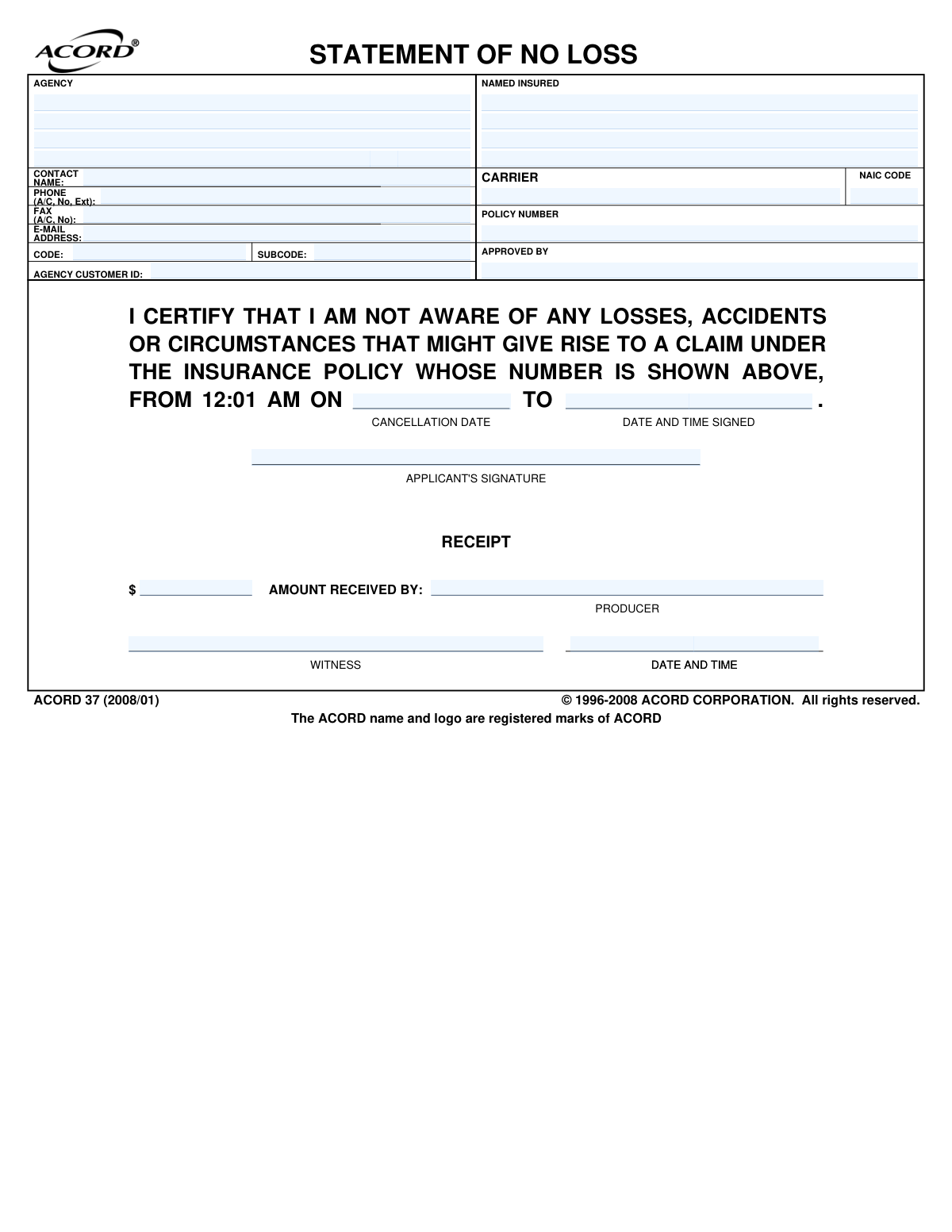
Yes! You can use AI to fill out ACORD 37, Statement of No Loss

The ACORD 37, also known as the Statement of No Loss, is a standard insurance industry form used by a policyholder to declare that they have not experienced any losses, accidents, or circumstances that could lead to a claim during a period when their coverage may have lapsed. This certification is typically required by an insurance carrier before reinstating a policy, ensuring no new risks are being assumed from the lapse period. Today, this form can be filled out quickly and accurately using AI-powered services like Instafill.ai, which can also convert non-fillable PDF versions into interactive fillable forms.
ACORD 37 is part of the policy service forms category on Instafill.
Our AI automatically handles information lookup, data retrieval, formatting, and form filling.
It takes less than a minute to fill out ACORD 37 using our AI form filling.
Securely upload your data. Information is encrypted in transit and deleted immediately after the form is filled out.

Form specifications

Form name: ACORD 37, Statement of No Loss
Number of fields: 30
Number of pages: 1
Language: English
main-image

Instafill Demo: How to fill out PDF forms in seconds with AI

How to Fill Out ACORD 37 Online for Free in 2026

Are you looking to fill out a ACORD 37 form online quickly and accurately? Instafill.ai offers the #1 AI-powered PDF filling software of 2026, allowing you to complete your ACORD 37 form in just 37 seconds or less.
Follow these steps to fill out your ACORD 37 form online using Instafill.ai:
  1. 1 Navigate to Instafill.ai and upload or select the ACORD 37 form.
  2. 2 Use the AI tool to automatically populate agency and carrier information, including names, NAIC codes, and contact details.
  3. 3 Enter the Named Insured's information and the specific Policy Number.
  4. 4 Specify the policy's cancellation date and the time period (from/to) for which you are certifying no loss.
  5. 5 Carefully review the certification statement confirming you are not aware of any losses or accidents.
  6. 6 Apply your digital signature and the date/time to finalize the certification.
  7. 7 Review all entered information for accuracy before downloading or sharing the completed, legally-binding document.

Our AI-powered system ensures each field is filled out correctly, reducing errors and saving you time.

Why Choose Instafill.ai for Your Fillable ACORD 37 Form?

Speed

Complete your ACORD 37 in as little as 37 seconds.

Up-to-Date

Always use the latest 2026 ACORD 37 form version.

Cost-effective

No need to hire expensive lawyers.

Accuracy

Our AI performs 10 compliance checks to ensure your form is error-free.

Security

Your personal information is protected with bank-level encryption.

Frequently Asked Questions About Form ACORD 37

This form is a legal declaration you make to your insurance carrier, certifying that you have not had any losses or incidents that could lead to a claim during a period when your policy was not active.

You are typically asked to sign this form when you want to reinstate a canceled insurance policy. It assures the insurance company that no claims occurred during the coverage gap, allowing them to reinstate your policy.

The 'Named Insured' is the primary person or entity listed on the insurance policy. You should enter your name exactly as it appears on your policy documents.

You will need your insurance policy number, the name of your insurance carrier (and its NAIC code if known), and the date your policy was canceled. This information can be found on your old policy documents or by contacting your agent.

The 'FROM' date is your policy's cancellation date, and the 'TO' date is the date you are signing the form to reinstate coverage. This represents the period during which you had a lapse in insurance.

This refers to any event, even if it seems minor, that could potentially lead to you filing an insurance claim in the future. If you are unsure, it is best to discuss the situation with your insurance agent before signing.

Signing this form dishonestly can be considered insurance fraud, which is a serious offense. Your reinstated policy could be voided, any related claims denied, and you could face legal consequences.

If you are uncertain about any incident that occurred during the lapse period, you must discuss it with your insurance agent or carrier before signing this form. It is crucial to be completely transparent.

These sections are for internal use by your insurance agent (the producer) or the insurance company. As the applicant, you only need to complete the top portion and provide your signature, along with the date and time.

Your insurance agent or carrier will provide instructions for submission. Typically, you can return the signed form via email, fax, or postal mail.

Yes, AI-powered services like Instafill.ai can help you accurately auto-fill your personal details and other known information, saving you time and reducing errors. However, the certification about no losses must be based on your personal knowledge.

Simply upload the form to the Instafill.ai platform, and its AI will identify the fields. You can then click to fill them with your saved information or type directly into the digital form before printing or submitting it.

You can use a service like Instafill.ai, which can convert flat, non-fillable PDFs into interactive, fillable forms. This allows you to easily type your information into the correct fields on your computer.

Compliance ACORD 37
Validation Checks by Instafill.ai

1
Policy Number Format and Existence
This check verifies that the 'POLICY NUMBER' field is not empty and conforms to the carrier's standard format, which is typically an alphanumeric string. A valid policy number is essential for linking the statement to the correct insurance contract. If the number is missing or malformed, the system cannot process the statement and it will be rejected for manual review.
2
NAIC Code and Carrier Consistency
This validation ensures the 'NAIC CODE' is a 5-digit number and corresponds to the code registered to the specified 'CARRIER'. This cross-reference is crucial for regulatory compliance and correct routing of information. A mismatch can lead to processing delays and indicates a potential data entry error for either the carrier name or the NAIC code.
3
Logical Signature Date
This check confirms that the 'DATE AND TIME SIGNED' is on or after the 'CANCELLATION DATE'. The insured cannot logically attest to having no losses during a coverage gap before that gap has concluded. A signature date prior to the cancellation date would invalidate the statement's purpose and will cause the submission to be flagged for correction.
4
Mandatory Applicant Signature
This validation verifies that the 'APPLICANT'S SIGNATURE' field contains a signature, whether digital or an uploaded image. As a legally binding document, the statement is void without the applicant's signature. Failure to provide a signature will result in an immediate rejection of the form submission.
5
Cancellation Date Format and Plausibility
This check ensures the 'CANCELLATION DATE' is a valid date in a standard format (e.g., MM/DD/YYYY) and is not a future date. The cancellation date marks the beginning of the coverage lapse, so it must be a real, historical date. An invalid or future date would make the no-loss period nonsensical and will prevent the form from being processed.
6
Contact Phone Number Structure
This validation checks that the 'PHONE' number field contains a valid 10-digit number, allowing for common formatting characters like parentheses, spaces, and hyphens. A correctly formatted phone number is essential for the agency or carrier to contact the insured if there are questions about the statement. Submissions with invalid numbers may be delayed until contact information is corrected.
7
Email Address Syntax Validation
This check ensures the 'E-MAIL' field contains a string that follows the standard '[email protected]' format. A valid email address is a primary method for communication, including sending confirmation of reinstatement or notifications about issues. An incorrectly formatted email will cause communication failures and will require manual correction.
8
Named Insured Completeness
This validation ensures the 'NAMED INSURED' field is not left blank. The name must match the primary individual or entity on the policy to correctly identify the contract being discussed. A missing name makes the form ambiguous and legally insufficient, leading to its rejection.
9
Carrier Name Completeness
This check verifies that the 'CARRIER' field is filled in with the name of the insurance company. Identifying the carrier is fundamental to processing the document, as it determines which underwriting company the statement applies to. A blank carrier field will result in an immediate processing failure.
10
Producer Information Presence
This validation confirms that the 'PRODUCER' field, identifying the agent or agency, is not empty. The producer is often the facilitator of the reinstatement process and a key point of contact. Missing producer information can complicate communication and record-keeping, so the form will be flagged if it is absent.
11
No-Loss Period Chronology
This check validates the logical sequence of the no-loss period, ensuring the 'FROM' date (implicitly the cancellation date) occurs before the 'TO' date (implicitly the signature/reinstatement date). This defines a valid, chronological time window for which the insured is attesting to no losses. An inverted or illogical period will cause the form to be rejected as it makes no legal sense.
12
Receipt Information Integrity
This validation ensures that if a payment amount is entered in the 'AMOUNT RECEIVED' field, then the 'AMOUNT RECEIVED BY' and 'RECEIPT DATE AND TIME' fields are also completed. This maintains the integrity of financial records associated with the reinstatement. A partial receipt entry suggests an incomplete transaction and will flag the form for review.
13
Agency Customer ID Format
This check validates that the 'AGENCY CUSTOMER ID' field, if provided, matches the expected format (e.g., numeric, alphanumeric, specific length). This ID is crucial for linking the form to the correct client file within the agency's management system. A malformed ID can lead to misfiling and processing errors.

Common Mistakes in Completing ACORD 37

Entering an Incorrect Policy Number

This often happens due to simple typographical errors, such as transposing digits or omitting characters. Using an incorrect policy number is a critical error because it prevents the insurance carrier from locating the policy record. As a result, the Statement of No Loss cannot be processed, and the request to reinstate coverage will be rejected, causing significant delays.

Omitting the Time of Signature

Applicants frequently fill in the date but forget to include the specific time of signing. This form explicitly requires the time because it establishes the exact moment up to which the insured is attesting there have been no losses. A form without the time may be considered incomplete and rejected by the carrier, as a loss could theoretically occur on the same day before the form was signed.

Using an Incorrect 'Named Insured'

The 'Named Insured' field must match the full legal name or business name exactly as it appears on the insurance policy documents, not a nickname or abbreviation. This mistake occurs when an individual uses a common name or a business owner doesn't use the full legal entity name. A mismatch can cause the carrier's system to fail to identify the policy, leading to rejection of the form.

Misunderstanding the 'No Loss' Certification

Signing this form while being aware of a loss, accident, or any circumstance that could lead to a claim is a serious error. Some individuals may underestimate a minor incident or sign out of a desire to reinstate coverage quickly, not realizing this constitutes insurance fraud. This can lead to claim denial, policy cancellation, and potential legal action.

Confusing the Statement Date Range

The form requires a statement period 'FROM' a specific date 'TO' the current date and time of signing. People often mistakenly enter incorrect dates, especially in the 'FROM' field, which should be the policy's cancellation date. An incorrect date range invalidates the legal attestation, as the carrier needs a clear, unbroken statement covering the entire lapse period.

Illegible Handwriting on a Printed Form

This form is often provided as a non-fillable PDF, forcing users to print and complete it by hand, which can result in illegible handwriting. A misread policy number, name, or date can lead to data entry errors by the carrier, causing processing to fail entirely. To avoid this, print clearly in block letters or use a tool like Instafill.ai, which can convert flat PDFs into fillable forms, allowing you to type for perfect clarity.

Providing an Unauthorized Signature

The form must be signed by the 'Named Insured' or a legally authorized representative (e.g., a corporate officer). A common mistake is having a spouse, employee, or other individual who is not listed as the named insured sign the document. An unauthorized signature makes the statement legally void and will result in immediate rejection by the carrier.

Incomplete Agency or Carrier Information

Applicants sometimes leave the Agency, Carrier, or NAIC Code fields blank, assuming the recipient already knows this information. This can slow down internal routing and processing, especially if the form is submitted to a general mailbox. To prevent delays, all fields should be filled out completely; AI-powered tools like Instafill.ai can help by auto-filling correct and validated information from a user's profile.

Failing to Distinguish Between Agency and Carrier

Policyholders often confuse their local insurance agency (the producer) with the actual insurance company (the carrier) that underwrites the policy. They might incorrectly write the agency's name in the 'CARRIER' field. This mistake can cause the form to be misrouted, significantly delaying the reinstatement process until the error is caught and corrected.
Saved over 80 hours a year

“I was never sure if my IRS forms like W-9 were filled correctly. Now, I can complete the forms accurately without any external help.”

Kevin Martin Green

Your data stays secure with advanced protection from Instafill and our subprocessors

Robust compliance program

Transparent business model

You’re not the product. You always know where your data is and what it is processed for.

ISO 27001, HIPAA, and GDPR

Our subprocesses adhere to multiple compliance standards, including but not limited to ISO 27001, HIPAA, and GDPR.

Security & privacy by design

We consider security and privacy from the initial design phase of any new service or functionality. It’s not an afterthought, it’s built-in, including support for two-factor authentication (2FA) to further protect your account.

Fill out ACORD 37 with Instafill.ai

Worried about filling PDFs wrong? Instafill securely fills acord-37-statement-of-no-loss forms, ensuring each field is accurate.