Yes! You can use AI to fill out Term Owner and Policy Change Form
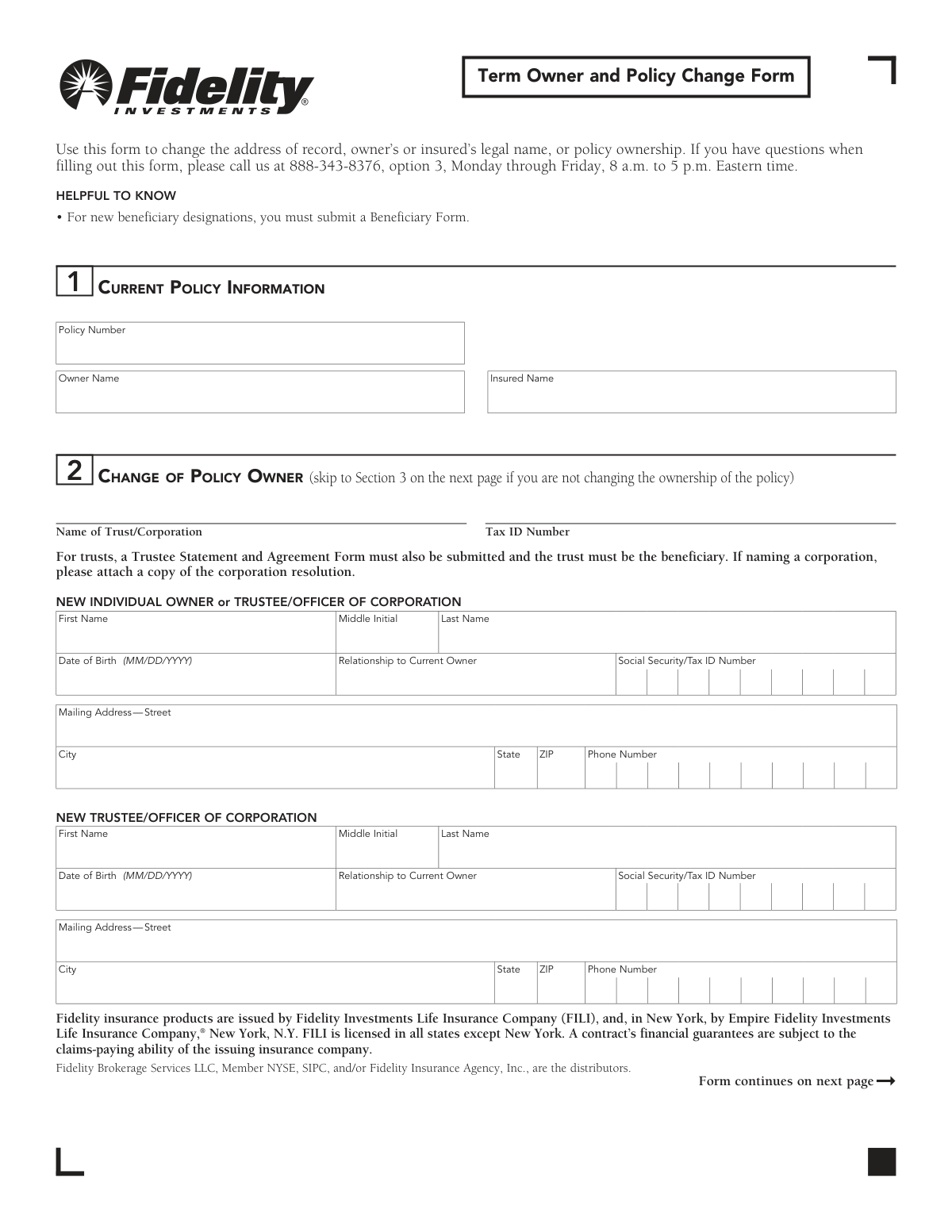
This form is a legal document used by term life insurance policyholders to request changes to their policy records, such as updating a mailing address, changing the owner's or insured's legal name, or transferring ownership to a new individual, trust, or corporation. It is crucial for ensuring that the insurance company has the most current and accurate information for policy administration and communication. Today, this form can be filled out quickly and accurately using AI-powered services like Instafill.ai, which can also convert non-fillable PDF versions into interactive fillable forms.
Rather not fill this in by hand? Instafill is an online form filler that completes PDF forms automatically — upload the blank form, answer a few questions, and the AI fills every field.
Form specifications
| Form name: | Term Owner and Policy Change Form |
| Number of pages: | 1 |
| Language: | English |
Our AI automatically handles information lookup, data retrieval, formatting, and form filling.
It takes less than a minute to fill out 617501.4.0 using our AI form filling.
Securely upload your data. Information is encrypted in transit and deleted immediately after the form is filled out.
Instafill Demo: How to fill out PDF forms in seconds with AI
How to Fill Out 617501.4.0 Online for Free in 2026
Are you looking to fill out a 617501.4.0 form online quickly and accurately? Instafill.ai offers the #1 AI-powered PDF filling software of 2026, allowing you to complete your 617501.4.0 form in just 37 seconds or less.
Follow these steps to fill out your 617501.4.0 form online using Instafill.ai:
- 1 Navigate to Instafill.ai and upload or select the Term Owner and Policy Change Form.
- 2 Use the AI assistant to accurately input your current policy information in Section 1, including the policy number and the names of the current owner and insured.
- 3 If you are changing policy ownership, proceed to Section 2 and provide all required details for the new individual owner, trust, or corporation.
- 4 To update an address or legal name, complete Section 3. Ensure you attach supporting documents like a marriage certificate or court decree for name changes.
- 5 Carefully review all the information you've entered. The AI tool will help flag any potential errors or omissions.
- 6 Complete Section 4 by having all required parties, such as the current and new owners, provide their authorized signatures and the date.
- 7 Download the completed, signed form and mail it to the Life Insurance Service Center address provided on the document.
Our AI-powered system ensures each field is filled out correctly, reducing errors and saving you time.
Why Choose Instafill.ai for Your Fillable 617501.4.0 Form?
Speed
Complete your 617501.4.0 in as little as 37 seconds.
Up-to-Date
Always use the latest 2026 617501.4.0 form version.
Cost-effective
No need to hire expensive lawyers.
Accuracy
Our AI performs 10 compliance checks to ensure your form is error-free.
Security
Your personal information is protected with bank-level encryption.
Frequently Asked Questions About 617501.4.0
This form is used to update your policy's address of record, change the legal name of the owner or insured person, or transfer ownership of the policy to a new individual, trust, or corporation.
No, this form cannot be used to change beneficiaries. You must submit a separate Beneficiary Form for any new beneficiary designations.
To change only your address, complete Section 1 with your policy information, Section 3 with your new address, and Section 4a with the current owner's signature.
For a legal name change, you must complete Section 3 and attach a photocopy of a supporting legal document, such as a marriage certificate, divorce decree, or other court order.
To transfer ownership, complete Section 1, Section 2 with the new owner's information, and Section 4, ensuring both the current owner(s) and new owner(s) sign in their respective signature blocks.
When transferring ownership to a trust, you must also submit a Trustee Statement and Agreement Form. The trust must also be named as the policy's beneficiary.
For any change, all current owners must sign in Section 4a. If you are changing the policy owner, all new owners must also sign in Section 4b.
You can mail the form to the Life Insurance Service Center at P.O. Box 724507, Atlanta, GA 31139-2049, or use the overnight mail address provided on the form for faster delivery.
An ownership transfer is officially completed once the signed form is received and recorded by the Life Insurance Service Center. Other changes like an address update are processed upon receipt.
If there are multiple current owners, all of them must sign in Section 4a for any changes to be authorized.
If you need help, you can call the support line at 888-343-8376, option 3, from Monday through Friday, 8 a.m. to 5 p.m. Eastern time.
Yes, services like Instafill.ai use AI to help you accurately auto-fill form fields, which can save you time and help prevent errors.
Simply upload a digital copy of the form to the Instafill.ai platform. Its AI will identify the fields and allow you to fill them out interactively online before downloading the completed document to print and sign.
If you have a non-fillable or 'flat' PDF, you can upload it to a service like Instafill.ai. The platform can convert it into an interactive, fillable form that you can complete on your computer.
Compliance 617501.4.0
Validation Checks by Instafill.ai
1
Validates Policy Number Existence
Ensures the Policy Number provided in Section 1 corresponds to an active policy in the system. This is the primary identifier for the entire transaction and prevents changes from being applied to the wrong or a non-existent policy. If the number is not found, the form submission must be rejected and investigated.
2
Verifies At Least One Change is Requested
Checks that the user has filled out data in either Section 2 (Change of Policy Owner) or Section 3 (Change Owner/Insured Address or Name). A form submitted with no changes indicated is an invalid request. This validation prevents processing empty forms, and a failure would result in returning the form to the user for completion.
3
Validates Date of Birth Format and Plausibility
Ensures the Date of Birth in Section 2 is entered in the correct MM/DD/YYYY format and represents a realistic date (e.g., the person is over 18 and not deceased). This is critical for identity verification and assessing legal capacity to own a policy. An invalid date would halt the ownership change process until corrected.
4
Validates Social Security/Tax ID Number Format
Checks that any Social Security Number (SSN) or Tax ID Number (TIN) follows the standard 9-digit format (XXX-XX-XXXX or XX-XXXXXXX). This number is essential for tax reporting (e.g., IRS backup withholding) and legal identification. An incorrectly formatted number will cause the form to fail validation and require correction.
5
Ensures New Name is Provided for Name Change Request
Verifies that if the 'Change your name' checkbox in Section 3 is selected, the 'New Name' fields are fully completed. This is a logical check to prevent incomplete requests where the intent is clear but the necessary data is missing. A failure would render the name change request void until the new name is provided.
6
Ensures New Address is Provided for Address Change Request
Validates that if the 'Change your address' checkbox in Section 3 is selected, the new address fields (Street, City, State, ZIP) are all filled out. This ensures an address change request is actionable and complete. An incomplete address would prevent the system from updating the policyholder's contact information, potentially leading to missed communications.
7
Validates ZIP Code Format and State Consistency
Checks that the ZIP code in any address field is a valid 5-digit or 9-digit (ZIP+4) format and corresponds to the selected State. This validation prevents data entry errors and ensures future mailings are deliverable. A mismatch or invalid format would trigger an error and require the user to correct the address.
8
Verifies Current Owner Signature and Date Presence
Confirms that the signature and date fields for the 'Current Owner/Trustee' in Section 4a are completed. This signature provides the legal authorization required to make any changes to the policy. Without this signature, the entire form is legally invalid and no changes can be processed.
9
Conditional Validation for New Owner Signature
Checks that if Section 2 (Change of Policy Owner) is filled out, then Section 4b (New Owner Signature) is also signed and dated. The new owner's signature is required to formally accept ownership and certify their tax information. An ownership transfer request is invalid without the new owner's signature.
10
Ensures Completeness of New Owner Details
If an ownership change is initiated in Section 2, this validates that all required fields for the new owner (Name, DOB, SSN/TIN, Address) are complete. An incomplete new owner profile prevents the legal and administrative transfer of the policy. The form would be rejected pending completion of the missing information.
11
Flags Requirement for Name Change Documentation
This is a procedural check that flags the submission for manual review if the 'Change your name' box in Section 3 is checked. The form states that a photocopy of a legal document (e.g., marriage certificate) is required. This validation ensures a processing agent verifies the presence of this required documentation before finalizing the change.
12
Flags Requirement for Trust or Corporation Documentation
This validation triggers a manual review if the 'Name of Trust/Corporation' field in Section 2 is populated. The form requires a 'Trustee Statement' or 'corporation resolution' to be attached. This check ensures a processor confirms these legal documents are present, as they are essential for verifying the entity's authority to own the policy.
13
Validates Phone Number Format
Ensures that any phone number entered on the form follows a standard 10-digit format, allowing for common separators. This validation helps maintain data quality and ensures the insurance company has a valid method of contact for the policy owner. An invalid number would require correction before the record can be updated.
14
Verifies Selection of Owner or Insured for Changes
In Section 3, this check ensures that for either a name or address change, at least one of the corresponding checkboxes ('Owner' or 'Insured') is selected. This clarifies whose information is being updated. A change request without this specification is ambiguous and would be rejected.
Common Mistakes in Completing 617501.4.0
This form requires signatures from all current owners, witnesses, and, if applicable, all new owners. People often miss a required signature, especially if there are co-owners or if they overlook the witness requirement in Section 4a. A missing signature will invalidate the entire request, leading to the form being rejected and returned, causing significant delays. To avoid this, carefully review Section 4 and ensure every required signature line is completed and dated by the appropriate party.
The form explicitly requires legal documents for certain changes, such as a marriage certificate for a name change (Section 3) or a Trustee Statement for a trust ownership change (Section 2). Applicants often forget to gather and include these attachments with their submission. Without the required documentation, the requested change cannot be legally processed and the application will be put on hold or rejected. Always read the instructions for each section carefully and prepare all necessary attachments before mailing the form.
The form's instructions clearly state it is for owner, name, or address changes, and a separate 'Beneficiary Form' is required for beneficiary designations. However, people often try to use a single form for all policy updates out of convenience or confusion. Submitting this form to change a beneficiary will result in the request being ignored, leaving the original beneficiary designation in place. Always use the specific form designated for the change you wish to make.
In Section 3, when changing a name or address, users must check a box to indicate whether the change applies to the 'Owner' or the 'Insured.' It's common for people to fill in the new information but forget to check the corresponding box. This ambiguity forces the processing center to either guess or reject the form, delaying the update. To prevent this, always tick the appropriate box next to 'Change your name' or 'Change your address' to clarify who the change applies to.
The policy number is the primary identifier used to locate your account and apply the requested changes. People may accidentally transpose digits, leave the field blank, or write illegibly. An incorrect or missing policy number will make it impossible for the service center to process the form, leading to an automatic rejection. Carefully copy the policy number from an official policy document and double-check it for accuracy before submission.
Section 4a requires a witness to sign and date alongside the current owner's signature, a step that is easily overlooked. This requirement is a legal safeguard to verify the owner's identity and intent. Failure to provide a valid witness signature will render the owner's authorization incomplete and cause the form to be rejected. Ensure an impartial witness is present when you sign and that they also sign and date in the designated space.
When changing policy ownership in Section 2, all fields for the new owner, including full name, date of birth, and Social Security/Tax ID Number, are mandatory. Applicants sometimes leave these fields blank, assuming they are optional. This missing data is critical for tax reporting and legal identification, and its absence will halt the ownership transfer process. Ensure every field in the 'NEW INDIVIDUAL OWNER' section is filled out completely and accurately.
Manual data entry of long numbers like a Social Security Number (SSN) or Tax ID Number (TIN) often leads to transposition errors. Such an error on this form can cause serious issues, from failed identity verification to incorrect tax reporting with the IRS. To avoid this, slowly enter the number and then read it backward to proofread. AI-powered form filling tools like Instafill.ai can help prevent these errors by validating number formats and ensuring accuracy.
When a policy ownership change is requested in Section 2, the new owner must sign and date Section 4b. People sometimes assume that only the current owner's signature is needed and miss this crucial step. The new owner's signature legally accepts ownership and certifies their tax information, so without it, the transfer cannot be completed. If you are the new owner, ensure you sign and date Section 4b.
Since this form is a non-fillable PDF, it must be printed and filled out by hand, where poor handwriting can make names, addresses, and policy numbers impossible to read. This leads to data entry errors on the processor's end or causes the form to be returned with a request to fill it out more clearly. To prevent this, print legibly in block capital letters. Alternatively, a tool like Instafill.ai can convert the non-fillable PDF into a fillable version, allowing you to type your information for perfect clarity.
Saved over 80 hours a year
“I was never sure if my IRS forms like W-9 were filled correctly. Now, I can complete the forms accurately without any external help.”
Kevin Martin Green
Your data stays secure with advanced protection from Instafill and our subprocessors




Robust compliance program
Transparent business model
You’re not the product. You always know where your data is and what it is processed for.
ISO 27001, HIPAA, and GDPR
Our subprocesses adhere to multiple compliance standards, including but not limited to ISO 27001, HIPAA, and GDPR.
Security & privacy by design
We consider security and privacy from the initial design phase of any new service or functionality. It’s not an afterthought, it’s built-in, including support for two-factor authentication (2FA) to further protect your account.
Fill out 617501.4.0 with Instafill.ai
Worried about filling PDFs wrong? Instafill securely fills term-owner-and-policy-change-form forms, ensuring each field is accurate.
