Yes! You can use AI to fill out Transamerica Annuity Policy Change Form
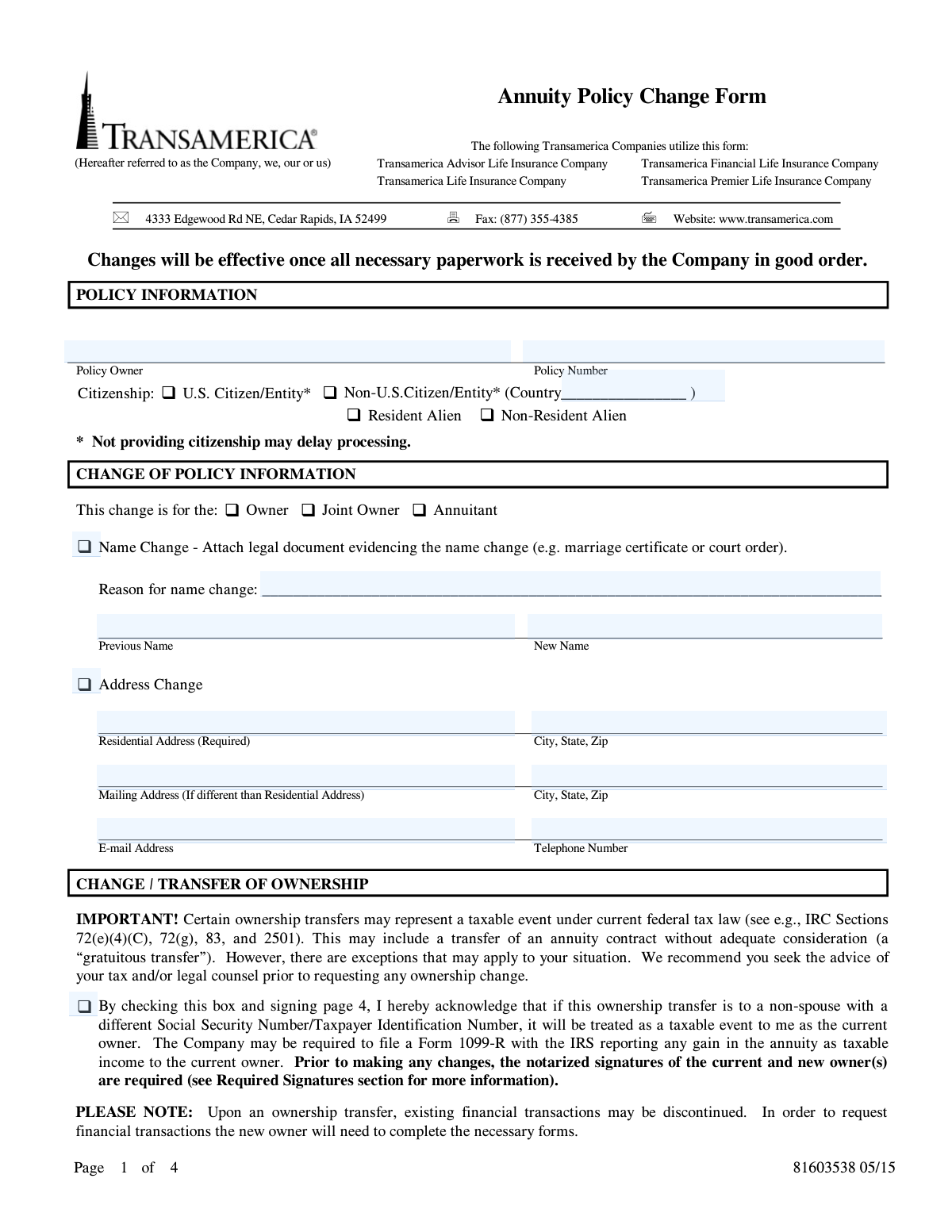
This form is an official document provided by Transamerica and its affiliated life insurance companies for annuity policy owners to request various changes to their policy. It allows for modifications such as updating personal information, transferring ownership to a new individual or entity, and changing primary or contingent beneficiaries. Completing this form accurately is crucial as changes can have significant financial and tax implications. Today, this form can be filled out quickly and accurately using AI-powered services like Instafill.ai, which can also convert non-fillable PDF versions into interactive fillable forms.
81603538 is part of the
Transamerica forms, annuity forms and policy change forms categories on Instafill.
Rather not fill this in by hand? Instafill is an online form filler that completes PDF forms automatically — upload the blank form, answer a few questions, and the AI fills every field.
Form specifications
| Form name: | Transamerica Annuity Policy Change Form |
| Number of pages: | 1 |
| Language: | English |
Our AI automatically handles information lookup, data retrieval, formatting, and form filling.
It takes less than a minute to fill out 81603538 using our AI form filling.
Securely upload your data. Information is encrypted in transit and deleted immediately after the form is filled out.
Instafill Demo: How to fill out PDF forms in seconds with AI
How to Fill Out 81603538 Online for Free in 2026
Are you looking to fill out a 81603538 form online quickly and accurately? Instafill.ai offers the #1 AI-powered PDF filling software of 2026, allowing you to complete your 81603538 form in just 37 seconds or less.
Follow these steps to fill out your 81603538 form online using Instafill.ai:
- 1 Navigate to Instafill.ai and upload or select the Transamerica Annuity Policy Change Form.
- 2 Provide your basic policy information, including the policy number and current owner's name.
- 3 Select the type of change you wish to make, such as 'Change of Policy Information', 'Change/Transfer of Ownership', or 'Change of Beneficiary'.
- 4 Use the AI assistant to accurately fill in the required details for the selected section, such as new addresses, new owner information, or beneficiary details.
- 5 Carefully review all the information populated by the AI to ensure its accuracy and completeness.
- 6 Electronically sign the form in the 'Required Signatures' section. Note that ownership changes require a Medallion Signature Guarantee or a Notary Public Stamp.
- 7 Download the completed form and submit it to Transamerica via mail or fax, ensuring you have obtained any necessary notarization or signature guarantees as instructed on the form.
Our AI-powered system ensures each field is filled out correctly, reducing errors and saving you time.
Why Choose Instafill.ai for Your Fillable 81603538 Form?
Speed
Complete your 81603538 in as little as 37 seconds.
Up-to-Date
Always use the latest 2026 81603538 form version.
Cost-effective
No need to hire expensive lawyers.
Accuracy
Our AI performs 10 compliance checks to ensure your form is error-free.
Security
Your personal information is protected with bank-level encryption.
Frequently Asked Questions About 81603538
This form is used by annuity policy owners to request changes to their policy, such as updating personal information, transferring ownership, or changing beneficiaries.
You can use this form to change your name, address, or contact information, transfer policy ownership to another person or entity, and add, remove, or update your primary and contingent beneficiaries.
For a name change, you must attach a copy of a legal document that proves the change, such as a marriage certificate or a court order.
Yes, transferring ownership to a non-spouse is typically a taxable event that may require Transamerica to report any gain to the IRS. It is strongly recommended that you consult a tax advisor before requesting an ownership change.
An ownership change requires the personal information of the new owner and the signatures of both the current and new owners. These signatures must be authenticated with a Medallion Signature Guarantee or a Notary Public stamp.
You must specify if a beneficiary is primary or contingent and assign allocation percentages that total 100% for each type. Providing complete details like their SSN and date of birth helps prevent delays with future claims.
This form has space for up to three beneficiaries. If you wish to name more, you must complete and attach an 'Additional Beneficiary Form' with your submission.
Your requested changes will be effective once Transamerica receives the form and any required documents completed correctly and in good order. Incomplete or incorrect paperwork will cause processing delays.
You can submit the completed and signed form by faxing it to (877) 355-4385 or by mailing it to Transamerica at 4333 Edgewood Rd NE, Cedar Rapids, IA 52499.
The 'Aggregation of Annuities' section is for tax purposes, as federal law requires that all non-qualified annuities issued by Transamerica or its affiliates to the same owner in the same year be treated as a single contract.
Yes, services like Instafill.ai use AI to accurately auto-fill form fields with your information, which can save you time and help reduce errors.
Simply upload the PDF to the Instafill.ai platform. The service will make the form fillable online, and you can provide your information once to have it automatically and securely placed in all the correct fields.
If your PDF is not interactive, you can use a service like Instafill.ai. It can convert flat, non-fillable PDFs into interactive forms that you can easily complete on your computer.
Compliance 81603538
Validation Checks by Instafill.ai
1
Beneficiary Allocation Percentage Sum
This check verifies that the 'Allocation Percentage' for all Primary beneficiaries adds up to exactly 100%, and similarly, the total for all Contingent beneficiaries also equals 100%. This is crucial for ensuring the policy proceeds are distributed exactly as the owner intends, without ambiguity. If the percentages for a beneficiary type do not sum to 100%, the form will be considered incomplete and rejected, preventing the beneficiary change from being processed.
2
SSN/TIN Format and Uniqueness
This validation ensures that all Social Security Number (SSN) and Taxpayer Identification Number (TIN) fields are entered in the correct 9-digit format. It is essential for accurate tax reporting and identity verification by the financial institution. An incorrectly formatted number will cause a processing delay and the form will be returned to the user for correction.
3
Conditional Requirement for Name Change Documentation
If the 'Name Change' checkbox is selected in the 'CHANGE OF POLICY INFORMATION' section, the system must verify that the 'Previous Name', 'New Name', and 'Reason for name change' fields are all populated. The form explicitly states that a legal document (e.g., marriage certificate, court order) must be attached. Failure to provide the required information and an indication that documentation is attached will result in the rejection of the name change request.
4
Ownership Transfer Signature and Acknowledgment
When the 'CHANGE / TRANSFER OF OWNERSHIP' section is completed, this check confirms that the signature and date for both the current owner and the new owner are present. It also validates that the checkbox acknowledging the potential taxable event is checked, as this is a significant financial and legal declaration. Missing signatures, dates, or the acknowledgment will halt the ownership transfer, as it would be legally incomplete and expose the company to risk.
5
Required Residential Address for Address Change
This check validates that if the 'Address Change' box is checked, the 'Residential Address' and 'City, State, Zip' fields are fully completed. The form explicitly marks the residential address as 'Required', as it is the official address of record for legal notices and compliance. If this information is missing, the address change cannot be processed, and communications will continue to be sent to the old address.
6
Citizenship Selection and Conditional Country Field
For any individual being added (New Owner or Beneficiary), this validation ensures that exactly one citizenship status is selected. Furthermore, if 'Non-U.S. Citizen' or 'Non-Resident Alien' is chosen, the corresponding 'Country of Citizenship' text field must be filled out. This information is critical for regulatory compliance and tax withholding rules, and its absence will delay processing until the information is provided.
7
Entity vs. Individual Field Validation
If a New Owner or Beneficiary is designated as an 'Entity or Trust', this check ensures that individual-specific fields like 'Gender' and 'Date of Birth' are left blank, while entity-specific fields like 'Date of Formation' and 'Taxpayer Identification Number' are populated. This prevents logical data conflicts and ensures the correct information is captured for the type of legal entity being named. Submitting conflicting information will require clarification and delay the request.
8
Signature and Date Co-dependency
This validation ensures that for every signature provided on the 'REQUIRED SIGNATURES' page, the corresponding 'Date' field is also filled out. A signature without a date is legally ambiguous as to when the authorization was provided. The form will be considered 'not in good order' if a signature is present but its corresponding date is missing, preventing any requested changes from taking effect.
9
Date of Birth Logical Validity
This check ensures that any 'Date of Birth' entered is a valid calendar date and is not in the future. It also checks that the age derived from the DOB is reasonable for an annuitant or beneficiary (e.g., not over 120 years old). This serves as a basic data quality check to prevent obvious data entry errors that could cause significant issues with identity verification or benefit calculations later.
10
Completeness of Beneficiary Information
If a beneficiary's name is entered, this validation requires other essential fields for that beneficiary to be completed, such as 'Relationship to Annuitant', 'SSN/TIN', 'Date of Birth', and 'Allocation Percentage'. The form notes that missing information can cause delays in processing a future claim. This check enforces the collection of complete data upfront to ensure the smooth and accurate payment of death proceeds to the correct individuals.
11
Notarization Requirement for Ownership Change
This check verifies that if an ownership change is requested, an indication of a 'Medallion Signature Guarantee or Notary Public Stamp' is present. The form explicitly requires this as a fraud prevention measure for high-risk transactions. Without the required notarization or signature guarantee, the ownership transfer is considered invalid and will be rejected immediately.
Common Mistakes in Completing 81603538
Policy owners often miscalculate allocation percentages. The form requires that percentages for all Primary beneficiaries total 100%, and separately, percentages for all Contingent beneficiaries must also total 100%. A common error is making the sum of all beneficiaries, both primary and contingent, equal 100%. This will cause the designation to be considered incomplete and rejected. To avoid this, treat each beneficiary type as its own group and ensure the allocations within each group sum to 100%. AI-powered form filling tools like Instafill.ai can help prevent this by automatically calculating sums and flagging errors if the percentages for a given beneficiary type do not total 100%.
The form explicitly requires a Notary Public Stamp or a Medallion Signature Guarantee for any ownership change. People often overlook this requirement or simply sign the form, assuming their signature is sufficient. Submitting the form without the proper validation will result in an immediate rejection, as it is not considered 'in good order.' To prevent this, you must take the completed form to a qualified institution like a bank or credit union to obtain the required stamp before submission.
Users frequently list only a beneficiary's name, omitting crucial details like their Social Security Number (SSN), date of birth, and current address. While the form may be accepted, this lack of information can cause significant delays and complications for your heirs when they file a claim, as the company may struggle to locate or positively identify the beneficiary. Always provide all requested information for each beneficiary to ensure a smooth payout. Using a tool like Instafill.ai can help by prompting you to fill all required fields for each beneficiary, reducing the chance of submitting incomplete information.
When requesting a name change due to marriage, divorce, or a legal action, policy owners must attach supporting legal documents. It's a common oversight to simply fill out the 'New Name' field without including a copy of the marriage certificate, divorce decree, or court order. Without this proof, the company cannot process the name change. Always gather and attach the required documentation before sending the form.
The ownership transfer section contains a critical checkbox acknowledging that a transfer to a non-spouse is a taxable event. Many filers either miss this checkbox or don't understand its significance. This can halt the processing of the transfer, as the company requires explicit acknowledgment of the tax implications. Before signing, carefully read this section, check the box to confirm your understanding, and consult a tax advisor if you are unsure.
Policy changes, especially ownership transfers, often require signatures from multiple parties, including the current owner, any joint owner, and the new owner. A frequent mistake is obtaining only the primary owner's signature and forgetting the others. An incomplete signature section will invalidate the entire form. Carefully review the 'Required Signatures' section to identify everyone who needs to sign and ensure all signatures are present before submission.
The form specifically requests a 'Residential Address (Required)' and provides a separate field for a 'Mailing Address.' Some individuals enter a P.O. Box in the residential address field, which is incorrect for compliance and identification purposes. This can lead to processing delays while the company requests a physical street address. Always provide your actual physical residential address and use the mailing address field for your P.O. Box if needed. Smart form fillers can validate address formats and alert you if a P.O. Box is entered in a field designated for a physical address.
The Policy Number is the primary identifier for your account, yet it is sometimes left blank at the top of the form. Without this number, the company cannot locate your policy or apply any of the requested changes. This simple omission renders the entire form unusable and guarantees its rejection. Since this form is a non-fillable PDF, tools like Instafill.ai can convert it into an interactive, fillable version, making it easier to see and complete every field, including the critical policy number.
Users sometimes fail to correctly designate beneficiaries as either 'Primary' or 'Contingent,' or they may list all beneficiaries as Primary. This creates ambiguity about the owner's intent for how proceeds should be distributed. Primary beneficiaries are first in line to receive the proceeds; contingent beneficiaries only receive them if all primary beneficiaries are deceased. Clearly marking each beneficiary's type is essential for ensuring your wishes are followed.
The form requires citizenship status for new owners and all beneficiaries, explicitly stating that not providing it may delay processing. People often skip these checkboxes, assuming they are optional. This information is critical for tax reporting and compliance. Failing to indicate whether an individual is a U.S. Citizen, Resident Alien, or Non-Resident Alien will flag the form for follow-up, delaying the requested changes.
Saved over 80 hours a year
“I was never sure if my IRS forms like W-9 were filled correctly. Now, I can complete the forms accurately without any external help.”
Kevin Martin Green
Your data stays secure with advanced protection from Instafill and our subprocessors




Robust compliance program
Transparent business model
You’re not the product. You always know where your data is and what it is processed for.
ISO 27001, HIPAA, and GDPR
Our subprocesses adhere to multiple compliance standards, including but not limited to ISO 27001, HIPAA, and GDPR.
Security & privacy by design
We consider security and privacy from the initial design phase of any new service or functionality. It’s not an afterthought, it’s built-in, including support for two-factor authentication (2FA) to further protect your account.
Fill out 81603538 with Instafill.ai
Worried about filling PDFs wrong? Instafill securely fills transamerica-annuity-policy-change-form forms, ensuring each field is accurate.
