
Yes! You can use AI to fill out Empower Retirement Payment Request Form
Don't type 106 fields by hand. Tell our AI about yourself, or upload a document you already have, and it fills every field in seconds. You check it, then download, print or sign.
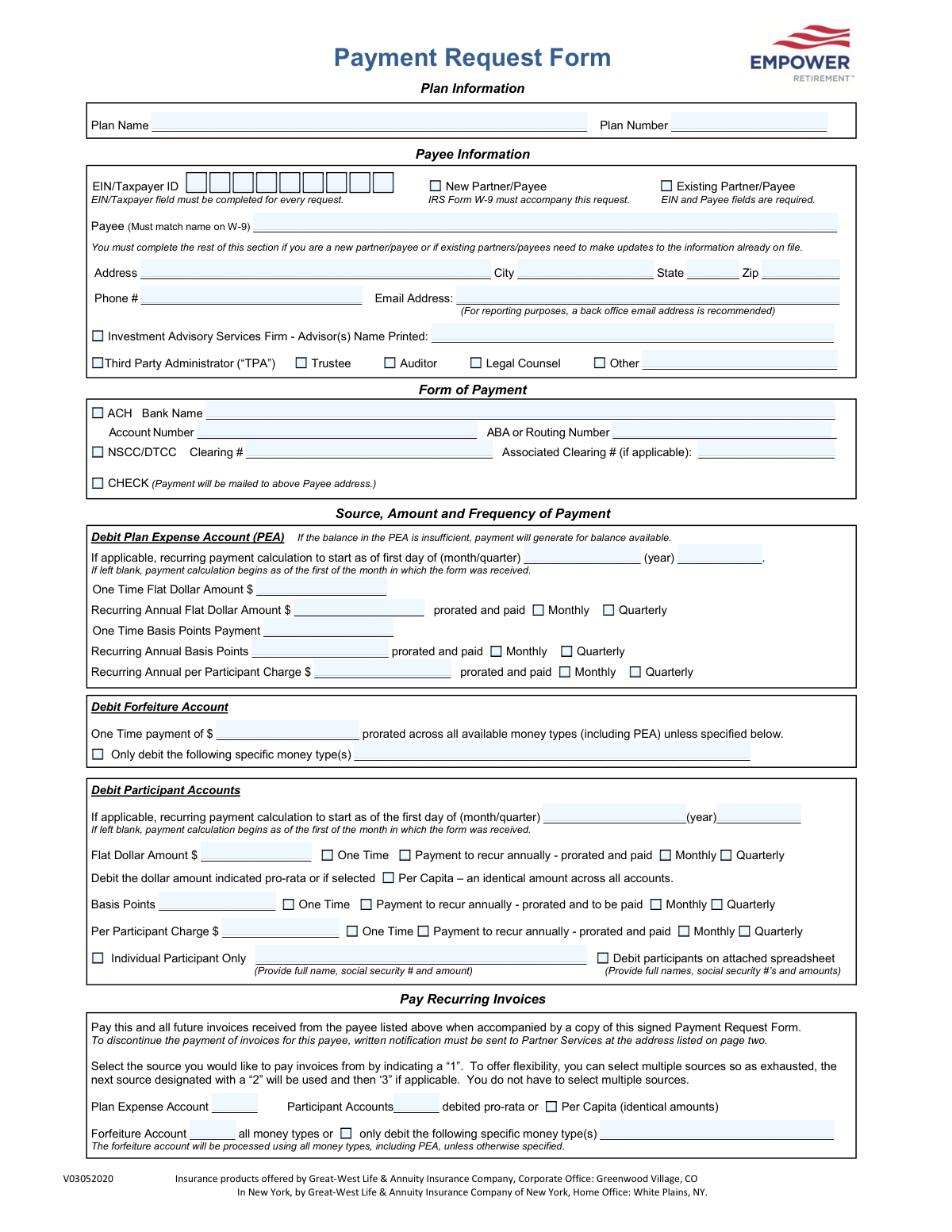
The AI does the filling. You just check it.
No typing into boxes, nothing to install.
What this form asks for
The AI fills all of it, from your answers or your documents.
The AI checks your answers before you download
14 checks built for this form, so a wrong date or a missing answer is caught before anyone else sees it.
This check verifies that the 'EIN/Taxpayer ID' field is not empty and conforms to the standard 9-digit format (e.g., XX-XXXXXXX or XXXXXXXXX). This ID is critical for tax reporting and payee verification with the IRS. If the field is empty or the format is incorrect, the submission will be rejected, as payment cannot be processed without a valid identifier.
Ensures the 'Payee' name field is completed. This is a mandatory field as it identifies the recipient of the payment. A submission without a payee name is incomplete and cannot be processed, leading to a validation failure and requiring the user to provide the information.
This validation confirms that if the 'New Partner/Payee' checkbox is selected, an IRS Form W-9 is attached to the submission. The form explicitly states the W-9 must accompany the request and that the Payee name must match the W-9. Failure to attach the W-9 for a new payee will halt the process until the required document is provided.
Verifies that if 'New Partner/Payee' is checked, the full address, phone number, and email address fields are completed. This information is essential for setting up the new payee in the system and for future communication. If this section is incomplete for a new payee, the form will be flagged as invalid.
Checks that if 'ACH' is selected as the 'Form of Payment', the 'Bank Name', 'Account Number', and 'ABA or Routing Number' fields are all filled out. Without this information, an electronic funds transfer is impossible. A failure will result in an error message prompting the user to provide the complete banking details or select a different payment method.
Validates that the 'ABA or Routing Number' is a 9-digit numeric value. This specific format is required by financial institutions to correctly route electronic payments. An incorrect format will cause the payment to fail, so the system must reject any entry that does not meet this standard.
And 8 more checks
- Mutually Exclusive Payment Selection
- Recurring Payment Frequency Selection
- Authorization Signature and Date Presence
- Invoice Payment Source Sequencing Logic
- Valid Email Address Format
- Reallocation Date Format and Presence
- Specification for 'Other' Payee Type
- Individual Participant Debit Details
Let AI fill out your V03052020
No typing. Every field filled in seconds, checked, ready to sign.
How to Fill Out V03052020 Online for Free in 2026
What the AI walks you through.
- Navigate to Instafill.ai and upload or select the Payment Request Form.
- Use the AI assistant to accurately fill in the Plan Information, including the Plan Name and Plan Number.
- Provide complete Payee Information, ensuring the name and EIN/Taxpayer ID match the accompanying IRS Form W-9.
- Select the desired Form of Payment, providing necessary details for ACH, NSCC/DTCC, or confirming the mailing address for a check.
- Specify the Source, Amount, and Frequency of Payment, indicating whether funds should be debited from the Plan Expense Account, Forfeiture Account, or Participant Accounts.
- Carefully review the Plan Representative Authorization section, then electronically sign and date the form to authorize the payment instructions.
- Download the completed form and submit it to Empower Retirement Partner Services via the email, fax, or mailing address provided.
Common Mistakes in Completing V03052020
The ones the AI is built to catch.
Forgetting to Attach the Required IRS Form W-9
Payee Name Does Not Match the W-9
Incorrect or Missing EIN/Taxpayer ID
Selecting Conflicting or Ambiguous Payment Instructions
Transposing or Incorrectly Entering ACH Banking Details
Missing Signature, Date, or Printed Name in Authorization
Failing to Specify Payee Status and Provide Required Details
Misunderstanding the Payment Source Priority for Recurring Invoices
Mismatching Payment Amount and Calculation Type
Submitting a Form with Illegible Handwriting
Frequently Asked Questions About V03052020
Is it really free for 7 days?
Can I fill other forms too?
How do I cancel?
How does the AI fill out V03052020?
What happens to my information?
How complex is V03052020 to fill out?
What is the purpose of this Payment Request Form?
Who needs to fill out and sign this form?
What documents must I submit along with this form?
What information is absolutely required for the form to be processed?
I am requesting payment for a new service provider. What information do I need to provide?
How can the payee receive the payment?
What happens if the Plan Expense Account (PEA) doesn't have enough funds for the requested payment?
Can I set up recurring payments with this form?
How do I stop a recurring payment that I previously set up?
Where do I send the completed form and attachments?
What happens to recurring payments if the plan is terminated?
Can I use an AI tool to help me fill out this form?
How can I fill out this Payment Request Form online?
The PDF version of this form I have is not fillable. What can I do?
Get your V03052020 filled out by AI
$0 today. Cancel before Nov 1 and you pay nothing.
Other forms like this one
retirement forms: Form SSA-1-BK, Application for Retirement Benefits, Form 8880, Credit for Qualified Retirement Savings Contributions, Nationwide Retirement Solutions Participant Distribution Request Form (PNF-0875M9, TRAC Version, 01/2025), Nationwide Retirement Solutions Participant Distribution Request Form (PNF-0875M9, TRAC Version, 01/2025), Momentum Wealth Retirement Income Option Application (WIS060E), Fidelity Investment-Only (Non-Prototype) Retirement Account Application, One-Time Withdrawal — Defined Contribution Retirement Plan, Fidelity One-Time Withdrawal Form — Nonretirement, One-Time Withdrawal – Investment-Only (Non-Prototype) Retirement Account, Automatic Withdrawals—Defined Contribution Retirement Plan, Fidelity Automatic Withdrawals — Nonretirement, Beneficiaries — Nonretirement Transfer on Death, The Church of the Nazarene 403(b) Retirement Savings Plan Beneficiary Designation Form, Beneficiaries – Defined Contribution Retirement Plan, Transfer Shares as a Gift — Nonretirement, Schwab Personal Choice Retirement Account® (PCRA) Limited Power of Attorney (LPOA) Form For a Participant, Vanguard Asset Transfer Authorization Form for the Emory University Retirement Plan, Retirement Transfer Between Existing Vanguard Accounts, Gift of Nonretirement Assets to Existing Vanguard Account Form, Vanguard Taking a Loan from Your Retirement Plan
Empower forms: 401(k) Retirement Account Conversion to Empower Frequently Asked Questions, Empower Incoming Rollover Form, Empower Retirement Plan Withdrawal Request Form, Hardship Withdrawal Request - Empower, Empower Hardship Distribution Request Form, Empower Corrective Distribution Request Form, Empower Disability Withdrawal Request Form, Empower Financial Services, Inc. (EFSI) and Empower Advisory Group, LLC (EAG) Form CRS Customer Relationship Summary, Empower Plan Service Center Authorization Form (PSC Plan Sponsor Username Request Form), Signature authorization form - Empower, Empower Loan Payment Change Request Form, Empower Enrollment Form, Empower Loan Administration Form, Empower 401(k) Loan Prepayment Request Form, Empower Required Minimum Distribution Request Form, Frequently Asked Questions: Transferring to an Empower Premier IRA, Empower Beneficiary Designation Governmental 457(b) Plan, Empower Death Benefit Claim Request Form, Empower Beneficiary Recordkeeping Form, Empower Beneficiary Designation Form for WoodmenLife 401(k) Plan
payment forms: Form 5405, Repayment of First-Time Homebuyer Credit, Form 1127, Application for Extension of Time for Payment of Tax Due to Undue Hardship, Form 1099-G, Certain Government Payments, Form 1099-K, Payment Card and Third Party Network Transactions, Form 1099-Q, Payments From Qualified Education Programs, Form SSA-8, Application for Lump-Sum Death Payment, Form 1845-0163, Borrower Defense to Repayment Application, application-and-contract-for-electric-facilities-w, Carer Payment and Carer Allowance – Medical Report (SA431) for a child under 16 years, Income-Driven Repayment (IDR) Plan Request (PAYE, IBR, and ICR) — William D. Ford Federal Direct Loan (Direct Loan) Program and Federal Family Education Loan (FFEL) Programs (OMB No. 1845-0102), Fidelity NetBenefits Distribution - Recurring Payments, Electronic Dividend and Interest Payment Authorization Form, Vanguard Super Apply for a financial hardship payment, Special Tax Notice Regarding Plan Payments, Empower Loan Payment Change Request Form, Empower 401(k) Loan Prepayment Request Form, Special Tax Notice Regarding Plan Payments, Transamerica Automatic Payment Authorization, Excess Withdrawal Request and Form W-4R, Withholding Certificate for Nonperiodic Payments and Eligible Rollover Distributions, Form F6776, Authorization of Interest-Only Payments (ERISA)
Empower Retirement forms: Empower Retirement Plan Withdrawal Request Form, 401(k) Retirement Account Conversion to Empower Frequently Asked Questions
Let AI fill out your V03052020
Your trial starts once a card is added. You pay nothing before Nov 1.
Our AI already knows this form, all 106 fields of it. Skip the typing: tell it about yourself, or upload what you have, and it fills the whole form in seconds.
- AI fills every field on all 4 pages, checkboxes included
- No typing into boxes: answer a few questions, or upload a document you already have, an old copy of this form, a photo of a document
- The AI checks the answers; you review and change anything before you download
- Download the finished PDF, print it, or sign it online
- Encrypted, and never used to train AI
Cancel before Nov 1 and you pay nothing.
A card is needed to start the trial. Cancel in two clicks from your account.
Terms · Privacy