Yes! You can use AI to fill out Transamerica Automatic Payment Authorization
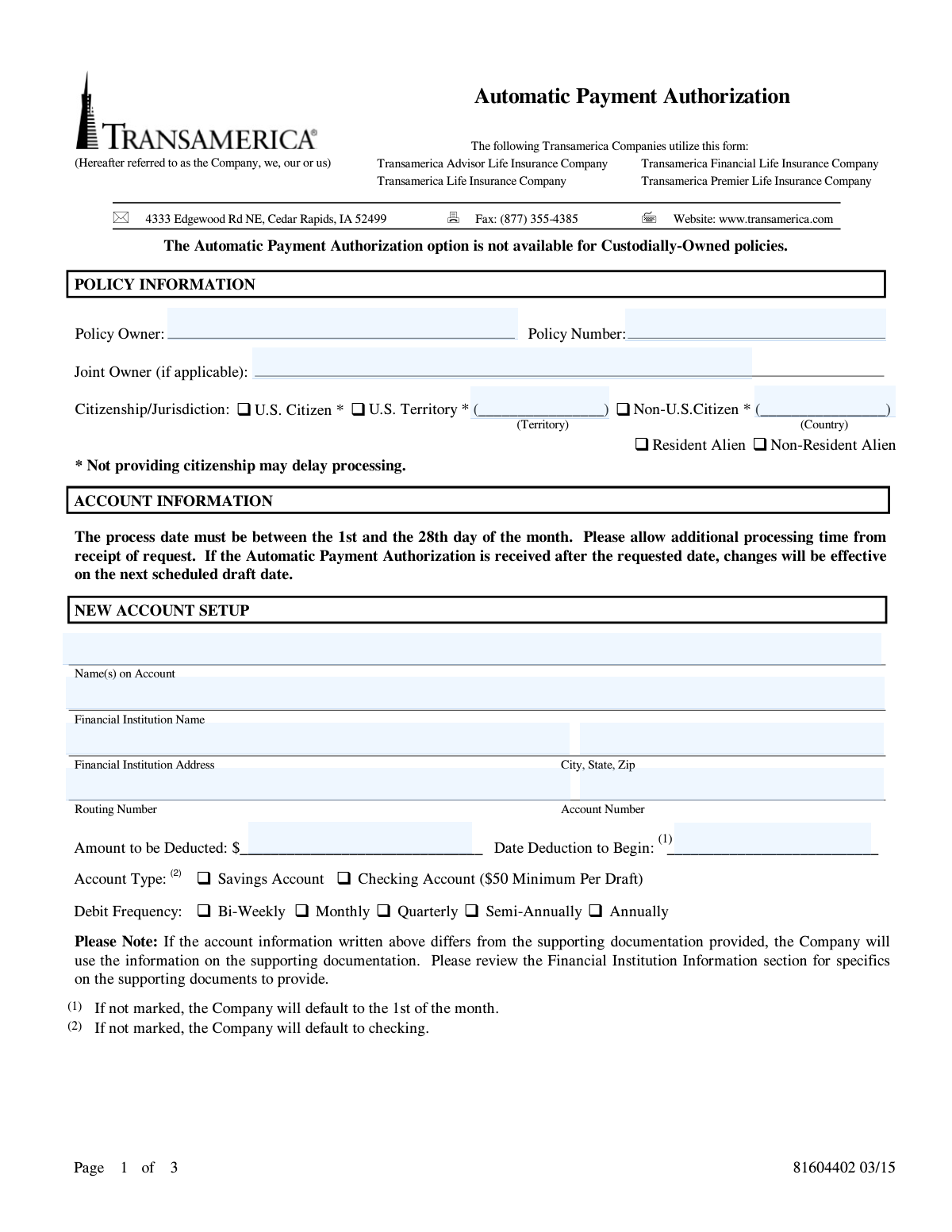
This form is used by Transamerica policyholders to authorize the company to automatically withdraw premium payments from a specified checking or savings account. It simplifies the payment process, ensuring premiums are paid on time without manual intervention. Today, this form can be filled out quickly and accurately using AI-powered services like Instafill.ai, which can also convert non-fillable PDF versions into interactive fillable forms.
381604402 is part of the
Transamerica forms, payment forms and payment authorization forms categories on Instafill.
Rather not fill this in by hand? Instafill is an online form filler that completes PDF forms automatically — upload the blank form, answer a few questions, and the AI fills every field.
Form specifications
| Form name: | Transamerica Automatic Payment Authorization |
| Number of pages: | 1 |
| Language: | English |
Our AI automatically handles information lookup, data retrieval, formatting, and form filling.
It takes less than a minute to fill out 381604402 using our AI form filling.
Securely upload your data. Information is encrypted in transit and deleted immediately after the form is filled out.
Instafill Demo: How to fill out PDF forms in seconds with AI
How to Fill Out 381604402 Online for Free in 2026
Are you looking to fill out a 381604402 form online quickly and accurately? Instafill.ai offers the #1 AI-powered PDF filling software of 2026, allowing you to complete your 381604402 form in just 37 seconds or less.
Follow these steps to fill out your 381604402 form online using Instafill.ai:
- 1 Navigate to Instafill.ai and upload the Transamerica Automatic Payment Authorization form or select it from their template library.
- 2 Provide your policy information, including the policy owner's name, policy number, and citizenship status.
- 3 Specify the account information for the automatic withdrawal, indicating whether it's a new setup or a change to an existing one.
- 4 Enter the financial institution details, such as the bank name, routing number, and account number, and select the account type (checking or savings).
- 5 Define the payment parameters, including the amount to be deducted, the start date, and the frequency of the debit (e.g., monthly, quarterly).
- 6 Review all the information populated by the AI for accuracy, ensuring all fields match your bank and policy details.
- 7 Electronically sign and date the form in the acknowledgements section to finalize the authorization.
Our AI-powered system ensures each field is filled out correctly, reducing errors and saving you time.
Why Choose Instafill.ai for Your Fillable 381604402 Form?
Speed
Complete your 381604402 in as little as 37 seconds.
Up-to-Date
Always use the latest 2026 381604402 form version.
Cost-effective
No need to hire expensive lawyers.
Accuracy
Our AI performs 10 compliance checks to ensure your form is error-free.
Security
Your personal information is protected with bank-level encryption.
Frequently Asked Questions About 381604402
This form is used to authorize Transamerica to automatically withdraw recurring policy payments directly from your checking or savings account. It can be used to set up a new payment plan or change an existing one.
Any Transamerica policy owner who wishes to start or modify automatic payments for their policy premiums should complete this form. Note that this option is not available for Custodially-Owned policies.
You must attach a voided check for payments from a checking account or a savings deposit slip for payments from a savings account. This is required to verify your account information.
If the payment is from a trust or entity account, you must provide a Letter of Instruction on the financial institution's letterhead. This letter must be signed by an officer of the institution and indicate who is authorized to sign for the account.
You can select a deduction date between the 1st and 28th of the month. Please allow for processing time; if the form is received after your requested date, deductions will start on the next scheduled draft date.
If there is a discrepancy, Transamerica will use the information printed on your supporting documentation (the voided check or deposit slip) to set up the payments.
Yes, if you are setting up automatic payments from a checking account, there is a minimum of $50 required per draft.
You can submit the completed and signed form, along with any required documents, by faxing it to (877) 355-4385 or mailing it to the Cedar Rapids, IA address listed on the form.
To terminate your automatic payment authorization, you must notify Transamerica or your financial institution in writing. They will need a reasonable amount of time to act on your termination request.
The form indicates that providing your citizenship status is important because failing to do so may result in a delay in processing your request.
Use the 'New Account Setup' section if you are authorizing automatic payments for the first time. Use the 'Change to Existing Account' section if you are updating the bank account, draft date, or amount for an existing automatic payment plan.
Yes, services like Instafill.ai use AI to auto-fill form fields accurately and save time, reducing the chance of errors when completing the form.
To fill this form online, upload the PDF to the Instafill.ai platform. The service will make the document interactive, allowing you to type your information directly into the fields before printing for signature and submission.
If you have a non-fillable PDF, you can use a tool like Instafill.ai. It can convert flat PDFs into interactive, fillable forms that you can easily complete on your computer.
Compliance 381604402
Validation Checks by Instafill.ai
1
Validates Routing Number Format and Checksum
This check ensures the provided bank routing number is exactly nine digits long. It also performs a checksum calculation to verify the number is a valid ABA routing transit number, which helps prevent payment rejections due to incorrect bank information. A failed validation will halt the submission and require the user to correct the routing number, preventing transaction failures and associated fees.
2
Ensures Deduction Start Date is Within Allowable Range
This validation confirms that the 'Date Deduction to Begin' is a valid calendar date and that the day of the month is between the 1st and the 28th, as specified on the form. This is crucial for aligning with the company's billing cycles and processing capabilities. If the date is invalid or outside this range, the form cannot be processed, and the user must select a compliant date to proceed.
3
Verifies Minimum Draft Amount for Checking Accounts
This check is triggered if the user selects 'Checking Account' as the account type. It verifies that the 'Amount to be Deducted' is equal to or greater than the $50.00 minimum specified on the form. This rule is important for meeting the company's policy requirements for checking account drafts and ensuring the transaction is not rejected. A failure would prompt the user to either increase the draft amount or select a savings account.
4
Confirms Completeness of Citizenship Information
This validation ensures that one of the citizenship statuses (U.S. Citizen, Resident Alien, etc.) has been selected, as this information is marked as important for processing. If 'Non-U.S. Citizen' or 'U.S. Territory' is chosen, it further validates that the corresponding country or territory name has been provided. Missing citizenship information can lead to significant processing delays or compliance issues, so a failed validation requires the user to complete this section.
5
Validates Section Exclusivity for New vs. Existing Setups
This check ensures that the user has provided information for either the 'NEW ACCOUNT SETUP' section or the 'CHANGE TO EXISTING ACCOUNT' section, but not both. This prevents ambiguity and potential errors in determining the user's intent, which could lead to creating a duplicate authorization or incorrectly modifying an existing one. If fields in both sections are filled, the user will be prompted to clear one section to resolve the conflict.
6
Requires Depositor Signature and Date
This validation confirms that the depositor's signature has been captured and that the signature date is present and valid. The signature and date are legal requirements for authorizing automatic payments, making them critical for the form's validity. A submission without a signature or a valid date is legally incomplete and will be rejected until both fields are properly filled.
7
Validates Depositor Phone Number Format
This check verifies that the 'Depositor's Telephone Number' field contains a valid phone number, typically conforming to a 10-digit North American Numbering Plan format. A valid phone number is essential for the company to contact the depositor regarding their account or payment authorization if issues arise. An invalid format would trigger an error, prompting the user to enter a correct phone number before submission.
8
Ensures Selection of a Debit Frequency
This validation ensures that the user has selected one of the available 'Debit Frequency' options (e.g., Monthly, Quarterly, Annually). This information is fundamental to the payment schedule and dictates when funds will be withdrawn from the account. Failure to select a frequency would make the authorization incomplete and unusable, so the system will prevent submission until a choice is made.
9
Verifies Completeness of Financial Institution Details
This check confirms that all required fields for the financial institution—including the institution's name, full address, routing number, and account number—are filled out for a new or changed setup. These details are absolutely essential for successfully processing electronic debit entries. Incomplete or missing information would guarantee payment failure, so the validation blocks submission until all required bank details are provided.
10
Requires Conditional Representative Name for Entities/Trusts
This validation is triggered if the account is identified as an Entity or Trust, based on the 'Name(s) on Account' or other indicators. It ensures the 'Printed Depositor's Authorized Representative Name' field is completed, as required by the form's instructions for non-individual accounts. This is a compliance check to confirm that the person signing has the authority to do so, and failure to provide this name will prevent the processing of authorizations for entity accounts.
11
Validates Policy Number Presence and Format
This check ensures that the 'Policy Number' field is not empty, as it is the primary identifier for the account to which payments will be applied. It may also check for a specific alphanumeric format if one is known for Transamerica policies. Without a valid policy number, the company cannot locate the correct account, making the entire authorization form useless.
12
Ensures Amount to be Deducted is a Valid Currency Value
This validation verifies that the 'Amount to be Deducted' field contains a positive, numeric value formatted as currency. This is critical for ensuring a valid monetary amount is specified for the withdrawal. Submitting non-numeric data or a negative amount would cause a processing error, so the system must enforce a proper currency format.
Common Mistakes in Completing 381604402
Users frequently make transcription errors when entering long routing and account numbers from their checks. A single transposed or incorrect digit will cause the automated payment (ACH) to fail, leading to payment rejection, potential late fees, and delays in setting up the service. To avoid this, carefully double-check the numbers against the source document, such as a voided check, before submitting the form.
The form explicitly requires attaching a voided check or savings deposit slip, and states that the information on this document will override what is written on the form. People often forget to include this physical attachment, rendering the application incomplete and halting the process. Always ensure the required document is securely attached, as it is used for verification and is the ultimate source of truth for your account details.
The citizenship section has multiple options and requires specifying a country or territory for non-U.S. citizens. Applicants often check a box like 'Non-U.S. Citizen' but forget to write in the corresponding country, or they misunderstand the distinction between 'Resident Alien' and 'Non-Resident Alien'. The form explicitly warns that incomplete citizenship information may delay processing, so it's crucial to fill out this section completely and accurately.
The form specifies that the 'Date Deduction to Begin' must be between the 1st and the 28th of the month. Applicants often overlook this instruction and enter a date like the 30th or 31st, or a date in the past. This causes the system to default to the next available draft date, which may not align with the applicant's financial planning and could result in an unexpected payment schedule.
Confusion can arise when the policy owner is not the owner of the bank account being used for payment. The 'Name(s) on Account' and the 'Signature of Depositor' must belong to the bank account owner, not necessarily the policy owner. Filling this out incorrectly will cause the authorization to be rejected by the financial institution, as the signature will not match the authorized signers on the account.
A note on the form specifies that if the payment is from an Entity or Trust account, a separate 'Letter of Instruction' on financial institution letterhead is required. Applicants using such accounts frequently miss this fine print, leading to an automatic rejection of their authorization form. To prevent this delay, you must obtain this specific documentation from your bank before submitting the form.
Omitting the signature or date is one of the most common and critical errors, as it renders the entire authorization legally invalid. An unsigned form cannot be processed and will be returned, delaying the setup of automatic payments and potentially causing a missed payment. Always perform a final review to ensure the signature and date fields are completed on the final page.
When this form is printed and filled out by hand, poor handwriting can make critical data like names, policy numbers, and bank details unreadable. This can lead to data entry errors on the company's end or cause the form to be rejected entirely. To ensure accuracy, it is best to print clearly in block letters. AI-powered tools like Instafill.ai can convert non-fillable PDFs into fillable versions, allowing you to type information for perfect legibility.
The form requires users to select either 'Checking Account' or 'Savings Account' and defaults to 'checking' if no selection is made. A user intending to use a savings account might forget to check the box, causing the transaction to be processed incorrectly and potentially fail. To prevent processing errors, you must always explicitly check the box that corresponds to your correct account type.
Saved over 80 hours a year
“I was never sure if my IRS forms like W-9 were filled correctly. Now, I can complete the forms accurately without any external help.”
Kevin Martin Green
Your data stays secure with advanced protection from Instafill and our subprocessors




Robust compliance program
Transparent business model
You’re not the product. You always know where your data is and what it is processed for.
ISO 27001, HIPAA, and GDPR
Our subprocesses adhere to multiple compliance standards, including but not limited to ISO 27001, HIPAA, and GDPR.
Security & privacy by design
We consider security and privacy from the initial design phase of any new service or functionality. It’s not an afterthought, it’s built-in, including support for two-factor authentication (2FA) to further protect your account.
Fill out 381604402 with Instafill.ai
Worried about filling PDFs wrong? Instafill securely fills transamerica-automatic-payment-authorization forms, ensuring each field is accurate.
