Yes! You can use AI to fill out Application and Contract for Electric Facilities Where Full Advance Payment Is Required (Temporary Service) — Southern California Edison (SCE CSD 274)
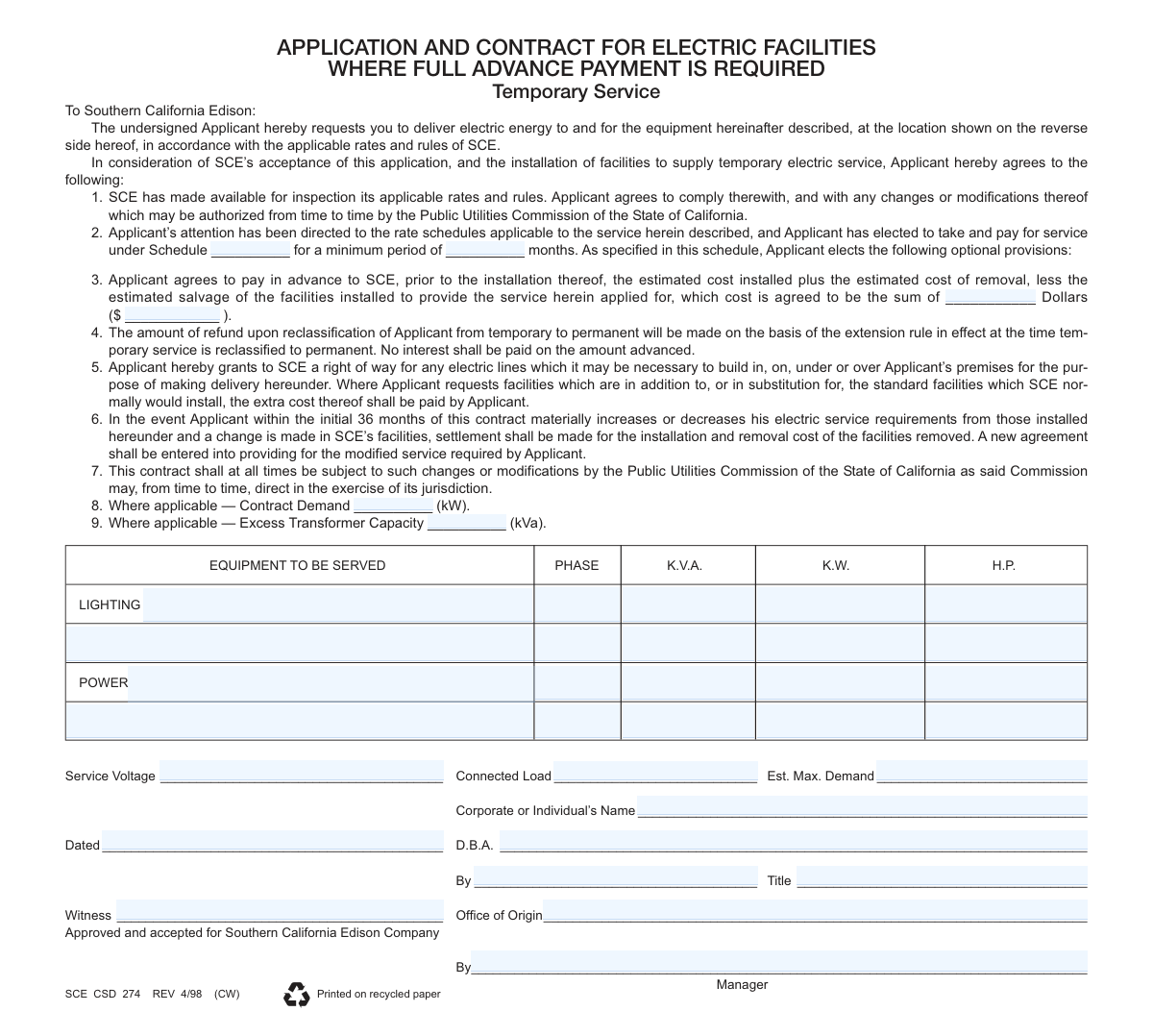
This is Southern California Edison’s application-and-contract form for establishing temporary electric service when full advance payment is required. It captures the applicant’s identity, service location, requested rate schedule and term, equipment/load details, and any applicable contract demand or transformer capacity. By signing, the applicant agrees to SCE’s tariffs/rules and to pay the estimated installed cost plus removal cost (minus salvage) before SCE installs facilities. The form also includes credit/deposit and business-organization information used by SCE to set up and approve the temporary service account.
Our AI automatically handles information lookup, data retrieval, formatting, and form filling.
It takes less than a minute to fill out SCE CSD 274 using our AI form filling.
Securely upload your data. Information is encrypted in transit and deleted immediately after the form is filled out.
Form specifications
| Form name: | Application and Contract for Electric Facilities Where Full Advance Payment Is Required (Temporary Service) — Southern California Edison (SCE CSD 274) |
| Number of pages: | 2 |
| Filled form examples: | Form SCE CSD 274 Examples |
| Language: | English |
Instafill Demo: filling out a legal form in seconds
How to Fill Out SCE CSD 274 Online for Free in 2026
Are you looking to fill out a SCE CSD 274 form online quickly and accurately? Instafill.ai offers the #1 AI-powered PDF filling software of 2026, allowing you to complete your SCE CSD 274 form in just 37 seconds or less.
Follow these steps to fill out your SCE CSD 274 form online using Instafill.ai:
- 1 Enter applicant and business details (corporate/individual name, DBA, form of organization, business type, business phone, and partners/officers if applicable).
- 2 Provide service location information (service address, city/state/ZIP, nearest cross streets, and any former/immediate previous Edison service address).
- 3 Specify the temporary service request terms: applicable rate schedule, minimum service period (months), date wanted/effective date, and any optional provisions noted on the schedule.
- 4 Complete technical service details: service voltage, connected load, estimated maximum demand, hours of operation, square footage (if required), and list equipment to be served (lighting/power with phase, kVA, kW, HP as applicable).
- 5 Fill in contract-specific fields where applicable, including Contract Demand (kW) and Excess Transformer Capacity (kVA), and note any non-standard facilities requested.
- 6 Provide credit and deposit information (residence address if required, deposit amount/number if assigned, and any additional information requested for credit department approval).
- 7 Review the contract terms (advance payment, right-of-way, reclassification/refund rules, and PUC-governed changes), then sign/date the application (authorized signer title, witness if required) and submit for SCE approval/acceptance.
Our AI-powered system ensures each field is filled out correctly, reducing errors and saving you time.
Why Choose Instafill.ai for Your Fillable SCE CSD 274 Form?
Speed
Complete your SCE CSD 274 in as little as 37 seconds.
Up-to-Date
Always use the latest 2026 SCE CSD 274 form version.
Cost-effective
No need to hire expensive lawyers.
Accuracy
Our AI performs 10 compliance checks to ensure your form is error-free.
Security
Your personal information is protected with bank-level encryption.
Frequently Asked Questions About Form SCE CSD 274
This form is used to request temporary electric service from Southern California Edison (SCE) and to set the terms for installing and later removing the temporary service facilities. It also documents the applicant’s agreement to SCE rates, rules, and payment requirements.
Any individual or business requesting temporary electric service (for example, construction sites, temporary events, or short-term operations) should complete it. The applicant is the party responsible for payment and compliance with SCE requirements.
SCE requires the applicant to pay upfront the estimated installed cost plus the estimated removal cost, minus estimated salvage value. This ensures the temporary facilities can be installed and later removed without unpaid balances.
The advance payment generally includes the estimated cost to install the temporary facilities and the estimated cost to remove them, less the estimated salvage value of the equipment. The total is written as a dollar amount in the contract section.
No. The form states that no interest will be paid on the amount advanced, even if a refund is later due.
If temporary service is reclassified to permanent, any refund is calculated based on the extension rule in effect at the time of reclassification. The refund amount is not guaranteed and depends on the applicable rule at that time.
You must enter the applicable Schedule number/name and the minimum period (in months) in the blanks provided. If you’re unsure which schedule applies, contact SCE so the correct rate schedule and options are selected for your type of temporary load.
You should list the types of load (lighting and/or power) and provide electrical details such as phase, kVA, kW, and/or horsepower (HP) as applicable. You’ll also provide service voltage, connected load, and estimated maximum demand.
These fields apply only where applicable, typically for larger or demand-based services. If SCE indicates they apply to your service, enter the requested kW and kVA values; otherwise they may be left blank per SCE instructions.
You’ll need the service address (where power will be delivered) and a mailing address for billing and correspondence. The form may also request an immediate previous Edison service address and the applicant’s residence address (often for credit verification).
The form asks for the form of business organization (e.g., proprietorship, corporation, partnership), type of business, business phone number, and names/titles/addresses of partners or corporate officers. This information supports credit review and account setup.
Possibly. The form includes fields for a service deposit number and deposit amount and notes that the deposit is subject to adjustment, which may depend on credit approval and SCE requirements.
Yes. By signing, you grant SCE a right-of-way to build necessary electric lines in, on, under, or over the premises to deliver service. If you request non-standard or upgraded facilities, you agree to pay the extra cost.
If within the initial 36 months you materially increase or decrease your service requirements and SCE must change its facilities, you may owe settlement costs for installation and removal of facilities that are removed. A new agreement may be required for the modified service.
The form includes a “date wanted/date effective” area and fields for hours of operation, square footage (as required), and nearest cross streets. Providing accurate timing and site details helps SCE schedule design, permitting (if needed), and installation.
Compliance SCE CSD 274
Validation Checks by Instafill.ai
1
Required applicant identity fields are present (Legal Name, DBA if applicable, Form of Organization)
Validates that the Corporate or Individual’s Name is provided and that a Form of Business Organization (e.g., proprietorship, corporation, partnership, other) is selected. If a DBA name is provided, it must not be the only name present; the legal name must still be captured for contracting and credit purposes. If these fields are missing or inconsistent, the submission should be rejected or routed for correction because the contract cannot be enforced or credit-checked reliably.
2
Signature, signer name, and title completeness for authorization
Checks that the contract execution section includes a signer (“By”), a date, and a Title (especially for corporations/partnerships) and that a Witness field is completed if required by business rules. This ensures the person signing has authority to bind the applicant entity and provides an audit trail. If missing, the form should fail validation because the agreement may be legally invalid or unenforceable.
3
Date fields use valid format and are logically consistent (Dated, Date Effective, Date Wanted)
Validates that all dates (e.g., Dated, DATE EFFECTIVE, DATE WANTED, CREDIT DEPT. APPROVAL DATE) are in an accepted format (such as MM/DD/YYYY) and represent real calendar dates. Also checks logical ordering (e.g., Date Wanted should not be earlier than Date Effective; approval date should not precede the application date if approval is required). If invalid or inconsistent, the submission should be flagged because scheduling, billing start, and compliance timelines depend on correct dates.
4
Service address completeness and postal validation (Street, City, State, ZIP, Apt/Unit if applicable)
Ensures the SERVICE ADDRESS includes street address, city, state (CA implied but should be validated if captured), and a 5-digit or 9-digit ZIP code, plus Apt No. when relevant. Also validates that the ZIP code format is correct and, if possible, that ZIP aligns with the city/state to reduce field service errors. If validation fails, the request should be held because meter orders, construction, and dispatch depend on a deliverable location.
5
Mailing address presence and consistency with service address when indicated
Checks that a MAILING ADDRESS is provided if it differs from the service address or if the form indicates separate mailing details. If the mailing address is omitted, the system should default to service address only when explicitly allowed; otherwise it should fail validation. This prevents billing and notices from being sent to an incorrect or incomplete address.
6
Immediate previous Edison service address required when prior service is indicated
Validates that the IMMEDIATE PREVIOUS EDISON SERVICE ADDRESS is completed when the applicant indicates prior SCE service or when credit processing requires it. This supports customer matching, credit history retrieval, and reduces duplicate customer records. If missing when required, the submission should be flagged for follow-up because credit and account setup may be inaccurate.
7
Business telephone numbers and contact phone numbers are valid and complete
Validates BUSINESS TELEPHONE NUMBER and any listed TELEPHONE NUMBER fields (partners/officers, applicant residence) for acceptable formats (e.g., 10 digits, optional country code, allowable separators) and rejects clearly invalid values (too short, all zeros, non-numeric). Also checks that at least one primary contact number is present for scheduling and issue resolution. If invalid or missing, the form should fail or be routed for correction because SCE cannot coordinate installation or resolve credit questions.
8
Partners/Officers section completeness based on selected business organization
If CORPORATION is selected, requires at least one corporate officer entry with name and title; if PARTNERSHIP/CO-PARTNERSHIP is selected, requires partner names and contact details. This ensures the correct responsible parties are recorded for credit, authorization, and legal notices. If the organization type and the provided officer/partner details do not align, the submission should be rejected as incomplete.
9
Rate schedule and minimum period fields are populated and valid
Checks that the Schedule field (rate schedule) is filled in and that the minimum period in months is a positive integer within allowed bounds (e.g., not zero, not negative, not unreasonably large per policy). This is necessary to calculate billing, enforce minimum term requirements, and apply correct tariff rules. If missing or invalid, the form should fail validation because service cannot be priced or contracted correctly.
10
Advance payment amount fields are numeric, consistent, and non-negative
Validates that the written amount in dollars and the parenthetical numeric amount ($ ________) are both present, numeric (for the numeric field), and represent the same value within rounding rules. Also enforces non-negative amounts and reasonable maximum thresholds to catch data entry errors (e.g., extra zeros). If mismatch or invalid, the submission should be blocked because the contract requires full advance payment and accounting must be accurate.
11
Deposit information validation (Deposit Number, Deposit Amount, adjustment acknowledgment)
Checks that DEPOSIT NUMBER (if used) follows expected format/length and that DEPOSIT AMOUNT is numeric, non-negative, and consistent with any duplicate deposit amount fields on the form. If the form includes an acknowledgment such as “THIS SERVICE DEPOSIT IS SUBJECT TO ADJUSTMENT,” ensure applicant initials are present where required. If validation fails, the submission should be flagged because deposit handling impacts credit approval and financial controls.
12
Credit department approval requirement and completeness
Validates that CREDIT DEPT. APPROVAL is completed (e.g., approver identifier/signature and date) when the workflow requires credit review (commonly for temporary service with deposits). Also checks that approval date is not after the requested service start if policy requires pre-approval. If missing when required, the submission should not proceed to scheduling because service may be installed without proper credit authorization.
13
Electrical load details are present and internally consistent (Voltage, Connected Load, Est. Max Demand, kW/kVA/HP)
Ensures Service Voltage, Connected Load, and Estimated Maximum Demand are provided in expected units and numeric formats where applicable. Validates that values are non-negative and that Estimated Max Demand does not exceed Connected Load by unreasonable margins (allowing for diversity factors only if specified by rules). If missing or inconsistent, the submission should be held because engineering design, transformer sizing, and safety depend on accurate load data.
14
Contract demand and excess transformer capacity fields validated when applicable
If the form indicates these are applicable, validates that Contract Demand (kW) and Excess Transformer Capacity (kVA) are numeric and within acceptable engineering limits for temporary service. Also checks that kVA is not less than kW in a way that violates basic power relationships unless a documented exception exists. If invalid, the request should be flagged for engineering review to prevent undersized/oversized installations and billing errors.
15
Operational details validation (Hours of Operation, Square Footage when required)
Validates HOURS OF OPERATION is provided in a recognized format (e.g., start/end times or total hours/day) and within 0–24 hours per day, and that SQUARE FOOTAGE is numeric when marked “AS REQUIRED.” These fields support load estimation, rate applicability, and planning for temporary service. If invalid or missing when required, the submission should be routed for clarification because planning assumptions may be wrong.
16
Work order / meter order identifiers format and cross-field presence
Checks that identifiers such as METER ORDER NO., C.W.O./C.J.O. NO., D.W.O. NO., LOOK-UP NO., and customer/account references (CUST. NO., BOOK/FOLIO, CYCLE/DIST) follow expected alphanumeric patterns and lengths, and that required ones are present for the stage of processing. This prevents downstream system rejections and ensures the request can be tracked through field operations and billing. If invalid, the submission should be rejected or queued for manual correction before integration with operational systems.
Common Mistakes in Completing SCE CSD 274
Applicants often skip the “Schedule ____” and “minimum period of ____ months” fields because they don’t know which tariff applies or assume SCE will fill it in. This can delay processing because the utility can’t confirm pricing, rules, or the required minimum service term for temporary service. To avoid this, confirm the correct SCE rate schedule for temporary service with your SCE contact/representative and enter both the schedule code and the minimum months exactly as agreed.
The advance payment section asks for a sum written out (“_____ Dollars”) and also a numeric amount (“$ _____”), and people frequently enter only one or the two values don’t match. Any discrepancy can trigger rejection or a request for clarification because it affects the legally binding advance payment amount. Always complete both fields and double-check that the written amount and the numeric amount are identical (including commas and cents, if used).
Many applicants misunderstand that the advance is based on installed cost plus removal cost minus estimated salvage, and they provide an arbitrary deposit number/amount instead. This leads to underpayment/overpayment and delays while SCE recalculates or requests additional funds before installation. Avoid this by confirming the estimate from SCE and ensuring the amount entered reflects the stated formula and the official estimate provided.
The form separates “Service Address Street,” “Service Address Post Office,” “City,” “CA,” and “ZIP Code,” and applicants often fill only a mailing address or omit the post office/city/ZIP. Missing or inconsistent location data can prevent SCE from locating the site, assigning the correct service territory/cycle, and scheduling field work. Enter the full physical service location (not just a P.O. Box), include city and ZIP, and ensure it matches any site plans or permits.
People frequently put their billing/mailing address in the service address fields or repeat the service address in the mailing section without checking which is which. This can cause missed notices, billing issues, and delays in coordinating installation because communications go to the wrong place. To avoid this, treat the service address as the physical location where power will be delivered and the mailing address as where bills and correspondence should be sent.
Applicants often leave the start date blank or request same-day/next-day energization without accounting for design, permits, inspections, and payment clearance. This results in scheduling conflicts and can push the project back when SCE must request a corrected timeline. Provide a realistic “Date Wanted/Date Effective,” confirm lead times with SCE, and ensure advance payment and site readiness align with the requested date.
The credit section requires choosing the form of business (proprietorship, corporation, partnership, etc.), and applicants sometimes check the wrong box or check multiple without clarification. This can cause credit review problems, incorrect legal responsibility, and requests for additional documentation (e.g., corporate authorization vs. personal guarantee). Choose the single correct entity type that matches your legal registration and ensure the “Corporate or Individual’s Name” matches that entity exactly.
Applicants often enter a trade name (DBA) as the legal “Corporate or Individual’s Name,” or they leave the DBA line blank even though they operate under a different name. This can create contract enforceability issues and delays in credit verification and billing setup. Enter the legal entity name exactly as registered (e.g., Secretary of State/IRS records) and list the DBA separately if applicable.
The contract requires “By,” “Title,” “Dated,” and a “Witness,” and submissions are frequently missing a title, date, or are signed by someone without authority. This can invalidate the agreement and force resubmission, delaying installation of temporary facilities. Ensure the signer is authorized (officer/owner/authorized agent), include their title, date the document, and complete the witness line if required by your process/SCE instructions.
The “Equipment to be served” table and fields for “Service Voltage,” “Connected Load,” and “Est. Max. Demand” are often left blank or filled with guesses. Incorrect or missing load data can lead to undersized/oversized temporary facilities, safety issues, transformer/metering changes, and additional costs or rework. Provide accurate load calculations (lighting, power, motors/HP), specify phase and voltage, and use electrician/engineer estimates rather than rough approximations.
Applicants frequently ignore these “Where applicable” fields because they’re unsure whether they apply, even when the project has a defined demand requirement or special transformer needs. This can cause incorrect billing determinants or inadequate transformer sizing, leading to change orders and delays. If your project has a specified demand or requires extra capacity, confirm the values with your electrical contractor/SCE planner and enter them; if not applicable, clearly mark “N/A” rather than leaving it ambiguous.
Saved over 80 hours a year
“I was never sure if my IRS forms like W-9 were filled correctly. Now, I can complete the forms accurately without any external help.”
Kevin Martin Green
Your data stays secure with advanced protection from Instafill and our subprocessors

Robust compliance program
Transparent business model
You’re not the product. You always know where your data is and what it is processed for.
ISO 27001, HIPAA, and GDPR
Our subprocesses adhere to multiple compliance standards, including but not limited to ISO 27001, HIPAA, and GDPR.
Security & privacy by design
We consider security and privacy from the initial design phase of any new service or functionality. It’s not an afterthought, it’s built-in, including support for two-factor authentication (2FA) to further protect your account.
Fill out SCE CSD 274 with Instafill.ai
Worried about filling PDFs wrong? Instafill securely fills application-and-contract-for-electric-facilities-w forms, ensuring each field is accurate.



