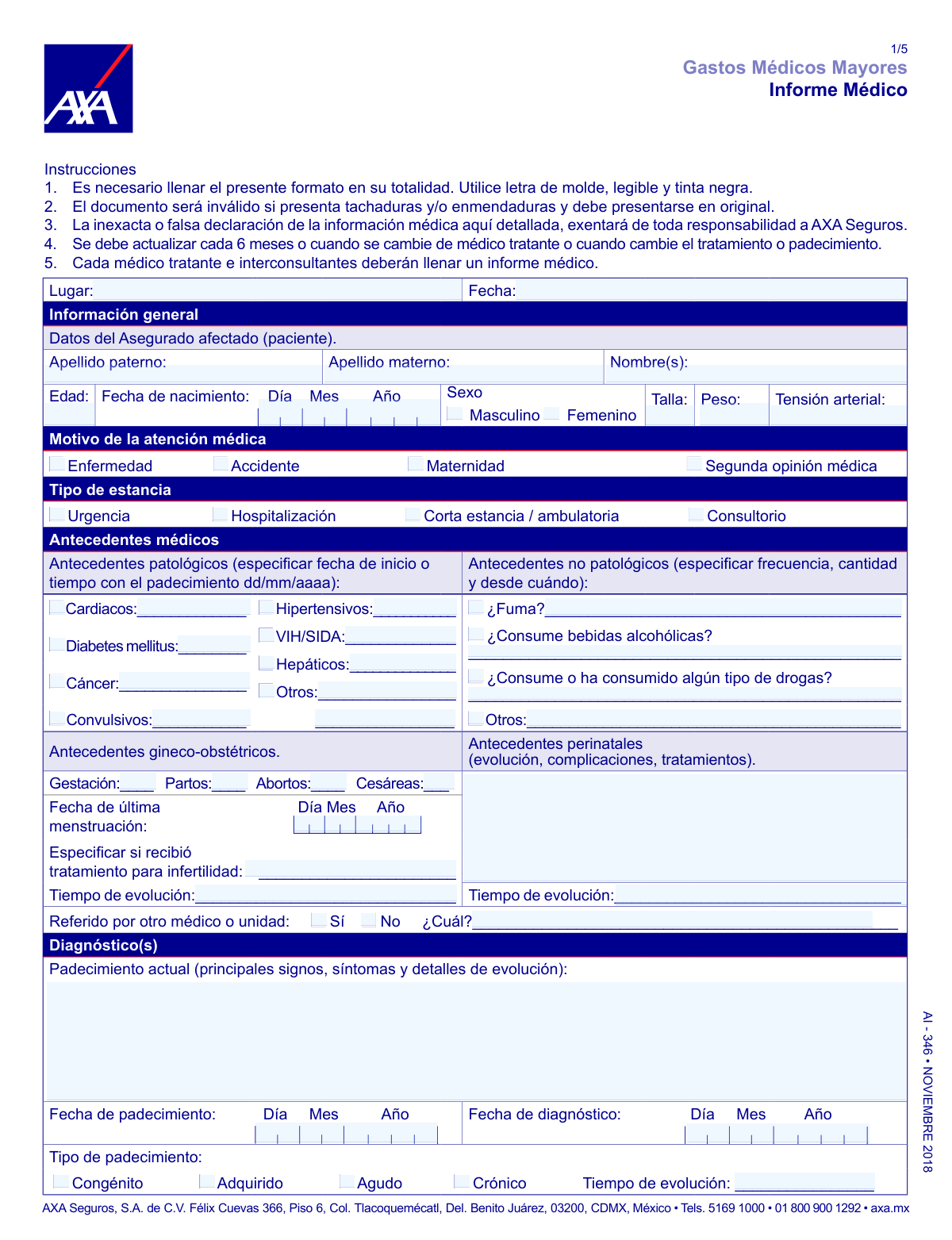
Yes! You can use AI to fill out Form AI-346, Gastos Médicos Mayores Informe Médico

Form AI-346, known as the 'Informe Médico' from AXA Seguros, is a comprehensive medical report that must be completed by a treating physician to support a major medical expense insurance claim. It details the patient's medical history, diagnosis, treatment plan, and prognosis, which is essential for AXA to assess the claim's validity and coverage. Today, this form can be filled out quickly and accurately using AI-powered services like Instafill.ai, which can also convert non-fillable PDF versions into interactive fillable forms.
Our AI automatically handles information lookup, data retrieval, formatting, and form filling.
It takes less than a minute to fill out AI-346 using our AI form filling.
Securely upload your data. Information is encrypted in transit and deleted immediately after the form is filled out.

Form specifications

Form name: Form AI-346, Gastos Médicos Mayores Informe Médico
Number of pages: 5
Language: English
main-image

Instafill Demo: How to fill out PDF forms in seconds with AI

How to Fill Out AI-346 Online for Free in 2026

Are you looking to fill out a AI-346 form online quickly and accurately? Instafill.ai offers the #1 AI-powered PDF filling software of 2026, allowing you to complete your AI-346 form in just 37 seconds or less.
Follow these steps to fill out your AI-346 form online using Instafill.ai:
  1. 1 Navigate to Instafill.ai and upload or select the AXA Form AI-346, Informe Médico.
  2. 2 The treating physician uses the AI assistant to accurately input the patient's general information, medical history, and vital signs.
  3. 3 Detail the diagnosis, including the current condition, onset date, cause, and relevant ICD codes.
  4. 4 Describe the proposed or administered treatment, including medications, surgical procedures, hospitalization dates, and any required therapies.
  5. 5 Enter the details of all attending physicians, including their specialty, professional license numbers, and signatures.
  6. 6 The insured patient reviews the document and signs the authorization sections for the use and transfer of personal and sensitive data.
  7. 7 Review all the information for completeness and accuracy before securely downloading or submitting the finished document to AXA Seguros.

Our AI-powered system ensures each field is filled out correctly, reducing errors and saving you time.

Why Choose Instafill.ai for Your Fillable AI-346 Form?

Speed

Complete your AI-346 in as little as 37 seconds.

Up-to-Date

Always use the latest 2026 AI-346 form version.

Cost-effective

No need to hire expensive lawyers.

Accuracy

Our AI performs 10 compliance checks to ensure your form is error-free.

Security

Your personal information is protected with bank-level encryption.

Frequently Asked Questions About Form AI-346

This form is used by your physician to provide AXA Seguros with detailed medical information about your diagnosis and treatment. It is essential for processing claims, authorizing procedures, or requesting reimbursements under your Major Medical Expenses policy.

Your treating physician and any consulting specialists must complete all the medical sections of the form. The insured patient, or their parent/guardian, is responsible for filling out and signing the authorization section at the end.

You must submit an updated form every 6 months. A new form is also required if you change your treating physician, or if your diagnosis or treatment plan changes.

Each treating physician and consulting specialist involved in your care must fill out and sign their own separate 'Informe Médico' form. This ensures all aspects of your treatment are properly documented for the insurance claim.

The form will be invalid if it has any cross-outs, corrections, or alterations. You must start over with a new, clean form to ensure it is accepted by AXA.

Your signature authorizes AXA to use and share your sensitive medical data with specialists and providers as needed to manage your insurance benefits. This is necessary for them to coordinate care, process claims, or obtain a second opinion on your behalf.

In this section, your doctor must describe your current condition, including signs and symptoms, the date the condition started, the date of diagnosis, and the cause or origin of the illness or injury.

The form has space to list up to 10 medications. If your treatment plan includes more, your physician should fill out an additional 'Informe Médico' form to list the remaining prescriptions.

Yes, your doctor should describe the relevant findings from lab and imaging studies in the designated section. It is also highly recommended to attach copies of the original reports to support the claim and prevent delays.

Yes, services like Instafill.ai use AI to accurately auto-fill patient information fields, saving you and your doctor's office time. However, all medical details must be entered and verified by the treating physician.

You can use a service like Instafill.ai to make any non-fillable PDF interactive. Simply upload the document, and the platform will convert it into a fillable form that you can complete online.

Upload the 'Informe Médico' PDF to the Instafill.ai platform, which will identify all the fields. You can then type in the information or use the auto-fill feature with your saved data, then download the completed PDF for printing and signing.

The ICD code is a standard diagnostic code from the International Classification of Diseases. Your doctor will provide this code, which specifically identifies your medical condition for billing and records.

Compliance AI-346
Validation Checks by Instafill.ai

1
Age and Date of Birth Consistency
This check verifies that the patient's stated 'Edad' (Age) is consistent with the provided 'Fecha de nacimiento' (Date of Birth). This validation prevents data entry errors and ensures the patient's demographic data is accurate for risk assessment and policy verification. If the values do not match, the form submission will be flagged for manual review to correct the discrepancy.
2
Chronological Order of Medical Dates
Verifies that the 'Fecha de diagnóstico' (Diagnosis Date) is on or after the 'Fecha de padecimiento' (Condition Onset Date). This ensures a logical timeline of the medical event, which is crucial for determining coverage eligibility and understanding the condition's progression. A failure indicates a likely data entry error that must be corrected before the claim can be processed.
3
Maternity Claim Gender Verification
Confirms that if 'Maternidad' (Maternity) is selected as the 'Motivo de la atención médica' (Reason for Care), the patient's 'Sexo' (Sex) must be 'Femenino' (Female). This is a fundamental logical check to prevent invalid claims related to maternity. Submissions failing this check will be rejected as they represent a logical impossibility.
4
Obstetric History Consistency
Validates that the sum of 'Partos' (Births), 'Abortos' (Abortions), and 'Cesáreas' (C-sections) is less than or equal to the total number of 'Gestación' (Pregnancies). This check ensures the internal consistency and plausibility of the patient's obstetric history. An inconsistency suggests an error in reporting that could affect medical assessment and must be clarified.
5
Hospitalization Period Validation
Ensures the 'Fecha de alta' (Discharge Date) is on or after the 'Fecha de hospitalización' (Admission Date). This validation confirms a valid and logical duration of stay for processing hospitalization benefits. If the discharge date is before the admission date, the form will be rejected for correction of this critical error.
6
Conditional Requirement for Cancer Staging
This check mandates that if the diagnosis is marked as 'Es cáncer: Sí' (Is Cancer: Yes), the 'Escala TNM' (TNM Stage) field must be completed. The TNM stage is essential for determining the severity, prognosis, and appropriate treatment protocol, directly impacting claim evaluation. A missing TNM stage will halt processing until the information is provided.
7
Physician's RFC Format Validation
Validates that the 'RFC' (Federal Taxpayers Registry) for the treating physician adheres to the official Mexican format, which is typically 13 characters for an individual (e.g., AAAA######XXX). A valid RFC is legally required for billing and ensures the physician is properly registered. An invalid format will prevent the claim from being processed.
8
Incapacity Period Chronology
If incapacity is indicated ('El padecimiento ocasionó incapacidad: Sí'), this check verifies that both 'Desde' (From) and 'Hasta' (To) dates are provided and that the 'Hasta' date is on or after the 'Desde' date. This ensures the disability period is documented correctly for calculating benefits. An invalid or illogical period will require correction before the claim can be approved.
9
Completeness of Patient's Full Name
Ensures that the 'Apellido paterno' (Paternal Last Name) and 'Nombre(s)' (First Name(s)) fields are not left blank. A complete legal name is fundamental for correctly identifying the insured individual and linking the medical report to the correct policy. Incomplete submissions will be rejected as the patient cannot be uniquely identified.
10
Conditional Requirement for Pathological History Date
Verifies that if a checkbox for a pre-existing condition is marked in the 'Antecedentes patológicos' section (e.g., 'Diabetes mellitus'), the corresponding 'fecha de inicio' (start date) field is filled. This information is critical for determining if the current condition is related to a pre-existing one, which affects coverage. Failure to provide the start date will delay the claim.
11
Blood Pressure Format Validation
This check ensures the 'Tensión arterial' (Blood Pressure) field is entered in a standard systolic/diastolic format, such as '120/80'. Proper formatting is necessary for the data to be parsed correctly and used in clinical assessments, ensuring data quality. Entries that do not match the expected format will be flagged for correction.
12
Conditional Requirement for Referral Details
Validates that if the 'Sí' (Yes) option is selected for 'Referido por otro médico o unidad' (Referred by another doctor), the corresponding '¿Cuál?' (Which?) text field is filled in. This information is important for understanding the patient's care pathway and for inter-provider communication. A missing referral source will trigger a request for completion.
13
Completeness of Medication Entry
For each row in the medication table, this check ensures that if the 'Nombre y presentación del medicamento' is provided, then the 'Cantidad', 'Cada cuánto', and 'Durante cuánto tiempo' fields are also provided. This guarantees that all prescribed treatments are fully documented for accurate review and authorization. Incomplete medication entries will cause the form to be flagged for clarification.

Common Mistakes in Completing AI-346

Incomplete or Illegible Physician Information

Doctors or administrative staff often forget to fill in all required fields, such as the professional license number (Cédula Profesional), specialty license, or RFC (tax ID). Illegible handwriting for names and contact details is also common. This can invalidate the report, as the insurer cannot verify the credentials of the treating physician, leading to significant delays or outright rejection of the claim until a corrected form is submitted.

Vague Medical History Descriptions

In the 'Antecedentes' sections, the form asks for specific details like frequency, quantity, and start dates (e.g., for smoking or alcohol use). Users often provide vague answers like 'socially' or 'occasionally' instead of the required specifics. This lack of detail can lead the insurer to request more information, delaying the claim's processing while they assess risk factors.

Confusing Onset Date with Diagnosis Date

The form distinguishes between 'Fecha de padecimiento' (date the condition started) and 'Fecha de diagnóstico' (date it was formally diagnosed). Applicants frequently use these dates interchangeably or leave one blank. This is a critical error for the insurer, as it affects the determination of pre-existing conditions and can lead to claim disputes or denial if the timeline is unclear.

Omitting Mandatory Diagnostic Details

When describing a diagnosis, crucial specifics like the ICD code, whether a condition is unilateral/bilateral, or the TNM cancer staging are often missed. For example, checking 'Sí' for cancer but leaving the 'Escala TNM' field blank provides incomplete information. This forces the insurance company to halt processing and request a more detailed report from the physician, delaying approvals for treatment.

Insufficient Justification for Tests and Treatments

The form requires a description of lab/imaging studies *with their interpretation* and a detailed breakdown of prescribed medications (dosage, frequency, duration). A common mistake is to list the names of tests without their results or to provide an incomplete medication schedule. Without this justification, the insurer may deem a procedure or medication as not medically necessary, potentially refusing coverage.

Ignoring Basic Form-Filling Instructions

The instructions explicitly state to use legible block letters, black ink, and to submit an original document without any cross-outs or alterations ('tachaduras y/o enmendaduras'). Many submissions are rejected because they are filled in blue ink, have messy handwriting, or contain corrected mistakes. This forces the applicant to have the entire multi-page form filled out again by the doctor, causing significant delays.

Missing Patient Signature on Authorization Sections

The final page contains crucial authorization sections that must be completed and signed by the insured, not the doctor. Patients often overlook this part, assuming the entire form is for the physician. Without these signatures authorizing the use and transfer of sensitive personal data, the insurer is legally unable to process the claim, bringing the entire procedure to a halt.

Incomplete Accident or Injury Description

For claims related to an accident, the form requires a detailed description of the 'tiempo, modo y lugar' (time, manner, and place) of the incident. Submissions often lack this detail, providing only a brief summary like 'fell at home'. This ambiguity can delay the claim as the insurer investigates to rule out policy exclusions and confirm the circumstances of the injury.

Leaving Conditional Fields Blank

Throughout the form, there are questions where checking 'Sí' (Yes) requires a mandatory explanation in an adjacent field (e.g., 'Se presentaron complicaciones: Sí / No. Describa...'). A frequent error is to check 'Sí' but leave the description box empty. This creates an incomplete record, forcing the insurer to follow up for the missing information and delaying the claim.

Using a Non-Fillable PDF without Proper Tools

This form is a flat, non-fillable PDF, which leads to manual filling and increases the likelihood of all the previously mentioned errors like illegible handwriting and mistakes requiring a full restart. Trying to fill it digitally without the right software can result in misaligned text and a unprofessional appearance. AI-powered tools like Instafill.ai can convert such documents into smart, fillable forms, validating data as it's entered to prevent errors and ensure a clean, professional submission.
Saved over 80 hours a year

“I was never sure if my IRS forms like W-9 were filled correctly. Now, I can complete the forms accurately without any external help.”

Kevin Martin Green

Your data stays secure with advanced protection from Instafill and our subprocessors

Robust compliance program

Transparent business model

You’re not the product. You always know where your data is and what it is processed for.

ISO 27001, HIPAA, and GDPR

Our subprocesses adhere to multiple compliance standards, including but not limited to ISO 27001, HIPAA, and GDPR.

Security & privacy by design

We consider security and privacy from the initial design phase of any new service or functionality. It’s not an afterthought, it’s built-in, including support for two-factor authentication (2FA) to further protect your account.

Fill out AI-346 with Instafill.ai

Worried about filling PDFs wrong? Instafill securely fills form-ai-346-gastos-mdicos-mayores-informe-mdico forms, ensuring each field is accurate.