Yes! You can use AI to fill out Medical Report for Carer Payment and/or Carer Allowance

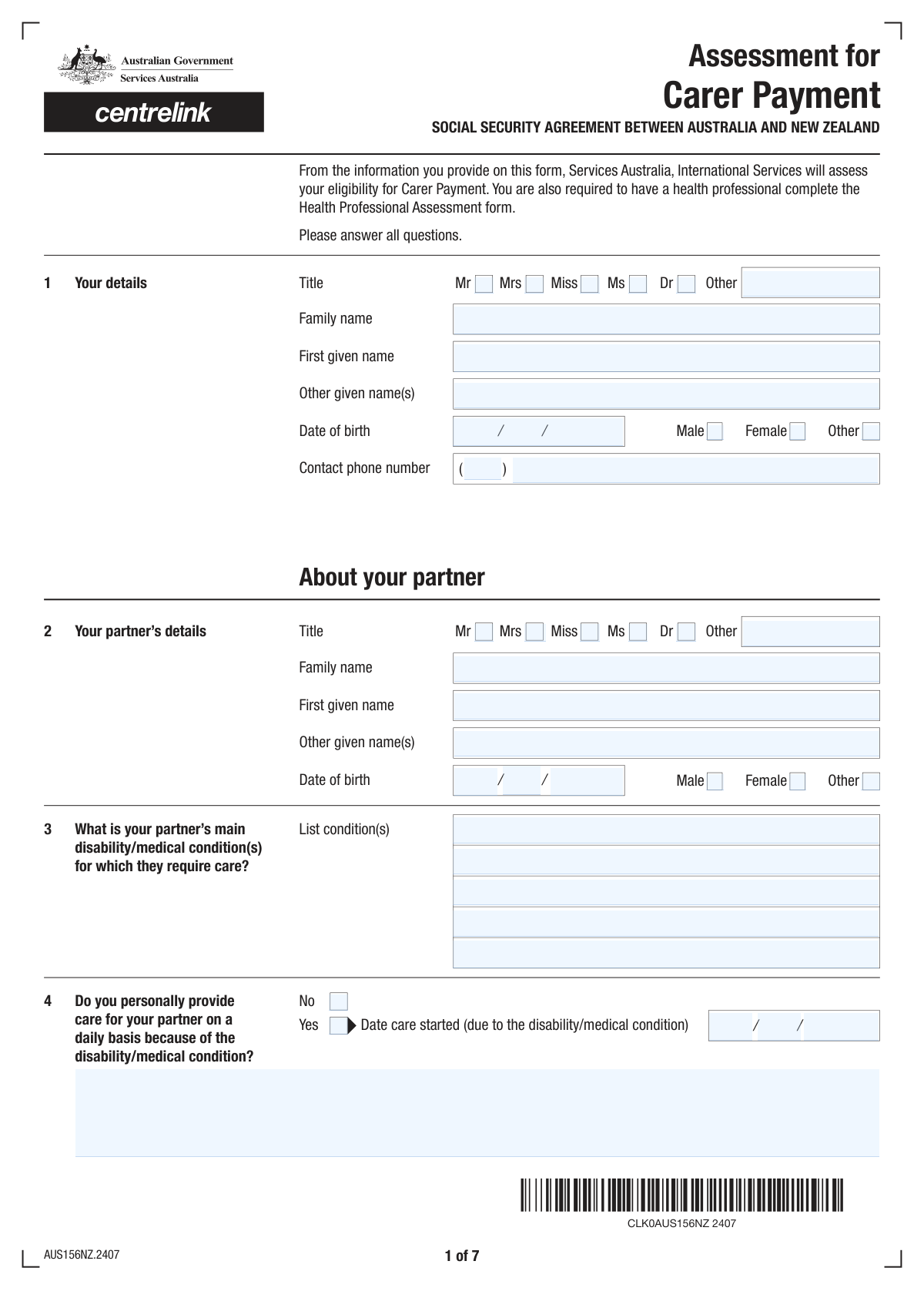
This form is a comprehensive medical report required when applying for a Carer Payment or Carer Allowance. It documents the care recipient's medical conditions, disabilities, and the level of daily assistance they require with tasks like mobility, personal care, and communication. This detailed assessment helps the government determine the carer's eligibility for financial support. Today, this form can be filled out quickly and accurately using AI-powered services like Instafill.ai, which can also convert non-fillable PDF versions into interactive fillable forms.
Carer Medical Report is part of the CAR forms, carer forms, Medi-Cal forms, medical forms, medical report forms, payment forms, L.A. Care forms and VA medical forms categories on Instafill.
Our AI automatically handles information lookup, data retrieval, formatting, and form filling.
It takes less than a minute to fill out Carer Medical Report using our AI form filling.
Securely upload your data. Information is encrypted in transit and deleted immediately after the form is filled out.

Form specifications

Form name: Medical Report for Carer Payment and/or Carer Allowance
Number of fields: 195
Number of pages: 7
Filled form examples: Form Carer Medical Report Examples
Language: English
main-image

Instafill Demo: How to fill out PDF forms in seconds with AI

How to Fill Out Carer Medical Report Online for Free in 2026

Are you looking to fill out a CARER MEDICAL REPORT form online quickly and accurately? Instafill.ai offers the #1 AI-powered PDF filling software of 2026, allowing you to complete your CARER MEDICAL REPORT form in just 37 seconds or less.
Follow these steps to fill out your CARER MEDICAL REPORT form online using Instafill.ai:
  1. 1 Navigate to Instafill.ai and upload or select the 'Medical Report for Carer Payment/Allowance' form.
  2. 2 Use the AI assistant to fill in your personal details as the carer and the personal details of the person you care for (your partner).
  3. 3 Provide information about the partner's main medical conditions and the date you began providing care.
  4. 4 Complete the detailed assessment of the care recipient's abilities, covering mobility, personal care, communication, memory, and behavior by selecting the appropriate options.
  5. 5 Answer questions regarding hospital stays, overnight care arrangements, and whether the partner is terminally ill.
  6. 6 Carefully review all the entered information for accuracy, then electronically sign and date the form before downloading it for submission.

Our AI-powered system ensures each field is filled out correctly, reducing errors and saving you time.

Why Choose Instafill.ai for Your Fillable Carer Medical Report Form?

Speed

Complete your Carer Medical Report in as little as 37 seconds.

Up-to-Date

Always use the latest 2026 Carer Medical Report form version.

Cost-effective

No need to hire expensive lawyers.

Accuracy

Our AI performs 10 compliance checks to ensure your form is error-free.

Security

Your personal information is protected with bank-level encryption.

Frequently Asked Questions About Form Carer Medical Report

This form is designed to collect detailed information about the care you provide for your partner due to their disability or medical condition. It is used to assess the level of care required and may be for an application for carer benefits or support.

You should complete this form if you are the person providing daily care for a partner with a significant disability, medical condition, or who is frail aged.

This means you are the main person helping your partner with their daily activities, such as mobility, personal hygiene, feeding, or managing treatments, due to their condition.

This question helps determine which part of the assessment to complete, as different rules or a faster process may apply. Answering 'No' will lead you to a detailed section about your partner's daily abilities.

Use your best judgment based on a typical week. 'Often' implies the behavior or need occurs most days, while 'sometimes' suggests it happens less frequently but is still a regular occurrence.

'With some help' means the person needs minor assistance or supervision to complete a task. 'With a lot of help' means they require significant physical support and can only do a small part of the task independently.

You must indicate that your partner is in the hospital and specify if you are still involved in their care there. You will also need to state if they are expected to return to your care upon release.

You need to report if your partner regularly stays overnight elsewhere for reasons like treatment, education, or shared/respite care. You must provide details on the type of stay, the number of nights, and when the arrangement started.

It is helpful to have your partner's medical records, details of hospitalizations, and information on any other care arrangements available. This will help you answer the detailed assessment questions accurately.

The form includes an 'Other Title' field for both you and your partner. You can simply write in any title that is not available as a checkbox option.

Yes, services like Instafill.ai use AI to accurately auto-fill form fields from your saved information. This can save you time and help ensure the details are entered correctly on complex forms.

You can use a service like Instafill.ai to upload the form. It allows you to easily type in your answers, check boxes, and sign the document digitally from your computer or device.

If you have a non-fillable or 'flat' PDF, you can upload it to a platform like Instafill.ai. It can convert the document into an interactive, fillable form that you can complete online.

Compliance Carer Medical Report
Validation Checks by Instafill.ai

1
Applicant Name Completeness
This check ensures that both the 'Family Name (Your Details)' and 'First Given Name (Your Details)' fields are filled. These fields are fundamental for identifying the applicant and processing the form correctly. If either field is left blank, the submission should be rejected with an error message prompting the user to provide their full name.
2
Applicant Date of Birth Validity
Validates that the 'Date of Birth (Your Details)' is a complete, valid date and is in the past. This check prevents impossible dates (e.g., February 30th) and future dates from being entered. It is crucial for age verification and eligibility determination, and a failure should prompt the user to correct the date.
3
Exclusive Title Selection
This validation ensures that for both the applicant and their partner, only one title option is selected from the available choices (e.g., Mr, Mrs, Miss, Ms, Dr) or entered in the 'Other Title' field. If multiple checkboxes are ticked, or a checkbox is ticked while 'Other Title' is also filled, an error should be triggered. This prevents ambiguity in personal data and ensures data integrity.
4
Conditional Care Details Requirement
Verifies that if the user checks 'Yes' for 'personally provide care for your partner', then the 'Care Start Date' fields (Day, Month, Year) are mandatory and must be filled. Conversely, if 'No' is checked, these date fields should be empty. This ensures that conditional information is captured completely and accurately, preventing incomplete records for active carers.
5
Care Start Date Logical Consistency
This check confirms that the 'Care Start Date' is logically valid by ensuring it occurs on or after the 'Partner's Date of Birth'. It is impossible for care to begin before the person being cared for was born. A failure indicates a data entry error that must be corrected to maintain the chronological accuracy of the record.
6
Conditional Terminal Illness Section Logic
Ensures that the entire section of questions regarding the partner's abilities (e.g., 'Move Around The House', 'Difficulty Hearing Others') is only filled out if the user selects 'No' for 'Is your partner terminally ill?'. If 'Yes' is selected, these subsequent fields must be empty or disabled. This rule prevents users from filling out irrelevant sections, reducing confusion and improving data quality.
7
Hospital Date Chronology
Validates that the 'Expected release date' from the hospital is on or after the 'Date of hospitalisation'. This check maintains the logical sequence of events. An error should be flagged if the release date is before the admission date, as this represents a chronological impossibility that needs correction.
8
Conditional Hospital Care Question
This validation ensures the question 'Do you provide care for your partner while they are in hospital?' is only answered if the user has first confirmed 'Yes' to 'Is your partner currently in hospital?'. This enforces the form's dependency logic, preventing contradictory or out-of-context answers. If the partner is not in the hospital, the follow-up question is irrelevant and should be left blank.
9
Overnight Stay Data Integrity
For each type of overnight stay ('Treatment', 'Education/training', 'Shared care', 'Other care'), this check verifies that the corresponding 'Number of Nights' and 'Start Date' fields are filled if and only if that stay type's checkbox is selected. This ensures that for every reported overnight stay, the required quantitative and temporal data is also provided. An error will occur if the details are missing for a selected type, or if details are provided for an unselected type.
10
Exclusive Ability Assessment Selection
For each question in the partner's ability assessment (e.g., 'Move Around The House', 'Fall Over Indoors Or Outdoors'), this check ensures that only one of the mutually exclusive options is selected. The form uses checkboxes where radio buttons would be more appropriate, so this validation is critical to prevent contradictory data, such as selecting both 'Without help' and 'With help of one person' for the same task. A failure requires the user to select only one option per question.
11
Phone Number Format and Completeness
This check validates that both the 'Phone Area Code' and 'Phone Number' (main part) fields are filled and contain only numeric digits. It ensures a complete and correctly formatted contact number is captured, which is essential for communication. If either part is missing or contains non-numeric characters, the submission should fail until a valid phone number is provided.
12
Signature Date Validity and Logic
Verifies that the signature date (composed of Day, Month, Year fields) is a valid, complete date that is not in the future. It also checks that the signature date is on or after other key dates in the form, such as the 'Care Start Date'. This ensures the declaration is signed after the events it describes have occurred, which is a critical requirement for legal and administrative validity.
13
Partner Name Requirement on Condition
This validation rule ensures that if any information is entered in the 'Your Partner's Details' section (e.g., a title or date of birth), then the 'Partner's Family Name' and 'Partner's First Given Name' fields become mandatory. This prevents the submission of an incomplete partner record. It ensures that if a partner is being referenced, they are properly identified.
14
Hospital Release Date Logic
This check ensures that if the user answers 'Yes' to 'Will your partner return to your care on their release from hospital?', the 'Expected release date' fields are filled out. The release date is critical information for planning future care arrangements. If the user confirms the partner will return to their care, the system must prompt for the expected date to ensure the record is complete.

Common Mistakes in Completing Carer Medical Report

Incorrectly Answering Conditional Questions

This form has complex conditional logic, where entire sections only become relevant based on a previous answer. For example, the detailed medical questionnaire should only be filled out if the answer to 'Is your partner terminally ill?' is 'No'. People often miss this instruction and either fill out sections they should skip or skip sections they should complete, leading to an incomplete or invalid submission that requires clarification and causes significant delays. To avoid this, carefully read the instructions like 'Fill only if...' for each question before answering.

Leaving Dependent Fields Blank

Many 'Yes' answers on this form require you to provide additional information in subsequent fields, such as dates or descriptive text. A common mistake is checking 'Yes' (e.g., 'Yes, I provide care') but then failing to fill in the mandatory follow-up details like 'Care Start Date' or 'Additional Care Details'. This omission makes the 'Yes' answer incomplete and will likely halt the application process until the missing information is provided. Always scan for related fields after selecting an option.

Inconsistent or Incorrect Date Formatting

The form separates dates into individual Day, Month, and Year fields, which can lead to errors. Applicants may enter the month as a number (e.g., '07') when a name ('July') is expected, or vice versa, or swap the day and month. This can create invalid dates that fail validation and delay the assessment. To prevent this, double-check the format required for each part of the date and ensure the final date is logical and correct.

Providing Vague Medical Condition Descriptions

The field 'Partner's Main Medical Conditions' requires specific information for the application to be assessed correctly. Applicants often provide vague descriptions like 'mobility issues' or 'pain' instead of official diagnoses. This lack of specificity can lead to follow-up requests from the processing authority to provide more detailed medical evidence, delaying the outcome. It is best to use the specific terminology or diagnoses provided by a medical professional.

Contradictory Answers in the Abilities Section

The detailed section on the partner's abilities contains many related questions, making it easy to provide contradictory information. For instance, selecting 'Is confined to bed' under 'Move Around The House' but then choosing 'With some help' for 'Move To And From Bed' is a direct contradiction. Such inconsistencies raise red flags and may lead to the application being rejected or returned for correction. Reviewing all answers in a section together can help catch these mistakes.

Incorrectly Splitting Phone Number Components

The form asks for a 'Phone Area Code' and a 'Phone Number' in separate fields. This separation is not standard in all regions and can be confusing, leading people to enter the full number in one field and leave the other blank, or split it incorrectly. An incorrect phone number prevents the agency from contacting the applicant, which can jeopardize the entire application. Always verify how your number should be split according to local conventions.

Swapping First Name and Family Name

Despite clear labels for 'Family Name' and 'First Given Name', it is a frequent error for people to enter them in the wrong fields. This often happens when filling out forms quickly, as the order can vary between different countries and systems. This mistake can cause significant administrative problems, including failed identity checks and the creation of incorrect records. Carefully reading each field label before entering personal data is essential.

Forgetting to Sign and Date the Form

The signature and date at the end of the form are the most critical parts for validating the declaration, yet they are commonly missed. Applicants may focus on the detailed questions and simply overlook the final page or section. An unsigned or undated form is legally invalid and will be immediately returned, causing the application to be reset to the back of the processing queue. Always flip to the last page first to ensure you know where to sign.

Mishandling 'Yes'/'No' Checkbox Pairs

The form uses pairs of 'Yes' and 'No' checkboxes for many questions. Users sometimes make the mistake of checking both boxes simultaneously, or more commonly, leaving both blank when a response is mandatory. This creates ambiguity and is treated as a non-answer, requiring follow-up. To avoid this, ensure that for every such pair, exactly one box is checked to reflect your answer clearly.

Inconsistent Subjective Assessments

Many questions require a subjective choice between 'Never', 'Sometimes', 'Often', or 'Always'. Applicants may struggle to categorize their partner's condition, leading to inconsistent reporting. For example, one might select 'Often' for 'Difficulty Hearing Others' but 'Always' for 'Understand what other people say?', which could be contradictory. While subjective, these answers should paint a consistent picture of the partner's abilities and challenges to ensure a fair assessment.
Saved over 80 hours a year

“I was never sure if my IRS forms like W-9 were filled correctly. Now, I can complete the forms accurately without any external help.”

Kevin Martin Green

Your data stays secure with advanced protection from Instafill and our subprocessors

Robust compliance program

Transparent business model

You’re not the product. You always know where your data is and what it is processed for.

ISO 27001, HIPAA, and GDPR

Our subprocesses adhere to multiple compliance standards, including but not limited to ISO 27001, HIPAA, and GDPR.

Security & privacy by design

We consider security and privacy from the initial design phase of any new service or functionality. It’s not an afterthought, it’s built-in, including support for two-factor authentication (2FA) to further protect your account.

Fill out Carer Medical Report with Instafill.ai

Worried about filling PDFs wrong? Instafill securely fills medical-report-for-carer-payment-andor-carer-allowance forms, ensuring each field is accurate.