Yes! You can use AI to fill out SA393 - Medical report for a person who is blind

Form SA393, the Medical report for a person who is blind, is a crucial document used by Services Australia to determine if a person meets the legislative criteria for permanent blindness for pension purposes. It must be completed by an ophthalmologist or optometrist, providing detailed evidence of the patient's visual acuity and field of vision, which is essential for patients applying for the Disability Support Pension or a higher rate of the Age Pension. Today, this form can be filled out quickly and accurately using AI-powered services like Instafill.ai, which can also convert non-fillable PDF versions into interactive fillable forms.
SA393 is part of the Medi-Cal forms, medical forms, medical report forms and VA medical forms categories on Instafill.
Our AI automatically handles information lookup, data retrieval, formatting, and form filling.
It takes less than a minute to fill out SA393 using our AI form filling.
Securely upload your data. Information is encrypted in transit and deleted immediately after the form is filled out.

Form specifications

Form name: SA393 - Medical report for a person who is blind
Number of fields: 82
Number of pages: 9
Filled form examples: Form SA393 Examples
Language: English
main-image

Instafill Demo: How to fill out PDF forms in seconds with AI

How to Fill Out SA393 Online for Free in 2026

Are you looking to fill out a SA393 form online quickly and accurately? Instafill.ai offers the #1 AI-powered PDF filling software of 2026, allowing you to complete your SA393 form in just 37 seconds or less.
Follow these steps to fill out your SA393 form online using Instafill.ai:
  1. 1 Navigate to Instafill.ai and upload or select the SA393 form.
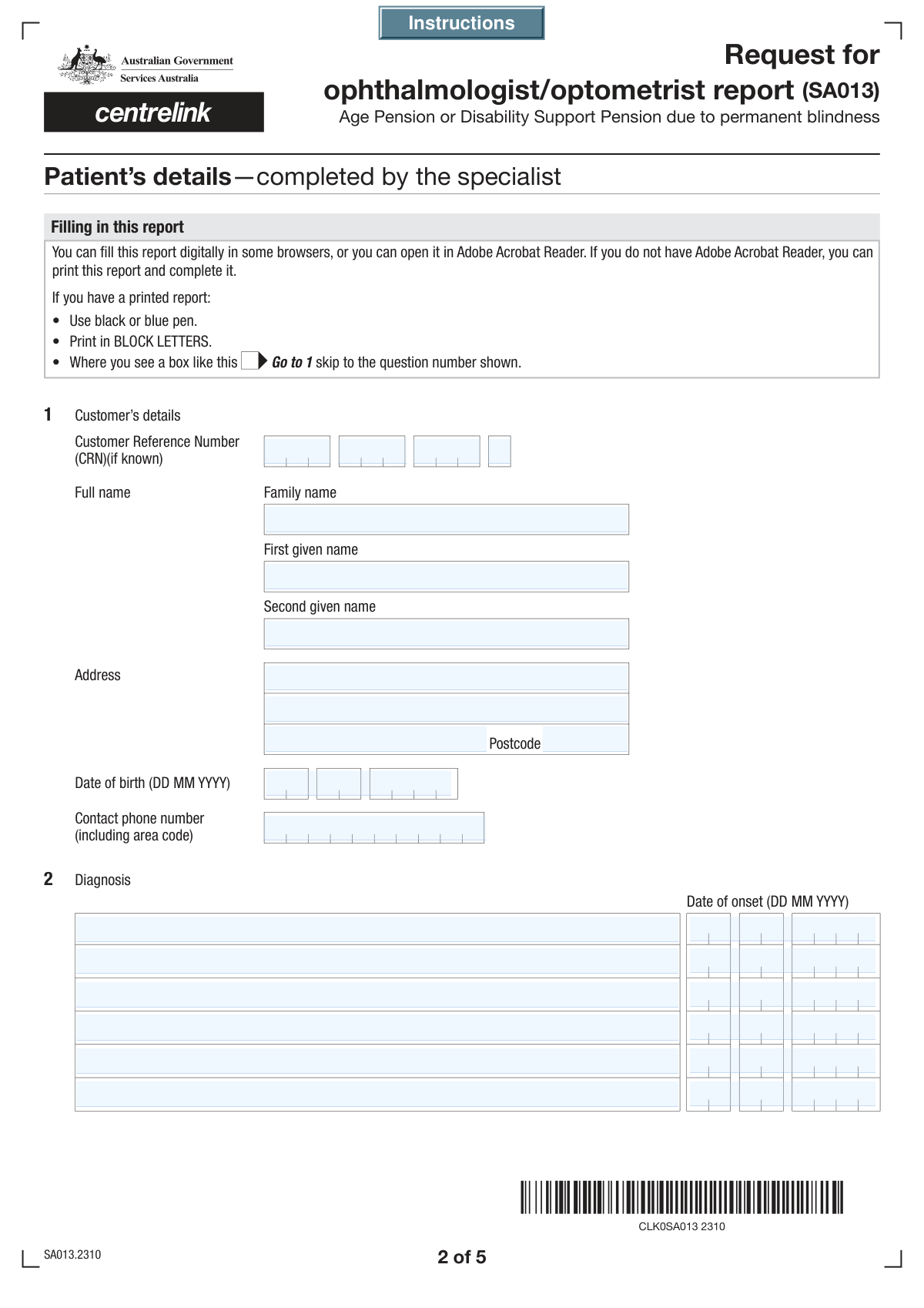
  2. 2 Provide the patient's personal information, including their full name, address, date of birth, and Customer Reference Number (CRN).
  3. 3 Detail the patient's diagnoses, dates of onset, and prognosis in the designated sections.
  4. 4 Enter the precise measurements for the patient's visual acuity (Snellen Scale) and the degree of constriction of their field of vision for both eyes.
  5. 5 Answer the series of yes/no questions regarding the patient's visual impairment, treatment prospects, and other visual defects.
  6. 6 Enter your professional details as the completing ophthalmologist or optometrist, including your name, qualifications, address, and signature.
  7. 7 Review the entire AI-populated report for accuracy, make any final adjustments, and then download or print the completed SA393 form for submission.

Our AI-powered system ensures each field is filled out correctly, reducing errors and saving you time.

Why Choose Instafill.ai for Your Fillable SA393 Form?

Speed

Complete your SA393 in as little as 37 seconds.

Up-to-Date

Always use the latest 2026 SA393 form version.

Cost-effective

No need to hire expensive lawyers.

Accuracy

Our AI performs 10 compliance checks to ensure your form is error-free.

Security

Your personal information is protected with bank-level encryption.

Frequently Asked Questions About Form SA393

This form is a medical report used to document a patient's visual impairment and related health conditions. It is typically used to support an application for disability benefits, services, or legal certification of vision impairment.

This form must be completed by a qualified eye care professional, specifically an Ophthalmologist or an Optometrist. The form includes a section where the professional must indicate their qualification.

The Customer Reference Number (CRN) is a unique identifier for the patient, likely assigned by the agency requesting this form. The patient should be able to provide this number, which is often found on letters or documents they have received from the agency.

The form provides space for up to six diagnoses. You should list the six most relevant conditions on the form and then use the 'Additional Relevant Information' field at the end to detail any other diagnoses.

Yes, the form requires a date of onset for each diagnosis you provide. This information is crucial for understanding the history and progression of the patient's condition.

This refers to any clinical information, such as a severe prognosis, that you believe could cause significant distress or harm to the patient if they read it without professional guidance. If you check 'Yes', you must provide details about why the information is sensitive.

While not always mandatory, having an Ophthalmologist's report to support your findings can strengthen the patient's case. You should indicate whether such a report is available and provide the ophthalmologist's details if so.

You should use standard alternative notations such as 'Counting Fingers' (CF), 'Hand Motion' (HM), or 'Light Perception' (LP). If the patient has no vision in an eye, you can use 'No Light Perception' (NLP).

If you have a flat, non-fillable PDF, you can use a service like Instafill.ai to convert it into an interactive, fillable form. This allows you to easily type your information into the correct fields.

Yes, services like Instafill.ai use AI to accurately auto-fill form fields from patient records, which saves time and reduces manual data entry errors. This is especially helpful for inputting recurring patient and practitioner information.

Simply upload the PDF of the form to the Instafill.ai platform. The service will automatically identify all the fields, allowing you to click and type your answers or auto-fill them from saved data, streamlining the entire process.

Visual acuity measures the sharpness of central vision (e.g., 6/60), while the field of vision section assesses the extent of peripheral vision. Both are required to provide a comprehensive assessment of the patient's functional vision.

The form includes a specific question about treatment improvement. If no significant improvement is expected within the next two years, you should check the 'No' box and leave the subsequent fields about treatment details blank.

Compliance SA393
Validation Checks by Instafill.ai

1
Customer Reference Number Completeness
This check ensures that all four parts of the Customer Reference Number (CRN) are filled out. The CRN is a critical identifier for linking the form to the correct customer record, and a partial number can lead to processing delays or data mismatches. If any of the four CRN fields are left empty, the form submission should be blocked until all parts are provided.
2
Date of Birth is in the Past
Validates that the 'Date of Birth' provided for the patient is a valid date that occurs before the current date. This is a crucial logical check to prevent data entry errors, such as accidentally entering the current date or a future date. An invalid or future date of birth would make age-related calculations and chronological assessments impossible, so the user must correct it before proceeding.
3
Conditional Requirement for Date of Onset
This validation ensures that for each diagnosis (1 through 6), if a 'Diagnosis Description' is provided, the corresponding 'Date of Onset' field must also be filled. This rule maintains data integrity by linking a diagnosis to its timeline, which is essential for medical assessment. If a diagnosis is entered without its onset date, the system will prompt the user to provide the date before submission.
4
Diagnosis Onset Date Chronology
Verifies that any provided 'Date of Onset' for a diagnosis is not earlier than the patient's 'Date of Birth'. A diagnosis cannot occur before the patient was born, and this check prevents logical impossibilities in the medical record. If an onset date precedes the date of birth, it indicates a data entry error that must be corrected to ensure the timeline of the patient's medical history is accurate.
5
Treatment Improvement Selection Exclusivity
Ensures that for the 'Treatment Improvement Details' question, the user can only select either 'Yes' or 'No', but not both. These options are mutually exclusive and selecting both creates an ambiguous and invalid response. This check prevents contradictory data and forces the user to make a clear choice, which is critical for determining the patient's prognosis and treatment plan.
6
Conditional Requirement for Treatment Improvement Details
This check enforces the rule that if the user selects 'Yes' for 'Treatment Improvement Details', then the 'Anticipated Improvement Period' and 'Treatment Improvement Details' text fields must be filled out. This information is vital for understanding the specifics of the positive prognosis. If 'Yes' is checked but the details are missing, the form submission will fail until the required information is provided.
7
Visual Acuity Snellen Format
Validates that the values entered into the 'Right Eye Visual Acuity' and 'Left Eye Visual Acuity' fields match the standard Snellen Scale format (e.g., '6/60', '20/200'). This ensures the data is standardized and can be correctly interpreted by medical professionals and systems. An incorrectly formatted value would be meaningless and could lead to a misinterpretation of the patient's vision impairment.
8
Visual Acuity Value and Checkbox Consistency
This validation cross-references the numeric values entered for visual acuity with the 'Yes'/'No' checkbox selection for 'corrected visual acuity is less than 6/60 in each eye'. For example, if the user checks 'Yes', the system should verify that the entered acuity values are indeed less than 6/60. This logical check prevents contradictory information and ensures the summary checkbox accurately reflects the detailed data.
9
Conditional Requirement for Field of Vision Details
Ensures that if the user checks 'Yes' for the question 'Is the patient's field of vision constricted to 10 degrees or less...', the 'Field of Vision Constriction Details' text area must be filled. This rule is critical for capturing the necessary specifics when a severe visual impairment is indicated. Failure to provide these details would leave the medical record incomplete, so the system will require the user to elaborate.
10
Conditional Requirement for Other Visual Defects Details
This check validates that if the 'Yes' checkbox is selected for 'Other Visual Defects Query', the corresponding 'Other Visual Defects Details' text field is not empty. This ensures that an affirmation of other defects is always accompanied by a specific explanation. Without this rule, a 'Yes' answer would be uninformative and require manual follow-up, so the form enforces completeness at the point of entry.
11
Professional Role Selection Exclusivity
Validates that the user selects only one professional role, either 'Ophthalmologist' or 'Optometrist', in the 'Form Completion Details' section. Since the form can only be completed by one person, these options must be mutually exclusive. This check prevents ambiguity about the qualifications of the person completing the report, which is important for assessing the report's authority.
12
Conditional Requirement for Ophthalmologist Report Details
This validation is triggered if the form is completed by an 'Optometrist' who answers 'Yes' to the 'Ophthalmologist Report Support Query'. It ensures that the 'Ophthalmologist Details' field is then filled out. This is crucial for traceability and verification, as it provides the source of the supporting opinion. If the details are missing, the claim of ophthalmologist support cannot be substantiated.
13
Postcode Format Validation
This check ensures that all postcode fields on the form (for the patient, ophthalmologist, and optometrist) adhere to a valid format, such as being a 4-digit number. Correctly formatted postcodes are essential for mail delivery, geographic analysis, and linking to other address-based systems. An invalid format would cause address validation to fail and could lead to communication breakdowns.
14
Report Completion Date Logic
Validates that the 'Date' of report completion is a valid date that is not in the future. Furthermore, it checks that this date is on or after all provided 'Date of Onset' fields. This ensures a logical and chronological sequence of events, where the report is created after the medical conditions it describes have occurred. An invalid date would compromise the integrity and timeline of the entire medical report.

Common Mistakes in Completing SA393

Incomplete or Mismatched Diagnosis Entries

Users frequently provide a diagnosis description but forget to enter the corresponding 'Date of Onset', or vice-versa. The form has six separate diagnosis sections, and each requires a date to be contextually valid. This omission leads to an incomplete medical history, causing processing delays while the reviewing authority requests the missing information. To avoid this, ensure every diagnosis listed is paired with its specific date of onset. AI-powered tools like Instafill.ai can enforce these dependencies, prompting for a date as soon as a diagnosis is entered.

Ignoring Conditional Field Instructions

Many fields on this form are conditional, with instructions like "Fill only if 'Yes' is 'Yes'". A common mistake is to either check 'Yes' and then fail to provide the required details (e.g., in 'Treatment Improvement Details'), or to fill in details for a section where 'No' was selected. This creates ambiguity and can invalidate the entire section. It is crucial to carefully follow the logic for each question. If the form is a non-fillable PDF, tools like Instafill.ai can convert it into an interactive version where these dependent fields are automatically shown or hidden based on your answers.

Incorrect Customer Reference Number (CRN) Segmentation

The form requires the Customer Reference Number (CRN) to be split across four separate fields. People often make mistakes by entering the entire CRN into the first field, transposing the segments, or leaving one of the segments blank. This error immediately prevents the form from being matched to the correct patient record, leading to outright rejection or significant delays. Always double-check that each part of the CRN is entered into its corresponding field in the correct order.

Improper Formatting of Visual Acuity Data

The 'Right Eye Visual Acuity' and 'Left Eye Visual Acuity' fields specifically require data using the Snellen Scale (e.g., 6/60). Clinicians or staff sometimes enter descriptive terms like 'poor vision', 'blurry', or use a different measurement standard. This non-standard data cannot be processed and requires manual follow-up. To prevent this, ensure all visual acuity measurements are converted to and entered in the specified Snellen format. AI form fillers can validate the input to ensure it matches the required 'number/number' pattern.

Contradictory Answers in Yes/No Sections

The form contains several pairs of 'Yes'/'No' checkboxes for a single question (e.g., 'Treatment Improvement Details', 'Visual acuity'). A frequent error is leaving both boxes unchecked or, in rare cases, checking both. This forces the processor to guess the intended answer, leading to delays or incorrect processing. Always ensure you select one, and only one, option for each binary question to provide a clear and unambiguous response.

Confusion Between Optometrist and Ophthalmologist Sections

The form has complex, conditional logic determining when an optometrist needs to provide supporting ophthalmologist details. For example, the 'Details of Ophthalmologist Involved' section should only be filled if a specific question about field of vision constriction is answered 'Yes'. Optometrists often fill this out incorrectly or unnecessarily, leading to confusion. It is vital to trace the logic carefully; an AI tool like Instafill.ai can manage this complexity by only displaying the relevant fields based on previous answers.

Vague or Non-Clinical Diagnosis Descriptions

When filling out the 'Diagnosis Description' fields, users sometimes provide vague information like 'eye problems' or 'trouble seeing' instead of a specific clinical diagnosis. This form is a medical report, and such descriptions lack the necessary detail for a proper assessment, resulting in the form being returned for clarification. Always use precise, recognized medical terminology for all diagnoses to ensure the patient's condition is accurately documented.

Transposing Patient Name Fields

The form clearly separates 'Family Name' from 'First Given Name' and 'Second Given Name'. However, due to habit or cultural differences, individuals often enter their first name in the 'Family Name' field and vice versa. This creates a data mismatch with official records, complicating patient identification and potentially delaying the entire process. Carefully read each label and enter the correct name component in the corresponding field.

Misinterpreting the Prejudicial Information Declaration

The section asking if the report contains information 'prejudicial to the patient's physical or mental health' is a critical legal and ethical declaration that is often misunderstood or overlooked. Some may check 'No' by default without fully considering the contents, or check 'Yes' without providing the required detailed explanation. This can have serious consequences for patient communication and data release protocols. This section must be completed with careful consideration by the reporting clinician.

Incomplete Practitioner Details

The final section requires the full name, qualifications, address, and contact number of the ophthalmologist or optometrist completing the report. It's common for one or more of these details to be missing, especially if the practitioner is in a hurry. An incomplete practitioner section can invalidate the entire report, as the authority cannot verify the source. Using a tool like Instafill.ai can help by saving practitioner profiles and auto-filling these repetitive details accurately every time.
Saved over 80 hours a year

“I was never sure if my IRS forms like W-9 were filled correctly. Now, I can complete the forms accurately without any external help.”

Kevin Martin Green

Your data stays secure with advanced protection from Instafill and our subprocessors

Robust compliance program

Transparent business model

You’re not the product. You always know where your data is and what it is processed for.

ISO 27001, HIPAA, and GDPR

Our subprocesses adhere to multiple compliance standards, including but not limited to ISO 27001, HIPAA, and GDPR.

Security & privacy by design

We consider security and privacy from the initial design phase of any new service or functionality. It’s not an afterthought, it’s built-in, including support for two-factor authentication (2FA) to further protect your account.

Fill out SA393 with Instafill.ai

Worried about filling PDFs wrong? Instafill securely fills sa393-medical-report-for-a-person-who-is-blind forms, ensuring each field is accurate.