
Yes! You can use AI to fill out Claim for Commonwealth Seniors Health Card
Don't type 273 fields by hand. Tell our AI about yourself, or upload your insurance card, and it fills every field in seconds. You check it, then download, print or sign.
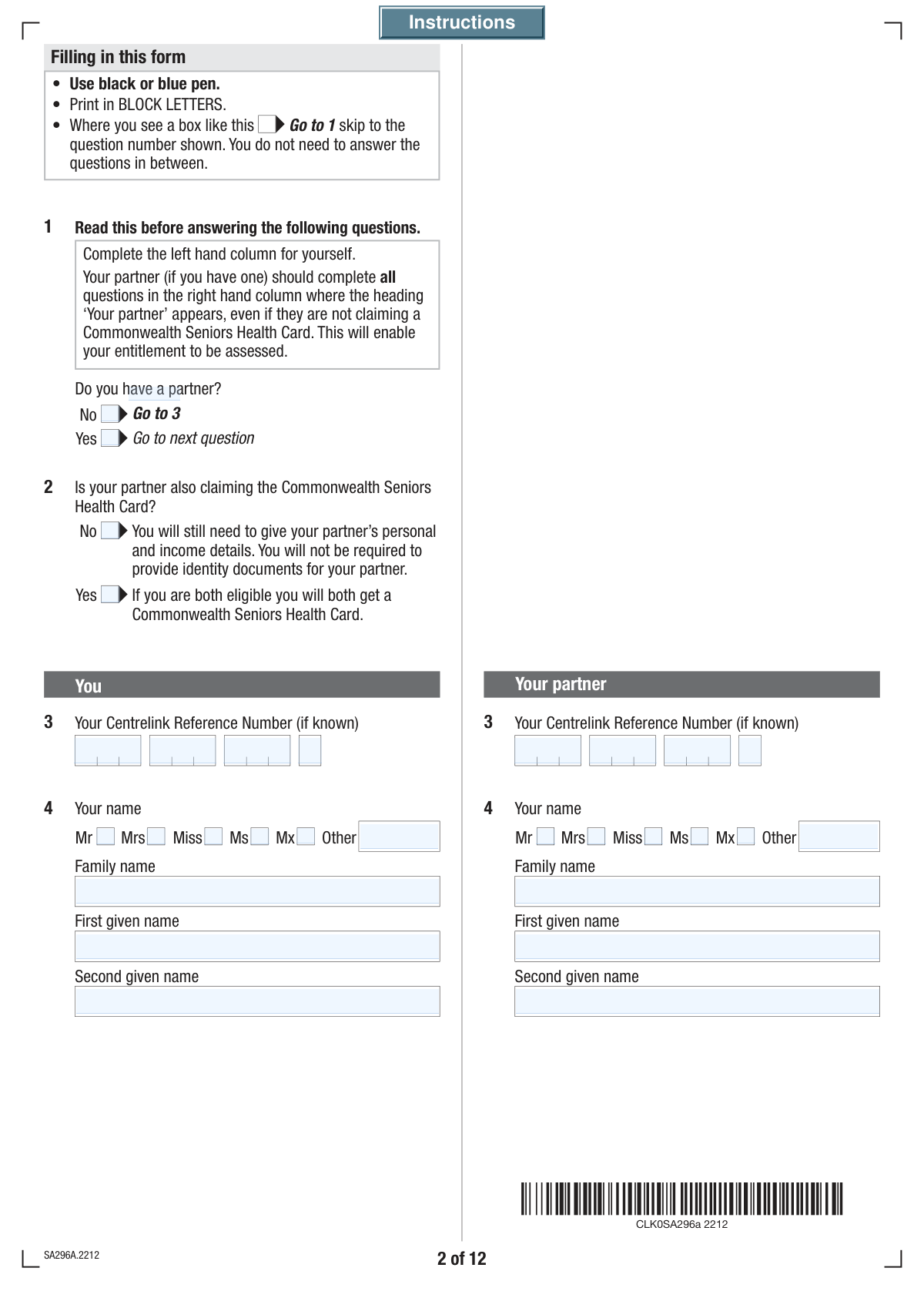
The AI does the filling. You just check it.
No typing into boxes, nothing to install.
What this form asks for
The AI fills all of it, from your answers or your documents.
The AI checks your answers before you download
14 checks built for this form, so a wrong date or a missing answer is caught before anyone else sees it.
This check verifies that if the user selects 'No' to having a partner, all subsequent fields related to a partner are left blank or are not submitted. This is critical for data integrity and preventing the storage of irrelevant or erroneous partner information. If partner data is present without a partner being declared, the submission should be rejected with an error prompting the user to either declare a partner or clear the partner fields.
This validation ensures the selected relationship status aligns with the declared partner status. For example, if the user indicates they do not have a partner, the only permissible relationship status is 'Never married or lived with a partner'. This prevents logical contradictions in the user's profile, and a mismatch should trigger an error forcing the user to correct their entries.
This check ensures the 'Your Date of Birth' field contains a valid date that is in the past. It also verifies the applicant meets a minimum age requirement for the Commonwealth Seniors Health Card, which is a core eligibility criterion. An invalid or future date, or a date indicating the applicant is too young, would result in a validation failure and prevent submission until a plausible date is entered.
This validation triggers if the user opts to provide their Tax File Number. It checks that the combined TFN fields contain exactly 9 digits and are purely numeric. This is crucial for correct identification with the Australian Taxation Office (ATO), and an incorrectly formatted TFN would be rejected, prompting the user to re-enter the number.
This check performs a calculation to verify that the value entered in 'Your Total Income' is the exact sum of its constituent parts (Taxable Income, Foreign Income, Net Investment Loss, etc.). This is important for ensuring the accuracy of the income assessment. If the sum does not match the total provided, the form should highlight the discrepancy and require the user to correct the values.
This validation ensures that if a user checks 'Yes' to having been known by other names, they must provide details in the 'First Other Name' field. This prevents incomplete submissions where the user indicates they have more information to provide but fails to do so. If 'Yes' is checked and the details are missing, an error message should prompt the user to fill in the required name information.
And 8 more checks
- Validates Bank BSB Number Format
- Verifies Chronological Order of Relationship Dates
- Mandates Reason for Lower Future Income
- Validates Email Address Format
- Validates Financial Year Sequence
- Ensures Account-Based Pension Details are Provided
- Validates Signature Date Presence
- Conditional 'Other Title' Entry
Let AI fill out your SA296
No typing. Every field filled in seconds, checked, ready to sign.
How to Fill Out SA296 Online for Free in 2026
What the AI walks you through.
- Navigate to Instafill.ai and upload your SA296 form, or select it from their library of templates.
- Provide your personal information, including your name, date of birth, contact details, and Centrelink Reference Number. If you have a partner, you will provide their details as well.
- Detail your current relationship status, living arrangements, and information about any dependent children.
- Complete the detailed income test section for both yourself and your partner, providing information on taxable income, foreign income, investments, and superannuation for the relevant financial year.
- Indicate which supporting documents you are providing, such as your ATO Notice of Assessment, identity documents, and details of income stream products (SA330).
- Carefully review all entered information for accuracy, then sign and date the declaration to certify that the information is true and complete before submitting the form to Centrelink.
Common Mistakes in Completing SA296
The ones the AI is built to catch.
Ignoring Conditional Logic for Partner Status
Incorrectly Entering Segmented Reference Numbers
Failing to Declare All Previous Names
Confusing Relationship Status with Living Arrangements
Inaccurate or Incomplete Income Reporting
Mishandling Past vs. Estimated Future Income
Submitting an Incomplete Partner Section
Forgetting to Attach Required Supporting Documents
Incorrectly Reporting Account-Based Pension Details
Improperly Splitting Address Information
Frequently Asked Questions About SA296
Is it really free for 7 days?
Can I fill other forms too?
How do I cancel?
How does the AI fill out SA296?
What happens to my information?
How complex is SA296 to fill out?
What is this form used for and who needs to fill it out?
I am single. Do I need to fill out the sections about a partner?
My partner is not claiming the Health Card. Do I still need to provide their details?
Where can I find my Centrelink Reference Number (CRN)?
Do I have to provide my Tax File Number (TFN)?
What income information do I need to provide?
My income this year is much lower than the last financial year. How do I report this?
What documents do I need to submit with this form?
Can I authorize someone else to deal with Centrelink for me?
What counts as an 'account-based pension'?
What if my permanent address is different from my postal address?
Can an AI tool help me fill out this form?
How can I fill out this form online?
The PDF version of this form I have is not fillable. What should I do?
Get your SA296 filled out by AI
$0 today. Cancel before Nov 4 and you pay nothing.
Other forms like this one
CAR forms: Form SSA-44, Medicare Income-Related Monthly Adjustment Amount - Life-Changing Event, Form I-90, Application to Replace Permanent Resident Card, Form 2441, Child and Dependent Care Expenses, Form WH-380-E, Certification of Health Care Provider, Form 4137, Social Security and Medicare Tax on Unreported Tip Income, Form 8959, Additional Medicare Tax, Form 8919, Uncollected Social Security and Medicare Tax, Form CMS-1763, Request for Termination of Medicare Coverage, Form CMS-855O, Medicare Enrollment Application, Form CMS-460, Medicare Participation Agreement, Form CMS-4040, Request for Enrollment in Medicare Part B, Form WH-380-F, Certification of Health Care Provider, Form W-10, Dependent Care Provider’s Identification, Form 1099-K, Payment Card and Third Party Network Transactions, Form CMS-40B, Application for Enrollment in Medicare Part B, Form SS-5-FS, Application for a Social Security Card, Form REG 195, Disabled Person Placard, Form AR-11, Alien's Change of Address Card, Form I-905, Application for Authorization to Issue Certification for Health Care Workers, Form I-131A, Application for Carrier Documentation
VA claim forms: Form OWCP-915, Claim for Medical Reimbursement, Form 8862, Information To Claim Certain Credits, Form CA-7, Claim for Compensation, Form CA-5, Claim for Compensation, Form SC-100, Plaintiff's Claim and ORDER to Go to Small Claims Court, Form 20-0995, Decision Review Request: Supplemental Claim, Form 104, List of Creditors 20 Largest Unsecured Claims, Form 941-X (Rev. April 2023), Adjusted Employer’s QUARTERLY Federal Tax Return or Claim for Refund, Judicial Council of California Form SC-104, Proof of Service (Small Claims), Immigration and Refugee Board of Canada (IRB) – Refugee Protection Division (RPD) Basis of Claim Form (for persons claiming refugee protection in Canada) (RPD.02.01), SC-108, Request to Correct or Cancel Judgment and Answer (Small Claims), Judicial Council of California Form SC-105, Request for Court Order and Answer (Small Claims), SC-120, Defendant’s Claim and ORDER to Go to Small Claims Court (Small Claims), Judicial Council of California Form SC-104, Proof of Service (Small Claims), Continental American Insurance Company (CAIC) / Aflac Group Critical Illness Claim Form (with Attending Physician’s Statement, HIPAA Authorization to Obtain Information, and Electronic Funds Transaction Authorization), Judicial Council of California Form SC-108, Request to Correct or Cancel Judgment and Answer (Small Claims), SC-105, Request for Court Order and Answer (Small Claims), Judicial Council of California Form SC-120, Defendant’s Claim and ORDER to Go to Small Claims Court (Small Claims), Small Claim and Notice of Small Claim (ORS 46.425) (OJD Official) (Jan 2026), VA Form 21-4138, Statement in Support of Claim
health forms: Form 1095-A, Health Insurance Marketplace Statement, Form 8889, Health Savings Accounts, Form WH-380-E, Certification of Health Care Provider, Form 7206, Self-Employed Health Ins. Ded., Form 8885, Health Coverage Tax Credit, Form WH-380-F, Certification of Health Care Provider, Form 1095-C, Employer-Provided Health Insurance Offer and Coverage, Form 1095-B, Health Coverage, Form I-905, Application for Authorization to Issue Certification for Health Care Workers, Form BHVH, Outpatient Behavioral Health – ABA Treatment Request, Form SHA, Separation Health Assessment, DHS-6696-ENG, Minnesota Health Care Programs Application (MNsure/DHS), Geisinger Health Plan Behavioral Health Professional Services Questionnaire, Priority Health Small Group Renewal Decision Form, Form CH-006: PA-BH-Res-PCS, Oregon Behavioral Health Support Program Plan of Care Authorization (Plan of Care Request for Behavioral Health Residential or Personal Care Services), Form 7206 (2025), Self-Employed Health Insurance Deduction, HIPAA Authorization Form, Authorization for the Release of Protected Health Information, Prior Authorization (PA) Request Form – Adult Palliative Care (Alameda Alliance for Health), Medicare Enrolment Application (Australia) – Enrol in Medicare, Re-enrol/Extend Eligibility, Enrol a Newborn, and Register for My Health Record, Alameda Alliance for Health Prior Authorization (PA) Request Form – Adult Palliative Care
health claim forms: Form AI-346, Gastos Médicos Mayores Informe Médico, Meritain Health Claim Form (Health Claim Form), CMS-1500 (02-12), Health Insurance Claim Form (NUCC Approved) (OMB 0938-1197), Meritain Health Claim Form (Health Claim Form), VA Form 21-0781, Statement in Support of Claimed Mental Health Disorder(s) Due to an In-Service Traumatic Event(s), VA Form 21-0781, Statement in Support of Claimed Mental Health Disorder(s) Due to an In-Service Traumatic Event(s), Standard Health Insurance Claim Form - Part B, CMS-1500 Health Insurance Claim Form (OMB-0938-0999), Ontario Blue Cross Extended Health Care Benefit Claim Form, Form SA296, Claim for a Commonwealth Seniors Health Card
Let AI fill out your SA296
Your trial starts once a card is added. You pay nothing before Nov 4.
Our AI already knows this form, all 273 fields of it. Skip the typing: tell it about yourself, or upload what you have, and it fills the whole form in seconds.
- AI fills every field on all 12 pages, tables and checkboxes included
- No typing into boxes: answer a few questions, or upload your insurance card, an old copy of this form, a photo of a document
- The AI checks the answers; you review and change anything before you download
- Download the finished PDF, print it, or sign it online
- Encrypted, and never used to train AI
Cancel before Nov 4 and you pay nothing.
A card is needed to start the trial. Cancel in two clicks from your account.
Terms · Privacy