Yes! You can use AI to fill out NYS Employment Application: Part 1 Pre-Interview Form #S1000

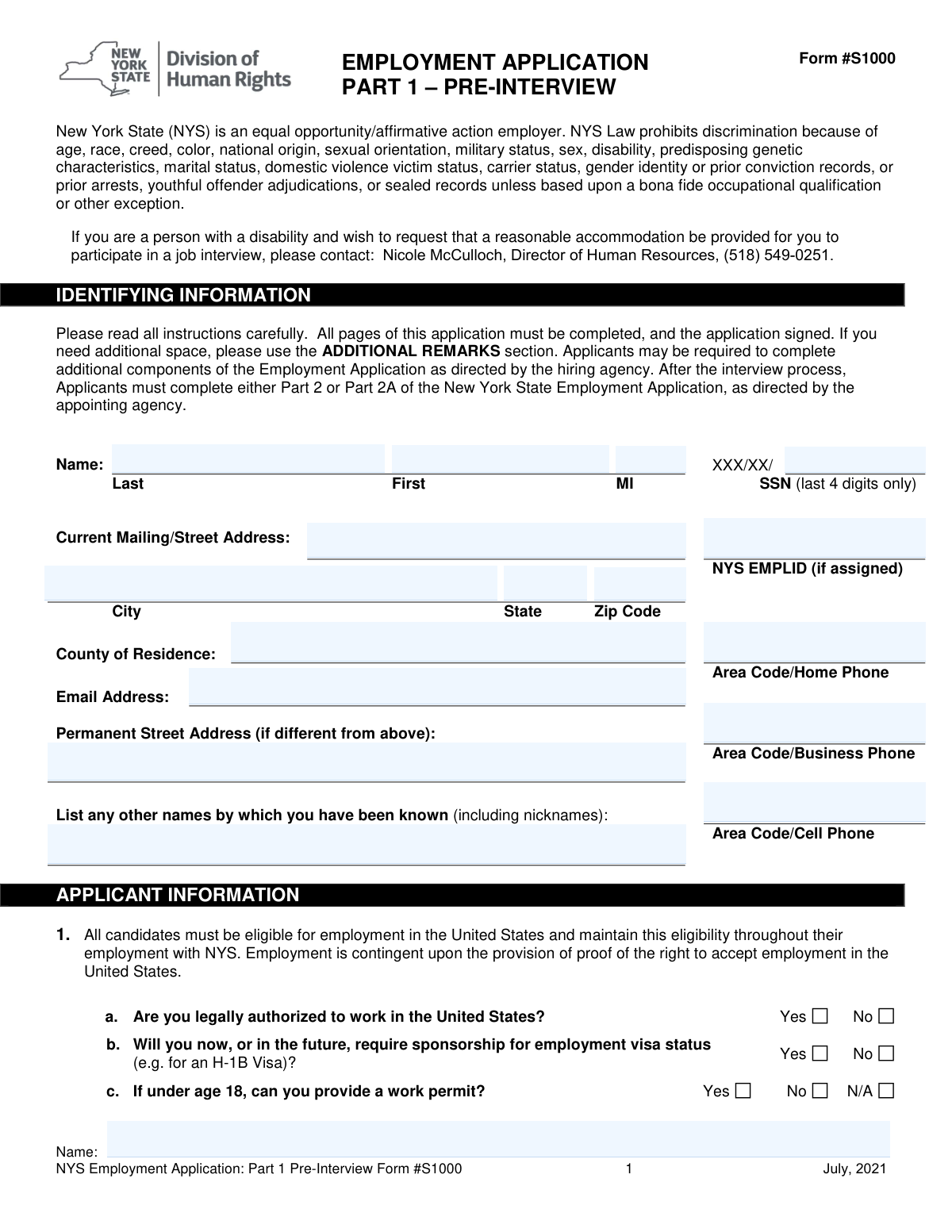
Form S1000 is the pre-interview section of the New York State Employment Application, used to collect essential information from job candidates. It gathers personal details, work eligibility, professional credentials, education, and employment history to assess a candidate's qualifications before the interview stage. Today, this form can be filled out quickly and accurately using AI-powered services like Instafill.ai, which can also convert non-fillable PDF versions into interactive fillable forms.
S1000 is part of the employment application forms, employment forms and NYS forms categories on Instafill.
Our AI automatically handles information lookup, data retrieval, formatting, and form filling.
It takes less than a minute to fill out S1000 using our AI form filling.
Securely upload your data. Information is encrypted in transit and deleted immediately after the form is filled out.

Form specifications

Form name: NYS Employment Application: Part 1 Pre-Interview Form #S1000
Number of fields: 220
Number of pages: 13
Filled form examples: Form S1000 Examples
Language: English
main-image

Instafill Demo: How to fill out PDF forms in seconds with AI

How to Fill Out S1000 Online for Free in 2026

Are you looking to fill out a S1000 form online quickly and accurately? Instafill.ai offers the #1 AI-powered PDF filling software of 2026, allowing you to complete your S1000 form in just 37 seconds or less.
Follow these steps to fill out your S1000 form online using Instafill.ai:
  1. 1 Navigate to Instafill.ai and upload or select the NYS Employment Application Form S1000.
  2. 2 Use the AI to automatically populate your identifying information, including name, address, contact details, and SSN (last 4 digits).
  3. 3 Answer the questions regarding your legal authorization to work, driver's license status, and any professional licenses or certifications you hold.
  4. 4 Complete the sections on your job interests, availability, educational background, and detailed employment history.
  5. 5 Provide contact information for your professional references and use the additional remarks section if needed.
  6. 6 Carefully review all entered information for accuracy, then electronically sign and date the Applicant Affirmation and Release Authorization.
  7. 7 Download or submit your completed application as instructed by the New York State hiring agency.

Our AI-powered system ensures each field is filled out correctly, reducing errors and saving you time.

Why Choose Instafill.ai for Your Fillable S1000 Form?

Speed

Complete your S1000 in as little as 37 seconds.

Up-to-Date

Always use the latest 2026 S1000 form version.

Cost-effective

No need to hire expensive lawyers.

Accuracy

Our AI performs 10 compliance checks to ensure your form is error-free.

Security

Your personal information is protected with bank-level encryption.

Frequently Asked Questions About Form S1000

This form is the pre-interview part of the New York State employment application. It is used to collect your personal information, work eligibility, qualifications, and employment history to assess your suitability for a position before an interview is scheduled.

Anyone applying for a job with a New York State agency must complete this form as the initial step in the application process. It is required before you can be considered for an interview.

You should have your personal contact information, the last 4 digits of your Social Security Number, driver's license details, any professional licenses or certifications, and a complete history of your education and employment.

No, you cannot. The form explicitly states that resumes will not be accepted in lieu of completing this section, so you must fill out your entire work history as requested.

The NYS EMPLID is a New York State Employee ID number assigned to current or former state employees. If you have never worked for New York State, you can leave this field blank.

After submission, the hiring agency reviews your application to see if you qualify for an interview. If you are selected to move forward, you will be instructed to complete either Part 2 or Part 2A of the application.

This question is used to identify and manage potential conflicts of interest, as required by state policy. You must disclose any relatives, as defined on the form, who are employed by the specific agency you are applying to.

Not all positions require a driver's license, but some do for travel or operating vehicles. If the position requires it, you must have a valid license or demonstrate your ability to meet the job's transportation needs.

By signing, you affirm that all information is true and authorize NYS to verify your employment history and other details. You also acknowledge that providing false information can lead to dismissal or other penalties.

While you list your education on this form, you will be required to provide actual proof, such as transcripts or a copy of your diploma, later in the hiring process. Be prepared to present these documents when requested.

Yes, services like Instafill.ai use AI to help you accurately auto-fill form fields from your saved information. This can save you significant time and help reduce errors.

Simply upload the form to the Instafill.ai platform. The AI will identify the fields, allowing you to use your saved profile to auto-fill your personal details, employment history, and more with just a few clicks.

If you have a flat, non-fillable PDF, you can use a service like Instafill.ai to make it interactive. Upload the document, and the tool will convert it into a fillable form that you can complete and sign on your computer.

Compliance S1000
Validation Checks by Instafill.ai

1
Validates SSN Last Four Digits Format
This check ensures that the 'SSN Last Four Digits' field contains exactly four numeric characters. This is crucial for correct applicant identification and background check processes while maintaining privacy. An invalid entry could delay or halt the application processing, requiring manual correction.
2
Ensures Valid Email Address Format
This validation verifies that the provided email address follows the standard format, including an '@' symbol and a domain (e.g., [email protected]). A valid email is essential for all communication regarding the application status, interview scheduling, and other notifications. If the format is invalid, the applicant will not receive critical updates, potentially missing employment opportunities.
3
Completeness Check for Core Identifying Information
This validation ensures that essential personal identification fields, including 'First Name', 'Last Name', 'Current Mailing/Street Address', 'City', 'State', and 'ZIP Code', are completed. This information is fundamental for identifying the applicant and for sending any physical correspondence. An incomplete submission cannot be processed and will be rejected until all required fields are filled.
4
Conditional Validation for Driver's License Details
This check enforces a logical rule: if an applicant indicates they have a valid driver's license by selecting 'Yes', they must then provide the corresponding details ('License Class', 'Licensing State', 'License Number', 'Expiration Date'). This is critical for positions requiring driving, as it allows for verification of the applicant's credentials. Failure to provide these details when required will result in an incomplete application for roles that mandate a driver's license.
5
Requires Explanation for License Suspension or Restrictions
This validation ensures that if an applicant answers 'Yes' to having license restrictions or a past suspension/revocation, the corresponding details field must be filled out. This information is crucial for assessing the applicant's professional standing and suitability for roles requiring licensure. Omitting the explanation will flag the application for manual review and may lead to disqualification.
6
Verifies Chronological Order of Employment Dates
This check validates that for each job listed in the 'Employment & Experience' section, the 'To' date is not before the 'Date Employed' (start date). This ensures the logical consistency and accuracy of the applicant's work history. Inaccurate date ranges can misrepresent work experience and cause confusion during background verification.
7
Mandatory Response for Work Authorization
This validation requires a definitive 'Yes' or 'No' answer to the question 'Are you legally authorized to work in the United States?'. This information determines the applicant's basic eligibility for any position. An unanswered question makes it impossible to proceed with the application, leading to its rejection.
8
Ensures Consistency in Relative Declaration
This validation prevents contradictory information regarding relatives employed by the agency. If the 'no relatives' checkbox is checked, the 'Relative Name' and 'Relationship' fields must be empty. Conversely, if those fields are filled, the checkbox must be unchecked, ensuring clear data for conflict of interest reviews.
9
Validates Presence of Applicant Signature and Date
This check confirms that the applicant has provided a signature and date in the 'Applicant Affirmation' section. The signature is a legal requirement that makes the application a binding document and authorizes verification. An unsigned or undated application is invalid and cannot be legally processed or considered for employment.
10
Validates 10-Digit Phone Number Format
This check confirms that all phone number fields (Home, Business, Cell) contain a 10-digit number, including the area code. Accurate phone numbers are vital for recruiters to contact the applicant for interviews or to clarify information. An incorrectly formatted number will prevent contact and can lead to the application being discarded.
11
Verifies Logical Chronology of License Dates
This validation checks the logical sequence of dates related to professional licenses, ensuring that the 'Expiration Date' occurs after the 'Issue Date'. This confirms the validity of the provided credential timeline and prevents data entry errors. Illogical dates would cast doubt on the credential's validity and require manual verification.
12
Ensures Footer Name is Completed on All Pages
This check verifies that the applicant's name is entered in the footer of each page as instructed. This is important for document management, ensuring that if pages are separated, they can still be correctly associated with the applicant's file. Missing names in the footer could lead to incomplete application records if pages are misplaced during processing.

Common Mistakes in Completing S1000

Writing 'See Resume' in Employment Section

Applicants often try to save time by writing 'See Resume' instead of re-entering their work history. This form explicitly states, 'Resumes will not be accepted in lieu of completing this Section,' making this a critical error that demonstrates an inability to follow instructions. This will likely lead to immediate disqualification, as the application is considered the official record. To avoid this, meticulously fill out every field for each job, ensuring the information is complete and presented in the requested reverse-chronological order.

Missing Applicant Name in Page Footers

This form requires the applicant's name to be written at the bottom of every page, a detail that is very easy to overlook. If the application pages are separated during processing, the hiring agency may not be able to reassemble them, causing the application to be deemed incomplete and discarded. Always perform a final review of the entire document, specifically checking the footer of each page. Since the form is a non-fillable PDF, using a tool like Instafill.ai can make it fillable, and some tools can automatically populate repeating fields like this.

Failing to Provide Details in Conditional Sections

The form contains sections like 'Driver's License' and 'Professional Licensure' that require details only if the applicant answers 'Yes' to a preceding question. A common mistake is to check 'Yes' but then neglect to fill in the required license numbers, dates, or explanations. This leaves the application incomplete and prevents screeners from verifying crucial qualifications. To prevent this, treat each 'Yes' answer as a trigger to carefully complete all subsequent fields in that section before moving on.

Forgetting the Signature and Date

The signature on the 'Applicant Affirmation' is a legal confirmation that the provided information is true and authorizes background checks. An unsigned or undated application is invalid and cannot be processed, leading to automatic rejection. This mistake often happens when an applicant is rushing to finish. Always make signing and dating the form the very last step in your final review before submission.

Providing an Incomplete or Gapped Employment History

The instructions ask for a complete list of all employment, but applicants sometimes omit short-term jobs, part-time work, or periods of unemployment. This creates unexplained gaps that can be a red flag for recruiters, raising questions about reliability or honesty. It is crucial to list all relevant experience in reverse-chronological order and use the 'Additional Remarks' section if necessary to briefly and professionally explain significant gaps.

Using Vague Descriptions for Job Duties

In the 'Your Title and Duties' field, applicants may write generic phrases like 'Office work' or 'General duties,' which fails to convey the scope of their skills and accomplishments. This is a missed opportunity to impress the hiring manager. To avoid this, use specific action verbs to describe your key responsibilities and achievements, mirroring the language you would use on a detailed resume. AI-powered tools like Instafill.ai can help by storing and auto-filling detailed, professional job descriptions from your profile.

Incorrect Social Security Number Format

The form specifically requests only the last four digits of the Social Security Number to protect sensitive information. Applicants, accustomed to providing the full number on other documents, may enter it out of habit. This error, while small, indicates a lack of attention to detail and can create data security concerns for the applicant. Always read field labels carefully to ensure you are providing information in the exact format requested.

Leaving Confirmation Checkboxes Blank

In sections like 'Potential for Conflict of Interest,' there is a checkbox to confirm a negative response (e.g., 'Check here if you have no relative(s) employed...'). Applicants often leave the entire section blank if it doesn't apply, which can be interpreted as an overlooked question rather than a negative answer. This ambiguity can cause processing delays. To ensure clarity, always check the appropriate box to affirmatively confirm your status, even if it's a 'No' or 'N/A' response.

Providing an Unprofessional 'Reason for Leaving'

This field is a common pitfall where applicants are candidly negative about a previous employer, writing things like 'Bad management' or 'Didn't like the job.' This reflects poorly on the applicant's professionalism and discretion, regardless of the circumstances. It is always best to use neutral, positive, or forward-looking language such as 'Seeking new challenges,' 'Career advancement,' 'Relocation,' or 'End of contract.'

Omitting Nicknames or Previous Legal Names

The form asks for 'any other names by which you have been known.' This is essential for conducting a thorough background check and verifying credentials from schools and past employers. Applicants may forget to list a common nickname their references might use, or a previous legal name (e.g., maiden name), which can cause confusion and significant delays during the verification process. Ensure you list all names that may appear on your official records.
Saved over 80 hours a year

“I was never sure if my IRS forms like W-9 were filled correctly. Now, I can complete the forms accurately without any external help.”

Kevin Martin Green

Your data stays secure with advanced protection from Instafill and our subprocessors

Robust compliance program

Transparent business model

You’re not the product. You always know where your data is and what it is processed for.

ISO 27001, HIPAA, and GDPR

Our subprocesses adhere to multiple compliance standards, including but not limited to ISO 27001, HIPAA, and GDPR.

Security & privacy by design

We consider security and privacy from the initial design phase of any new service or functionality. It’s not an afterthought, it’s built-in, including support for two-factor authentication (2FA) to further protect your account.

Fill out S1000 with Instafill.ai

Worried about filling PDFs wrong? Instafill securely fills nys-employment-application-part-1-pre-interview-form-s1000 forms, ensuring each field is accurate.