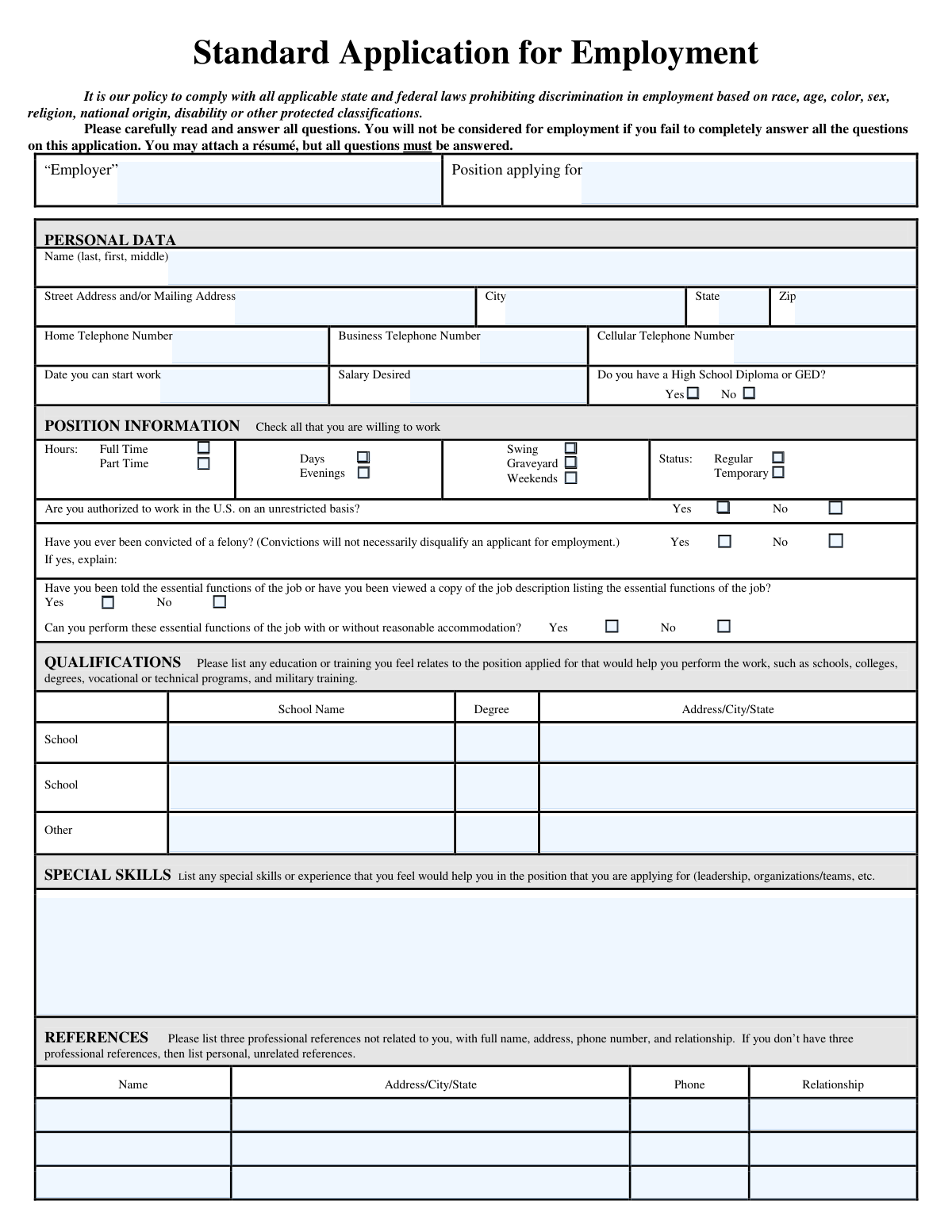
Yes! You can use AI to fill out Standard Application for Employment

A Standard Application for Employment is a document employers use to gather consistent information from all job candidates, covering personal data, work history, education, and references. This standardized format helps employers make fair and informed hiring decisions by comparing applicants on the same criteria. Today, this form can be filled out quickly and accurately using AI-powered services like Instafill.ai, which can also convert non-fillable PDF versions into interactive fillable forms.
Standard Application for Employment is part of the employment application forms and employment forms categories on Instafill.
Our AI automatically handles information lookup, data retrieval, formatting, and form filling.
It takes less than a minute to fill out Standard Application for Employment using our AI form filling.
Securely upload your data. Information is encrypted in transit and deleted immediately after the form is filled out.

Form specifications

Form name: Standard Application for Employment
Number of fields: 105
Number of pages: 2
Language: English
main-image

Instafill Demo: How to fill out PDF forms in seconds with AI

How to Fill Out Standard Application for Employment Online for Free in 2026

Are you looking to fill out a STANDARD APPLICATION FOR EMPLOYMENT form online quickly and accurately? Instafill.ai offers the #1 AI-powered PDF filling software of 2026, allowing you to complete your STANDARD APPLICATION FOR EMPLOYMENT form in just 37 seconds or less.
Follow these steps to fill out your STANDARD APPLICATION FOR EMPLOYMENT form online using Instafill.ai:
  1. 1 Navigate to Instafill.ai and upload or select the Standard Application for Employment form.
  2. 2 Use the AI assistant to automatically fill in your personal data, including your name, address, and contact information.
  3. 3 Specify the position you are applying for, your availability, desired salary, and work authorization status.
  4. 4 Complete the qualifications section by providing details about your education, training, and any special skills relevant to the job.
  5. 5 Enter your complete work history, starting with your most recent employer and including all requested details for each position.
  6. 6 Provide contact information for at least three professional or personal references.
  7. 7 Review the entire application to ensure all information is accurate and complete, then electronically sign and date the form to certify its truthfulness before submission.

Our AI-powered system ensures each field is filled out correctly, reducing errors and saving you time.

Why Choose Instafill.ai for Your Fillable Standard Application for Employment Form?

Speed

Complete your Standard Application for Employment in as little as 37 seconds.

Up-to-Date

Always use the latest 2026 Standard Application for Employment form version.

Cost-effective

No need to hire expensive lawyers.

Accuracy

Our AI performs 10 compliance checks to ensure your form is error-free.

Security

Your personal information is protected with bank-level encryption.

Frequently Asked Questions About Form Standard Application for Employment

This form is used to collect your personal data, qualifications, work history, and references to be considered for employment. It is a standard document that helps employers evaluate candidates for a specific position.

No, you must answer all questions on the application completely, even if you attach a résumé. The form explicitly states that you will not be considered for employment if you fail to answer all questions.

You should start with your present or most recent job and work backward in chronological order. The form provides space for four jobs, but you can use a separate sheet if you need more space.

The application includes a checkbox asking for your permission to contact your present employer. You can select 'Yes', 'No', or 'N/A' to indicate your preference.

You should list three professional references who are not related to you, such as former supervisors or colleagues. If you do not have three professional references, the form allows you to list personal, unrelated references instead.

Not necessarily. The form states that a conviction will not automatically disqualify an applicant, but you must disclose it and provide an explanation if asked.

You can enter a specific number, a salary range, or write 'Negotiable' or 'Competitive'. Researching the typical salary for the position in your area can help you provide a realistic figure.

'At will' employment means that either you or the employer can terminate the employment relationship at any time, for any legal reason, with or without cause. By signing the form, you acknowledge this policy.

Yes, you should include relevant unpaid positions, such as internships or significant volunteer roles, in the Work History section. This can help demonstrate your skills and experience.

The application clearly states that you will not be considered for employment if you fail to completely answer all questions. It is crucial to fill out every field, using 'N/A' (Not Applicable) where a question does not apply to you.

Yes, services like Instafill.ai use AI to accurately auto-fill form fields from your saved profile, which can save you significant time and reduce errors. This is especially helpful for repetitive information like your address and work history.

Simply upload the application form to the Instafill.ai platform. The AI will identify the fields, and you can then use your saved profile to auto-fill your personal information, work history, and other details with a single click.

If you have a non-fillable or 'flat' PDF, you can use a service like Instafill.ai. It can convert the non-fillable PDF into an interactive, fillable form that you can easily complete and sign online.

Compliance Standard Application for Employment
Validation Checks by Instafill.ai

1
Work History Date Chronology
This validation ensures that for each job listed in the Work History section, the 'End Date' is chronologically after the 'Start Date'. This is a critical logical check to maintain the integrity of the employment timeline. If an end date precedes a start date, the system should flag the entry as an error and prompt the user to correct the dates, as it represents an impossible scenario.
2
Conditional Felony Explanation Requirement
This check verifies that if an applicant selects 'Yes' for the question 'Have you ever been convicted of a felony?', the corresponding explanation text field is not left empty. This is important because company policy often requires context for affirmative answers to this question. If the explanation is missing, the form submission should be blocked until the required information is provided.
3
Minimum Contact Information
This validation ensures that the applicant has provided at least one valid phone number across the 'Home Telephone', 'Business Telephone', or 'Cellular Telephone' fields. It is essential for the employer to have a reliable method of contacting the applicant for interviews or follow-up questions. If no phone number is provided, the application should be considered incomplete and prompt the user to enter one.
4
Phone Number Format Validation
This check confirms that all entered phone numbers (for the applicant, references, and past employers) adhere to a standard format, such as a 10-digit number (e.g., XXX-XXX-XXXX or (XXX) XXX-XXXX). This ensures the data is clean, consistent, and usable for automated dialing systems or manual contact. Invalid formats should trigger an error message requesting the user to correct the entry.
5
Work Start Date Validity
This validation ensures the 'Date you can start work' is a valid date and is not in the past. This information is crucial for hiring managers to plan for onboarding and scheduling. An invalid or past date is not actionable and indicates a data entry error, so the system should reject it and ask for a current or future date.
6
Work History Sequence Verification
This check validates that the work history is listed in reverse chronological order, as instructed by the form ('Start with your present or most recent employment and work back'). The start date of 'Job Title #1' should be more recent than the start date of 'Job Title #2', and so on. This ensures the application is filled out as requested and makes it easier for recruiters to review the applicant's career progression.
7
Reference Completeness Check
For each reference listed, this validation ensures that the 'Name', 'Phone', and 'Relationship' fields are all filled out. A reference entry is useless without all three pieces of information, as the employer cannot identify, contact, or understand the context of the reference. If any of these fields are missing for a provided reference, the system should prompt the user to complete the entry.
8
Work Authorization Response Mandatory
This check ensures that the question 'Are you authorized to work in the U.S. on an unrestricted basis?' has been answered with either 'Yes' or 'No'. This is a fundamental, legally required screening question for employment eligibility in the United States. Failure to answer this question should halt the submission process until a selection is made.
9
ZIP Code Format Validation
This validation verifies that all ZIP code fields (for the applicant's address and work history locations) contain a valid 5-digit or 9-digit (ZIP+4) numeric format. Correct ZIP codes are essential for mailing correspondence, verifying location, and conducting background checks. An invalid format should trigger an error, preventing the submission of incorrect or poorly formatted address data.
10
Salary Progression Logic
This check verifies that for each job in the work history, the 'Ending Salary' is greater than or equal to the 'Starting Salary'. While exceptions can exist, an ending salary lower than the starting salary is unusual and could indicate a data entry error. The system should raise a soft warning, asking the user to confirm the values are correct before proceeding.
11
Availability Selection Completeness
This validation ensures the applicant has selected at least one option from the 'Hours' category (Full Time/Part Time) and at least one option from the 'Days/Shifts' category (Days, Evenings, etc.). This information is critical for matching the applicant with available openings and understanding their work preferences. If either category is left blank, the form should prompt the user to make a selection.
12
Essential Functions Questions Answered
This check confirms that both questions related to the 'essential functions of the job' have been answered 'Yes' or 'No'. These questions are important for compliance with the Americans with Disabilities Act (ADA) and for ensuring the applicant understands the job requirements. An unanswered question in this section should prevent form submission, as it is critical for the hiring process.

Common Mistakes in Completing Standard Application for Employment

Writing 'See Resume' Instead of Completing Fields

Applicants often write 'See Resume' in sections like Work History or Skills, assuming their attached resume is sufficient. However, the application explicitly states that all questions must be answered and failure to do so may lead to disqualification. This forces reviewers to hunt for information and suggests the applicant did not follow instructions. To avoid this, meticulously fill out every field, even if it duplicates information on your resume.

Providing Incomplete or Unprofessional References

This mistake includes listing relatives (which is explicitly forbidden), providing incomplete contact information like a missing phone number, or not getting permission from the reference first. This prevents the employer from verifying your background and can reflect poorly on your professionalism. Always list professional contacts who have agreed to be a reference, and double-check that their full name, phone number, and relationship are entered correctly.

Leaving 'Salary Desired' Blank or Writing 'Negotiable'

Applicants may write 'Negotiable' or leave this field blank, fearing they will ask for too much or too little. While common, this can slow down the hiring process or lead to the application being screened out if it doesn't align with the company's budget. Research the typical salary range for the position in your area and provide a specific number or a narrow range to show you've done your homework.

Omitting Dates or Reasons for Leaving in Work History

Applicants sometimes leave start/end dates, supervisor names, or the 'Reason for Leaving' field blank, creating unexplained gaps in their employment timeline. This can raise red flags for hiring managers, who may assume the applicant is hiding something. Ensure every job listed has accurate start and end dates (mo/day/yr) and a brief, professional reason for leaving to present a clear and trustworthy work history.

Failing to Explain a 'Yes' Answer for Felony Conviction

If an applicant checks 'Yes' for a felony conviction but fails to provide the required explanation, their application is considered incomplete and will likely be discarded. This is a critical field that requires full transparency. If applicable, provide a concise, factual explanation as requested to ensure your application can move forward in the review process.

Ignoring the 'May we contact your present employer?' Question

This is a critical question that applicants often overlook, especially when currently employed. Leaving it blank creates uncertainty for the recruiter, while an incorrect 'Yes' could jeopardize your current job. Always answer this question; select 'No' if you are still employed and have not given notice, and 'N/A' if you are not currently employed.

Using Vague Descriptions for Duties and Special Skills

Providing generic descriptions like 'customer service' for duties or 'team player' for skills fails to highlight specific accomplishments and qualifications. This is a missed opportunity to impress the hiring manager and tailor your application to the job. Use action verbs and quantifiable achievements (e.g., 'Managed a team of 5' or 'Increased sales by 15%') to demonstrate your value.

Forgetting to Sign and Date the Application

An unsigned application is legally invalid and cannot be processed, as the signature certifies the truthfulness of the information provided. This simple oversight often happens when applicants are rushing to submit the form. Always double-check the final page and provide a signature and the current date. If the form is a non-fillable PDF, tools like Instafill.ai can make it fillable and allow for a digital signature.

Incorrect Name Formatting

The form specifically requests the name in 'last, first, middle' order, but many people instinctively write their first name first. This minor error suggests a lack of attention to detail right from the start of the application. To avoid this, carefully read the instructions for each field. AI-powered form filling tools like Instafill.ai can help prevent this by automatically mapping and formatting data correctly based on field requirements.

Inconsistent or Missing Availability Information

Applicants may forget to check any boxes under 'Hours' (Full Time/Part Time) or 'Days' (Days/Evenings/Weekends), leaving the employer unsure of their availability. This can lead to being overlooked for suitable positions. Carefully review the position information section and check all boxes that accurately reflect your work availability to ensure you are considered for the right shifts.
Saved over 80 hours a year

“I was never sure if my IRS forms like W-9 were filled correctly. Now, I can complete the forms accurately without any external help.”

Kevin Martin Green

Your data stays secure with advanced protection from Instafill and our subprocessors

Robust compliance program

Transparent business model

You’re not the product. You always know where your data is and what it is processed for.

ISO 27001, HIPAA, and GDPR

Our subprocesses adhere to multiple compliance standards, including but not limited to ISO 27001, HIPAA, and GDPR.

Security & privacy by design

We consider security and privacy from the initial design phase of any new service or functionality. It’s not an afterthought, it’s built-in, including support for two-factor authentication (2FA) to further protect your account.

Fill out Standard Application for Employment with Instafill.ai

Worried about filling PDFs wrong? Instafill securely fills standard-application-for-employment forms, ensuring each field is accurate.